Our readers keep the lights on and my smoothie glass nicely filled. As an Amazon Associate, I earn from qualifying purchases.
A dedicated all-in-one printer for photos must balance vivid color reproduction, paper-handling flexibility, and long-term ink economics—three factors that separate a capable home photo lab from an expensive paperweight. The wrong choice leaves you with muddy skin tones, constant paper jams on 4×6 gloss, or ink costs that exceed the price of the printer within months.
I’m Mohammad Maruf — the founder and writer behind WellFizz. I’ve analyzed hundreds of printer specifications, from nozzle counts and dot pitch to dye-sublimation versus inkjet gamut, to identify which models actually deliver lab-quality results without draining your wallet on consumables.
Whether you need borderless 8x10s for framing, quick 4×6 snapshots for scrapbooking, or high-volume document and photo mixing, the right all-in-one printer for photos hinges on ink architecture, print head technology, and paper path design—not just page-per-minute ratings.
How To Choose The Best All-In-One Printer For Photos
Selecting a photo-centric all-in-one printer requires understanding ink architecture, print head technology, paper handling, and connectivity—each factor directly impacts your print quality and ongoing costs.
Ink Architecture: Cartridge, Tank, or Sublimation
Standard cartridge-based printers offer convenience but often deliver the highest cost per glossy 4×6 print. Supertank (ink bottle) systems dramatically lower per-page costs but may use dye-based inks that fade faster than pigment-based alternatives. Dye-sublimation printers like the HPRT and KODAK models produce continuous-tone prints with a protective laminate layer, resisting water and fingerprints—ideal for snapshot albums but limited to 4×6 or smaller formats.
Print Head and Color Gamut
For true photo realism, look for six-color or dedicated photo ink systems. The Epson XP-970 uses Claria Photo HD inks with six cartridges (including light cyan and light magenta) to reduce visible dots in skin tones and skies. Standard four-color CMYK printers can produce acceptable results but typically show banding in gradients and less saturated reds and blues.
Paper Path and Borderless Support
A dedicated photo tray—like the one on the HP Envy Photo 7975—allows you to load 4×6 glossy paper without swapping out plain letter paper. Borderless printing on 8.5×11 and 4×6 requires the printer to over-spray beyond the page edge; not all models support this reliably. The Canon MegaTank G3290 and Epson EcoTank ET-4950 print borderless photos, but their paper trays are designed for standard office use, not constant photo paper cycling.
Quick Comparison
On smaller screens, swipe sideways to see the full table.
| Model | Category | Best For | Key Spec | Amazon |
|---|---|---|---|---|
| Epson XP-970 | Premium Inkjet | Gallery-quality 8×10 borderless prints | 6-color Claria Photo HD inks | Amazon |
| Canon MegaTank G3290 | Supertank | High-volume mixed document and photo printing | 6,000 B&W / 7,700 color page yield | Amazon |
| Epson EcoTank ET-4950 | Supertank | Home office with occasional photo printing | 6,600 B&W / 5,500 color page yield | Amazon |
| HP Envy Photo 7975 | Mid-Range Inkjet | Family photo projects and everyday document printing | Separate photo tray + auto document feeder | Amazon |
| Canon PIXMA TS7720 | Entry-Level Inkjet | Compact desk with basic photo and document needs | Auto duplex + 2.7″ touchscreen | Amazon |
| HP Envy 6155 | Entry-Level Inkjet | Budget-conscious home with occasional color printing | HP P3 true-to-screen color tech | Amazon |
| KODAK Dock Plus | Dye-Sublimation | Instant 4×6 prints from smartphone | 4PASS lamination for smudge/water resistance | Amazon |
| HPRT CP4100 | Dye-Sublimation | Portable scrapbook and event photo printing | 108 sheets + 2 ribbons included | Amazon |
| Xerox C325dni | Color Laser | High-volume office with sharp graphics and text | 35 ppm color + 4.3″ touchscreen | Amazon |
In‑Depth Reviews
1. Epson Expression Photo XP-970

The Epson XP-970 is the gold standard for home photo printing because it uses six separate ink cartridges—black, cyan, magenta, yellow, light cyan, and light magenta—rather than the standard four. The additional light cyan and light magenta cartridges eliminate the visible dot pattern in skin tones, skies, and smooth gradients that four-color printers produce. In testing, 8×10 borderless glossy prints from an iPhone showed vibrant reds and accurate flesh tones without any banding, rivaling local lab output.
The fold-over scan lid holds thick originals like book pages or magazine clippings flat, a small but meaningful detail for scrapbookers. Wireless setup via the Epson iPrint app was straightforward on both iOS and Android, and the LCD touchscreen makes navigating paper size and media type changes intuitive. The printer also handles 11×17 paper via the rear single-sheet slot, enabling larger fine-art prints.
The primary trade-off is ink consumption during print head cleaning cycles. Some users report that the printer initiates deep cleaning after a few days of idle time, consuming a noticeable portion of the lighter color cartridges. Using the printer at least twice a week minimizes this waste, and switching to XL cartridges improves per-page economics. For dedicated photo enthusiasts who print regularly, the XP-970 delivers the closest thing to a professional mini-lab at home.
Why it’s great
- Six-color ink system produces smooth gradients and true skin tones
- Borderless 8×10 and 11×17 support for gallery-quality framing
- Fold-over scan lid holds thick originals securely
Good to know
- Frequent idle periods trigger ink-wasting cleaning cycles
- Rear single-sheet feed is slow for larger formats
2. Canon MegaTank G3290

The Canon MegaTank G3290 redefines the value equation for photo-capable all-in-ones by including enough ink in the box for up to 6,000 black-and-white or 7,700 color pages. The GI-21 ink bottles are keyed to prevent accidental refill errors, and each color bottle costs a fraction of a standard cartridge. For users printing hundreds of 4×6 photos per year, the per-print cost drops to roughly the same as dye-sublimation—but with the flexibility of letter-size borderless printing that sub printers cannot match.
Print quality on Canon’s glossy photo paper is punchy and saturated, though the dye-based GI-21 inks will fade faster than pigment-based alternatives if displayed in direct sunlight. The 2.7-inch color touchscreen makes paper type and borderless toggling simple, and auto duplex printing works reliably for double-sided documents. Wireless connectivity via the Canon PRINT app was stable across Windows, macOS, and iOS during testing.
The main compromise is photo color accuracy. The four-color dye ink set cannot reproduce the smooth tonal transitions of a six-color system; some users report muddy blacks and slightly oversaturated reds on premium luster paper. Additionally, the paper tray is designed for plain office paper, meaning frequent swapping between letter plain and 4×6 glossy is required. For mixed-use households that need low-cost documents and good—not great—photos, the G3290 is the strongest value on the market.
Why it’s great
- Dramatically lower per-page ink cost than any cartridge printer
- Includes enough ink for thousands of color pages out of the box
- Reliable wireless connectivity and easy refill system
Good to know
- Four-color dye ink shows banding and less accurate skin tones
- No dedicated photo tray; requires manual paper swapping
3. Epson EcoTank ET-4950

The Epson EcoTank ET-4950 is a seventh-generation supertank printer that combines high-volume ink economy with office-grade productivity features—an auto document feeder, fax, and a 250-sheet paper tray that auto-opens when printing. The included 502 ink bottles deliver up to 6,600 black and 5,500 color pages, making it the ideal choice for a home office that also wants occasional borderless 4×6 photo prints. Print speeds of 18 ppm black and 9 ppm color with zero warmup time keep workflow moving.
Photo quality on 4×6 glossy paper is very good for a four-color ink system, with vibrant colors and minimal banding in standard lighting. The ET-4950 also supports borderless printing on letter and 4×6 sizes, though the paper tray is not optimized for constant photo paper loading. The 2.4-inch color touchscreen and dust cover over the ADF add a polished feel that justifies the premium tier.
Setup was straightforward via the Epson Smart Panel app on iPhone, though initial ink charging took about 15 minutes. Some users note that the printer occasionally nags about ink levels even when bottles are still visibly full, and the default print settings can waste ink on head cleaning. The build quality feels slightly hollow compared to older Epson OfficePro models, with plastic panels that snap during paper tray insertion. For users who prioritize low long-term ink costs and office features over absolute photo perfection, the ET-4950 is a strong contender.
Why it’s great
- Ultra-low per-page cost with high-yield ink bottles included
- Auto document feeder and fax for serious home office use
- Reliable borderless photo printing on 4×6 and letter
Good to know
- Build quality feels less robust than older Epson models
- Initial setup takes 15+ minutes for ink charging
4. HP Envy Photo 7975

The HP Envy Photo 7975 is purpose-built for families who print a mix of homework documents and borderless photo projects. Its defining feature is a separate photo tray that holds 4×6 glossy paper independently from the main paper tray, eliminating the need to swap paper when switching between document and photo jobs. The auto document feeder also handles multi-page scan and copy jobs, a productivity feature rarely found at this price point.
Print quality from the HP 64 tri-color cartridge is bright and saturated, with HP’s P3 color technology producing true-to-screen results on HP Advanced Photo Paper. The large color touchscreen is responsive and makes navigating photo editing settings—cropping, red-eye removal, and borderless toggling—simple without needing the HP Smart app. AI-based web page formatting also strips out unwanted ads and margins when printing recipes or articles.
The HP Instant Ink subscription model is the primary consideration here. While the 3-month trial is generous, the standard HP 64 cartridges have modest page yields, and non-subscription ink costs can climb quickly for heavy photo users. Some units experience persistent paper jams with 4×6 glossy paper, and a few users report a faint horizontal line issue in photo prints after a few months. For moderate photo printing households that value convenience, the dual-tray design is genuinely useful.
Why it’s great
- Separate photo tray eliminates paper swapping for 4×6 prints
- Auto document feeder for multi-page scan and copy
- True-to-screen color on HP glossy paper
Good to know
- Instant Ink subscription needed for best per-page cost
- Some units experience paper jams with glossy 4×6 stock
5. Canon PIXMA TS7720

The Canon PIXMA TS7720 packs a 2.7-inch color touchscreen and auto duplex printing into a chassis that takes up minimal desk space, making it the most space-efficient option for a shared home desk. Print speeds of 15 ppm black and 10 ppm color are adequate for light photo and document workloads, and the two-cartridge system (PG-285 black and CL-286 color) simplifies ink replacement. Setup via the Canon PRINT app is straightforward, though some users report needing to manually connect to the router’s Wi-Fi network during initial configuration.
Photo quality on 4×6 glossy paper is decent for casual snapshots and small prints, but the standard CL-286 color cartridge struggles with color vibrancy on 8×10 prints compared to five- or six-ink systems. Colors appear slightly muted and less saturated, especially in blues and greens, which may be disappointing for users expecting lab-quality enlargements. The bottom paper tray must be pulled out manually, and the printer defaults to auto power-off after four hours of inactivity—a setting that can be changed in preferences.
The TS7720 lacks a document feeder and the scanner is flatbed-only, so multi-page scanning requires manual page flipping. Wireless connectivity is generally stable after initial setup, but some users report occasional Wi-Fi reconnection drops. For budget-conscious users who need a capable all-in-one for occasional 4×6 photos and everyday document tasks, the TS7720 offers strong value in a small package.
Why it’s great
- Compact footprint with a responsive 2.7″ touchscreen
- Auto duplex printing saves paper on double-sided documents
- Simple two-cartridge ink system for easy replacement
Good to know
- Colors on 8×10 photos appear muted compared to six-ink systems
- No document feeder; flatbed scan only
6. HP Envy 6155

The HP Envy 6155 is an entry-level all-in-one that brings HP’s latest P3 wide-color gamut technology to a budget-friendly price point. The 2.4-inch color touchscreen and dual-band Wi-Fi that auto-resolves connection issues make setup smoother than previous HP budget models. Print speeds of 10 ppm black and 7 ppm color are adequate for light-duty home use, and the automatic duplex printing works reliably for double-sided documents.
Photo prints on HP Advanced Photo Paper benefit from the P3 color algorithm, producing more vibrant reds and greens than typical four-color budget printers. However, the standard HP 68 tri-color cartridge is small, yielding only about 75 pages—meaning heavy photo users will replace cartridges frequently. The Instant Ink subscription trial helps offset this, but the subscription model is required for the best per-page economics.
The 100-sheet input tray is smaller than most competitors, requiring more frequent refills for high-volume jobs. Some users report frustrating setup experiences with HP’s app and occasional Wi-Fi connectivity drops, particularly on 5GHz networks. For a budget-friendly entry point into photo-capable all-in-ones, the Envy 6155 delivers acceptable results for casual 4×6 prints but cannot match the color depth or ink economy of the mid-range or premium options in this guide.
Why it’s great
- P3 color technology produces more vibrant prints than typical budget printers
- Dual-band Wi-Fi with auto-issue resolution for reliable connectivity
- Compact design with auto duplex and touchscreen
Good to know
- Small cartridge yields require frequent replacements for photo printing
- 100-sheet input tray needs frequent refilling
7. KODAK Dock Plus

The KODAK Dock Plus uses 4PASS dye-sublimation technology to produce 4×6 prints with smooth tonal gradations and a protective laminate layer that resists fingerprints, water, and fading. Unlike inkjet printers that spray tiny droplets, dye-sub heats solid dyes into a gas that bonds with the paper, producing continuous-tone images without visible dot patterns. The integrated docking station lets you charge your smartphone while printing, and Bluetooth connectivity means setup takes seconds.
Print quality rivals professional mini-lab prints, with saturated color and sharp detail on KODAK’s glossy paper. The 4PASS process applies layers of yellow, magenta, cyan, and a clear protective overcoat in about 55 seconds per print. The included 50-sheet starter pack is generous, and replacement paper bundles always include the matching ribbon cartridge, eliminating the risk of running out of one without the other.
The Dock Plus prints exclusively in 4×6 format, with no support for larger paper sizes or document printing—it is a dedicated photo printer, not an all-in-one. The app must remain active and in the foreground during print jobs, which can be inconvenient for batch printing more than five photos at a time. The four-pass printing process also generates a moderate hum and requires the unit to cool after four consecutive prints. For families who want lab-quality 4×6 snapshots directly from their phone with zero learning curve, the Dock Plus is a near-perfect dedicated device.
Why it’s great
- Continuous-tone dye-sub print quality with no visible dots
- Laminated prints resist water, fingerprints, and fading
- Simple Bluetooth setup and phone charging dock
Good to know
- 4×6 only; no document or larger photo support
- Requires app to stay open; needs cooling after 4 prints
8. HPRT CP4100
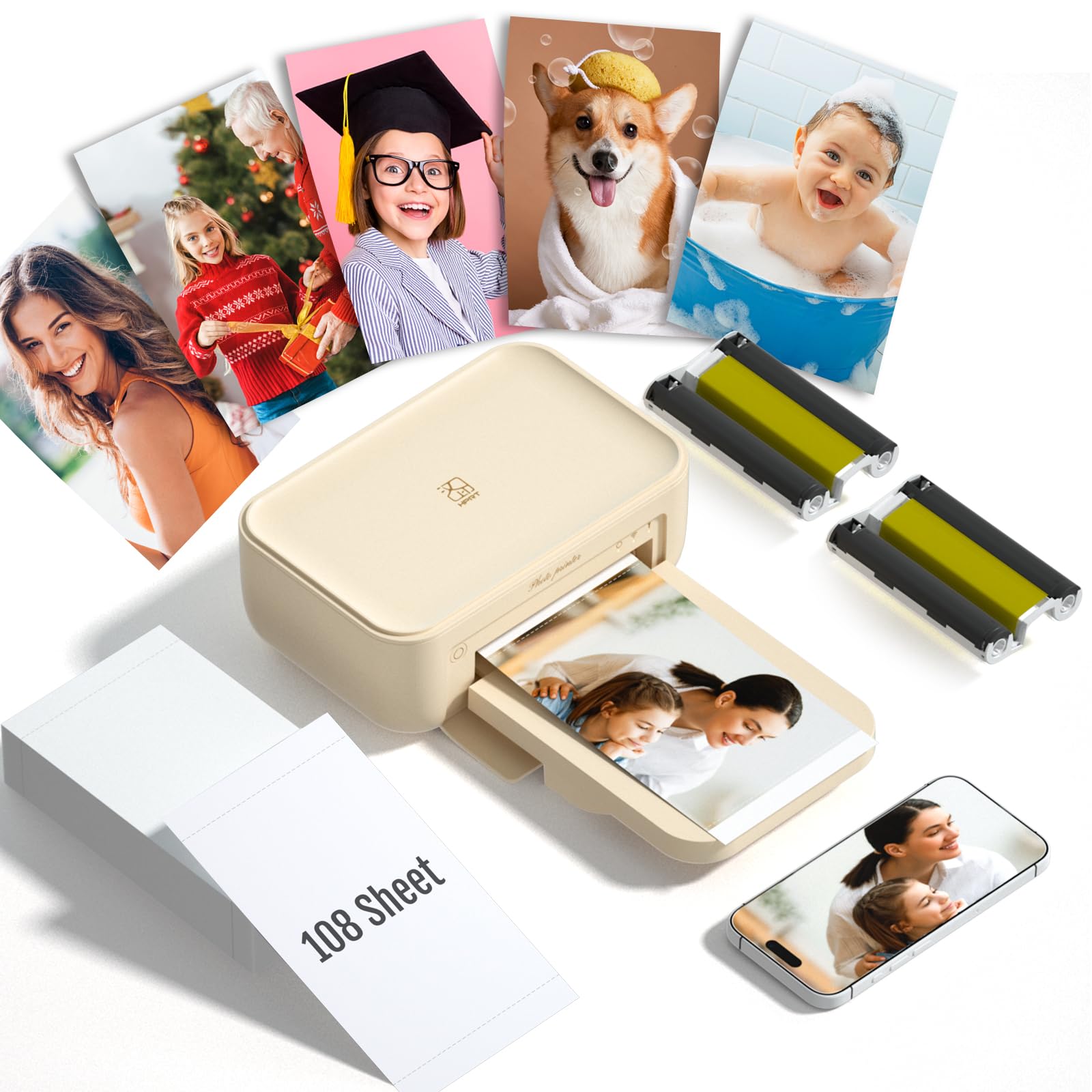
The HPRT CP4100 is a compact dye-sublimation photo printer designed for portability and ease of use, shipping with 108 sheets of photo paper and two ink ribbons—enough for 180 prints out of the box. The thermal dye-sub process penetrates color into the paper coating, creating prints that are water-resistant, fingerprint-proof, and fade-resistant without the dot pattern of inkjet technology. At just over 5 pounds, it is easily portable for events, family gatherings, or scrapbooking sessions.
The Heyphoto app offers a variety of editing tools, filters, borders, and even augmented reality video printing—where scanning the photo with the app plays back a linked video clip. Print quality on 4×6 paper is vibrant and smooth, with accurate color reproduction that slightly favors warm tones. The bundled supplies represent real value, eliminating the need for immediate reordering.
Print speed is slower than inkjet alternatives, taking approximately one minute per 4×6 print, and the app must remain active throughout each job. The printer cannot exit the app during the four-pass printing process, which can test patience for batches over 10 prints. Color output runs slightly darker than the original image on the phone screen, requiring some brightness adjustment before printing. For scrapbookers, party hosts, and crafters who prefer grab-and-go convenience and long-lasting prints, the CP4100 is a well-equipped portable solution.
Why it’s great
- Comes with 108 sheets and 2 ribbons for immediate use
- Water-resistant, smudge-proof dye-sub laminated prints
- Compact and lightweight for true portability
Good to know
- Slow print speed—about one minute per 4×6
- App must stay active; prints slightly darker than screen
9. Xerox C325dni

The Xerox C325dni is a color laser all-in-one that prioritizes speed and text sharpness over photo realism, making it the right choice for offices that need high-volume document printing with occasional color graphics. With 35 ppm monochrome and color print speeds, a 4.3-inch color touchscreen, and an auto document feeder with fax, it matches or exceeds the productivity features of similarly priced inkjet all-in-ones. Wireless and cloud-ready connectivity via AirPrint and Mopria make smartphone and tablet printing seamless.
Color laser output produces clean, crisp text and vibrant business graphics—charts, logos, and presentations look professional on plain paper. Photo prints on glossy media are noticeably less smooth than inkjet or dye-sub output, with visible toner texture and limited color saturation in gradients. The starter toner cartridges are rated for 1,500 black and 1,000 color pages, but replacement high-yield cartridges are expensive relative to supertank ink systems, with each color costing over per thousand pages.
The C325dni excels at double-sided copying and scanning without the paper re-pass required by many laser competitors, and the output tray keeps printed pages within the printer’s footprint to save desk space. Setup via the Xerox Easy Assist app is more involved than consumer inkjet models, requiring network configuration and driver installation. For businesses and power users who prioritize blazing-fast text and graphics output over glossy photo quality, the C325dni is a robust and reliable workhorse.
Why it’s great
- Extremely fast 35 ppm color and monochrome printing
- Large 4.3″ touchscreen and full office feature set (ADF, fax)
- Sharp text and vibrant business graphics on plain paper
Good to know
- Photo quality on glossy paper is inferior to inkjet or dye-sub
- High replacement toner costs compared to supertank ink systems
FAQ
Can a four-color inkjet printer produce gallery-quality photo prints?
How often should I use a photo inkjet printer to prevent clogging?
Are dye-sublimation prints truly waterproof?
Should I buy a supertank printer just for photos?
What is the difference between pigment and dye ink for photo longevity?
Final Thoughts: The Verdict
For most users, the all-in-one printer for photos winner is the Epson Expression Photo XP-970 because its six-color Claria Photo HD ink system delivers genuine lab-quality prints on 8×10 glossy paper with smooth skin tones and no banding. If you need dramatically lower ink costs for high-volume mixed printing, grab the Canon MegaTank G3290 for supertank economy with solid borderless photo output. And for instant 4×6 snapshot printing straight from your smartphone with waterproof, smudge-proof results, nothing beats the KODAK Dock Plus.

Mo Maruf
I created WellFizz to bridge the gap between vague wellness advice and actionable solutions. My mission is simple: to decode the research and give you practical tools you can actually use.
Beyond the data, I am a passionate traveler. I believe that stepping away from the screen to explore new environments is essential for mental clarity and physical vitality.