Finding a gaming keyboard that is both cheap and genuinely good is trickier than it sounds — many options under the entry-level price cap feel mushy under your fingers or stop registering keystrokes when you press multiple keys at once during a frantic firefight. This guide cuts through the noise to show you five keyboards that deliver real mechanical or magnetic-switch performance while staying affordable, so every click, press, and rapid combo feels crisp and responsive.
I’m Mohammad Maruf — the co-founder and writer behind WellFizz. This guide is built by comparing the manufacturers’ published specifications and the patterns across verified customer reviews, so you get each pick’s real strengths and trade-offs instead of marketing spin.
Whether you are upgrading from a spongy membrane board or building your first battle station on a strict budget, the right cheap gaming keyboard exists — and we have found the contenders worth your time. Here are the best options for the cheapest keyboard for gaming that money can buy right now.
How To Choose The Best Cheapest Keyboard For Gaming
The word “cheapest” often scares buyers into thinking they must settle for a mushy, unreliable membrane board. But with a few key specifications in mind, you can snag real competitive performance for under $50. Here is what to look for.
Switch Type: Mechanical vs. Membrane vs. Magnetic (Hall Effect)
Membrane keyboards use a rubber dome under each key that wears out and feels gooey within months — avoid them for gaming if you can. Mechanical switches (like the Cherry MX-style linear reds) offer crisp, consistent presses with a 50-million-keystroke lifespan, so your cheap keyboard will outlast any pre-built office board. A newer alternative is the Hall Effect magnetic switch, which uses magnets instead of physical contact to register a press — it lasts longer (no wear) and offers adjustable actuation points (how far you push the key before it counts), letting you fine-tune the feel for different games.
Layout Size: Full, TKL, or 60 Percent
A full-size keyboard (104 keys) includes a number pad that most gamers never touch, taking up desk space and slowing down mouse sweeps. Tenkeyless (TKL) layouts cut the number pad for an 87-key design that leaves room for a wider mouse pad and keeps your arms closer together. The smallest option is a 60-percent layout (61–68 keys), which removes the function row and arrow keys entirely — ideal for travel and tournaments if you are okay using two-key shortcuts to access those missing controls.
Polling Rate and Anti-Ghosting
Polling rate (measured in Hz) tells you how many times per second your keyboard reports its key states to the computer. A rate of 1,000Hz is standard for most gaming keyboards, sending a signal every millisecond — good for casual play. Higher-end budget picks now reach 8,000Hz (eight times per second), which can mean the difference between winning and losing a pixel-perfect flick shot. Anti-ghosting and N-key rollover (NKRO) ensure every single key registers even when you slam down on several keys at once — if a cheap keyboard lacks NKRO, you might find your character stops moving while you reload, which is a death sentence in competitive games.
Quick Comparison
On smaller screens, swipe sideways to see the full table.
| Model | Category | Best For | Key Spec | Amazon |
|---|---|---|---|---|
| AULA WIN60 HE | Hall Effect | Competitive FPS on a budget | 8000Hz polling rate | Amazon |
| AULA WIN68 HE | Hall Effect | Arrow keys in a 60% body | Adjustable actuation (0.02mm step) | Amazon |
| Redragon K552 | Mechanical | Reliable TKL with metal frame | 87-key N-key rollover | Amazon |
| TMKB 60% | Mechanical | Ultra-portable starter board | 61-key compact with detachable USB-C | Amazon |
| Corsair K55 CORE | Membrane | Quiet office/gaming crossover | 300ml spill resistance | Amazon |
In‑Depth Reviews
1. AULA WIN60 HE

0.02mm rapid-trigger step distance and genuine Hall Effect magnetic switches make the AULA WIN60 HE the top pick for budget-conscious competitive gamers who want Wooting-level performance without the $150-plus price tag. You get the same magnetic-contact tech found in premium boards like the Wooting 60HE and Razer Huntsman 60%, with an 8,000Hz polling rate that sends inputs eight times more often than a standard 1,000Hz keyboard, shrinking input lag near zero. It also has hot-swappable switches — you can pull out a broken switch and push in a new one without soldering, a rare perk at this price point.
The catch is the web-based driver software, which reviewers describe as “unpolished” with translation quirks. Once you set your preferred actuation point (how far you push the key before it registers), you rarely need the software again. Buyers report it is “legit straight up Wooting/Razer Huntsman 60% competitor at much cheaper price.”
If competitive performance is your goal, this keyboard delivers results that rival boards costing three times as much.
Why it’s great
- Hall Effect magnetic switches with adjustable actuation
- 8,000Hz polling rate for near-zero input lag
- Hot-swappable — change switches without soldering
- Compact 60% layout frees desk space
Good to know
- Web driver has translation issues
- Not compatible with PS5 or Xbox consoles
- Stock actuation may be too sensitive out of the box
2. AULA WIN68 HE

You give up about nothing from the WIN60 HE but gain dedicated arrow keys — a real convenience if you hate holding down function combos just to move a cursor. Both share the same 8,000Hz polling rate and Hall Effect magnetic switches, but the WIN68 adds two extra keys for a 68-key layout, keeping arrow keys in a 60-percent-sized body without ruining the compact footprint. At 686 grams (about 1.5 pounds), owners mention the “solid build quality and crisp typing sound.” The adjustable actuation range spans 0.02mm to 3.44mm, and it can be set individually for every single key — so you make WASD hair-trigger sensitive for strafing but keep your space bar firm to avoid accidental jumps. The south-facing LEDs deliver 16.8 million RGB colors without glare.
If you want the magnetic switch speed of the WIN60 HE but need arrow keys for spreadsheets or in-game menus, this is the smarter pick. It is slightly larger on your desk, but the extra utility is worth it for most gamers.
Choose the WIN68 HE over the top pick if you need dedicated arrow keys without sacrificing the 8,000Hz polling rate or per-key adjustable actuation from 0.02mm to 3.44mm.
Where it shines
- Includes dedicated arrow keys in a compact design
- Adjustable actuation per key (0.02mm steps)
- 8,000Hz polling rate with 0.3ms latency
- Detachable USB-C cable for easy storage
Worth noting
- Web driver is Windows-only (no macOS support)
- Plastic frame feels light despite good build
- Software setup can be confusing at first
3. Redragon K552

If you’re a competitive gamer on a tight budget who needs a keyboard that won’t flex or creak during frantic matches, the Redragon K552 delivers a steel-reinforced metal frame that feels substantially tougher than all-plastic alternatives. Its 87-key tenkeyless (TKL) layout saves desk space without cutting the function row, and one verified buyer reports the K552 “increased typing speed by ~15 WPM,” crediting the smooth, clicky Outemu blue switches (they require about 55g of force — slightly heavier than a Cherry MX Blue but still satisfyingly tactile). The N-key rollover (NKRO) ensures every simultaneous keypress is recognized, so you can crab-walk left, reload, and swap weapons all at once without a single missed input.
The downside is the loud click — multiple reviewers warn it is “very loud,” and the noise from the switch click, keycap bottom-out, and hollow plastic base can annoy people in shared spaces. Enthusiasts often add foam inside the case to dampen the sound to about 25 percent of the original. If loud clicks bother you, skip this one; for sheer durability and reliable mechanical performance at its price, the K552 is tough to beat.
For a keyboard that costs less than a new game but feels like it could survive a drop from your desk, the Redragon K552 is the steel-framed workhorse that refuses to quit.
What stands out
- Steel-reinforced metal frame — durable and rigid
- 87-key TKL layout with full N-key rollover
- True mechanical switches (Outemu blue) with satisfying click
- 6 rainbow LED lighting modes
The trade-offs
- Very loud; can be distracting in shared rooms
- Not hot-swappable out of the box
- Rainbow LED is fixed color — no per-key RGB customization
4. TMKB 60% Mechanical Gaming Keyboard
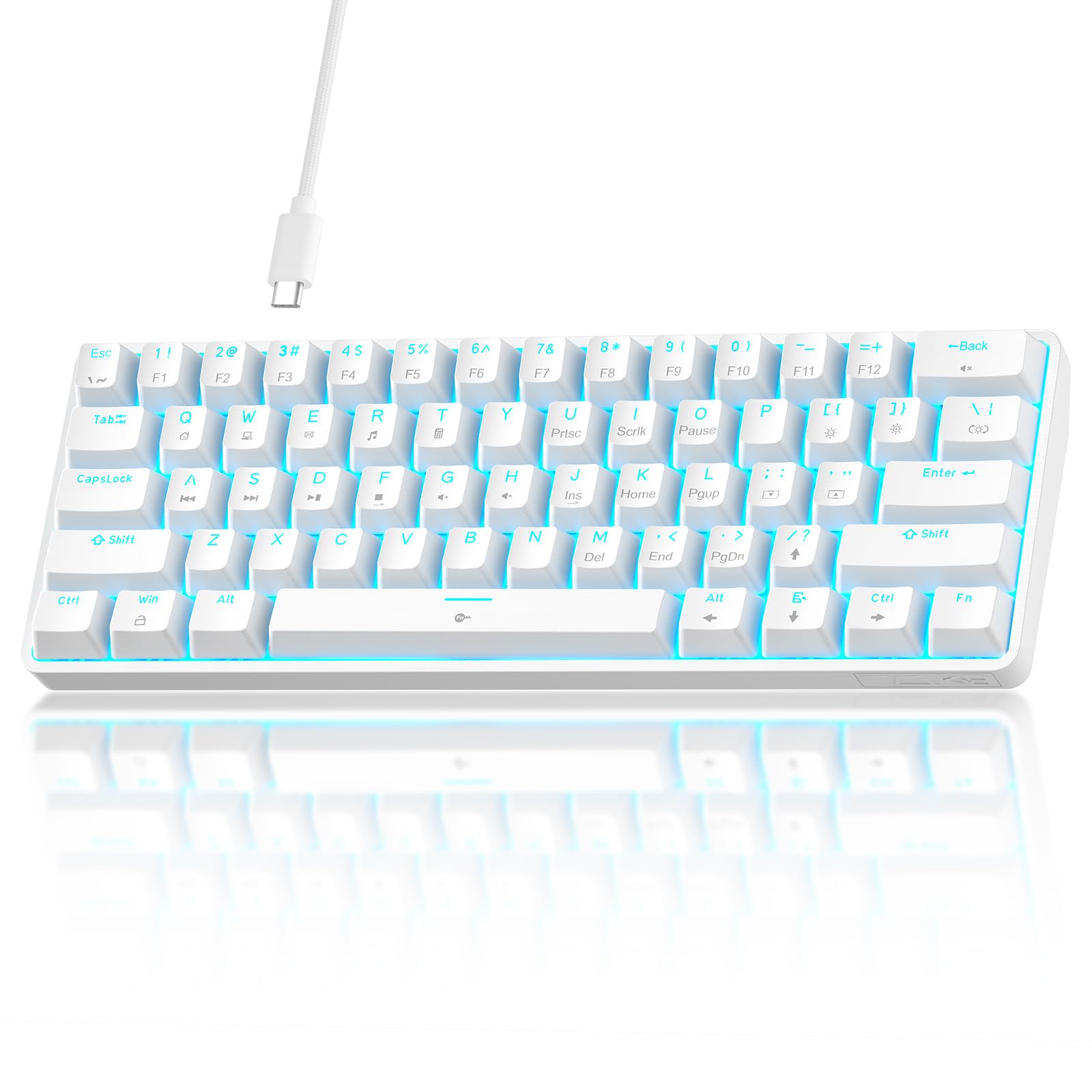
The single number that matters most in this category is the price, and this keyboard scores as the cheapest true mechanical option in this roundup. The TMKB 60% is designed for gamers who need a board that fits in a laptop bag, with 61 keys — 43 percent fewer than the Redragon K552 — making it ideal for travel, LAN parties, or cramped dorm desks where every inch of mouse space counts. Buyers describe it as “compact, lightweight, sturdy,” and the detachable USB-C cable (not micro-USB) is a modern convenience: you can replace a damaged cable with any standard phone charger, extending the keyboard’s lifespan. The linear red switches (45g actuation force) require a lighter touch than the K552’s blues, so rapid double-taps in fighting games feel less fatiguing.
The simplicity is the secret weapon here — no bulky software, no driver downloads, just plug it into your PC, Linux, or macOS machine via USB-C and start playing. The all-plastic body is the trade-off (it lacks the K552’s metal frame), but for a dedicated travel board or a first mechanical keyboard for a young gamer, this tiny workhorse delivers exactly what you need and nothing you do not.
For the lowest price in the roundup, you get a modern USB-C connection, linear switches suited for fast inputs, and a footprint that maximizes mouse space — making this a strong price-to-value read for budget-conscious gamers who prioritize portability over build materials.
The upsides
- Smallest form factor — fits in a laptop backpack sleeve
- Detachable USB-C cable for easy replacement
- Linear red switches with 45g actuation for fast tapping
- Plug-and-play with Windows, macOS, and Linux
Keep in mind
- All-plastic build; less durable than steel-frame alternatives
- Single-color blue backlight only (no RGB)
- Not hot-swappable — switches cannot be replaced without soldering
5. Corsair K55 CORE

What you actually get at this lower price is a full-size membrane keyboard with a number pad, dedicated media keys (volume, playback, brightness), and 300ml of spill resistance so one accidental drink splash does not end your session. Buyers confirm it is “quiet, responsive, and stylish” with ten-zone RGB backlighting customizable through Corsair’s iCUE software. The 1,000Hz polling rate and 12-key rollover (not full N-key, but enough for most gaming scenarios) ensure basic inputs register without noticeable lag, and one reviewer noted it was “still going strong after a year and a half of use.” The included detachable wrist rest adds comfort for long sessions.
The softer, mushier feel of membrane switches is one limitation — they lack the crisp tactile bump of a mechanical blue switch or the lightning-fast response of a Hall Effect magnetic switch. If you play casual single-player games or need a quiet, spill-proof board, the K55 CORE is a solid option. But if your main goal is ultra-fast competitive play, skip this and go with the AULA WIN60 HE instead.
This is the exact budget buyer it is perfect for: someone who prioritizes durability, quiet typing, and spill protection over mechanical feel, and who plays casually enough that 12-key rollover and a 1,000Hz polling rate are more than sufficient.
Why we’d pick it
- 300ml spill resistance protects against drink accidents
- Quiet membrane switches — no loud clicks
- Full-size layout with number pad and media keys
- Included detachable wrist rest
A few caveats
- Membrane feel is mushier than mechanical switches
- 12-key rollover — not full NKRO
- Non-detachable USB-A cable
- Zone-based RGB is less customizable than per-key lighting
Understanding the Specs
Polling Rate (Hz)
This number tells you how often your keyboard reports its key states to your computer each second. A rate of 1,000Hz (standard for most gaming keyboards) means it sends a signal every millisecond — a delay most players never consciously feel. An 8,000Hz rate sends that signal eight times more often, shrinking the window between your finger hitting the key and the game registering the action. The difference matters most in fast-paced shooters where fractions of a second decide a one-versus-one fight.
Hall Effect (Magnetic) Switches
Unlike traditional mechanical switches, which use a piece of metal touching another metal contact to register a keypress, Hall Effect switches use a magnetic field. A magnet attached to the key stem moves past a sensor, and the sensor detects when the magnetic field strength crosses a threshold you set. This means zero physical contact, so the switch never wears down from friction. It also allows adjustable actuation — you can set the key to trigger with just a light tap (0.02mm travel) for ultra-fast reactions or require a deeper press to avoid accidental inputs.
Anti-Ghosting & N-Key Rollover (NKRO)
Ghosting happens when pressing several keys at once causes some inputs to be ignored entirely — a disaster when you are holding down W, A, Shift, and Space at the same moment. Anti-ghosting technology prevents this by isolating each key’s circuit. N-key rollover (NKRO) means every single key can be pressed simultaneously without any missed signals. For gaming, you want at least 12-key rollover, but NKRO on all keys is ideal, and that is what the mechanical boards in this list provide.
Hot-Swappable vs. Soldered Switches
Most cheap mechanical keyboards come with switches soldered to the circuit board, meaning if one switch breaks or you want a different feel (from linear to clicky, for instance), you must de-solder and re-solder each key — a tedious craft requiring a soldering iron. A hot-swappable keyboard has sockets that let you pull out a switch with a small tool and push in a new one without any soldering. This extends the life of your keyboard enormously and lets you customize the feel of each key. The AULA WIN60 and WIN68 HE both support hot-swapping.
FAQ
Is a membrane keyboard okay for competitive gaming if I am on a tight budget?
Do I really need a 8,000Hz polling rate or is 1,000Hz enough?
Do 60% keyboards work for non-gaming tasks like typing or spreadsheet work?
Final Thoughts: The Verdict
For most gamers on a strict budget, the best cheapest keyboard for gaming is the AULA WIN60 HE because it delivers Hall Effect magnetic switches with 8,000Hz polling and adjustable actuation — all at a price that undercuts traditional mechanical competition. If you need dedicated arrow keys without sacrificing the compact form factor, grab the AULA WIN68 HE instead. And for the absolute cheapest entry into real mechanical typing with a steel frame, the Redragon K552 is a time-tested workhorse that still punches above its weight.

Mo Maruf
I created WellFizz to bridge the gap between vague wellness advice and actionable solutions. My mission is simple: to decode the research and give you practical tools you can actually use.
Beyond the data, I am a passionate traveler. I believe that stepping away from the screen to explore new environments is essential for mental clarity and physical vitality.