Our readers keep the lights on and my smoothie glass nicely filled. As an Amazon Associate, I earn from qualifying purchases.
A display drawing tablet replaces your monitor with a surface you can draw directly on, combining a high-resolution screen with a pressure-sensitive pen for natural, eye-hand coordination. Unlike screenless tablets, you see your strokes appear exactly under the nib, eliminating the disconnect that makes digital art feel alien at first.
I’m Mohammad Maruf — the founder and writer behind WellFizz. I’ve spent hundreds of hours analyzing display drawing tablet specs, poring through user reports on color accuracy, parallax thickness, driver stability, and pen feel to separate the marketing from what actually matters for your daily workflow.
This guide breaks down nine of the best contenders across every budget tier so you can find the best display drawing tablet for your studio, freelance career, or creative hobby without wasting money on the wrong screen size or pen technology.
How To Choose The Best Display Drawing Tablet
Picking the right display drawing tablet goes beyond just screen size and price. The real deal-breakers live in the lamination type, color accuracy, pen pressure system, and the number of shortcut keys — features that directly affect how natural and efficient your drawing sessions feel.
Full Lamination and Parallax
A full-laminated screen bonds the glass and LCD panel together, virtually eliminating the gap between the pen tip and the cursor. This means your strokes land exactly where your hand expects them. Non-laminated or air-gapped screens introduce noticeable parallax that can throw off fine line work, especially for detailed illustration and calligraphy.
Pen Pressure Levels and Initial Activation Force
Pressure sensitivity is measured in levels — 8192 and 16384 are the current standards. More levels allow for smoother transitions between thin and thick lines, but the initial activation force (IAF) matters just as much. A pen that registers a mark with a 2-gram touch gives you far better control for light sketching than one that needs 5 grams, regardless of the total level count.
Color Gamut Coverage
Look for 99% sRGB as a baseline for digital work and web design. If you do photo retouching or print production, 99% Adobe RGB or DCI-P3 coverage becomes critical. A Delta E value under 2 indicates factory-calibrated accuracy that will keep your greens, skin tones, and blues consistent from screen to print.
Quick Comparison
On smaller screens, swipe sideways to see the full table.
| Model | Category | Best For | Key Spec | Amazon |
|---|---|---|---|---|
| XPPen Artist Pro 14 Gen2 | Mid-Range | Hyper-detailed line work & portability | 16384 pressure levels, 14″ 16:10 | Amazon |
| Wacom Cintiq Pro 27 | Premium | Professional studio & 4K color grading | 27″ 4K UHD, 120Hz, 99% Adobe RGB | Amazon |
| HUION Kamvas Pro 16 V2 | Mid-Range | Paper-like feel & Smart Touch Bar | 16K pen, 99% sRGB, 15.6″ | Amazon |
| XPPen Artist Ultra 16 | Premium | 4K OLED & multi-touch navigation | 15.6″ 4K OLED, dual styli, touch | Amazon |
| Wacom Cintiq 16 | Premium | Trusted build & 2.5K resolution | 16″ 2.5K WQXGA, 100% sRGB | Amazon |
| Wacom Cintiq 24 | Premium | Large canvas for design & animation | 23.8″ 2.5K WQHD, adjustable stand | Amazon |
| XPPen Artist 15.6 Pro | Mid-Range | Budget-friendly 15.6″ workspace | 15.6″ 1080p, 8192 pressure, Red Dial | Amazon |
| HUION Kamvas 13 Gen 3 | Budget | Compact entry-level with dual dials | 13.3″ 1080p, 16384 pen, Canvas Glass 2.0 | Amazon |
| XPPen Artist 13.3 Pro V2 | Budget | First screened tablet with 16K pen | 13.3″ 1080p, 16384 pressure, Red Dial | Amazon |
In‑Depth Reviews
1. XPPen Artist Pro 14 Gen2

The XPPen Artist Pro 14 Gen2 brings a 14-inch 16:10 display with full lamination and anti-glare etched glass that reduces parallax to almost nothing. The 16384 pressure levels on the X3 Pro smart chip stylus deliver smooth, precise lines that rival the feel of much pricier Wacom models, with an initial activation force that captures even the lightest feathering strokes.
Color accuracy hits 123% sRGB area ratio and ΔE <2.2, making it a solid pick for illustrators and photo editors who need vibrant yet reliable color reproduction. A built-in foldable stand, wireless shortcut remote, and X-Edge wrist rest are all included in the box, which saves you money on accessories that other mid-range tablets skip.
The display can also switch into screenless tablet mode by holding the power button, giving you the flexibility to work on a separate monitor without buying a second device. Minor note: some units have shipped with the wrong stylus initially, but XP-Pen support resolves replacement quickly.
Why it’s great
- 16384 pressure levels with X3 Pro chip for ultra-nuanced control
- Full-laminated anti-glare glass eliminates parallax
- Built-in stand and wireless remote included
Good to know
- Requires a computer to operate; not standalone
- Some early units had pen mis-shipment issues
2. Wacom Cintiq Pro 27

The Wacom Cintiq Pro 27 is the benchmark that other display drawing tablets are measured against, featuring a 27-inch 4K UHD display with 10-bit color, 99% Adobe RGB, 98% DCI-P3, and a 120Hz refresh rate that makes brush strokes feel fluid and responsive. The Pro Pen 3 offers 8192 pressure levels with adjustable weight, center of balance, and interchangeable grips.
Eight customizable ExpressKeys, improved multi-touch gestures, and four integrated ¼-inch mount points allow you to attach accessories like an extension table or a phone mount directly to the display. The anti-glare etched glass keeps reflections under control while maintaining sharpness, and the 120Hz refresh rate is a tangible upgrade for animators and fast sketchers.
It is the most expensive option on this list and requires either a Flex Arm or Ergotron mount for comfortable ergonomic positioning — the included stand has some wobble. Fan noise is minimal but noticeable at higher brightness levels, and the Pro Pen 3’s side buttons can feel stiff to some users initially.
Why it’s great
- 4K UHD 120Hz with 10-bit color for fluid, accurate rendering
- 99% Adobe RGB and 98% DCI-P3 coverage
- Pro Pen 3 with adjustable weight and grip
Good to know
- Premium price requires a significant budget
- Stand wobble; an Ergotron arm is strongly recommended
3. HUION Kamvas Pro 16 V2
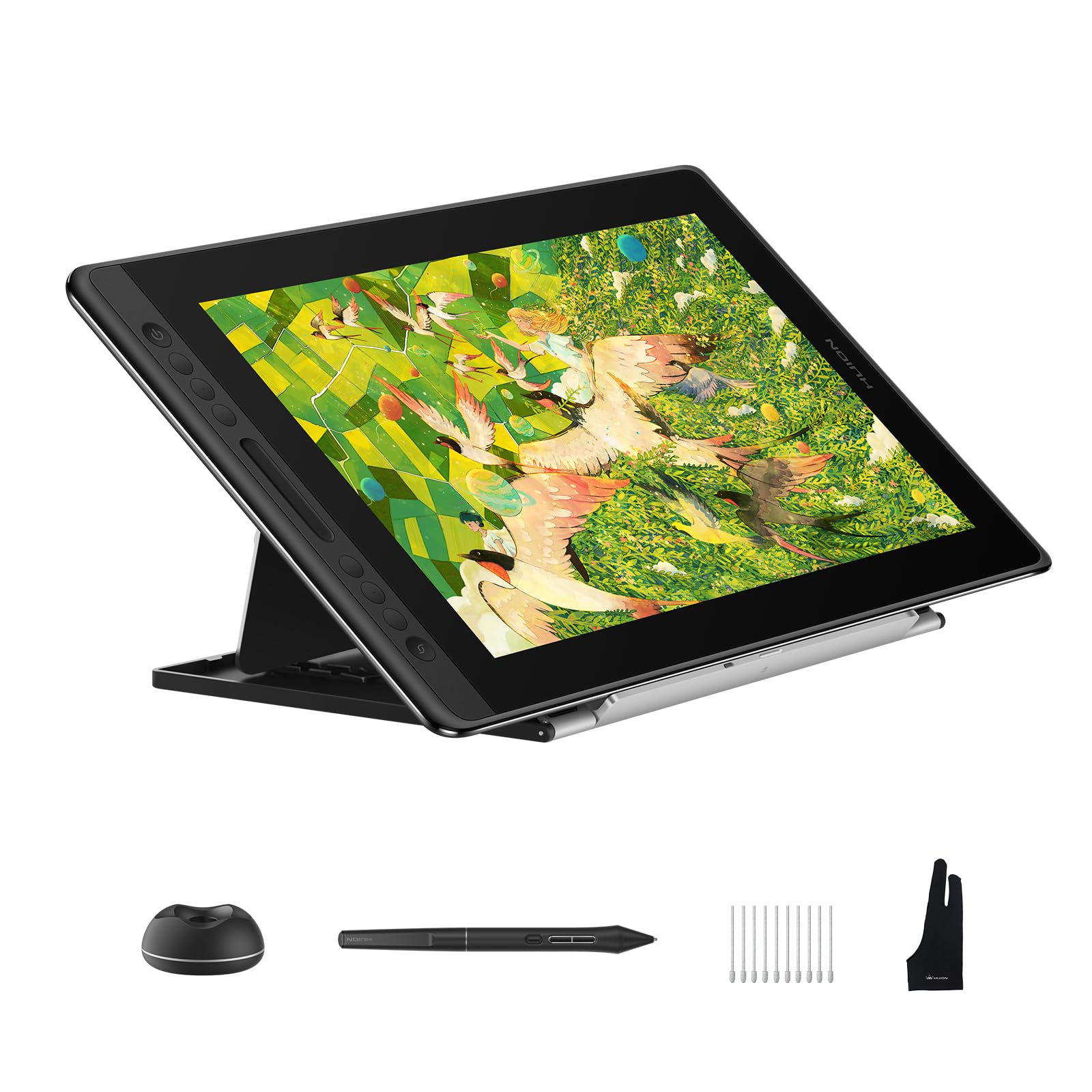
The HUION Kamvas Pro 16 V2 pairs a 15.6-inch full-laminated anti-glare display with PenTech 4.0, offering 16,384 pressure levels at 5080 LPI resolution. The battery-free PW600A pen requires only 2 grams of initial activation force, making it one of the most responsive pens in its price range for light, expressive sketching.
Color coverage hits 120% sRGB (99% sRGB and 99% Rec.709) with factory calibration, which is ideal for print-ready work. The Smart Touch Bar and six customizable Express Keys provide faster access to brush size, zoom, and canvas rotation, and holding the function key for three seconds turns the Express Keys into OSD controls for brightness and contrast.
The included ST200 aluminum stand offers six angles from 14.5° to 45°, and the recessed USB-C port locks the cable securely in place so it won’t disconnect mid-stroke. Some users report the screen appears a bit dim at 200 nits, and the tablet can warm up on the port side after extended use.
Why it’s great
- PenTech 4.0 with 2g IAF for delicate line control
- Smart Touch Bar and six Express Keys improve workflow
- ST200 stand with six adjustable angles
Good to know
- Screen brightness caps at 200 nits, which feels dim
- 3-in-1 cable system can be cumbersome
4. XPPen Artist Ultra 16

The XPPen Artist Ultra 16 is the first in this lineup to pack a 15.6-inch 4K OLED AMOLED display with a 100,000:1 contrast ratio, <1 ms response time, and 1.07 billion colors (10-bit). The OLED panel delivers true blacks and incredible vibrancy that IPS panels simply cannot match, making it an outstanding choice for photo retouching, animation, and any work where shadow detail matters.
Color coverage includes 99% Adobe RGB, 99% sRGB, and 98% Display P3, all verified with Calman and a Delta E <1.1 for professional accuracy. Multi-touch support lets you zoom, rotate, and pan with standard Windows and macOS gestures, and you can define a dead zone on the screen to prevent palm rejection issues.
The package includes two styli — an X3 Smart Chip Pro Stylus and an X3 Pro Slim Stylus — both offering 16K pressure sensitivity. The ACK05 shortcut remote adds 40 programmable keys. The aluminum stand attaches with foam adhesive that can loosen over time, and the tablet is not VESA compatible without a separate laptop tray mount.
Why it’s great
- 4K OLED with true blacks and 10-bit color depth
- 99% Adobe RGB and Calman-verified Delta E <1.1
- Multi-touch support with customizable dead zone
Good to know
- Stand uses foam adhesive that may lose grip over time
- No VESA mount; requires laptop tray for arm attachment
5. Wacom Cintiq 16

The Wacom Cintiq 16 brings a 16-inch IPS display with 2.5K WQXGA resolution (2560 x 1600) and 100% sRGB coverage, offering a noticeably sharper image than the 1080p panels common at this size. The Pro Pen 3 delivers 8192 levels of pressure sensitivity with tilt support and three customizable side switches, all backed by Wacom’s industry-leading driver stability.
The built-in fold-out legs provide a fixed 20-degree working angle, and the USB-C connection supports DisplayPort Alt Mode or Thunderbolt 3/4 for a single-cable setup on compatible computers. The anti-glare surface minimizes sparkle and keeps reflections manageable, which many users prefer over budget tablets that use rougher etched glass.
There are no Express Keys or on-display shortcut buttons, so you’ll need to rely on keyboard shortcuts or a separate shortcut remote for efficient workflow. The included cable kit lacks a mini-HDMI cable, requiring an additional purchase if your computer doesn’t support DP Alt Mode over USB-C. Some users also note the Pro Pen 3 feels slightly slim and the button placement can be awkward.
Why it’s great
- 2.5K resolution delivers sharper detail than 1080p panels
- 100% sRGB and 99% DCI-P3 for accurate color
- Wacom driver reliability and Pro Pen 3 feel
Good to know
- No Express Keys or on-screen shortcuts
- mini-HDMI cable not included
6. Wacom Cintiq 24

The Wacom Cintiq 24 provides a 23.8-inch workspace with 2.5K WQHD resolution (2560 x 1440), offering more screen real estate than the 16-inch model while staying below the price of the Pro 27. The fully adjustable stand is included in the box, giving you tilt and height adjustments out of the gate without an extra purchase.
The Pro Pen 3 with 8192 pressure sensitivity and ±60° tilt support performs identically to the one on the Cintiq 16, so you get the same high-quality drawing experience on a larger surface. Color accuracy is rated at 100% sRGB with 8-bit depth, making it suitable for professional digital design and animation workflow.
Like the Cintiq 16, there are no built-in shortcut buttons, which can slow down users who prefer dedicated keys on the display. The Pro Pen 3 continues to feel a bit lightweight and the side buttons are reported as stiff by some users. The display uses non-bonded glass, introducing slight parallax that may bother detail-oriented artists.
Why it’s great
- Large 23.8″ canvas with 2.5K WQHD resolution
- Fully adjustable stand included at no extra cost
- Consistent Wacom pen performance and driver support
Good to know
- No Express Keys or touch shortcut controls
- Non-bonded glass creates noticeable parallax
7. XPPen Artist 15.6 Pro

The XPPen Artist 15.6 Pro offers a 15.6-inch full-HD display with full-laminated technology that keeps parallax low, paired with a battery-free PA2 stylus that provides 8192 levels of pressure sensitivity. The screen covers 120% sRGB (88% NTSC) and 178° viewing angles, delivering rich colors that satisfy most illustrators and photo editors.
Eight customizable Express Keys and a Red Dial shortcut controller let you adjust brush size, zoom, and canvas rotation without reaching for the keyboard. The slim 11mm profile makes it easy to fit into a larger laptop bag, and the smart screen-brightness button allows quick adjustments based on your room lighting.
Setup is straightforward — download the driver, connect via HDMI and USB, and start drawing. The stand has only one fixed position, which may cause neck strain during long sessions, and the color saturation can be slightly punchy out of the box, though calibration improves accuracy. The 8192 pressure level system works well for most users but lacks the finer nuance of the newer 16K pens.
Why it’s great
- Full-laminated 15.6″ display with low parallax
- 8 Express Keys and Red Dial for efficient workflow
- Thin profile and solid build for the price
Good to know
- Fixed single-position stand limits ergonomic adjustment
- Color saturation may need calibration out of the box
8. HUION Kamvas 13 Gen 3

The HUION Kamvas 13 Gen 3 packs a 13.3-inch full-laminated screen with Canvas Glass 2.0, which reduces glare and improves scratch resistance compared to the previous generation. The new PenTech 4.0 system delivers 16,384 pressure levels with a 2-gram IAF, putting next-gen pen performance into a compact and affordable package.
Color accuracy is factory-calibrated to Avg. ΔE <1.5 with 99% sRGB coverage, making it suitable for color-critical work on a small desk. Five programmable shortcut keys and two dual dials give you tactile control over zoom, brush size, and canvas navigation that you’d normally expect on larger, pricier models.
The included ST300 adjustable stand lets you tilt the screen for comfortable viewing angles, and the USB-C single-cable connection works with compatible devices. The screen brightness is on the lower side at 200 nits, which can be a problem in brightly lit rooms, and some users report heat buildup on the port side after several hours of use.
Why it’s great
- PenTech 4.0 with 16384 levels and 2g IAF
- Two dual dials and five shortcut keys in a compact body
- Factory-calibrated ΔE <1.5 for color accuracy
Good to know
- Screen brightness is only 200 nits
- Heat buildup on port side during extended sessions
9. XPPen Artist 13.3 Pro V2

The XPPen Artist 13.3 Pro V2 brings 16,384 pressure levels (the industry-first 16K spec) to a 13.3-inch full-laminated display at an accessible price point. The X3 Pro smart chip stylus delivers fast response with an improved 90ms initial response rate and 20% better accuracy over previous generations, making it feel more responsive for quick sketching and gesture work.
Color coverage is strong for the price, with 125% sRGB area ratio and 99% sRGB coverage, along with 107% Adobe RGB and 95% Display P3. The 250 cd/m² brightness and 1000:1 contrast ratio provide better visibility than many budget 13-inch models. The Red Dial Quick Key and eight customizable shortcut keys give beginners simple access to essential controls.
The S01 foldable stand is included, and the full-featured USB-C cable simplifies connection to compatible computers. Driver issues have been reported on some Windows systems when using multi-monitor setups with mixed resolutions, and the pen nibs can scratch the screen over time, so a screen protector is worth considering early on.
Why it’s great
- 16384 pressure sensitivity at an entry-level budget
- Wide color gamut with 125% sRGB area ratio
- Red Dial and eight shortcut keys for streamlined workflow
Good to know
- Driver can be finicky with multi-monitor setups
- Pen nibs may scratch screen; protector recommended
FAQ
Can I use a display drawing tablet without a computer?
What does the pressure level number actually mean for my drawing?
Does a higher sRGB percentage guarantee better color accuracy?
Why do some drawing tablets include a Red Dial or Touch Bar?
Final Thoughts: The Verdict
For most users, the best display drawing tablet winner is the XPPen Artist Pro 14 Gen2 because it delivers 16384 pressure sensitivity, full-laminated anti-glare glass, and a built-in stand at a mid-range price that outperforms many premium models. If you want the absolute best color accuracy and a silky 120Hz display for professional studio work, grab the Wacom Cintiq Pro 27. And for a compact, budget-friendly entry point that still offers 16K pen technology, nothing beats the XPPen Artist 13.3 Pro V2.

Mo Maruf
I created WellFizz to bridge the gap between vague wellness advice and actionable solutions. My mission is simple: to decode the research and give you practical tools you can actually use.
Beyond the data, I am a passionate traveler. I believe that stepping away from the screen to explore new environments is essential for mental clarity and physical vitality.