Our readers keep the lights on and my smoothie glass nicely filled. As an Amazon Associate, I earn from qualifying purchases.
When your computer’s internal storage is full and cloud subscriptions feel like a slow, recurring tax on your data, a Direct Attached Storage (DAS) device is the solution. Unlike a NAS, a DAS connects directly via USB or eSATA, offering raw, high-speed capacity without the complexity of a network setup—perfect for video editors, photographers, and anyone managing large local libraries.
I’m Mohammad Maruf — the founder and writer behind WellFizz. I’ve spent hundreds of hours analyzing the mechanical and interface specifications of dozens of DAS enclosures to understand what separates a reliable multi-year storage investment from a drive-destroying headache.
This guide breaks down the connectivity, RAID options, and thermal performance you need to know before buying the best direct attached storage for your workflow.
How To Choose The Best Direct Attached Storage
Selecting a DAS enclosure is a multi-year commitment. Focus on four core factors: bay count and total capacity, interface speed, RAID support, and thermal design. Each determines whether your storage setup feels seamless or frustrating.
Interface Speed and Protocol
The data transfer rate is the single metric that defines your workflow. USB 3.0 (5Gbps) is adequate for HDD backups, but USB 3.2 Gen 2 (10Gbps) is essential for large video files or running multiple SSDs. The chipset inside the enclosure—such as VIA VL820 or ASMedia ASM235CM—determines UASP support and multi-drive performance.
RAID Modes and Hardware Controller
Hardware RAID handles parity calculations (RAID 5, 6) on the enclosure itself, freeing your computer’s CPU for other tasks. A DAS with a hardware controller is ideal for RAID 5 because software RAID over USB can cause lag and data corruption under load. If you need simple drive concatenation or mirroring, software RAID via macOS Disk Utility or Windows Storage Spaces is often sufficient.
Enclosure Material and Cooling
An aluminum chassis acts as a passive heatsink, pulling heat away from the drives. Enclosures with front and rear ventilation and a temperature-controlled fan maintain consistent internal temperatures. A cheap plastic enclosure with inadequate venting can cook enterprise drives, reducing their lifespan dramatically.
Quick Comparison
On smaller screens, swipe sideways to see the full table.
| Model | Category | Best For | Key Spec | Amazon |
|---|---|---|---|---|
| TERRAMASTER D4-320 | Non-RAID | High-speed SSD/HDD workflows | 10Gbps USB-C | Amazon |
| QNAP TR-004 | Hardware RAID | Reliable RAID 1/5 via hardware controller | 4-bay, USB-C | Amazon |
| Mediasonic HF7-SU31C | Non-RAID | Quiet, fast 10Gbps expansion | 10Gbps Metal | Amazon |
| CENMATE 6-Bay 10Gbps | Non-RAID | Daisy-chaining multiple enclosures | 6-bay, 10Gbps | Amazon |
| ORICO 9858RU3 | Hardware RAID | 8 RAID modes in a 5-bay chassis | 5-bay, 110TB | Amazon |
| CENMATE 4-Bay RAID | Hardware RAID | 8 RAID modes with tool-less caddies | 5Gbps, eSATA | Amazon |
| ORICO 9848U3 | Non-RAID | Budget 4-bay with hardware lock | 5Gbps, 88TB | Amazon |
| Yottamaster PS500U3 | Non-RAID | Budget 5-bay for JBOD | 5-bay, 110TB | Amazon |
| WD Elements 5TB | Portable | Single-drive portable backup | 5TB, USB 3.0 | Amazon |
In‑Depth Reviews
1. TERRAMASTER D4-320

The TERRAMASTER D4-320 is the benchmark for a high-performance non-RAID DAS. Its USB 3.2 Gen 2 Type-C interface delivers up to 10Gbps, enabling combined read/write speeds over 1,000 MB/s with four SATA III SSDs. The hot-swappable, tool-free trays with the Push-lock design make drive swaps effortless without powering down the unit.
Thermal management is a standout: the intelligent temperature-controlled fan, combined with sound-absorbing panels and vibration damping, keeps noise levels below 21 dB(A) in standby. This makes the D4-320 usable in a home office or editing bay without audible distraction. The compact plastic chassis is lightweight but feels solid, and the four individual drive slots appear as separate disks with no software RAID overhead.
One common caveat is the stock USB cable, which reviews indicate can be too thin for reliable 10Gbps signaling. Replacing it with a short, shielded 0.5m 10Gbps-rated cable resolves disconnection issues. Single drive performance with a SATA III SSD reaches about 510 MB/s read, while HDD arrays saturate the 10Gbps link with sequential transfers.
Why it’s great
- True 10Gbps speed for fast multi-drive workflows
- Near-silent operation ideal for quiet offices
- Tool-free hot-swap trays speed drive maintenance
Good to know
- Stock USB cable may cause disconnects above 1m length
- Plastic build feels less premium than metal enclosures
- No hardware RAID support; requires software RAID setup
2. QNAP TR-004

The QNAP TR-004 is the definitive hardware RAID DAS. Its on-board controller supports RAID 0, 1, 5, JBOD, and Individual modes, taking parity calculation off your main computer. This is essential for RAID 5 on a Mac or PC because software RAID over USB can introduce latency and corruption under sustained write loads.
The metal chassis is compact and lockable, with tool-less trays for 3.5-inch drives and screw mounts for 2.5-inch SSDs. The USB Type-C interface is compatible with Thunderbolt 3/4 ports and delivers consistent 6Gbps SATA speeds. Integration with QNAP NAS units is a key advantage: the TR-004 can expand a NAS’s capacity while also functioning as a standalone DAS for a desktop.
Customer reviews praise the reliability for RAID 1 and RAID 5 setups on Plex servers and Mac Mini workstations. Noise can be noticeable due to the lack of vibration dampening, and the drive trays feel slightly flimsy compared to premium enclosures. A few users reported false drive failure alerts that resolved with a power cycle, but long-term stability is generally high.
Why it’s great
- True hardware RAID with dedicated controller
- Dual-use as NAS expansion or standalone DAS
- Lockable drive bays for physical security
Good to know
- Audible fan and drive vibration in quiet rooms
- Plastic drive trays feel less robust than metal
- Flimsy RAID mode switch requires power-off
3. Mediasonic USB 3.2 4 Bay HF7-SU31C

The Mediasonic HF7-SU31C is a 4-bay metal enclosure that delivers 10Gbps via USB 3.2 Gen 2 Type-C. Its VIA Labs VL820 and VL716 chipset supports UASP, making multi-drive transfers efficient. The revised front door includes an air intake feature, though some users report that the door restricts airflow and drives may run above 110°F unless the door is left open.
Each drive bay supports SATA III 6Gbps and drives up to 24TB, for a total of 30TB per slot. The smart fan with a built-in thermal sensor auto-adjusts speed, keeping the unit quiet during idle and moderate load. Build quality is solid—made in Taiwan—with a metal enclosure that dissipates heat passively.
The biggest concern is inconsistency: some units suffer from random connection failures and power cycling that can corrupt drives. A minority of buyers experienced complete failure within weeks, leading them to switch to the TERRAMASTER D4-320. If you get a good unit, the speed and quiet operation are excellent.
Why it’s great
- Full 10Gbps bandwidth with UASP chipset
- Durable metal chassis aids passive cooling
- Smart fan runs quiet during normal loads
Good to know
- Front door can restrict airflow and cause overheating
- Quality control issues with power cycling reported
- No RAID support; pure JBOD/individual expansion
4. CENMATE 6 Bay 10Gbps
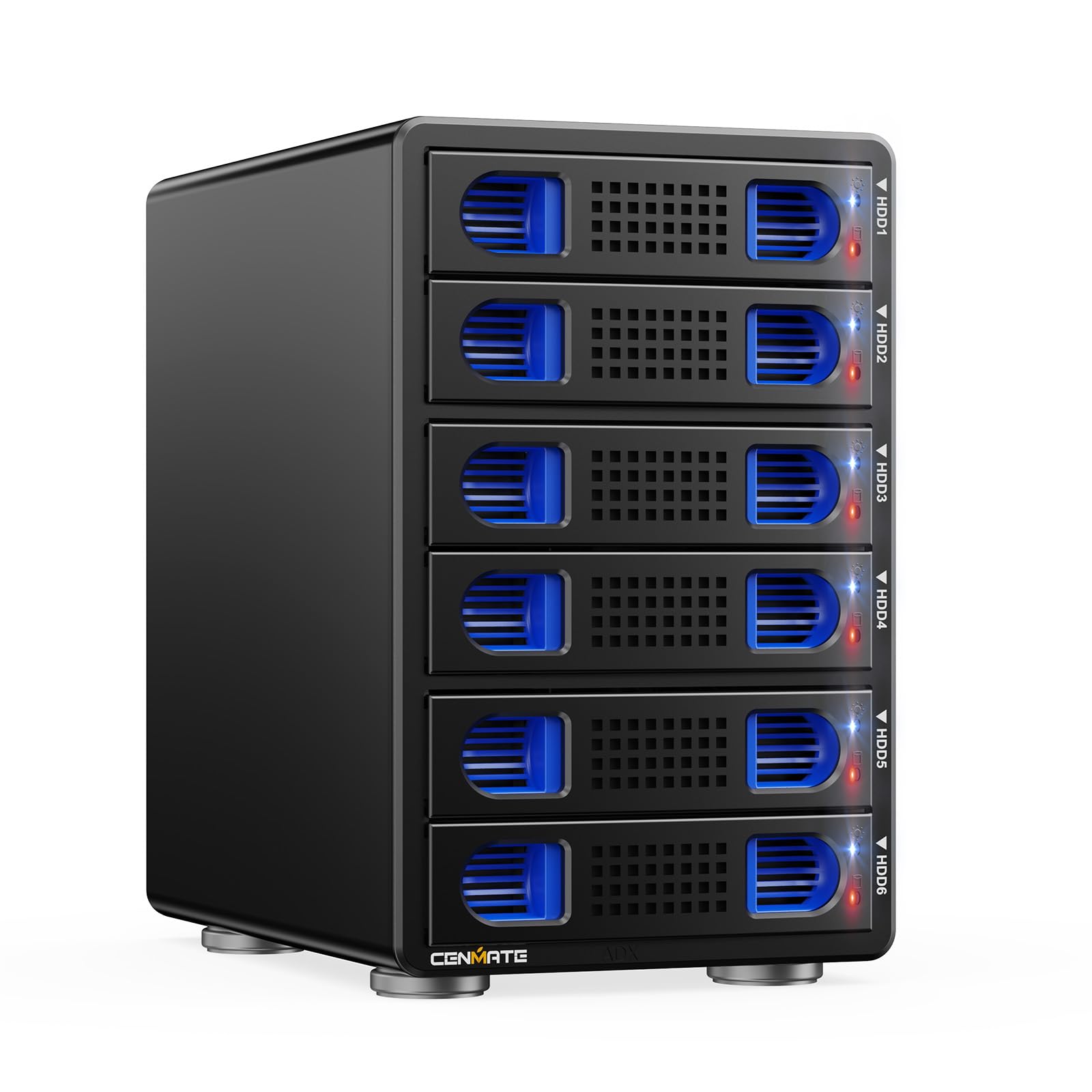
The CENMATE 6-bay enclosure offers the highest bay count in this roundup, supporting up to 120TB total with 20TB per drive. Its USB 3.2 Gen 2 interface (10Gbps) uses the VL822+ASM235CM chipset, delivering 500 MB/s combined read/write over two HDDs and 510 MB/s with a single SSD. The daisy chain port lets you expand up to three enclosures, reaching 360TB total.
Thermal management relies on two 2.7-inch fans and an aluminum-alloy body. The hot-swappable feature allows drive replacement without powering off, a major convenience for media production or surveillance NVRs. Tool-free drive trays make installation fast, and compatibility with Windows, Mac, and Linux is plug-and-play.
The main downside is fan noise: measured at 40-50 dB, it is audible from another room. Some users experienced data loss when drives dropped out intermittently on Windows 11, and the plastic clips on the trays are fragile. For the price per bay, it’s a strong value, but careful handling and a quality USB cable are recommended.
Why it’s great
- 6-bay offers best capacity in class
- Daisy-chain support expands storage further
- Hot-swap trays for easy drive maintenance
Good to know
- Fans are loud (40-50 dB) in quiet spaces
- Intermittent drive dropouts on some Windows setups
- Plastic drive trays feel delicate
5. ORICO 9858RU3 5 Bay RAID

The ORICO 9858RU3 is a 5-bay hardware RAID enclosure supporting eight modes: RAID 0, 1, 3, 5, 10, JBOD, CLONE, and CLEAR. Its hardware controller offloads parity calculations from the host, making RAID 5 viable for Mac and Linux users who lack native software RAID. The aluminum chassis and 80mm silent fan keep drives cool even under constant load.
Each tray holds a 3.5-inch SATA drive, with a maximum single disk capacity of 22TB for a total of 110TB. The bracket-free design and independent safety lock prevent accidental drive ejection. The built-in 150W power supply eliminates a bulky external brick, tidying up a desktop. Transfer speeds via USB 3.0 reach 235 MB/s, adequate for HDD arrays but limiting for SSDs.
Customer feedback flags a firmware power management issue when connected directly to a PC USB port, requiring daily hard resets in some cases. Connecting the enclosure to a NAS USB port resolves this. Multi-drive write speeds drop drastically after cache fills, and file copy stalling was reported. The Terramaster D4-320 is faster for sequential writes.
Why it’s great
- Hardware RAID with 8 modes including RAID 5/10
- Large 110TB capacity in a 5-bay form factor
- Built-in 150W PSU keeps desktop clean
Good to know
- Firmware issues with PC USB power management
- Multidrive write speeds tank after cache fills
- USB 3.0 limit of 5Gbps is a bottleneck for SSDs
6. CENMATE 4 Bay RAID

The CENMATE 4-bay RAID enclosure packs 8 hardware RAID modes (RAID 0/1/3/5/10, CLONE, LARGE, NORMAL) into a compact aluminum body. It supports both USB 3.0 and eSATA connectivity, offering 5Gbps via UASP. Each bay can hold a 20TB drive for an 80TB total, and the tool-less caddy design makes swapping drives quick.
An 80mm fan and aluminum-alloy construction keep internal temperatures stable. The fan is rated at 40-50 dB, which some users find loud but not excessive. The external power brick provides stable 12V power for up to four enterprise drives. Setup is plug-and-play on Windows 7+, Mac 9.1+, and Linux.
RAID mode switching requires a physical paddle and a ten-second reset hold, which is clunky but functional. The enclosure works well with macOS for RAID 1 configurations, though the included firmware update process for Mac compatibility can be confusing. The build quality is basic but functional, and the noise level is acceptable with added ventilation.
Why it’s great
- Full hardware RAID with 8 modes at a competitive price
- Dual connectivity with USB 3.0 and eSATA
- Tool-free caddies for fast drive swapping
Good to know
- RAID mode switching requires physical paddle and reset
- Fan noise is audible at 40-50 dB
- Some Mac users needed firmware update for compatibility
7. ORICO 9848U3

The ORICO 9848U3 is a 4-bay non-RAID enclosure designed for budget-conscious users who need large capacity. Its USB 3.0 interface delivers 5Gbps with real-world transfer rates around 235 MB/s. The aluminum-alloy body and 80mm silent fan maintain stable temperatures, and the front and rear vents provide adequate airflow for continuous operation.
The tray-less, bracket-free design uses a safety lock to prevent accidental drive ejection. Each slot supports up to 22TB drives for an 88TB total. The built-in 150W power supply eliminates the need for a separate power brick. Setup is straightforward: the unit is recognized immediately on Windows, Mac, and Linux.
The main issue is a hard-coded power management function that forces daily hard resets when connected directly to a PC USB port. This can be avoided by plugging the enclosure into a NAS USB port. Multi-drive write speeds also drop to 15-22 MB/s after the cache fills, which makes large file transfers frustrating. The Terramaster D4-320 resolves these issues at a higher price point.
Why it’s great
- Solid aluminum chassis for heat dissipation
- Safety lock prevents accidental drive removal
- High 88TB capacity with 22TB per slot
Good to know
- USB power management forces daily hard resets on PC
- Very slow write speeds after cache fills
- Preferred use is as NAS expansion, not direct PC DAS
8. Yottamaster PS500U3 5 Bay

The Yottamaster PS500U3 is a 5-bay non-RAID enclosure that delivers the lowest price per bay in this guide. It supports up to 110TB total with 22TB per drive and uses USB 3.0 for 5Gbps transfers. The aluminum shell and 80mm intelligent temperature-control fan keep drives cool, with the fan adjusting speed based on internal temperature.
The front door features a push-to-open design for easy drive access, and the removable trays support both 3.5-inch and 2.5-inch SATA drives. The drive rails are snug, but some users found the alignment tricky. The enclosure is well-suited for JBOD (Just a Bunch Of Disks) setups where each drive functions independently or via software RAID.
The biggest complaint is an aggressive power management feature that puts drives to sleep after 10 minutes, causing drive letters to disappear. This can be mitigated by disabling USB power management in the operating system. Another caveat: despite appearing like metal, the body is plastic with a painted aluminum finish, which may affect long-term heat dissipation.
Why it’s great
- Lowest price per bay for a 5-drive enclosure
- Supports both 3.5-inch and 2.5-inch drives
- Intelligent fan keeps noise low during idle
Good to know
- Aggressive power management drops drives after 10 min idle
- Body is plastic, not solid aluminum despite appearance
- No hardware RAID support; software only
9. Western Digital 5TB Elements Portable

The Western Digital 5TB Elements is a simple, portable single-drive DAS. It connects via USB 3.2 Gen 1 (5Gbps) and is powered entirely over the USB bus—no external power adapter required. The 2.5-inch form factor makes it pocketable for travel, and its plug-and-play compatibility with Windows, Mac, and even game consoles is seamless.
This drive is ideal for a single backup of a laptop or as a file-transfer shuttle. Sequential read/write speeds are typical for a 5400 RPM HDD, around 120 MB/s. The compact plastic casing includes no active cooling, but the drive runs quiet and only slightly warm. The included USB-A cable is short and functional, though some users replace it with a more durable braided option.
The Elements lacks any RAID support or multi-drive capability, so it is a pure expansion drive—not a replacement for a multi-bay DAS. It’s also not designed for constant heavy write loads; using it as a Time Machine destination on macOS works, but the drive may need reformatting. For a low-cost, reliable portable backup, it remains the standard.
Why it’s great
- Ultra-portable 2.5-inch design with bus power
- True plug-and-play with no setup
- Trusted brand reliability for basic backups
Good to know
- Single drive with no RAID protection
- Not suitable for constant heavy write workloads
- Included cable is short and may fail over time
FAQ
Can I use a DAS without any RAID setup?
Does a DAS need a network connection like a NAS?
Will a DAS enclosure work with both HDDs and SSDs?
What does the “sleep” or “power management” feature do in a DAS?
Final Thoughts: The Verdict
For most users, the best direct attached storage winner is the TERRAMASTER D4-320 because it combines full 10Gbps speed, near-silent operation, and tool-free hot-swap trays at a balanced price. If you need reliable hardware RAID, grab the QNAP TR-004. And for a budget-conscious multi-bay option, the CENMATE 4 Bay RAID delivers eight RAID modes without breaking the bank.

Mo Maruf
I created WellFizz to bridge the gap between vague wellness advice and actionable solutions. My mission is simple: to decode the research and give you practical tools you can actually use.
Beyond the data, I am a passionate traveler. I believe that stepping away from the screen to explore new environments is essential for mental clarity and physical vitality.