Our readers keep the lights on and my smoothie glass nicely filled. As an Amazon Associate, I earn from qualifying purchases.
A digital wall calendar is the command center your home has been missing. It replaces the frantic group texts, the forgotten dentist appointments, and the refrigerator paper that gets buried under takeout menus. These smart displays sync with your phone, show every family member’s schedule at a glance, and even double as a photo frame — turning your wall into a living hub for your household.
I’m Mohammad Maruf — the founder and writer behind WellFizz. I’ve spent hundreds of hours analyzing screen resolutions, calendar sync capabilities, app ecosystems, and the feature sets that actually matter for family coordination to build this definitive guide.
This guide breaks down everything you need to know about selecting the perfect best digital wall calendar for your home, from screen size and sync compatibility to chore tracking and photo display.
How To Choose The Best Digital Wall Calendar
Not all digital wall calendars are created equal. The biggest mistake buyers make is focusing on the screen size without considering the quality of the calendar sync or the app ecosystem. A beautiful screen is useless if it can’t pull your work calendar and your kids’ soccer practice into a single, readable view. Before you buy, consider the three factors that define the user experience: display quality, sync depth, and the family-friendly feature set.
Screen Size and Resolution
Screen size determines how much information you can see at once, and resolution determines how sharp that information looks. A 10.1-inch screen is compact enough for a desk or a narrow wall space, but a 15.6-inch display gives you room for a weekly overview, chore columns, and a weather widget without scrolling. Resolution matters most for photo display — if you plan to use the device as a digital picture frame, look for a 1080P HD panel that renders images without graininess. Anti-glare coatings are a bonus for kitchens with overhead lights.
Calendar Sync Capabilities
The core value of a digital wall calendar is its ability to pull in events from multiple platforms automatically. Two-way sync with Google Calendar, iCloud, Outlook, and Cozi ensures that changes made on your phone appear on the wall display in seconds — and vice versa. Models that only offer one-way sync or require manual app configuration add friction that defeats the purpose of a shared family calendar. Look for devices that support bulk event filtering by family member and can display color-coded schedules for everyone at a glance.
Chore and Reward Systems
Many digital wall calendars now include built-in chore charts with star or point-based reward systems. These features are genuinely effective for building consistent habits in children, but the implementation varies widely. Some models allow you to assign tasks with deadlines, set custom reward goals, and automate notifications when a chore is completed. Others require manual manipulation for each task assignment. If your household includes school-age kids, prioritize a system that makes the reward loop visual and immediate — a chime and a star that appears on screen is far more motivating than a passive checklist.
Quick Comparison
On smaller screens, swipe sideways to see the full table.
| Model | Category | Best For | Key Spec | Amazon |
|---|---|---|---|---|
| Airzeen 15.6 Inch | Premium | Customizable family dashboard | 1080P HD touchscreen, 15.6 in | Amazon |
| Apolosign 15.6-inch | Premium | Android mode and smart home control | Google Gemini voice assistant | Amazon |
| Dragon Touch 15.6″ FHD | Mid-Range | Large screen on a mid-range budget | FHD 1080P, 15.6 in | Amazon |
| Anyuse 16″ | Mid-Range | Large screen with senior-friendly fonts | 16 in, 4-level font size | Amazon |
| JSUSOU 15.6 Inch | Mid-Range | Fridge-mounting with magnetic back | Magnetic refrigerator mount | Amazon |
| Dragon Touch 10.1 Inch | Budget-Friendly | Chore chart and reward system | 10.1 in touchscreen, reward chime | Amazon |
| BMDIGIPF 10.1 Inch | Budget-Friendly | Recipe storage and photo sharing | 10.1 in, multi-platform sync | Amazon |
In‑Depth Reviews
1. Airzeen 15.6 Inch Digital Calendar
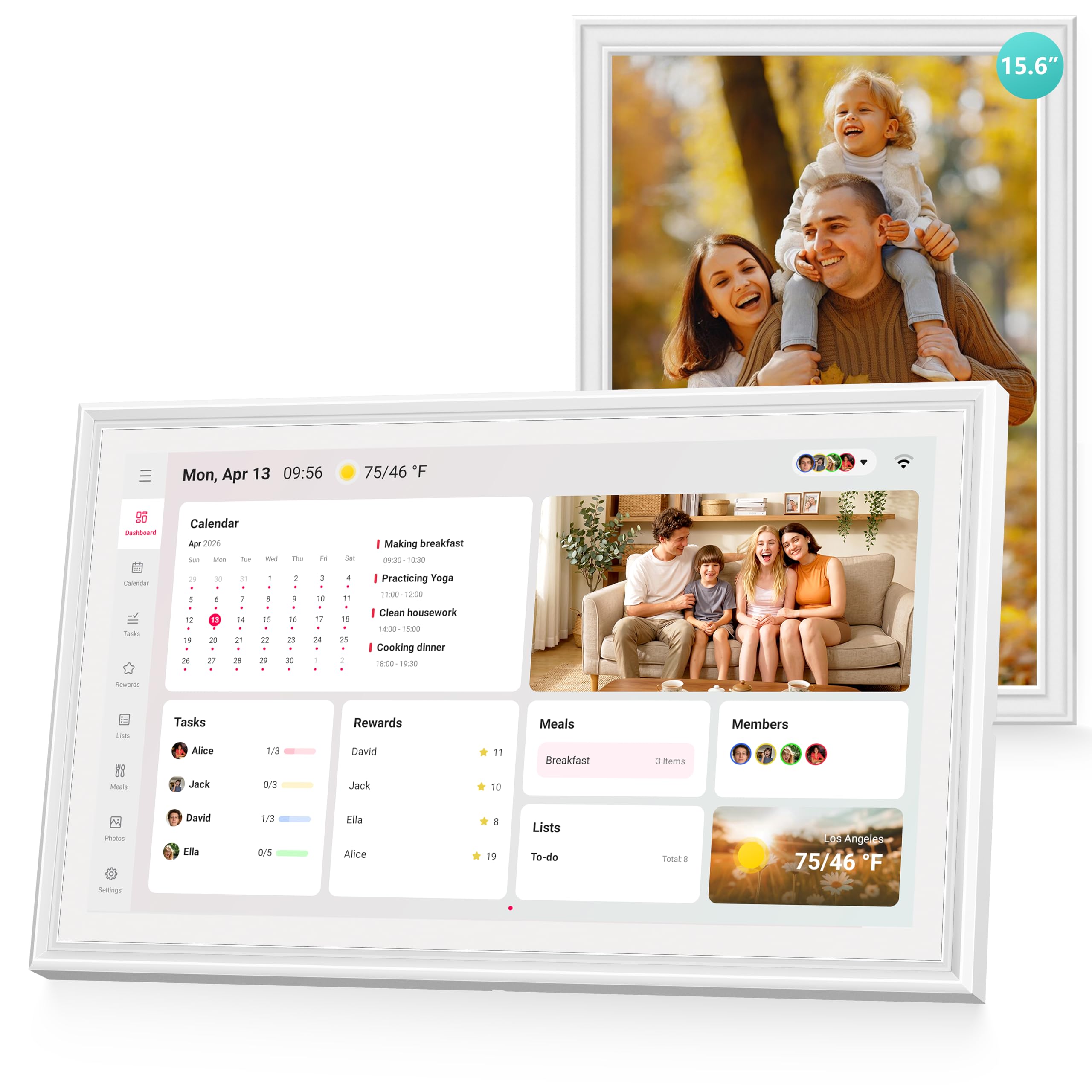
The Airzeen stands out because it offers a fully customizable dashboard with zero monthly fees. You get widgets for tasks, rewards, meal planning, to-do lists, weather, and photos — all on a bright 1080P HD 15.6-inch touchscreen. The ability to create multi-page layouts means you’re not limited to a single view; you can swipe between a weekly calendar, a chore chart, and a photo slideshow without losing context.
Two-way Google Calendar sync is automatic and instant, and the color-coded shared calendar supports avatars for each family member. The reward system assigns stars for completed tasks, and kids can redeem them for pre-set rewards — the visual feedback loop is clear and motivating. Setup takes minutes via the companion app, and the device works with Google, iCloud, Outlook, Cozi, and Yahoo.
Reviewers consistently praise the screen clarity, the responsive touch interface, and the practicality of having meal planning and shared lists in one place. The adjustable brightness and sleep mode make it comfortable for bedside or kitchen use. The only minor complaint is that the app could offer more granular control over list sharing, but the core experience is polished and complete.
Why it’s great
- 1080P HD 15.6-inch touchscreen with customizable multi-page dashboard
- Two-way sync with Google, iCloud, Outlook, Cozi, and Yahoo
- Subscription-free with full features for tasks, rewards, meal planning, and photos
Good to know
- App interface for list management could be more refined
- Wall mount requires careful placement for cable routing
2. Apolosign 15.6-inch Digital Family Calendar
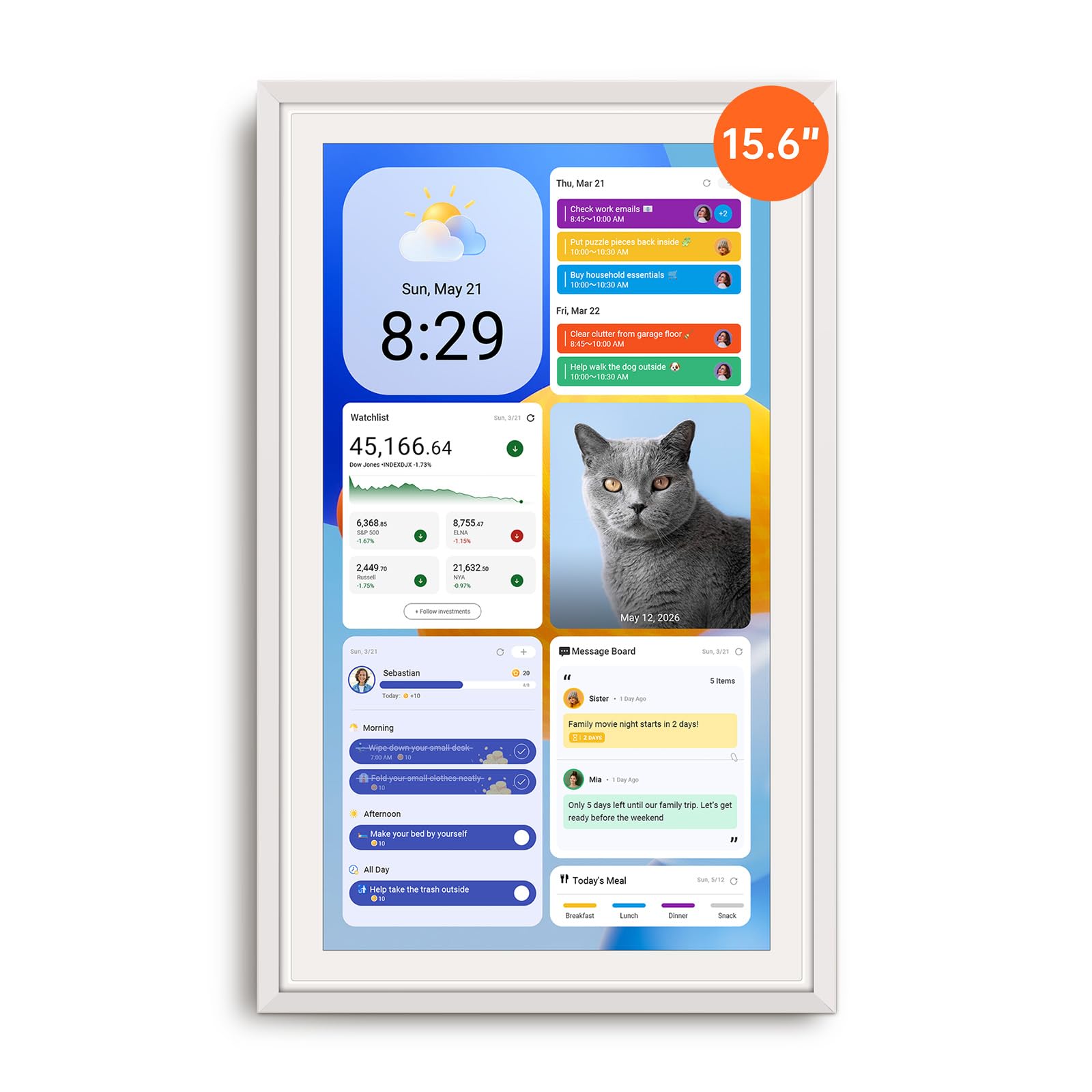
The Apolosign takes the concept a step further with a dual-mode operating system. You can toggle between Calendar Mode for a clean, focused family schedule view and Android Mode for a fully customizable dashboard that supports widgets, apps, and even streaming services like Netflix and YouTube. This essentially turns the device into a family information hub that can also entertain.
Built-in Google Gemini voice assistant lets you check schedules, set reminders, ask for weather updates, and control compatible smart home devices — lights, cameras, doorbells — directly from the wall display. The reward-based chore chart is color-coded per child and includes a fun reward wheel that kids actually enjoy interacting with. The 15.6-inch anti-glare HD touchscreen includes auto-brightness and sleep mode.
User reviews highlight the seamless Google and iCloud sync, the absence of any subscription fees, and the surprising durability of the build (one reviewer noted it survived a 4-foot drop). The included wall mount and stand hardware make placement flexible. The main trade-off is that the device must remain plugged in at all times, and the sound from the built-in speaker is average for music playback.
Why it’s great
- Dual-mode OS: Calendar Mode for simplicity, Android Mode for full customization
- Google Gemini voice assistant with smart home device control
- No subscription fees and supports streaming apps like Netflix and YouTube
Good to know
- Must stay plugged into a power source at all times
- Built-in speaker quality is adequate but not rich for music
3. Dragon Touch 15.6″ FHD Digital Calendar

Dragon Touch brings a 15.6-inch Full HD 1080P touchscreen to the mid-range price bracket without skimping on core features. The interface is clean and intuitive: assign different colors to each family member, set up an interactive chore chart with star rewards and chimes, and plan weekly dinners so the “what’s for dinner” question finally disappears. The eCalendar app lets you manage everything from your phone.
Setup is straightforward — plug in, connect to Wi-Fi, and sync your iOS or Google calendars. The device auto-integrates multiple personal calendars into one unified view. The screen doubles as a digital picture frame when not in use, and the 1080P resolution makes photos look vibrant and sharp. The 15.6-inch size is large enough to read from across the kitchen but slim enough to mount on a wall without dominating the room.
User feedback is consistently positive about the reward system’s motivational effect on kids and the value proposition compared to + competitors. Some users note that the sync between the app and the device can take one to two minutes for changes to appear, and the app requires manual editing for shared tasks. However, for a large-screen family organizer at this price point, the Dragon Touch delivers exceptional value.
Why it’s great
- 15.6-inch FHD 1080P touchscreen at a mid-range price
- Interactive chore chart with star rewards and chime notifications
- Doubles as a high-resolution digital photo frame
Good to know
- App sync can take one to two minutes for changes to appear
- Assigning shared tasks requires manual per-person setup in the app
4. Anyuse 16″ Smart Digital Calendar

The Anyuse 16-inch model prioritizes readability above all else. With four adjustable font size and brightness levels, it is specifically designed for multi-generational households where seniors need to see appointments clearly and kids need to navigate tasks easily. The 16-inch HD touchscreen supports four placement modes — wall, desk, horizontal, and vertical — and includes free mounting accessories for each configuration.
Calendar sync is robust and two-way with Google, iCloud, Outlook, Cozi, Yahoo, and TeamSnap. Changes made on any third-party calendar update on the device within seconds. The built-in chore and reward system lets you assign age-appropriate tasks with color labels, set deadlines, and define star-based rewards. The meal planner includes a built-in recipe library, and you can attach cooking notes to each meal. The Whale Framely App supports photo and video sharing with a maximum 60-second video clip per upload.
Families with multiple children appreciate the ability to create virtual members (no email required for kids) and the account protection feature that prevents accidental event deletion. The sleep mode can be customized with specific on/off times, and the 24-hour format option accommodates diverse household habits. The only drawback mentioned by reviewers is the limited photo size adjustment — only two aspect ratio settings, which don’t flatter every image perfectly.
Why it’s great
- 16-inch HD display with four font size and brightness levels for seniors and kids
- Two-way sync with Google, iCloud, Outlook, Cozi, Yahoo, and TeamSnap
- Built-in recipe library with cooking notes for meal planning
Good to know
- Photo size adjustment limited to two aspect ratio options
- Video upload limited to 60 seconds per clip
5. JSUSOU 15.6 Inch Digital Smart Calendar

The JSUSOU digital calendar is designed for one specific placement scenario: your refrigerator. It comes with a magnetic mounting system that slides onto textured fridge surfaces, and for smoother finishes it includes a 3M adhesive strip. The 15.6-inch HD touchscreen is large enough to be readable from across the kitchen, and it syncs seamlessly with Google, iCloud, and Outlook calendars in real time.
Setup is remarkably simple — plug in, connect to Wi-Fi, and the device automatically pulls in events from your linked calendars. Both parents can add appointments and photos via the companion app, making it a true shared family device. When not displaying the schedule, the screen cycles through family photos in a clean slideshow mode. The sleek white bezel blends into most kitchen aesthetics without looking like a bulky gadget.
Reviewers love the easy setup and the fact that no instructions were needed to get it running. The magnetic mount is a standout feature for households that want the calendar front and center on the fridge. The main criticism concerns the app’s multi-phone sync — some users had difficulty connecting a second phone after initial setup, and the included instructions were not particularly helpful for troubleshooting this issue.
Why it’s great
- Magnetic fridge mount included for easy kitchen placement
- Real-time calendar sync with Google, iCloud, and Outlook
- Simple plug-and-setup process, no instructions required
Good to know
- Connecting a second phone can be tricky after initial setup
- Included instructions are minimal and not detailed
6. Dragon Touch 10.1 Inch Interactive Touchscreen Family Planner

The ten-inch Dragon Touch is the smart entry point for families who want a digital wall calendar without overspending. The 10.1-inch touchscreen is large enough for a weekly overview in a home office or kitchen corner, and it packs the same feature set as its larger sibling: color-coded schedules, an interactive chore chart with star rewards, a dinner planner, and a digital photo frame mode. The reward chime when a child completes a task is a small but effective motivational touch.
Setup is quick via the eCalendar app — plug in, connect to Wi-Fi, and sync your iOS or Google calendars. The interface is intuitive enough that grandparents can learn it in minutes, and the chore chart with the stars-to-reward system keeps kids engaged with household responsibilities. The screen doubles as a digital picture frame that displays family photos in an elegant slideshow when not in calendar mode.
Users consistently report that this device is a “game-changer” for busy households, especially those managing ADHD or multiple extracurricular schedules. The value proposition is strong — it matches the functionality of premium alternatives at a fraction of the cost. The main compromise is the smaller screen size, which means less room for widgets and a tighter weekly view. The app also has a minor learning curve for assigning shared tasks to multiple people.
Why it’s great
- Excellent value with chore chart, reward chime, and calendar sync
- Easy setup and intuitive interface suitable for grandparents
- Doubles as a digital photo frame with family photo slideshow
Good to know
- 10.1-inch screen limits widget space and weekly calendar view
- App requires manual per-person setup for shared task assignments
7. BMDIGIPF 10.1 Inch Digital Calendar with Touch Screen
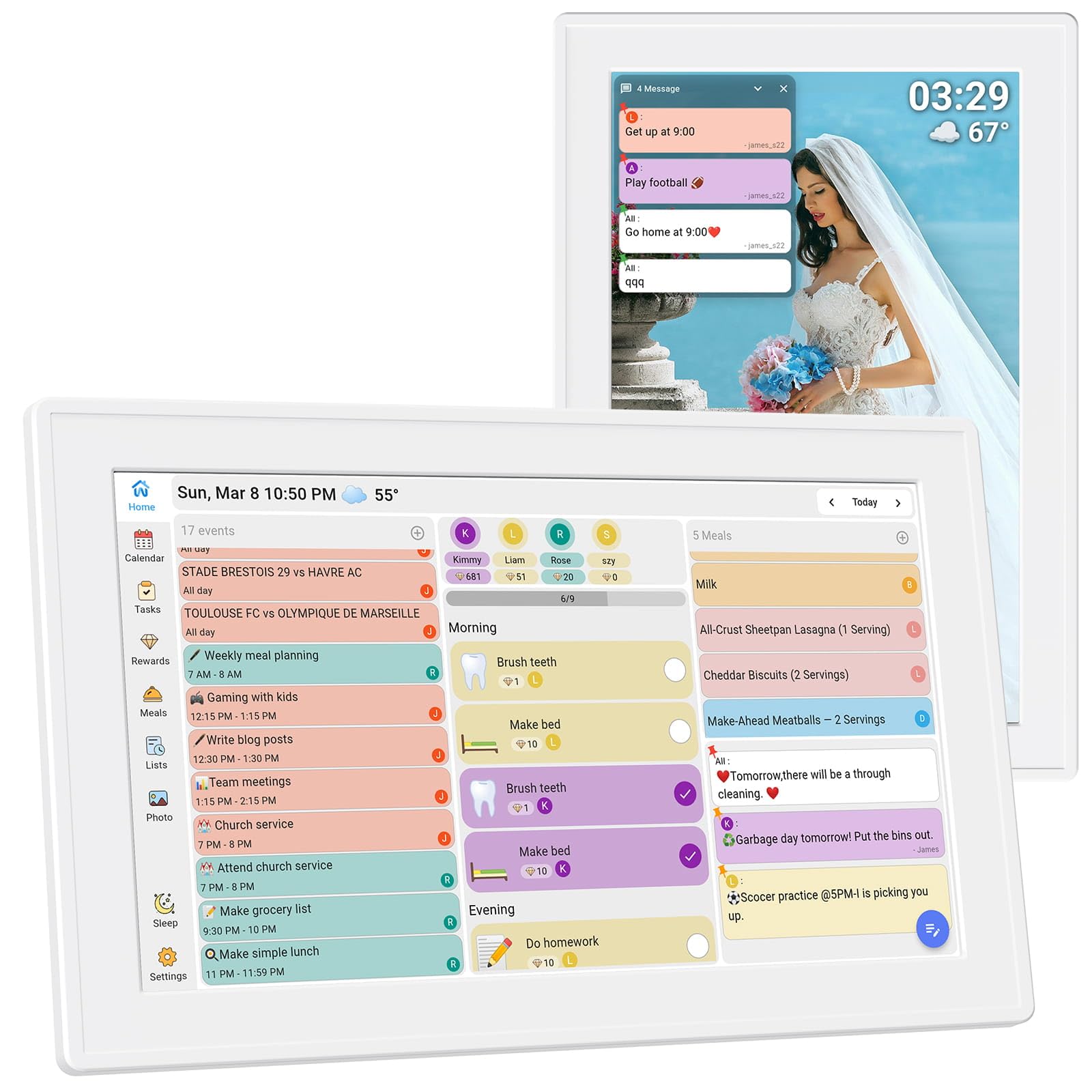
The BMDIGIPF digital calendar is the budget-conscious family’s entry into smart scheduling. The 10.1-inch touchscreen offers a clear daily schedule view with real-time sync across Google, Outlook, Cloud, Yahoo, and Cozi. The interface is clean and modern, displaying a weekly view alongside tasks, meal plans, and family photos. It includes a built-in recipe storage feature — one-tap saving from online sources — and flexible checklists for shopping and housework.
The task and reward system is designed to encourage good habits in children. Parents can assign daily routines and link them to small rewards, making habit-building feel like a game. The remote photo sharing feature lets family members send pictures directly to the device via app, turning the screen into a living family memory album. Setup supports horizontal, vertical, and wall mount placement, and the slim design fits into most home aesthetics.
Reviews highlight the easy setup and the centralization of family schedules, meal planning, and photos as the biggest wins. The build quality, however, leans toward the plastic side — it functions well but doesn’t feel premium in hand. The screen is bright and responsive, but users on a tight budget will appreciate that it delivers the core digital calendar experience without a subscription fee.
Why it’s great
- Budget-friendly entry with multi-platform calendar sync and recipe storage
- Remote photo sharing keeps extended family connected to the display
- No subscription fees for core features
Good to know
- Build feels plastic and less premium than larger models
- 10.1-inch screen limits the amount of visible information at once
FAQ
Do digital wall calendars require a monthly subscription?
Can I sync both Google Calendar and iCloud at the same time?
How important is a 1080P screen for a family calendar?
Will the touchscreen work with wet or greasy fingers in the kitchen?
Can I assign different tasks to multiple children on one device?
Final Thoughts: The Verdict
For most users, the best digital wall calendar winner is the Airzeen 15.6 Inch because it combines a crisp 1080P touchscreen, a fully customizable dashboard, and zero subscription fees into a package that handles calendars, chores, meal planning, and photo display equally well. If you want a device that doubles as a streaming hub and smart home controller, grab the Apolosign 15.6-inch. And for families who need a budget-friendly start with a solid reward system, nothing beats the Dragon Touch 10.1 Inch.

Mo Maruf
I created WellFizz to bridge the gap between vague wellness advice and actionable solutions. My mission is simple: to decode the research and give you practical tools you can actually use.
Beyond the data, I am a passionate traveler. I believe that stepping away from the screen to explore new environments is essential for mental clarity and physical vitality.