Our readers keep the lights on and my smoothie glass nicely filled. As an Amazon Associate, I earn from qualifying purchases.
The gap between a muddy, distant voice and a rich, present one is nearly always the microphone resting on your desk. A headset mic picks up every breath and keyboard clatter, while a proper desk microphone focuses on your voice and rejects the room noise your listeners never asked to hear.
I’m Mohammad Maruf — the founder and writer behind WellFizz. I’ve spent hundreds of hours cross-referencing capsule types, polar pattern data, frequency response curves, and real-world user feedback across dozens of models to isolate the desk microphones that actually deliver on their specs.
This guide cuts through the noise to help you find the best desk microphone for your exact setup, whether you stream, podcast, or just want your Zoom calls to sound professional.
How To Choose The Best Desk Microphone
Choosing the right desk microphone comes down to three factors: how much room noise you have, whether you want simple USB plug-and-play or expandable XLR, and what type of capsule captures your voice best. Condenser mics are more sensitive and detailed but pick up every click and fan — dynamic mics are warmer and more forgiving in untreated rooms. Always check the polar pattern: cardioid is the standard for solo use, while bidirectional or stereo patterns help if you record interviews or instruments.
Capsule Type: Dynamic vs. Condenser
Dynamic mics like the Shure MV7+ handle high sound pressure levels and reject ambient noise naturally. Condenser mics, such as the Audio-Technica AT2020USB-X, capture more detail and transient snap but require a quieter environment. For a typical home office or gaming desk with fans and typing, a dynamic capsule is often the less distracting choice.
Connectivity and Control
USB mics offer instant plug-and-play on any computer — no interface needed. XLR mics route through a mixer or audio interface for higher fidelity and independent gain staging. Hybrid models like the FIFINE AM8PROT and Shure MV7+ give you both, so you can start with USB and upgrade later. Onboard controls — mute, gain, headphone volume — let you adjust without diving into software mid-stream.
Pickup Pattern and Placement
Cardioid patterns capture sound from the front while rejecting the sides and rear, ideal for a single speaker. Omni picks up everything around the mic, good for room ambience or group calls. Stereo patterns work for acoustic instruments. Most desk microphones come with a stand or boom arm — a boom arm positions the capsule closer to your mouth for consistent levels and reduces desk vibration transfer.
Quick Comparison
On smaller screens, swipe sideways to see the full table.
| Model | Category | Best For | Key Spec | Amazon |
|---|---|---|---|---|
| FIFINE AM8PROT | USB / XLR Dynamic | Streamers on a budget | 115 dB SPL, 75 dB SNR | Amazon |
| Blue Yeti Blackout | USB Condenser | Multi-pattern versatility | 4 pickup patterns | Amazon |
| HyperX QuadCast 2 | USB Condenser | Built-in shock mount stability | 32 Ohm impedance | Amazon |
| Sennheiser Profile | USB Condenser | Software-free natural tone | 125 dB sensitivity | Amazon |
| Elgato Wave:3 | USB Condenser | Streamers needing Wave Link mixing | 24-bit / 96 kHz ADC | Amazon |
| Audio-Technica AT2020USB-X | USB Condenser | Home studio vocal detail | 24-bit / 96 kHz, 600 Ohm | Amazon |
| Shure MV7+ | USB / XLR Dynamic | Professional broadcast quality | Voice Isolation Tech, DSP | Amazon |
In‑Depth Reviews
1. Shure MV7+ Podcast Dynamic Microphone

The Shure MV7+ brings Voice Isolation Technology and a built-in DSP engine that actively filters out fan hum, room echo, and background chatter in real time. The dynamic capsule delivers a warm, closed-in sound that mimics a professional broadcast booth — no foam panels required. OBS certification means zero driver hassle; plug it in via USB-C or XLR and the MOTIV Mix app handles EQ, reverb, and Auto Level Mode.
The LED touch panel lets you swipe to mute with a 16.8 million color indicator, a tactile upgrade over the stiff mute buttons on lesser mics. The digital pop filter eliminates plosives without a physical windscreen, keeping your waveform clean during excited commentary. The 3.6‑lb metal body and adjustable desk stand feel built for daily abuse — nothing about this mic wobbles.
Auto Level Mode dynamically adjusts gain based on your distance from the capsule, a lifesaver for streamers who lean in and out. The bundled 3m USB-C cable and foam windscreen cover the essentials out of the box. If your budget allows one mic that handles every scenario, this is the anchor.
Why it’s great
- Real-time DSP noise reduction removes ambient hum without post-processing
- USB-C and XLR dual connectivity for future interface upgrades
- Auto Level Mode prevents clipping during dynamic voice levels
Good to know
- Premium tier price reflects professional-grade components
- Heavier build requires a sturdy arm or included stand
2. Elgato Wave:3 White

Elgato’s Wave:3 pairs a cardioid condenser capsule with proprietary Clipguard technology, which detects and digitally reroutes distortion before it reaches the recording. The result is a clean, studio‑grade vocal that stays intact even when you raise your voice mid‑stream. The 24‑bit / 96 kHz analog-to-digital converter captures transient detail that budget converters smear.
The Wave Link app is the real differentiator — it lets you control the mic level plus up to eight separate audio sources (game, music, chat, browser) into two independent mixes. You can send one mix to your stream and another to your headphones, a feature normally requiring a hardware mixer. The slim profile and USB‑C connectivity keep the desk footprint small.
Mute is a capacitive touch button on top, responsive and silent. The included desk stand is low‑profile but the boom arm adapter in the box gives you mounting flexibility. On‑board controls for gain, monitor mix, and headphone volume keep you out of menus. For streamers who want software‑integrated audio routing without a GoXLR, this is the pick.
Why it’s great
- Clipguard prevents distortion before it hits the ADC
- Wave Link app replaces a hardware mixer for multi‑source audio
- Thin, space‑saving design with included boom arm adapter
Good to know
- Taller profile may partially block monitor screens
- Condenser capsule picks up more room noise than a dynamic mic
3. Audio-Technica AT2020USB-X

The AT2020USB-X builds on the legacy of the legendary XLR AT2020 by adding a high‑resolution 24‑bit / 96 kHz AD converter and USB‑C connectivity. The cardioid condenser capsule delivers a smooth, extended frequency response with articulate top end and present low‑mid body — ideal for vocalists, voiceover artists, and podcasters who need detail without sibilance.
A soft‑touch capacitive mute button on the body lets you cut audio silently, with a two‑state LED ring that glows blue when active and red when muted. The built‑in headphone jack offers zero‑latency monitoring, and the included custom desk stand tilts for precise capsule positioning. The stainless‑steel grille and metal enclosure resist wear from transport and daily use.
The 600‑Ohm output impedance pairs well with most interfaces, though the mic is sensitive enough to pick up PC fan noise if your room is untreated — a pop filter and boom arm help. For a pure condenser sound in a USB form factor that rivals XLR performance, this is the benchmark.
Why it’s great
- Proven AT2020 capsule with 24‑bit / 96 kHz USB conversion
- Zero‑latency headphone monitoring with volume control
- Capacitive mute with clear blue/red LED indicator
Good to know
- High sensitivity means untreated rooms need acoustic treatment
- USB only — no XLR option for interface upgrades
4. Sennheiser Profile USB Cardioid Condenser

The Sennheiser Profile is built for the user who wants broadcast‑ready sound without installing a single driver. The cardioid condenser capsule is tuned to accentuate the body and presence of the human voice, delivering a natural, warm tone that doesn’t require EQ sculpting. The metal housing and German‑engineered capsule give it a premium feel that matches its + price tier.
Onboard controls are refreshingly tactile: a twist‑dial for gain, a separate dial for headphone volume and monitor mix, and a front‑facing mute button. All knobs and switches face you, not the ceiling, so you can adjust without reaching. The built‑in headphone jack bypasses computer audio latency entirely.
The table stand is compact but sits low — most users will want a boom arm to position the capsule closer to mouth level. No XLR output means this is strictly a USB mic, but the plug‑and‑play reliability across Windows, macOS, and Linux is extraordinary. If you prioritize hassle‑free natural tone over flashy software, this is the quiet winner.
Why it’s great
- Zero‑software operation — USB audio class compliant on any OS
- Warm, natural voicing without digital processing
- Front‑facing controls for easy reach during use
Good to know
- Compact stand is too low for ideal mouth placement
- USB only — no XLR expansion path
5. FIFINE Gaming Microphone Kit AM8PROT
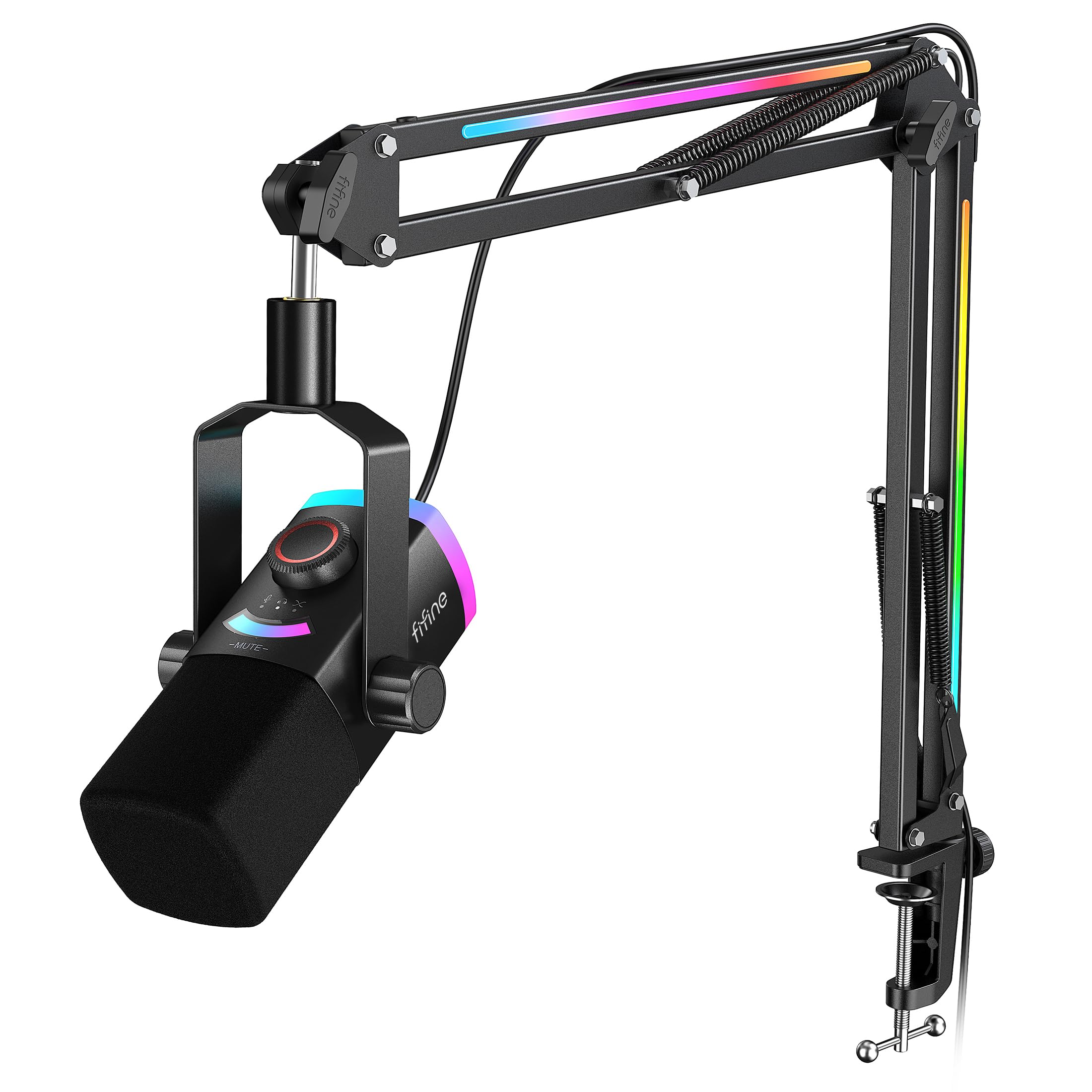
The FIFINE AM8PROT punches well above its price tier by pairing a dynamic capsule with both USB and XLR outputs. The cardioid pattern plus 75 dB SNR effectively rejects noise from multiple peripherals running simultaneously — a common pain for gamers with loud fans and mechanical keyboards. The 115 dB SPL handling means you can raise your voice without distortion.
The kit includes a thickened boom arm with integrated cable routing and a foam windscreen, saving you the cost of accessories. The 3‑in‑1 silent knob controls gain, headphone volume, and mix balance — all via USB. RGB lighting offers 240+ combos that can pulse to game audio, though the lights require USB power even when using XLR mode.
Tap‑to‑mute with a visible LED panel prevents hot‑mic moments mid‑game. The 8.2‑ft USB‑C cable reaches most PC towers without an extension. If you want a complete streaming package — dynamic mic, boom arm, windscreen, dual connectivity — at an entry‑level price, this is the most complete bundle available.
Why it’s great
- USB and XLR hybrid connectivity in a dynamic capsule
- Complete kit includes boom arm, windscreen, and long cable
- 75 dB SNR for effective background noise rejection
Good to know
- RGB requires USB power even in XLR-only setups
- Software EQ recommended for optimal low‑end response
6. Blue Yeti Blackout USB Microphone

The Blue Yeti remains a reference point in the USB mic category because its three‑capsule array supports four polar patterns — cardioid, bidirectional, omnidirectional, and stereo. You can switch from solo streaming to a two‑person interview to capturing a room’s ambience without swapping hardware. The metal enclosure and adjustable desktop stand give it a substantial, professional look.
Onboard controls include headphone volume, pattern selection, instant mute, and gain — all physical knobs with satisfying resistance. The Yeti’s condenser design is sensitive, so placing it 3–6 inches from your mouth and adding a pop filter is recommended for best clarity. The Blackout finish eliminates reflective surfaces for a clean, stealth aesthetic on camera.
The biggest trade‑off is the micro‑USB connection, which feels dated compared to USB‑C competitors. The mic is also heavy — the included stand is stable but takes up significant desk real estate. For creators who need one mic that adapts to multiple recording scenarios, the Yeti’s pattern versatility is unmatched at this tier.
Why it’s great
- Four pickup patterns in one housing for maximum flexibility
- Solid metal build and adjustable stand included
- Instant mute and gain control without software
Good to know
- Micro‑USB rather than modern USB‑C
- Condenser sensitivity requires a quiet room or pop filter
7. HyperX QuadCast 2 USB Microphone

The HyperX QuadCast 2 focuses on build quality and physical isolation. The aluminum enclosure and integrated anti‑vibration shock mount decouple the capsule from desk knocks and typing vibrations — a feature usually reserved for aftermarket mounts. The cardioid condenser delivers clear, crisp audio with 20 Hz to 20 kHz frequency response, and the tap‑to‑mute with LED indicator is satisfying and responsive.
Plug‑and‑play USB‑C connectivity works on PC, Mac, PS5, and PS4 with no drivers. The included 9.84‑ft cable gives flexibility for tower placement. The internal shock mount reduces the need for a separate boom arm, though the included stand is wider than average and takes up desk space.
The QuadCast 2 is not aimed at pro music recording — its strength is in gaming, streaming, and voice chat where reliability and low handling noise matter. The red LED ring is bright and non‑adjustable, so consider the QuadCast S variant if RGB uniformity with your setup matters. For a durable, ready‑to‑go mic with built‑in isolation, this is the straightforward pick.
Why it’s great
- Built‑in shock mount reduces desk vibration transfer
- Aluminum enclosure for long‑term durability
- USB‑C plug‑and‑play with console compatibility
Good to know
- Single red LED color may clash with other setups
- Wider stand footprint consumes more desk surface
FAQ
Should I get a dynamic or condenser desk microphone for gaming?
What does a shock mount do for a desk microphone?
Can I use a desk microphone with a boom arm instead of the included stand?
Do I need 24‑bit 96 kHz audio for podcasting or streaming?
Final Thoughts: The Verdict
For most users, the best desk microphone winner is the Shure MV7+ because it combines a dynamic capsule with real‑time DSP noise reduction, USB/XLR hybrid connectivity, and Auto Level Mode — delivering professional broadcast quality in any untreated room. If you want deep software integration for multi‑source streaming, grab the Elgato Wave:3. And for the best value in a complete kit — dynamic mic, boom arm, and windscreen together — nothing beats the FIFINE AM8PROT.

Mo Maruf
I created WellFizz to bridge the gap between vague wellness advice and actionable solutions. My mission is simple: to decode the research and give you practical tools you can actually use.
Beyond the data, I am a passionate traveler. I believe that stepping away from the screen to explore new environments is essential for mental clarity and physical vitality.