Our readers keep the lights on and my smoothie glass nicely filled. As an Amazon Associate, I earn from qualifying purchases.
The line between a hobbyist board and a serious desktop replacement has officially blurred. You are no longer choosing between an entry-level single-board computer that struggles with multitasking and a bulky tower that eats desk space — the modern cyber deck sits in that sweet spot, offering x86 or Arm compute power, expandable storage, and enough I/O to run a home server, a retro-gaming station, or a development rig all from a chassis smaller than a paperback. The challenge is filtering through the kits, the bare boards, and the mini PCs to find the one that actually matches your workload without wasting RAM or bottlenecking on cooling.
I’m Mohammad Maruf — the founder and writer behind WellFizz. I’ve spent hundreds of hours cross-referencing processor benchmarks, memory configurations, cooling solutions, and real-world user reports across the latest Raspberry Pi 5 kits, mid-range mini PCs, and high-end compact workstations to cut through the spec-sheet noise.
Whether you are building a silent media server, a portable coding station, or a compact edge-computing hub, this guide breaks down the nine most compelling options available right now to help you land the best cyber deck for your specific project.
How To Choose The Best Cyber Deck
Not every compact computer is a true cyber deck. The term implies a self-contained, portable, or permanently deployed system that balances processing power, thermal management, and connectivity without the burden of a full desktop chassis. The wrong pick means constant undervoltage warnings, a fan that sounds like a drone, or a board that maxes out its I/O before you even add a single hat. Here is what separates the useful from the frustrating.
RAM Capacity Dictates Your Workload Ceiling
A 2GB board is fine for Pi-hole, a lightweight ad-blocker, or a single-purpose sensor hub. Step into Home Assistant with multiple integrations, run a local Llama model, or open more than a handful of browser tabs, and 8GB starts feeling tight. The 16GB Raspberry Pi 5 exists for a reason — it is the minimum for comfortable LLM inference and multi-app headless servers. Mini PCs with 32GB DDR5 are in a completely different league, handling virtual machines, 8K video editing, and AAA gaming at low-to-medium settings without breaking a sweat.
Active Cooling Is Non-Negotiable For Sustained Loads
The Raspberry Pi 5’s Cortex-A76 runs hot. Passive cooling works for burst tasks, but a sustained compile, a retro gaming session, or a 4K transcode will trigger throttling within minutes if you only rely on a bare heatsink. Look for kits that include the official active cooler — a blower fan paired with an aluminum heatsink — or aftermarket solutions with a PWM fan. For x86 mini PCs, check the fan decibel rating; a unit rated above 40dB under load becomes intrusive in a living room, while a good low-noise design stays around 35dB in quiet mode.
Storage Boot Methods And Expansion Slots
MicroSD cards are the most common failure point in a Raspberry Pi setup. A card can die within a year of heavy writes, corrupting your OS. Kits that include a pre-loaded SD card are convenient, but the long-term solution is NVMe boot via a hat or USB 3.0 SSD. For mini PCs, the ability to add a second M.2 drive or a 2.5-inch SATA drive matters if you plan to run a media server or a file storage node. Triple M.2 slots, like those on premium units, give you room for OS, cache, and bulk storage without external enclosures.
Quick Comparison
On smaller screens, swipe sideways to see the full table.
| Model | Category | Best For | Key Spec | Amazon |
|---|---|---|---|---|
| CanaKit Pi 5 Basic Kit | Arm Kit | Budget-first projects, Pi-hole | 2GB LPDDR4, 1.2GHz Cortex A9 | Amazon |
| Vemico Pi 5 8GB Kit | Arm Kit | Smart home, Bitcoin node | 8GB LPDDR4X, 27W GaN PSU | Amazon |
| RasTech Pi 5 8GB 64GB Edition | Arm Kit | Beginners, all-in-one setup | 8GB RAM, 64GB microSD, GaN PSU | Amazon |
| Vilros Turbo Cooled 8GB Kit | Arm Kit | Plug-and-play, retro gaming | 8GB LPDDR4X, preloaded 32GB OS | Amazon |
| Vilros MAX 8GB Kit (128GB) | Arm Kit | LLM inference, headless server | 8GB RAM, 128GB preloaded SD | Amazon |
| Raspberry Pi 5 16GB | Arm Board | Overkill Arm server, cloud node | 16GB LPDDR4X, 2.4GHz quad-core | Amazon |
| GEEKOM A5 Mini PC | x86 Mini PC | Home office, 4K media server | Ryzen 5 7430U, 16GB DDR4, 1TB NVMe | Amazon |
| BOSGAME P3 Mix Mini PC | x86 Mini PC | AAA gaming, 8K editing | Ryzen 7640HS, 32GB DDR5, 1TB SSD | Amazon |
| GMKtec K12 Mini PC | x86 Mini PC | eGPU setup, heavy multitasking | Ryzen 7 H 255, 32GB DDR5, OCuLink | Amazon |
In‑Depth Reviews
1. GMKtec K12 Gaming Mini PC

The K12 represents the ceiling of what a compact cyber deck can achieve today. Powered by the Ryzen 7 H 255 — an upgraded Hawk Point chip with eight Zen 4 cores hitting 4.9 GHz — paired with 32GB of DDR5 RAM and the Radeon 780M iGPU, this unit handles AAA gaming at 1080p, 8K video output via HDMI 2.1, and heavy DAW sessions with zero stutter. The OCuLink port is the standout feature: it gives you PCIe 4.0 x4 bandwidth for an external GPU, effectively turning this palm-sized box into a desktop-grade gaming rig when docked.
Storage expansion is equally ambitious. Three M.2 2280 slots allow up to 24TB of internal NVMe storage, and the dual 2.5GbE NICs make it a natural fit for a soft router, firewall, or multi-channel NAS. Dual cooling fans keep the chassis around 35dB in quiet mode, though the top RGB LED can’t be switched off, and the plastic lid feels a bit fragile when opening for upgrades. The 512GB base SSD is modest; you will likely want to add a second drive right away.
For a development workstation, media production hub, or LAN-party portable, the K12 delivers desktop-class performance in a footprint that fits in a backpack. The 1-year warranty is shorter than some competitors, but the hardware specification is unmatched at this size.
Why it’s great
- OCuLink port enables high-bandwidth eGPU setups
- Three M.2 2280 slots for massive internal storage
- Radeon 780M iGPU handles AAA titles at 1080p
Good to know
- Plastic top panel feels delicate during disassembly
- RGB lighting on top cannot be disabled
- Base SSD capacity is only 512GB
2. BOSGAME P3 Mix Mini PC
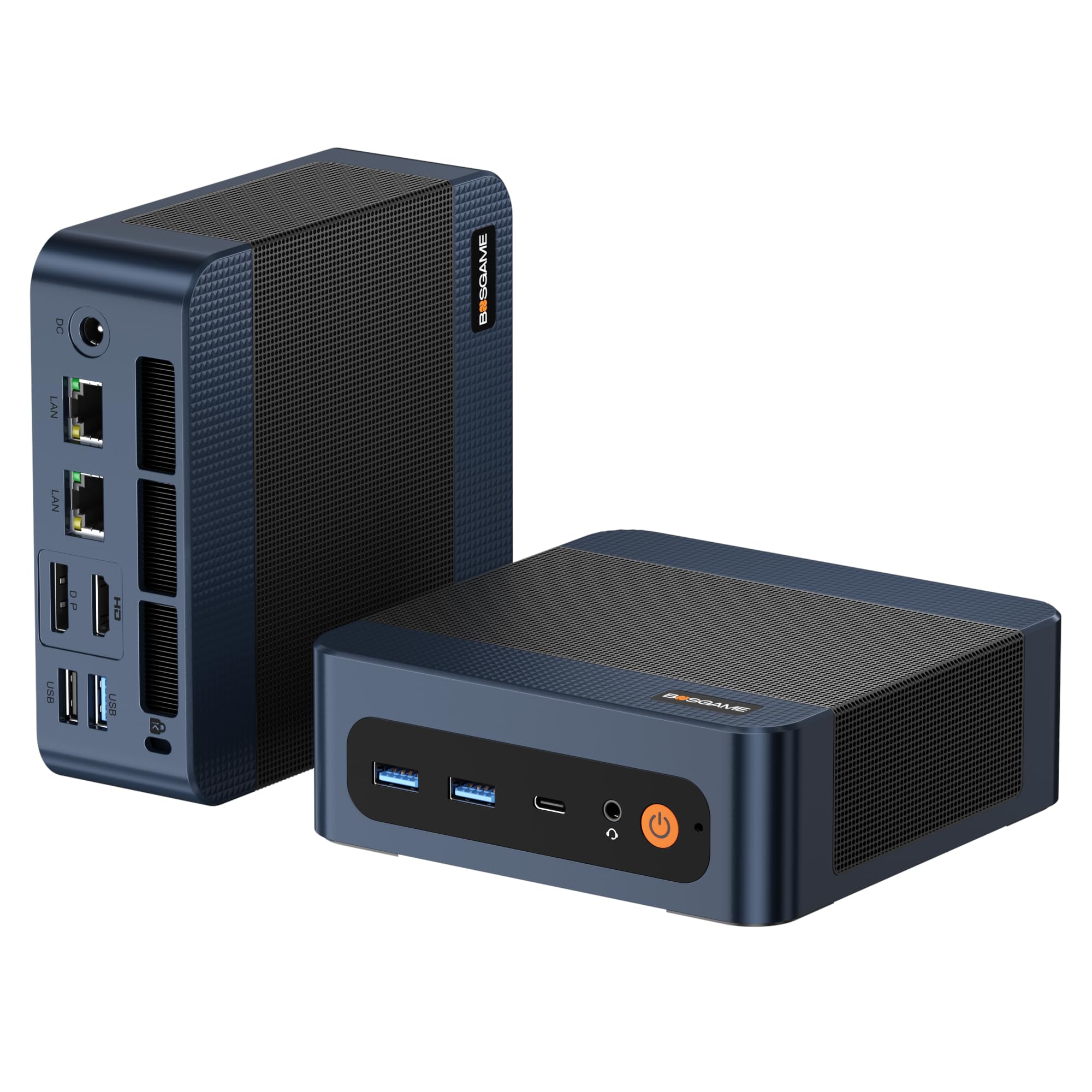
The P3 Mix brings the Ryzen 7640HS processor to the table, a 6-core / 12-thread chip clocked up to 5.0 GHz with the Radeon 760M iGPU. That combination delivers smooth 4K video editing, light 3D rendering, and even some esports titles without an external graphics card. The 32GB DDR5 4800MHz RAM is dual-channel out of the box, so memory bandwidth is never a bottleneck in multi-app workflows. Storage is handled by a 1TB PCIe 4.0 SSD, which loads large project files and game assets instantly.
Connectivity is a strong point: dual 2.5G LAN ports provide up to 5Gbps aggregate throughput for a PFsense box or media server, while Wi-Fi 6E and Bluetooth 5.2 ensure seamless wireless connections. The USB 4.0 port supports 8K display output and can connect an eGPU, though it lacks OCuLink’s dedicated PCIe lane architecture. Triple-display support via HDMI 2.0, DisplayPort, and USB 4.0 caters to stock traders, video editors, and multi-monitor coders.
The unit runs quiet and cool under normal workloads, but users report it struggles a bit with sustained all-core loads, where the fan becomes audible. The included power adapter is compact, and the VESA mount lets you tuck it behind a monitor for a clean desk. The 1-year warranty is standard, but the build quality and spec sheet justify the mid-range price bracket.
Why it’s great
- 32GB DDR5 RAM out of the box for heavy multitasking
- Dual 2.5G LAN for advanced networking setups
- USB 4.0 supports 8K output and eGPU connectivity
Good to know
- Fan becomes noticeable under sustained all-core load
- Limited USB-C ports — a hub is recommended
- No dedicated NPU for AI acceleration
3. GEEKOM A5 Mini PC
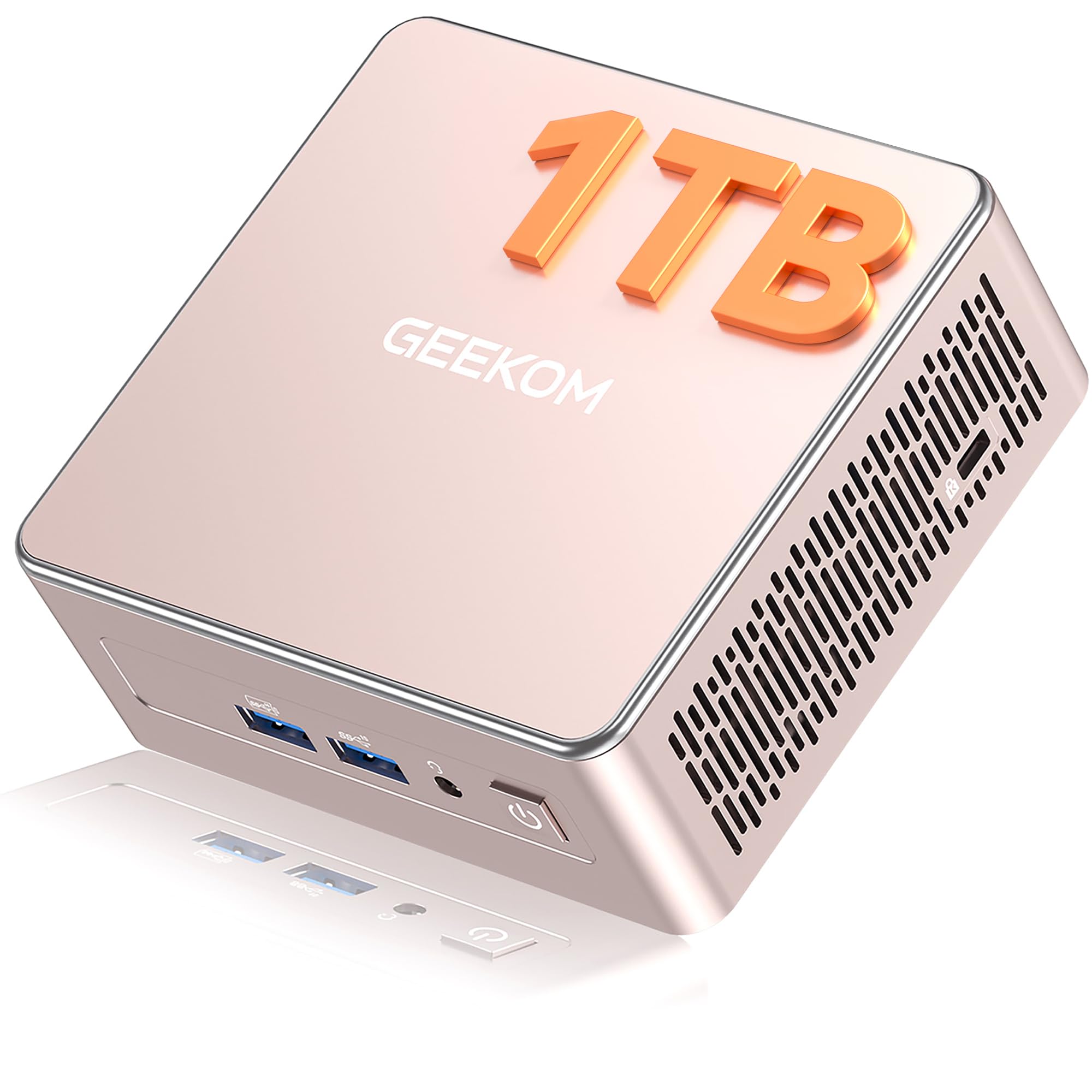
GEEKOM’s A5 is the pragmatic choice for anyone who needs a quiet, reliable desktop replacement without the gaming GPU tax. The AMD Ryzen 5 7430U (6 cores, 12 threads up to 4.3 GHz) paired with 16GB of DDR4 RAM and a 1TB NVMe SSD handles Zoom calls, Excel, 4K streaming, and light Adobe work without breaking a sweat. The integrated Radeon graphics support up to four 4K displays via dual HDMI and dual USB-C ports, and one of those Type-C ports can drive an 8K display.
The chassis is a reinforced ABS+PC shell with a metal mid-frame that acts as a heat spreader, keeping fan noise low during office tasks. Vibration-damping feet and a high-gain 3D antenna round out the design. Storage expansion is flexible: you get an extra M.2 2242 slot and a 2.5-inch SATA bay, allowing up to 10TB total — ideal for a local media server. Wi-Fi 6 and Bluetooth 5.2 are onboard, and the 3-year warranty is significantly longer than what most mini PC vendors offer.
It is not built for AAA gaming or heavy rendering, but for a home office, a business deployment, or a Blue Iris NVR station, the A5 is nearly silent and rock-solid. The 16GB soldered-like RAM is upgradeable via dual SO-DIMM slots, and the tool-less SSD access makes maintenance simple.
Why it’s great
- 3-year warranty provides long-term peace of mind
- Upgradeable RAM and dual storage bays
- Nearly silent fan during typical office workloads
Good to know
- Integrated Radeon GPU not designed for AAA gaming
- DDR4 memory instead of faster DDR5
- Windows 11 initial setup can feel slow
4. Raspberry Pi 5 (16GB)

The 16GB Raspberry Pi 5 is the board you buy when you need Arm efficiency but refuse to hit the RAM ceiling. With 16GB of LPDDR4X, you can run Home Assistant, Pi-hole, a local Llama 3.2 model, and a media server concurrently without the OOM killer stepping in. The Broadcom BCM2712 with a 2.4GHz quad-core Cortex-A76 and the VideoCore VII GPU is a significant leap over the Pi 4 in both CPU and graphics performance, making lightweight desktop use, retro gaming, and 4K video playback genuinely smooth.
It is sold as a bare board, so you will need to supply your own active cooler, power supply, and SD card or NVMe hat. The packaging has been criticized for being too minimal — thin cardboard with no anti-static bag — so handle it with care. The PCIe 2.0 x1 lane remains a limitation for NVMe speed (roughly 500MB/s), but it is still far more reliable than a microSD card for OS boot. Gigabit Ethernet with PoE+ support (via a separate hat) makes it a capable low-power server.
This board is overpriced relative to a used NUC with similar specs, but for projects that require the Pi’s GPIO, camera interface, and the vast Arm software ecosystem, the 16GB version eliminates RAM as a constraint. It is the ultimate headless server for makers who have outgrown 8GB.
Why it’s great
- 16GB RAM removes the biggest bottleneck in Arm projects
- GPIO and MIPI support for hardware hacking
- Dual 4Kp60 output over micro HDMI
Good to know
- Bare board — no PSU, cooler, or storage included
- Packaging offers minimal protection during shipping
- PCIe lane is single-lane Gen3, capping NVMe speed
5. RasTech Raspberry Pi 5 8GB 64GB Edition

RasTech’s bundle is the most complete Raspberry Pi 5 kit on the market. It includes the 8GB board, a 27W GaN USB-C power supply, an active cooler, a case, two micro HDMI cables, a 64GB SanDisk microSD card, two card readers, and a screwdriver. The GaN PSU is a standout — it supports multiple voltage profiles (5.1V/5A, 9V/3A, 12V/2.25A, 15V/1.8A), so it works not only with the Pi 5 but also with other USB-C gadgets. The active cooler keeps the Cortex-A76 from throttling during prolonged use, and the case provides good airflow despite being plastic rather than metal.
Reviewers consistently praise the kit for being genuinely beginner-friendly: the SD card comes pre-loaded with Raspberry Pi OS, HDMI cables are included so you do not need to hunt for adapters, and the manual provides clear step-by-step assembly instructions. That said, a small number of users have reported that the fan blades can occasionally hit the shroud if the screws are over-tightened, and the case’s power button does not align perfectly with every Pi 5 revision.
For anyone who wants a single-box solution for a media center, a coding workstation for a child, or a retro gaming console, this kit removes every friction point. The 64GB card is enough to run the OS and a handful of applications, though you will want an SSD for anything write-intensive.
Why it’s great
- Truly complete kit — no extra parts needed to boot
- GaN PSU works with multiple voltage profiles
- Active cooler prevents thermal throttling
Good to know
- Plastic case lacks the thermal mass of metal alternatives
- Case power button may not align perfectly with all boards
- Fan can rub against shroud if screws are over-tightened
6. Vilros Raspberry Pi 5 Starter Kit MAX (128GB)
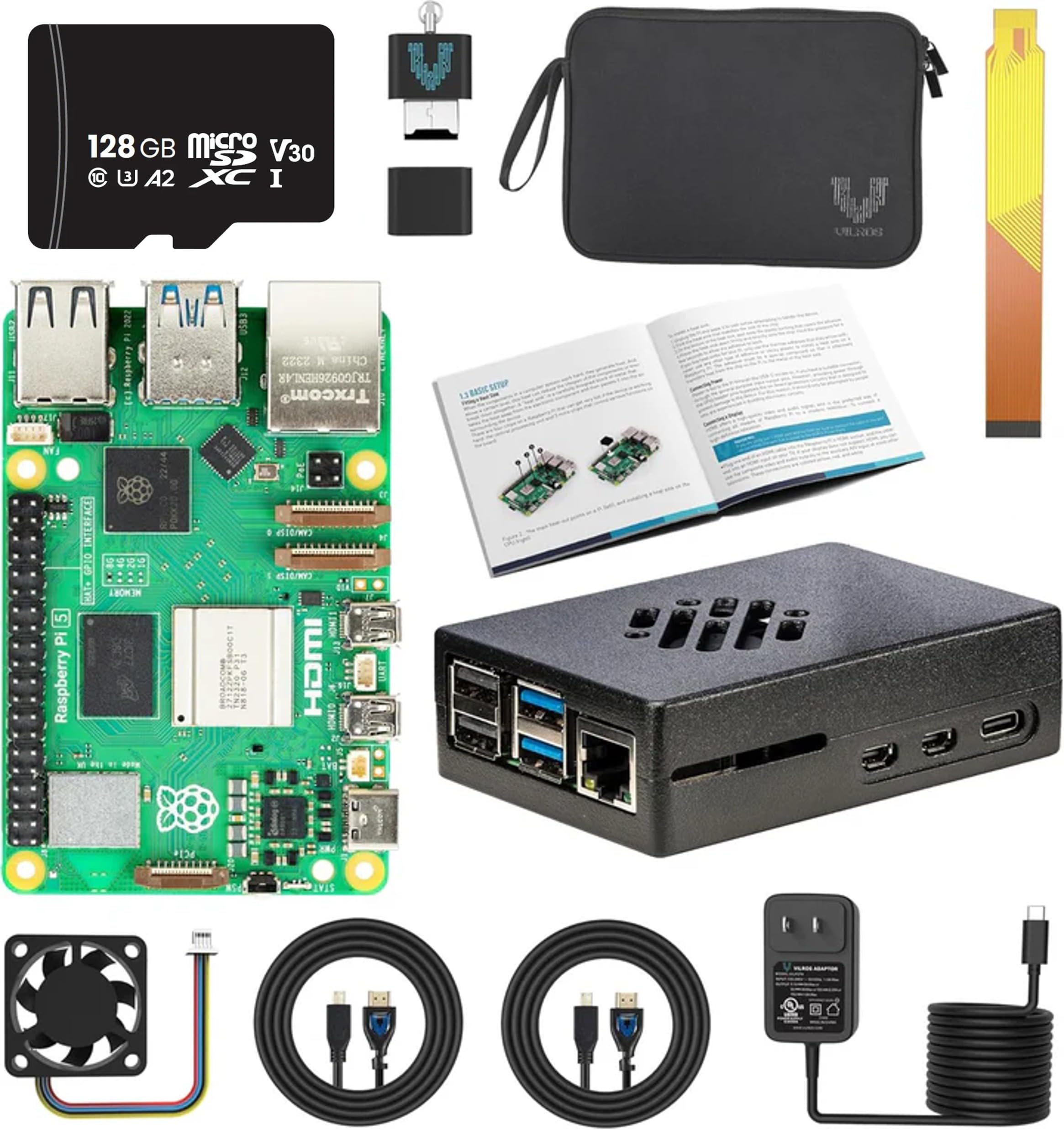
The Vilros MAX kit is designed for users who need a generous storage buffer right out of the box. The 128GB microSD card is pre-loaded with Raspberry Pi OS, so you can boot and start installing packages immediately without flashing a card. The kit also includes a metal case — a notable upgrade over the plastic cases found in most other bundles — along with the official active cooler and a 27W GaN power supply. Two 5-foot micro HDMI cables with Velcro ties make dual-monitor setup easy, and a USB microSD card reader is included for transferring files from your main computer.
The metal case provides better heat dissipation than plastic, and the included thermal pads transfer heat efficiently from the board to the chassis. Users running headless servers have reported zero crashes even after months of continuous operation. The kit has everything you need except an NVMe hat, which is a worthwhile addition if you plan to write logs or database files frequently. The active cooler is whisper-quiet, making this a strong contender for a living-room media server or a home automation hub.
The only common complaint is the absence of a dedicated active cooler — the kit uses the standard fan and heatsink, which is adequate but not as thermally efficient as a large passive heatsink for totally silent operation. For most projects, this kit’s completeness and build quality justify its position as a premium Raspberry Pi 5 bundle.
Why it’s great
- 128GB pre-loaded SD card minimizes setup friction
- Metal case improves heat dissipation
- Includes two micro HDMI cables and a card reader
Good to know
- Active cooler is standard fan, not a large passive heatsink
- No NVMe hat included for high-speed storage
- 8GB RAM may feel tight for local LLM work
7. Vilros Turbo Cooled 8GB Kit

Vilros targets beginners with this Turbo Cooled bundle, emphasizing a plug-and-play experience. The kit includes the 8GB Pi 5 board, a low-noise PWM fan, a passive cooling case, a 32GB microSD card pre-loaded with Raspberry Pi OS, a micro HDMI adapter, and a camera module adapter cable. The assembly is straightforward, and the step-by-step quickstart guide gets you to the desktop in about 10 minutes. Several reviewers have used it as a retro gaming station, running Quake III Arena over LAN without issues.
The passive cooling case combined with the PWM fan is effective at keeping temperatures down during moderate use, but the fan has been noted by multiple users to produce an audible whine — one reviewer described it as “a mosquito in your ear.” If the device lives in a separate room or a closet, the noise is less of an issue, but in a bedroom or office setup, it could become annoying. The 32GB card is adequate for the OS and a few applications, but you will outgrow it quickly if you plan to store media or install multiple Docker containers.
This kit is best suited for a maker or a parent gifting a first Pi to a child. The pre-loaded OS removes the intimidation factor of flashing a card, and the case offers decent protection. For any serious or always-on server project, consider upgrading to a kit with a larger SD card and a quieter fan.
Why it’s great
- Pre-loaded OS means zero initial setup time
- PWM fan provides active cooling in a compact form
- Ideal for retro gaming and educational projects
Good to know
- Fan emits a noticeable whine in quiet environments
- 32GB card is small for media or Docker workloads
- No HDMI cable included — adapter only
8. Vemico Raspberry Pi 5 8GB Starter Kit
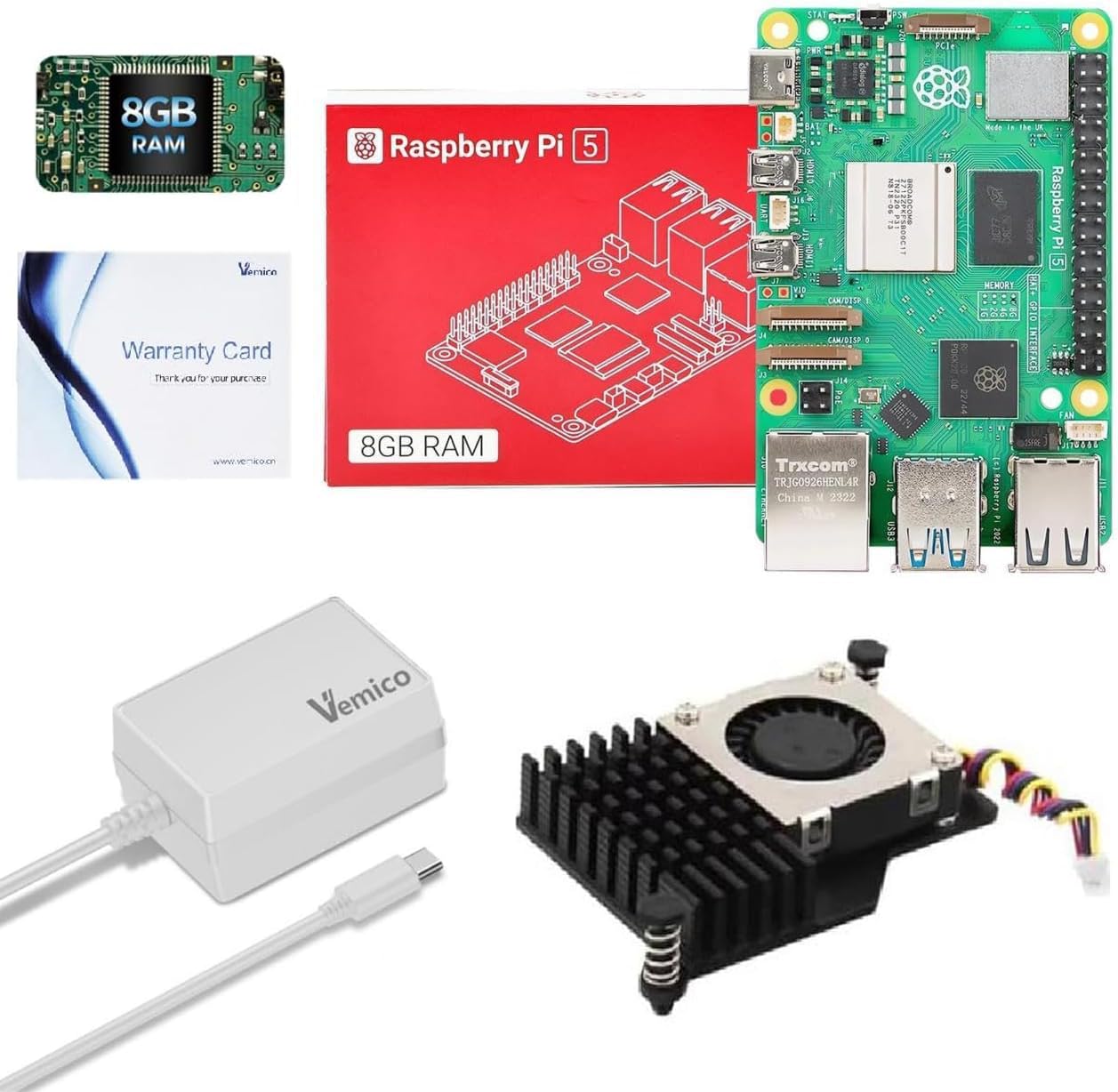
The Vemico kit strips away extras and focuses on the essentials: the 8GB Pi 5 board, a 27W GaN Type-C power supply, and the official active cooler. No SD card, no case, no cables — just the core components you need to get the board running if you already have a monitor, keyboard, and storage. The GaN PSU is particularly well-regarded for delivering clean, stable power without voltage drop, even when powering USB peripherals. This is critical for projects like a Bitcoin node or a Home Assistant server that run 24/7.
The active cooler uses a temperature-controlled blower fan and an aluminum heatsink, which is the same design as the official Raspberry Pi active cooler. Assembly is simple, and the cooler fits inside most standard cases. Several users have set up Home Assistant on this kit in under 15 minutes, and one reviewer uses it as a Bitcoin mining node. The lack of a case means the board is exposed to dust and accidental shorts, so you should budget for a case separately if the board sits on a desk rather than in a ventilated rack.
The kit is a good value for experienced users who already own peripherals and want a no-frills way to get the 8GB Pi 5 with proper power and cooling. Beginners should note that the kit comes without documentation or thermal pads — a small detail that has caught a few buyers off guard.
Why it’s great
- 27W GaN PSU prevents undervoltage issues
- Official active cooler design keeps the board cool
- Inexpensive path to a stable 8GB Pi 5 setup
Good to know
- No case, SD card, or cables included
- Missing user documentation and thermal pads
- Not beginner-friendly — requires prior Pi experience
9. CanaKit Raspberry Pi 5 Basic Kit (2GB)

CanaKit is a trusted name in the Raspberry Pi ecosystem, and this Basic Kit is the most affordable way to get started with the Pi 5. It includes the 2GB board — the entry-level RAM configuration — but no SD card or power supply. That means you will need to supply your own storage and a 5V/5A USB-C adapter.
The board itself is identical in build quality to the higher-RAM versions, with the same GPIO header, dual micro HDMI ports, USB 3.0, and Wi-Fi 6. CanaKit’s reputation for reliability extends to their PCIe and accessory designs — they have been a go-to vendor since the Pi 3 era. However, the 2GB ceiling is real: Home Assistant users have reported out-of-memory errors when running multiple add-ons, and the microSD card failure rate after a year of heavy writes is a known risk that an NVMe hat can mitigate.
This kit is best suited for a single-purpose low-power appliance or for a maker who wants to experiment with GPIO projects without spending much. If you think you might expand your project later, spend the extra money on an 8GB kit — the 2GB will force you to upgrade within months.
Why it’s great
- Lowest entry price into the Pi 5 ecosystem
- Trusted CanaKit quality and support
- Identical GPIO and I/O to higher-RAM models
Good to know
- 2GB RAM severely limits multitasking and Docker use
- No SD card, PSU, or case included
- MicroSD cards may fail within a year under heavy writes
FAQ
Can I use a Raspberry Pi 5 as a daily desktop computer?
What is the difference between a Raspberry Pi kit and a bare board?
How much RAM do I need for Home Assistant?
Final Thoughts: The Verdict
For most users, the best cyber deck winner is the GMKtec K12 Mini PC because it delivers desktop-class 8-core performance, 32GB DDR5, OCuLink eGPU support, and three M.2 storage slots in a genuinely compact footprint. If you want a proven Arm-based server with the largest possible RAM ceiling, grab the Raspberry Pi 5 16GB. And for the most comprehensive all-in-one Pi 5 experience that boots in minutes, nothing beats the RasTech Pi 5 8GB 64GB Edition.

Mo Maruf
I created WellFizz to bridge the gap between vague wellness advice and actionable solutions. My mission is simple: to decode the research and give you practical tools you can actually use.
Beyond the data, I am a passionate traveler. I believe that stepping away from the screen to explore new environments is essential for mental clarity and physical vitality.