Our readers keep the lights on and my smoothie glass nicely filled. As an Amazon Associate, I earn from qualifying purchases.
The moment you’re staring at four monitor panels, each packed with live charts, Level 2 data, order books, and news feeds, your CPU hits its limit. A single freeze or input lag during a volatile open can cost you—no other component determines real-time responsiveness the way the processor does. Trading demands sustained multi-threaded throughput without thermal throttling, and choosing the wrong silicon means your platform stutters while the market moves.
I’m Mohammad Maruf — the founder and writer behind WellFizz. I’ve spent hundreds of hours analyzing passmark scores, core architectures, thermal design profiles, and real-world multitasking benchmarks to separate the processors that thrive under trading workloads from those that cannot keep up.
This guide cuts through the marketing to deliver the specific benchmarks and platform considerations that define the best cpu for trading — focusing on core counts, cache sizes, single-thread boost performance, and platform longevity so you can build a rig that never misses a tick.
How To Choose The Best CPU For Trading
Selecting the right trading processor is different from building a gaming PC. Trading software like ThinkorSwim, MetaTrader, TradeStation, and Sierra Chart relies on rapid single-threaded execution for chart rendering and order placement while demanding multi-threaded headroom for simultaneous news feeds, automated scripts, and Excel calculations. You need a balance of high boost clocks and enough cores to prevent context-switching latency.
Core Count vs Single-Thread Speed
Eight cores with hyperthreading is the baseline for serious multi-monitor trading. Fewer cores leads to stuttering when you have streaming data across multiple windows, but too many slow cores won’t help either — the platform’s primary rendering thread benefits from high boost frequencies. Look for CPUs that can hit at least 4.5 GHz under load while maintaining at least eight physical cores.
Cache Hierarchy and Memory Bandwidth
L3 cache size directly impacts how quickly your processor can feed real-time data to your trading application. CPUs with larger caches (96 MB or more) reduce the number of RAM fetches during high-frequency chart refreshes. DDR5 support also matters — higher memory bandwidth ensures your Level 2 and Level 3 data streams don’t bottleneck when every millisecond counts.
Platform Longevity and Upgrade Path
A trading rig is a multi-year investment. Choosing a platform with a clear upgrade path (AM5 for AMD, LGA1851 for Intel’s latest) allows you to swap processors later without replacing your motherboard and RAM. Budget-friendly builds on mature platforms like AM4 still deliver excellent value, but you sacrifice future compatibility.
Quick Comparison
On smaller screens, swipe sideways to see the full table.
| Model | Category | Best For | Key Spec | Amazon |
|---|---|---|---|---|
| AMD Ryzen 7 7800X3D | Premium Gaming CPU | Fastest chart rendering | 96 MB L3 cache, 8 cores | Amazon |
| Intel Core Ultra 9 285K | Flagship Hybrid | Heavy multi-tasking with stability | 24 cores, up to 5.7 GHz | Amazon |
| Intel Core i9-14900KF | High-End Desktop | Peak single-thread + multi-core mix | 6 GHz turbo, 24 cores | Amazon |
| AMD Ryzen 9 5900XT | Value Workstation | Best multi-core for AM4 budget | 16 cores, 72 MB cache | Amazon |
| AMD Ryzen 7 5800XT | Mid-Range AM4 | Affordable 8-core upgrade | 36 MB cache, 4.8 GHz boost | Amazon |
| KAMRUI Mini PC Ryzen 7 7735HS | Compact Trading PC | Space-saving triple display | 8 cores, 24 GB LPDDR5 | Amazon |
| Dell Optiplex 7060 i7-8700 | Renewed Business | Entry-level 6-core budget | 6 cores, 4.6 GHz turbo | Amazon |
| STGAubron Gaming PC i7-9700 | Starter Pre-Built | All-in-one trading desktop | 8 cores, GTX 1660 Ti | Amazon |
| TechMagnet Siwa 6 i5-6500 | Dedicated Trading Rig | 4-monitor out-of-box solution | 4 cores, 4x 24″ monitors | Amazon |
In‑Depth Reviews
1. AMD Ryzen 7 7800X3D

The 7800X3D is the fastest gaming processor on the market, and that immense 96 MB L3 cache makes it equally lethal for trading. Real-time data streams that stress memory bandwidth benefit enormously from the stacked 3D V-Cache — chart refreshes feel instant, and platform lag virtually disappears even with ten-plus windows open. It draws only around 75W during gaming loads, staying cool on modest air coolers and delivering consistent boost clocks without thermal throttling.
For a trading rig running ThinkorSwim or MetaTrader with multiple chart timeframes and automated scripts, the 7800X3D provides a level of snappiness that no other chip at this power envelope can match. The Zen 4 architecture gives you PCIe 5.0 support and DDR5 compatibility on the AM5 platform, ensuring your build stays relevant for years. You get the best single-thread responsiveness available today without sacrificing the core count needed for background tasks like news scanning and order routing.
The main trade-off is value — you are paying a premium for the 3D V-Cache technology, and the 7800X3D is not the absolute best pure multi-threaded workstation chip. But for the specific real-time responsiveness that defines a smooth trading session, this processor is unmatched. Pair it with a B650 motherboard and 32 GB of DDR5-6000 for a balanced, high-end trading machine.
Why it’s great
- Massive 96 MB L3 cache reduces data latency noticeably
- Runs cool and quiet at ~75W typical load
- AM5 platform offers long-term upgrade path
Good to know
- Premium pricing for 3D V-Cache technology
- Limited to 8 cores — not ideal for heavy rendering workloads
2. Intel Core Ultra 9 285K

The Core Ultra 9 285K represents Intel’s new hybrid architecture built on the LGA 1851 socket, combining 8 high-performance P-cores with 16 efficient E-cores for a total of 24 threads. Early adopter reviews from professional CAD workstation users confirm the 285K runs cooler and more stable than the previous 13th and 14th generation chips, with peak temperatures around 78°C under Cinebench loads using a decent AIO. This stability is critical for traders who leave their systems running for weeks at a time.
The 5.7 GHz boost clock on the P-cores handles the primary trading application thread with authority, while the 16 E-cores manage background streaming data, Excel models, Slack notifications, and browser tabs without interfering. The memory controller supports DDR5-6000 and beyond, and the integrated Intel Graphics are sufficient for multi-monitor setups if you need a quick backup solution. The LGA 1851 platform will support at least one more generation of Intel processors, extending the life of your investment.
The downside is that you need a new 800-series chipset motherboard and CUDIMM RAM to get the full memory speed benefit. It is also a significant investment — this is a flagship processor that demands top-tier cooling. If your trading workflow involves heavy virtualization or compiling custom indicators while live trading, the 24-core hybrid design offers the most balanced mix of speed and multi-threading available.
Why it’s great
- 24-core hybrid design excels at background multitasking
- Improved thermal stability over previous Intel generations
- LGA 1851 platform allows future CPU upgrades
Good to know
- Requires new 800-series motherboard and CUDIMM RAM
- AIO liquid cooling is strongly recommended
3. Intel Core i9-14900KF

The 14900KF is the fastest consumer desktop processor Intel has ever released in terms of raw single-thread boost, hitting 6.0 GHz out of the box. For traders who rely on a single trading platform thread for order execution and Level 2 price updates, the 14900KF delivers the snappiest click-to-order latency available. The 8 P-cores and 16 E-cores give you 32 total threads, meaning you can run ThinkorSwim, ToS, MetaTrader, Chrome with 50 tabs, and a virtual machine simultaneously without perceptible slowdown.
Compatibility with both DDR4 and DDR5 motherboards on the LGA 1700 platform makes it versatile — you can repurpose a solid Z690 or Z790 board and save money. Users report idle temperatures around 35°C with a 240mm AIO and load temps in the 70-80°C range even when overclocked. With a decent GPU, the 14900KF handles even the heaviest multi-monitor setups with zero stutter.
The big caution is the known stability issues that plagued some 13th and 14th gen processors early in their lifecycle. Intel’s microcode updates have addressed the voltage spikes, but the 14900KF runs hot under sustained all-core loads, requiring premium cooling and a high-quality power supply. If you need absolute peace of mind for a 24/7 trading rig, the Core Ultra 9 285K’s newer architecture is a safer long-term bet.
Why it’s great
- 6.0 GHz single-core boost for minimal order latency
- 32 threads for heavy multitasking
- Compatible with existing LGA 1700 DDR4/DDR5 boards
Good to know
- Past stability issues require BIOS updates
- Runs hot under sustained loads — AIO mandatory
4. AMD Ryzen 9 5900XT

The 5900XT is a Zen 3 refresh that packs 16 cores and 32 threads on the mature AM4 platform, offering workstation-class multi-threaded performance at a mid-range price point. For traders who run multiple virtual machines, backtest strategies in TradeStation, or process large historical tick data sets, the 5900XT delivers impressive throughput. The 72 MB of total cache helps with data locality, and the 4.8 GHz boost speed ensures your trading platform’s primary thread stays responsive.
One of the strongest arguments for the 5900XT is the AM4 platform value — you can pair it with a B550 or X570 motherboard and affordable DDR4-3600 RAM, keeping total build costs far below an AM5 or LGA 1851 rig. Users report it runs cooler than the 5950X while matching or exceeding its multi-threaded performance in many workloads. The high core count also makes it ideal for running a dedicated trading server that handles automated strategies while you use a separate client machine.
The limitation is that Zen 3 lacks PCIe 5.0 support and uses DDR4 memory, which means no future upgrade path beyond the 5000 series. If you are building a new rig today, the AM5 platform offers better longevity. But for anyone already on AM4 looking to maximize their investment, the 5900XT is the best price-for-performance upgrade available.
Why it’s great
- 16 cores on affordable AM4 platform
- Runs cooler and faster than 5950X in many workloads
- Excellent for backtesting and virtual machines
Good to know
- No PCIe 5.0 support
- AM4 platform is end-of-life for future CPUs
5. AMD Ryzen 7 5800XT

The 5800XT is essentially a 5800X that has been refreshed with a higher boost ceiling, hitting 4.8 GHz out of the box. With 8 cores and 16 threads based on the Zen 3 architecture, it provides more than enough compute power for a focused trading rig with 2-3 monitors. The included Wraith Prism cooler with RGB LEDs saves you from an immediate aftermarket purchase, though users consistently recommend upgrading to a decent air cooler or 240mm AIO to sustain boost clocks under prolonged loads.
This processor shines as a drop-in upgrade for anyone on an existing AM4 B450 or B550 motherboard. The 36 MB cache keeps platform data flowing, and the 8-core count is sufficient for running ThinkorSwim, multiple browser windows, and Excel simultaneously without felt slowdown. Users upgrading from the 5600X report a noticeable improvement in boot times and heavy multitasking responsiveness.
The thermal profile is the main weakness — the 5800XT runs hot with the stock cooler, especially during sustained all-core loads like backtesting or compiling scans. Investing in a quality cooler like a Noctua NH-D14 or 280mm AIO brings temperatures down to 70-75°C under load and keeps boost clocks high. If you can swing the extra cost for a good cooler, the 5800XT delivers 90% of the trading performance of higher-end chips at a fraction of the platform cost.
Why it’s great
- Excellent value as an AM4 drop-in upgrade
- 8 cores handle trading and multitasking well
- Includes AMD Wraith Prism cooler
Good to know
- Runs hot with stock cooler — aftermarket recommended
- AM4 platform has no future upgrade path
6. KAMRUI Mini PC Ryzen 7 7735HS
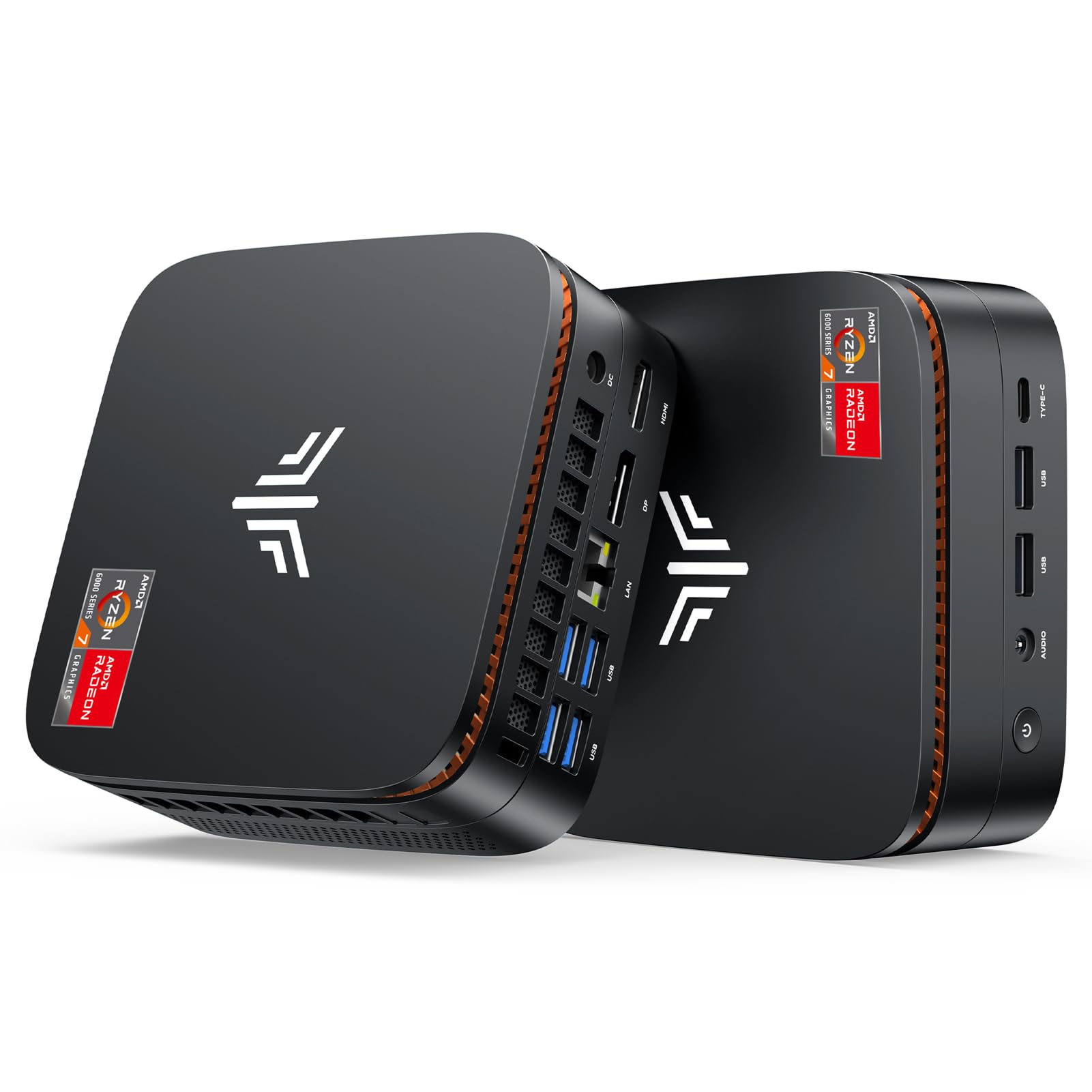
The KAMRUI Hyper H1 packs a mobile Ryzen 7 7735HS with 8 cores and 16 threads into a mini-PC chassis that supports triple 4K displays via two HDMI and one USB-C output. For traders who want a clean, clutter-free workspace or need to move their setup between home and office, this tiny machine delivers surprisingly capable performance. The 24 GB of LPDDR5 memory at 5500 MT/s provides snappy multitasking for trading platforms, and the 2.5G LAN and WiFi 6 ensure you have the lowest possible latency for order execution.
The integrated Radeon 680M graphics are sufficient for driving three 4K monitors at 60 Hz, which covers most multi-monitor trading setups. Users report smooth performance for office work, streaming data, and even light gaming, though this is not a high-end workstation for heavy backtesting or virtualization. The passive air cooling keeps it quiet — a major advantage for overnight trading or shared spaces.
The limitations are clear: the 7735HS is a mobile chip, so it lacks the raw multi-core throughput of desktop processors like the 7800X3D or 14900KF. The integrated graphics cannot handle high-refresh gaming, and the mini-PC form factor limits internal expansion to one additional M.2 SSD. If your trading needs are straightforward — running 2-3 chart windows, news feeds, and order entry — the KAMRUI is a clean, cost-effective solution that takes almost no desk space.
Why it’s great
- Ultra-compact with triple 4K display support
- 2.5G LAN and WiFi 6 for low-latency connectivity
- Quiet passive cooling for 24/7 operation
Good to know
- Mobile chip architecture limits raw performance
- Limited internal expansion compared to desktop builds
7. Dell Optiplex 7060 i7-8700

The Dell Optiplex 7060 SFF is a renewed business-class desktop featuring the 8th-gen Intel Core i7-8700 with 6 cores and 12 threads, boosted up to 4.6 GHz. This is the most budget-friendly option for getting a dedicated trading machine with a clean OS install. The 16 GB of DDR4 RAM and 512 GB NVMe SSD provide enough space for your trading platform, operating system, and basic storage, and the small form factor fits neatly on a desk next to your monitors without dominating the space.
The i7-8700 can handle a single trading platform with 2-3 chart windows and basic Excel models without major lag, but it will struggle if you try to run multiple demanding applications simultaneously. The included wireless keyboard and mouse are functional but cheap — plan to replace them immediately. The built-in WiFi and Bluetooth are convenient, but the single included HDMI adapter means you will need to buy additional adapters for a multi-monitor setup.
The biggest risk with renewed systems is consistency — some units arrive in near-perfect condition, while others have hardware issues or missing components. Reviewers report mixed experiences: one unit worked perfectly for 12 months before a motherboard failure, while others arrived with dead peripherals. If your budget is extremely tight and you only need a computer for basic charting and order entry, the Optiplex 7060 can suffice, but we recommend paying more for a newer processor if you rely on trading for income.
Why it’s great
- Extremely low entry cost for a dedicated trading PC
- Compact SFF design saves desk space
- 16 GB DDR4 and NVMe storage included
Good to know
- 6-core CPU struggles with heavy multitasking
- Renewed units have inconsistent quality control
8. STGAubron Gaming PC i7-9700
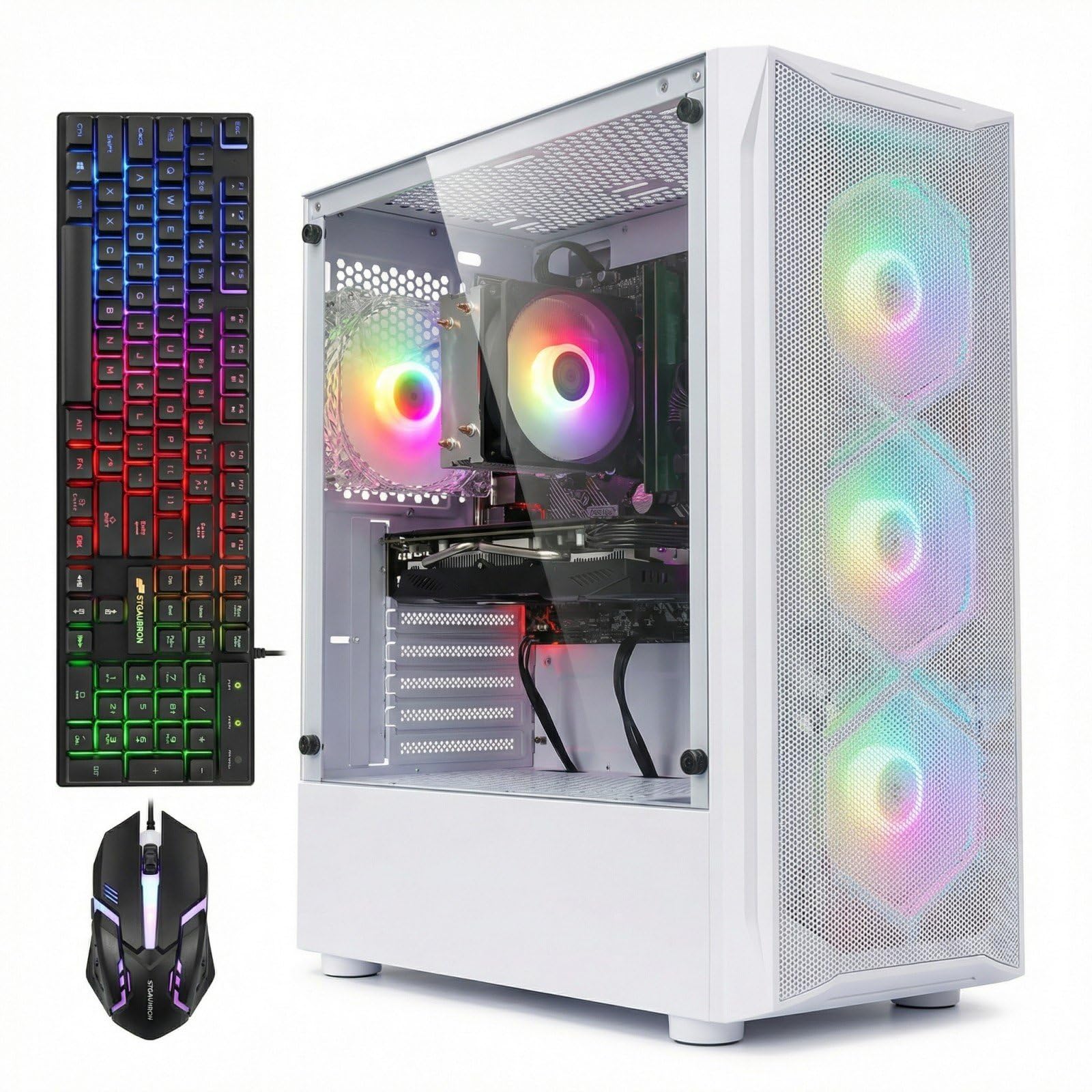
The STGAubron gaming desktop is built around a 9th-gen Intel Core i7-9700 with 8 cores and 8 threads (no hyperthreading), paired with a dedicated GTX 1660 Ti 6 GB graphics card. For traders who also want to game occasionally, this pre-built offers a ready-to-go solution with 16 GB of RAM, a 512 GB SSD, and RGB fan lighting. The dedicated GPU gives you smooth multi-monitor output up to 4K resolution and can drive three displays without issue.
The i7-9700’s top speed of 3.9 GHz means it will handle a single trading platform well, but the lack of hyperthreading reduces its ability to manage multiple intensive background processes. If you run complex Excel models, TradeStation backtesting, or multiple virtual desktops simultaneously, you will notice context-switching latency. The included RGB keyboard and mouse are serviceable, though the mouse reportedly feels cheap.
One significant concern is that the i7-9700 uses the older LGA 1151 platform, which does not support Windows 11 hardware requirements out of the box (TPM 2.0). Multiple reviewers received units that failed Windows 11 upgrades, causing system loops or requiring manual BIOS workarounds. If you need Windows 11 compatibility guaranteed, look for a newer platform. This pre-built is best suited for casual traders who want a simple, ready-to-run desktop for moderate charting tasks.
Why it’s great
- All-in-one package with RGB keyboard and mouse
- Dedicated GTX 1660 Ti for multi-monitor support
- Ready to use out of the box
Good to know
- No hyperthreading limits background multitasking
- Windows 11 upgrade may fail due to TPM requirements
9. TechMagnet Siwa 6 i5-6500

The TechMagnet Siwa 6 is a purpose-built trading desktop that comes with four new 24-inch 1080p LED monitors, two separate 1 Gbps network cards, and an Intel Core i5-6500 processor. This is the only solution in our guide that arrives as a complete multi-monitor trading setup out of the box — you plug it in, connect to your broker, and you are trading with four screens immediately. The dual LAN cards allow you to dedicate one network interface to market data and one to order routing, minimizing latency during high-traffic periods.
The i5-6500 is a 4-core, 4-thread Skylake processor from 2015, making it the oldest and weakest CPU in our list. It has a maximum boost of 3.6 GHz and only 6 MB of L3 cache. For very basic trading — opening one or two chart windows and entering simple orders — it will function, but anything beyond light use will cause noticeable stuttering. The 16 GB of RAM and 2 TB HDD plus 120 GB SSD combination provides adequate storage, but the 4-core limit means you cannot run multiple trading platforms simultaneously.
The primary value here is the convenience of the four-monitor bundle and the responsive technical support (reviewers praise the customer service). However, the outdated processor means this system will not handle modern trading platforms like ThinkorSwim’s advanced scans, multiple timeframes, or automated strategies. If you are a complete beginner on a strict budget who needs four monitors immediately, this works. For anyone serious about active trading, we recommend buying a newer CPU separately and using this as a secondary data display machine.
Why it’s great
- Complete four-monitor trading setup included
- Dual network cards for separate data/order streams
- Responsive customer support
Good to know
- 4-core i5-6500 is extremely dated for 2025 trading
- Cannot run advanced platforms or heavy multitasking
FAQ
How many CPU cores do I need for day trading?
Does the AMD 3D V-Cache actually help trading performance?
Is a dedicated graphics card necessary for a trading CPU?
Should I choose AMD or Intel for a trading workstation?
Can a refurbished office PC work for trading?
Final Thoughts: The Verdict
For most users, the best cpu for trading winner is the AMD Ryzen 7 7800X3D because its 96 MB 3D V-Cache delivers unmatched real-time data responsiveness while staying cool and efficient on the AM5 platform. If you need maximum multi-tasking headroom for running virtual machines and backtesting while trading, grab the Intel Core Ultra 9 285K. And for a budget-friendly AM4 upgrade that still handles 8-core trading performance well, nothing beats the AMD Ryzen 7 5800XT.

Mo Maruf
I created WellFizz to bridge the gap between vague wellness advice and actionable solutions. My mission is simple: to decode the research and give you practical tools you can actually use.
Beyond the data, I am a passionate traveler. I believe that stepping away from the screen to explore new environments is essential for mental clarity and physical vitality.