Our readers keep the lights on and my smoothie glass nicely filled. As an Amazon Associate, I earn from qualifying purchases.
A cordless mouse that doesn’t track smoothly, runs out of battery mid-presentation, or feels like a brick after two hours is a tool that actively works against you. Whether you’re grinding through spreadsheets, editing timelines, or trying to keep your K/D ratio healthy, the right wireless input device isn’t a luxury—it’s the single most impactful upgrade you can make to your daily workflow. The difference between a cheap, laggy pointer and a purpose-built ergonomic tool is the difference between a productive day and a session spent wrestling with your equipment.
I’m Mohammad Maruf — the founder and writer behind WellFizz. I’ve spent hundreds of hours analyzing wireless input hardware, parsing component specifications, and cross-referencing real user data to separate marketing claims from actual performance.
Whether you need quiet clicks for the library, a tilt that saves your forearm, or gaming-grade tracking on a single AA battery, this guide walks through the five best options available right now. My goal is straightforward: match the perfect best cordless mouse to your specific hand, workspace, and daily demands without wasting your time on what doesn’t matter.
How To Choose The Best Cordless Mouse
The cordless mouse market is saturated with options that look identical on a shelf but perform radically differently under real use. Before you click add to cart, you need to understand how hand size, sensor type, and connectivity protocols interact with your specific workflow. Ignoring these three factors is the fastest route to buyer’s remorse.
Ergonomic Shape and Hand Orientation
A symmetrical ambidextrous mouse forces your wrist into a pronated position that compounds strain over an eight-hour day. Right-handed contoured shells—especially vertical designs with a 52-degree tilt—keep your forearm in a natural handshake posture, reducing muscle tension by measurable percentages. If you have medium to large hands, prioritize a mouse with an extended palm rest and a textured thumb groove. If your hand span is under five inches, an oversized vertical mouse will actually worsen fatigue by forcing your fingers into an uncomfortable stretch.
Sensor Technology and DPI Range
Optical sensors have largely replaced laser in modern cordless mice because they track more consistently on fabric and wood surfaces without the jitter that plagued early laser models. DPI—dots per inch—determines how far the cursor moves per inch of physical movement. A range of 800 to 4000 DPI covers most office workflows and light gaming, but the real differentiator is whether the mouse lets you toggle between preset levels on the fly. A dedicated DPI button beats digging through software settings every time you switch from a 4K monitor to a laptop screen.
Battery Architecture and Charging
Your choice between a built-in rechargeable cell and a replaceable AA battery dictates the mouse’s weight profile and long-term maintenance. Rechargeable mice with 500mAh to 800mAh cells offer weeks of use on a single charge and eliminate disposable battery waste, but they eventually lose capacity after hundreds of charge cycles. Single-AA mice like the Logitech G305 can deliver 250 hours of continuous gaming use or nine months of office work on one battery, and swapping a fresh AA restores full capacity instantly with zero downtime. USB-C charging ports are becoming standard, and a five-minute emergency top-up that provides an hour of use is a genuinely useful feature for anyone who forgets to plug in overnight.
Quick Comparison
On smaller screens, swipe sideways to see the full table.
| Model | Category | Best For | Key Spec | Amazon |
|---|---|---|---|---|
| XBG B15pro | Mid-Range | Multi-device hybrid work | 500 mAh battery, LED status screen | Amazon |
| AOC Vertical Mouse | Mid-Range | Ergonomic wrist relief | 800 mAh battery, 52° vertical tilt | Amazon |
| Logitech G305 | Premium | Gaming and travel | 12,000 DPI, 250h AA battery | Amazon |
| PHILIPS SPK7858 | Premium | Spreadsheet productivity | Dual scroll wheels, 5-level DPI | Amazon |
| Logitech MX Ergo S | Premium | Severe wrist strain relief | Thumb trackball, 20° adjustable tilt | Amazon |
In‑Depth Reviews
1. XBG B15pro Wireless Bluetooth Mouse

The XBG B15pro is the rare cordless mouse that crams a full information dashboard into a compact, ambidextrous shell. The built-in LED screen shows real-time battery percentage, active DPI level across five settings (800-2400), and current connection mode—eliminating the guesswork that plagues mice with hidden status LEDs. Tri-mode connectivity (Bluetooth 5.0, Bluetooth 4.0, and 2.4GHz) lets you switch between a desktop, tablet, and laptop in under a second, making it an ideal companion for anyone juggling multiple devices on a single desk.
The 500 mAh rechargeable battery provides roughly one month of mixed use, and the Type-C charging port means you can use the same cable as your phone. Silent switches retain a crisp tactile bump while keeping noise below the threshold that disturbs coworkers or library patrons. The contoured thumb rest and arched palm support prevent wrist strain during full workdays, though the symmetrical shape won’t deliver the same natural wrist angle as a dedicated vertical mouse. At its price point, the LED screen alone justifies the buy—no other mouse in this range gives you that level of real-time feedback.
Build quality is solid for the weight class, with a matte finish that resists fingerprints and a textured grip zone on the sides. The nano receiver stores inside the battery compartment, which prevents loss during travel. Some users report that the instruction manual lacks clarity on remapping buttons, and the five-minute auto-sleep timer isn’t adjustable. But for a mixed-use cordless mouse that handles office work, light creative tasks, and daily browsing without fuss, the B15pro delivers exceptional value.
Why it’s great
- LED screen shows battery, DPI, and mode at a glance
- Tri-mode connectivity pairs with three devices simultaneously
- Silent clicks and ergonomic contour reduce fatigue
Good to know
- Symmetrical shape offers less wrist relief than vertical designs
- Auto-sleep timer is fixed at five minutes with no software override
- Button remapping requires third-party software workaround
2. AOC 2.4GHz Ergonomic Vertical Mouse
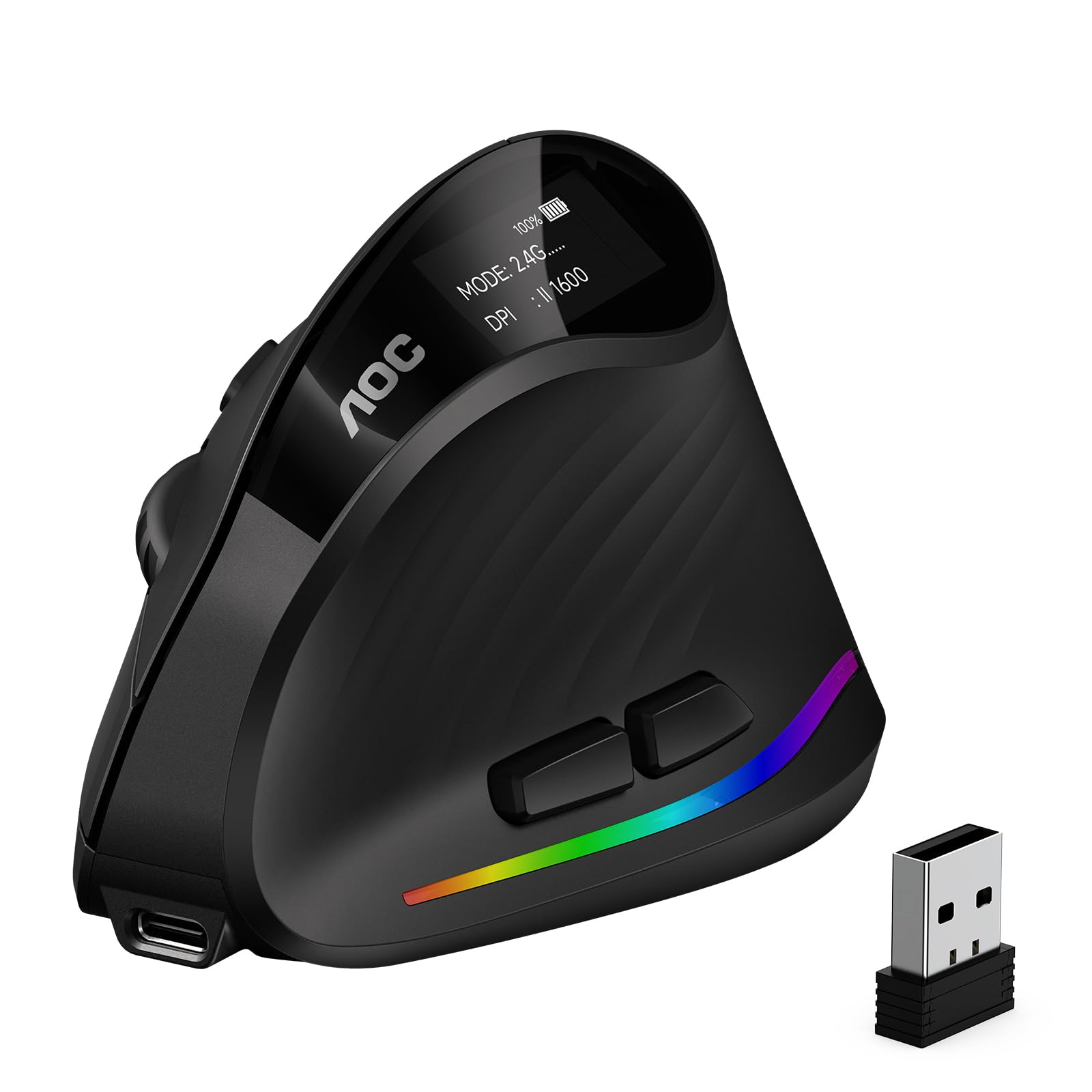
AOC’s vertical mouse tackles the root cause of repetitive strain injuries by tilting your hand into a 52-degree handshake position. This fixed angle keeps your forearm pronation to a minimum, reducing wrist twisting that leads to carpal tunnel over time. The right-handed sculpted body fits medium-to-large palms naturally, with a soft rubber texture that prevents slipping during rapid cursor movements. An 800 mAh rechargeable battery delivers up to 200 hours of use with RGB lighting turned off, and the Type-C port supports pass-through charging so you can keep working while the battery refills.
The sensor tracks reliably up to 4800 DPI across five preset levels (1000/1600/2400/3200/4800), which covers everything from precise photo editing to fast multi-monitor navigation. Seven programmable buttons can be customized through AOC’s downloadable app, including the RGB lighting effects that cycle through colors based on your preset or active DPI zone. The left and right clicks operate at under 35 decibels, making this one of the quietest vertical mice available—though the side buttons and scroll wheel produce normal clicking sounds, so it’s not fully silent.
Triple-mode connectivity (Bluetooth 5.4, 2.4GHz receiver, and wired USB) gives you flexibility across devices, though the receiver storage slot is absent, so you’ll need to keep the dongle somewhere safe. Some users with smaller hands found the vertical grip too wide for comfortable reach, and the battery life drops to about 40 hours with RGB active—still respectable but worth noting if you want the lights on. For anyone experiencing forearm or wrist pain from a traditional flat mouse, the AOC vertical design is a proven mechanical fix that doesn’t require a trackball learning curve.
Why it’s great
- 52-degree vertical angle reduces wrist and forearm strain effectively
- 800 mAh battery offers up to 200 hours of runtime without RGB
- Triple-mode connectivity with Bluetooth 5.4 for stable multi-device use
Good to know
- Oversized shape feels uncomfortable for hands under 5 inches wide
- No built-in storage slot for the 2.4GHz receiver
- RGB lighting halves battery life to approximately 40 hours
3. Logitech G305 Lightspeed Wireless Gaming Mouse

The Logitech G305 proves that a competitive gaming mouse doesn’t need to be heavy, wired, or expensive. At just 3.4 ounces, it’s lightweight enough for frantic flick shots while still feeling substantial enough for precise desktop work. The HERO optical sensor delivers 12,000 DPI with zero smoothing or acceleration, tracking at 400 IPS with a 1-millisecond report rate that rivals wired mice. That sensor is also extraordinarily power-efficient—Logitech claims 250 hours of continuous gaming on a single AA battery, and in endurance mode via G HUB software, that stretches to nine months of typical office use.
The symmetrical ambidextrous shell has a compact footprint that favors claw and fingertip grips, making it a strong travel companion for gamers who take their laptop to LAN parties or dorm rooms. Six programmable buttons are standard, and onboard memory stores your DPI profiles and macros directly on the mouse so you don’t need to keep G HUB installed on every machine. The nano receiver clicks into a storage compartment under the top shell, so you won’t lose it in transit. There’s no RGB lighting, which some purists prefer for reduced distraction and maximum battery life.
The main tradeoff is the lack of Bluetooth—the G305 is strictly 2.4GHz wireless, so you’ll need the USB receiver for every connection. The plastic build, while durable, feels less premium than higher-end Logitech options, and the textured side grips are absent, so sweaty-handed gamers may want aftermarket grip tape. But for under thirty dollars, the G305 delivers a sensor that competes with hundred-dollar mice, battery life that outlasts anything with a rechargeable cell, and a weight that makes it one of the most maneuverable cordless gaming mice on the market.
Why it’s great
- HERO sensor delivers 12,000 DPI with 1ms lag-free wireless
- Single AA battery lasts 250 hours gaming or 9 months office use
- Ultra-lightweight 3.4-ounce design with onboard memory storage
Good to know
- No Bluetooth connectivity—requires USB receiver at all times
- Compact shape favors claw/fingertip grip; less comfortable for palm grippers
- No textured rubber side grips for sweaty hands
4. PHILIPS Ergonomic Wireless Mouse SPK7858

Philips built the SPK7858 specifically for spreadsheet warriors and timeline editors who spend their days navigating horizontally vast documents. The standout feature is the thumb-side horizontal scroll wheel, which lets you sweep across Excel columns, Premiere Pro timelines, or Figma artboards without dragging the cursor edge-to-edge. The main wheel has a tactile notched feel for precise line-by-line scrolling, while the secondary wheel offers smooth continuous rotation for fast panning. Combined with five programmable buttons mapped through Philips software, this mouse turns repetitive navigation tasks into single-finger operations.
The right-handed contoured shell includes an anti-slip thumb rest and a pronounced palm arch that supports wider grips naturally. The dual 2.4GHz receiver—which flips between USB-A and USB-C—eliminates the need for dongles or adapters when switching between older desktop PCs and modern laptops. Bluetooth pairing adds a third connection channel, so you can bounce between a Windows desktop, MacBook, and iPad without touching a cable. The advanced optical sensor offers five DPI levels from 800 to 4000, adjustable on the fly, with smooth tracking across fabric, wood, and glass surfaces.
The 500 mAh battery lasts roughly 25 days under heavy eight-hour use, and the emergency top-up feature delivers one hour of use from a five-minute charge—genuinely useful for those mornings you realize the battery is dead right before a video call. The silent left and right buttons produce library-quiet clicks under 30 decibels, though the scroll wheel is noticeably audible. One ergonomic concern: the dotted texture on the main scroll wheel irritated some users’ fingers during extended scrolling sessions, and the USB plug on a long-term test unit developed a loose connection requiring upward pressure. For productivity-focused professionals who value horizontal scrolling and multi-device flexibility, the PHILIPS SPK7858 is a purpose-built tool.
Why it’s great
- Horizontal thumb scroll wheel eliminates dragging across wide spreadsheets
- Dual USB-A/C receiver works with both old and new laptops
- Emergency 5-minute charge provides 1 hour of use
Good to know
- Dotted scroll wheel texture can irritate fingertips during long sessions
- Scroll wheel is audible compared to the silent main clicks
- USB connector on the receiver may loosen with heavy daily use
5. Logitech MX Ergo S Advanced Wireless Trackball Mouse

The MX Ergo S is the definitive solution for users who already feel pain in their wrist, forearm, or shoulder from conventional mouse use. Instead of sliding a shell across a pad, you roll a thumb-operated ball—your hand stays stationary, and only your thumb moves. This eliminates the repetitive wrist articulation that causes carpal tunnel and tennis elbow. The 20-degree adjustable tilt platform further reduces muscle strain by 27 percent compared to a flat mouse, and the sculpted right-handed body with soft rubber grip is certified by ergonomists for medium-to-large hands.
The precision mode button lets you toggle between high-speed cursor movement and pixel-level accuracy for detail work like photo retouching or CAD drawing. Six programmable buttons plus an easy-switch button let you pair with up to three devices via Bluetooth or the included Logi Bolt USB receiver, and switching between them takes half a second. The USB-C rechargeable battery delivers 120 days of typical use on a full charge, and a one-minute charge gives you 24 hours of runtime—perfect for the night before a deadline. The clicks are 80 percent quieter than the previous MX Ergo generation, making the Ergo S suitable for shared office environments.
The learning curve is real: thumb-controlled cursor movement feels unnatural for the first few days, and fine cursor placement requires practice that some users never fully master. The mouse is also bulky, with a base footprint that doesn’t work well in cramped bags, and there’s no included USB-C cable for charging. Some users with smaller hands (under 5-inch span) found the Ergo S forced their hand into an overly open position that paradoxically caused fatigue. For anyone who has already tried vertical mice and needs something more aggressive in ergonomic support, the MX Ergo S is a medical-grade intervention that justifies its premium price through pain reduction alone.
Why it’s great
- Thumb trackball eliminates wrist movement entirely for pain relief
- 20-degree adjustable tilt reduces muscle strain by 27%
- USB-C fast charging: 1 minute = 24 hours of use
Good to know
- Thumb control has a significant learning curve for new users
- Large footprint and heavy build reduce portability
- Oversized shape can cause fatigue for users with smaller hands
FAQ
Is a vertical mouse actually better for wrist pain than a trackball?
Why do some cordless mice use AA batteries instead of built-in rechargeable cells?
What does DPI adjustment actually do for my daily work?
Final Thoughts: The Verdict
For most users, the best cordless mouse winner is the XBG B15pro because it delivers a real-time LED status display, tri-mode connectivity, and silent ergonomic comfort at a price that undercuts the competition by a wide margin. If you want the ergonomic intervention of a vertical tilt that actively reduces wrist strain, grab the AOC Vertical Mouse. And for users who already suffer from repetitive strain injuries and need to eliminate wrist motion entirely, nothing beats the Logitech MX Ergo S‘s thumb-controlled trackball design.

Mo Maruf
I created WellFizz to bridge the gap between vague wellness advice and actionable solutions. My mission is simple: to decode the research and give you practical tools you can actually use.
Beyond the data, I am a passionate traveler. I believe that stepping away from the screen to explore new environments is essential for mental clarity and physical vitality.