Every high-end CPU turns electricity into heat — and without a capable cooler, that heat throttles your performance, shortens your hardware’s life, and fills your room with fan noise. Whether you are building a new gaming rig, upgrading a prebuilt office PC, or squeezing every drop of speed from a workstation processor, the cooler you choose directly affects how fast your system runs and how loud it sounds while doing it. This guide cuts through the marketing claims to show you which coolers actually deliver lower temperatures and quieter operation for your exact build.
I’m Mohammad Maruf — the co-founder and writer behind WellFizz. This guide is built by comparing the manufacturers’ published specifications and the patterns across verified customer reviews, so you get each pick’s real strengths and trade-offs instead of marketing spin.
The difference between a mediocre cooler and a great one is measured in degrees Celsius, decibels, and compatibility with your case. This guide to the best cooling system for pc helps you decode those specs so you can make a confident buying decision without guessing.
How To Choose The Best Cooling System For PC
Choosing a CPU cooler is not about picking the biggest radiator or the most fans. It is about matching the cooler’s physical size, airflow capacity, and noise level to your specific CPU, case, and tolerance for fan hum. Here are the three factors that separate a perfectly matched cooler from a frustrating mistake.
Case Compatibility and Clearance
The most powerful cooler in the world is useless if it does not fit inside your case. Tower air coolers have a height limit (measured from the CPU socket to the side panel), while liquid AIO coolers (all-in-one water cooling units) require radiator mounting space — typically at the top or front of the case. Measure the internal width of your case (for air coolers, check the “CPU cooler height” spec; for liquid coolers, check “radiator support” in millimeters) before you buy. A 154mm-tall air cooler like the Thermalright PS120SE fits most mid-tower cases, while the 360mm radiators on units like the MSI MEG S360 require cases specifically designed for triple-fan installations.
Airflow vs. Noise Level
Fan speed (measured in RPM — revolutions per minute) determines how much air moves through the cooler, but higher RPM always means more noise. Airflow capacity is measured in CFM (cubic feet per minute), and noise is measured in decibels (dBA — a unit that measures sound pressure level). A good balance for most builds is a cooler with fans running at 1500-2100 RPM that stays at or below 26 dBA under load. The ID-COOLING IS-55 reaches 3300 RPM at max speed, which pushes 54.6 CFM of air but hits 31.2 dBA — loud enough that you will notice it in a quiet room. Prioritize coolers with PWM (pulse-width modulation) fan control, which lets the motherboard adjust speed automatically so the fans only spin fast when the CPU is actually hot.
Thermal Performance and Heat Pipe Design
Heat pipes (sealed copper tubes filled with a liquid that vaporizes and carries heat away from the CPU) are the backbone of any air cooler. More heat pipes and wider spacing between fins (the thin aluminum sheets that dissipate heat) generally mean better cooling, but the quality of the base plate and the heat pipe technology matters more than the count. The Thermalright PS120SE uses 7 heat pipes with AGHP 4.0 technology (Advanced Gravity Heat Pipe generation 4 — which prevents heat pipe performance loss when the cooler is mounted vertically or horizontally), while low-profile coolers like the ID-COOLING IS-55 pack 5 heat pipes into a 57mm-tall body. For liquid AIOs (all-in-one liquid coolers), the key spec is the radiator size in millimeters (240mm, 280mm, or 360mm) and the pump’s noise floor — the CORSAIR Nautilus 360 RS runs its pump at just 20 dBA, quieter than a library whisper.
Quick Comparison
On smaller screens, swipe sideways to see the full table.
| Model | Category | Best For | Key Spec | Amazon |
|---|---|---|---|---|
| Thermalright PS120SE ARGB | Air Cooler | High-end CPUs on a budget | 66.17 CFM at 25.6 dBA | Amazon |
| ID-COOLING IS-55 Black | Low-Profile Air | Small form factor ITX builds | 57mm height, 5 heat pipes | Amazon |
| CORSAIR Nautilus 360 RS LCD | 360mm AIO | Quiet liquid cooling with flair | 2.1″ LCD, pump at 20 dBA | Amazon |
| MSI MEG CoreLiquid S360 | 360mm AIO | VRM cooling + LCD monitoring | 2.4″ IPS display, Asetek pump | Amazon |
| NZXT Kraken Elite 360 RGB 2024 | Premium 360mm AIO | Max performance + huge display | 2.72″ 640×640 IPS LCD | Amazon |
In‑Depth Reviews
1. Thermalright PS120SE ARGB CPU Air Cooler

66.17 CFM at just 25.6 dBA — this is the pick for anyone building a high-performance gaming or workstation PC who wants premium-level cooling without paying a premium price. Buyers report it “keeps Ryzen 9 9950x3D at max 78°C under sustained load, minimal throttling” — a result that rivals coolers costing four times as much.
Its twin-tower design uses 7 copper heat pipes with AGHP 4.0 technology (Advanced Gravity Heat Pipe generation 4, which prevents the cooling liquid inside the pipes from pooling when the cooler is mounted vertically) and dual 120mm PWM fans (fans whose speed is automatically controlled by the motherboard based on CPU temperature). The cooler stands 154mm tall, which means it fits inside most mid-tower cases without issue. At 25.6 dBA, it is significantly quieter than the ID-COOLING IS-55’s 31.2 dBA at max speed — a 22% quieter operation during heavy loads — while moving 21% more air (66.17 vs 54.6 CFM).
The only real trade-off is RAM clearance: the front fan sits directly over the memory slots, so if you have tall RAM sticks with large heat spreaders (like Corsair Vengeance RGB), you may need to slide that fan up by about 5mm or install it on the rear of the tower. Even with that small adjustment, this is the best-performing air cooler at its price tier and a confident first choice for most builders.
Why it’s great
- Exceptional 66.17 CFM airflow for a dual-tower air cooler at this price tier
- Near-silent 25.6 dBA operation even under sustained CPU loads
- Includes PWM fan splitter and ARGB controller for easy cable management
Good to know
- Front fan may overhang tall RAM modules; can be shifted up slightly
- No RGB lighting on heatsink itself — only the fan blades light up
2. ID-COOLING IS-55 Black CPU Cooler

It falls short on noise (31.2 dBA vs 25.6 dBA) and airflow (54.6 vs 66.17 CFM), but in a small form factor build, there is simply no room for a tower cooler of that size. Owners mention it “replaced HP Omen factory cooler; CPU temps dropped from 90+°C to low 50°C at 100% usage (40+°C drop)” — a massive improvement for anyone rescuing a prebuilt PC from thermal throttling.
The 5 copper heat pipes transfer heat efficiently from the CPU to an aluminum fin stack, and the included 120mm slim fan (15mm thick instead of the standard 25mm) pulls air through those fins even in tight quarters. It supports Intel LGA 1851 (Intel’s newest socket for Arrow Lake processors) and AMD AM5 (AMD’s current socket for Ryzen 7000 and 9000 series CPUs), so it covers the latest platforms. The 31.2 dBA noise figure is its ceiling at max 3300 RPM; when you set a quiet fan curve via software (which most motherboards allow), it drops to around 13.8 dBA at idle — essentially silent.
Choose this over the Thermalright PS120SE if you are building a Mini-ITX system (a tiny motherboard format for compact cases) where every millimeter of clearance matters. It is the best low-profile cooler available at this price for getting a modern high-performance CPU under control inside a case the size of a game console.
Where it shines
- Only 57mm tall — fits the tightest compact ITX cases without side-panel bulge
- 5 heat pipes in a low-profile body deliver surprising thermal capacity for its size
- Excellent memory clearance; does not overhang RAM slots on Mini-ITX boards
Worth noting
- Fan can be loud at 31.2 dBA max RPM; use a custom fan curve for quiet operation
- Mounting bracket quality feels less refined than premium brands like Noctua
3. CORSAIR Nautilus 360 RS LCD Liquid CPU Cooler
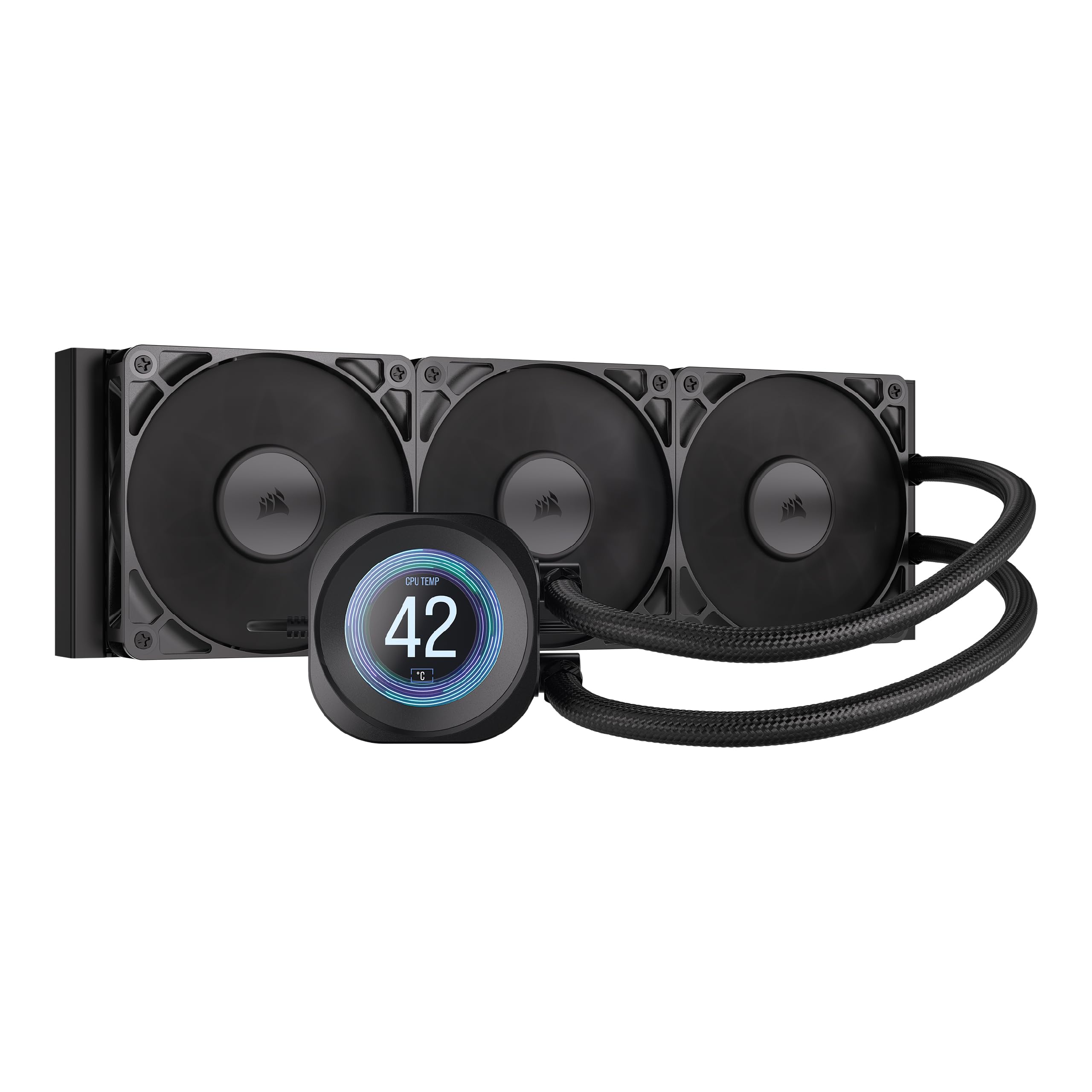
If your home office doubles as your gaming room and you cannot stand the hum of fans, this 360mm AIO runs its pump at just 20 dBA — that is roughly the sound of leaves rustling in a gentle breeze. Buyers confirm “it keeps my 9800x3d below 50 with competitive games and 70 with high load games,” proving you do not have to trade silence for cooling power. The pump itself is a convex cold plate design and comes with thermal paste already applied, so installation takes about 20 minutes out of the box.
The 2.1-inch IPS LCD screen shows custom images, GIFs, or real-time CPU temperature, and the included three RS120 fans use CORSAIR AirGuide technology and Magnetic Dome bearings. At 3.51 pounds and 15.59 inches long, the 360mm radiator requires a case with a top or front mounting location that supports 360mm radiators — check your case spec for “360mm radiator support” before ordering.
The catch is that the included RS120 fans hit 2100 RPM at full speed, and while most buyers find them quiet, a few sensitive ears report audible airflow noise under sustained gaming loads. If you are an absolute silence fanatic, swapping these fans for Noctua NF-A12x25s is a common upgrade. For everyone else, the Nautilus 360 RS delivers a near-silent liquid cooling experience with a customizable display — a standout for builds where quiet operation and a clean aesthetic matter equally.
What stands out
- Extremely quiet pump at 20 dBA — nearly inaudible in a mid-tower case
- 2.1″ LCD screen lets you display temps, GIFs, or custom images on the pump
- Pre-applied thermal paste and simple bracket system for fast installation
The trade-offs
- Stock fans can produce audible airflow noise at max 2100 RPM for sensitive ears
- Requires a case with 360mm radiator support — not compatible with smaller cases
4. MSI MEG CoreLiquid S360 AIO CPU Liquid Cooler
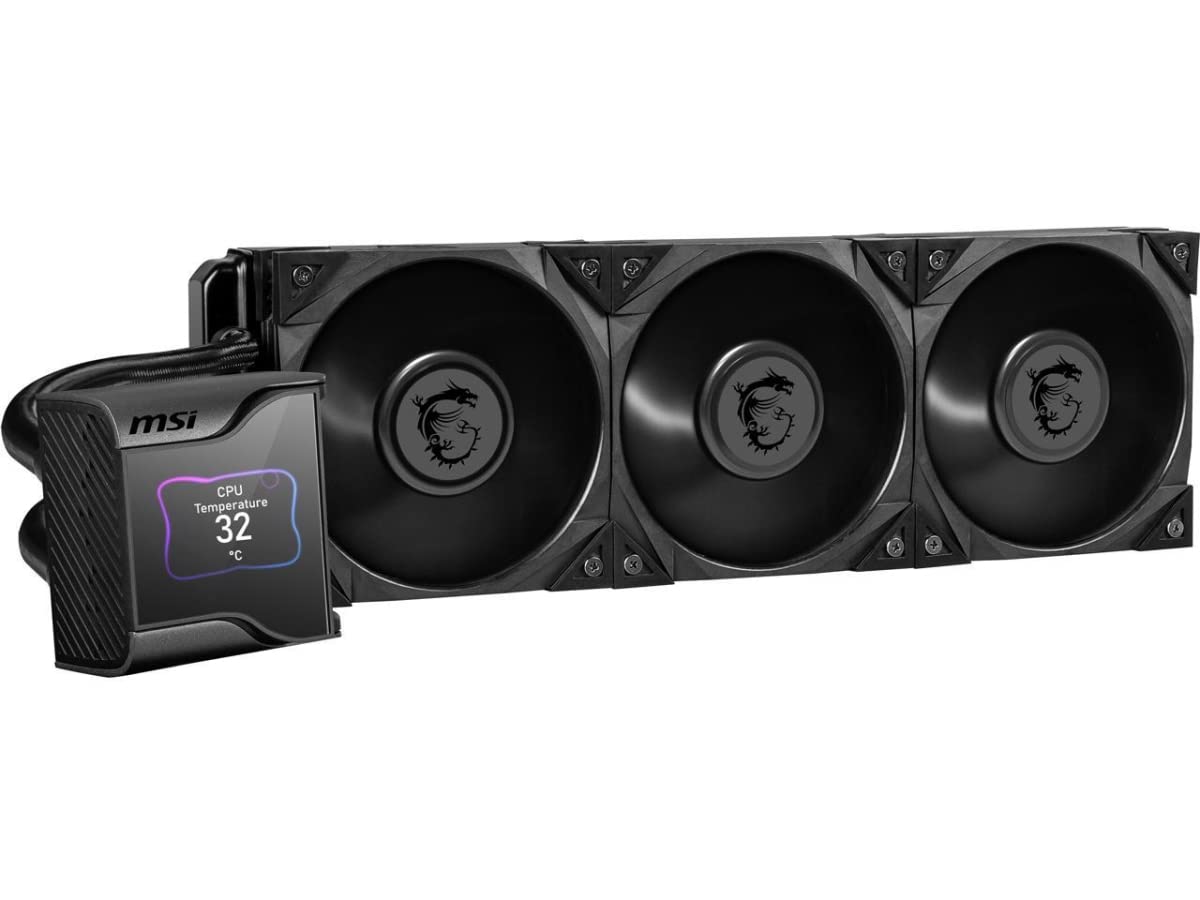
The single number that matters most in this category is the 60mm downdraft fan concealed between the pump and the LCD screen — it blows cool air directly onto the VRM and the M.2 SSD slot, solving a problem no other 360mm AIO addresses. If you are overclocking a high-core-count CPU like the Ryzen 9 7900X3D or running a build with limited case airflow over the motherboard, that extra fan can shave 5-8°C off your VRM temperatures — which means more stable power delivery and longer overclocking headroom. Buyers confirm it keeps “Ryzen 9 7900X3D: idle 33-34°C, light use 38-42°C, gaming 50s-70°C” with quiet operation.
Inside the pump block is an Asetek 7th Generation pump (PWM controlled, rated for 50,000 hours of continuous use — that is roughly 5.7 years running 24/7) with a noise level of 21.2 dBA. The 2.4-inch IPS display (320×240 pixels, 500 nits brightness, 16-bit color) is protected by a magnetically attached transparent cover — you can swap it for custom decals or leave it clear. The three Silent Gale P12 fans (120mm, 2250 RPM max) push 56.2 CFM each at 23 dBA, which is competitive with premium fans in the same category.
The downside is price and installation complexity: at the premium tier, this is a serious investment, and the MSI Center software required for LCD control has a reputation for being buggy (one reviewer noted it treats the unit as a removable device in Windows, risking accidental ejection). The hoses are also on the shorter side at 400mm — measure your case’s PSU shroud-to-CPU distance before buying, especially for full-tower or vertically mounted GPU setups. For the richest feature set in a liquid cooler, this is the right choice but requires careful planning, making its price-to-value read as a premium investment that demands careful case compatibility planning.
The upsides
- Integrated 60mm VRM fan cools motherboard components other AIOs ignore
- 2.4-inch IPS LCD display with magnetic cover for easy customization
- Asetek 7th Gen pump rated for 50,000 hours of reliable operation
Keep in mind
- MSI Center software can be buggy; disable onboard graphics in BIOS for stability
- Short 400mm hoses may limit mounting options in larger cases
5. NZXT Kraken Elite 360 RGB 2024 AIO Liquid Cooler

What you actually get at this lower price is a 2.72-inch IPS LCD with 640×640 resolution (330 pixels per inch — nearly Retina-quality clarity) running at a smooth 60Hz refresh rate and 690 cd/m² brightness, making it the best-looking cooler screen you can mount on a CPU. Customers note it maintains “stable idle temperatures of 44-45°C on the Ryzen 9 9950X3D” — a hot-running flagship processor that demands serious thermal headroom.
The custom-designed NZXT Turbine pump delivers a 10% performance improvement over the previous generation, with increased flow rate and head pressure while running quieter than the outgoing model. The three F360 RGB Core fans (120mm, 2800 RPM max) push air through the 360mm radiator with a daisy-chain connector that reduces cable clutter to one fan cable. At 33.88 dBA at full speed, it runs 69% louder than the CORSAIR Nautilus’s 20 dBA pump, but the noise is a smooth whoosh rather than an annoying whine.
The honest downside is reliability history: one verified buyer reports this was their sixth NZXT AIO failure within four months, with a cheap air cooler outperforming it on idle temps (29-31°C vs 34-35°C). While this is likely an outlier, the pattern of pump failures in NZXT’s earlier models is worth noting. If you want the absolute best display and are willing to accept a small reliability risk for top-tier aesthetics and cooling performance on a flagship CPU, the Kraken Elite 360 is perfect for the builder who prioritizes visual flair and is comfortable with a slightly higher chance of warranty claims.
Why we’d pick it
- Outstanding 2.72-inch 640×640 IPS LCD with 60Hz refresh for crisp animations
- NZXT Turbine pump delivers 10% better flow than previous generation
- Tool-free mounting brackets for Intel LGA 1851 and AMD AM5/AM4
A few caveats
- Noise level of 33.88 dBA is louder than most AIO pumps in this comparison
- Reliability concerns from a minority of reviewers point out pump failures within months
Understanding the Specs
CFM (Cubic Feet per Minute)
This measures how much air a fan pushes each minute. A higher number means more air moves across the heatsink or radiator, which carries away more heat. The Thermalright PS120SE leads our list at 66.17 CFM, while the low-profile ID-COOLING IS-55 manages 54.6 CFM. For a mid-range CPU (like an Intel Core i5 or AMD Ryzen 5), 50-60 CFM is plenty; for a high-end chip (i7/i9 or Ryzen 7/9) under sustained gaming or rendering loads, you want 65 CFM or more.
dBA (Decibels A-Weighted)
A decibel is a unit of sound pressure. A-weighting means the measurement accounts for how the human ear actually hears different frequencies — so 20 dBA is about the sound of a whisper from 5 feet away, 30 dBA is a quiet library, and 40 dBA is light rain. The CORSAIR Nautilus pump runs at just 20 dBA — effectively silent inside a case. The ID-COOLING IS-55 hits 31.2 dBA at max fan speed, which is audible but not distracting if your case sits under a desk.
AIO vs Air Cooler
An AIO (all-in-one) liquid cooler uses a sealed loop of coolant, a pump, and a radiator with fans to move heat away from the CPU. An air cooler uses a metal heatsink (usually aluminum fins on copper heat pipes) and one or more fans. AIOs generally handle higher heat loads (350W+) and take up less physical space around the CPU socket, but they cost more, have a pump that can fail, and require radiator space in your case. Air coolers are simpler, cheaper, and more reliable long-term but bulky around the motherboard and limited to about 280W of cooling capacity.
TDP Rating (Thermal Design Power)
This is a spec in watts that tells you how much heat a CPU is designed to produce under maximum load. A cooler’s TDP rating tells you the maximum CPU wattage it can handle without overheating. An AMD Ryzen 7 7800X3D has a TDP of 120W, while an Intel Core i9-14900K can draw 253W under load. The Thermalright PS120SE is rated for roughly 260W — enough for most CPUs except the very hottest Intel chips. Always match or exceed your CPU’s TDP when choosing a cooler.
FAQ
Do I need liquid cooling or is a high-end air cooler enough for my gaming PC?
How do I know if a CPU cooler will fit inside my PC case?
What is PWM fan control and why does it matter for CPU coolers?
How many heat pipes do I need in a CPU air cooler?
Which CPU cooler is quietest at idle for a home office PC?
Final Thoughts: The Verdict
For most buyers, the best cooling system for PC winner is the Thermalright PS120SE because it delivers high-end air cooling performance (66.17 CFM at 25.6 dBA with 7 heat pipes) at a price that leaves room in your budget for other components. If you want a sleek display and whisper-quiet liquid cooling, grab the CORSAIR Nautilus 360 RS for its 20 dBA pump and customizable 2.1-inch LCD. And for ultra-compact Mini-ITX builds where every millimeter matters, the ID-COOLING IS-55 (57mm height, 5 heat pipes) is the only cooler that fits while keeping your CPU below 75°C under load.

Mo Maruf
I created WellFizz to bridge the gap between vague wellness advice and actionable solutions. My mission is simple: to decode the research and give you practical tools you can actually use.
Beyond the data, I am a passionate traveler. I believe that stepping away from the screen to explore new environments is essential for mental clarity and physical vitality.