Our readers keep the lights on and my smoothie glass nicely filled. As an Amazon Associate, I earn from qualifying purchases.
A premium PC build with a high-end GPU and CPU is only as good as the chassis that houses it. If airflow is restricted, temperatures climb, fans spin louder, and performance throttles. The right case solves for this by balancing open mesh panels, strategic fan placement, and internal volume that doesn’t strangle your components.
I’m Mohammad Maruf — the founder and writer behind WellFizz. I’ve spent hundreds of hours analyzing thermal performance data, airflow design, and build quality on the most popular PC cases to separate marketing claims from genuine cooling capability.
Every chassis here was chosen for its measurable ability to keep hardware cool while offering a clean building experience. Use this guide to find the best cool pc cases for your next build that actually move air without sacrificing build quality or aesthetics.
How To Choose The Best Cool PC Cases
Buying a PC case solely on looks is the most common mistake. A case with a solid glass front panel and tiny side intakes will starve your components of cool air, forcing fans to spin faster and louder. Prioritize cases with full mesh fronts, perforated top panels, and clear intake paths from the front fans to the motherboard and GPU area.
Fan Size and Configuration
Larger fans — 140mm versus 120mm — move more air at lower RPMs, which translates directly to quieter operation. A case that includes two or three 140mm intake fans from the factory is already ahead of one that includes four 120mm units. Also look for reverse-blade fan options; they pull air from the side without showing the usual fan hub, improving both airflow and aesthetics.
Radiator and GPU Clearance
Check the maximum radiator length the case supports on the top and front. If you plan a liquid-cooled build, aim for 360mm support minimum. For air-cooled systems with large tower coolers, verify CPU cooler height clearance (over 165mm is ideal). GPU clearance of 350mm or more ensures you can fit today’s triple-fan cards without forcing the front fans to be relocated.
Cable Management Depth
The space behind the motherboard tray — measured in millimeters — determines how easily you can route and hide cables. Cases with less than 20mm of clearance require careful cable flattening. Models with 25mm or more, combined with Velcro straps and rubber grommets, make for a far cleaner build and better airflow inside the main chamber.
Quick Comparison
On smaller screens, swipe sideways to see the full table.
| Model | Category | Best For | Key Spec | Amazon |
|---|---|---|---|---|
| Lian Li LANCOOL 216 | Premium Air | High-end air-cooled builds | 2x160mm + 1x140mm PWM fans | Amazon |
| NZXT H9 Flow | Dual-Chamber | Panoramic display builds | 420mm radiator support | Amazon |
| Geometric Future M5 | Fan-Packed | Out-of-box ready with 5 fans | 5x pre-installed 140mm ARGB fans | Amazon |
| Corsair 4000D RS Frame | Modular | Upgradeable panel customization | InfiniRail fan mounting system | Amazon |
| be quiet! Pure Base 501 | Silent | Low-noise workstation builds | 2x Pure Wings 3 140mm PWM fans | Amazon |
| Corsair 3500X RS ARGB | Panoramic | Glass panorama builds | 3x RS120-R ARGB fans included | Amazon |
| Montech XR-B | Value | Budget high-airflow builds | 3x120mm ARGB PWM fans | Amazon |
In‑Depth Reviews
1. Lian Li LANCOOL 216

The Lian Li LANCOOL 216 leads the group because of its massive dual 160mm front intake fans. These 160mm units move more air at lower RPM than any 140mm or 120mm fan, producing near-silent operation even under gaming load. The included 140mm rear exhaust fan completes a three-fan setup that creates strong positive pressure, keeping dust out of unfiltered gaps.
Internally, the case offers GPU clearance up to 392mm — enough for any current RTX 4000-series card — and a rear PCIe fan bracket that mounts an extra 120mm or 140mm fan to blow directly onto the GPU backplate. The modular motherboard I/O tray lets you shift the board up or down by 15mm to improve clearance for top-mounted radiators or tall air coolers, a feature rarely seen at this level.
Cable management is handled by a deep rear chamber with Velcro straps and pre-installed clips. The glass side panel is secured by a single retained screw on the rear edge, making removal tool-free. At this price point, the combination of fan size, build flexibility, and thermal performance is unmatched.
Why it’s great
- Two 160mm front fans provide excellent airflow at low noise
- Rear PCIe fan bracket targets GPU cooling directly
- Adjustable motherboard tray improves top radiator clearance
Good to know
- SSD mounting behind motherboard tray is a bit tight
- Front I/O relocates but requires removing panels to do so
2. NZXT H9 Flow (2025)
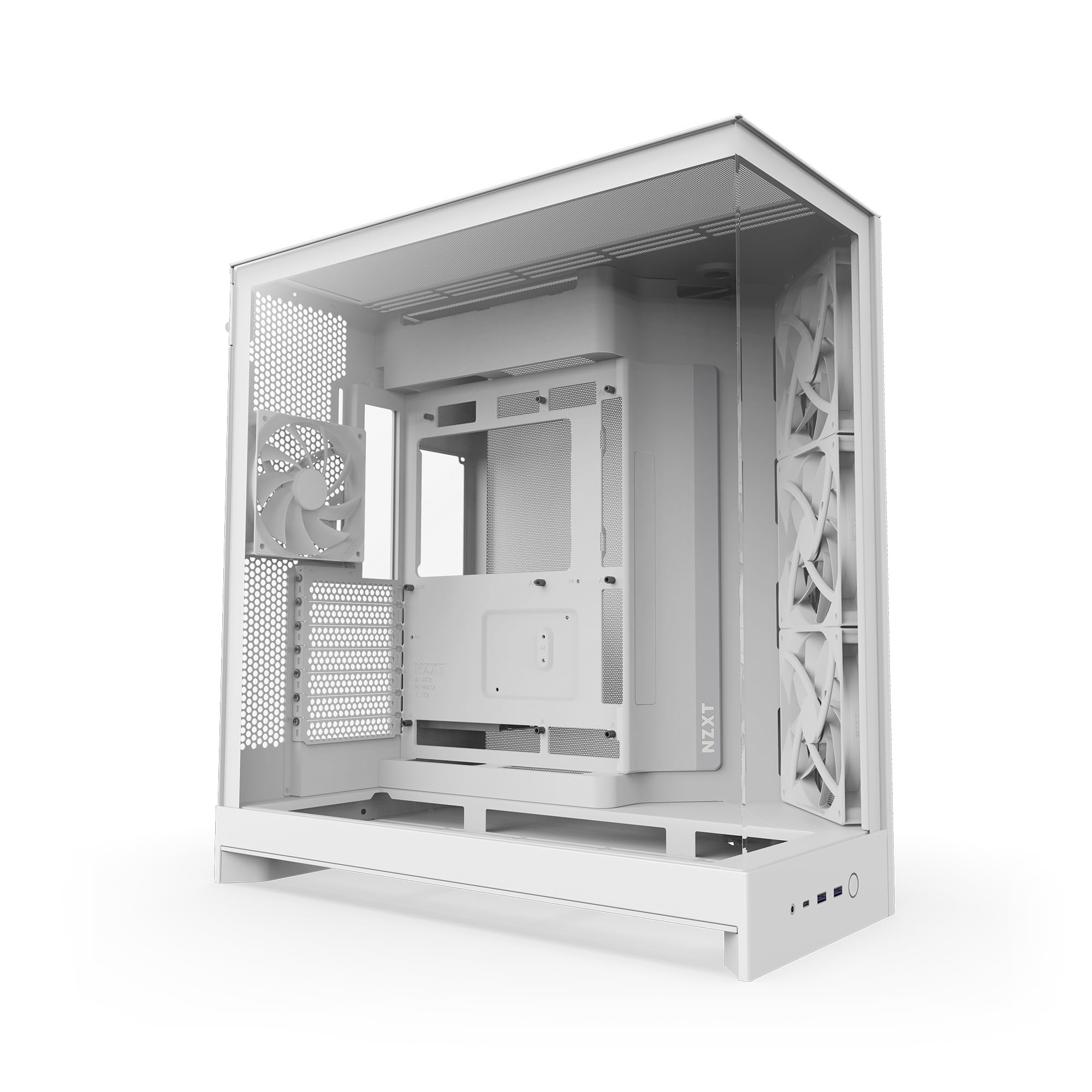
The NZXT H9 Flow uses a dual-chamber layout to separate the PSU and drives from the main motherboard area, reducing internal cable clutter and improving airflow paths. The panoramic tempered glass panels on the front and side give an unobstructed view of every component, while perforated steel panels on the top and bottom ensure intake paths remain open.
Cooling capacity is extraordinary: the case supports up to nine 140mm fans total and a 420mm radiator on the top or front-right. The included three F140Q front intake fans and one F120Q rear exhaust fan provide immediate airflow, though these are 3-pin DC fans rather than PWM. Replacing them with PWM units is a common first upgrade for enthusiasts who want precise speed control.
Build quality is excellent, with thick steel panels and rounded edges. The cable management channels are extra wide, with built-in Velcro straps that simplify routing. One minor convenience issue is the front I/O placement on the bottom edge of the case, which requires bending down to reach the power button.
Why it’s great
- Dual-chamber design keeps cables hidden for a clean build
- Supports 420mm radiator on top for extreme cooling loops
- Panoramic tempered glass panels show off components fully
Good to know
- Stock fans are 3-pin DC, not PWM
- Front I/O ports and power button located at the bottom edge
3. Geometric Future M5

The Geometric Future M5 ships with five pre-installed 140mm ARGB PWM fans — three front intake and two top exhaust — which is more factory fan coverage than any other case in this roundup. This eliminates the need to buy additional fans for most builds, making it an exceptional value for anyone who wants RGB lighting and solid airflow without extra spending.
The chassis is built from 0.8–1.2mm thick steel, giving it a rigid, premium feel that resists flex during transport. It supports E-ATX motherboards up to 280mm wide and GPUs up to 460mm in length, so even the largest triple-fan cards fit without touching the front fans. The tool-free tempered glass panels can be removed by hand, which speeds up component swaps significantly.
While the case is spacious, the cable management area behind the motherboard tray requires careful planning, especially with larger PSUs above 160mm depth that can press against routed cables. The unique PSU shroud with a display window is a nice touch for showing off a high-end power supply, but it does limit where you can tuck excess wiring.
Why it’s great
- Five pre-installed 140mm ARGB PWM fans out of the box
- Tool-free tempered glass panels for quick access
- GPU support up to 460mm fits the largest cards available
Good to know
- Cable management is tight with PSUs over 160mm deep
- PSU shroud display window limits routing options
4. Corsair 4000D RS Frame

The Corsair 4000D RS Frame stands out for its FRAME modular system, which allows you to swap the motherboard tray, front I/O panel, and other structural components over time. This is the only case on this list designed to evolve with your build rather than being replaced entirely. The included InfiniRail mounting system lets you slide fans along a steel rail in the front and roof, allowing precise placement without fixed screw holes.
Airflow is handled by a 3D Y-pattern perforated steel front panel that provides a low-restriction path for cool air. Three RS PWM fans are pre-installed in the front and support daisy-chained 4-pin PWM connections and Zero RPM mode for silent operation at low loads. The case fits dual 360mm radiators simultaneously — one in the front and one in the roof — making it suitable for high-end custom loops.
The side panel near the motherboard tray is removable, allowing you to mount fans for extra intake or exhaust if your GPU runs hot. Build quality is excellent, with thick tempered glass and a matte finish that resists fingerprints. One minor drawback is the glass side panel can be difficult to reinstall without visual guides, and the PSU area becomes tight when the HDD cage is installed.
Why it’s great
- FRAME modular system allows upgradeable motherboard trays and I/O panels
- InfiniRail lets you slide fans to any position for targeted airflow
- Supports two 360mm radiators for advanced liquid cooling
Good to know
- Glass side panel can be tricky to reinstall
- PSU area feels cramped with HDD cage in place
5. be quiet! Pure Base 501

The be quiet! Pure Base 501 is engineered for near-silent operation. It comes with two Pure Wings 3 140mm PWM fans that use airflow-optimized blades to reduce turbulence and noise. The case itself includes foam dampening pads on the side panels that absorb vibration and lower the overall noise floor, making it the quietest option here for noise-sensitive users.
Cooling support is still impressive despite the acoustic focus. The front can hold three 140mm fans or a 360mm radiator, while the top supports up to 240mm radiators. The PCIe slots rotate 90 degrees for vertical GPU mounting, which helps prevent GPU sag when paired with an optional riser cable. All bays use captive screws, so nothing gets lost during disassembly.
The fully mesh front panel is easy to clean — it pops off without tools — and the rounded edges on every interior surface make cable routing safe and comfortable. One common complaint is that the case ships with only two fans, so you will likely want to add more for high-power builds. The clean, minimalist design has no RGB lighting, which is exactly what some users prefer.
Why it’s great
- Extremely quiet operation with sound-dampened panels
- Pure Wings 3 140mm fans are very efficient and silent
- Captive screws on all bays prevent hardware loss
Good to know
- Only two fans included, additional intake fans recommended
- No RGB lighting or glass aesthetic for show builds
6. Corsair 3500X RS ARGB
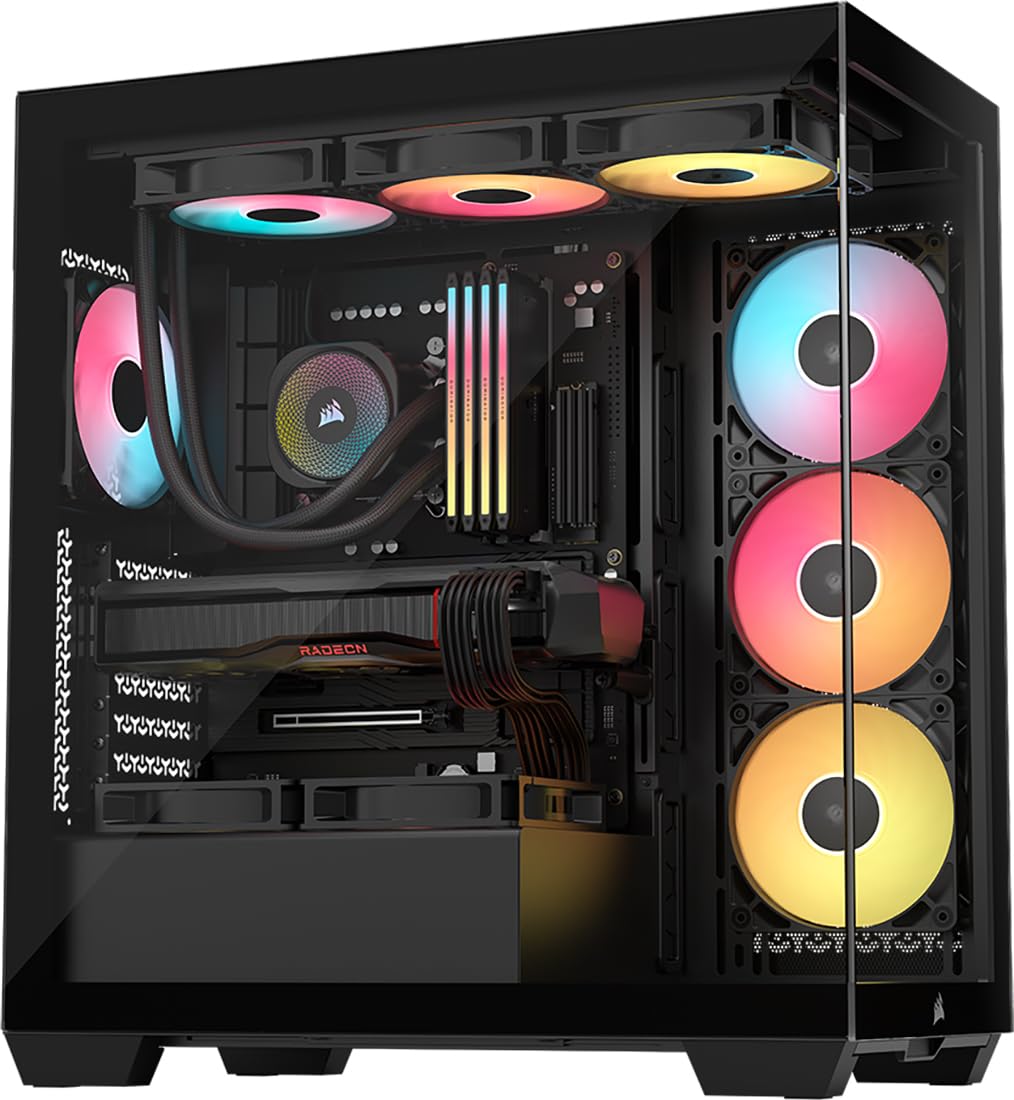
The Corsair 3500X RS ARGB wraps the front and side in continuous tempered glass, creating a panorama view of your components similar to the NZXT H9 Flow but at a lower entry price. It includes three RS120-R ARGB fans pre-installed on the front intake, and the roof and PSU shroud support up to ten 120mm total fans for serious cooling flexibility.
This case is validated for reverse-connection motherboards like ASUS BTF and MSI Project Zero, which hide all cable connectors on the back side of the board for a completely wire-free front look. Removable front and side glass panels make building and upgrades easy — no screws needed, just lift the panels off their mounting points.
Cooling performance is strong thanks to the mesh side intake path on the right side panel, which allows front fans to draw in fresh air despite the glass front. The interior is spacious enough for large CPU coolers and high-end GPUs. Some users note that the pre-installed fans are 3-pin DC rather than PWM, but the overall build quality and visual appeal justify the price point.
Why it’s great
- Wraparound tempered glass panels provide excellent component visibility
- Ready for reverse-connection motherboards (ASUS BTF, MSI Project Zero)
- Removable glass panels without tools for easy building
Good to know
- Pre-installed fans are 3-pin DC, not PWM
- Glass front panel may limit airflow compared to full mesh designs
7. Montech XR-B

The Montech XR-B delivers surprising value with dual tempered glass panels, a wood-grain design I/O interface, and three pre-installed 120mm ARGB PWM fans — two of which are reverse-blade side intakes that hide the fan hub for a cleaner aesthetic. Despite the low entry price, it supports a 360mm radiator on the top and fits high-end 40-series GPUs without issue.
Build quality is above expectations for the price range. The steel frame feels solid, and the rubber grommets on cable management holes prevent wire damage. The included fans are daisy-chained for simple wiring and spin at up to 1500 RPM, providing stable airflow even under load. Dust filters cover the top, bottom, and side panels, which is uncommon at this price tier.
The case interior is roomy enough for a three-fan GPU and a large tower air cooler. The wood-grain I/O panel on the front top edge adds a unique design touch that stands out from the usual all-black or all-glass cases. Some users report that the tempered glass can arrive with light scratches or fingerprints, but the overall construction and included accessories (zip ties, screws, GPU mounts) make this a compelling budget choice.
Why it’s great
- Includes three ARGB PWM fans with reverse-blade side intakes
- Unique wood-grain I/O panel for distinct aesthetics
- Dust filters on top, bottom, and side panels for easy cleaning
Good to know
- Tempered glass may arrive with minor scratches
- Side glass panel is push-in style, not hinged
FAQ
What is the best fan configuration for airflow in a mid-tower case?
Will a 360mm radiator fit in most ATX mid-tower cases?
How much GPU clearance do I need for a modern high-end graphics card?
Final Thoughts: The Verdict
For most users, the best cool pc cases winner is the Lian Li LANCOOL 216 because its dual 160mm fans provide quiet, high-volume airflow right out of the box, and the adjustable motherboard tray offers flexibility that few cases match. If you want a dual-chamber panoramic design for maximum component visibility, grab the NZXT H9 Flow. And for an out-of-box fan-packed value that needs no upgrades, nothing beats the Geometric Future M5.

Mo Maruf
I created WellFizz to bridge the gap between vague wellness advice and actionable solutions. My mission is simple: to decode the research and give you practical tools you can actually use.
Beyond the data, I am a passionate traveler. I believe that stepping away from the screen to explore new environments is essential for mental clarity and physical vitality.