Our readers keep the lights on and my smoothie glass nicely filled. As an Amazon Associate, I earn from qualifying purchases.
Hybrid meetings live or die on two factors: the remote participant feeling present, and the in-room team not shouting at a laptop. A single webcam on a monitor edge fills neither role—it misses half the table, flattens voices, and creates a focal point that excludes everyone outside its narrow lens. The right camera system changes that dynamic, turning a scattered table of faces into a single, engaged frame where every speaker is seen and heard without effort.
I’m Mohammad Maruf — the founder and writer behind WellFizz. For this guide, I’ve dissected the technical specifications, real customer experiences, and room-size compatibility data across nine conference cameras to identify which models actually solve the physical realities of group video calls.
The right system depends on room size, participant count, and whether you need automatic speaker tracking or a fixed wide view. This guide breaks down the best conference room webcam options to match your meeting space and budget.
How To Choose The Best Conference Room Webcam
Conference room webcams fall into three physical architectures: fixed wide-angle bars (all-in-one units with a single lens), PTZ cameras (pan-tilt-zoom with motorized articulation), and 360° spherical units. Each maps to a specific room shape and meeting style. A fixed 120° bar works wonders in a huddle room with four people around a small table but fails in a long conference table where half the participants sit at the edges. A PTZ camera excels in larger rooms where the active speaker changes predictably, but its motor noise and delay can feel intrusive in fast-moving stand-ups. The 360° camera creates a complete wrap-around view, but the de-warped image often shows participants at odd angles and can feel disorienting to remote viewers. The decision starts with your room’s physical layout.
Microphone range and beamforming
A camera with 4K video is wasted if voices from the end of the table arrive muddy. The microphone system—specifically its pickup radius and beamforming technology—determines whether everyone is heard clearly. Consumer-grade cameras typically pick up clear audio within 3–4 meters. Premium business-grade all-in-ones (like the Logitech MeetUp) reliably capture voices up to 4 meters, and can extend with an expansion mic. The top-tier 360° units (Meeting Owl 3 and 4+) reach 5.5 meters, which covers medium rooms but still requires careful placement. If your table is longer than 5 meters, look for a system that supports daisy-chaining a second unit or an expansion microphone. Avoid any camera that lists pickup range without specifying the distance; vague claims like “room-filling audio” are not specs.
Auto framing and speaker tracking
AI-driven auto framing and speaker tracking are the most impactful upgrades over a static camera. In a fixed-frame system, remote participants see the entire room, and the active speaker may be a tiny face at the edge. Speaker tracking solves this by dynamically zooming and panning to center the person talking. Real-world performance varies dramatically: some systems track smoothly with a 1–2 second lag, while others produce abrupt jumps that cause motion sickness. Physical PTZ cameras like the Insta360 Link 2 Pro and TONGVEO offer motorized pan/tilt that feels more natural than digital crop-based tracking, but they introduce audible motor noise in quiet rooms. Software-based tracking (found in the WYRESTORM and Owl series) requires no moving parts and operates silently but can be confused by multiple people speaking over each other. Test the tracking speed and smoothness in your room’s lighting before committing.
Connectivity and platform compatibility
Not all conference cameras play equally with every platform. While most modern units support USB plug-and-play for Zoom, Teams, and Google Meet, there are important edge cases. The Insta360 Link 2 Pro explicitly does NOT support ARM-based Windows systems or Windows Hello Face Recognition, making it a poor choice for Surface Pro users. The TONGVEO offers HDMI output in addition to USB, which matters if you’re feeding a dedicated video switcher or streaming to a church’s production system. The NexiGo Meeting 360 Ultra goes further with a built-in operating system and App Store, eliminating the need for a connected computer entirely—ideal for fully managed conference rooms. Verify that your specific conferencing software (especially if you use Cisco Webex, BlueJeans, or proprietary platforms) officially lists each model in its compatibility matrix. “Works with most platforms” is not the same as “certified for.”
Quick Comparison
On smaller screens, swipe sideways to see the full table.
| Model | Category | Best For | Key Spec | Amazon |
|---|---|---|---|---|
| Insta360 Link 2 Pro | PTZ + AI | Desk & small rooms, streaming | 1/1.3″ sensor, 4K, AI tracking | Amazon |
| Bose Professional VB-S | All-in-one | Small rooms & home office | 4K, 4 beamforming mics, Bluetooth | Amazon |
| TONGVEO PTZ (20X) | PTZ Zoom | Large rooms, church streaming | 20X optical zoom, 1080p60, HDMI | Amazon |
| WYRESTORM 4K AI | All-in-one + AI | Medium to large rooms | 120° FOV, 4-mic array, 5X zoom | Amazon |
| Tenveo VLoop VL20H | PTZ Pro | Professional integration | 20X optical zoom, USB 3.0/HDMI | Amazon |
| Logitech MeetUp | All-in-one | Huddle & small rooms | 120° FOV, 4K, beamforming mics | Amazon |
| Meeting Owl 3 | 360° | Small–medium hybrid rooms | 360° video, 18-ft mic pickup | Amazon |
| NexiGo Meeting 360 Ultra | 360° + AI | Large rooms, long tables | 8K capture, built-in OS, AI tracking | Amazon |
| Meeting Owl 4+ | 360° 4K | Large enterprise rooms | 4K 360°, 360° audio, PoE | Amazon |
In‑Depth Reviews
1. Insta360 Link 2 Pro

The Insta360 Link 2 Pro uses a large 1/1.3” sensor that delivers noticeably cleaner video in low light compared to typical 1/2.8” sensor webcams, and its 4K resolution at up to 60fps ensures smooth motion during presentations. AI tracking physically pans and tilts the camera head to follow your movements, which feels more natural than digital cropping. The dual-microphone beamforming system isolates voices effectively in a busy office environment.
Integration with Elgato Stream Deck and gesture controls makes this a flexible choice for content creators who also run meetings. The magnetic mount provides a clean desktop setup, and the included USB-C to USB-A adapter ensures backward compatibility. It supports Zoom, Teams, Twitch, and other platforms natively without driver downloads.
One limitation: the Link 2 Pro does not support ARM-based Windows systems or Windows Hello Face Recognition, which rules it out for Surface Pro users. The motorized PTZ is quiet but not silent—in a dead-quiet room, the tracking movement is audible. The AI tracking works best when the subject is the only person in frame; group auto-framing is less reliable than dedicated all-in-one solutions.
Why it’s great
- Excellent low-light performance with large sensor
- Physical PTZ tracking keeps subject centered smoothly
- Natural bokeh effect for a polished look
- Stream Deck integration for power users
Good to know
- Not compatible with ARM-based Windows devices
- Motor noise audible in quiet rooms during PTZ movement
- Group tracking less effective than single-person tracking
2. Bose Professional VB-S

The Bose Professional VB-S is an all-in-one videobar that combines a 4K camera with 5x digital zoom and a beamforming 4-mic array that focuses on voices while rejecting ambient noise. Its Bluetooth capability sets it apart—you can stream music or phone calls through its hi-fi speaker when the camera is idle, making it a dual-purpose device for small offices that double as break rooms. The digital PTZ functionality includes two auto-framing modes controllable via the included IR remote.
The build quality is typical Bose: a sturdy, low-profile aluminum housing that fits on a credenza or mounts to a wall using the included kit. Setup is genuinely plug-and-play—Windows and macOS detect it as both a camera and a speakerphone without driver installation. The image quality at 4K is sharp, though the 5x digital zoom introduces noticeable artifacts when fully extended.
For rooms larger than 10 feet deep, the fixed wide-angle lens (digital PTZ only) struggles to fill the frame with participants seated at the far end. The beamforming mics are excellent at isolating speech in a 8×10-foot space but drop off noticeably past 12 feet. The absence of a physical privacy shutter is a minor oversight for security-conscious buyers.
Why it’s great
- Best audio quality in its class with effective beamforming
- Bluetooth streaming for music and calls when not in meetings
- Compact, elegant design with wall-mount option
- Reliable plug-and-play compatibility across major platforms
Good to know
- Digital zoom limits image quality at maximum extension
- Microphone range drops significantly beyond 12 feet
- No physical privacy shutter included
3. TONGVEO Conference Room PTZ Camera System
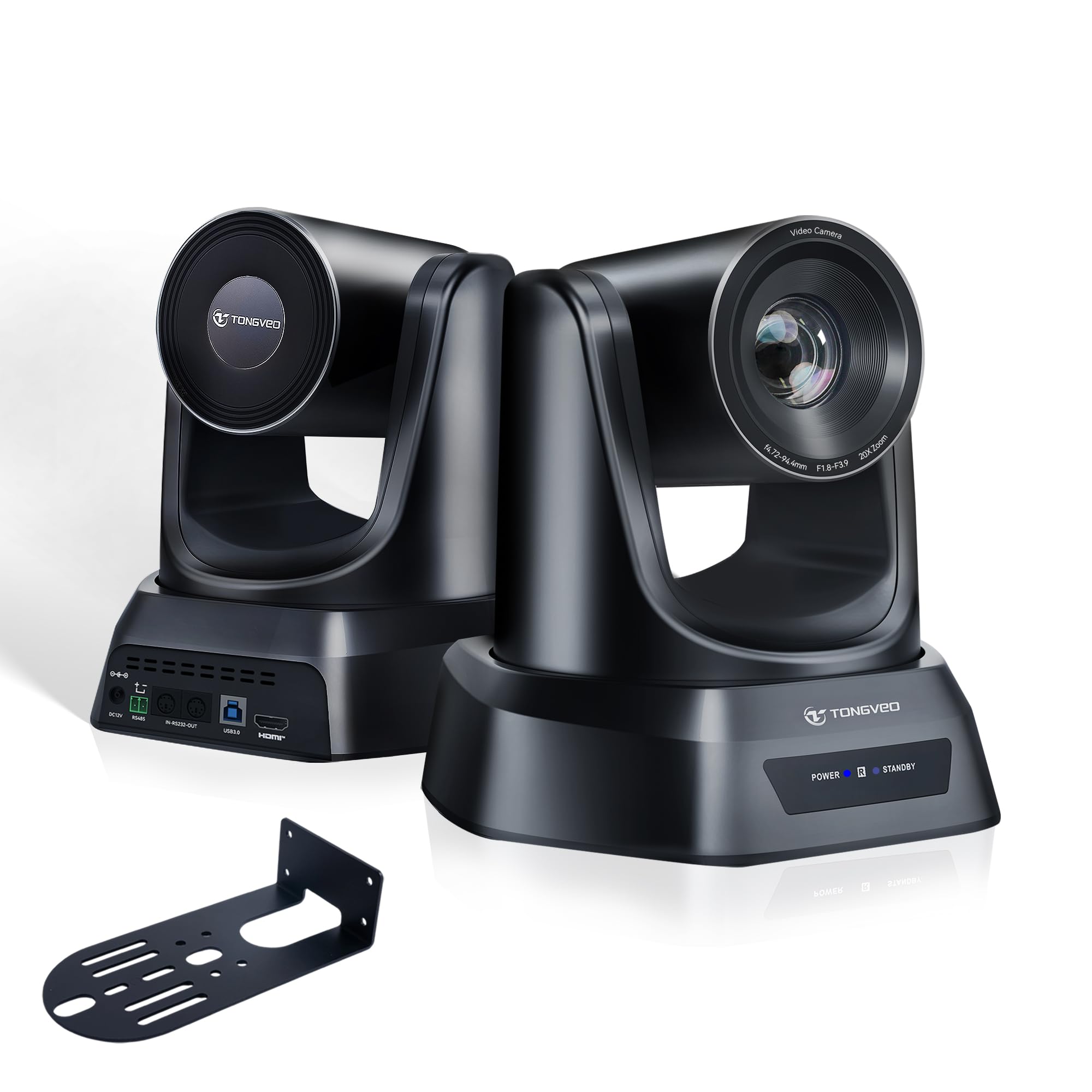
The TONGVEO PTZ camera delivers professional-level 20X optical zoom at 1080p 60fps, making it the go-to option for large rooms, lecture halls, and church streaming where subjects may be 40 to 60 feet from the lens. The 1/2.8” CMOS sensor provides reliable color accuracy and stable brightness, and the AI auto tracking supports both single-person and multi-person framing modes. The motorized PTZ base offers 350° pan and 180° tilt with 255 programmable presets, all recallable via the included IR remote.
Connectivity is versatile: HDMI and USB 3.0 outputs allow direct connection to a production switcher or a laptop, and the camera works with OBS, vMix, Zoom, and Teams without driver installation. The built-in wall bracket and screws simplify ceiling or wall mounting, and the 9.8-foot USB cable provides reasonable placement flexibility. Customers report that the auto lighting and auto focus features require some manual fine-tuning to avoid blown-out highlights or focus hunting.
The biggest reliability concern: several users report the camera freezing after extended use, though TONGVEO’s customer service provided prompt replacements in those cases. The included USB 2.0 cable (not USB 3.0) limits bandwidth and may cause compatibility issues with high-bitrate streaming. The camera lacks built-in audio, so an external microphone is mandatory for conferencing.
Why it’s great
- True 20X optical zoom preserves detail at long distances
- HDMI + USB outputs for professional AV integration
- 255 presets for quick angle switching in large rooms
- AI tracking handles single and multi-person framing
Good to know
- No built-in microphone—requires external audio
- Included USB cable is 2.0 only; upgrade recommended
- Occasional freezing reported; firmware updates may help
4. WYRESTORM 4K Conference Camera System
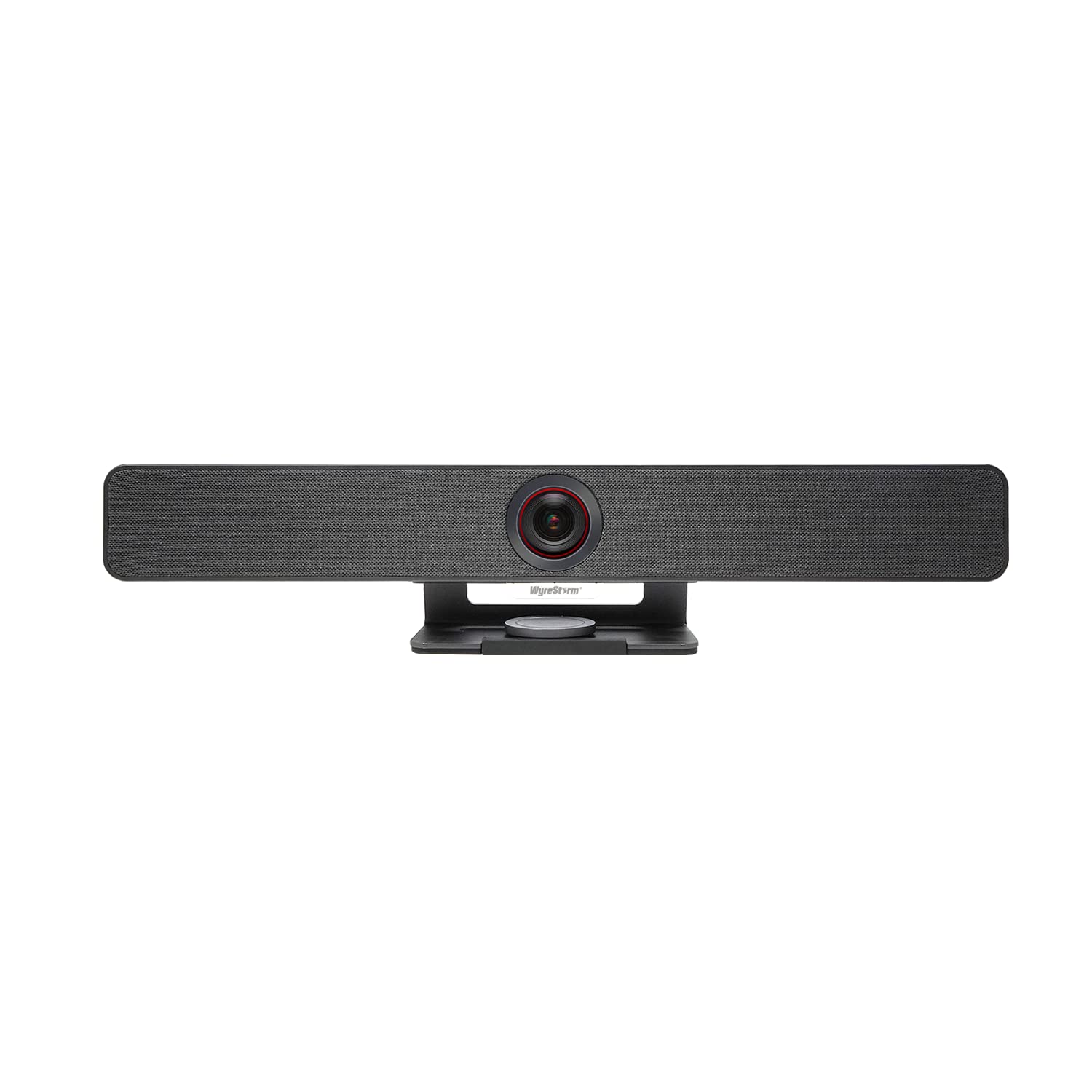
The WYRESTORM system targets the sweet spot between a basic all-in-one bar and a professional PTZ setup, offering a 120° wide-angle 4K camera with AI auto framing and speaker tracking for medium to large rooms. The camera automatically detects participants and adjusts the frame in real time, and its presenter tracking mode follows the active speaker during presentations. The 4-mic array with noise reduction delivers clear voice pickup across a 15×30-foot office space in real-world tests.
Build quality feels solid for the price point, with a magnetic privacy cover and included wall-mount bracket. The companion app allows color and exposure fine-tuning, and customers report the AI tracking transitions are smooth without the jarring jumps common in cheaper alternatives. It operates as a plug-and-play UVC device compatible with Teams, Zoom, and Google Meet without drivers.
A significant firmware caution: updating the camera from a non-admin user account can soft-brick the device, requiring a full reinstall from an admin-level machine. The image color profile leans cool-toned, which may require manual adjustment for natural skin tones. The 5X zoom is digital only, so zoomed-in footage shows reduced clarity compared to optical zoom alternatives.
Why it’s great
- Wide 120° FOV captures entire table effectively
- AI auto framing tracks movement naturally
- Good low-light performance with minimal noise
- Includes magnetic privacy cover for security
Good to know
- Firmware update process can brick device if done wrong
- Cool color temperature requires manual adjustment
- Digital zoom only; optical zoom not available
5. Tenveo VLoop VL20H

The Tenveo VLoop VL20H is a Red Dot Design winner that prioritizes professional-grade PTZ control and broadcast-quality optics. Its 1/2.8″ CMOS sensor delivers 1080p at 60fps with 20X optical zoom, and the wide 60° horizontal field of view covers typical meeting spaces without the distortion of ultra-wide lenses. Connectivity includes USB 3.0, HDMI, RS485, and RS232 interfaces, enabling seamless integration into existing AV systems, production switchers, and control panels.
The platinum silver housing and minimalist design look appropriate in executive boardrooms, and the included wall mount, screws, and IR remote provide out-of-box mounting flexibility. The camera supports desktop, monitor, tripod, wall, and ceiling mounting. It works with Zoom, Skype for Business, Teams, WebEx, and other conferencing platforms via USB plug-and-play, or as a standalone HDMI camera in production workflows.
Critical omission: The VL20H has NO built-in microphones and NO AI tracking. If you need in-camera audio or automatic speaker following, this is not the right unit. Some users report erratic PTZ control when used through OBS plugins—the camera may jump or skip positions—though the standalone PTZ Optics software works reliably. The camera is designed for indoor fixed installation only.
Why it’s great
- True 20X optical zoom at 1080p 60fps with no quality loss
- Professional RS485/RS232 control for AV integration
- Multiple interface options (USB 3.0, HDMI)
- Compact design wins Red Dot Award
Good to know
- No built-in microphone or audio input
- No AI tracking—manual PTZ only
- PTZ control can be unreliable via OBS plugins
6. Logitech MeetUp

The Logitech MeetUp remains a benchmark for huddle and small conference rooms, combining a 120° field-of-view 4K sensor with motorized pan/tilt that expands coverage to 170° when needed. The beamforming microphone array captures voices up to 4 meters away, extendable to 5 meters with the optional Expansion Mic. The all-in-one form factor integrates camera, speakers, and microphones into a single unit that mounts to a wall, credenza, or TV via the Logitech TV Mount accessory.
Image quality at 4K is excellent with minimal wide-angle distortion, and the 5x HD zoom holds up well for medium shots. The included RF remote controls volume, zoom, and preset positions. Integration with Logitech Sync allows IT admins to remotely monitor and update devices across multiple rooms. It works with Teams, Zoom, Google Meet, Cisco Webex, and BlueJeans out of the box.
The MeetUp is designed for 5–7 person rooms—in larger rooms, the digital zoom degrades image quality, and the microphone struggles to pick up voices beyond 4 meters. The 4K sensor is excellent for video quality, but it uses digital zoom, not optical, so zooming in significantly past 5X introduces pixelation. Some users report that the extreme wide-angle lens distorts whiteboard content at the edges.
Why it’s great
- Excellent 4K video with minimal wide-angle distortion
- Beamforming mics capture clear audio up to 4 meters
- Motorized pan/tilt extends FOV to 170°
- Scalable with Expansion Mic and Logitech RoomMate
Good to know
- Digital zoom degrades image quality at 5X+
- Designed for small rooms (5–7 people) only
- Expansion microphone sold separately
7. Owl Labs Meeting Owl 3

The Meeting Owl 3 is the most popular 360° conference camera for a reason: it creates an immersive hybrid meeting experience where remote participants see a panoramic view of the table and the system automatically highlights the active speaker. The 1080p HD video output is de-warped by the Owl Intelligence System software, which uses visual and audio cues to detect who is speaking and zoom in on them. The 360° audio pickup extends up to 18 feet (5.5 meters), covering most medium conference rooms.
Setup takes roughly 6 minutes from unboxing to first meeting, using the included USB-C cable. IT admins can manage fleets of Owls through The Nest management portal. The device supports daisy-chaining—pair two Meeting Owl 3 units or add an Expansion Mic to cover larger rooms. It’s certified for Microsoft Teams and works with Zoom, Google Meet, Cisco Webex, and GoToMeeting.
The primary compromise: 1080p video resolution limits clarity when viewed on large room displays (65 inches or bigger), and the price sits above most 4K competitors. The speaker tracking lag (approximately 1–2 seconds) can feel slow during fast-paced meetings. The device requires a stable USB connection and can be sensitive to cable quality; users report occasional disconnections with lower-quality USB cables.
Why it’s great
- True 360° video creates equitable hybrid experience
- Voice tracking handles multiple speakers effectively
- 18-foot microphone pickup covers medium rooms
- Daisy-chainable for larger space coverage
Good to know
- 1080p resolution limited for large-screen viewing
- Speaker tracking has 1–2 second lag
- USB cable quality affects connection stability
8. NexiGo Meeting 360 Ultra (Gen 3)

The NexiGo Meeting 360 Ultra pushes the 360° category further with dual 195-degree lenses that capture 8K resolution, though it outputs 1080p for streaming. The built-in Android operating system is the standout feature: it runs conferencing apps (Zoom, Teams, Google Meet) directly without needing a connected PC, making it ideal for meeting rooms without a dedicated computer. The camera supports multi-camera setups—you can integrate up to four NexiGo units for very large or oddly shaped rooms.
Eight omnidirectional microphones pick up audio from up to 18 feet, with echo cancellation and noise filtering. The integrated hi-fi speakers deliver clear bidirectional sound. AI-powered auto framing recognizes active speakers and provides focused shots, while the privacy cover adds security when the camera is idle. Setup options include connection via PC, TV, or internet router, offering flexibility for IT teams.
The internal operating system, while convenient, adds complexity—users report occasional app crashes and slower boot times compared to dedicated hardware. The AI auto framing, while functional, can be confused by rapid movement or multiple simultaneous speakers. The unit is heavy and requires a stable surface; the included stand may not be sufficient for all table configurations. Some users note that the built-in mic quality is good for conferencing but not exceptional for premium audio fidelity.
Why it’s great
- Built-in OS eliminates need for external computer
- 8K capture for future-proofing and versatile framing
- Multi-camera support for large or custom room layouts
- 360° audio pickup with noise reduction
Good to know
- Built-in OS can be buggy and slower than dedicated hardware
- Heavy unit requires stable mounting surface
- AI framing struggles with rapid movement
9. Owl Labs Meeting Owl 4+

The Meeting Owl 4+ is the enterprise-grade evolution of the Owl Labs ecosystem, upgrading the video resolution to 4K while maintaining the same 360° audio and video approach that made the Owl 3 popular. The camera output is significantly sharper on large screens, and the 360° audio pickup still extends 18 feet. The Owl Intelligence System now includes improved visual and audio cue processing, resulting in faster and more accurate speaker tracking compared to the Owl 3.
Enterprise features include WiFi connectivity for wireless management, a built-in Kensington lock slot, and Power over Ethernet (PoE) support via an adapter—critical for IT departments that want to avoid running separate power cables to every meeting room. The device is certified for Microsoft Teams and supports Zoom, Google Meet, Cisco Webex, and GoToMeeting. The included USB-C cable supports SuperSpeed data transfer for reliable 4K output.
The largest drawback is the price: the Owl 4+ sits at the premium end of the market. The 4K video is a meaningful upgrade over the Owl 3, but in very large rooms, the 360° de-warped view can still feel compressed. The speaker tracking lag is reduced but still present, especially when switching between speakers across the table. For rooms with more than 12 people in a full-circle layout, you may need to pair two units or add an Expansion Mic for complete coverage.
Why it’s great
- 4K 360° video provides sharp image on large displays
- PoE support simplifies IT deployment
- Enterprise WiFi and Kensington lock for security
- Improved tracking speed over Owl 3
Good to know
- Higher price point requires budget justification
- Speaker tracking lag still present between fast switches
- Large rooms may require dual unit setup
FAQ
Can I use a consumer webcam in a conference room?
What is the difference between AI tracking and auto framing?
How do I mount a conference webcam in a glass-walled room?
Do I need a dedicated PC for a conference room webcam?
Final Thoughts: The Verdict
For most teams, the best conference room webcam winner is the Insta360 Link 2 Pro because it delivers superior low-light 4K video and reliable physical PTZ tracking at a mid-range price. If you need true 360° coverage for hybrid roundtable meetings, grab the Meeting Owl 3 for its proven ecosystem and 18-foot mic pickup. And for large lecture-style rooms or streaming where you need uncompromised long-range detail, nothing beats the TONGVEO PTZ Camera System with its 20X optical zoom and professional AV connectivity.

Mo Maruf
I created WellFizz to bridge the gap between vague wellness advice and actionable solutions. My mission is simple: to decode the research and give you practical tools you can actually use.
Beyond the data, I am a passionate traveler. I believe that stepping away from the screen to explore new environments is essential for mental clarity and physical vitality.