Our readers keep the lights on and my smoothie glass nicely filled. As an Amazon Associate, I earn from qualifying purchases.
The gap between a good round and a great one often comes down to a single keystroke. A gaming keyboard that registers your input exactly when you need it, with the right tactile feedback, transforms reaction time into a tangible advantage. The difference lies not in branding, but in the specific switch technology and build quality beneath your fingertips.
I’m Mohammad Maruf — the founder and writer behind WellFizz. I spend countless hours analyzing switch actuation points, polling rates, chassis materials, and customer feedback to find which keyboards actually deliver on their performance promises for competitive play.
Whether you prioritize lightning-fast magnetic actuation or a creamy, thocky typing experience, the right computer keyboard for gaming depends on matching switch type, form factor, and build quality to your specific play style and desk setup.
How To Choose The Best Computer Keyboard For Gaming
Selecting a gaming keyboard goes beyond picking a flashy RGB pattern. The right choice hinges on understanding switch behavior, form factor ergonomics, and how these elements interact with the specific genres you play most.
Switch Type Dictates Your Feel and Speed
Membrane switches offer a cushioned, quieter press at a lower cost, but lack the precision and responsiveness required for competitive play. Mechanical switches provide distinct tactile or linear feedback with faster actuation. Hall Effect magnetic switches represent the current frontier, allowing per-key adjustable actuation from 0.4mm to 3.6mm — letting you configure hair-trigger sensitivity for rapid-fire actions or deeper presses to avoid accidental inputs.
Form Factor and Desk Real Estate
Full-size keyboards (104 keys) include a numpad, which eats up mouse room during low-sensitivity aiming. Tenkeyless (TKL) and 75% layouts remove the numpad, freeing desk space for sweeping mouse movements. Compact 60% boards strip function row and arrow keys, maximizing portability but requiring function-layer memorization. If you frequently use Hotkey combinations or media controls, a TKL or 75% layout with dedicated keys strikes the best balance for gaming and daily use.
Quick Comparison
On smaller screens, swipe sideways to see the full table.
| Model | Category | Best For | Key Spec | Amazon |
|---|---|---|---|---|
| Corsair K70 PRO TKL | Hall Effect | Competitive FPS with adjustable actuation | 0.4mm-3.6mm per-key actuation | Amazon |
| SteelSeries Apex Pro TKL Gen 3 | Hall Effect | Esports with Rapid Trigger and Protection Mode | OmniPoint 3.0 / 0.1-4.0mm actuation | Amazon |
| GravaStar Mercury K1 Pro | Mechanical Wireless | Premium build and wireless freedom | 8000mAh battery / 75% layout | Amazon |
| SteelSeries Apex 7 | Mechanical | OLED display with media controls | Blue Clicky switches / OLED screen | Amazon |
| RK ROYAL KLUDGE R98 Pro | Mechanical | Creamy typing feel out of the box | Gasket mount / Pre-lubed Cream switches | Amazon |
| HyperX Alloy Origins 60 | Mechanical Compact | Ultra-portable 60% with aluminum frame | Aircraft-grade aluminum / 80M keystrokes | Amazon |
| Corsair K55 CORE | Membrane | Budget-friendly entry with spill resistance | Quiet membrane / 300ml spill resistance | Amazon |
In‑Depth Reviews
1. Corsair K70 PRO TKL RGB

The Corsair K70 PRO TKL uses pre-lubed Hall Effect MGX Hyperdrive magnetic switches, allowing per-key actuation adjustment from 0.4mm to 3.6mm in 0.1mm steps. Rapid Trigger dynamically changes the reset point so you can repeat keypresses faster without fully releasing the key — a clear advantage in rapid-tap scenarios found in Valorant or Fortnite. The dual-rail switch design reduces wobble and is rated for 150 million keystrokes, indicating exceptional durability.
The tenkeyless layout frees significant mouse space while retaining dedicated media keys and a volume roller. The aluminum chassis provides a sturdy, premium feel at 2.13 pounds, resisting flex during intense gameplay. iCUE software offers deep customization but has a steeper learning curve and occasional bugs reported by users, particularly with lighting profiles and game mode settings during setup.
SOCD (Simultaneous Opposing Cardinal Directions) and Flash Tap features give competitive players additional movement advantages in shooters where counter-strafing matters. ABS double-shot keycaps hold up well but may develop shine over time compared to PBT alternatives. If you want granular control over every aspect of key response and prioritize a compact, rock-solid build, this is the performance benchmark at its tier.
Why it’s great
- Per-key adjustable actuation from 0.4mm to 3.6mm
- Rapid Trigger and SOCD for competitive edge
- Sturdy aluminum chassis with TKL space savings
Good to know
- iCUE software can be buggy during initial setup
- Volume knob placement overlaps with navigation keys
- ABS keycaps may wear faster than PBT
2. SteelSeries Apex Pro TKL Gen 3

SteelSeries claims 20x faster actuation and 11x quicker response time with Gen 3 OmniPoint Hall Effect switches compared to standard mechanical switches. The adjustable actuation range spans 0.1mm to 4.0mm across 40 levels, giving you hair-trigger precision for FPS games or deeper actuation to prevent accidental presses during typing. Rapid Trigger and Rapid Tap work together to reduce latency on repeated and alternating keypresses, which directly improves strafing speed and aim correction.
Protection Mode is a standout exclusive feature: it reduces the sensitivity of surrounding keys when you press the intended key, effectively eliminating accidental inputs during fast movements. The OLED Smart Display lets you adjust settings, view game stats, or display custom GIFs without alt-tabbing out of your game. The TKL form factor includes a comfortable magnetic wrist rest, and PBT keycaps resist shine longer than standard ABS.
User feedback highlights exceptional build quality with a heavy, non-slip base and smooth, satisfying key feel despite being magnetic switches rather than mechanical. The SteelSeries GG software is described as superior to competitors in reliability, though some users note the customization depth requires exploration. For esports-focused players who want every millisecond advantage, this keyboard delivers the fastest response architecture currently available.
Why it’s great
- World’s fastest actuation with OmniPoint 3.0 switches
- Protection Mode prevents accidental key presses
- OLED display for on-the-fly adjustments
Good to know
- Premium pricing places it at the high end
- Plastic enclosure feels less premium than aluminum alternatives
- Software learning curve for advanced features
3. GravaStar Mercury K1 Pro
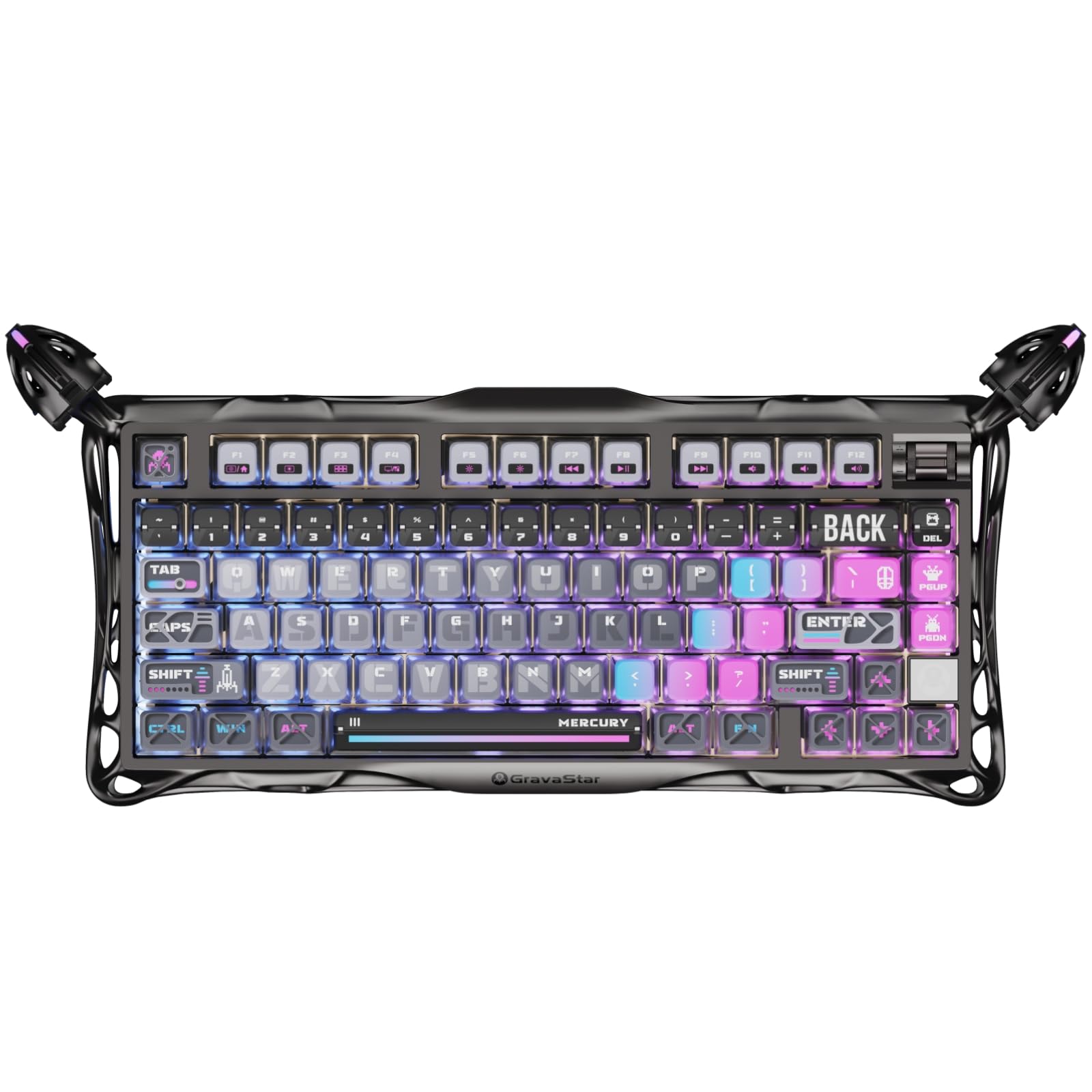
The GravaStar Mercury K1 Pro stands out with its cyberpunk-inspired electroplated glossy frame and skeletal aluminum alloy build. Inside, custom Kailh Speedy Mint linear switches deliver 45gf actuation force with 1.2mm pre-travel, providing ultra-responsive keystrokes that feel smooth without requiring manual lubing. The gasket-mounted FR4 plate combined with five layers of sound-dampening foam produces a deep, thocky sound signature that mechanical keyboard enthusiasts actively seek.
An 8000mAh battery powers tri-mode connectivity — wired, Bluetooth, and 2.4GHz wireless — allowing weeks of continuous use without recharging. The 75% layout with 79 keys saves desk space while retaining navigation keys and a programmable control knob. Dual independent RGB lighting systems with south-facing LEDs and pudding PBT keycaps deliver vibrant illumination with minimal keycap shine-through interference.
Users praise the build quality as premium and heavy, with a satisfying typing feel that rivals custom-built boards. The compact layout requires a brief adjustment period due to unconventional key placement near the Enter key. Wireless performance on 2.4GHz is reported as flawless with no perceptible latency. If aesthetic uniqueness and a creamy sound profile matter as much as raw gaming performance, this keyboard delivers both without compromise.
Why it’s great
- Massive 8000mAh battery for wireless longevity
- Gasket-mounted design with thocky sound profile
- Unique electroplated design with aluminum frame
Good to know
- Compact layout has a learning curve for navigation keys
- South-facing RGB reduces legend visibility in dark rooms
- Linear switches lack tactile feedback for some typists
4. SteelSeries Apex 7

The SteelSeries Apex 7 integrates a dedicated OLED Smart Display that shows game information, Discord messages, Spotify tracks, and system settings without overlaying your screen. The Blue clicky switches provide distinct tactile feedback with an audible click, ideal for gamers who prefer confirming each keystroke through sound and feel. The aircraft-grade aluminum alloy frame gives it a sturdy, durable foundation that resists flex during heavy use.
Per-key RGB illumination with 16.8 million colors offers extensive customization through SteelSeries Engine software, which reliably syncs with popular games and Discord. A dedicated volume scroll wheel and media controls provide convenient access without function layers. The full-size layout includes a USB passthrough port for connecting a mouse or headset directly through the keyboard, reducing cable clutter.
The magnetic wrist rest provides palm support but lacks plush padding, and its rubberized surface attracts fingerprints and dust over time. The non-braided cable feels less premium compared to other keyboards in its price bracket. Users consistently praise the OLED screen’s utility and the satisfying click of the Blue switches, though the clicky noise may be disruptive in shared spaces. If you value a full-size layout with unique display functionality, this remains a compelling choice.
Why it’s great
- OLED Smart Display for in-game and system info
- Tactile Blue switches with distinct click feedback
- Aircraft-grade aluminum frame for durability
Good to know
- Clicky switches are loud for shared environments
- Wrist rest lacks padding and attracts fingerprints
- Thick non-braided cable feels dated
5. RK ROYAL KLUDGE R98 Pro

The RK ROYAL KLUDGE R98 Pro delivers an enthusiast-grade typing experience at a mid-range price point. Its gasket-mounted design with five layers of sound-dampening foam produces a creamy, thocky sound that rivals custom keyboards costing significantly more. Pre-lubed linear Cream switches offer smooth keystrokes straight out of the box, eliminating the need for manual modification that many hobbyists perform.
The 96% layout retains a numpad and arrow keys while occupying less desk width than a full-size board. MDA profile PBT keycaps fit fingers naturally with a matte surface that resists shine and fading over time. Hot-swappable switch sockets support both 3-pin and 5-pin switches, allowing you to experiment with different switch types without soldering. A detachable aluminum volume knob provides tactile rotary control.
RK’s online driver supports macro programming, key remapping, and RGB customization. RGB lighting is described as vibrant but the south-facing LEDs mean keycap legends are less illuminated than north-facing designs. Users report that the keyboard sounds excellent without any modifications, and the build quality feels weighty and solid. If you want a creamy sound signature and hot-swap flexibility without the premium price tag, this is an outstanding option.
Why it’s great
- Gasket mount with five foam layers for creamy sound
- Pre-lubed Cream switches smooth out of the box
- Hot-swappable with 3/5-pin switch compatibility
Good to know
- South-facing LEDs reduce legend brightness
- Backlight dimmer than some competitors
- Online driver required for macro customization
6. HyperX Alloy Origins 60

The HyperX Alloy Origins 60 packs a full aircraft-grade aluminum body into a supremely compact 60% layout, leaving maximum mouse space for low-sensitivity aimers. Custom HyperX Red linear switches are rated for 80 million keystrokes and feature exposed LEDs for exceptionally bright, true-to-color RGB illumination. Double-shot PBT keycaps resist wear, and secondary functions are printed on the keycap sides for quick reference without cluttering the top face.
Three adjustable tilt angles and a detachable USB-C cable make this keyboard highly portable for LAN events or travel. A keycap puller and additional Esc key with alternate spacebar design are included for personalization. The NGENUITY software supports per-key lighting, macro creation, and Game Mode customization, though users consistently report software instability and crashes that erase custom profiles.
The compact layout requires memorizing function layers for arrow keys and media controls, which may frustrate users transitioning from full-size boards. Stabilizers are known to have excessive lateral play and rattle, though a tape mod can mitigate this. If you need the smallest possible footprint with a rock-solid metal chassis and the brightest RGB on the market, the Alloy Origins 60 delivers — just plan to use the software once and uninstall it.
Why it’s great
- Full aluminum frame in a ultra-compact 60% layout
- Extremely bright RGB with exposed LEDs
- Detachable USB-C for easy portability
Good to know
- NGENUITY software is buggy and crashes frequently
- Stabilizers have lateral play and rattle stock
- No dedicated arrow keys, requires function layer
7. Corsair K55 CORE RGB

The Corsair K55 CORE RGB offers an entry point into gaming keyboards with quiet membrane switches and 300ml spill resistance. Twelve-key rollover with a 1,000Hz polling rate ensures basic gaming inputs register reliably, and ten-zone RGB backlighting provides customizable illumination through iCUE software. Dedicated media keys, a Win lock button, and brightness controls add convenience without requiring software.
The membrane switch feel is soft and quiet — suitable for shared living spaces where mechanical clatter would be disruptive. The full-size layout includes a numpad for productivity tasks, and the keyboard includes a detachable wrist rest. Multiple brightness levels and onboard memory allow saving settings directly to the keyboard for plug-and-play use across different computers.
Users report good durability over extended use, with no keycap wear or lighting failures after months of daily gaming. The membrane feel is noticeably different from mechanical switches — less precise, softer, and without tactile feedback. While it lacks hot-swappable switches or adjustable actuation, the spill resistance, quiet operation, and robust build make it a reliable budget option for casual gamers or those needing a quiet work-and-play keyboard.
Why it’s great
- Quiet membrane switches for noise-sensitive environments
- 300ml spill resistance adds peace of mind
- Dedicated media keys with onboard memory
Good to know
- Membrane feel is less precise than mechanical switches
- Ten-zone RGB lacks per-key customization
- No hot-swap or adjustable actuation features
FAQ
Does adjustable actuation actually improve gaming performance?
Are Hall Effect magnetic switches better than mechanical switches for gaming?
What keyboard form factor is best for first-person shooters?
Final Thoughts: The Verdict
For most users, the computer keyboard for gaming winner is the Corsair K70 PRO TKL because it combines Hall Effect precision, per-key adjustable actuation, Rapid Trigger, and a sturdy aluminum TKL chassis at a price that undercuts premium competitors. If you want the absolute fastest response architecture with Protection Mode and OLED convenience, grab the SteelSeries Apex Pro TKL Gen 3. And for a creamy typing experience with premium wireless freedom and unique design, nothing beats the GravaStar Mercury K1 Pro.

Mo Maruf
I created WellFizz to bridge the gap between vague wellness advice and actionable solutions. My mission is simple: to decode the research and give you practical tools you can actually use.
Beyond the data, I am a passionate traveler. I believe that stepping away from the screen to explore new environments is essential for mental clarity and physical vitality.