Our readers keep the lights on and my smoothie glass nicely filled. As an Amazon Associate, I earn from qualifying purchases.
The gap between a smooth gaming session and a frustrating slideshow comes down to one thing: raw hardware bandwidth. Modern AAA titles don’t just ask for more pixels—they demand higher clock speeds, faster memory, and dedicated ray-tracing cores that older systems simply can’t deliver. The right desktop or laptop handles shader compilation, background streaming, and 4K texture streaming without a single hitch, making the difference between winning and watching.
I’m Mohammad Maruf — the founder and writer behind WellFizz. I’ve spent hundreds of hours analyzing gaming PC specifications, benchmarking scores, and real-user performance data to separate genuine upgrades from marketing hype.
This guide covers desktops, laptops, and components across every performance tier so you can find the ideal computer for gaming that matches your titles, resolution targets, and upgrade path.
How To Choose The Best Computer For Gaming
Picking the right gaming machine starts with matching hardware to the games you actually play. Competitive shooters reward high refresh rates, open-world RPGs need fast storage and ample VRAM, and simulation titles thrive on CPU cache size. Understanding which specs drive your specific library prevents overspending on features you may never use and underinvesting in the ones that matter most.
GPU — The Heart of Gaming Fidelity
The graphics card determines resolution and framerate ceilings. For 1080p high-refresh, an RTX 5060-class GPU handles nearly everything at max settings. Stepping up to RTX 5070 Ti or RTX 5080 unlocks 1440p ultra-wide or 4K gaming with ray tracing enabled. VRAM also matters — 8GB suffices for today’s titles, but 12GB or 16GB offers headroom for texture-heavy mods and future releases.
CPU — Bottleneck Prevention
Modern games leverage eight-core processors, but clock speed and cache size separate the good from the great. AMD’s 3D V-Cache chips excel in simulation, strategy, and MMOs where cache-sensitive workloads dominate. Intel’s Core Ultra lineup delivers strong single-threaded performance for esports titles. If you stream or run background apps while gaming, prioritize at least eight cores and a boost clock above 4.5 GHz.
Memory and Storage
32GB of DDR5 RAM has become the sweet spot for dual-channel gaming and multitasking. Faster speeds (5600–6000 MHz) tighten load times and reduce stutter in open-world environments. A 1TB NVMe SSD is the minimum comfortable capacity given modern game install sizes — anything less forces frequent storage management. Look for PCIe Gen 4 drives with at least 5000 MB/s read speeds.
Quick Comparison
On smaller screens, swipe sideways to see the full table.
| Model | Category | Best For | Key Spec | Amazon |
|---|---|---|---|---|
| Skytech Gaming King 95 | Desktop | 4K Ultra / VR / Streaming | RTX 5080 16GB + 9850X3D | Amazon |
| STORMCRAFT Skyhawk PRO | Desktop | Simulation & MMO Ultra | 9800X3D + RTX 5070 Ti | Amazon |
| Lenovo Legion Tower 5i | Desktop | 1440p AAA / Productivity | RTX 5070 Ti + Ultra 7 265F | Amazon |
| ASUS ROG G700 | Desktop | High-refresh 1440p | RTX 5070 + Ultra 7 265KF | Amazon |
| Alienware Aurora ACT1250 | Desktop | Marathon gaming / Streaming | 1000W Platinum PSU + RTX 5070 | Amazon |
| iBUYPOWER Element EWA9N5702 | Desktop | Ryzen 9 + RTX 5070 Streaming | Ryzen 9 7900X + Liquid Cooling | Amazon |
| The Horizon Autherium Dragon | Desktop | Heavy multitasking / Creation | 64GB RAM + 5TB Storage | Amazon |
| MSI Codex Z2 | Desktop | Mid-range 1440p Gaming | RTX 5070 + 2TB NVMe | Amazon |
| CyberPowerPC Gamer Master | Desktop | Entry 1440p / Budget | RTX 5060 Ti + Ryzen 7 8700F | Amazon |
| Thermaltake LCGS Quartz i1460 | Desktop | 1080p Entry / Value | RTX 5060 + i5-14400F | Amazon |
| ASUS TUF Gaming RTX 5080 | Component | DIY 4K Upgrade | 16GB GDDR7 OC Edition | Amazon |
| Acer Nitro V 16S AI | Laptop | Portable Mid-range Gaming | RTX 5060 + 32GB DDR5 | Amazon |
| Dell Pro Tower Plus | Desktop | Office & Light Gaming | 32GB DDR5 + Integrated GPU | Amazon |
In‑Depth Reviews
1. Skytech Gaming King 95
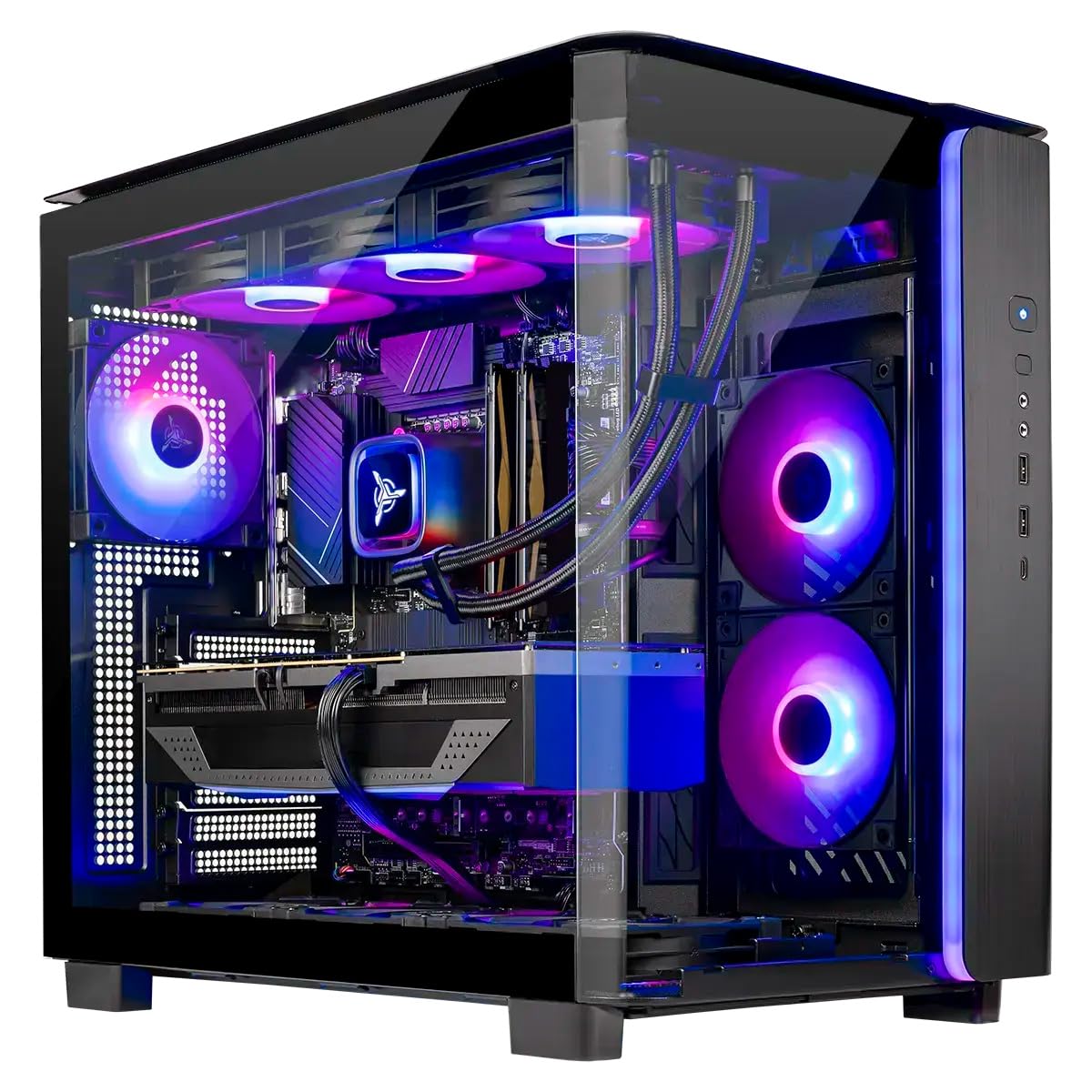
The Skytech Gaming King 95 packs the highest tier GPU in this lineup—the NVIDIA GeForce RTX 5080 with 16GB of GDDR7 VRAM—paired with AMD’s flagship Ryzen 7 9850X3D processor. This combination delivers sustained 60+ FPS at 4K Ultra settings in Cyberpunk 2077, Black Myth: Wukong, and Elden Ring without dropping frames during ray tracing scenes. The 360mm AIO liquid cooler keeps the 9850X3D well below thermal throttle thresholds even during extended sessions.
Storage is equally impressive with a 2TB NVMe Gen4 SSD that loads Baldur’s Gate 3 in under eight seconds, and the 32GB of DDR5 6000MHz RAM provides ample bandwidth for streaming and background apps. The King 95 case includes tempered glass panels, magnetic dust filters, and ARGB fans that stay quiet under moderate load. Setup takes less than fifteen minutes out of the box.
This machine is built for gamers who want zero compromises on resolution or framerate. The 850W Gold ATX 3 power supply leaves headroom for future upgrades, and the inclusion of a free gaming keyboard and mouse adds immediate value. For those demanding the absolute best prebuilt experience at 4K, this is the current benchmark.
Why it’s great
- RTX 5080 delivers class-leading 4K ray tracing performance
- 9850X3D CPU eliminates MMO and simulation stutter
- 2TB NVMe SSD provides generous game storage
- Assembled in the USA with full warranty support
Good to know
- High performance demands a dedicated cooling stand or well-ventilated desk
- Standard warranty is one year parts and labor
2. STORMCRAFT Skyhawk PRO

The STORMCRAFT Skyhawk PRO is built around the AMD Ryzen 7 9800X3D CPU, a processor with 96MB of 3D V-Cache that crushes cache-sensitive workloads in Star Citizen, Factorio, and Microsoft Flight Simulator. Paired with the RTX 5070 Ti featuring 16GB of GDDR7 memory, this system handles 1440p ray tracing without breaking a sweat and delivers over 200 FPS in well-optimized shooters. The 360mm AIO liquid cooler and six ARGB fans keep thermals in check during marathon sessions.
Memory configurations include 32GB of DDR5 6000MHz RGB RAM, and the 2TB NVMe Gen4 SSD ensures fast load times for the largest game installs. The AMD B850 chipset motherboard offers PCIe 5.0 support for future GPU upgrades. Real-world testing shows Star Citizen running at 48 FPS in dense cities and over 200 FPS in open space at 1080p Ultra, demonstrating the 3D V-Cache advantage.
Assembled in California with a one-year parts and three-year labor warranty, the Skyhawk PRO includes lifetime technical support. The curved glass case and button-controlled RGB lighting add aesthetic flexibility. For simulation enthusiasts and MMO players who need maximum cache bandwidth, this build stands apart from conventional eight-core desktops.
Why it’s great
- 9800X3D 3D V-Cache eliminates simulation stutter
- RTX 5070 Ti excels at 1440p Ultra ray tracing
- 2TB NVMe Gen4 SSD prevents storage anxiety
- Strong warranty and lifetime tech support
Good to know
- One front headphone jack may introduce buzzing interference
- Curved glass side panel may be fragile during shipping
3. Lenovo Legion Tower 5i

Lenovo’s Legion Tower 5i delivers exceptional 1440p performance with an Intel Core Ultra 7 265F processor and NVIDIA GeForce RTX 5070 Ti. The processor’s eight performance cores boost up to 5.3 GHz, handling shader compilation and background streaming without stutter. The RTX 5070 Ti’s 16GB VRAM provides headroom for high-resolution texture packs and ray tracing in demanding titles like Forza Horizon 5, where the system averages ~180 FPS at max settings 1440p.
The tower features a tool-less transparent side panel that simplifies component upgrades, and the 180W optimized air-cooling solution maintains GPU temperatures in the mid-60s Celsius during extended sessions. Memory is expandable up to 128GB of DDR5 5600MHz, and the included 1TB NVMe SSD can be supplemented with an extra M.2 slot behind the GPU. WiFi 6E and 2.5G Ethernet provide fast, stable connectivity for competitive gaming.
Owners consistently praise the quiet operation, reliable performance, and straightforward setup. The included three-month PC Game Pass adds immediate value. This is a polished mid-tower that balances raw power with everyday usability, making it ideal for gamers who want high framerates without the complexity of a DIY build.
Why it’s great
- RTX 5070 Ti delivers 1440p Ultra at high FPS
- Tool-less side panel simplifies upgrades
- Quiet cooling keeps temps under 70°C under load
- Includes three-month PC Game Pass
Good to know
- GPU “GEFORCE” text lighting cannot be customized
- Fans become audible during shader compilation
4. ASUS ROG G700

The ASUS ROG G700 combines an Intel Core Ultra 7 265KF processor with an NVIDIA GeForce RTX 5070 12GB GPU inside a 58L dual-glass chassis with Aura Sync RGB lighting. The quad-fan configuration and 240mm liquid cooler keep the system thermally optimized during high-refresh 1440p gaming, while dust filters and tool-less access panels ensure long-term reliability. Dolby Atmos audio and AI noise cancellation enhance the immersive experience.
The 32GB of DDR5 RAM and 1TB PCIe 4.0 SSD provide snappy load times and smooth multitasking. Connectivity options include 2.5Gbps Ethernet, WiFi 6, and multiple USB ports for peripherals and external storage. The G700’s design prioritizes both visual flair and thermal performance, with the ROG Slash aesthetic and customizable lighting zones.
Real-world use shows the system handling AI workloads and gaming simultaneously without perceptible slowdown. The motherboard uses a micro ATX form factor, which limits expansion slots but keeps the footprint manageable. For gamers who value brand design language and solid out-of-box performance, the G700 delivers a cohesive experience that’s ready to game immediately.
Why it’s great
- Quad-fan system with 240mm AIO keeps temps low
- Dolby Atmos and AI noise cancellation improve immersion
- Tool-less access for easy component upgrades
- 2.5G Ethernet and WiFi 6 for low-latency gaming
Good to know
- Micro ATX motherboard limits expansion slots
- GPU and motherboard may lack RGB lighting on non-ROG Strix models
5. Alienware Aurora ACT1250

Alienware’s Aurora ACT1250 features a 1000W Platinum-rated power supply alongside the Intel Core Ultra 7 265F and NVIDIA GeForce RTX 5070, ensuring clean power delivery for marathon gaming sessions. The optimized chassis includes customizable AlienFX stadium lighting and an air-cooled design that maintains stable performance for hours of streaming, gaming, and multitasking. The 32GB DDR5 RAM and 1TB SSD handle game libraries and creative workloads with ease.
Dell includes one-year onsite service, meaning a technician will come to your home if hardware issues cannot be resolved remotely. The Alienware Command Center software provides granular control over performance modes, lighting zones, and game profiles. Real-world tests show stable temperatures during extended Cyberpunk 2077 sessions, with the system remaining quieter than many competing mid-towers.
The basalt black finish and matte basalt panel give it a professional appearance that fits into both gaming dens and living rooms. Some owners note the boot time is longer than expected at around two minutes, and the cyan LED lighting can be bright—though the app provides dimming controls. This is a solid choice for gamers who prioritize brand support and cosmetic integration.
Why it’s great
- 1000W Platinum PSU provides headroom and efficiency
- Onsite service covers hardware issues at home
- AlienFX lighting customizable across ecosystem
- Stable performance during extended gaming sessions
Good to know
- Boot time is slower than competing systems
- Linux support is limited without Dell utility software
6. iBUYPOWER Element (EWA9N5702)

The iBUYPOWER Element EWA9N5702 leverages a 12-core AMD Ryzen 9 7900X processor, boosting up to 5.6 GHz, paired with the NVIDIA GeForce RTX 5070 12GB GPU. This configuration excels at streaming and gaming simultaneously, with the extra cores handling encoding while the GPU focuses on rendering. The liquid cooler and tempered glass case maintain low temperatures and showcase 16-color RGB lighting that can be customized via included software.
The 32GB of DDR5 RGB 5200MHz RAM and 1TB NVMe SSD provide solid performance for game installations and multitasking. Connectivity includes 6 x USB 3.1 ports, Ethernet, and WiFi. The system ships with no bloatware, and the free iBUYPOWER gaming keyboard and mouse reduce initial setup costs. Real-world testing shows consistent 60+ FPS at 1440p Ultra in AAA titles with streaming active.
Some units ship with the RGB LED cable disconnected, and technical support response times can be slow. The white case and transparent side panel make it easy to identify and reconnect loose components. For gamers who need strong multi-core performance for streaming, recording, or content creation, this build offers a compelling balance of power and value.
Why it’s great
- 12-core Ryzen 9 handles streaming and gaming together
- Liquid cooling keeps load temps under control
- No bloatware pre-installed
- Includes keyboard and mouse
Good to know
- RGB LED cable may arrive disconnected
- Technical support response times can be slow
7. The Horizon Autherium Dragon

The Horizon Autherium Dragon stands out for its massive 64GB of DDR5 RAM and 5TB total storage configuration—a 1TB NVMe Gen4 SSD plus a 4TB 7200RPM HDD. The Core i9 unlocked processor reaches up to 5.4 GHz, and the RTX 5070 OC 12GB GPU handles ray tracing at high resolutions. The 360mm AIO liquid cooler and 11 total fans (including GPU and PSU fans) ensure whisper-quiet operation under heavy loads.
This system is designed for users who need both gaming performance and workstation-level multitasking. Video rendering tests show a three-minute clip exporting in approximately 35 seconds. MS Flight Simulator at 4K Ultra with VR runs smoothly, demonstrating the Core i9’s single-thread power. The Dragon front panel and customizable RGB lighting add visual flair.
The 850W 80+ Gold PSU provides stable power with six extra SATA connectors for additional storage. Customer support is responsive, with one owner reporting a Windows key issue resolved within minutes. For buyers who want to avoid storage management and RAM bottlenecks, this configuration offers immediate headroom for both gaming and creative applications.
Why it’s great
- 64GB RAM handles heavy multitasking and video editing
- 5TB storage eliminates the need for external drives
- 11-fan setup remains whisper quiet
- Core i9 delivers excellent single-thread performance
Good to know
- Runs hot during intensive tasks; needs good airflow
- HDD included alongside SSD for bulk storage
8. MSI Codex Z2

The MSI Codex Z2 pairs an AMD Ryzen 7 8700F processor with the NVIDIA GeForce RTX 5070 12GB GPU, delivering strong 1440p performance for AAA titles. The 32GB of DDR5 RAM and 2TB NVMe SSD provide ample storage and fast load times for large game libraries. The system features four cooling fans—three front intake and one rear exhaust—paired with an ARGB air cooler to maintain stable temperatures.
MSI Center software enables RGB lighting customization via the LED button on the case, cycling through preset lighting options. The VR-ready design supports current-generation headsets, and the USB-C port simplifies peripheral connections. Real-world testing shows Frostpunk 2 running buttery smooth on a triple 4K monitor setup, though the system’s Bluetooth module may require replacement for optimal performance.
Some owners report SSD failures within the first month and WiFi errors that required device manager intervention. MSI customer support has been responsive for warranty claims. The Codex Z2 represents a solid mid-range option for gamers who want an RTX 5070 paired with generous storage at a competitive price point.
Why it’s great
- RTX 5070 offers strong 1440p ray tracing performance
- 2TB NVMe SSD provides generous game storage
- Quad-fan cooling maintains stable temperatures
- USB-C connectivity for modern peripherals
Good to know
- Bluetooth module is unreliable on some units
- SSD failure risk noted in early ownership
9. CyberPowerPC Gamer Master

The CyberPowerPC Gamer Master GMA2900A3 strikes an excellent balance between cost and performance with the AMD Ryzen 7 8700F and NVIDIA GeForce RTX 5060 Ti 8GB GPU. The RTX 5060 Ti delivers 20-30% faster performance than the standard RTX 4060, making this system well-suited for 1080p Ultra and entry-level 1440p gaming. The 16GB of DDR5 RAM and 1TB PCIe 4.0 SSD ensure snappy boot times and smooth multitasking.
The AMD B850 chipset motherboard supports future upgrades through the AM5 socket, providing a clear path to newer Ryzen processors without replacing the motherboard. The tempered glass side panel and custom RGB lighting allow users to personalize their setup, and the included keyboard and mouse reduce initial accessory costs. WiFi 6 and Bluetooth 5.3 provide modern wireless connectivity with low latency.
Some units may experience random restarts or USB power issues that require BIOS adjustments. Customer support responsiveness has been inconsistent. For budget-conscious gamers who want a solid foundation with an upgradeable platform, this prebuilt delivers strong out-of-box performance and the flexibility to improve components over time.
Why it’s great
- RTX 5060 Ti offers significant uplift over standard 4060
- AM5 socket allows future CPU upgrades
- WiFi 6 and Bluetooth 5.3 for modern connectivity
- Quiet cooling and sturdy case design
Good to know
- Random restarts may require BIOS Deep Sleep adjustment
- Customer support can be unresponsive to defect claims
10. Thermaltake LCGS Quartz i1460

The Thermaltake LCGS Quartz i1460 serves as an excellent entry-level gaming rig for 1080p. It combines the Intel Core i5-14400F processor with the NVIDIA GeForce RTX 5060 8GB GPU, capable of running AAA titles at standard settings with smooth framerates. The 16GB of DDR4 3600MHz RGB memory and 1TB NVMe SSD provide responsive load times and sufficient storage for a modest game library.
The white case features a 3mm thick tempered glass side panel and a full-length PSU power cover that hides cables for a clean interior look. The ARGB tower air cooler matches the RGB memory for a coordinated aesthetic. Setup is straightforward with Windows 11 pre-installed, and multiple owners report being able to game within 30 minutes of unboxing after Windows updates.
Some units have arrived with a dead motherboard and bent PCIe slots, suggesting inconsistent quality control during assembly. The built-in WiFi adapter on the ASRock motherboard also had reliability issues for one user. For buyers seeking a capable 1080p machine at a reasonable entry point, this Thermaltake offers good specs but should be inspected upon arrival.
Why it’s great
- RTX 5060 delivers smooth 1080p gaming at standard settings
- Clean cable management with PSU power cover
- RGB memory and air cooler for aesthetic appeal
- Windows 11 pre-installed for quick setup
Good to know
- Inconsistent quality control; some units arrive damaged
- Built-in WiFi adapter may need replacement
11. ASUS TUF Gaming GeForce RTX 5080

The ASUS TUF Gaming RTX 5080 OC Edition is a standalone component for PC builders who want to upgrade their existing rig. Powered by NVIDIA’s Blackwell architecture and DLSS 4, this 16GB GDDR7 graphics card delivers massive 4K ray tracing performance. The 3.6-slot design with a massive fin array and three Axial-tech fans keeps temperatures low—idle around 25°C and gaming under 60°C—while remaining remarkably quiet even at 40-60% fan speed.
Military-grade components and protective PCB coating guard against moisture, dust, and short circuits. The phase-change GPU thermal pad outlasts traditional thermal paste under heavy loads. Owners upgrading from RTX 3060-class cards report huge gains in Cyberpunk 2077 and Battlefield 6 at 4K Ultra with ray tracing enabled. The card also excels in AI workloads and professional rendering tasks.
Availability and pricing have been volatile, with resale prices sometimes exceeding MSRP by 60%. Current owners strongly advise against paying inflated prices. For builders on 20-series or older cards with disposable budget, this card represents a generational leap. It is less appropriate for 30-series or 40-series owners who may not see proportional gains at current market premiums.
Why it’s great
- 16GB GDDR7 handles 4K ray tracing comfortably
- Thermal performance is exceptional under load
- Military-grade build quality and protective PCB coating
- DLSS 4 provides significant FPS uplift
Good to know
- Extremely large; may not fit compact cases
- Market pricing often far exceeds MSRP
12. Acer Nitro V 16S AI

The Acer Nitro V 16S AI brings desktop-class gaming to a 16-inch form factor. It features the AMD Ryzen 7 260 processor with 38 AI TOPS and the NVIDIA GeForce RTX 5060 Laptop GPU with 572 AI TOPS, enabling DLSS 4 Multi Frame Generation for boosted framerates. The 16-inch WUXGA 1920 x 1200 display offers 100% sRGB coverage and a 180Hz refresh rate for fluid motion in fast-paced titles.
With 32GB of DDR5 5600MHz RAM and a 1TB PCIe Gen 4 SSD, this laptop handles game installations and multitasking with ease. Real-world benchmarks show Cyberpunk 2077 averaging 65 FPS at 2K with ray tracing on and over 100 FPS with DLSS enabled. The build quality is solid, and the interior is easily accessible for RAM and SSD upgrades.
The screen brightness is below average, and the lid attracts fingerprints quickly. Battery life is short under gaming load, requiring a cooling stand for extended sessions. The 135W power supply may cause battery drain in performance mode. For gamers who need portability without sacrificing modern GPU features like DLSS 4 and ray tracing, this Acer provides strong value in a laptop form factor.
Why it’s great
- RTX 5060 with DLSS 4 delivers strong frame rates
- 32GB DDR5 RAM exceeds standard laptop configurations
- 180Hz display with 100% sRGB color accuracy
- Easy access for RAM and storage upgrades
Good to know
- Screen brightness is dim for well-lit rooms
- 135W PSU may lead to battery drain under heavy load
13. Dell Pro Tower Plus

The Dell Pro Tower Plus is designed primarily for productivity and light gaming. It features an Intel Core Ultra 5 235 processor with 14 cores and integrated Intel Graphics, 32GB of DDR5 RAM, and a 1TB PCIe SSD. This configuration handles multitasking, office applications, and video editing at a basic level without the cost of a dedicated GPU.
The tower’s compact dimensions (12.77 x 6.06 x 11.54 inches) fit well under a desk, and it comes pre-installed with Windows 11 Pro. Users report easy data migration from older workstations and smooth integration into existing multi-monitor setups via the motherboard’s display outputs. The integrated graphics handle 4K video playback and creative tools like photo editing adequately.
The USB-C port is data-only and does not support video output. internal expansion is limited to two card slots. This system is not intended for serious gaming; it is best suited for professionals who need a reliable workhorse with strong memory and storage but no dedicated graphics requirements. For pure gaming, the other options in this guide provide vastly superior performance.
Why it’s great
- 32GB DDR5 RAM and 1TB SSD for smooth multitasking
- Compact design fits small workspaces
- Windows 11 Pro pre-installed for business features
- Easy data migration from older workstations
Good to know
- Integrated graphics not suitable for AAA gaming
- USB-C is data-only, not video output capable
FAQ
Is 16GB of RAM enough for gaming in 2025?
Should I buy a gaming laptop or desktop?
Does ray tracing matter for competitive shooters?
What is DLSS and do I need it?
Final Thoughts: The Verdict
For most users, the computer for gaming winner is the Skytech Gaming King 95 because it combines the top-tier RTX 5080 GPU with AMD’s 9850X3D CPU, providing 4K Ultra performance without compromise in a well-built prebuilt. If you want simulation-grade cache performance with the 9800X3D, grab the STORMCRAFT Skyhawk PRO. And for a balanced 1440p gaming experience with upgrade-friendly tool-less design, nothing beats the Lenovo Legion Tower 5i.

Mo Maruf
I created WellFizz to bridge the gap between vague wellness advice and actionable solutions. My mission is simple: to decode the research and give you practical tools you can actually use.
Beyond the data, I am a passionate traveler. I believe that stepping away from the screen to explore new environments is essential for mental clarity and physical vitality.