Our readers keep the lights on and my smoothie glass nicely filled. As an Amazon Associate, I earn from qualifying purchases.
A colour label printer is the difference between a package that looks homemade and one that looks like it came from a real brand. Handwriting labels or printing black-and-white stickers might save a few cents upfront, but that faded, ink-smeared look tells your customers you are still figuring things out. The right colour label printer delivers sharp barcodes, vibrant logos, and durable adhesive labels that survive shipping without smudging or peeling.
I’m Mohammad Maruf — the founder and writer behind WellFizz. I’ve spent countless hours digging through thermal print engine specs, colour resolution numbers, wireless connectivity standards, and media compatibility charts to separate the machines that actually earn their spot on a desk from the ones that just look good in the product photos.
Whether you run a small ecommerce shop, manage inventory in a warehouse, or need professional-quality labels for your office, your choice comes down to speed, colour accuracy, and total cost of ownership. This guide compares the top contenders to help you find the right best colour label printer for your specific workflow and budget.
How To Choose The Best Colour Label Printer
Choosing a colour label printer isn’t just about the cheapest upfront cost. The real cost comes from consumables — toner cartridges, ink ribbons, and label rolls. A printer that works perfectly with one type of label may jam constantly with another. You need to match the machine to your actual daily volume, the kind of labels you print, and the environment they will end up in.
Print Technology: Direct Thermal vs Thermal Transfer vs Laser
Direct thermal printers heat coated paper to create black text — no ink, no toner. The trade-off is that the print fades over time and works for monochrome shipping labels only. For colour labels, thermal transfer printers use a ribbon that melts coloured wax or resin onto the label, producing durable, fade-resistant prints that look professional. Laser printers apply toner onto paper using heat and pressure — faster than inkjet and perfect for high-volume colour jobs with crisp text and graphics, though the upfront cost is higher.
Resolution and Print Speed
Resolution is measured in dots per inch (DPI). For shipping labels with scannable barcodes, 203 DPI is the baseline. If you need fine text or small graphics, 300 DPI or higher produces sharper results. Print speed matters if you print more than a few hundred labels per day — measured in pages per minute (ppm) for laser printers or inches per second (ips) for thermal units. A printer that slows down after ten labels will bottleneck your workflow.
Media Compatibility and Label Sizes
Not all printers handle the same label types. Some accept 4×6-inch shipping labels only, while others print on continuous tape rolls or custom die-cut sizes from 1.5 to 4.25 inches wide. If you need small product barcode labels, address labels, and shipping labels on the same machine, look for a printer with adjustable media guides and support for both roll-fed and fan-fold labels.
Connectivity and Software Ecosystem
Printers that rely on driver-heavy setups can turn a simple task into a headache. Modern colour label printers should offer Wi-Fi, AirPrint, and direct USB connectivity. Windows, macOS, and mobile support is essential if you print from a tablet or phone on the shop floor. Some brands provide bundled label design software, but that tool is only useful if it exports to common formats like PDF, ZPL, or EPL.
Quick Comparison
On smaller screens, swipe sideways to see the full table.
| Model | Category | Best For | Key Spec | Amazon |
|---|---|---|---|---|
| Brother MFC-L3780CDW | Colour Laser All-in-One | High-volume office printing | 31 ppm colour, single-pass duplex | Amazon |
| HP Color LaserJet Pro M283fdw | Colour Laser All-in-One | Wireless office with mobile print | 22 ppm colour, dual-band Wi-Fi | Amazon |
| Xerox C235dni | Colour Laser All-in-One | Small office with low running costs | 24 ppm colour, high-yield cartridges | Amazon |
| TSC TTP-244CE | Thermal Transfer | Industrial barcode labels | 203 DPI, 240 ppm, optional Bluetooth | Amazon |
| Brother QL-820NWB | Thermal (mono + red) | Address and small business labels | 300 DPI, 110 labels/min, Bluetooth | Amazon |
| Arkscan 2054K-WF | Direct Thermal | Shipping labels via Wi-Fi | 5 ips, supports 4.25″ wide labels | Amazon |
| Rollo Wireless | Direct Thermal | Wireless shipping labels | 203 DPI, 150 mm/s, AirPrint | Amazon |
| Indy Print 2 | Thermal Transfer (specialty) | Oil change reminder stickers | 320 x 240 px colour display | Amazon |
In‑Depth Reviews
1. Brother MFC-L3780CDW

The Brother MFC-L3780CDW is the most complete colour label printer for a small-to-medium business. It prints at 31 pages per minute in both colour and monochrome, which means a stack of 200 shipping labels or product tags is done in under seven minutes. The single-pass duplex scan and copy feature eliminates the need to flip stacks manually — a genuine time saver when you process multiple orders or inventory batches each day.
Wireless connectivity includes dual-band Wi-Fi (2.4 GHz and 5 GHz), Gigabit Ethernet, and Wi-Fi Direct, so you can print from any device in the building without running cables. The Brother Refresh subscription trial offers automatic toner delivery, though some users report the program can be difficult to manage if a payment method changes. The TN229XXL super high-yield cartridges deliver the lowest cost-per-page in this class.
Print quality is laser-sharp on plain paper and standard label stock. For product labels with small barcodes or thin fonts, the output is consistently crisp. The main consideration is that colour laser toner is inherently expensive — if you print fewer than 200 colour labels per month, a thermal transfer model might offer lower running costs.
Why it’s great
- Fast 31 ppm colour output — among the quickest in its class
- Single-pass duplex scan and copy for high-efficiency workflows
- Multiple connectivity options including dual-band Wi-Fi and Ethernet
- Super high-yield toner cartridges reduce cost per page
Good to know
- Colour laser toner is expensive compared to thermal transfer alternatives
- Brother Refresh subscription can be problematic if payment details change
- Not designed for continuous label rolls — best for cut-sheet labels
2. HP Color LaserJet Pro M283fdw

The HP Color LaserJet Pro M283fdw is a solid all-in-one that delivers professional colour output at a slightly slower pace than the Brother — 22 ppm — but with exceptional clarity and consistent registration. The included HP Smart app makes mobile setup and remote printing genuinely painless, and dual-band Wi-Fi keeps the connection stable even in busy office environments with many wireless devices.
Security is a differentiator here. HP built in firmware-level threat detection and anti-fraud toner authentication, which matters if you handle sensitive client data or need to prevent counterfeit cartridges from degrading print quality. The 50-sheet automatic document feeder handles multi-page scan jobs easily, and the automatic duplex printing saves paper when producing two-sided labels or instruction sheets.
The biggest drawback is the toner policy: the printer only works with cartridges containing original HP chips. Some users report that firmware updates can block third-party alternatives. If you want the flexibility to choose any toner brand, this machine will frustrate you. The introductory toner cartridges also yield only about 800 black pages and 700 colour, so budget for replacements immediately.
Why it’s great
- Sharp, vibrant colour output with excellent registration
- HP Smart app for easy mobile setup and remote printing
- Strong built-in security features for sensitive data
- Automatic duplex and 50-sheet ADF for efficient workflows
Good to know
- Only works with HP-branded cartridges with authentication chips
- Starter toner yields are low — plan for immediate replacements
- Some users experience periodic network dropouts requiring reboots
3. Xerox C235dni

The Xerox C235dni hits a sweet spot for small offices that need colour labels daily but don’t want to pay premium prices for every page. Print speed is 24 ppm in both colour and monochrome, which is fast enough for small batch runs of product labels or address stickers. The printer supports high-yield toner cartridges that push the cost per page down significantly compared to some competitors.
Setup is accomplished through the Xerox Easy Assist App, which guides you through Wi-Fi connection and driver installation without requiring manual downloads. Apple AirPrint and Mopria support mean you can print directly from a phone or tablet without any extra software. The all-in-one functionality includes a flatbed scanner and copier, making it a practical hub for a desk that handles both labels and general document work.
Paper selection matters here. Some users found that cheap copy paper produced faded-looking prints, while switching to a better grade like Hammermill Premium Inkjet/Laserjet paper restored full contrast and colour depth. The scanner and copier are adequate but not exceptional — fine for occasional use but not designed for high-speed document scanning. The monthly duty cycle is rated at 1,500 pages, so this is not a printer for heavy warehouse production.
Why it’s great
- Low running costs with high-yield toner cartridges
- Easy smartphone setup via the Xerox Easy Assist App
- AirPrint and Mopria support for mobile printing
- Reliable brand with excellent print quality on quality paper
Good to know
- Requires good-quality paper for optimal colour output
- Monthly duty cycle of 1,500 pages limits heavy use
- Scanner and copier quality is decent but not exceptional
4. TSC TTP-244CE
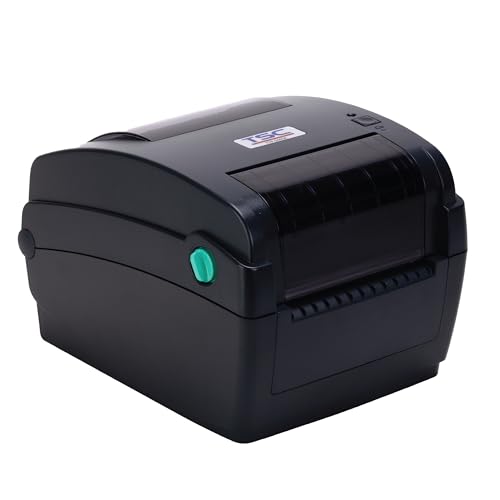
The TSC TTP-244CE is a desktop thermal transfer barcode printer built for industrial environments where labels need to survive exposure to chemicals, abrasion, or outdoor conditions. Its 203 DPI resolution is standard for shipping and warehouse labels, and the thermal transfer method means you can print on durable materials like polyester and polypropylene using wax, wax-resin, or resin ribbons.
Connectivity options include USB, Ethernet, and an optional Bluetooth interface, which gives you flexibility on the factory floor or in a retail back office. The printer supports label widths up to 4.25 inches and handles continuous rolls as well as fan-fold media. Some users report that the TTP-244CE runs reliably for years with minimal maintenance — a few mentioned replacing a dirty roller after three years of consistent use.
The main drawback is the lack of a bundled cutter and the difficulty of finding one separately if you need individual cut labels. The printer is also single-function — it prints labels and nothing else — so you will need a separate device for scanning or copying. Setup can be driver-intensive on macOS, and the included software is basic, but for straightforward barcode label printing from Windows or Excel, it delivers consistently.
Why it’s great
- Durable thermal transfer prints last in harsh conditions
- Reliable long-term performance with minimal maintenance
- Multiple connectivity options including optional Bluetooth
- Handles both roll-fed and fan-fold media up to 4.25″ wide
Good to know
- Does not include a label cutter — must be purchased separately
- Single-function printer with no scan or copy capabilities
- Setup and driver installation can be complicated on macOS
5. Brother QL-820NWB

The Brother QL-820NWB is a versatile thermal label printer that excels at producing monochrome labels with an optional red accent colour (using DK-2251 red/black tape). It prints up to 110 standard address labels per minute at 300 DPI — noticeably sharper than the 203 DPI common on shipping label printers. The 300 DPI resolution makes small text and fine barcodes easier to read and scan.
Connectivity is this printer’s strongest feature: Bluetooth, wireless (802.11 b/g/n), Ethernet, and USB host for connecting a barcode scanner directly. The monochrome LCD screen allows standalone operation without a computer, so you can create and print labels directly from the device. The continuous tape format lets you print labels up to three feet long, which is useful for wire marking or cable identification.
The P-Touch editor software is functional but dated, and the Bluetooth connection is limited to one device at a time — if you switch devices frequently, using Wi-Fi Direct is more practical. The paper loading mechanism can be finicky, and the screen is dim in low light. For a dedicated label maker that stays on a single desk, these issues are minor, but mobile users may find the workflow slightly awkward.
Why it’s great
- High 300 DPI resolution for crisp small text and barcodes
- Multiple connectivity options — Bluetooth, Wi-Fi, Ethernet, USB
- Standalone operation via monochrome LCD screen
- Prints labels up to 3 feet long for cable and wire marking
Good to know
- Bluetooth connection is limited to one device at a time
- Paper loading can be finicky, and the screen is dim
- P-Touch software feels outdated compared to mobile apps
6. Arkscan 2054K-WF

The Arkscan 2054K-WF is a direct thermal label printer that focuses on doing one thing well: printing shipping labels fast and reliably. With a speed of 5 inches per second, it outputs a 4×6-inch label in under 1.2 seconds. The direct thermal method means no ink, no toner, no ribbons — just the label roll and the printer.
Wi-Fi connectivity works with Android, iOS, Windows, macOS, Chromebook, and Linux. The printer supports label widths from 0.75 inches to 4.25 inches and lengths from 0.4 inches to 90 inches, making it compatible with most shipping labels from UPS, FedEx, and USPS as well as smaller product barcode labels. The included BarTender UltraLite software (Windows only) provides basic label design tools for text, graphics, and barcodes.
Customer support from Arkscan is frequently praised — several users mention quick resolution of setup issues via phone, live chat, or remote access. The printer does not support AirPrint, so iOS users will need to use the Arkscan mobile app or Wi-Fi printing from the label provider’s platform. The build quality is solid for the price point, though some units may require occasional roller cleaning after heavy use.
Why it’s great
- Fast 5 ips print speed — great for high-volume shipping
- No ink or toner required — lower ongoing costs
- Works with almost any shipping platform and label type
- Highly responsive US-based customer support
Good to know
- No AirPrint support for direct iOS printing
- BarTender software is Windows-only
- Wi-Fi setup can be cumbersome without the video guides
7. Rollo Wireless Shipping Label Printer

The Rollo Wireless label printer brings AirPrint support to the thermal label category, letting you print 4×6-inch labels directly from an iPhone, iPad, or Mac without installing any drivers. The print speed is 150 mm per second, which translates to roughly one 4×6-inch label per second — fast enough for small-to-medium shipping volumes without creating a bottleneck.
The Rollo Ship Manager app provides access to discounted shipping rates and integrates with ecommerce platforms like Shopify, Etsy, eBay, and Amazon. The printer can also handle custom labels from 1.57 to 4.1 inches wide, including barcode labels, product labels, QR codes, and business stickers.
Print quality at 203 DPI is adequate for standard shipping labels, but the resolution is lower than some thermal transfer options. A few users report occasional label alignment issues or partial printing, and the automated setup process can fail, requiring manual driver installation. The printer head has a rated lifespan of about 650,000 labels — roughly four times longer than some competitors — which makes this a durable long-term investment despite the higher upfront cost.
Why it’s great
- AirPrint support for direct wireless printing from Apple devices
- Rollo Ship Manager app offers discounted shipping rates
- Extremely durable print head rated for 650,000 labels
- Compact design fits easily on a small desk
Good to know
- 203 DPI resolution is adequate but not as sharp as 300 DPI models
- Automated setup can fail, requiring manual driver installation
- Some users report occasional label alignment or partial printing issues
8. Indy Print 2 Oil Change Reminder Printer

The Indy Print 2 is a specialized thermal transfer printer designed exclusively for printing oil change reminder stickers. It operates entirely standalone — no computer required. The built-in 2.3-inch colour TFT display (320×240 pixels) lets you select mileage, date, and oil grade from the keyboard, then prints directly onto the 2.25×1.25-inch sticker.
The system includes the printer, keyboard with protective cover, ink ribbon, power supply, and 1,000 stock labels. The included software allows you to customize stickers with your shop’s logo and contact information. Several users report that this machine is far more reliable than consumer-grade alternatives — one user claims zero wasted stickers out of the first 500, saving over compared to previous equipment.
This is not a general-purpose label printer. It prints only one size of sticker in a fixed format. If you need shipping labels, barcode labels, or product tags, this machine will not help. For an auto repair shop that prints reminder stickers daily, the focused design and durability make it a smart investment. The two-year printer warranty adds peace of mind for a device that sees heavy daily use.
Why it’s great
- Fully standalone operation — no computer required
- Reliable design with very low waste — nearly zero jams
- Includes 1,000 stock labels and customizable shop info
- Two-year warranty for high-use environments
Good to know
- Prints only one sticker size (2.25″ x 1.25″) in a fixed format
- Not suitable for general label printing or multi-purpose use
- Higher upfront cost for a single-use machine
FAQ
What is the difference between 203 DPI and 300 DPI in a label printer?
Can I use a regular colour laser printer for labels?
How long do thermal transfer labels last compared to direct thermal?
Which label printer software is easiest to use for a beginner?
Final Thoughts: The Verdict
For most users, the best colour label printer winner is the Brother MFC-L3780CDW because it combines the fastest colour print speed (31 ppm) with single-pass duplex scanning and reliable wireless connectivity, making it the most versatile choice for a busy office or small business. If you want a dedicated thermal label printer with AirPrint support for wireless shipping labels, grab the Rollo Wireless. And for an auto repair shop that needs a focused, jam-free oil change sticker solution, nothing beats the Indy Print 2.

Mo Maruf
I created WellFizz to bridge the gap between vague wellness advice and actionable solutions. My mission is simple: to decode the research and give you practical tools you can actually use.
Beyond the data, I am a passionate traveler. I believe that stepping away from the screen to explore new environments is essential for mental clarity and physical vitality.