Our readers keep the lights on and my smoothie glass nicely filled. As an Amazon Associate, I earn from qualifying purchases.
Equipping a classroom for modern learning means moving beyond a simple projector and a whiteboard. The right technology — from interactive displays with 20-point touch to wireless PA systems covering 100 listeners — directly impacts how lessons are delivered and how students engage. Choosing the wrong gear wastes budgets and frustrates teachers.
I’m Mohammad Maruf — the founder and writer behind WellFizz. I’ve analyzed dozens of classroom technology specifications — from ANSI lumen ratings and laser light source lifespans to touch response times and wireless latency metrics — to build this guide around real-world teaching environments.
Whether you need a document camera for live demonstrations or a portable PA for an auditorium, this guide breaks down the best classroom technology equipment for every teaching space and student capacity.
How To Choose The Best Classroom Technology Equipment
Classroom technology spans projection, audio, and interactive display categories. Matching the equipment to your room size, ambient light, and user count prevents overspending on unnecessary brightness or underserving a space with weak amplification.
Projector Brightness and Light Source
Measured in ANSI lumens, a classroom projector needs at least 3,500 lumens to be visible with lights on. Laser projectors offer 20,000+ hour lifespans with no bulb replacement, while UHE lamps cost less upfront but need periodic lamp swaps after 8,000-12,000 hours. Short-throw models are essential for small rooms where a standard lens cannot project a 100-inch image from a few feet away.
Audio Coverage and Expandability
Wireless group listening systems operating on 2.4GHz deliver low-latency (25-30ms) audio for cinema or lecture settings. For live speaking or performances, consider PA systems with at least 375W RMS output and multiple XLR inputs for microphones. Expandable systems that can connect 100+ headphones are ideal for large auditoriums or silent disco setups.
Interactive Display Touch Performance
Touchscreen whiteboards should have a response time under 10ms for natural writing. Infrared 20-point touch supports multi-student interaction on a single display. For hybrid classrooms, ensure compatibility with video conferencing platforms like Zoom and Teams — integrated cameras are not standard on every model. Resolution above 1080p (4K UHD) is recommended for text-heavy content at close viewing distances.
Quick Comparison
On smaller screens, swipe sideways to see the full table.
| Model | Category | Best For | Key Spec | Amazon |
|---|---|---|---|---|
| ViewSonic LS740HD | Laser Projector | Bright auditoriums | 5500 ANSI lumens / 1080p / Laser | Amazon |
| COOLHOOD 65″ Smart Board | Interactive Whiteboard | All-in-one 4K touchscreen | 3840×2160 / 20-point touch / 6ms | Amazon |
| Vibe S1 55″ Smart Board | Interactive Whiteboard | Hybrid classrooms | 4K UHD / Chrome OS / 250+ apps | Amazon |
| Fender Passport Event S2 | PA System | School assemblies | 375W RMS / 7-channel mixer / Bluetooth | Amazon |
| Bose S1 Pro+ | Portable PA | Mobile teaching | Wireless mic / battery / bluetooth | Amazon |
| Epson PowerLite X49 | Classroom Projector | Standard classroom projection | 3600 Lumen / XGA / 12,000h lamp | Amazon |
| ViewSonic PS502W | Short Throw Projector | Small rooms / Golf sim | 4000 Lumens / WXGA / 0.5 throw | Amazon |
| Avantree Quartet 2 | Group Headphones | Silent listening groups | 2.4GHz / 25ms / Expand to 100 | Amazon |
| IPEVO VZ-R | Document Camera | Real-time demonstrations | 8MP / HDMI+USB / 12x digital zoom | Amazon |
In‑Depth Reviews
1. COOLHOOD 65″ Smart Board

This 65-inch 4K interactive whiteboard delivers an octa-core processor with Android 13 and 128GB of storage, making it a powerful all-in-one teaching station. The 20-point multi-touch system and 6ms response time ensure smooth annotation and collaborative work from multiple students simultaneously.
It supports wireless screen sharing across Mac, Windows, iOS, and Android, and integrates with Zoom, Google Meet, and Teams for hybrid classrooms. The IPS LCD panel offers a 2000:1 contrast ratio and blue light filter, reducing eye strain during long lessons. File sharing via QR code simplifies distributing notes after class.
The built-in speakers and USB-C connectivity add versatility, though the stand is sold separately and a dedicated camera is missing — something buyers should note for video-conferencing-heavy environments. The wall mount is included, making fixed installation straightforward.
Why it’s great
- 20-point infrared touch with 6ms response for lag-free writing
- 4K resolution with 16:9 aspect ratio for crisp text and diagrams
- Open app ecosystem supports popular video conferencing platforms
Good to know
- Stand sold separately — wall mount included
- No built-in camera for video calls
2. ViewSonic LS740HD Laser Projector
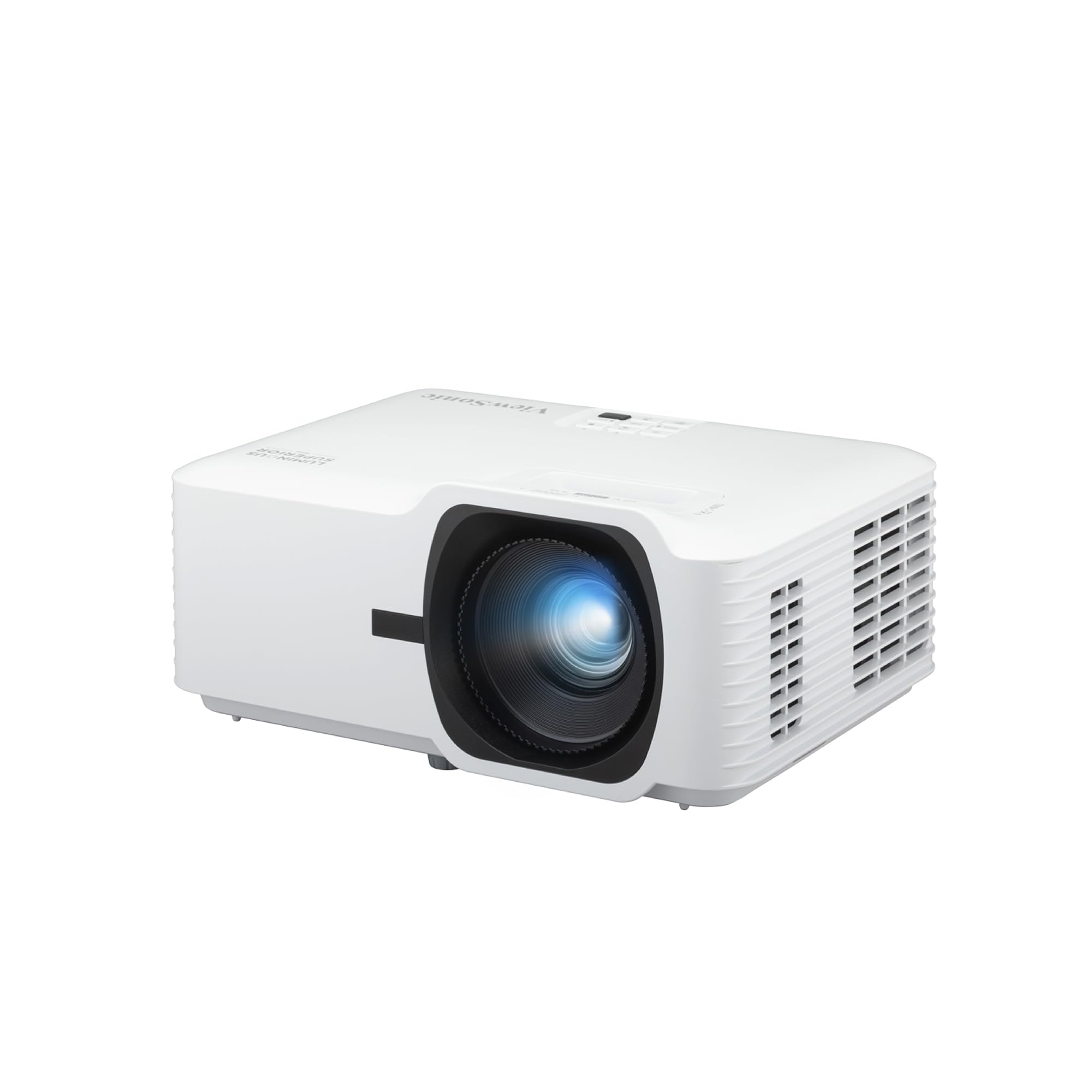
With 5,500 ANSI lumens and a 1080p laser light source delivering 3,000,000:1 contrast ratio, the LS740HD dominates bright auditoriums and large classrooms where visibility is non-negotiable. The laser eliminates lamp replacement, pushing its usable lifespan toward 20,000+ hours of daily operation.
Its 1.3x optical zoom and 360-degree projection capability allow flexible ceiling or wall mounting. H/V keystone and 4-corner adjustment simplify image alignment even on uneven surfaces. Golf Mode supports simulation software, making this projector equally useful for sports science labs.
Buyers should note the external power brick, which keeps the chassis smaller but adds a component to manage during installation. The ambient fan noise is low in Eco mode, but the unit is not designed for portrait mode without proper ventilation clearance.
Why it’s great
- Laser light source: no bulb replacement over long lifespan
- 5,500 lumens provides clear image with ambient light on
- 360-degree and portrait mode projection for complex setups
Good to know
- External power brick adds bulk to installation
- Menu interface is basic with limited RS232 adjustment
3. Vibe S1 55″ Smart Board

Running on VibeOS on Chromium OS, this 55-inch 4K interactive board offers an open ecosystem with 250+ apps, including Google Workspace and Microsoft 365. The 10-point infrared touch delivers under 8ms latency, providing a natural pen-to-paper feel for annotation and diagramming during lessons.
Wi-Fi 6 and Bluetooth 5.2 ensure stable wireless connectivity for hybrid classrooms. Split-screen mode allows teachers to present slides while monitoring a video call simultaneously. The infinite canvas feature supports large-format brainstorming sessions without running out of writing space.
The tempered glass surface is durable, but the only two passive styli included may not satisfy classrooms requiring multiple active participants. Customer reports note occasional sporadic screen refreshes during drawing, though no data is lost. The board is heavy at 50.7 pounds, so wall mounting is recommended.
Why it’s great
- Chrome OS ecosystem with enterprise-level security and fleet management
- Split-screen, infinite canvas, and real-time annotation for dynamic lessons
- Wireless sharing and cloud storage integration for hybrid classrooms
Good to know
- Includes only passive styli — active stylus shipped at random
- Sporadic screen refresh reported during extended drawing sessions
4. Fender Passport Event S2 PA System
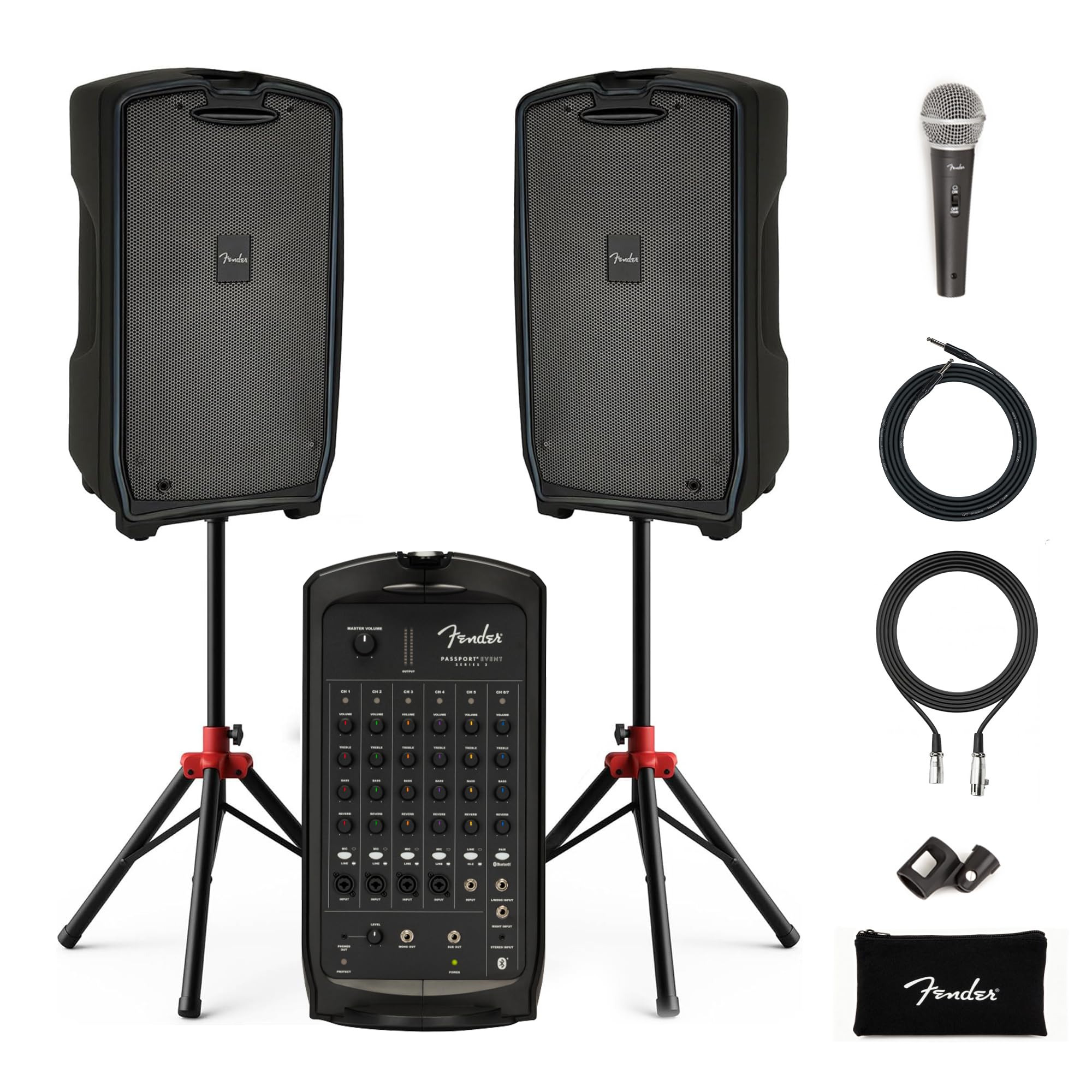
The Fender Passport Event S2 delivers 375 watts RMS of clear, full-range audio through dual 8-inch speakers with 1.2-inch horn-loaded tweeters. Its suitcase-style design integrates a 7-channel mixer, making setup and breakdown fast — critical for schools that share spaces between assemblies, performances, and daily announcements.
Four XLR/¼-inch combo inputs accommodate multiple microphones and instruments, while Bluetooth streaming enables quick audio playback from a tablet or phone. The bundled Austin Bazaar kit includes speaker stands, a cardioid microphone, and cables — everything needed to cover a crowd of 100-300 indoors or outdoors.
The protruding latches on the case are vulnerable to damage during transport, and the speaker cable connection is located on the front panel rather than the rear. Despite these design quirks, the system remains lightweight and portable for a powered PA at this power level.
Why it’s great
- 375W RMS output fills medium to large rooms with clear sound
- Built-in Bluetooth and 7 channels for flexible audio routing
- All-in-one suitcase design with carry handles for portability
Good to know
- Front-facing speaker cable connection affects aesthetics
- Protruding latches on case are prone to damage
5. Bose S1 Pro+ PA System

The Bose S1 Pro+ redefines portable classroom amplification with a built-in Li-ion battery, wireless microphone and instrument transmitters, and stereo Bluetooth streaming. Its Auto EQ adjusts sound based on placement (horizontal, tilted, or pole-mounted) — delivering Bose’s signature wide coverage from a single unit.
ToneMatch technology optimizes vocal reproduction and acoustic guitar settings at the touch of a button, making it ideal for music classrooms or lecture halls. With a 30-foot range for the wireless transmitter and four hours of battery life, this system handles entire school days without being tethered to a power outlet.
The combination of XLR mic inputs and ¼-inch instrument inputs supports three channels, though larger performances may need additional units. The electrostatic nature of the cabinets requires careful transport to avoid damage to the internal electronics.
Why it’s great
- Battery-powered operation for true wireless portability
- Auto EQ automatically adjusts to placement and room acoustics
- Wide, even sound dispersion from front and side-facing drivers
Good to know
- Only 3 channels — insufficient for large multi-mic setups
- Four-hour battery life may require mid-day charging
6. Epson PowerLite X49 Projector

The Epson PowerLite X49 uses 3LCD technology with 3,600 ANSI lumens and a 16,000:1 contrast ratio for vibrant, eye-catching images even in rooms with ambient light. Its XGA (1024×768) resolution is sufficient for text-heavy presentations and basic video, making it a reliable workhorse for standard classrooms.
The long lamp life of 12,000 hours reduces maintenance frequency and total cost of ownership. Built-in wireless connectivity lets up to 50 users connect simultaneously via the moderator function, enabling interactive polling and screen sharing during lectures. Its compact form factor supports ceiling mounting or tabletop placement.
The built-in speaker is weak for anything beyond a small room — external speakers are necessary for larger spaces. The native 4:3 aspect ratio is less suited for widescreen content, though it remains the standard for many educational materials and legacy software.
Why it’s great
- 3LCD technology delivers bright, colorful images in lit rooms
- 12,000-hour lamp life lowers long-term bulb costs
- Moderator function supports up to 50 connected devices
Good to know
- Built-in speaker is weak for large classrooms
- Native XGA (4:3) resolution not ideal for 16:9 content
7. ViewSonic PS502W Short Throw Projector

The ViewSonic PS502W eliminates shadow problems common in small classrooms with its 0.5 throw ratio — projecting a 100-inch image from just 4.5 feet away. Its 4,000 ANSI lumens and DLP technology provide sharp, bright visuals for lecture halls, meeting rooms, and even golf simulators.
SuperColor technology delivers a wide color gamut for vibrant educational videos and graphics. Digital zoom (0.8x-2.0x), vertical auto-keystone, and 4-corner adjustment simplify image setup. The instant power on/off feature lets teachers start and end lessons without waiting for lamp cool-downs.
The DLP color wheel produces excellent black levels, but users report fan noise during operation and a menu navigation system that feels dated. For classrooms with ceiling-mounted projectors, the short throw distance requires careful placement relative to the screen.
Why it’s great
- 0.5 throw ratio projects a large image from very close distance
- 4,000 lumens remains visible in lamp-lit rooms
- Instant power on/off eliminates lamp warm-up delays
Good to know
- Fan is louder than average during operation
- Menu navigation feels clunky and dated
8. Avantree Quartet 2 Group Headphones
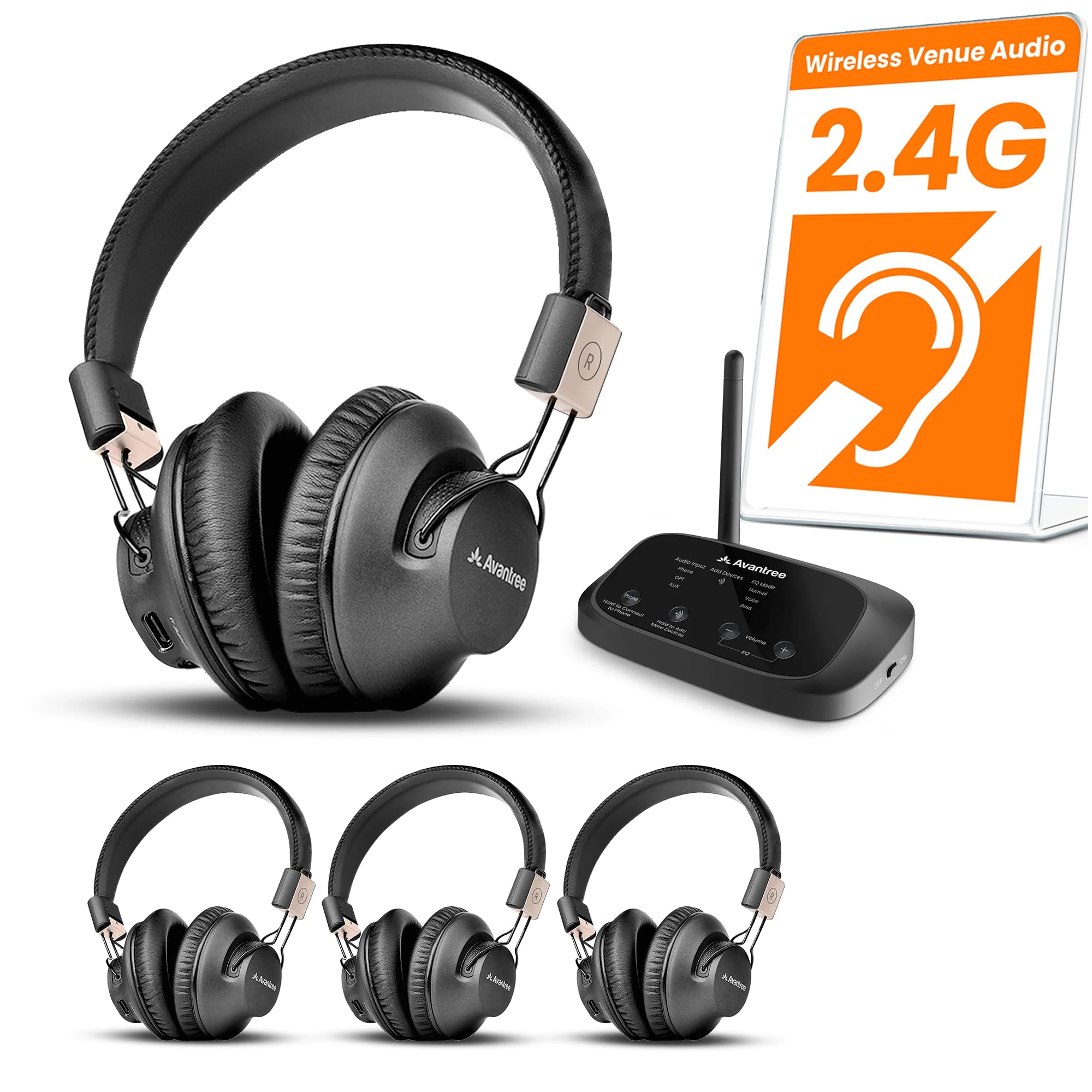
The Avantree Quartet 2 provides a plug-and-play 2.4GHz wireless listening system for classrooms, silent discos, or church settings. The transmitter connects via Optical, AUX, or Bluetooth to any audio source and broadcasts to four included headphones with 25ms ultra-low latency — invisible to the human ear for lip-sync accuracy.
Clear Voice and Balanced EQ modes adapt the sound profile to speech or music, making this system effective for language labs or movie screenings. Individual volume controls on each headphone allow students to set their preferred level without affecting others. Expandable to 100 users with additional Avantree extra headphones.
The earcups are comfortable for extended wear, but the charging cable is split four ways and relatively short — a minor inconvenience for schools charging multiple units simultaneously. No power adapter is included, relying on USB charging from existing classroom ports.
Why it’s great
- Ultra-low 25ms latency eliminates lip-sync issues
- Expandable to 100 headphones for large groups
- Individual volume controls on each headphone
Good to know
- Short 4-way split charging cable limits placement
- No wall power adapter included — charges via USB only
9. IPEVO VZ-R Document Camera

The IPEVO VZ-R functions as a dual-mode document camera with HDMI direct connection to a TV or projector and USB connection to a computer — no drivers required. Its 8-megapixel Sony CMOS sensor captures up to 3264×2448 in USB mode and 1920×1080 in HDMI mode, with fast autofocus and excellent color reproduction.
The glass fiber reinforced stand (GVX-5H) provides durability and flexibility with a swiveling head and multi-jointed arm for capturing different angles. Tactile buttons on the body control focus, exposure, zoom, and an LED light for dimly lit classroom environments. It doubles as a webcam for video calling.
The package does not include an HDMI cable or wall power adapter — a common oversight that requires separate purchase. The 12x digital zoom is effective for text but introduces pixelation at maximum magnification compared to optical zoom solutions.
Why it’s great
- HDMI and USB dual-mode for computer-free or computer-connected operation
- 8MP Sony CMOS sensor with fast autofocus and noise reduction
- Glass fiber reinforced stand for daily classroom durability
Good to know
- HDMI cable and wall power adapter not included
- Digital zoom only — no optical zoom for lossless magnification
FAQ
Do I need a short throw projector for a small classroom?
How many ANSI lumens are enough for a lit room projector?
Can a wireless group listening system replace a PA system?
Final Thoughts: The Verdict
For most users, the best classroom technology equipment winner is the COOLHOOD 65″ Smart Board because it combines a 4K touchscreen, an octa-core processor, and seamless video conferencing integration into one wall-mounted unit — perfect for modern classrooms transitioning to hybrid learning. If you need a ViewSonic LS740HD if a laser projector with 5,500 lumens for large auditoriums. And for Fender Passport Event S2 for school assemblies requiring portable, scaled audio coverage for 100+ people.

Mo Maruf
I created WellFizz to bridge the gap between vague wellness advice and actionable solutions. My mission is simple: to decode the research and give you practical tools you can actually use.
Beyond the data, I am a passionate traveler. I believe that stepping away from the screen to explore new environments is essential for mental clarity and physical vitality.