Our readers keep the lights on and my smoothie glass nicely filled. As an Amazon Associate, I earn from qualifying purchases.
The right robot can turn screen time into build time and transform a child’s curiosity into real engineering logic. But the market is flooded with plastic junk that flashes lights for a week and then sits under the bed. The difference between a toy that teaches and a toy that frustrates comes down to three things: the quality of the interactive feedback, the depth of the coding layer, and whether the build process matches the child’s dexterity level.
I’m Mohammad Maruf — the founder and writer behind WellFizz. I’ve spent hundreds of hours cross-referencing motor specs, programming interfaces, sensor arrays, and connector durability across the most popular STEM robot kits to separate the genuine learning tools from the disposable novelties.
This guide walks through seven rigorously vetted models and breaks down what makes each one worth your attention — from build quality and control range to coding progression pathways and battery endurance — to help you find the absolute best children’s robots for a kid in your life right now.
How To Choose The Best Children’s Robots
Not every robot toy is built to survive a 5-year-old’s enthusiastic drop test, and not every coding kit offers a true learning path past the first hour. You need to match the robot’s complexity to the child’s age, patience, and motor control — and you need to know which specs actually matter for long-term engagement.
Age Appropriateness and Build Difficulty
A child’s fine motor development directly dictates whether a kit is fun or frustrating. For ages 3-5, look for pre-assembled or snap-together designs with large, easy-to-grip pieces — avoid anything requiring tiny screws or intricate alignment. For ages 6-8, kits with 400-700 pieces and clear step-by-step instructions provide the right challenge. For ages 9-14, modular platforms with aluminum frames, gear systems, and expandable sensor arrays offer genuine engineering depth.
Coding Progression — From Remote Control to Python
The best robots grow with the child. Entry-level models use icon-based drag-and-drop sequencing that teaches logic without syntax. Mid-tier kits introduce block coding (Scratch) with loops, variables, and conditional statements. Premium platforms offer a pathway from block to text-based languages like Python and JavaScript — look for models that include both an app-based coding environment and project cards that scaffold difficulty over time.
Motor Power, Sensor Quality, and Battery Life
A robot that struggles to move on carpet loses its magic fast. Check the motor type — dual high-speed motors with metal gears outperform single plastic-geared motors on torque and longevity. For sensor-based play, look for infrared arrays for line-following, ultrasonic sensors for obstacle avoidance, and gyroscopes for tilt-based control. Battery life matters too: USB rechargeable lithium-ion packs offering 1-5 hours of runtime are vastly more convenient than disposable AA setups.
Quick Comparison
On smaller screens, swipe sideways to see the full table.
| Model | Category | Best For | Key Spec | Amazon |
|---|---|---|---|---|
| Makeblock mBot2 | Coding Robot | Learning Scratch to Python | Aluminum chassis + 10 sensors | Amazon |
| Sphero Mini Activity Kit | App Robot Ball | Early coding & arcade games | Gyroscope + accelerometer | Amazon |
| Apitor Robot J | Building Block Kit | App-based coding for ages 7-12 | 480 blocks + dual motors | Amazon |
| okk STEM Robot Kit | Remote & App Robot | Versatile control modes | 635 pieces + USB rechargeable | Amazon |
| Suplanet 5-in-1 Robot | Transformable Kit | 5 build shapes in one set | 720 pieces + 2.4GHz remote | Amazon |
| VATOS Robot Dog | Interactive Pet | Touch & follow play for ages 3-8 | 17 functions + infrared sensors | Amazon |
| Educational Insights Design & Drill Robot | Building Toy | Toddler fine motor practice | Real toy drill + 70+ pieces | Amazon |
In‑Depth Reviews
1. Makeblock mBot2

The Makeblock mBot2 is the rare children’s robot that doesn’t compromise on build quality to hit a consumer price point. Its chassis is machined from blue anodized aluminum — not brittle plastic — which means it survives the inevitable tumbles off a desk while housing ten advanced sensors including a line-following array, ultrasonic rangefinder, and a Wi-Fi module for IoT experiments. Assembly takes about 30 minutes with the included screwdriver and printed guide, and the step-by-step process teaches real mechanical thinking about gear trains and wiring.
The coding progression is where this kit separates itself from the competition. Beginners start with icon-based blocks to make the robot sing or react when flipped upside down, then advance through Scratch-based drag-and-drop logic, and finally graduate to Python programming using the free mBlock software. The voice control feature is genuinely useful for younger kids who can’t read yet — they simply speak commands to change the LED colors or trigger movements. With up to five hours of playtime on a single USB charge and wireless connectivity via Bluetooth or Wi-Fi, this robot stays relevant from elementary school through middle school.
What makes the mBot2 a true long-term investment is its expandability. The mBuild platform supports over 30 additional modules — temperature sensors, light displays, camera modules — so the robot grows in capability as the child’s skills grow. It’s the only kit in this roundup that connects to real-world IoT concepts, giving an 11-year-old a genuine head start in understanding how smart devices communicate.
Why it’s great
- Aluminum frame provides exceptional durability for active kids
- Real coding progression from block-based to Python without needing a new robot
- Five-hour rechargeable battery eliminates the AA battery treadmill
- Voice control mode works well for pre-readers
Good to know
- Assembly requires small screwdriver work — an adult should supervise the first build
- Python tutorials are comprehensive but may require a parent with some coding familiarity for maximum benefit
2. Sphero Mini Activity Kit

The Sphero Mini is a ping-pong-ball-sized robotic sphere that packs a gyroscope, accelerometer, and fully customizable RGB LED into a clear polycarbonate shell. Unlike traditional walking or rolling robot kits, the Mini uses a spherical drive system — it rolls and spins in any direction with remarkable precision, controlled by tilting your phone or using the app’s joystick mode. The Activity Kit version includes 15 STEM-inspired challenge cards, a 28-piece construction set with arches and connector pieces, plus six bowling pins and three cones for obstacle course design.
The real learning value lies in the Sphero Edu app, which offers three coding tiers: draw-and-drive for absolute beginners, block coding with loops and conditionals for intermediate users, and full JavaScript text coding for ambitious kids. The drag-and-drop interface is intuitive enough that a 6-year-old can make the robot trace a square within minutes of opening the box. The built-in gyroscope also enables motion-controlled arcade games — the robot ball becomes a game controller for titles like “Lightning Lab” to teach reaction timing and physics concepts.
Durability is a standout feature here. The clear shell takes repeated drops onto hardwood and tile without cracking, and the internal components are shock-mounted to survive impacts. The rechargeable battery delivers about an hour of active play per charge, and the micro USB charging port is standard and easy to access. While construction-oriented kits appeal to Lego fans, the Sphero Mini is uniquely suited for kids who respond better to active, motion-based play and prefer quick feedback loops over long building sessions.
Why it’s great
- Spherical drive allows smooth movement on any hard floor surface
- Coding progression spans draw-to-block-to-JavaScript for long-term skill building
- Activity cards provide structured challenges without requiring screen time to start
- Extremely durable shell survives repeated drops
Good to know
- Battery runtime of roughly one hour feels short compared to wheeled robots
- Cannot traverse thick carpet or uneven surfaces — best on hardwood or tile
3. Apitor Robot J

The Apitor Robot J hits a sweet spot between complexity and accessibility — its 480 colorful blocks snap together with no screws or tools required, making it approachable for a 7-year-old while offering enough structural variety to challenge a 12-year-old. The kit builds into six different models including a tracked robot with articulated arms and a 360-degree stunt vehicle, all powered by a single control module with two integrated high-speed motors and two multicolor LED strips. The building instructions are clear and icon-based, and the included sorting tray keeps pieces organized during assembly.
The coding layer is where Apitor differentiates itself from generic building block kits. The free Apitor Kit app offers four control modes: dual-motor simultaneous control, single-motor precision steering, gyro-based tilt steering, and path mode where kids draw a route on their tablet screen that the robot follows. The programming interface uses icon-based Scratch blocks that teach loop structures, conditional triggers based on sensor input, and variable timing sequences. The robot’s eyes are animated and its joints have enough articulation to convey expressive body language, which adds an emotional engagement layer that pure construction kits lack.
Build quality is notable — the block clutch power and fit tolerance rival major name-brand systems, and the control module snaps securely without wobble during high-speed movement. Parents report that kids as young as 7 can independently build the simpler models after some initial guidance, and the more complex configurations keep older children engaged for multiple weekend sessions. The kit requires 3 AA batteries, which is the main tradeoff for the tool-free snap construction.
Why it’s great
- Tool-free snap assembly makes building accessible for younger kids
- Four app control modes teach different programming concepts
- High block quality with clutch power comparable to premium building systems
- Multiple build configurations extend replay value significantly
Good to know
- Requires 3 AA batteries — not included and not rechargeable
- Small pieces could be a choking hazard, so supervision for kids under 6 is essential
4. okk STEM Robot Kit
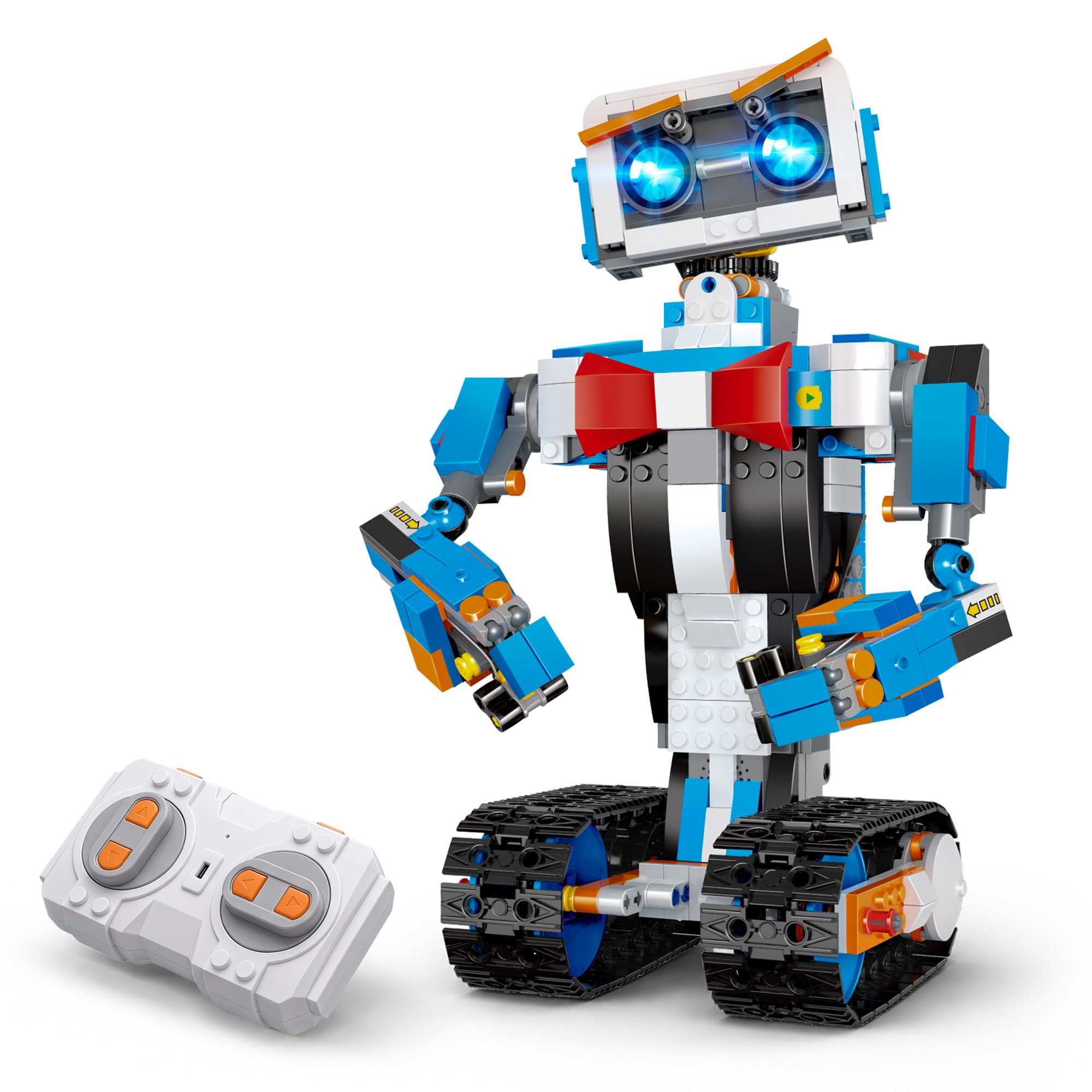
The okk STEM Robot Kit packs 635 building pieces into a single box and supports five distinct control modes — remote, app Bluetooth, voice, gravity sensor, and path-drawing — which makes it one of the most versatile options in this roundup for kids ages 6-14. The robot’s joint system allows full articulation: the head, shoulders, arms, elbows, tracks, and even the eyebrows can rotate independently, enabling a surprising range of expressive poses. The motor system uses updated gearboxes that provide enough torque to climb over small obstacles and operate on medium-pile carpet without stalling.
USB rechargeability is a major practical advantage here. The built-in lithium-ion battery charges fully in about two hours and delivers roughly one hour of continuous play, and the included 2.4GHz remote controller operates at a 65-foot radius. The app’s five control modes are genuinely distinct — voice control responds to simple commands like “forward” and “dance” with surprising accuracy, while the gravity sensor mode lets kids steer the robot by tilting their phone. The stem programming mode uses block-based coding that records and repeats a sequence of actions, teaching the basics of command sequencing without requiring reading proficiency.
Build quality is solid for the price point. The plastic pieces have good mold precision and snap together with satisfying resistance, though the instructions use numbered bag organization which experienced builders will appreciate but beginners may find slightly opaque. The arms move manually while the tracks are motor-driven, giving kids both mechanical and electronic building experience. This kit works equally well as a construction project and as a playable remote-control vehicle, bridging the gap between pure building sets and functional robotics.
Why it’s great
- Five distinct control modes including voice and gravity sensor for varied play
- USB rechargeable battery eliminates disposable battery waste
- Full joint articulation allows expressive movement and poses
- Motors have enough torque to operate on carpet, not just hard floors
Good to know
- Instructions lack bag-numbered steps, making piece sorting more challenging for younger kids
- Remote controller requires 2 AAA batteries not included in the box
5. Suplanet 5-in-1 Robot

The Suplanet 5-in-1 kit offers the highest piece count in this roundup at 720 particles, and its core advantage is that a single set builds five completely different vehicles — a tracked robot, a tank, an off-road vehicle, a drilling vehicle, and a bulldozer — without requiring additional parts. The modular chassis design with four independent motors enables full directional movement and 30-meter remote control range via the 2.4GHz controller, which supports multiple cars operating simultaneously without frequency interference. This makes it an excellent choice for siblings or playdates where two sets can run side by side.
APP control adds a second control layer via Bluetooth, and the included steam programming feature allows kids to sequence specific movement patterns that the robot then executes autonomously. This is genuinely useful for introducing the concept of “stored programs” — recording a dance routine or obstacle course path and having the robot repeat it exactly. The futuristic vehicle-style aesthetic with simulated cockpit detail and treaded wheels appeals strongly to kids interested in construction vehicles and military-style machinery, maintaining engagement through the building process and beyond.
Build quality is adequate for the category, though the clutch power on some of the smaller connector pieces is slightly less tight than premium brick systems. The large chassis platform provides a stable base that prevents the robot from tipping during sharp turns, and the four-motor drivetrain provides balanced power distribution. Some younger builders may find the 720-piece count intimidating without adult help on the first build, but the step-by-step paper instructions are clear and logically sequenced. This is a strong pick for a child who wants variety and enjoys rebuilding more than programming.
Why it’s great
- Five different vehicle builds from a single set maximizes value and replayability
- Four-motor chassis provides stable, balanced movement across surfaces
- 30-meter 2.4GHz remote supports interference-free multi-set play
- APP programming mode introduces stored program concepts
Good to know
- Small connector pieces have slightly less clutch power than premium block brands
- 720 pieces require significant adult supervision for kids under 8 during assembly
6. VATOS Robot Dog

The VATOS Robot Dog is the only pre-assembled pet-style robot in this roundup, and it fills a completely different niche than the building kits. It requires zero assembly and responds instantly out of the box — turn it on and it automatically performs attention-getting motions every five seconds, simulating the spontaneous behavior of a real puppy. Three integrated infrared sensors allow the dog to track and follow the remote control’s signal, creating an engaging “come here” interaction that feels more alive than simple radio-controlled toys. The touch sensor under the chin triggers randomized sounds and movements, adding an element of unpredictability that keeps toddlers and preschoolers engaged.
With 17 total functions including dancing to built-in music, programmable sequence mode, and emotional response triggers, this robot dog offers genuine interactive depth for its category. The programmable mode is simplified — kids record a sequence of up to 50 actions that the dog then repeats — which serves as a gentle introduction to sequencing logic without requiring any app or screen. The pink color scheme and cute design appeal strongly to younger girls, and parents report that the dog survives drops from bunk beds and stair tumbles without breaking, which sets it apart from more fragile robotic pets.
The rechargeable battery is built-in and charges via USB, which eliminates the cost and waste of replacement batteries for a toy that gets daily use. The built-in music and dance routines encourage active play as children dance alongside the robot, combining gross motor movement with responsive technology. This is not a STEM kit in the traditional building sense — there’s no construction or coding depth — but for a child ages 3-8 who wants a responsive interactive companion rather than a building project, the VATOS Robot Dog delivers reliable engagement with surprising durability.
Why it’s great
- Zero assembly required — works straight out of the box for instant gratification
- Touch sensor and infrared follow technology create genuinely interactive play patterns
- Exceptional durability survives drops from bunk beds and stairs
- Built-in rechargeable battery with USB charging for daily use
Good to know
- Programmable mode is very basic — 50-step sequencing without branching logic
- Not suited for building or construction learning — purely an interactive pet experience
7. Educational Insights Design & Drill Robot Workshop

The Educational Insights Design & Drill Robot Workshop is purpose-built for the youngest end of the age spectrum — kids ages 3-6 who are still developing the fine motor control needed to manipulate small objects. The centerpiece is a kid-safe electric drill that spins at a speed appropriate for small hands but has enough torque to drive the included bolts through the plastic robot body. The drill bit set includes a Phillips head, a screwdriver bit, and a gear socket, teaching kids the practical difference between fastener types through tactile play. Over 70 pieces including 32 bolts, 26 interchangeable body parts, 7 gears, and a sticker sheet allow for mixing, matching, and assembling multiple robot configurations.
The educational value here is grounded in occupational therapy principles — the act of aligning a bolt, applying downward pressure, and activating the drill strengthens the same hand muscles and hand-eye coordination pathways that handwriting and scissor use require. The gears introduce cause-and-effect reasoning: turning one gear makes the connected gear spin, which is a foundational mechanical concept. Parents of children with autism spectrum disorder report that the repetitive bolt-driving action has a calming, focusing effect that extends engagement time significantly beyond typical toys.
Group play is a practical bonus here — with enough pieces to build 3-4 robot variations simultaneously, siblings or playmates can each build their own design at the same time. The included sticker sheet adds a customization layer that appeals to creative kids. The drill requires 2 AA batteries which are not included, but the low power draw means a single set lasts through many play sessions. This is the only robot in this guide specifically designed for ages 3+, making it the essential pick for parents of preschoolers who want to introduce construction play and mechanical thinking before abstract coding concepts.
Why it’s great
- Kid-safe real drill develops fine motor skills through authentic tool use
- 70+ pieces support simultaneous multi-kid play with 3-4 robot builds
- Gears introduce basic mechanical cause-and-effect concepts
- Highly engaging for kids with sensory processing needs and autism spectrum disorder
Good to know
- Requires 2 AA batteries not included in the box
- No coding or programming elements — this is purely a construction and fine motor toy
FAQ
What is the right age to introduce a programmable robot to a child?
How important is the piece count when choosing a robot building kit?
Can children’s robots connect to multiple devices for classroom use?
Final Thoughts: The Verdict
For most families, the best children’s robots winner is the Makeblock mBot2 because it combines pro-grade aluminum build quality with a genuine coding progression from block-based Scratch to full Python, all backed by expandable sensor modules that keep the robot relevant for years. If you want a compact, app-driven robot that teaches motion control and JavaScript through active play, grab the Sphero Mini Activity Kit. And for a toddler-safe introduction to construction and mechanical thinking without any screens involved, nothing beats the Educational Insights Design & Drill Robot Workshop.

Mo Maruf
I created WellFizz to bridge the gap between vague wellness advice and actionable solutions. My mission is simple: to decode the research and give you practical tools you can actually use.
Beyond the data, I am a passionate traveler. I believe that stepping away from the screen to explore new environments is essential for mental clarity and physical vitality.