Our readers keep the lights on and my smoothie glass nicely filled. As an Amazon Associate, I earn from qualifying purchases.
The market for entry-level document digitizers is crowded with flimsy wands and frustratingly slow flatbeds that often feel like a gamble. This guide evaluates the top contenders based on build quality, print legibility, and real-world scanning speed, focusing entirely on sub-100-dollar units that prove you don’t need to spend big to get dependable scans.
I’m Mohammad Maruf — the founder and writer behind WellFizz. I’ve spent countless hours analyzing the specifications and user feedback for dozens of budget scanning tools to understand which compromises are worth making and which ones kill the entire purpose of owning a scanner.
Whether you are digitizing old family photos or archiving business receipts, the right best cheap scanner balances reliable image capture with easy setup and a compact footprint that fits your desk or bag.
How To Choose The Best Cheap Scanner
When your budget is tight, every specification becomes a trade-off. The goal is to zero in on the features that directly impact your scanning experience without paying for extras you do not need. Here are the critical factors to consider.
Flatbed versus Sheet-Fed Design
A flatbed scanner has a glass platen and a lid, allowing you to scan books, fragile documents, and thick items without bending or tearing them. Sheet-fed models pull a page through a roller mechanism, making them faster for loose pages and perfect for receipts or double-sided scanning but useless for bound materials. If you handle mostly single sheets, a portable sheet-fed unit saves desk space. If you scan family photos or important books, a flatbed is the only choice that preserves the originals.
Optical Resolution and Sensor Type
Cheap scanners almost universally use CIS (Contact Image Sensor) technology rather than the more expensive CCD (Charged Coupled Device). CIS sensors are thinner, require less power, and are cheaper to manufacture, but they have a very shallow depth of field. This means any curve or wrinkle in your document will appear blurry. For flat, crisp documents, CIS is fine. For textured paper or thick books, CCD delivers superior edge-to-edge sharpness. Ignore interpolated resolution numbers; focus on the optical DPI. For most general-purpose scanning, 600 DPI is plenty. Going higher than 1200 DPI on a cheap CIS sensor often yields diminishing returns in detail.
Software and Driver Support
A scanner is only as good as its driver. Many budget models rely on TWAIN or WIA drivers that may not be updated for Windows 11 or macOS Ventura and later. Check the manufacturer’s support page before purchasing. Some brands bundle OCR (Optical Character Recognition) software that turns scanned images into editable Word or searchable PDF files, which can save hours of manual data entry. If the scanner requires a specific third-party app to function, factor that into your decision.
Quick Comparison
On smaller screens, swipe sideways to see the full table.
| Model | Category | Best For | Key Spec | Amazon |
|---|---|---|---|---|
| Canon CanoScan LiDE 400 | Premium Flatbed | High-res photo digitizing & documents | 4800 x 4800 dpi optical resolution | Amazon |
| Brother DS-640 | Premium Sheet-fed | Fast multi-page document scanning | 16 ppm color & grayscale speed | Amazon |
| Epson WorkForce ES-50 | Mid-Range Sheet-fed | Receipt & ID card archiving | 5.5 seconds per page scan speed | Amazon |
| Canon CanoScan LiDE 300 | Mid-Range Flatbed | Everyday document and photo scanning | 2400 x 2400 dpi optical resolution | Amazon |
| Plustek S410 Plus | Mid-Range Sheet-fed | Button-free scanning automation | Automatic image processing & folder save | Amazon |
| Visioneer 7900 | Budget Flatbed | Photo archiving with face tagging | 1200 dpi optical resolution | Amazon |
| Hczrc Portable Scanner | Budget Handheld | Travel & receipt scanning on the go | 900 dpi max, 16GB SD card included | Amazon |
In-Depth Reviews
1. Canon CanoScan LiDE 400

This flatbed delivers the highest optical resolution in the entire budget class at 4800 x 4800 dpi, making it the only unit here capable of capturing fine details from old photographs without interpolation artifacts. The inclusion of a USB Type-C cable means both power and data travel through a single modern connection, a convenience rarely seen at this price point. On top of that, the built-in Auto Scan mode detects whether you are scanning a photo, a document, or a receipt and applies optimized settings automatically.
Scanning a full-color photo at 2400 dpi takes under thirty seconds thanks to its four-line CIS sensor, and the bundled ScanGear software offers color restoration and dust removal tools that genuinely improve faded prints. Users report that the scanner works plug-and-play with macOS without needing to download a driver, which removes a major headache for Apple users. The vertical stand included in the box saves desk space when the unit is not in use.
Operating noise is moderate — it produces a distinct, audible glide when the CIS carriage moves, but nothing disruptive in a home office setting. At just 0.4 inches in thickness, it is the slimmest flatbed in this lineup. The main workflow quirk is that you must close and reopen the scanning window between pages to avoid errors, a minor annoyance that does not undermine its class-leading performance.
Why it’s great
- Highest optical resolution in its price range for detailed photo scans
- USB-C connectivity for modern laptops and simplified cable management
- Color restoration and dust removal features work well on old prints
Good to know
- You must reopen the scanning window between each page to continue scanning
- The vertical stand feels flimsy and is not essential for operation
2. Brother DS-640

The DS-640 is a compact sheet-fed scanner engineered for throughput, scanning color and monochrome documents at a consistent 16 pages per minute — a speed that rivals desktop office machines several times its size. Weighing just over a pound and measuring under a foot in length, it slides into a laptop bag with ease. The micro USB 3.0 cable powers the device entirely from your computer, eliminating the need for a wall outlet or batteries.
Paper handling is impressively forgiving: it accepts laminated cards, embossed plastic cards, and standard receipts without frequent jams. The free iPrint&Scan desktop app lets you route scans directly to cloud services, email, or OCR output with minimal clicks. After more than two years of monthly use, multiple long-term reviews report zero mechanical failure and over 5,000 scanned pages, which speaks to the build quality of the roller mechanism and feed path.
Automatic color detection and background removal ensure that mixed-content stacks — some pages with color photos, others with black text — are processed without manual intervention. The included OCR software creates searchable PDFs and editable Word files, a feature that saves hours of retyping. The only notable physical limitation is the maximum scan length of about 14 inches, which means legal-size documents must be fed lengthwise.
Why it’s great
- Blazing 16 ppm speed identical for both color and black-and-white
- USB-powered, ultra-portable design with durable rollers
- Handles plastic cards and thick paper without jamming
Good to know
- Initial software setup can be tedious and requires a few restarts
- Maximum document scan length is about 14 inches
3. Epson WorkForce ES-50
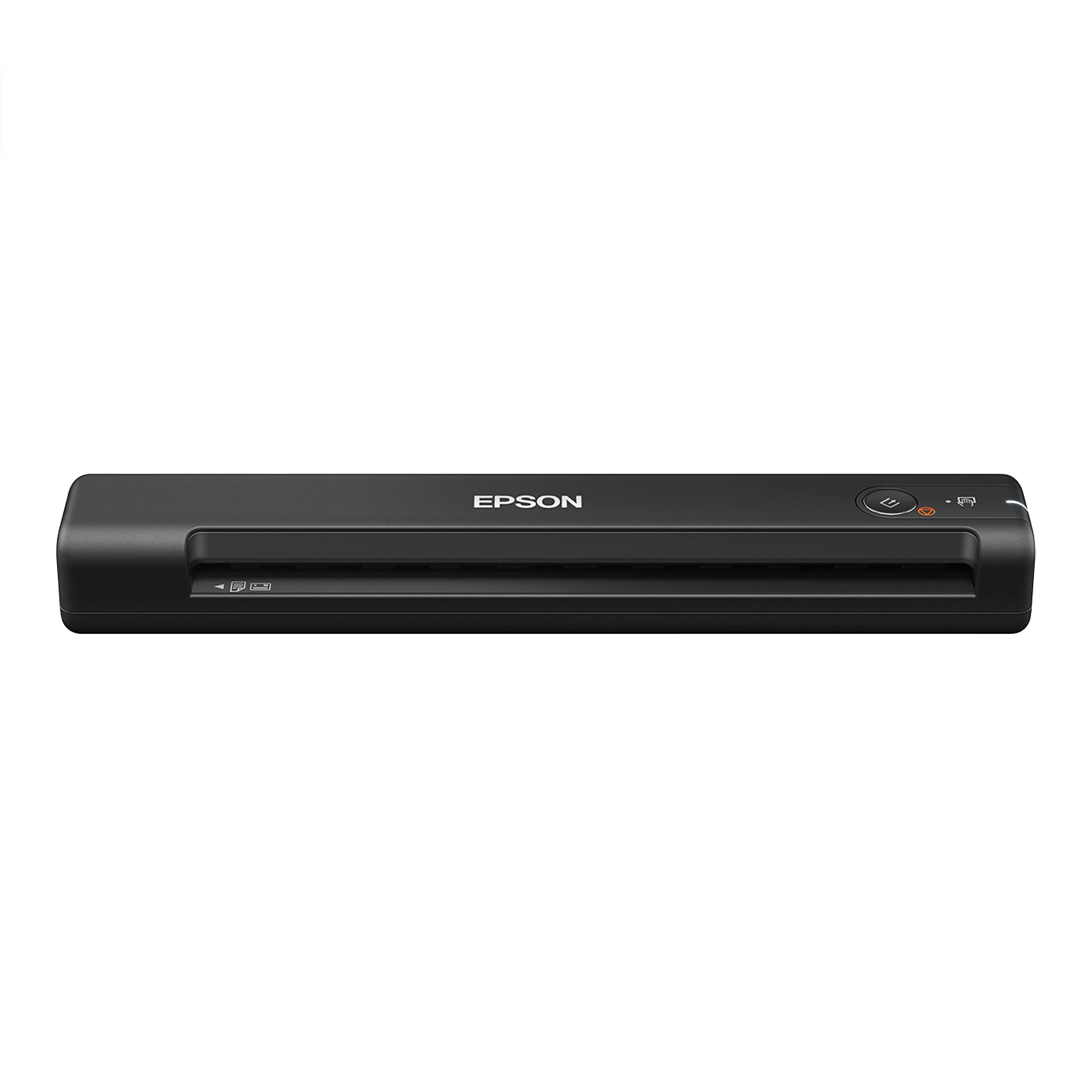
Epson’s ES-50 is a single-sheet-fed portable scanner that prioritizes simplicity and speed for users who need to digitize receipts, ID cards, and standard documents on the go. It completes each page in roughly 5.5 seconds and can handle media up to 8.5 by 72 inches, making it one of the few budget models that can scan an entire legal-length receipt in one pass without stitching. The USB-powered operation means you can plug it into a laptop at a coffee shop and start scanning immediately.
The free Epson ScanSmart software is intuitive: you press the single button on the device, and the software automatically detects the page, crops it, and saves it in your chosen format. Automatic feeding mode stacks multiple pages into a single PDF without requiring a physical automatic document feeder. Users on macOS and Linux report straightforward driver installation, though the initial download from Epson’s website is necessary since no CD is included.
The compact chassis is only 10.7 inches wide and weighs about half a pound, fitting easily into the outer pocket of a backpack. There are no paper guides, so you must gently align each page before feeding, but this is a minor trade-off for the size reduction. Some users note that the scan quality, while perfectly legible for text and receipts, lacks the sharpness needed for detailed graphics. For pure document archiving, however, this is a top-tier portable choice.
Why it’s great
- Ultraslim, lightweight design that fits a laptop bag pocket
- Scans extra-long receipts up to 72 inches in a single pass
- One-button operation with intuitive automatic feeding mode
Good to know
- No paper guides, so you must align each page manually
- Scan quality is adequate for text but mediocre for high-detail graphics
4. Canon CanoScan LiDE 300

The LiDE 300 is Canon’s entry-level flatbed that strips away the USB-C and 4800 DPI capabilities of its bigger sibling while keeping the core scanning reliability and plug-and-play convenience. With a native optical resolution of 2400 x 2400 dpi, it still produces sharp text and clear photos for most home and small-office needs. The Auto Scan mode detects whether you are scanning a photo, document, or barcode and adjusts settings on the fly, reducing the need to fiddle with software.
One standout feature for photo digitizing is the ability to place four photos on the platen at once and have the scanner automatically separate them into four individual JPEG files. This workflow dramatically speeds up batch photo digitizing for family albums. The scanner’s lid has a slightly flimsy hinge, but it does articulate enough to accommodate a thin book. The included stand is less useful than the one on the LiDE 400 and can be ignored.
Users running Linux report that the scanner works reliably with VueScan or the free xsane driver after a quick update. At 3.6 pounds, it is heavier than a portable sheet-fed model but still light enough to move from desk to desk. The biggest performance catch is that hitting the full 4800 DPI resolution is not possible on this model without interpolation, so stick to 2400 DPI for the best balance of detail and speed.
Why it’s great
- Auto-scan mode detects document types without manual settings
- Can scan and auto-split four photos into separate JPEGs at once
- Plug-and-play on macOS with no driver download required
Good to know
- Lid hinge feels flimsy and the included stand is nearly useless
- No USB-C; uses a dated USB-A to Mini-B cable
5. Plustek S410 Plus

The Plustek S410 Plus is a sheet-fed mobile scanner designed for users who want to eliminate manual steps from their scanning routine. Once you connect it to your computer via USB, the device automatically detects when a document is inserted, scans it without requiring any button press, and saves the image to a pre-configured folder. There is no software to launch, no settings to confirm — just feed the paper and move on. This hands-free approach is ideal for busy professionals who scan the same type of document repeatedly.
It handles Letter, Legal, business cards, and plastic ID cards through its straight paper path, which minimizes jams even on slightly wrinkled receipts. The bundled Plustek DocAction software includes OCR that converts scans into searchable PDF, Word, or Excel files with surprisingly good accuracy on standard fonts. Users have successfully scanned delicate vintage recipes without tearing them, which speaks to the gentle roller tension design.
On the downside, there is no wireless connectivity, so you are tethered to your laptop. Some users found the initial software setup confusing because the menus are not immediately intuitive, but once configured, the automatic scanning behavior requires zero daily interaction. The 600 DPI optical resolution is adequate for text and basic images but will not satisfy photo enthusiasts.
Why it’s great
- True button-free scanning: insert paper and it saves automatically
- Bundled OCR creates editable Word, Excel, and searchable PDF files
- Gentle roller path handles delicate or old paper without damage
Good to know
- Set-up software can be confusing for non-tech-savvy users
- No wireless option; requires a physical USB cable connection
6. Visioneer 7900

The Visioneer 7900 stands out in the budget category because it uses a CCD sensor rather than the typical CIS. This gives it a deeper depth of field, meaning curved pages from books or textured photo paper remain sharp from edge to edge. The flatbed design accommodates a wide range of media, and the lid lifts high enough to handle thick reference materials without stress. With a native 1200 DPI optical resolution, it produces scans that hold up well for basic archiving and casual sharing.
A unique selling point is the included one-year subscription to Tag That Photo, an automated facial recognition and tagging software. This tool identifies faces in scanned photos and lets you organize them by person, event, or custom keyword — a massive time-saver for anyone digitizing a large family photo collection. The software can pull from local libraries, servers, or cloud services like Dropbox, creating a searchable archive without manual tagging.
Build quality is mixed: while the scanner itself is quiet and fast at 300 DPI, the support website is poorly maintained and missing drivers for Windows 11, which caused issues for some users. The included CD works for older operating systems, but those on newer machines may need to download drivers from a third-party source. Additionally, the scan numbering resets to 00001 every session, which can overwrite previous files if you are not careful about moving them between sessions.
Why it’s great
- CCD sensor delivers superior edge sharpness on curved or textured media
- Tag That Photo facial recognition software saves hours of manual organization
- Quiet and fast scanning at standard resolutions
Good to know
- Official driver support for Windows 11 is unreliable
- Scan numbering resets each session, risking overwritten files
7. Hczrc Portable Scanner

The Hczrc Portable Scanner is an entry-level handheld wand designed for maximum portability and minimal upfront investment. It operates on two AA batteries (not included) and saves scans directly to a bundled 16GB microSD card, requiring no computer connection during the scan process. This makes it uniquely suited for field work, library research, or any situation where carrying a laptop is impractical. You select JPEG or PDF format via a button, and a small LED display shows the count of scanned files as you go.
The optical resolution reaches 900 DPI, which is respectable for a wand-style scanner, but real-world output quality depends heavily on a steady hand and a flat document surface. Users report that white balance calibration is necessary before first use — the manual provides a procedure using a piece of white paper. The scanner works well for capturing book pages or single receipts, but does struggle with wrinkled paper, and the lack of a guide rail means crooked scans are common. The included memory card has about 14.5GB of usable space, enough for thousands of pages at 300 DPI.
Customer feedback reveals a split opinion: many find it reliable for on-the-go archiving at its asking price, while a few experienced distorted output that rendered scans unusable. The device is not plug-and-play with a computer via USB without the SD card, which disappointed some buyers expecting direct connection scanning. For the price, it serves as a functional backup or travel companion, but it demands patience and a willingness to accept the occasional failed scan.
Why it’s great
- Fully standalone operation with AA batteries and included SD card
- Ultra-lightweight and pocket-friendly for field or library use
- Three resolution options up to 900 DPI for basic text capture
Good to know
- White balance calibration required before first use for acceptable colors
- No direct USB scanning; must use SD card to transfer files to a computer
FAQ
Will a cheap scanner work with modern Windows 11 and macOS Sonoma?
Can I scan book pages or thick items with a budget sheet-fed scanner?
What does 600 DPI versus 4800 DPI actually mean for my scans?
Final Thoughts: The Verdict
For most users, the best cheap scanner winner is the Canon CanoScan LiDE 400 because it offers the highest optical resolution, USB-C connectivity, and reliable auto-scan software in a slim flatbed package that handles both photos and documents. If you need blazing speed for a high volume of loose pages, grab the Brother DS-640. And for the lightest travel companion that runs off USB power and fits in a bag pocket, nothing beats the Epson WorkForce ES-50.

Mo Maruf
I created WellFizz to bridge the gap between vague wellness advice and actionable solutions. My mission is simple: to decode the research and give you practical tools you can actually use.
Beyond the data, I am a passionate traveler. I believe that stepping away from the screen to explore new environments is essential for mental clarity and physical vitality.