Our readers keep the lights on and my smoothie glass nicely filled. As an Amazon Associate, I earn from qualifying purchases.
Your desk, nightstand, or countertop is swallowed in a nest of black cables—each one fighting for a single wall outlet. A dedicated charging station organizer cuts that mess, turning scattered bricks and dangling cords into a single, accessible hub that actually fits your space.
I’m Mohammad Maruf — the founder and writer behind WellFizz. I spent dozens of hours digging through spec sheets, reading verified buyer feedback, and comparing build quality across the most popular charging station organizers to separate the ones that truly clean up a room from the ones that just add another brick to the pile.
Whether you need a desk clamp that frees up surface area or a tower that hides everything inside a box, this guide breaks down the top contenders to help you find the best charging station organizer that matches your actual setup and daily device load.
How To Choose The Best Charging Station Organizer
A charging station organizer isn’t just a power strip with a new shape. The right unit matches your desk thickness, device count, and cable tolerance. Focus on these three areas before clicking buy.
Mount Style vs. Free-Standing
Desk clamp models free up surface area by attaching to your desk edge, but they require a tabletop that is thick enough (usually up to 2 inches) and accessible from the side. Free-standing towers and boxes sit anywhere but take up floor or counter space. If your desk is thin or has no exposed edge, a tower or box style is the better fit.
USB-C Power Delivery Output
Port count is meaningless if each port delivers slow trickle charging. Look for at least one USB-C port rated for 20W PD or higher — that spec determines whether your iPad or laptop actually charges fast when you plug it in. Shared total wattage (e.g., 40W across four ports) means speeds drop as you add devices.
Cable Management Depth
Some organizers simply give you a perch; others hide the entire mess inside a built-in box. If you want a truly clean look, a model with a dedicated cable management compartment or a retractable cord is worth the premium. For a minimalist desk mount, clip-on cable guides can help but won’t fully hide the wires.
Quick Comparison
On smaller screens, swipe sideways to see the full table.
| Model | Category | Best For | Key Spec | Amazon |
|---|---|---|---|---|
| Redagod Power Strip with Cable Box | Management Box | Hidden cord solution | 8 AC + 3 USB, 6.6 ft cord | Amazon |
| Mifaso PD30W Desk Clamp | Clamp Strip | Laptop + phone charging | 30W USB-C PD, 1080J surge | Amazon |
| Acozvin 17-in-1 Clamp | Clamp Strip | High device count | 9 AC + 8 USB, 40W total | Amazon |
| kakyanill Power Tower | Tower | Floor/counter space saving | 9 AC + 8 USB, retractable cord | Amazon |
| CLEVER BRIGHT 6-Port Dock | Dock | Family nightstand charging | 20W PD, 6 cables included | Amazon |
In‑Depth Reviews
1. Redagod Power Strip with Cable Management Box

This is the only unit on the list that completely hides the power strip and cable mess inside a sturdy ABS plastic box. The built-in surge protector with 8 AC outlets and 3 USB ports handles up to 11 devices, and the 6.6-foot flat plug cord reaches outlets behind furniture without bulging. The box lid has cable routing slots on both ends, so only the device cables exit — everything else stays invisible.
Verified reviews highlight how the management box prevents kids and pets from reaching the plugs, and the 1382°F flame-retardant shell adds real peace of mind. The 10-amp maximum current is lower than some competitors, so high-draw appliances like space heaters are off limits, but for phones, tablets, laptops, and desk lamps, it performs flawlessly. One cat owner reported that water spilled inside without causing sparks, confirming the build quality.
If your goal is a zero-clutter look on a desk, counter, or entertainment center, the integrated cable box makes this the most complete solution here. The trade-off is physical footprint — it takes up more surface area than a clamp-on strip — but the clean result justifies the space.
Why it’s great
- Fully hides strip and cords inside a durable box.
- Cable routing slots keep only device wires visible.
- Flame-retardant ABS+PC shell rated to 1382°F.
Good to know
- 10-amp limit; not for high-wattage appliances.
- Only 3 USB ports; lacks USB-C PD.
- Larger footprint than clamp-style organizers.
2. Mifaso PD30W Desk Clamp Power Strip

The only clamp-on model that delivers a true 30W USB-C PD port — enough to charge a MacBook or iPad Pro at full speed. It combines 4 AC outlets with 4 USB ports (including 2 USB-C) in a compact 9.3-inch body that clamps to desktops up to 2 inches thick. The 1080-joule surge protection and 15-amp rating mean it’s safe for a full office setup that includes a monitor, lamp, and laptop.
Verified users report the foam-padded clamp holds securely without scratching the desk surface, and the 1.9-inch outlet spacing clears bulky power bricks. The 5-foot flat cord with a 45-degree right-angle plug keeps the strip close to the wall, making it ideal for standing desks and tight corners. Multiple five-star reviews call it a “space saver” and note how easily it eliminates the need to crawl under the desk to find an outlet.
At this wattage and surge rating, the Mifaso clamp matches premium performance at a mid-range build cost. The only real limitation is the clamp’s 2-inch thickness limit — thicker butcher-block or tapered-edge desks may not fit. For every standard desk, this is the single most capable clamp organizer on the market.
Why it’s great
- 30W USB-C PD charges laptops at full speed.
- Clamp mounts securely with foam anti-scratch pad.
- 1.9-inch outlet spacing fits bulky adapters.
Good to know
- Clamp limited to 2-inch desk edge thickness.
- 5-foot cord may be short for large rooms.
- No cable management box; wires remain partially visible.
3. Acozvin 17-in-1 Desk Clamp Power Strip
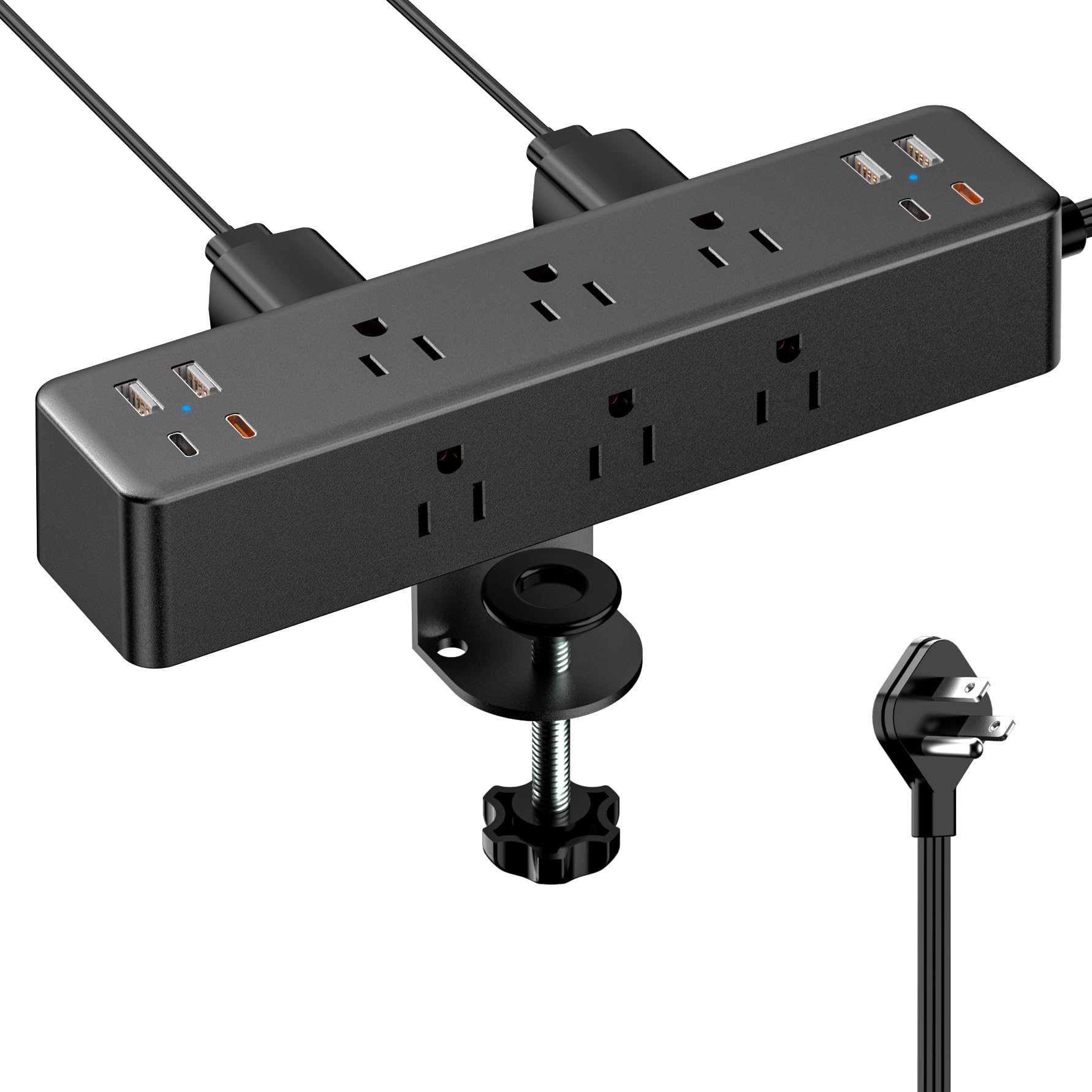
With 17 total outlets — 9 AC and 8 USB (including 4 USB-C) — this clamp strip offers the highest device capacity in the category. The dual PD20W USB-C ports each deliver 20W max, and the total USB output is 40W, which means simultaneous charging of two tablets at decent speed. The 10-foot flat extension cord gives you far more reach than any other clamp model, and the 0.3-inch flat plug fits behind furniture without forcing the cord to bend.
Customer feedback highlights the sturdy clamp fit on desk edges up to 1.7 inches thick. Musicians and hobbyists report mounting it on guitar amp stands and workbenches to keep cables off the floor. The 15-amp circuit handles soldering irons, monitors, and small power tools without tripping. Some buyers note that when all four USB-C ports are in use, the 40W total output is distributed, so a single device won’t see the full 20W.
If you need the most possible ports in one clamped unit and have a wide enough desk edge, this is the highest-count option. The trade-off is that the USB-C ports share the 40W pool, and the very high port count means cable management is entirely on you — there is no built-in box or comb.
Why it’s great
- 17 outlets — highest device capacity in a clamp format.
- 10-foot flat cord provides long reach.
- Dual 20W USB-C PD ports for simultaneous fast charging.
Good to know
- 40W total USB output is shared across all ports.
- Clamp maxes at 1.7-inch desk thickness.
- No cable routing or management features.
4. kakyanill Power Strip Tower Surge Protector
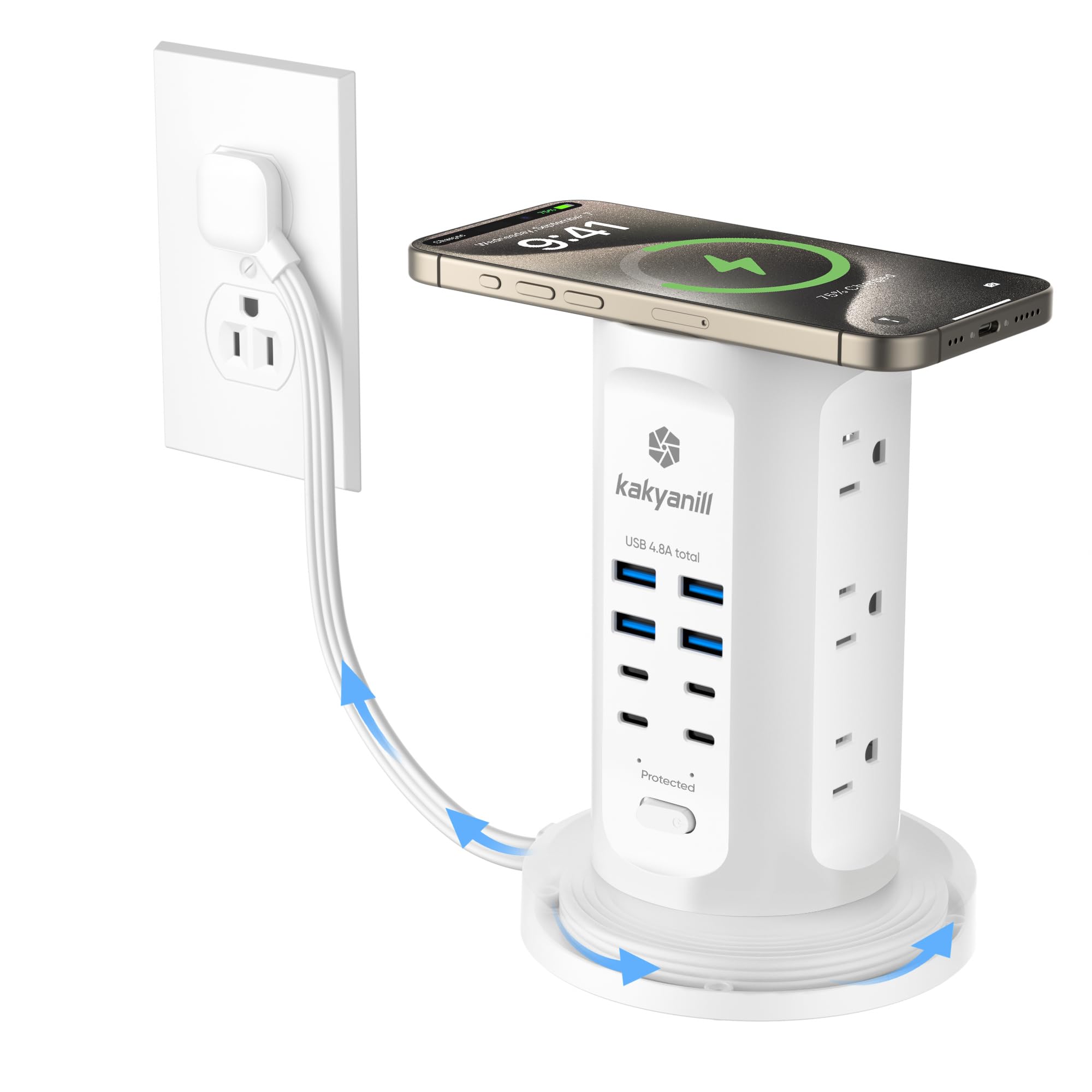
The vertical tower design is the most space-efficient layout for a countertop or floor. It packs 9 AC outlets and 8 USB ports (4 USB-A + 4 USB-C) into a slim white column that takes up almost no horizontal surface area. The retractable 6-foot flat cord winds into the base by rotating the unit — a clever trick that eliminates loose cable coils entirely. The 1080-joule surge protector and individual outlet switches give you power control over each device.
Verified buyers love the aesthetic: the white tower blends into kitchens, nightstands, and office desks, and the retractable mechanism has held up well in daily use. The 1.5-inch AC outlet spacing works with most adapters, though very bulky wall warts may need an end slot. The total USB output is 4.8A shared, which is fine for phones and earbuds but won’t fast-charge a laptop. Users note that the cord can tangle slightly if you don’t wind it evenly.
If your space is tight horizontally but you need a lot of ports, this tower is the best shape. It lacks USB-C PD, so it’s not for laptop charging, but for phones, tablets, lamps, and small appliances, it’s a clean, organized power station.
Why it’s great
- Vertical design maximizes floor/counter space.
- Retractable cord keeps storage tidy.
- Individual outlet switches for per-device control.
Good to know
- No USB-C PD; 4.8A shared for all USB ports.
- 1.5-inch outlet spacing may block very large plugs.
- Not suitable for high-speed laptop charging.
5. CLEVER BRIGHT 6-Port Charging Station Dock

This is the simplest entry-level organizer for a family nightstand or kitchen counter. The dock holds up to 6 devices in a single tier, with a built-in 20W USB-C PD port and 6 included cables (two Lightning-style, two USB-C, one universal Type-C, and one Micro USB). The non-slip rubber surface and removable dividers let you adjust the slots to fit phones, tablets, or earbuds cases of different sizes.
Customer reviews emphasize how much it reduces morning chaos: families of four can park school devices and phones overnight without hunting for cables. The soft nightlight is a thoughtful touch for bedside use, and the matte black finish hides fingerprints reasonably well. Some users noted the plastic dividers don’t lock in place and can shift if bumped, which is the main durability trade-off at this price tier.
This is the right pick if you want a simple, all-in-one charging stand that includes cables so you don’t have to buy anything else. The 20W PD port works for phone fast-charging, but it won’t power a laptop. For its intended use — family device corral — it delivers solid convenience without overcomplicating.
Why it’s great
- Includes 6 cables with multiple connector types.
- Adjustable dividers fit different device sizes.
- Built-in 20W USB-C PD for fast phone charging.
Good to know
- Dividers can dislodge with accidental bumps.
- Not suitable for laptop or large tablet charging.
- Only 6 device slots; limited expandability.
FAQ
Will a desk clamp organizer work on a standing desk with a tapered edge?
Can I charge a MacBook Pro with a charging station organizer that has USB-C PD?
Is a tower or a desk clamp better for a small apartment?
Final Thoughts: The Verdict
For most users, the charging station organizer winner is the Mifaso PD30W Desk Clamp Power Strip because it delivers true 30W laptop charging, strong 1080J surge protection, and a secure clamp design in a footprint that doesn’t steal desk space. If you want a completely hidden cord solution that keeps kids and pets safe, grab the Redagod Power Strip with Cable Management Box. And for a family-friendly dock that includes every cable you need, nothing beats the CLEVER BRIGHT 6-Port Charging Station Dock.

Mo Maruf
I created WellFizz to bridge the gap between vague wellness advice and actionable solutions. My mission is simple: to decode the research and give you practical tools you can actually use.
Beyond the data, I am a passionate traveler. I believe that stepping away from the screen to explore new environments is essential for mental clarity and physical vitality.