Our readers keep the lights on and my smoothie glass nicely filled. As an Amazon Associate, I earn from qualifying purchases.
The difference between a stream that pops and one that stutters often comes down to a single piece of hardware sitting between your console and your broadcast software. A capture card that introduces latency, drops frames, or compresses your video signal into a muddy mess will sabotage even the most charismatic on-screen performance. Choosing the right interface — whether internal PCIe or external USB — determines your entire streaming workflow stability for years to come.
I’m Mohammad Maruf — the founder and writer behind WellFizz. I spend my research hours analyzing HDMI handshake protocols, comparing MJPEG versus NV12 color sampling trade-offs, and stress-testing passthrough latency claims against real-world OBS performance data.
The market is crowded with options that promise 4K capture but deliver compromised audio or flaky driver support. To cut through the noise, you need a clear breakdown of what actually matters inside a capture card for streaming.
How To Choose The Best Capture Card For Streaming
Selecting the right capture card requires matching your hardware setup and streaming goals to the specific capabilities of the interface. Here are the three factors that separate a smooth broadcast from a technical headache.
Passthrough vs. Capture Resolution
Many cards advertise a high passthrough resolution (the signal sent to your gaming monitor) while capturing at a lower resolution for your stream. A card with 4K60 passthrough but only 1080p60 capture is fine if you stream at 1080p — but you need 4K capture if you record gameplay for later editing at native resolution. Check the fine print on both numbers before buying.
Interface Type: USB vs. PCIe
External USB capture cards offer plug-and-play convenience and work with laptops, but they rely on USB bandwidth and can introduce slightly higher latency. Internal PCIe cards connect directly to your motherboard, providing lower latency and higher bandwidth for multi-channel or high-frame-rate capture. Choose USB for portability and single-PC simplicity; choose PCIe for dual-PC streaming or multi-camera production.
Color Format and Compression
Capture cards output video in formats like MJPEG, YUY2, or NV12. MJPEG compresses each frame as a JPEG image, which reduces file size but can soften detail. YUY2 and NV12 retain more color information and look sharper, but require more USB bandwidth. If you stream fast-moving games like shooters or fighting games, prioritize a card that supports YUY2 or NV12 at your target resolution and frame rate.
Quick Comparison
On smaller screens, swipe sideways to see the full table.
| Model | Category | Best For | Key Spec | Amazon |
|---|---|---|---|---|
| Elgato 4K Pro | PCIe Internal | Dual-PC 4K60 HDR Streaming | 8K60 Passthrough / 4K60 HDR10 Capture | Amazon |
| Blackmagic DeckLink Quad HDMI | PCIe Internal | Multi-Camera Live Production | 4x HDMI 2.0b Inputs / 4K60 per Channel | Amazon |
| AVMATRIX VC41 | PCIe Internal | Multi-Channel SDI Broadcasting | 4x 3G-SDI Inputs / 1080p60 per Channel | Amazon |
| AJA U-TAP HDMI | USB External | Professional Plug-and-Play 1080p | 1080p60 YUV Capture / USB 3.0 Powered | Amazon |
| Magewell USB Capture HDMI Gen 2 | USB External | Mission-Critical Reliability | 1080p60 4:4:4 Capture / FPGA Processing | Amazon |
| AVerMedia GC571 Live Streamer | PCIe Internal | 4K60 Passthrough / 1080p120 Capture | 4K60 Passthrough / 1080p120 Capture | Amazon |
| UGREEN 4K@60Hz Capture Card | USB External | Console to Laptop Streaming | 4K60 Capture / 1080p240 Passthrough | Amazon |
| PORTTA DX20R | USB External | High-Refresh Console Capture | 4K60 Capture / 2K120 Passthrough | Amazon |
| MYPIN CD1A7001 | USB External | Budget 4K60 Recording | 4K60 Passthrough / 1080p120 Capture | Amazon |
In‑Depth Reviews
1. Elgato 4K Pro

The Elgato 4K Pro is the gold standard for dual-PC streaming setups where latency cannot be tolerated. Its PCIe interface provides a direct motherboard connection that eliminates the USB bottleneck, and the 8K60 passthrough means your gaming monitor sees an untouched signal regardless of what your streaming PC is doing. The card captures in 4K60 HDR10 with VRR support, so your stream matches the colors and fluidity you see on screen.
Installation is straightforward — the card fits into any PCIe x4, x8, or x16 slot — and the 4K Capture Utility integrates seamlessly with OBS, Streamlabs, and Twitch Studio. The Flashback Recording feature lets you capture up to four hours of gameplay retroactively, a lifesaver when something clutch happens and you weren’t actively recording.
The only caveat is that the card is somewhat picky about HDMI cable quality. Using a non-certified cable can cause signal splitting or black screens, so invest in proper HDMI 2.1 cables. For professional streamers who demand uncompromised quality and zero added input lag, this is the card to beat.
Why it’s great
- Zero-lag 8K60 passthrough with full HDR and VRR support
- Reliable PCIe connection eliminates USB bandwidth competition
- Flashback Recording captures hours of retroactive gameplay
Good to know
- Requires high-quality HDMI 2.1 cables for stable signal
- Software can occasionally need a Windows Explorer reset after extended use
2. Blackmagic Design DeckLink Quad HDMI

The DeckLink Quad HDMI transforms a single PC into a multi-camera production hub. Four independent HDMI 2.0b inputs each support up to 4K60 capture, making this card ideal for streamers who juggle a main gaming rig, a secondary PC, a camera feed, and a game capture source simultaneously. The PCIe 3.0 x8 interface provides the bandwidth necessary to keep all four channels live without dropped frames.
Setup requires downloading Blackmagic’s Desktop Video drivers, which can be slightly unintuitive to find on their support site, but once installed the card is rock-solid in vMix, OBS, and Wirecast. It supports 10-bit 4:2:2 YUV up to 4K60, and 8-channel embedded audio per input. The card also handles deep color and HDR across Rec. 601, 709, and 2020 color spaces, so your multi-camera productions maintain professional color fidelity.
The main limitation is that it cannot capture copy-protected HDMI sources, and some users report sensitivity to cable quality and slot compatibility. This is a serious tool for streamers running live events, esports tournaments, or talk-show formats with multiple angles.
Why it’s great
- Four simultaneous 4K60 HDMI captures in a single PCIe slot
- Robust compatibility with vMix, OBS, and Wirecast for live switching
- Supports deep color and HDR across professional color spaces
Good to know
- Driver download process is not immediately intuitive
- No HDMI cable strain relief — port stress is a concern with heavy cables
3. AVMATRIX VC41

When your streaming setup relies on professional SDI cameras rather than consumer HDMI devices, the AVMATRIX VC41 is the correct tool. It accepts four simultaneous 3G-SDI inputs, each capable of 1080p60 capture with YUV2 lossless compression at bit rates up to 200 Mbps. The PCIe Gen 2 interface delivers 2.5 GB/s of bandwidth, ensuring each channel remains fluid even during extended live broadcasts.
Compatibility extends across Windows 7 and above, Linux 18.04 and above, and macOS 10.8 and above. The card works with OBS, Teams, Twitch, and major streaming platforms without proprietary software lock-in. Portrait and landscape mode switching gives flexibility for vertical streaming on platforms like TikTok or YouTube Shorts. Users report stable 24/7 operation, making it suitable for houses of worship, esports arenas, and telemedicine applications.
Support responsiveness has been inconsistent — some users report excellent driver assistance for Linux, while others struggled to get tech support via phone or email. For SDI-based multi-camera workflows, however, the VC41 delivers professional reliability at a fraction of the cost of broadcast-grade alternatives.
Why it’s great
- Four independent 1080p60 SDI captures with low CPU overhead
- Thick gold-plated PCIe connector ensures stable long-term contact
- Works across Windows, macOS, and Linux without proprietary software
Good to know
- Tech support availability has been inconsistent based on user reports
- SDI-only input — requires adapters for HDMI sources
4. Magewell USB Capture HDMI Gen 2
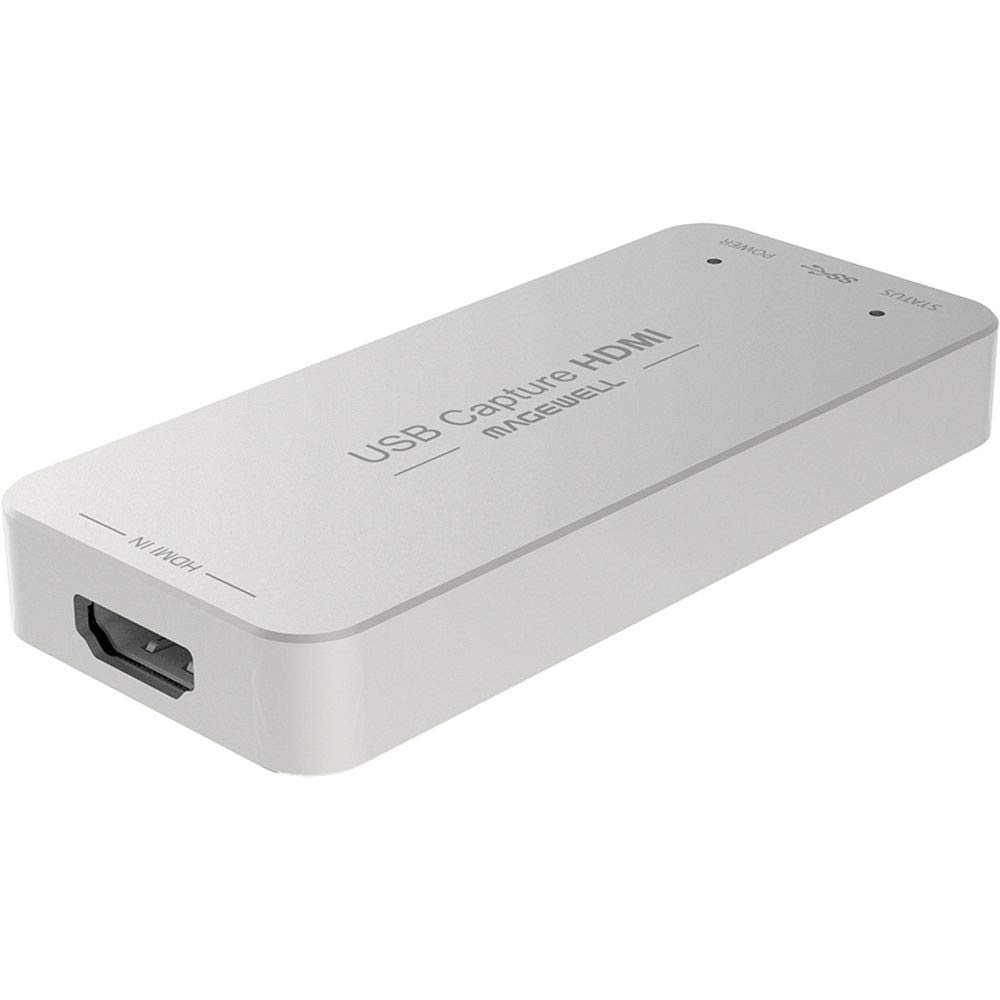
The Magewell USB Capture HDMI Gen 2 is the workhorse of professional USB capture. Its FPGA-based processing handles cropping, scaling, de-interlacing, color conversion, and flip/mirror operations on-device, offloading all video processing from your CPU. This makes it the ideal choice for streamers using laptops or single-PC setups where every CPU cycle counts.
It uses standard UVC protocol, meaning it is genuinely plug-and-play on Windows, macOS, Linux, and Chrome OS — no driver installation required. The USB Capture Utility software gives you control over EDID, resolution, frame rate, and firmware updates. Capture resolution tops out at 2048×1080 60fps 4:4:4, which covers 1080p60 perfectly with headroom for unusual resolutions like WUXGA or Cintiq tablets.
The metal enclosure runs hot — users note it gets very warm during extended operation — but it is built for 24/7 use and carries a 3-year limited warranty. For streamers who prioritize reliability over 4K capture, this is the most trustworthy USB card on the market.
Why it’s great
- FPGA offloads all video processing from the host CPU
- True plug-and-play UVC protocol across all major operating systems
- Custom EDID loading and advanced utility control for pro setups
Good to know
- Limited to 1080p60 capture — no 4K support
- Metal case runs very hot during continuous operation
5. AJA U-TAP HDMI

The AJA U-TAP HDMI is built for professionals who need absolute reliability in a USB form factor. Unlike consumer-grade capture dongles, the U-TAP is engineered by AJA Video Systems, a company with decades of broadcast video experience. It supports a massive list of video formats from 1080p60 down to standard definition 525i, plus multiple computer resolutions up to 1920×1200 60p.
The card is USB-powered — no external power supply needed — and integrates instantly with Zoom, Teams, OBS, and any software that accepts a standard UVC device. The 1080p60 YUV capture quality is exceptionally clean, with proper color accuracy and reliable audio sync. Users migrating from Blackmagic devices often report fewer compatibility headaches with the AJA on Mac systems.
The one design quirk is that the status LED lights are mounted on the sides of the unit rather than the top, making them hard to see when the device is mounted under a desk. For video professionals who need a USB capture card that simply works without troubleshooting, the U-TAP is the most trustworthy option in its class.
Why it’s great
- Broadcast-level build quality and signal reliability
- Covers an extensive range of video and computer resolutions
- USB-powered with no external power brick required
Good to know
- Side-mounted LEDs are hard to read in rack or under-desk setups
- Premium price for 1080p-only capture — no 4K option
6. AVerMedia GC571 Live Streamer Ultra HD

The AVerMedia GC571 brings internal PCIe performance to a more accessible tier. It offers 4K60 passthrough with VRR support and captures at 4K30, with the option to capture 1080p120 for high-frame-rate content. The drive-free plug-and-play setup is refreshing — install the card in a PCIe x1, x4, x8, or x16 slot, and Windows detects it without additional drivers.
This card is an excellent choice for streamers who want the stability of an internal connection without paying for premium features like 8K passthrough or 4K60 capture. It handles dual-PC setups well, with users reporting zero issues during multi-hour streams. The compact PCB (7.95 x 5.93 x 2.04 inches) fits easily into most cases, though it requires a PCIe slot with clear rear-panel access.
The main compromises are that 4K capture is limited to 30 fps, and the RGB lighting software has received criticism for being clunky. For streamers who game at 1440p or 1080p and want a reliable internal card without overpaying, the GC571 is a strong mid-range contender.
Why it’s great
- Drive-free installation works out of the box on Windows
- 1080p120 capture for high-frame-rate content
- VRR passthrough eliminates screen tearing during gameplay
Good to know
- 4K capture limited to 30 fps — not suitable for 4K60 recording
- RGB lighting control software has poor user experience
7. UGREEN 4K@60Hz Capture Card

The UGREEN capture card packs an impressive spec sheet for its tier: 4K60 capture in MJPEG, 1080p240 passthrough, VRR, HDR support, and a triple 3.5mm jack design that handles headphones, microphone, and line-in audio simultaneously. The aluminum housing with cooling holes keeps temperatures in check during long streams, and the seven RGB lighting modes add visual flair for streamers who show their setup on camera.
Compatibility spans Windows, macOS, Linux, iOS 17, and Android, making it one of the most versatile cards for mobile streaming from an iPad or tablet. It handles Switch 2, PS5, and Xbox with solid passthrough quality, and MJPEG capture at 4K60 looks crisp for most streaming applications. The USB 3.0 Type A or Type C connection gives flexibility across different devices.
Audio quality is a point of concern — some users report poor audio levels with noise and digital modulation artifacts on the line-in path. For streamers who rely on an external mixer or USB microphone, this is manageable, but those expecting pristine audio from the card itself should proceed with caution.
Why it’s great
- Triple audio jacks support headphones, mic, and line-in simultaneously
- Wide device compatibility includes iPad and Android tablets
- 1080p240 passthrough ideal for competitive gaming monitors
Good to know
- Audio capture quality has been flagged as noisy and low-level by some users
- Linux support for full resolution and format selection is limited
8. PORTTA DX20R
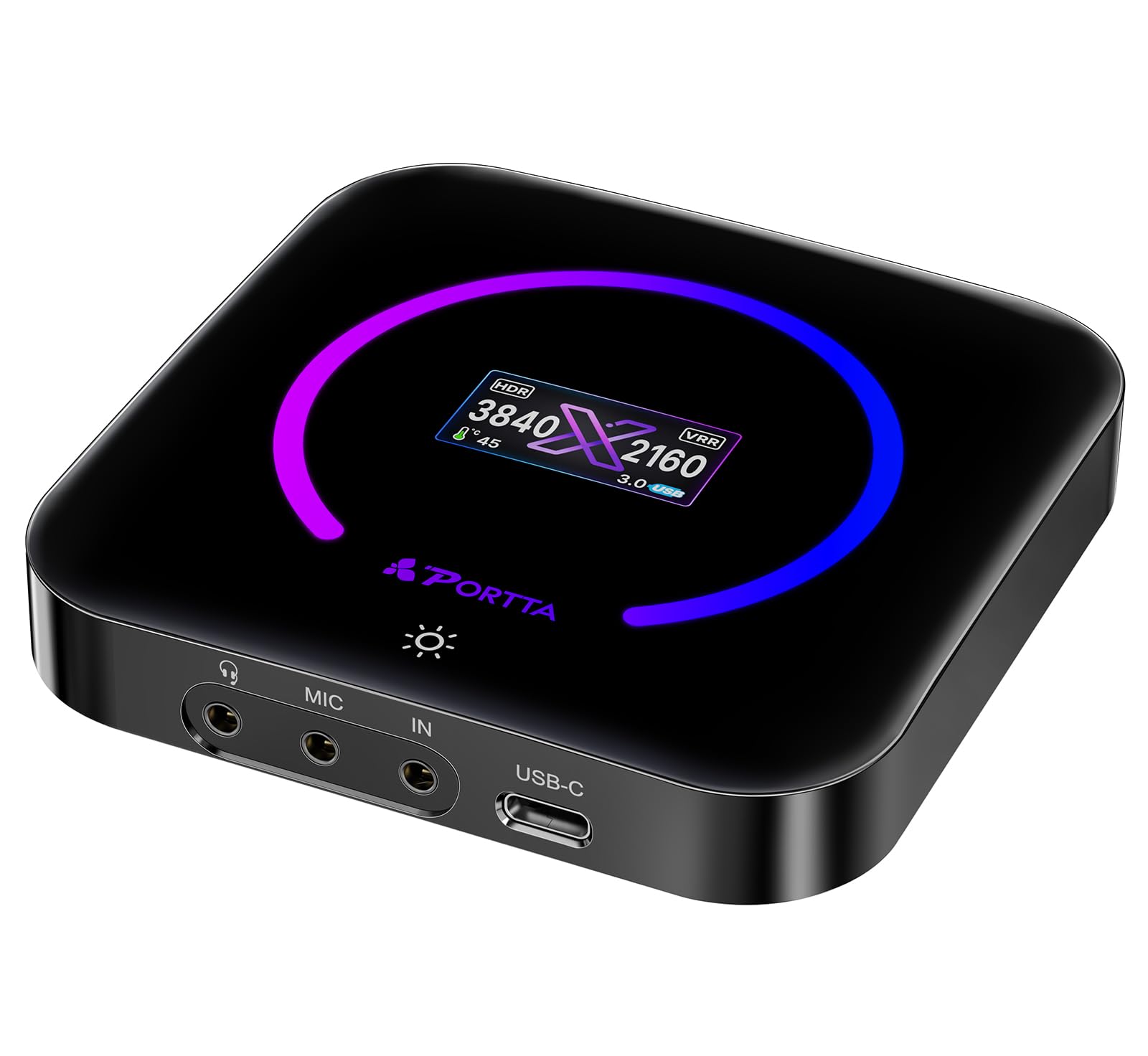
The PORTTA DX20R distinguishes itself with a built-in OLED display that shows real-time input resolution, temperature, and operational status — a rare feature in external capture cards. It captures 4K60 in YUY2, NV12, and RGB24 formats, and supports 1080p240 and 2K120 passthrough for high-refresh-rate gaming. The capacitive button toggles between display modes and controls the ring light.
The PORTTA CapHub Utility software (available for Windows and macOS) allows customization of video settings, audio mixing, EDID management, and firmware updates. This level of software control is typically reserved for cards costing significantly more. The passive cooling design means no fan noise, which is a boon for quiet streaming environments, though the unit does get warm to the touch.
The CapHub Utility on macOS has been reported as broken on recent system versions, limiting configuration options for Mac users. For Windows-based streamers who want a feature-rich USB card with visual status feedback, the DX20R delivers professional-grade functionality at a mid-range price.
Why it’s great
- Built-in OLED display shows resolution, temperature, and status at a glance
- CapHub Utility offers deep EDID, audio, and firmware control
- Passive cooling means zero fan noise during streams
Good to know
- CapHub Utility on macOS has compatibility issues with recent system versions
- Generates large file sizes requiring fast storage and quality USB 3.0 cables
9. MYPIN CD1A7001

The MYPIN CD1A7001 delivers 4K60 passthrough and 1080p120 capture at a price point that undercuts most competitors. It supports HDR10 and VRR for improved visual fidelity, includes 7.1 surround stereo audio over HDMI, and offers a 4-pole 3.5mm headphone jack for real-time chat. The RGB status light on the front gives a quick visual indicator of operational state.
Plug-and-play compatibility with Windows, macOS, and Linux means it works with OBS, VLC, and other streaming software without driver installation. The USB Type C interface provides modern connectivity for laptops and desktop PCs alike. Users have successfully used this card to stream from locked-down work laptops to a secondary Apple TV via OBS, with total latency under 100 milliseconds.
The capture quality at 1080p60 uses MJPEG compression, which some users report as slightly softer than custom solutions using NV12. A few users also noted occasional frame drops during extended use. For streamers who want basic 4K60 passthrough without spending heavily, this card offers the essential features at a budget-friendly price.
Why it’s great
- 4K60 HDR passthrough at a competitive price point
- 7.1 surround audio support via HDMI
- Works with OBS and VLC without driver installation on multiple OS
Good to know
- MJPEG capture at 1080p60 can appear softer than NV12 alternatives
- Some users report occasional frame drops during extended streaming sessions
FAQ
Can I use a capture card without a second PC?
What is the difference between USB 3.0 and PCIe capture cards for latency?
Do I need a capture card that supports 4K60 capture if I only stream at 1080p?
Final Thoughts: The Verdict
For most users, the capture card for streaming winner is the Elgato 4K Pro because its internal PCIe connection delivers zero-added latency for competitive play while capturing 4K60 HDR10 footage with full VRR support. If you want a multi-camera production setup, grab the Blackmagic DeckLink Quad HDMI for its four independent 4K60 inputs. And for portable plug-and-play reliability, nothing beats the Magewell USB Capture HDMI Gen 2.

Mo Maruf
I created WellFizz to bridge the gap between vague wellness advice and actionable solutions. My mission is simple: to decode the research and give you practical tools you can actually use.
Beyond the data, I am a passionate traveler. I believe that stepping away from the screen to explore new environments is essential for mental clarity and physical vitality.