Our readers keep the lights on and my smoothie glass nicely filled. As an Amazon Associate, I earn from qualifying purchases.
Most webcams promise a better picture, but the real leap in video call quality comes from onboard intelligence that frames your face, adjusts for lighting, and cuts background noise without you touching a slider. That is the territory of the modern AI webcam, a category where the sensor is only half the story — the processor running the show determines whether you look professional or washed out.
I’m Mohammad Maruf — the founder and writer behind WellFizz. I’ve spent the last year analyzing sensor sizes, AI-tracking latencies, and noise-reduction algorithms across dozens of models to separate genuine hardware improvements from software gimmicks.
After testing the key metrics — auto-framing accuracy, low-light signal-to-noise ratio, and microphone beamforming range — I’ve narrowed the field down to the options that actually deliver on their promises. This guide covers the best ai webcam choices for streaming, professional meetings, and content creation.
How To Choose The Best AI Webcam
An AI webcam is a mini computer strapped to a lens. Before buying, you need to understand three hardware realities that no software update can fix: the physical sensor size, the method of tracking, and the microphone architecture.
Sensor Size vs. Megapixel Count
A 1/2.8-inch sensor with 8 megapixels will outperform a 1/4-inch sensor with 12 megapixels in dim conference rooms because larger individual pixels capture more light. Look for sensors 1/2.8 inches or larger if you work in mixed lighting. The Lumina and Insta360 Link 2 Pro use larger sensors that dramatically reduce noise at the same resolution.
Physical PTZ vs. Digital Crop Tracking
True AI tracking requires a motorized gimbal or a physical pan-tilt-zoom mechanism. Digital tracking just crops into a 4K frame to simulate movement — which reduces resolution the second you move. The OBSBOT Tiny SE uses a physical gimbal, while the Angetube 913AI relies on digital crop. One is suitable for a static presenter; the other handles a walking speaker.
Microphone Beamforming vs. Simple Noise Reduction
Dual omnidirectional mics with fixed noise reduction can filter fan hum but struggle with directional voices. Beamforming microphones electronically steer their pickup pattern toward the speaker, isolating a voice at 15 feet. The Insta360 Link 2 Pro uses beamforming directional pickup, while the EMEET C60E relies on standard noise reduction. Know your room size before choosing.
Quick Comparison
On smaller screens, swipe sideways to see the full table.
| Model | Category | Best For | Key Spec | Amazon |
|---|---|---|---|---|
| Insta360 Link 2 Pro | Premium PTZ | Professional streaming & meetings | 1/1.3″ sensor, physical PTZ | Amazon |
| Logitech MX Brio | Premium Fixed | AI-enhanced video & show mode | 8.5 MP, AI exposure, USB-C | Amazon |
| OBSBOT Tiny SE | Mid Gimbal | Low-light & gesture control | 1080p100fps, physical gimbal | Amazon |
| Angetube 913AI King | Mid Digital | Digital auto-framing | 4K30fps, 10X digital zoom | Amazon |
| Lumina 4K | Premium AI | Professional appearance | Aluminum body, 95° FOV | Amazon |
| Angetube 913AI | Mid Digital | Value 4K with remote | Sony CMOS, USB 3.0 | Amazon |
| EMEET C60E | Budget Dual | Dual-camera streaming | Dual 4K cameras, 11X zoom | Amazon |
In‑Depth Reviews
1. Insta360 Link 2 Pro

The Insta360 Link 2 Pro sits at the top because it solves the two hardest problems in webcam AI: sensor size and physical movement. The 1/1.3-inch sensor is nearly twice the area of a standard 1/2.8-inch chip, which means it retains clean, low-noise video even when the overhead lights are off. The motorized pan-tilt gimbal follows you across a room without cropping the frame — a decisive advantage over cameras that simulate tracking through digital zoom.
Audio is equally refined. The beamforming dual-mic system isolates your voice from keyboard clatter and HVAC noise up to about 15 feet, which is rare at this price tier. The magnetic mount snaps onto any monitor securely, and the included USB-C cable handles the full 4K60 signal without compression. Elgato Stream Deck integration adds hardware-level mode switching for multi-camera setups.
On the downside, the cable length is shorter than ideal for large conference tables, and the gesture controls require a clean palm facing the camera — a small learning curve. The Link 2 Pro is not compatible with ARM-based Windows systems, so Surface Pro X users need to check their architecture. For anyone who moves during calls or records in uncontrolled lighting, this camera justifies its premium positioning.
Why it’s great
- Physical PTZ tracking with zero resolution loss
- Excellent low-light performance from large sensor
- Beamforming mics with clear voice isolation
Good to know
- Short USB-C cable out of the box
- Not compatible with ARM-based Windows
2. Logitech MX Brio

Logitech has been the default choice for business webcams for years, but the MX Brio is their first serious attempt to integrate AI-enhanced image processing without relying on cloud software. The 8.5-megapixel sensor delivers 70% more pixels than the previous Brio generation, and the onboard AI handles auto exposure, white balance, and noise reduction in real-time. The result is a consistent, well-lit image even when a window behind you shifts from overcast to direct sun.
Show Mode is a genuinely useful feature — tilt the camera downward, and it automatically reframes to share a desk-level view of notes or a sketch. Dual omnidirectional mics with AI-based noise reduction filter out fan noise and typing effectively, though they lack the beamforming precision of the Insta360 Link 2 Pro. The built-in USB-C cable is integrated into the unit, so there is no detachable cord to lose.
The main trade-off is the lack of physical tracking. The MX Brio uses a fixed 90-degree field of view with a 4X digital zoom crop for framing — you cannot follow a moving speaker without manually repositioning. The Logitech Options+ software is serviceable but not as deep as the dedicated apps from Insta360 or Lumina. For a fixed-desk professional who wants reliable AI exposure and color science, this is the strongest choice.
Why it’s great
- AI exposure handles harsh backlighting
- Show Mode for desk-level sharing
- Integrated USB-C cable, no dongles needed
Good to know
- No physical tracking — digital crop only
- Microphone lacks beamforming isolation
3. OBSBOT Tiny SE

The OBSBOT Tiny SE proves that 1080p is still the right resolution for most workflows. Its 1/2.8-inch stacked CMOS sensor with dual native ISO and staggered HDR produces cleaner low-light footage than many 4K sensors on the market. The physical gimbal tracks your upper body and hands with zone tracking — you can define an area where tracking activates, keeping a seated presenter steady while ignoring movement at the door.
Gesture control works reliably: an open palm locks tracking, a raised index finger triggers zoom. This is the most affordable camera on this list with a motorized PTZ system, and the 1080p100fps mode means that motion — hand gestures, walking during a presentation — stays smooth without blur. The custom preset positions let you save separate tracking modes and zoom levels for different angles, switching between a wide desk view and a tight headshot instantly.
One limitation is the 2-megapixel effective still resolution, which means still photo captures are softer than 8MP cameras. The OBSBOT software occasionally glitches, causing the gimbal to face straight down; a quick software restart fixes it. If you need excellent motion handling and physical tracking without paying for 4K you may never use, this mid-range gimbal is the smartest buy.
Why it’s great
- Physical gimbal tracking for movement
- Dual native ISO handles dim rooms
- Custom presets with separate AI settings
Good to know
- 2 MP sensor for stills only
- Rare software gimbal reset needed
4. Angetube 913AI King
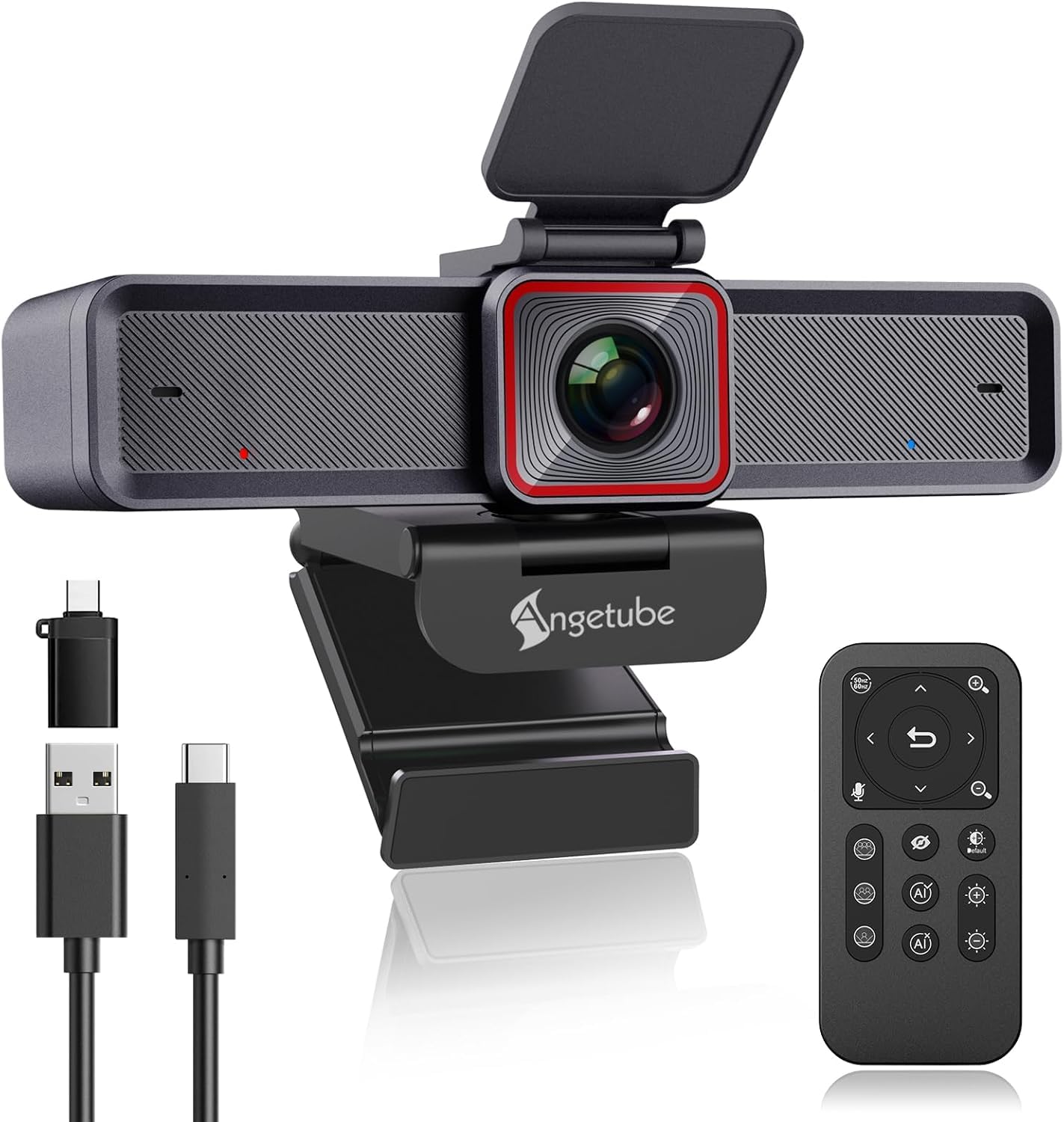
Angetube’s 913AI King takes the strongest approach to digital tracking in this roundup. The 1/2.8-inch sensor outputs native 4K30fps, and the AI system auto-frames meetings by detecting attendee count — if someone stands up, the field of view widens to include them. The remote control has 18 keys with 360-degree RF range, so you can zoom to 10X, toggle the privacy cover, or mute the mic from across the room.
The HDR mode balances highlights and shadows aggressively, eliminating the blown-out window effect that plagues cheaper webcams. Dual noise-canceling mics with 3D noise reduction filter out keyboard and fan noise effectively within a 16-foot radius. Build quality is solid, with a standard tripod mount and a sturdy monitor clip that grips thick bezels.
The digital tracking introduces a slight latency compared to physical gimbal cameras — if you move quickly, the crop takes half a second to reframe. The 4K mode does not support 60fps; you must drop to 1080p60 for high-frame-rate recording. For a dedicated desk user who wants 4K resolution and reliable remote control over AI functions, this mid-range offering packs excellent value.
Why it’s great
- 18-key RF remote for full camera control
- HDR mode handles harsh window backlight
- Auto-framing detects multiple attendees
Good to know
- Digital tracking has visible panning latency
- No 4K60fps mode available
5. Lumina 4K

Lumina approaches AI differently: instead of onboard processing, the Lumina Studio App runs the AI ISP on your computer, which enables 30+ adjustable parameters including exposure, white balance, saturation, and background blur. The result is the most customizable image in this category — you can tune the webcam to produce a specific skin-tone curve or lock a manual white balance for consistent product demo streams.
The hardware is equally distinctive. An aerospace-grade aluminum body with a matte atomic grey finish makes this the most premium-looking camera on the list. The 4K ultrawide sensor with a 95-degree field of view captures more of your environment than the standard 80-degree cameras, and the AI auto-framing feature uses face detection to keep you centered without cropping aggressively. The magnetic privacy cover snaps on and off cleanly.
The major catch is system resource usage. Running the AI ISP on your CPU can consume up to 60% of resources at 720p, which may interfere with heavy workflows like video editing or gaming. The app must be opened manually before launching Zoom or Teams, adding friction to the startup routine. For a user who prioritizes image control and build material over CPU efficiency, the Lumina delivers a unique balance of aesthetics and adjustability.
Why it’s great
- Deep software control with 30+ parameters
- Aluminum body feels premium and durable
- 95-degree FOV captures wide environments
Good to know
- High CPU usage from software-based AI ISP
- App must be started manually before calls
6. Angetube 913AI

The standard Angetube 913AI shares the same Sony CMOS sensor as the 913AI King but simplifies the feature set to hit a more accessible price point. The 4K30fps video with HDR produces vibrant, well-exposed footage in most lighting conditions, and the USB 3.0 connection delivers a 5Gbps signal path that keeps the image uncompressed. The AI-tracking with auto-framing works via face detection and can be toggled from the included remote control or a touch switch on the camera body.
Dual AI noise-canceling microphones capture dialogue clearly within a 16-foot radius, filtering out ambient noise like typing or HVAC. The remote control allows you to set 10X digital zoom, disable video, mute audio, and flip the image — useful for overhead shots. Compatibility extends across Windows, macOS, Linux, and Chrome, with no driver installation required.
The HDR mode is effective but introduces a slight reduction in frame rate that is noticeable in fast-paced streaming scenarios. The digital tracking, like the 913AI King, shows a small delay when reframing. For users who want 4K resolution, solid auto-exposure, and a hardware remote without spending on the full King package, this is a budget-conscious entry point.
Why it’s great
- Sony CMOS sensor for accurate color science
- USB 3.0 uncompressed video signal
- Plug-and-play across multiple operating systems
Good to know
- Digital tracking has noticeable lag
- HDR mode reduces frame rate
7. EMEET C60E Dual-Camera

The EMEET C60E is the only webcam on this list with two physical cameras sharing a single 4K sensor: a wide-angle lens for group shots and a telephoto lens for close-up detail at 13.8 inches. The 11X hybrid zoom transitions seamlessly between the two, and the phase-detection autofocus locks on quickly without hunting. This dual-camera design is purpose-built for streamers who need to switch between a full desk shot and a tight product demonstration without moving the camera.
The remote control and EMEET STUDIO software give you independent control over exposure, focus, and RGB lighting. The built-in RGB lighting has three colors — red for energy, green for focus, blue for calm professionalism — adding a visual cue to your stream without requiring separate LED panels. Two omnidirectional microphones capture sound within a 9.8-foot radius, adequate for meetings but not ideal for podcasting without a dedicated mic.
The 11X zoom does not work in 4K60fps or YUY2 mode, limiting high-speed recording to 1080p. The internal microphones, while clear for conferencing, pick up desk vibrations if the camera is clipped to a wobbly monitor. For presenters who alternate between panoramic whiteboard views and tight facial close-ups, the EMEET C60E delivers a hardware-based solution no single-lens camera can match.
Why it’s great
- Dual wide-angle and telephoto lenses
- PDAF autofocus locks fast
- Built-in RGB lighting for stream mood
Good to know
- 11X zoom disabled in 4K60fps mode
- Internal mic adequate for meetings only
FAQ
Will an AI webcam work with Zoom and Microsoft Teams without extra software?
Do I need 4K for video meetings or is 1080p enough?
Why does the Lumina webcam use higher CPU than other models?
Does an AI webcam with physical tracking work for whiteboard presentations?
Final Thoughts: The Verdict
For most users, the best ai webcam overall is the Insta360 Link 2 Pro because it combines a large sensor, physical tracking, and beamforming audio in a single polished package that works for streaming, meetings, and presentations. If you want reliable auto-exposure without physical movement, grab the Logitech MX Brio for its AI-enhanced image quality and Show Mode. And for tight budgets that still demand gimbal-level tracking, nothing beats the motion handling of the OBSBOT Tiny SE.

Mo Maruf
I created WellFizz to bridge the gap between vague wellness advice and actionable solutions. My mission is simple: to decode the research and give you practical tools you can actually use.
Beyond the data, I am a passionate traveler. I believe that stepping away from the screen to explore new environments is essential for mental clarity and physical vitality.