Our readers keep the lights on and my smoothie glass nicely filled. As an Amazon Associate, I earn from qualifying purchases.
A keyboard and mouse that fight back against wrist fatigue, not cause it. The best business keyboard and mouse combo delivers more than just keystrokes—it reshapes your desk ergonomics, cuts out the noise of clacky switches, and streamlines multi-device workflows so you can stay focused from morning meeting to late-night project.
I’m Mohammad Maruf — the founder and writer behind WellFizz. I’ve spent hundreds of hours analyzing peripheral specs, reading through user experiences, and comparing membrane versus scissor-switch actuation, DPI ranges, wireless protocols, and battery architectures to build this guide.
Whether you type for hours in a home office or bounce between devices on a business trip, finding a reliable business keyboard and mouse combo means balancing ergonomic support with silent operation and seamless connectivity.
How To Choose The Best Business Keyboard And Mouse Combo
Picking the right combo saves your wrists, your focus, and your desk space. The wrong one introduces noise, lag, and fatigue. Here are the three specs that separate a smart buy from a repeated replacement.
Keyboard switch type and noise level
Membrane switches produce a softer, quieter keystroke ideal for open offices. Scissor-switch keyboards (like those on premium laptops) offer a more responsive feel with slightly more tactile feedback. If you share a workspace, look for terms like “SilentTouch” or “quiet clicks” — these combos use dampened mechanisms that reduce switch noise by roughly 90% compared to standard mechanical boards.
Battery architecture and charging
Rechargeable lithium-ion batteries eliminate the cost and waste of AA replacements. Check whether both keyboard and mouse use USB-C charging and whether they support passthrough operation while charging. Some budget-friendly combos use auto-sleep to extend runtimes to weeks, while premium models advertise months of use on a single full charge.
Ergonomic shape and wrist support
Split or wave-shaped keyboards naturally align your forearms at a neutral angle, reducing ulnar deviation. A cushioned palm rest — especially one with memory foam or faux-leather cover — prevents contact stress on the carpal tunnel area. Mouse shape matters too: contoured right-hand designs with thumb rests and adjustable DPI reduce forearm tension during extended navigation.
Quick Comparison
On smaller screens, swipe sideways to see the full table.
| Model | Category | Best For | Key Spec | Amazon |
|---|---|---|---|---|
| Logitech MX Keys Combo for Business | Gen 2 | Premium | Enterprise multi-device power users | Darkfield 8000 DPI laser sensor | Amazon |
| Logitech MK955 Signature Slim | Premium | Large hands, quiet office work | 90% reduced click noise (SilentTouch) | Amazon |
| ProtoArc EKM01 Plus | Mid-Range | Full-size split design for ergo comfort | Split curved keyframe + 500mAh battery | Amazon |
| Sablute MA31 Pro (White) | Mid-Range | Rechargeable wave keyboard with backlight | 4000mAh keyboard battery, 10M keystroke | Amazon |
| Sablute Purple Ergonomic Wave | Mid-Range | Budget ergonomic wave with leather rest | Wave-shaped keys, synthetic leather rest | Amazon |
| ProtoArc XKM03 Foldable | Mid-Range | Business travel and compact carry | 166° V-shape split, 3 Bluetooth devices | Amazon |
| SABLUTE CK13Pro Typewriter | Budget | Stylish desk with retro aesthetic | 7-color backlight, magnetic wrist rest | Amazon |
In‑Depth Reviews
1. Logitech MX Keys Combo for Business | Gen 2

This is the gold standard for business productivity. The full-size keyboard uses spherically-dished Perfect Stroke scissor keys that cup your fingertips for stable, quiet typing with zero wobble. The MX Master 3S mouse employs a Darkfield 8000 DPI laser sensor that tracks on glass, and its MagSpeed electromagnetic scroll wheel lets you fly through a thousand-line spreadsheet in a second or click through line by line with pixel precision.
All-metal construction gives the keyboard a reassuring heft, while the included palm rest attaches magnetically. Quiet Click technology drops mouse noise by 90%, making it ideal for open-plan spaces. Logi Bolt wireless delivers encrypted, enterprise-grade security with a dedicated USB receiver, and the combo remembers up to three paired devices for instant switching.
Rechargeable batteries in both keyboard and mouse support passthrough typing while charging via USB-C. The backlighting adjusts automatically based on ambient light and hand proximity, conserving battery when you step away. This is the only combo in the lineup that pairs enterprise security certification with premium materials and a near-silent typing experience.
Why it’s great
- Dished scissor keys provide exceptional tactile feel and stability
- Darkfield sensor works on glass surfaces without a mouse pad
- Enterprise-grade encrypted wireless with Logi Bolt
Good to know
- Premium price reflects the professional-grade feature set
- Heaviest combo in the roundup, less portable
2. Logitech MK955 Signature Slim

Logitech designed the K950 keyboard with a slim, laptop-style scissor mechanism that stays quiet even during fast typing. The M750 L mouse uses SilentTouch technology to reduce click noise by 90%, making this one of the quietest combos available for shared workspaces. The full-size layout accommodates larger hands without crowding the number pad.
The SmartWheel on the mouse automatically switches between ratchet scrolling for precision and free-spin for rapid navigation through long documents. Up to three devices pair via Bluetooth or Logi Bolt, and the Logi Options+ app unlocks custom key assignments and app-specific shortcuts. Plastic parts use certified post-consumer recycled content — 48% in the keyboard and 25% in the mouse.
Battery life is excellent: the keyboard runs for months on two AA batteries, while the mouse uses a single AA. The raised, responsive keys are noticeably quieter than a standard office keyboard, and the contoured mouse shape fits palm grips naturally. Build quality feels solid without being overly heavy.
Why it’s great
- Whisper-quiet clicks and scissor-switch keystrokes
- SmartWheel scroll adapts to your browsing speed
- Multi-device switching across three platforms
Good to know
- Requires AA batteries; not rechargeable out of box
- No backlighting on the keyboard
3. ProtoArc EKM01 Plus

The EKM01 Plus brings a full-size split curved keyframe to users who feel wrist strain from traditional flat boards. The keyboard splits into left and right halves at a gentle angle, positioning your forearms in a neutral posture without requiring a steep learning curve. A curved memory-foam palm rest attaches magnetically to support the base of your palms during long sessions.
Four adjustable tilt legs let you choose between sitting and standing desk angles. The mouse is contoured with a palm and thumb rest, and its 2000 DPI sensor tracks precisely on most surfaces. Forward and back buttons enhance browsing efficiency. Both keyboard and mouse connect via a single USB receiver or Bluetooth to up to three devices, switching with one button press.
Built-in 500mAh rechargeable batteries in both units provide around 250 hours of standby after a two-hour full charge. Auto-sleep kicks in after 30 minutes of inactivity. The scissor-switch keys are quiet and responsive, striking a balance between laptop-style feel and desktop ergonomic width.
Why it’s great
- Split curved layout reduces ulnar deviation without sacrifice of full-size keys
- Memory-foam palm rest with magnetic attachment
- Triple-device switching via Bluetooth and USB receiver
Good to know
- Large footprint requires ample desk space (20.75 x 11 inches)
- Not backlit, which may matter in low-light scenarios
4. Sablute MA31 Pro (White)
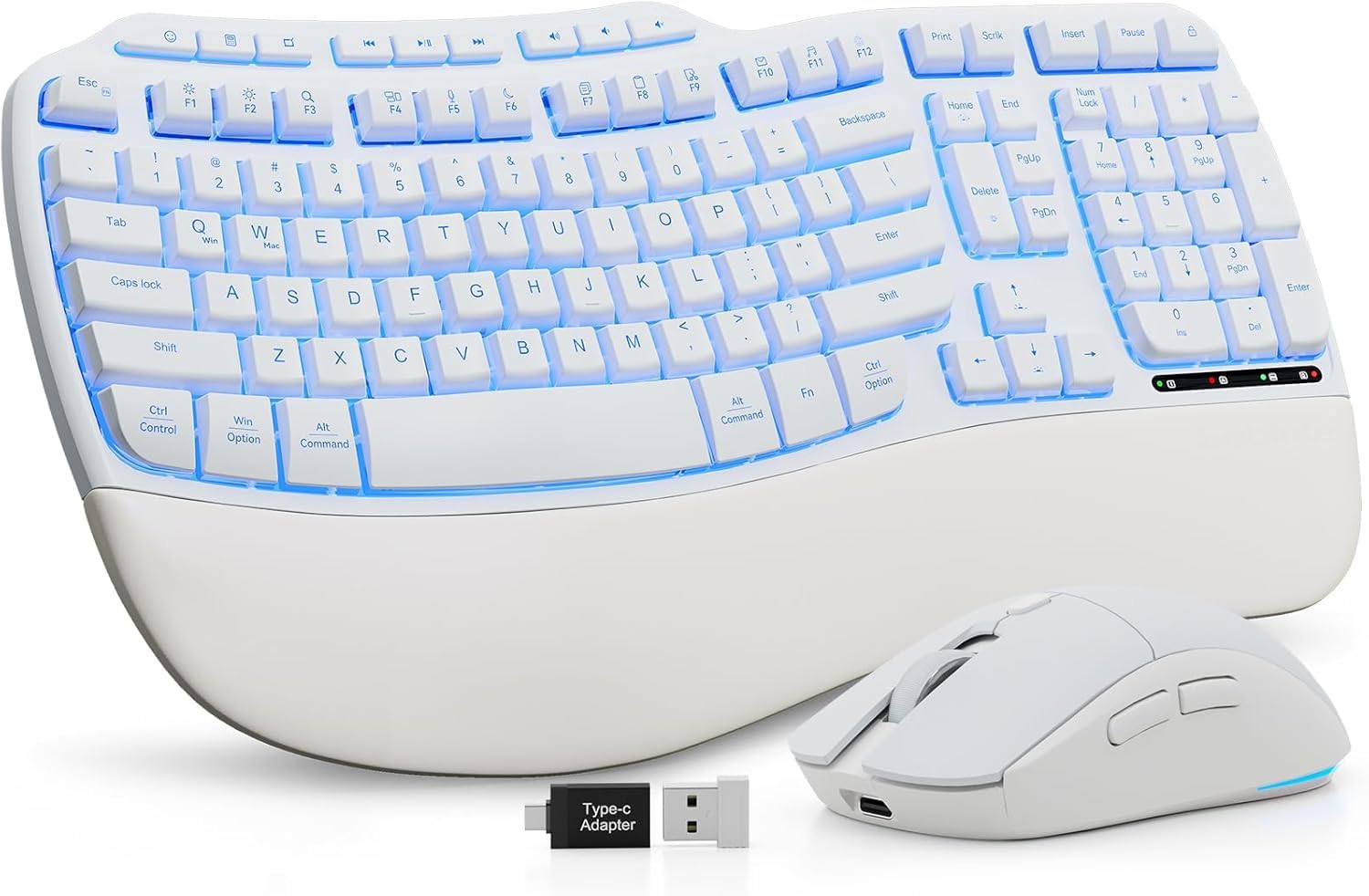
The MA31 Pro delivers a wave-shaped ergonomic keyboard that closely mirrors the Logitech K350 contour at a fraction of the cost. Its 4000mAh internal battery doubles the capacity of most backlit keyboards, lasting weeks between charges even with the 7-color backlight activated. The faux-leather palm rest feels soft and resists sweat, unlike fabric alternatives that absorb oils.
Rated for 10 million keystrokes, this membrane keyboard is built for longevity. The mouse packs a 700mAh battery, six buttons, and three DPI levels (800/1200/1600). Instead of cycling through lighting modes, the mouse lets you lock in one of six fixed colors or five animation modes. Nine one-touch shortcut keys on the keyboard handle volume, browser, and media controls.
Wireless is handled by a single 2.4GHz USB receiver that works with both units at up to 33 feet. The package includes USB-A and USB-C adapters for broad device compatibility. Keys are quiet and provide a satisfying tactile bump without the loud clack of mechanical switches.
Why it’s great
- Massive 4000mAh battery with weeks of real-world life
- Wave shape closely replicates premium ergonomic boards
- Selectable fixed-color mouse lighting instead of cycle-only
Good to know
- Keyboard is heavy; less suited for frequent travel
- Mouse surface can feel slippery during fast movements
5. Sablute Purple Ergonomic Wave
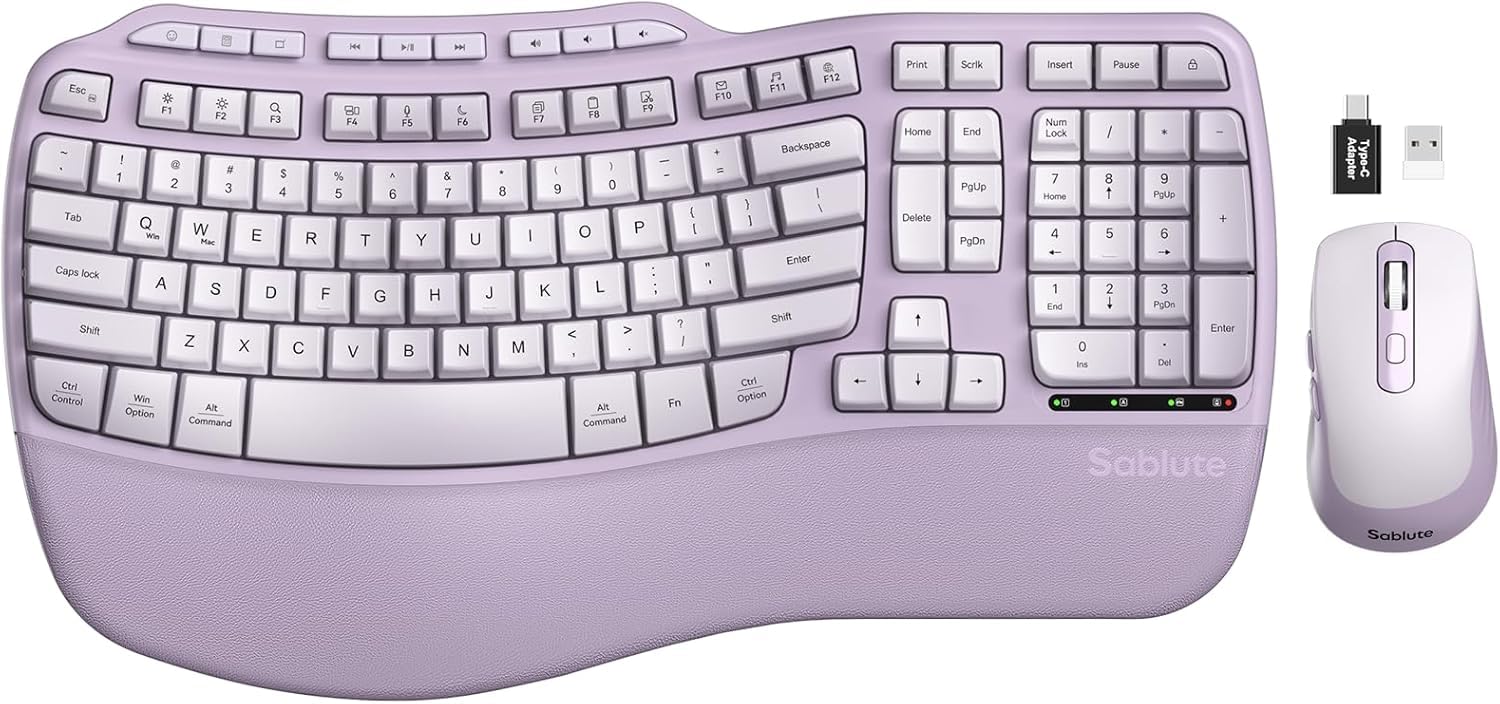
This purple wave-keyboard combo stands out for its aesthetic and its focus on typing posture. The ergonomic wave shape positions fingers at a natural typing arc, and independent front and back tilt stands let you switch between seated and standing desk setups. The integrated palm rest uses a synthetic leather that feels softer than basic foam and wipes clean easily.
The SilenceTouch mouse delivers 90% quieter clicks than standard office mice, with a rubber scroll wheel that doesn’t rattle. Three DPI levels (800/1200/1600) and forward/back buttons cover everyday browsing needs. Nine multimedia shortcut keys on the keyboard handle volume, calculator, and browser controls without extra software.
Setup is true plug-and-play: a single USB receiver connects both devices instantly, and the combo works with Windows and Mac using the FN+A/S toggle. Two AA batteries power the keyboard, while the mouse uses one AA. Users report easy Mac compatibility and a comfortable typing angle that dramatically reduces wrist strain during eight-hour workdays.
Why it’s great
- Distinctive wave shape with dual-angle tilt adjustment
- Synthetic leather palm rest resists sweat and stains
- Plug-and-play 2.4GHz wireless with 33-foot range
Good to know
- AA batteries required; no rechargeable battery built in
- Some users report occasional defective units requiring replacement
6. ProtoArc XKM03 Foldable

The XKM03 folds in half at a 166-degree V-shape to fit inside a carry-on sleeve or backpack. The split keyset design creates a natural hand position even on an airplane tray table. The keyboard powers on automatically when unfolded and reconnects to the last paired device, eliminating setup friction. A magnetic closure keeps it shut during transport.
Both keyboard and mouse connect via Bluetooth to three devices simultaneously — laptop, iPad, and iPhone — and switch with a dedicated key. The ergonomic mouse includes a palm and thumb rest that reduces wrist strain despite its compact footprint, and its 2400 DPI sensor delivers precise tracking on coffee shop tables. The included hard-shell case holds the keyboard, mouse, earbuds, and a power bank.
Rechargeable lithium batteries in both units charge via USB-C and hold a charge for weeks with moderate use. The PU leather exterior resists wear from daily packing. The main tradeoff is the missing numeric keypad, which saves space but sacrifices data-entry convenience. Bluetooth-only connectivity means no USB dongle to lose, a genuine advantage for road warriors.
Why it’s great
- Folds into a compact kit for airplane and café use
- Bluetooth pairs with three devices; no dongle required
- Included hard case keeps everything organized
Good to know
- No numeric keypad; slow for heavy spreadsheet work
- No backlighting; difficult to use in dark environments
7. SABLUTE CK13Pro Typewriter
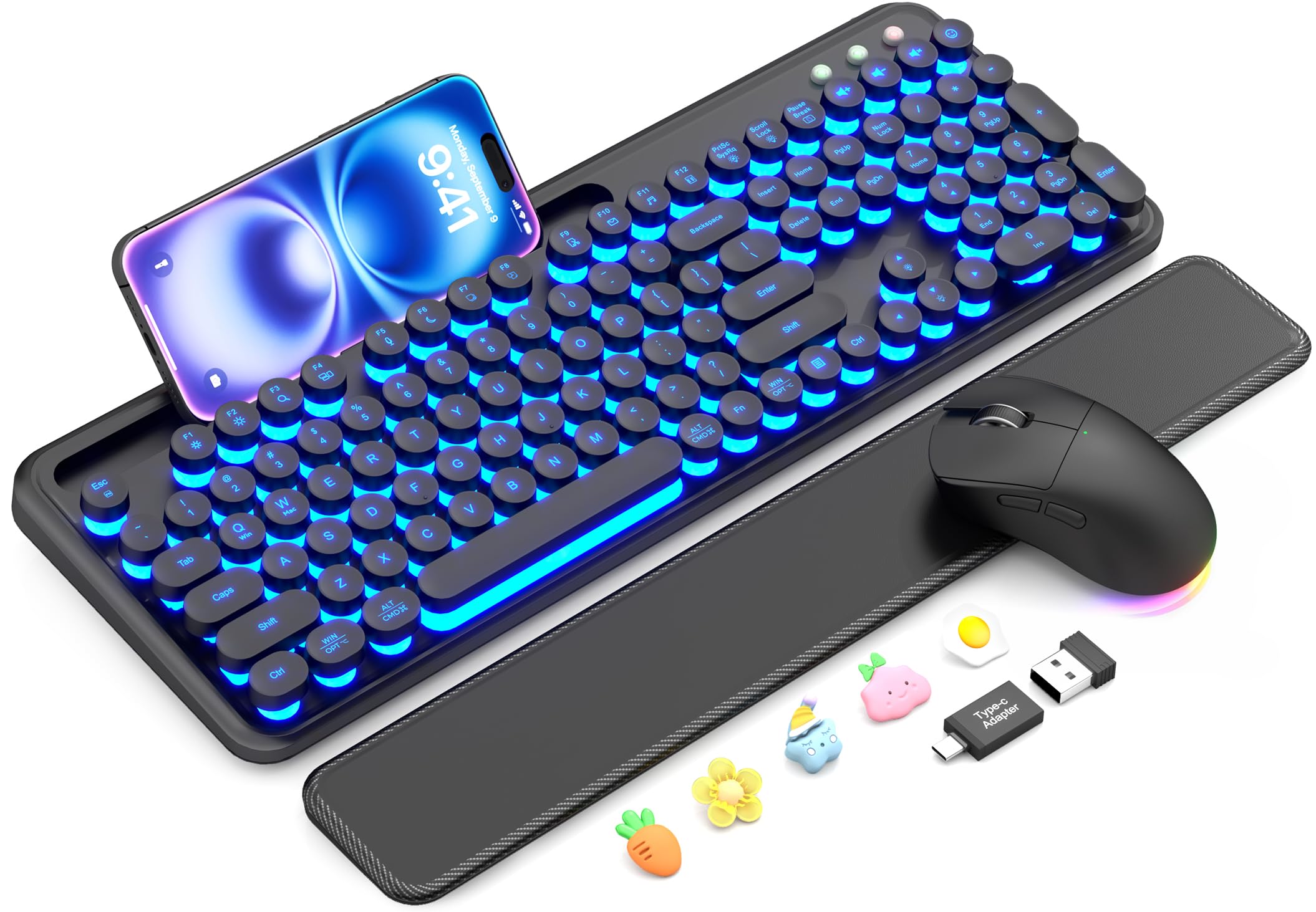
The CK13Pro swaps the typical rectangular slab for a retro typewriter look with round, light-up keycaps. Seven selectable backlight colors let you match the keyboard to your desk lighting, and the RGB mouse offers 11 cycling or fixed modes. The magnetic wrist rest attaches firmly, uses soft sponge padding with a skin-friendly surface, and detaches for cleaning.
Built-in phone holder keeps your smartphone upright for glances at notifications or video calls without picking it up. The membrane keys are quieter than standard rubber dome boards, and the raised circular shape takes a short adaptation period but provides clear tactile feedback. A single 2.4GHz USB receiver connects both devices at up to 33 feet, and the keyboard supports dual-system layouts for Windows and Mac via a key toggle.
Both keyboard and mouse are rechargeable via USB-C and include auto-sleep and power switches to preserve battery. The mouse has three DPI levels and forward/back navigation buttons. The typing experience is comfortable for long sessions once you adjust to the round keycaps, and the overall build feels sturdier than the price tier suggests.
Why it’s great
- Distinct retro style with customizable backlight colors
- Phone holder built into the keyboard frame
- Magnetic wrist rest removes easily for transport
Good to know
- Round keycaps require an adjustment period for touch typists
- Wrist rest padding is thinner than full ergonomic rests
FAQ
Should I use the 2.4GHz dongle or Bluetooth for my business combo?
What does DPI mean and how many do I need for office work?
Final Thoughts: The Verdict
For most users, the business keyboard and mouse combo winner is the Logitech MX Keys Combo for Business because it combines enterprise-grade encryption, a premium all-metal build, near-silent typing, and a mouse that tracks flawlessly on glass. If you want a quieter office experience with excellent multi-device switching, grab the Logitech MK955 Signature Slim. And for a budget-friendly ergonomic wave with a long-lasting rechargeable battery, nothing beats the Sablute MA31 Pro.

Mo Maruf
I created WellFizz to bridge the gap between vague wellness advice and actionable solutions. My mission is simple: to decode the research and give you practical tools you can actually use.
Beyond the data, I am a passionate traveler. I believe that stepping away from the screen to explore new environments is essential for mental clarity and physical vitality.