Our readers keep the lights on and my smoothie glass nicely filled. As an Amazon Associate, I earn from qualifying purchases.
Finding a pair of computer speakers that deliver clear dialogue, punchy soundtracks, and reliable performance without demanding a premium budget is a surprisingly tricky task—most entry-level units sacrifice driver quality for low cost, leaving you with tinny highs and muddy lows.
I’m Mohammad Maruf — the founder and writer behind WellFizz. I’ve spent years analyzing audio hardware, driver configurations, and user testing patterns to separate the few genuinely capable desktop speakers from the overwhelming number of mediocre options.
Whether you need better audio for gaming, streaming, or conference calls, this guide cuts through the noise to help you find the best budget pc speakers for your exact desk setup and sound preferences.
How To Choose The Best Budget PC Speakers
The entry-level speaker market is crowded, but a few key specs separate the gems from the duds. Here’s what to prioritize when shopping with a limited budget.
Driver Size and Configuration
Driver diameter directly affects frequency response. A 48mm or larger driver typically yields fuller mids and less distortion at higher volumes. Look for units with passive radiators—they add bass weight that small drivers naturally lack.
Wattage vs. Distortion
A 14W rating can sound louder and cleaner than a 10W unit if the amplifier is well-matched to the drivers. Avoid speakers that list “peak power” without RMS—RMS gives a more honest measure of sustained output without distortion.
Power and Connectivity
USB-powered speakers simplify cable management and eliminate wall warts, but AC-powered models can sometimes achieve cleaner separation and higher headroom. A 3.5mm aux input is standard, and a front-facing headphone jack adds everyday convenience.
Quick Comparison
On smaller screens, swipe sideways to see the full table.
| Model | Category | Best For | Key Spec | Amazon |
|---|---|---|---|---|
| FUNLOGY Speaker | Mid-Range | Best Overall Value | 14W, dual 48mm drivers | Amazon |
| OFFSIR 2-in-1 Speaker | Mid-Range | Versatile Desk Layouts | 10W, detachable/soundbar modes | Amazon |
| Creative Pebble SE | Mid-Range | Minimalist Aesthetic | 2.0 channel, 4W per channel | Amazon |
| Cyber Acoustics CA-2890BT | Premium | Space-Saving Soundbar | 5W, Bluetooth 5.0 | Amazon |
| ROSON A-293 | Budget | No-Frills Utility | 6W, 6.96-inch width | Amazon |
In‑Depth Reviews
1. FUNLOGY Speaker
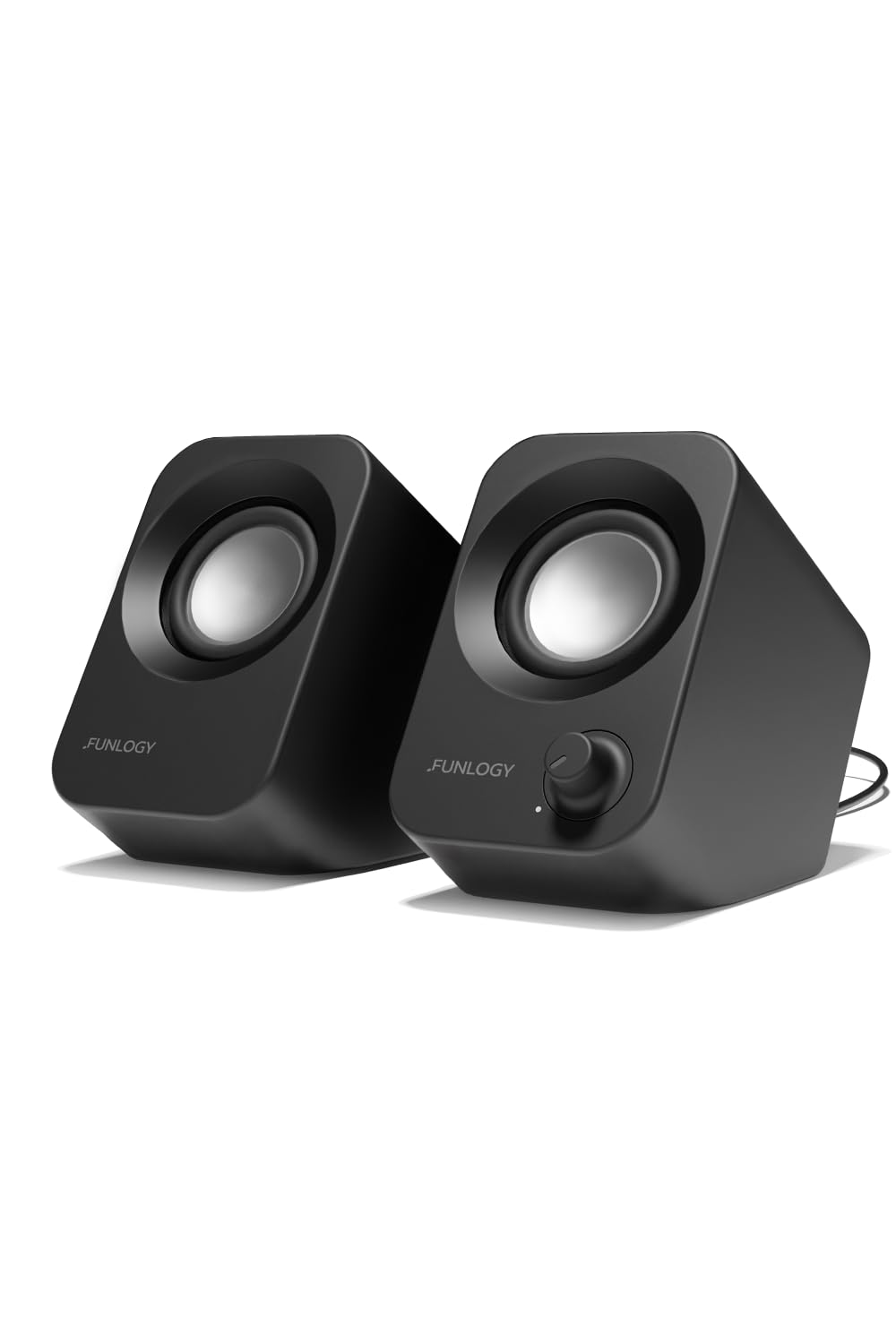
The FUNLOGY delivers a surprising 14W total output from dual 48mm full-range drivers, and the rear passive radiator adds noticeable low-end presence that most speakers in this class skip entirely. The 30-degree upward tilt angles sound toward your ears without needing a stand, which makes a real difference in clarity during long listening sessions.
Setup is genuinely plug-and-play: USB for power, 3.5mm for audio, and a front volume knob that doubles as a power switch. The gold-plated AUX input keeps the noise floor low—no hum or static during PC startup or when the system is idle. Multiple verified buyers note it outperforms stock monitor speakers and cheaper USB alternatives at similar price points.
That said, a few users report the output is quiet at maximum volume, so it’s better suited for close-field desk listening than filling a large room. The compact footprint works well for tight desks, sim rigs, or retro gaming setups, and the matte finish resists fingerprints. For the balanced blend of driver quality, tilt ergonomics, and clean power, this is the strongest all-around pick.
Why it’s great
- Impressive 14W output from compact palm-sized body
- 30-degree tilt optimizes sound delivery without extra stands
- Gold-plated AUX with low background noise floor
Good to know
- Max volume may be insufficient for large rooms
- No Bluetooth or built-in headphone jack
2. OFFSIR 2-in-1 PC Speaker
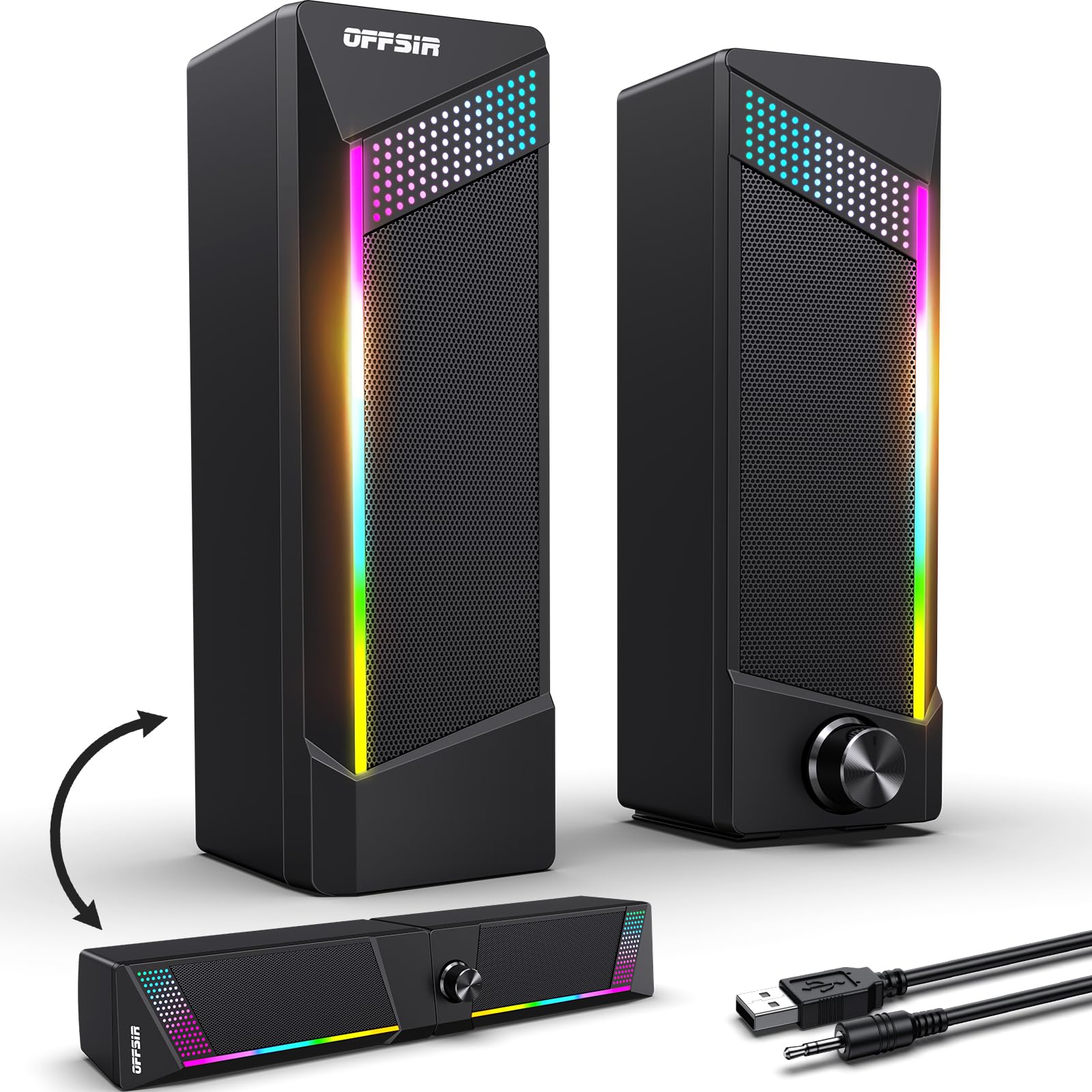
What makes the OFFSIR stand out is its modular design: the two stereo units snap together to form a single soundbar for a cleaner desk, or you can separate them for wider stereo imaging. The dual 5W drivers produce clear mids and decent treble, with enough volume for daily desktop use without sounding strained.
The touch-sensitive RGB lighting offers four modes (red, green, blue, and rainbow) and responds to a simple tap—no software required. The 58-inch USB and AUX cables give flexibility for tower placements, and the cable between the speakers is 52 inches long, comfortably stretching across most desk widths. Verified users praise the easy plug-and-play setup and the premium look of the ABS enclosure.
On the flip side, the build quality is budget-grade, and the RGB brightness is modest rather than blinding. It’s not suited for high-volume environments, but for everyday gaming, video calls, and music, the 2-in-1 flexibility is genuinely useful. This is a solid choice if you want options for your desk layout without moving up a price tier.
Why it’s great
- Snaps together as soundbar or separates for stereo spread
- Touch-responsive RGB with four lighting modes
- Long cables for flexible desktop and tower placement
Good to know
- ABS enclosure feels less premium than metal mesh
- Not designed for high-volume playback without distortion
3. Creative Pebble SE

The Creative Pebble SE carries the lineage of one of the most popular budget speaker lines in existence. At 4.92 inches tall and weighing just 1.9 pounds, it occupies minimal desk space while delivering clean treble and surprisingly chunky bass for its size—multiple users note zero distortion even at near-max volume during music and gaming sessions.
Setup takes about 60 seconds: USB for power and 3.5mm for audio, with a subtle RGB underglow that adds tasteful ambiance without being flashy. The sound signature favors clarity over exaggerated bass, making it excellent for conference calls, podcast listening, and watching dialogue-heavy content. Verified owners consistently mention it outperforms built-in laptop speakers by a significant margin.
The main drawbacks are the short inter-speaker cable (roughly 2 to 3 feet) and the fact that it requires an AC outlet via USB—no pure battery option. A faint hum can appear at max volume when idle, but it’s negligible during playback. If your priority is a clean, small-footprint speaker with proven audio from a trusted brand, the Pebble SE is a reliable winner.
Why it’s great
- Clean, neutral sound signature with zero distortion
- Ultra-compact footprint and tasteful RGB underglow
- Trusted Creative brand with decades of PC audio expertise
Good to know
- Short cable between speakers limits placement options
- Slight idle hum at maximum volume
4. Cyber Acoustics CA-2890BT

The Cyber Acoustics CA-2890BT takes a different approach: instead of two separate speakers, it’s a single soundbar that clamps to the bottom of your monitor, freeing up every inch of desk space. The 5W output is modest, but the audio is noticeably clearer and louder than any built-in monitor speaker—especially for voice calls and virtual meetings.
Bluetooth 5.0 lets you connect a smartphone simultaneously alongside your PC, so you can take a hands-free call without switching audio sources. The built-in microphone performs well for conferencing, and the multi-function button toggles between USB and Bluetooth. Setup is genuinely zero-install: a single USB-C cable (with included USB-A adapter) powers and streams audio from compatible laptops.
Where it falls short is bass—there’s very little low-end extension, so it’s not ideal for music listening that relies on kick drums or sub-bass. The clamp spring is strong and may not fit very slim monitor bezels, and the weight can cause laptop screens to wobble. If desk space is your bottleneck and you prioritize calls over deep bass, this is a smart, space-conscious solution.
Why it’s great
- Clamp design zero desk space used
- Simultaneous Bluetooth for smartphone and PC audio
- Plug-and-play single USB-C cable for power and audio
Good to know
- Very little bass extension
- Clamp may not fit all monitor bezels
5. ROSON A-293

The ROSON A-293 is an entry-level stereo set that prioritizes simplicity above all else. With a 3W output per channel, it won’t rattle windows, but it delivers clear, bright audio that’s a noticeable step up from any laptop’s internal speakers. The 6.96-inch-wide right speaker houses both the volume knob and a front-facing headphone jack—a small but welcome convenience for private listening.
Setup is as basic as it gets: USB for power, 3.5mm for signal, and you’re running. The 39-inch cables between the speakers and to the computer are adequate for a standard desk, and the extended multi-stage debugging mentioned in the specs helps keep background noise low. Several long-term users note the sound remains clear after months of daily use for music, videos, and work.
The tradeoffs are expected at this tier: bass response is weak, and the speaker chassis can resonate at low frequencies, introducing some buzz during bass-heavy tracks. The 3.5mm connection is wired only—no Bluetooth. If you need an ultra-low-cost set that simply works for voice calls, YouTube, and background music without fuss, the ROSON gets the job done without any surprises.
Why it’s great
- Front headphone jack for quick private listening
- Extremely simple USB-powered plug-and-play setup
- Compact footprint fits tight desk spaces
Good to know
- Chassis resonance creates buzz on low-frequency content
- No Bluetooth or wireless connectivity
FAQ
Can USB-powered speakers deliver enough volume for gaming?
What causes static or humming from cheap PC speakers?
Do I need a dedicated sound card for budget PC speakers?
Final Thoughts: The Verdict
For most users, the best budget pc speakers winner is the FUNLOGY Speaker because it combines the highest RMS output (14W) with dual 48mm drivers, a passive radiator, and a smart 30-degree tilt—all at a price that undercuts comparable models. If you prefer a modular layout that works as a soundbar or separated stereo, grab the OFFSIR 2-in-1. And for the ultra-minimalist who wants a proven brand with clean aesthetics, nothing beats the Creative Pebble SE.

Mo Maruf
I created WellFizz to bridge the gap between vague wellness advice and actionable solutions. My mission is simple: to decode the research and give you practical tools you can actually use.
Beyond the data, I am a passionate traveler. I believe that stepping away from the screen to explore new environments is essential for mental clarity and physical vitality.