Our readers keep the lights on and my smoothie glass nicely filled. As an Amazon Associate, I earn from qualifying purchases.
The pursuit of a truly portable typing tool often means sacrificing key size, key feel, or battery longevity. A cramped layout or a mushy switch turns a quick email into a frustrating chore, especially when you are working from a coffee shop, an airplane tray table, or a co-working lounge.
I’m Mohammad Maruf — the founder and writer behind WellFizz. I have spent dozens of hours analyzing the Bluetooth keyboard market, comparing keycap pitch, hinge durability, battery circuits, and multi-device pairing protocols across dozens of models to separate the genuinely portable from the merely small.
Whether you need a compact companion for your tablet or a full-featured travel rig for your laptop, this guide breaks down the seven best options available today. After reading, you will know exactly which bluetooth keyboard portable matches your workflow and your bag.
How To Choose The Best Bluetooth Keyboard Portable
Selecting a travel keyboard is about more than just checking the box for “Bluetooth.” You need to balance a dozen small factors that determine whether the keyboard lives in your bag or sits unused in a drawer. Here are the five non-negotiable specs to evaluate before you buy.
Key Layout and Keycap Pitch
Measured in millimeters of center-to-center key spacing, keycap pitch directly determines whether you can touch-type without errors. Full-size desktop keyboards use 19mm spacing. Many compact portable keyboards shrink that to 16mm or 17mm, which forces your fingers to contract. Look for models that advertise “full-size” or “standard pitch” — anything below 17.5mm increases typo frequency during extended sessions.
Hinge Construction and Fold Cycle Rating
Folding keyboards rely on metal or plastic hinges that endure repeated open-and-close cycles. Standard folding keyboards are tested to roughly 10,000 cycles. Premium models with reinforced metal hinges survive 50,000 cycles or more. A weak hinge introduces key wobble, misalignment, and eventually dead keys. If you travel daily, prioritize a higher cycle rating.
Battery Type and Standby Life
Two battery architectures dominate portable keyboards: coin-cell batteries (CR2032) and rechargeable lithium-ion packs. Coin cells last up to three years but require replacement and cannot be recharged. Rechargeable models offer 30 to 150 hours of active use and 120 to 150 days of standby. Decide whether you prefer a disposable battery that lasts for years or a rechargeable battery that you top up every few weeks.
Multi-Device Pairing and OS Compatibility
Most portable Bluetooth keyboards pair with up to three devices and switch with a single hotkey. However, the reliability of Bluetooth 5.0 or 5.1 varies between operating systems. Keyboards that remember the OS layout (iOS, Android, Windows, macOS) and automatically map modifier keys reduce setup friction. Check that the keyboard supports your primary OS natively, not just as a fallback.
Backlighting and Low-Light Usability
If you work in dim hotel rooms or on evening flights, a backlit keyboard is not a luxury — it is a necessity. Look for models with adjustable brightness levels (at least three). Single-color white backlighting works well for most settings. Avoid keyboards that lack a backlight if you frequently type in low ambient light, because the small keycaps become nearly invisible.
Quick Comparison
On smaller screens, swipe sideways to see the full table.
| Model | Category | Best For | Key Spec | Amazon |
|---|---|---|---|---|
| ProtoArc XK01 Plus | Tri-Fold Backlit | Travelers needing a full number pad | 105 keys, tri-fold, 150-day standby | Amazon |
| Nillkin Foldable | Touchpad Combo | Users who want a mouse-free setup | 64 keys, touchpad & numpad, 50K-cycle hinge | Amazon |
| Samsers KF08S | Full-Size Foldable | Budget-conscious touch typists | Full-size keys, 0.65-inch keycaps, 120-day standby | Amazon |
| OMOTON Foldable | Number Pad Travel | Spreadsheet and data entry on the go | Built-in numpad, 30-min auto-sleep | Amazon |
| Logitech Keys-To-Go 2 | Ultra-Slim Cover | Minimalists who want a built-in cover | 3-year coin-cell battery, 78 keys | Amazon |
| Microsoft Surface Pro Keyboard | Tablet-Specific | Surface Pro owners needing pen storage | Alcantara material, backlit, Copilot key | Amazon |
| Satechi SM3 | Mechanical Wireless | Typists who prefer mechanical switches | Low-profile brown switches, 2500mAh battery | Amazon |
In‑Depth Reviews
1. ProtoArc XK01 Plus

The ProtoArc XK01 Plus uses a tri-fold chassis that packs a full 105-key layout, including a dedicated number pad, into a package that measures 8.46 by 4.68 by 0.78 inches when folded. The three-level white backlight is a genuine productivity tool — it illuminates the full keycap set without washing out the legends, and the brightness is adjustable via Fn+Backlit hotkey. Standby life reaches 150 days on a single USB-C charge, making this keyboard ready for multi-week trips without a charging cable.
Bluetooth 5.1 supports three simultaneous connections, and the keyboard auto-recognizes the OS layout when you switch devices. The scissor-switch mechanism delivers 1.5mm of travel with a crisp bottom-out that feels denser than most membrane-based folding keyboards. The included PU carry pouch and folding phone stand add genuine utility for coffee-shop setups, though the keyboard lacks a built-in tilt riser, so the typing angle is fixed at whatever surface you use.
Build quality is solid — the metal hinge feels tight with no lateral play, and the backlit keycaps show no uneven glow. A few users noted that the key layout squeezes the right Shift key slightly, but touch typists adapt within a few sessions. The XK01 Plus earns the top spot because it delivers a full-size typing experience with a backlight, long battery life, and a durable folding mechanism at a mid-range price.
Why it’s great
- Full 105-key layout with number pad
- Three-level white backlight for dim environments
- 150-day standby battery life
- Sturdy tri-fold metal hinge design
Good to know
- No built-in tilt riser for typing angle
- Right Shift key is slightly smaller than standard
2. Nillkin Foldable with Touchpad
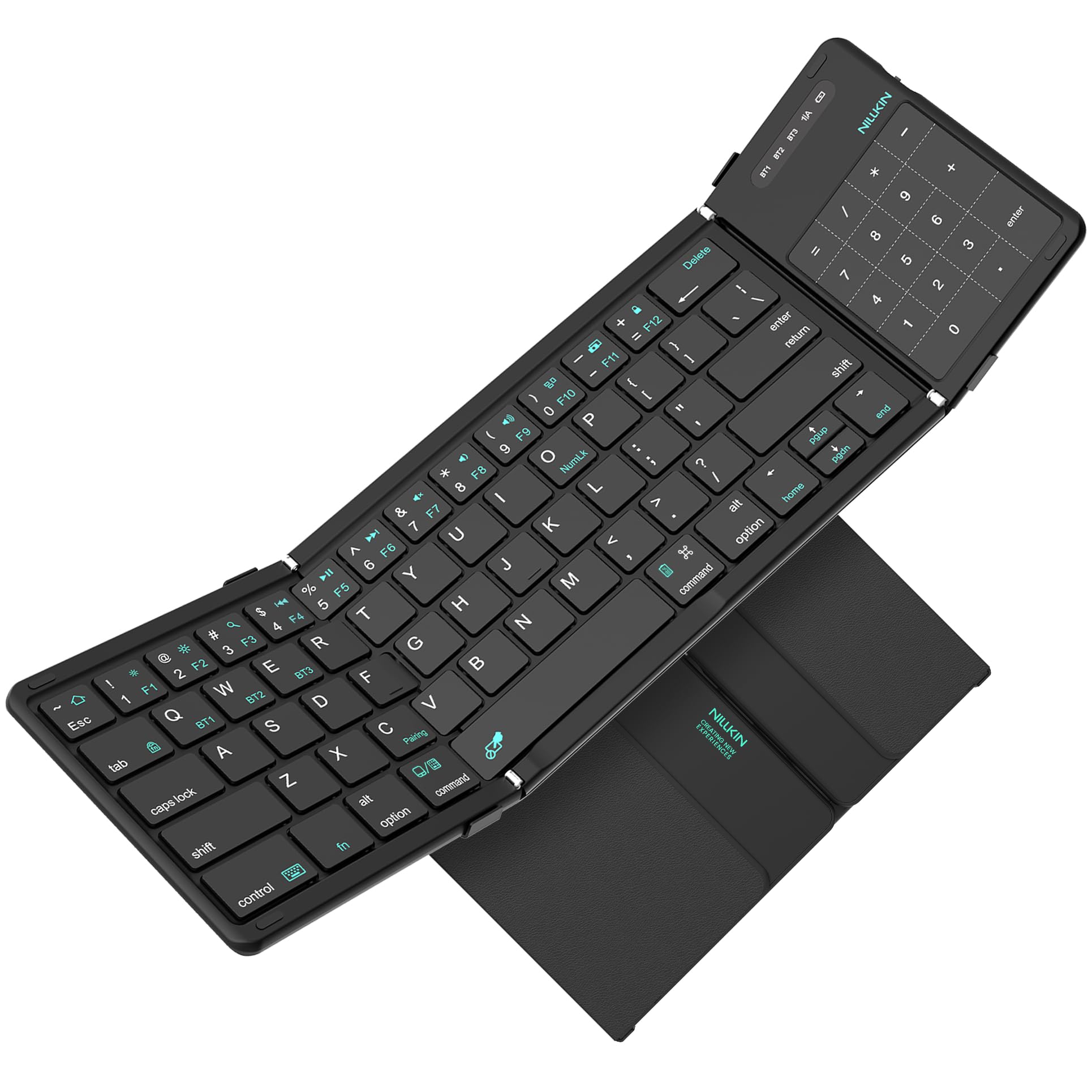
The Nillkin Foldable stands apart because it integrates a 3.4-inch touchpad into the same footprint as a standard folding keyboard, eliminating the need to carry a separate mouse. The touchpad supports multi-touch gestures — scroll, zoom, drag, and app-switching — and a single keystroke converts the touchpad surface into a number pad, preserving data-entry functionality without adding bulk. The hinge is rated for 50,000 open-close cycles, five times the industry average, which directly addresses the most common failure mode in folding keyboards.
Keycaps measure 16mm pitch with 1.5mm scissor-switch travel, and the layout keeps common punctuation in standard positions so touch typists do not have to relearn muscle memory. The silicone-leather back panel resists scratches and stains better than standard PU leather, and strong magnets snap the keyboard shut securely. Standby life is 140 days, and active typing with the touchpad enabled delivers roughly 30 hours per charge.
Some early units showed keycap failures after several months of heavy use, particularly the “A” and left tab keys, which raises a durability concern for daily drivers. The touchpad also requires AssistiveTouch to be enabled on iPhones for full gesture support, and Linux trackpad drivers are absent. For anyone who wants a mouse-free mobile workstation with a number pad, the Nillkin is a compelling option, but verify the warranty period before committing.
Why it’s great
- Integrated touchpad with number pad mode
- 50,000-cycle reinforced metal hinge
- Silicone-leather back resists wear
- Familiar QWERTY layout with standard punctuation
Good to know
- Durability reports vary after months of heavy use
- iPhone requires AssistiveTouch for full trackpad
- No Linux trackpad driver support
3. Samsers KF08S
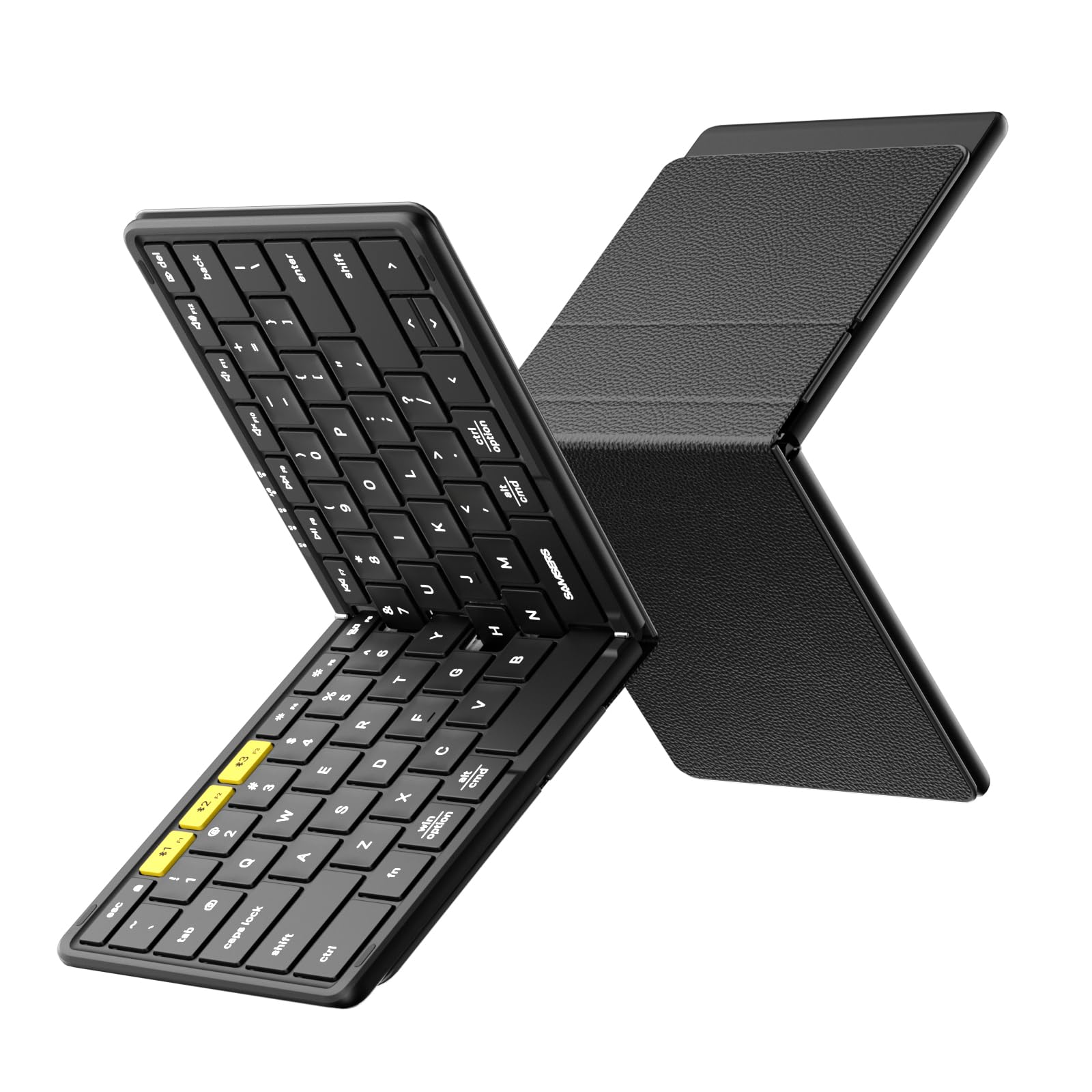
The Samsers KF08S uses a single-fold design that unfolds to the same dimensions as a standard laptop keyboard — 11 by 4.8 inches — and folds down to palm size. The keycaps measure 0.65 inches across, which matches laptop-style spacing and allows touch typists to transition without finger strain. The split space bar is unusual, but most users adapt within a few hours, and the separate Esc key removes the need for awkward Fn combinations.
Bluetooth pairs with up to three devices and switches with one click. The X-shaped scissor mechanism provides a snappy bounce that feels closer to a desktop keyboard than most membrane-based travel alternatives. The 120-day standby time covers extended business trips, and the included velvet pouch, phone holder, and USB-C cable add convenience without extra cost. The PU leather back panel protects the keyboard from dust and scratches during transport.
Some users noted that the key spacing feels slightly wider than typical laptop keyboards, and the split space bar may require a brief adjustment period. A rare Android Bluetooth compatibility issue was resolved by customer support, per verified reviews. The KF08S is the budget-friendly winner for anyone who wants a full-size typing experience in a folding format and is willing to adapt to the split space bar.
Why it’s great
- Full-size 0.65-inch keycaps match laptop feel
- Separate Esc key and Fn lock for faster operations
- 120-day standby battery life
- Compact fold with included travel pouch
Good to know
- Split space bar takes time to learn
- Key spacing slightly wider than typical laptops
4. OMOTON Foldable
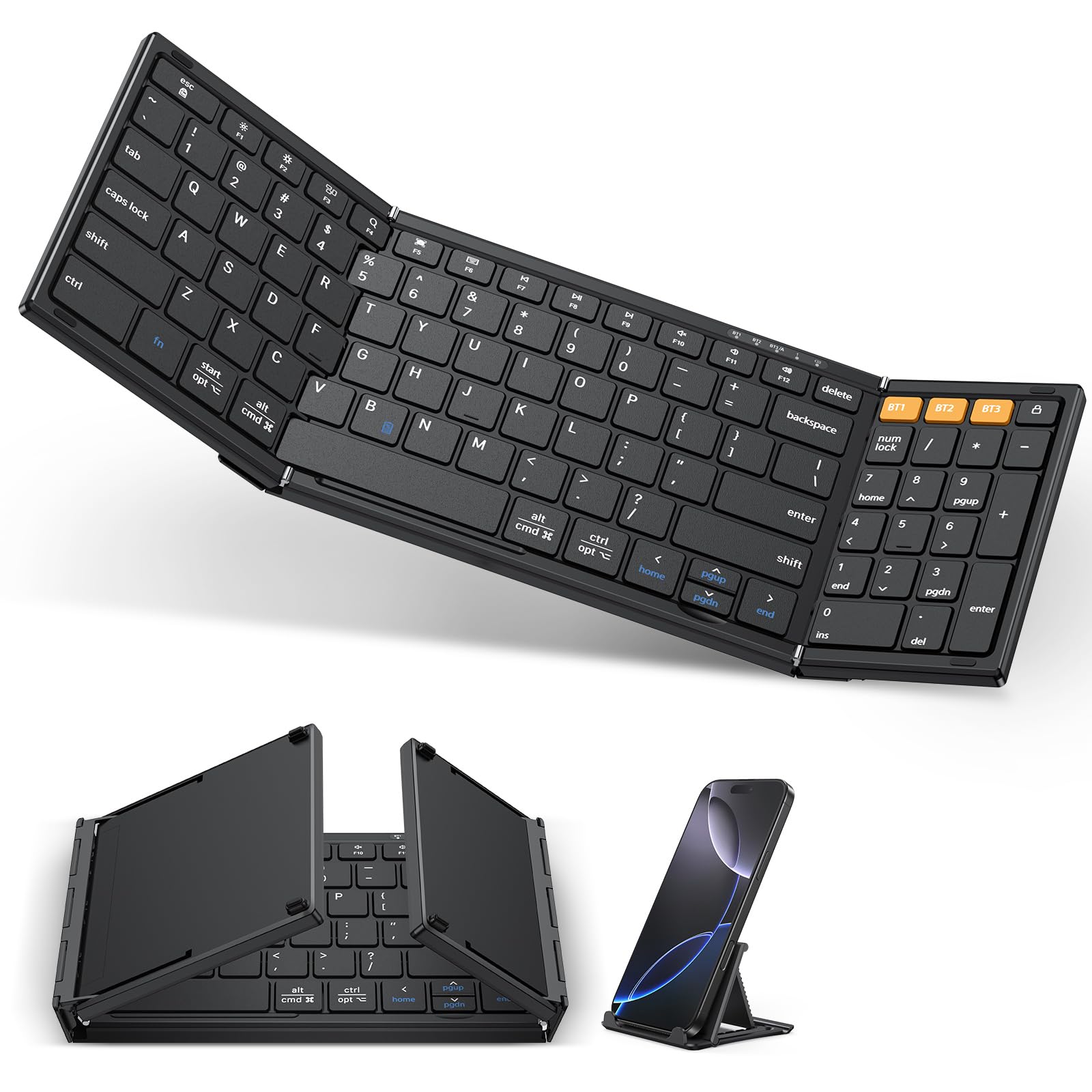
The OMOTON Foldable prioritizes number-crunching portability with a built-in number pad that sits to the right of the standard QWERTY section. The keyboard folds to 7.24 by 4.52 by 0.43 inches, making it slightly more compact than the Samsers model when folded. Pairing spans up to three devices, and the dedicated hotkeys for iOS (Fn+Q), Android (Fn+W), Windows (Fn+E), and macOS (Fn+R) auto-configure the modifier keys for each OS.
The keys use a scissor-switch mechanism that feels stable but slightly shallower than the Samsers or ProtoArc options — the travel is adequate for emails and short documents but less satisfying for extended typing sessions. The auto-sleep mode activates after 30 minutes of inactivity and wakes with any key press, a feature that conserves battery during intermittent use. The included foldable phone holder is a practical addition for mobile setups.
Battery life holds for roughly three weeks of daily use on a single charge, and the USB-C port makes recharging convenient with modern laptop chargers. Some users reported that the initial Bluetooth pairing sequence required following the printed instructions closely. The OMOTON is a solid mid-range choice for spreadsheet-heavy travelers who need a dedicated number pad and do not mind slightly shallower key travel.
Why it’s great
- Built-in number pad for data entry
- Dedicated OS layout hotkeys for iOS, Android, Windows, macOS
- Compact folded size with included phone holder
- Auto-sleep mode after 30 minutes of inactivity
Good to know
- Key travel is shallower than some competitors
- Bluetooth pairing requires following specific instructions
5. Logitech Keys-To-Go 2

The Logitech Keys-To-Go 2 is the thinnest portable keyboard in this roundup, measuring just a few millimeters thick with a built-in fabric cover that protects the keys when stowed. It runs on two pre-installed CR2032 coin-cell batteries rated for up to three years of typical use, which means you never have to remember to charge it before a trip. The scissor-switch keys are well-spaced and feel remarkably similar to Apple’s Magic Keyboard, with a shallow but crisp actuation that suits quick typing.
Pairing supports three devices, and a full row of shortcut keys gives one-tap access to volume, media controls, and screen brightness. The Logi Options+ app (available on Windows and macOS) allows F-row customization, enabling you to assign app-specific shortcuts. The cover folds back to serve as a stand or closes completely to protect the keys, and the overall weight is light enough to carry in a sling bag alongside an iPad mini.
The primary trade-off is the lack of a backlight and the non-rechargeable battery — if the coin cells die mid-trip, you cannot simply plug in a USB cable. A small number of units exhibited Bluetooth disconnection and input lag after extended use, though the majority of reviews praise the consistent connection. For minimalists who value slimness and multi-year battery life over backlighting and foldability, the Keys-To-Go 2 is the premium pick.
Why it’s great
- Ultra-thin design with built-in protective cover
- Three-year coin-cell battery life
- Responsive scissor-switch keys
- Customizable F-rows via Logi Options+ app
Good to know
- No backlight for low-light typing
- Non-rechargeable coin cells cannot be topped up
- Rare Bluetooth disconnection reports
6. Microsoft Surface Pro Keyboard

The Microsoft Surface Pro Keyboard is purpose-built for the Surface Pro 8, 9, and 11th Edition (Copilot+), attaching magnetically to the tablet’s edge to create a full laptop experience. The Alcantara material covering the palm rest feels soft and premium, and the keyboard includes a dedicated Copilot key, a microphone mute key, and a snipping key for quick screen captures. The backlit keys and large Precision trackpad provide a typing and navigation experience that rivals a traditional ultrabook.
Optimal key spacing allows fast, fluid typing, and the mechanical keyset delivers a stable feel with no wobble. When folded back against the screen, the keyboard automatically disables inputs and puts the tablet into slate mode. The integrated pen storage loop secures the Surface Slim Pen 2, keeping it charged and accessible. The magnetic connection is strong enough to hold the keyboard at any kickstand angle without detachment.
This keyboard works only with Surface Pro 8, 9, and 11th Edition models — it is not compatible with other Windows tablets, iPads, or Android devices. The price places it firmly in the premium tier. For Surface Pro owners who want a seamless first-party typing solution with pen storage and quick-access keys, this is the definitive choice, despite the lack of foldability or third-party compatibility.
Why it’s great
- Alcantara palm rest with premium feel
- Backlit keys and large Precision trackpad
- Dedicated Copilot, mute, and snipping keys
- Integrated pen storage and charging
Good to know
- Only compatible with Surface Pro 8, 9, and 11th Edition
- Cannot be used independently as a standalone Bluetooth keyboard
7. Satechi SM3 Mechanical Keyboard

The Satechi SM3 brings low-profile mechanical brown switches to the portable keyboard space, offering tactile feedback without the high-pitched click that disturbs coworkers. The full 108-key layout includes a numeric keypad, dedicated arrow keys, and a full row of function keys, all housed in a slim aluminum chassis that weighs 1.43 pounds. Connectivity spans four channels: two Bluetooth 5.0 channels, a 2.4 GHz USB receiver, and a wired USB-C mode, giving you flexibility for low-latency gaming or office use.
The white LED backlight supports 14 different patterns with three brightness levels and four speed settings, which can be cycled via the F5 and F6 keys. The 2500mAh rechargeable battery lasts for weeks of mixed use, and the USB-C port serves both charging and wired-data transmission. Included in the box are two extra Windows keycaps and a 2.4 GHz receiver stored magnetically on the keyboard’s underside.
The brown switches produce a moderate volume that is quieter than Cherry MX Blue but louder than typical scissor-switch travel keyboards. Bluetooth input lag was noted by one reviewer during gaming, though the wired and 2.4 GHz modes eliminate that concern. The keyboard is designed primarily for macOS but includes Windows keycaps, and the dual OS support covers Mac, Windows, iPad, and Chromebook. For anyone who refuses to compromise on mechanical switch feel during travel, the SM3 is the premium option.
Why it’s great
- Low-profile brown mechanical switches with tactile feedback
- Four connectivity modes: 2x Bluetooth, 2.4 GHz, wired
- 14 white LED backlight patterns
- Full 108-key layout with numeric keypad
Good to know
- Bluetooth mode may show input lag during gaming
- Switches are louder than scissor-switch alternatives
FAQ
How many devices can a portable Bluetooth keyboard pair with at once?
What is the difference between a coin-cell battery and a rechargeable lithium battery in a travel keyboard?
Do folding Bluetooth keyboards work with all operating systems?
What should I do if the hinge on my folding keyboard becomes loose?
Final Thoughts: The Verdict
For most users, the bluetooth keyboard portable winner is the ProtoArc XK01 Plus because it delivers a full 105-key layout with a tri-fold chassis, a three-level backlight, and 150 days of standby battery life at a mid-range price. If you want an integrated touchpad with a number pad mode for mouse-free data entry, grab the Nillkin Foldable. And for a premium mechanical typing experience in a full-size format, nothing beats the Satechi SM3.

Mo Maruf
I created WellFizz to bridge the gap between vague wellness advice and actionable solutions. My mission is simple: to decode the research and give you practical tools you can actually use.
Beyond the data, I am a passionate traveler. I believe that stepping away from the screen to explore new environments is essential for mental clarity and physical vitality.