Our readers keep the lights on and my smoothie glass nicely filled. As an Amazon Associate, I earn from qualifying purchases.
Jumping into podcasting means facing a wall of gear choices that can stall even the most motivated beginner. The gap between a muddled laptop recording and a broadcast-ready voice is bridged by just a few core components — a capable microphone, a clean signal path, and the right accessories to reject the rumble of a desk fan or a passing truck. Getting the fundamentals right on your first buy saves hours of post-production frustration and keeps listeners locked on your content.
I’m Mohammad Maruf — the founder and writer behind WellFizz. I’ve spent countless hours dissecting entry-level audio gear, comparing dynamic versus condenser capsules, and analyzing interface specs so you don’t have to wonder whether a bundle is worth your budget.
Whether you plan to host solo shows, co-host with a partner, or record from a room without acoustic treatment, this guide breaks down the nine most practical options for building a beginner podcast setup that prioritizes clean audio and simple workflow right out of the box.
How To Choose The Best Beginner Podcast Setup
Building a first podcast rig is less about chasing expensive gear and more about matching your recording environment and workflow to the right components. Room acoustics, the number of hosts, and your comfort with software all dictate whether a simple USB microphone or a full XLR interface-and-mic bundle will serve you better.
Dynamic vs. Condenser: Which Capsule for Your Room
Dynamic microphones excel at rejecting background noise and are far more forgiving in untreated rooms with hard floors or open windows. Condenser microphones capture more detail but also pick up every chair squeak and echo. For a first podcast setup where acoustic treatment is minimal, a dynamic capsule is almost always the safer choice.
USB Simplicity vs. XLR Scalability
A USB microphone offers true plug-and-play convenience — no interface, no extra cables, just a single connection to your computer. XLR microphones require an audio interface but unlock the ability to connect multiple microphones, apply hardware gain, and mix on the fly. If you plan to host guests in person, an XLR-capable interface is worth the extra step.
Build Quality and the All-Important Boom Arm
A cheap desktop stand transmits vibrations from typing or drumming fingers directly into the microphone. A dedicated boom arm clamped to a sturdy desk isolates the mic from physical noise and positions it correctly — six to eight inches from your mouth, slightly off-axis. Look for metal construction in both the arm and the microphone body to avoid wobble and premature failure.
Quick Comparison
On smaller screens, swipe sideways to see the full table.
| Model | Category | Best For | Key Spec | Amazon |
|---|---|---|---|---|
| Logitech Creators Blue Yeti | USB Condenser | Solo podcasters and streamers wanting broadcast presence | Four pickup patterns, Blue VO!CE software | Amazon |
| MAONO PD200W | Wireless Hybrid | Creators who need wireless freedom and dual-mic recording | Wireless / USB / XLR, 60m range, 60h battery | Amazon |
| MAONO AME2C Pro Bundle | Interface + XLR Mic | Streamers and live podcasters craving real-time effects | 10-channel mixer, 11 customizable sound pads | Amazon |
| PreSonus AudioBox USB 96 | Studio Bundle | Beginners wanting a complete recording package with DAW | 24-bit / 96 kHz interface, Studio One Artist | Amazon |
| Focusrite Scarlett Solo Studio 4th Gen | Professional Bundle | Songwriters and vocalists needing high dynamic range | 120dB dynamic range, Air mode, 192 kHz sample rate | Amazon |
| Movo PodPro-TH | Portable Duo Kit | Co-hosted podcasts recorded on the go | Dual XLR interface, battery-powered, travel case | Amazon |
| Behringer U-PHORIA STUDIO | Entry Bundle | Ultra-budget home recording with a condenser mic | 192 kHz sample rate, 2-channel interface | Amazon |
| FIFINE K688T | Dynamic USB/XLR | Podcasters on a budget who want a full boom arm kit | Dual connectivity, 130dB SPL, heavy-duty arm | Amazon |
| FIFINE Ampligame KS5W | Gaming Podcast Bundle | Gamers who need a mic-plus-mixer combo with RGB | XLR/USB mic, slider fader mixer, voice effects | Amazon |
In‑Depth Reviews
1. Logitech Creators Blue Yeti
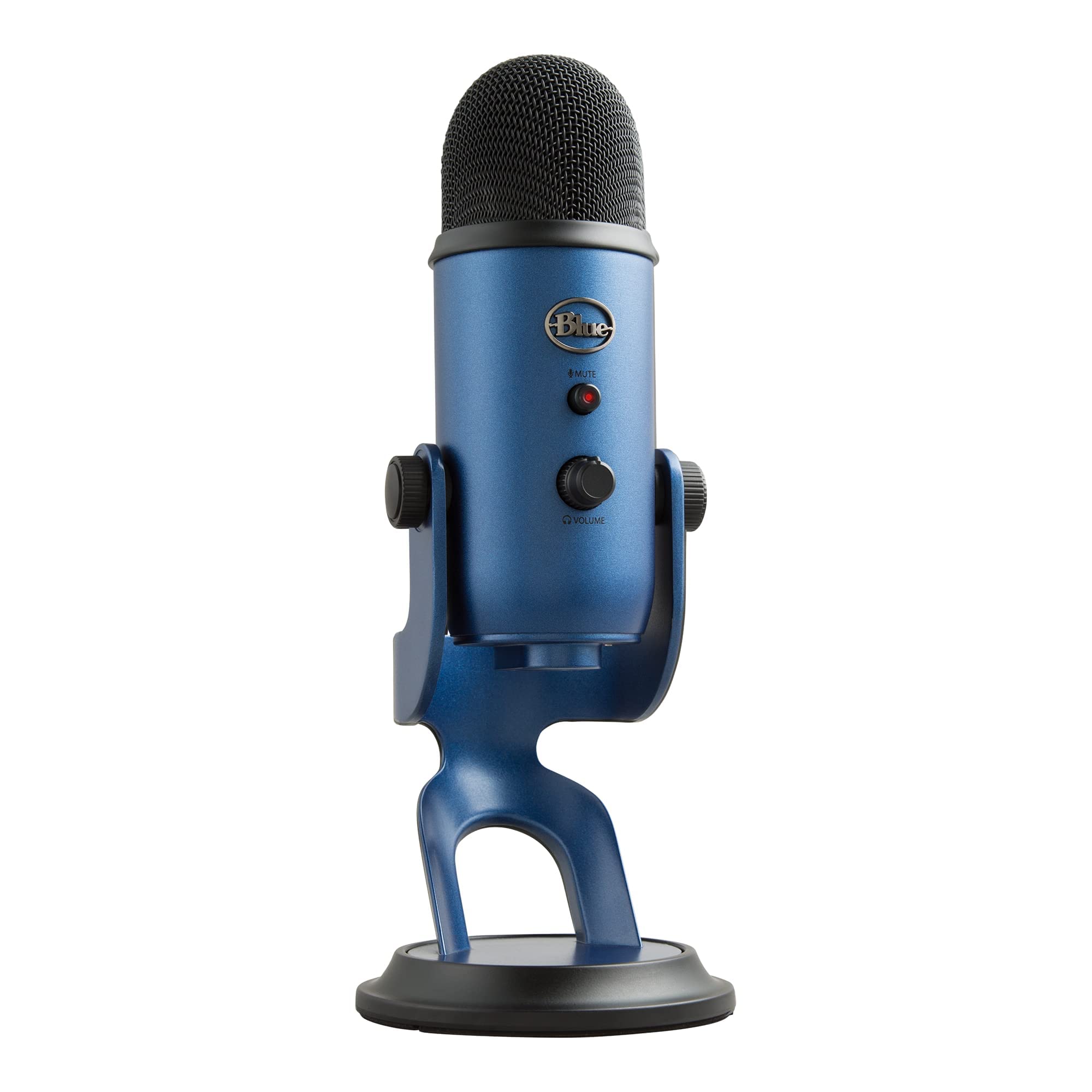
The Blue Yeti remains a benchmark for USB podcast microphones because of its three-capsule array and four switchable pickup patterns. Cardioid mode isolates your voice for solo shows, while bidirectional and omnidirectional patterns let you record two-person interviews or capture room ambience without needing multiple mics. The metal body and adjustable desktop stand give it a studio feel that holds up to daily pivoting and repositioning.
Onboard controls for headphone volume, pattern selection, mute, and mic gain put all essential adjustments at your fingertips without digging into software menus. The Blue VO!CE software adds broadcast-style effects and advanced modulation, though the microphone sounds excellent even without it. Its condenser design does pick up more room echo and desk vibrations than a dynamic mic, so a separate shock mount and pop filter are recommended if your space isn’t treated.
Plug-and-play compatibility with both Mac and PC makes the Yeti a favorite for beginners who want one cable and immediate broadcast-quality audio. The trade-off is its size — the footprint is larger than most dynamic USB mics, and it lacks XLR output for future interface upgrades. For a solo podcaster or streamer who values simplicity and vocal richness, this is a proven starting point.
Why it’s great
- Four pickup patterns cover solo and interview recording without extra gear
- Solid metal construction and adjustable stand feel premium
- Blue VO!CE software adds effects and EQ for polished live streams
- Onboard mute and gain control for quick adjustments
Good to know
- Condenser capsule picks up room echo and requires good mic technique
- Shock mount and pop filter sold separately for best results
- Large footprint occupies significant desk space
- No XLR connectivity limits upgrade path to pro interfaces
2. MAONO PD200W Wireless Hybrid Microphone
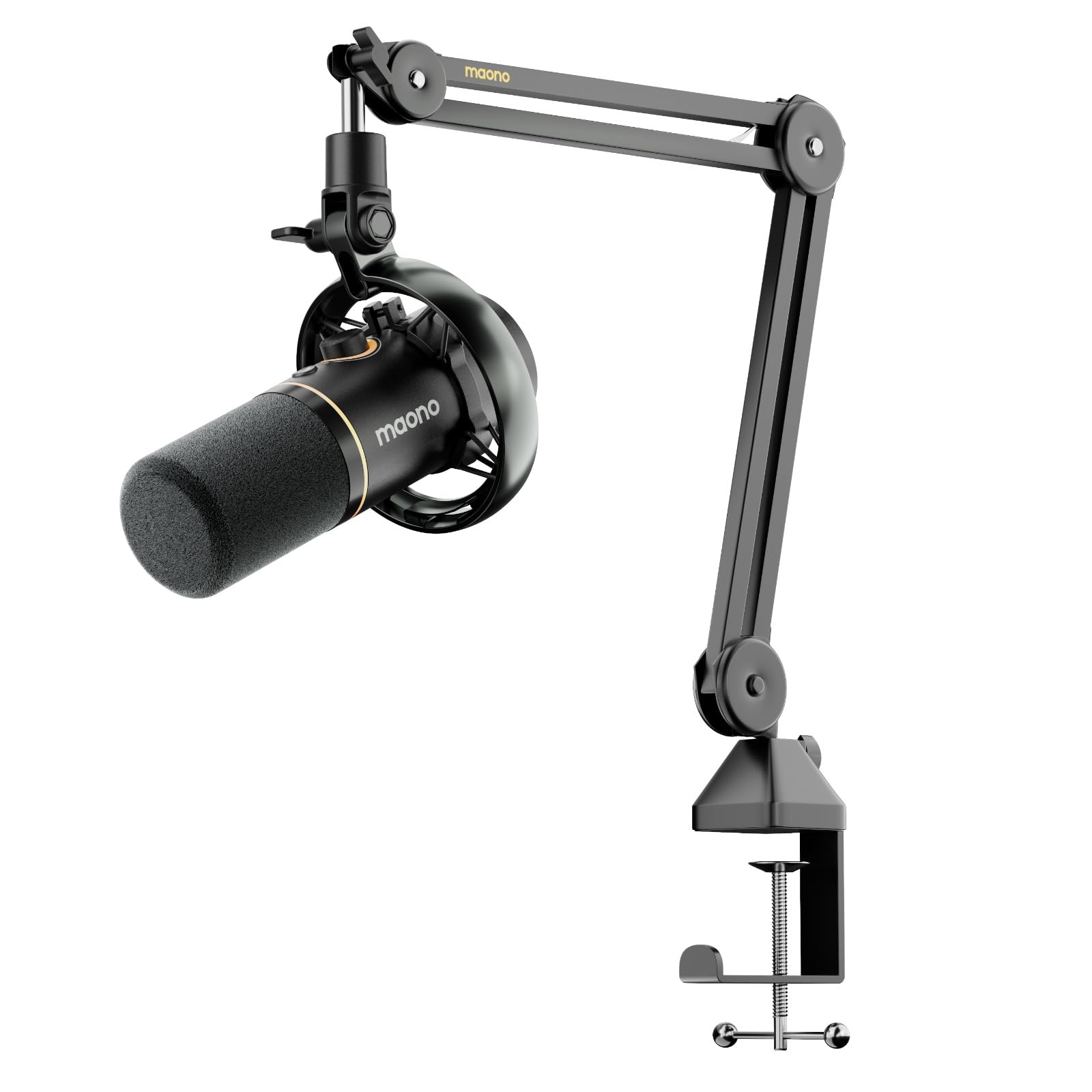
The MAONO PD200W breaks the mold of a fixed-desk microphone by offering three connectivity modes in one package: wireless via a Type-C receiver, wired USB for plug-and-play on computers and phones, and XLR for integration with a traditional audio interface. The 30mm dynamic capsule with cardioid pattern delivers studio-quality vocal reproduction while rejecting off-axis noise, and the 82dB signal-to-noise ratio means your voice stays prominent above background hum.
A standout feature for co-hosts is the ability to connect two PD200W microphones to a single receiver, with each mic recorded to its own track for precise post-production editing. The MaonoLink app lets you toggle between four master-tuned presets and adjust EQ and reverb parameters directly from your PC or smartphone. Wireless range extends to 60 meters, and battery life reaches 60 hours with RGB lighting off — enough for extended recording sessions without hunting for a cable.
The bundle includes a boom arm stand and all necessary cables, though the camera receiver and Lightning receiver are sold separately if you want to record directly onto a camera body. The dynamic capsule handles up to 128dB SPL before distortion, making it forgiving of sudden vocal spikes. Beginners who want maximum flexibility — recording from a phone, a laptop, or a full studio interface — will find this kit hard to match at its price point.
Why it’s great
- Triple connectivity covers wireless freedom, USB simplicity, and XLR pro path
- Dual-mic wireless support with independent tracks for interviews
- MaonoLink app offers EQ, reverb, and four preset modes
- 60-hour battery life and 60-meter wireless range for on-the-go recording
Good to know
- Camera and Lightning receivers for direct recording are sold separately
- Wireless mode introduces slight latency compared to wired XLR
- RGB lighting significantly reduces battery life when active
- Boom arm is included but may need tightening for heavier use
3. Focusrite Scarlett Solo Studio 4th Gen
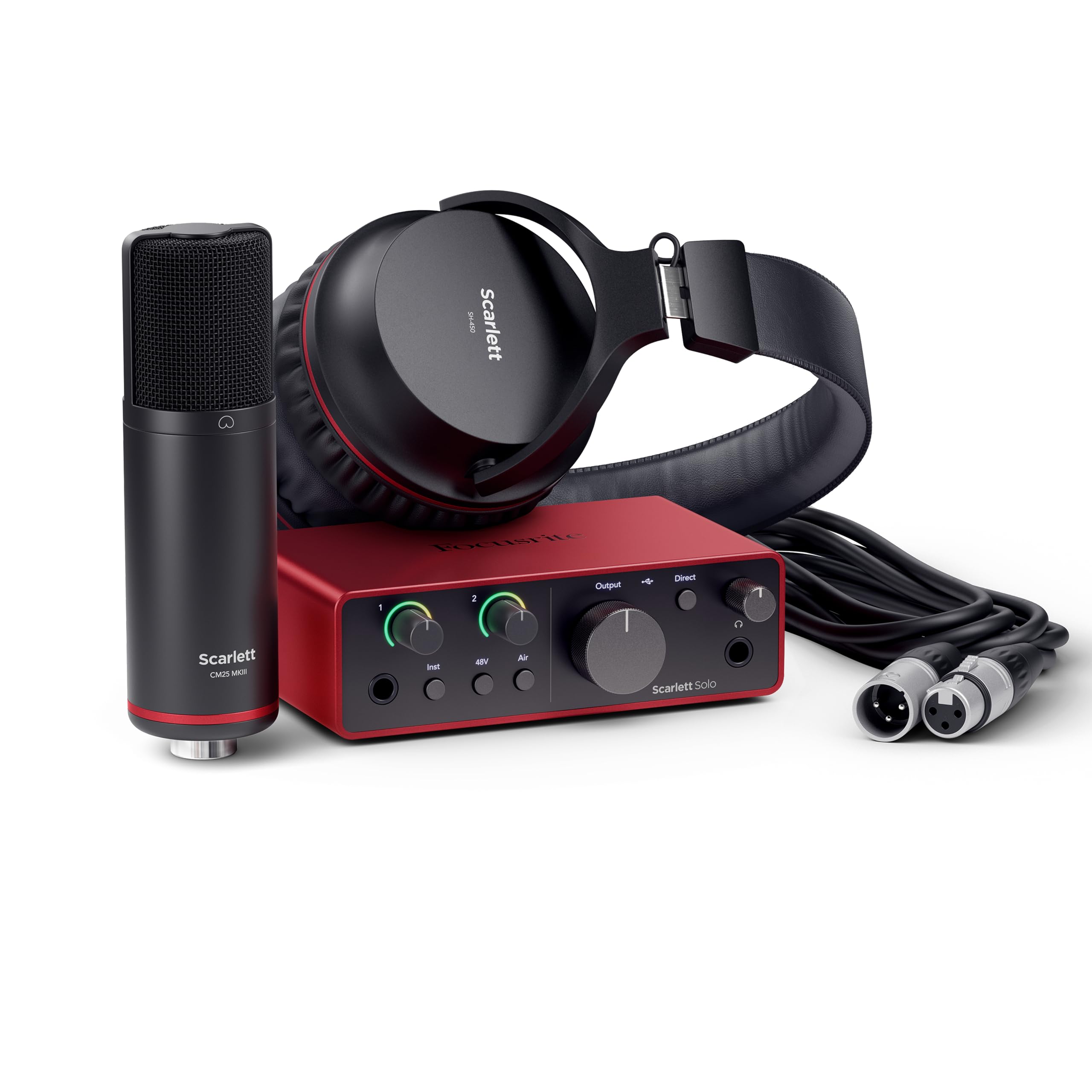
The Focusrite Scarlett Solo Studio 4th Gen is the complete songwriter’s starter package, bundling the acclaimed Scarlett Solo audio interface with a CM25 MkIII condenser microphone and SH-450 headphones. The interface shares its converter technology with Focusrite’s flagship models, achieving a 120dB dynamic range that captures subtle vocal nuances and loud transients without distortion. The 4th Gen’s Air mode applies a high-frequency shelf that lifts vocals and acoustic guitars forward in the mix, adding presence without needing external plugins.
Setup is straightforward: plug the USB-C cable into your computer, connect the mic via the included XLR cable, and you’re recording in minutes. The bundle includes Pro Tools Intro+, Ableton Live Lite, Cubase LE, and the Hitmaker Expansion plugin suite — a software package that would cost hundreds if purchased separately. The SH-450 headphones offer a balanced frequency response for monitoring your recordings accurately during tracking and mixing.
This bundle is ideal for beginners who want professional-grade conversion and a clear upgrade path without replacing core gear later. The condenser microphone is best suited for treated rooms or close-miked vocal performances. The single XLR input and one instrument input accommodate solo vocalists and guitarists, but multi-host podcasters will need a model with more inputs. For a single creator focused on audio quality, the Scarlett Solo Studio represents a premium entry point.
Why it’s great
- Flagship-grade converter technology with 120dB dynamic range
- Air mode adds presence to vocals and instruments without external EQ
- Comprehensive software bundle includes Pro Tools, Ableton Live, and plugins
- USB-C connectivity and simple driverless setup on Mac and Windows
Good to know
- Single XLR input limits recording to one microphone at a time
- Condenser mic picks up room reflections; best with acoustic treatment
- Bundle price is a step above entry-level USB mic kits
- Headphones are functional but not at the level of dedicated studio monitors
4. MAONO AME2C Pro Podcast Equipment Bundle

The MAONO AME2C Pro bundle combines a 10-channel audio interface with an XLR dynamic microphone specifically designed for live streaming and podcasting where real-time audio manipulation matters. The interface includes 11 customizable sound pads — three capable of recording up to 60 seconds of audio with one-key looping, and eight that handle 20-second clips — letting you trigger music, sound effects, or pre-recorded segments during a live show without touching your computer. The built-in preamps deliver up to 60dB of clean gain with ultra-low noise, and the 48V phantom power option supports condenser microphones when you want to expand your capsule collection.
Six reverb modes, a 12-step auto-tune function, and three-band EQ controls (treble, mid-range, bass) give you vocal shaping tools typically found on far more expensive broadcast consoles. The interface supports dual XLR mic inputs, a 6.35mm instrument jack for guitar or bass, and Bluetooth connectivity for streaming backing music from a smartphone. Loopback and sidechain functions let you blend computer audio with your mic feed, making this bundle a complete hub for a one-person podcast or live stream studio.
The included XLR dynamic microphone features a built-in double-layer pop filter and cardioid pattern to reject room noise. The bundle arrives with a boom arm, table clamp, XLR cable, and 3.5mm TRRS cables for connecting a smartphone as a secondary audio source. Beginners who want to move beyond simple recording into interactive live production will appreciate the creative control this setup provides, though the learning curve for the sound pad system may require a few trial runs before a live show.
Why it’s great
- 10-channel mixer with 11 sound pads for live effects and audio triggers
- Dual XLR inputs and 48V phantom power for expanding to a second mic
- Bluetooth input, six reverb modes, and auto-tune for broadcast-style production
- Complete bundle includes interface, mic, boom arm, and all cables
Good to know
- Sound pad system has a moderate learning curve for first-time users
- Plastic construction on the mixer body feels less rugged than metal alternatives
- Some users report sound pad reliability issues after extended use
- Not ideal for multi-track recording; primarily a live streaming mixer
5. PreSonus AudioBox USB 96 25th Anniversary Studio Package

The PreSonus AudioBox USB 96 25th Anniversary Studio Package is an all-in-one bundle built around the durable AudioBox USB 96 audio interface, which records at 24-bit depth and 96 kHz sample rate — specs that surpass CD quality and give beginners room to mix without aliasing artifacts. The interface includes two combo inputs with Class A preamps, MIDI I/O for connecting synthesizers or drum pads, and zero-latency monitoring via the built-in mix knob. The M7 large-diaphragm condenser microphone delivers warm, rich tones suitable for vocals and acoustic instruments, while the HD7 headphones provide balanced frequency response for accurate monitoring during tracking.
Studio One Artist, included in the bundle, is a full-featured DAW that many podcasters and musicians use through their entire career. The Studio Magic plugin suite adds over worth of virtual instruments, effects loops, and mastering tools to your production arsenal. All cables and a desktop mic stand are packed in the box, so nothing else is needed to start recording on day one. The interface is class-compliant on Mac and requires a simple driver install on Windows, keeping the technical barrier low.
This package is ideal for beginners who want a traditional studio-style workflow with a dedicated DAW, rather than a simplified all-in-one app. The condenser microphone demands a relatively quiet room for best results, and the desktop stand provided with the mic transfers desk vibrations into the recording. Upgrading to a boom arm and shock mount is a common first step after the initial purchase. For anyone planning to record both speech and music, the AudioBox 96 bundle offers genuine longevity without feeling toy-like.
Why it’s great
- Includes Studio One Artist DAW and over in plugin content
- Two combo inputs with Class A preamps for recording a second source
- MIDI I/O expands capabilities for electronic instruments
- Zero-latency monitoring via hardware mix knob
Good to know
- M7 condenser mic picks up room echo; shock mount upgrade recommended
- Desktop mic stand included but inferior to a boom arm for isolation
- HD7 headphones are functional but not high-end for critical mixing
- 96 kHz sample rate is excellent but exceeds most podcast delivery requirements
6. Movo PodPro-TH Portable Podcast Equipment Bundle
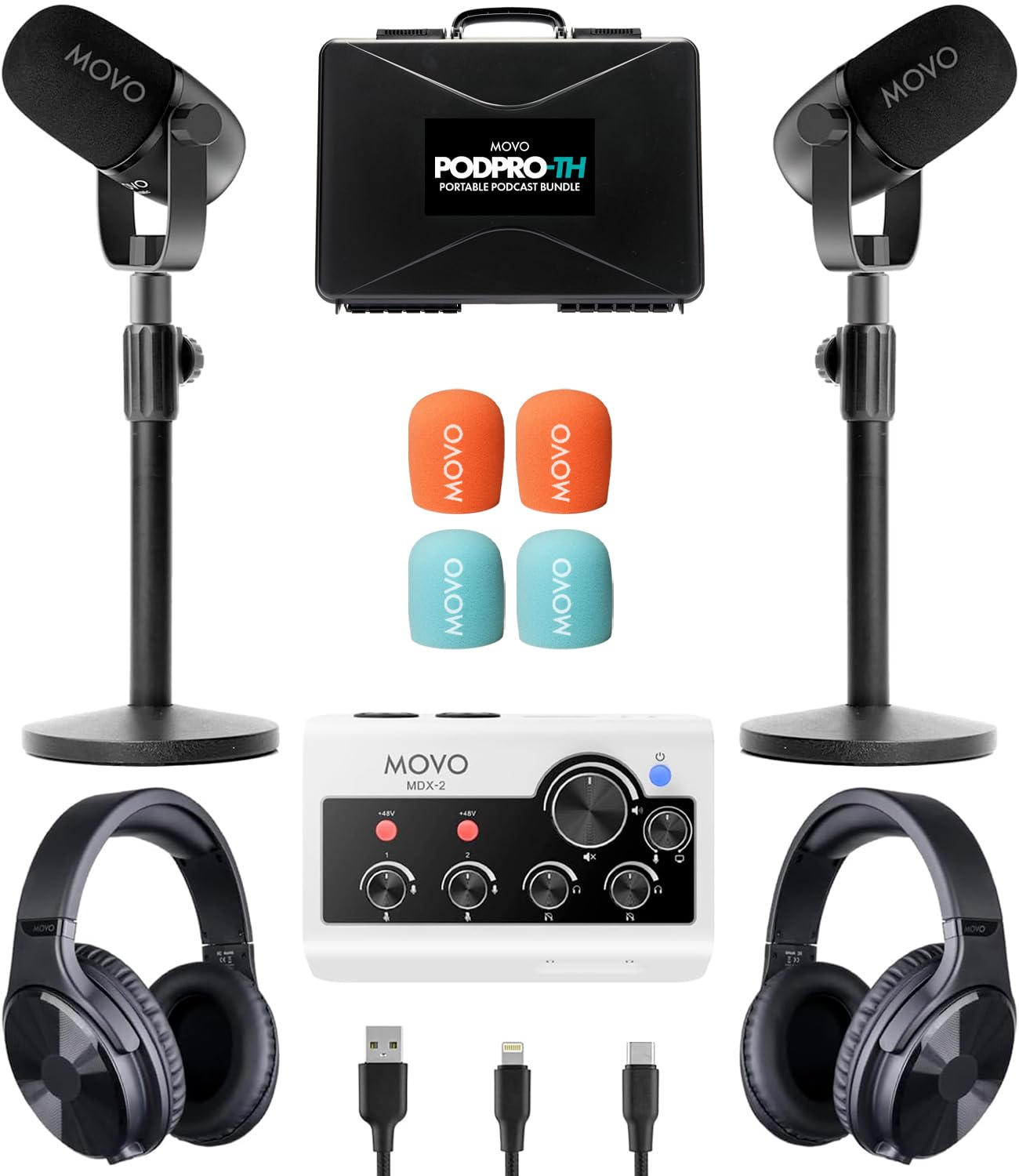
The Movo PodPro-TH is designed for two-person podcast teams who need a portable rig that works with iPhones, Android phones, and computers without a separate mixer. The MDX-2 audio interface runs on battery power with a three-hour lifespan, and it ships with USB-A, USB-C, and Lightning cables so you can plug directly into virtually any modern smartphone or laptop. The two CastMic XLR dynamic microphones use a cardioid pattern with a 40Hz-16kHz frequency response that cuts background noise and delivers balanced, studio-quality sound for both hosts.
The interface includes two XLR inputs with 48V phantom power, two headphone outputs for independent monitoring, and stereo 1/4-inch outputs for connecting to additional recording equipment. A hard-shell travel case holds the entire kit — interface, both microphones, two tabletop stands, XLR cables, and all connectivity cables — making it easy to pack for remote recording sessions or co-hosted field interviews. The battery-powered design means you can record in a coffee shop or conference room without hunting for a wall outlet.
This bundle is purpose-built for beginners who want to record two hosts in person without the complexity of a traditional mixer interface. The tabletop stands are adequate for desktop use but less stable than heavy-duty boom arms for active speakers. Some users report cable management challenges due to the number of connections, and the second microphone has occasionally failed, though the return process is straightforward. For creators whose primary need is a transportable, ready-to-record duo setup, the PodPro-TH delivers a polished out-of-box experience.
Why it’s great
- Includes everything for two-person recording in a single travel case
- Battery-powered interface works without wall power for up to three hours
- USB-A, USB-C, and Lightning cables ensure smartphone and laptop compatibility
- Two independent headphone outputs for per-host monitoring
Good to know
- Tabletop stands transmit desk vibrations; boom arms are a worthwhile upgrade
- Battery life may limit extended recording sessions without recharging
- Cable clutter can be significant when all connections are active
- Some reports of microphone failures on the second unit require exchange
7. Behringer U-PHORIA STUDIO Complete Recording/Podcasting Bundle

The Behringer U-PHORIA STUDIO bundle strips podcasting down to its essentials: a USB audio interface, a condenser microphone, and studio headphones — all at a price point that makes home recording accessible to almost anyone. The interface supports a 192 kHz maximum sample rate and 24-bit conversion, specs that match much more expensive units and provide headroom for processing without digital distortion. Two input channels let you record a microphone and a line-level instrument simultaneously, and the included mic delivers clean enough audio for spoken-word applications when used in a controlled environment.
The bundle is compatible with most major DAWs on Windows and macOS, including Audacity, which is free and a common starting point for new podcasters. Setup takes minutes: install the driver, plug in the interface, connect the mic via XLR, and begin recording. The headphones in the kit provide basic monitoring, though their build quality is noticeably entry-level — the adjustment mechanism may not accommodate larger head sizes, and the ear pads are not designed for long wear.
This is the most budget-focused bundle in the guide, and it shows in the headphones and the condenser microphone’s sensitivity to untreated room acoustics. The interface itself is a solid performer for the price, and many users keep it as a secondary rig after upgrading other components. Beginners who want the lowest possible entry cost to a full XLR-based recording chain, and who are willing to invest in a better pair of headphones shortly after purchase, will find the U-PHORIA STUDIO a capable foundation.
Why it’s great
- 192 kHz sample rate and 24-bit conversion at an entry-level price
- Two input channels for mic and instrument simultaneous recording
- Works with free DAWs like Audacity for zero software cost
- Complete kit includes interface, mic, headphones, and cables
Good to know
- Included headphones are uncomfortable for extended wear and poorly sized
- Condenser microphone picks up room echo and background noise easily
- Interface buzz on the mic input may require software noise gates
- Build quality of bundled accessories is noticeably entry-level
8. FIFINE K688T Dynamic Podcast Microphone Set

The FIFINE K688T is a dynamic microphone bundle built around a sturdy metal boom arm and a cardioid capsule that rejects side and rear noise effectively, making it a strong choice for podcasters recording in less-than-silent rooms. The dynamic element handles sound pressure levels up to 130dB without distortion, meaning you can speak with enthusiasm or raise your voice without the audio breaking up. The boom arm supports up to two kilograms, extends vertically 180 degrees and horizontally 135 degrees, and clamps securely to most desk edges without damaging the surface.
Dual connectivity — USB for plug-and-play simplicity and XLR for future integration with an audio interface — gives beginners room to grow without replacing the microphone itself. The tap-to-mute button on the mic body lets you silence yourself instantly during a live recording, and the gain knob adjusts sensitivity without needing to open software settings. A headphone monitoring jack with a dedicated volume knob allows real-time audio tracking, a feature often missing at this price tier.
The included windscreen and shock mount suppress explosive plosive sounds and low-frequency desk vibrations, cleaning up the recording before it hits your DAW. Some users note the arm lacks fine positional flexibility, requiring a firm hand to bend into precise angles, and the microphone is sensitive to direct table bumps despite the shock mount. For budget-conscious beginners who want a dynamic microphone with a professional boom arm setup and the option to move to XLR later, the K688T delivers remarkable value.
Why it’s great
- Dynamic capsule rejects room echo and background noise effectively
- Heavy-duty metal boom arm holds position and dampens vibration
- USB and XLR dual connectivity for future upgrade without new mic
- Onboard mute, gain, and headphone monitoring with no software needed
Good to know
- Boom arm adjustment range is limited; fine tuning requires effort
- Microphone picks up table bumps despite included shock mount
- USB connection is quieter than XLR; XLR upgrade improves clarity
- Aluminum body shell can ring slightly on plosive sounds without pop filter
9. FIFINE Ampligame KS5W Gaming Equipment Bundle

The FIFINE Ampligame KS5W pairs a dynamic XLR/USB microphone with a dedicated game audio mixer that includes a slider fader, function buttons, and five RGB color modes. This bundle is tailored for gamers who want to separate voice chat from game audio and apply voice effects during streams without installing separate software. The microphone uses a dynamic capsule with cardioid rejection, a mute button for instant silence, and a gain knob for adjusting sensitivity to match your vocal level. The mixer’s slider fader gives intuitive control over volume levels, and the function buttons trigger built-in sound effects that add production value to live streams.
Connectivity is straightforward: the mic connects to the mixer via XLR, and the mixer connects to your computer via USB for power and audio. A headphone jack on the microphone lets you monitor your own voice with zero latency, and the RGB button cycles through five lighting modes that match gaming peripherals or stream overlays. The bundle works well for podcasters who also game, as the mixer can blend microphone audio with system sounds for a single clean output feed into streaming software like OBS or Streamlabs.
The mixer’s plastic housing feels budget-friendly, and some users report the unit sporadically shuts off and reboots, which can interrupt a live recording. Voice changer effects — elder, baby, robot — are fun for gaming but less useful for serious podcasting. The microphone itself delivers clear audio that represents a noticeable upgrade over headset mics, but the plastic mixer build and occasional power issues make this bundle best suited for casual podcasters and gaming streamers who want an integrated control surface without a significant financial commitment.
Why it’s great
- Dynamic mic and audio mixer in one bundle for streamlined setup
- Slider fader and function buttons provide intuitive live audio control
- Five RGB lighting modes add visual flair for streaming setups
- Voice changer effects add entertainment value for gaming streams
Good to know
- Plastic mixer build feels less durable than metal alternatives
- Some units experience sporadic power cycling during use
- Voice effects are not suitable for professional podcasting
- Function keys and RGB controls only work via USB, not XLR connection
FAQ
Do I need an audio interface or can I just use a USB microphone for podcasting?
Why do dynamic microphones sound better than condensers in untreated rooms?
How important is a shock mount and boom arm for a beginner microphone?
Can I record two people with a single USB microphone?
What sample rate and bit depth should I use for podcast recording?
Final Thoughts: The Verdict
For most users, the beginner podcast setup winner is the Logitech Creators Blue Yeti because its multi-pattern flexibility and plug-and-play simplicity eliminate the need for an interface while delivering broadcast-grade vocal presence. If you need wireless mobility and dual-mic support for co-hosted shows, grab the MAONO PD200W. And for the best traditional studio foundation with a full DAW and upgrade path, nothing beats the Focusrite Scarlett Solo Studio 4th Gen.

Mo Maruf
I created WellFizz to bridge the gap between vague wellness advice and actionable solutions. My mission is simple: to decode the research and give you practical tools you can actually use.
Beyond the data, I am a passionate traveler. I believe that stepping away from the screen to explore new environments is essential for mental clarity and physical vitality.