Our readers keep the lights on and my smoothie glass nicely filled. As an Amazon Associate, I earn from qualifying purchases.
A tablet holder for bed solves a specific physical problem: holding a device above your face for more than ten minutes without your arms turning numb or your neck craning forward. The market is flooded with goosenecks that sag overnight and floor stands with bases too light to hold an iPad without tipping. The real engineering challenge in this category is preventing drift, managing reach over the edge of a mattress, and keeping the grip secure enough that a dozing reader doesn’t get hit in the face.
I’m Mohammad Maruf — the founder and writer behind WellFizz. I’ve spent the last several months analyzing the mechanical design, base weight, clamp architecture, and joint tension systems across dozens of tablet holders to identify which models actually solve the physics of bedside viewing.
This guide breaks down the five strongest contenders for anyone who wants their tablet suspended where they can see it without their arms involved. After hours of reading real build specs and user accounts, I’m confident the right pick comes down to base stability, arm stiffness, and grip adaptability — you’ll find the best bed tablet holder for your setup among these tested designs.
How To Choose The Best Bed Tablet Holder
The wrong bed tablet holder leads to a predictable cycle: you spend five minutes positioning it, it drifts during the first chapter, and you end up holding the tablet anyway. Three specifications separate the stable designs from the frustrating ones.
Base Weight and Contact Surface
Floor stands rely on a weighted base to prevent tipping when the arm extends over a mattress. A base under 8 pounds creates a risk — the leverage of a fully extended arm holding a 1.5-pound tablet can pull the whole unit over if the tablet is bumped. Look for bases that exceed 10 pounds if you plan to position the stand beside a bed and reach the holder past the edge of the mattress.
Arm Construction: Gooseneck vs. Articulated
Gooseneck arms are flexible and easy to bend, but they rely entirely on the stiffness of the metal conduit to hold position. Over time, the bend weakens and the holder sags. Articulated aluminum arms use friction joints — tightened with an Allen wrench — that hold their position indefinitely. For a permanent bedside setup, an articulated arm with adjustable friction is more reliable.
Grip Mechanism and Clamp Width
The holder’s grip determines compatibility with different device thicknesses. Spring-loaded clips work well for thin tablets but struggle with cases, especially thick protective shells. Adjustable clamp brackets, usually with a threaded wheel, provide more consistent pressure and accommodate devices from 4.7 inches up to over 13 inches without modifying the grip.
Quick Comparison
On smaller screens, swipe sideways to see the full table.
| Model | Category | Best For | Key Spec | Amazon |
|---|---|---|---|---|
| BluuSuuk Tablet Floor Stand | Floor Stand | Maximum stability over a bed | 11 lb metal base | Amazon |
| AboveTEK Adjustable Arm Clamp | C-Clamp | Permanent bedside or desk mount | 27-inch aluminum arm | Amazon |
| TabHolderix Heavy Base Floor Stand | Floor Stand | Budget-friendly floor stability | 4.5 lb reinforced base | Amazon |
| Urmust Aluminum Desk Stand | Desk Stand | Sturdy tabletop positioning | Aluminum alloy frame | Amazon |
| Kefotic Gooseneck with Page Turner | Gooseneck | Hands-free reading with remote | Page turner remote | Amazon |
In‑Depth Reviews
1. BluuSuuk Tablet Floor Stand

The defining spec of this floor stand is the 11-pound metal base — more than double the base weight of most competing floor units in this category. That mass eliminates the tipping risk that plagues lighter stands when you extend the arm over the side of a bed. Users report zero wobble even with the arm fully stretched forward holding an iPad Pro 12.9.
The adjustable arm extends from 13.4 to 58.7 inches off the ground, with a 360-degree rotating holder that lets you flip between landscape and portrait without repositioning the base. The spring-loaded clip grips devices from 4.7 to 12.9 inches, including tablets with cases, though inserting a device requires two hands to pull the grips apart.
For anyone who wants a permanent floor-mounted solution beside the bed, the BluuSuuk delivers a locked-in feel that cheaper stands cannot match. The trade-off is physical size — the base occupies noticeable floor space and the unit weighs over 13 pounds assembled, making it inconvenient to relocate daily.
Why it’s great
- 11 lb base prevents tipping at full extension
- Height range accommodates standing, sitting, or lying positions
- Wide device compatibility from phones to 12.9-inch tablets
Good to know
- Spring grips require two hands to secure the device
- Large footprint makes it difficult to move between rooms
2. AboveTEK Tablet Stand Holder

The AboveTEK uses a C-clamp that bolts onto surfaces up to 2.95 inches thick — desk edges, bed frames, or headboards — instead of relying on a weighted base. This clamping approach transfers stability to the furniture itself, so the arm never wobbles even when fully extended. The 27-inch articulated arm has four adjustable joints (one 255-degree, one 305-degree, and two 360-degree) for precise positioning over a bed.
Construction uses aluminum alloy, iron, and ABS plastic, with an adjustable bracket that spans 5.1 to 8.8 inches wide. The clamp grip includes silicone padding that prevents scratching and holds even heavy tablets with thick cases. An included Allen wrench allows you to tighten the friction joints to eliminate drift over time — a feature missing from cheaper arms.
The C-clamp design limits placement to surfaces with an overhanging edge, so it won’t work on solid headboards or beside a bed with a frame that lacks a lip. However, for users with a suitable mounting point, the AboveTEK offers the most stable extended reach at this price range without the floor footprint of a base stand.
Why it’s great
- Clamp-on design transfers stability to the bed frame
- Four friction joints hold position without sagging
- Includes 1/4-inch screw for camera or GoPro mounting
Good to know
- Requires a flat surface edge at least 2.95 inches thick
- Does not fit with some thick protective cases on 13-inch iPads
3. TabHolderix Tablet Floor Stand

This unit lands in the mid-range category with a reinforced 4.5-pound base constructed from carbon steel. The manufacturer specifically increased the base weight from 3.74 pounds in an earlier revision after user feedback about stability — a responsive design change that matters for this category. The stand adjusts from 27.5 to 59 inches tall and includes a 22-inch cantilever arm with 360-degree rotation.
The clamp holds devices from 4.7 to 12.9 inches and supports up to 1.5 pounds. The spring-loaded mechanism grips securely, and users report that the stand remains stable during swiping and tapping when the joints are tightened properly. Assembly uses thumb screws and requires no tools, though the base-to-arm screw needs significant hand torque to lock in place.
For the price point, the TabHolderix delivers floor-stand functionality with a stability margin that works for tablets up to iPad size. The base is not heavy enough to extend the arm fully over a bed without adding weight to the base — the manual advises pressing the base with heavy objects in that scenario. This makes it best suited for bedside use where the stand sits close to the viewer rather than reaching over the mattress.
Why it’s great
- Reinforced 4.5 lb base improves stability over older versions
- Height range suits both sitting and lying positions
- Tool-free assembly with thumb screws
Good to know
- May need extra weight on the base for full extension over a bed
- One joint thumb screw can feel looser than others out of the box
4. Urmust Adjustable iPad Holder
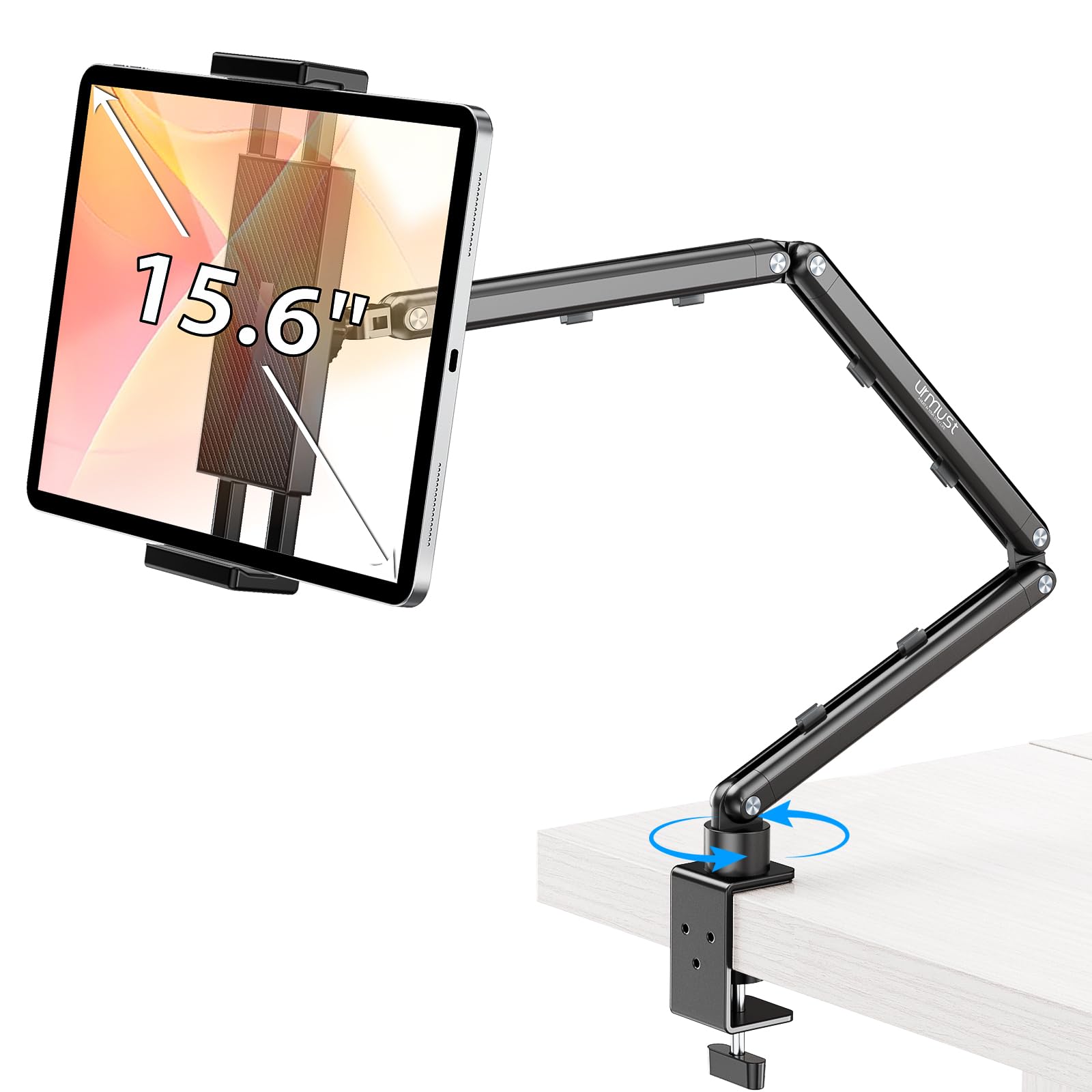
The Urmust stand uses aircraft-grade aluminum alloy for the arm and base, which gives it a weight capacity of 2.42 pounds — higher than most articulated stands at its price. The double-beam arm design with friction joints prevents the sagging common in single-joint arms. Each joint can be tightened with the included Allen wrench, and users report that the arm holds a 2.5-pound iPad Pro without drooping even after extended use.
The base is designed for flat tabletop surfaces only — the manufacturer explicitly warns against mounting it on headboards. The anti-slip base pad keeps the stand planted during use, and integrated cable clips along the arm keep charging cables organized. The device holder fits screens from 4.7 to 15.6 inches, making it one of the widest compatibility ranges in this comparison.
The articulated design requires occasional re-tightening if you adjust the position frequently, and the swivel base nut can feel finicky when fine-tuning the rotation angle. This is a desk or nightstand stand, not a floor unit, so it works best on a bedside table positioned close enough that the arm reaches your viewing position without full extension over the mattress.
Why it’s great
- Aluminum alloy frame supports up to 2.42 lbs without sagging
- Wide device compatibility from 4.7 to 15.6 inches
- Integrated cable clips keep cords organized
Good to know
- Not designed for headboard or wall mounting
- Friction joints require an Allen wrench for adjustment
5. Kefotic Gooseneck Tablet Holder

The Kefotic holder differentiates itself with an included page turner remote — a small clip-on device that taps the screen without Bluetooth or WiFi, allowing you to turn Kindle pages without reaching out from under the blanket. This feature alone makes it the most useful option for dedicated e-reader users who want their hands fully free. The gooseneck arm is stiff enough to hold its position after adjusting, though it requires more bending force than articulated arms.
The clip holder extends from 4.5 to 7.2 inches wide, covering most e-readers and tablets up to 11 inches. The clamp mounts onto surfaces like side tables, headboards, or bed frames and the arm bends into any position. The page turner remote charges via USB and users report the remote battery lasts through several reading sessions before needing a recharge.
Gooseneck arms inherently drift over time as the metal conduit fatigues, and this unit is no exception — users note that the arm can wobble when bumped, especially at full extension. The page turner remote’s battery degrades faster than the arm itself, with some users reporting frequent charging needs after a few months. This is a convenience-first choice for Kindle readers who prioritize the page turner over long-term arm rigidity.
Why it’s great
- Page turner remote enables true hands-free reading in bed
- Flexible gooseneck arm bends to any viewing angle
- Works with Kindle, Kobo, and Kindle app on tablets
Good to know
- Gooseneck drifts and wobbles more than articulated arms
- Page turner remote battery requires frequent charging over time
FAQ
Can a bed tablet holder support an iPad Pro 12.9 with a heavy case?
How do I keep a gooseneck arm from sagging overnight?
Will a C-clamp holder damage my bed frame or headboard?
Final Thoughts: The Verdict
For most users, the best bed tablet holder winner is the BluuSuuk Tablet Floor Stand because its 11-pound base provides a margin of safety no other floor stand at this level matches, making it reliable for bending over a mattress. If you want a clamp-on with zero floor footprint, grab the AboveTEK C-Clamp Stand for its locked-in stability on bed frames. And for dedicated e-reader users who want to turn pages without moving an arm, nothing beats the Kefotic Gooseneck with Page Turner.

Mo Maruf
I created WellFizz to bridge the gap between vague wellness advice and actionable solutions. My mission is simple: to decode the research and give you practical tools you can actually use.
Beyond the data, I am a passionate traveler. I believe that stepping away from the screen to explore new environments is essential for mental clarity and physical vitality.