Our readers keep the lights on and my smoothie glass nicely filled. As an Amazon Associate, I earn from qualifying purchases.
Your microphone is an expensive tool, yet your voice still sounds thin, distant, or buried under a layer of hiss. That hollow quality isn’t your mic’s fault—it’s the preamps in your interface failing to deliver enough clean gain. A podcasting interface isn’t just a box that converts XLR to USB; it is the nervous system of your entire audio chain, and choosing one with weak preamps or noisy converters means fighting a losing battle in post-production every single episode.
I’m Mohammad Maruf — the founder and writer behind WellFizz. I’ve spent years dissecting the internal circuitry, noise floor specs, and real-world gain staging of dozens of audio interfaces to separate marketing fluff from the measurable specs that actually determine whether your podcast sounds professional or amateur.
Whether you host a solo show or run a multi-person roundtable, finding the best audio interface for podcasting boils down to preamp headroom, connectivity, and zero-latency monitoring that keeps your guests on track.
How To Choose The Best Audio Interface For Podcasting
Most first-time buyers fixate on the number of inputs and completely overlook the preamp gain rating. A two-input interface with 60dB of clean gain will outperform a four-input unit that only delivers 45dB—especially when paired with common dynamic podcast microphones like the Shure SM7B or Rode PodMic. Here are the specs that matter most for spoken-word production.
Preamp Gain and Noise Floor
Dynamic microphones require significant amplification because they generate a weaker signal than condensers. If your interface offers less than 55dB of gain, you will need an inline booster like a Cloudlifter or FetHead to avoid cranking the trim knob and introducing audible hiss. Look for a rating of at least 60dB and an Equivalent Input Noise (EIN) of -129dBV or better.
Loopback and Mix-Minus Capabilities
For live streaming or remote guest recording, loopback allows your computer’s audio—browser sounds, game audio, or music—to be routed back through the interface and into your recording software. Mix-minus prevents your remote guest from hearing their own delayed voice by sending them a copy of the mix that excludes their mic input. These two features separate a podcast interface from a simple music recording interface.
Zero-Latency Monitoring
Latency is the delay between speaking into your mic and hearing your own voice in the headphones. Anything above 10ms creates a distracting echo that throws off pacing. A dedicated hardware monitoring path via a direct/playback blend knob lets you hear yourself in real time without routing through the computer.
Physical Faders vs. Knobs
If you host a multi-person show, physical faders allow you to mix live levels quickly without diving into software menus. Knobs work fine for solo podcasters or duos, but faders provide tactile control for three or more simultaneous voice tracks.
Built-in Effects and Processing
Several modern podcast interfaces include onboard DSP for compression, EQ, and de-essing. This unloads processing from your computer and applies consistent polish to your voice before it even hits the recording track. Look for APHEX processing or Focusrite Air mode, which adds high-frequency presence to naturally darker voices.
Quick Comparison
On smaller screens, swipe sideways to see the full table.
| Model | Category | Best For | Key Spec | Amazon |
|---|---|---|---|---|
| Focusrite Vocaster Two | Mid-Range | Dual-host shows, easy setup | 70dB gain, Auto Gain, Enhance | Amazon |
| Rode RØDECaster Duo | Premium | All-in-one production studio | 76dB gain, APHEX processing, faders | Amazon |
| Solid State Logic SSL 2 MKII | Premium | Legendary console sound, HPF | 32-bit/192kHz AD/DA, Legacy 4K | Amazon |
| Focusrite Scarlett 4i4 4th Gen | Premium | Multi-instrument + podcast hybrid | 120dB dynamic range, Auto Gain | Amazon |
| MOTU M4 4×4 | Premium | Transparent preamps, LCD metering | 192kHz, 8-channel mix, loopback | Amazon |
| Universal Audio Volt 2 | Mid-Range | Warm vintage mic preamp sound | UA 610 preamp emulation, 192kHz | Amazon |
| M-AUDIO AIR192x4 VSPro | Mid-Range | All-inclusive starter kit | 24-bit/192kHz, 2.59ms latency | Amazon |
| Shure MVX2U Gen 2 | Budget | Portable single-mic setup | 60dB gain, Auto Level, Denoiser | Amazon |
| MAONO MaonoCaster AME2 | Budget | All-in-one with sound pads | 10-channel mixer, 60dB gain | Amazon |
In‑Depth Reviews
1. Focusrite Vocaster Two

The Vocaster Two was designed specifically for podcasters, not musicians, which explains its unique feature set. It delivers over 70dB of clean preamp gain, eliminating the need for an external booster even with demanding dynamic microphones like the Shure SM7B. The Auto Gain function sets your input level with one button press, and the four Enhance presets apply EQ and compression tailored for spoken word.
Dual independent headphone outputs with individual Show Mix controls let each host dial in their preferred blend of their own voice and their guest’s audio. The Bluetooth phone connectivity allows remote guests to call in without a separate mixer or hybrid adapter. The TRRS camera output routes clean audio directly to a DSLR or mirrorless camera for video-first content creators.
Build quality is plastic but rugged enough for mobile recording, and the USB-C bus power means no wall wart is needed. Some users report the USB cable included is short, but the unit itself performs reliably across Mac, PC, and iPad. For the majority of podcasters recording one or two hosts, this is the most focused solution available.
Why it’s great
- Auto Gain and Enhance presets simplify setup for beginners
- Bluetooth phone integration for remote interview recording
- More than 70dB of gain handles any dynamic microphone
Good to know
- Plastic chassis doesn’t inspire the same confidence as metal rivals
- Only two XLR inputs limit larger roundtable scenarios
2. Rode RØDECaster Duo
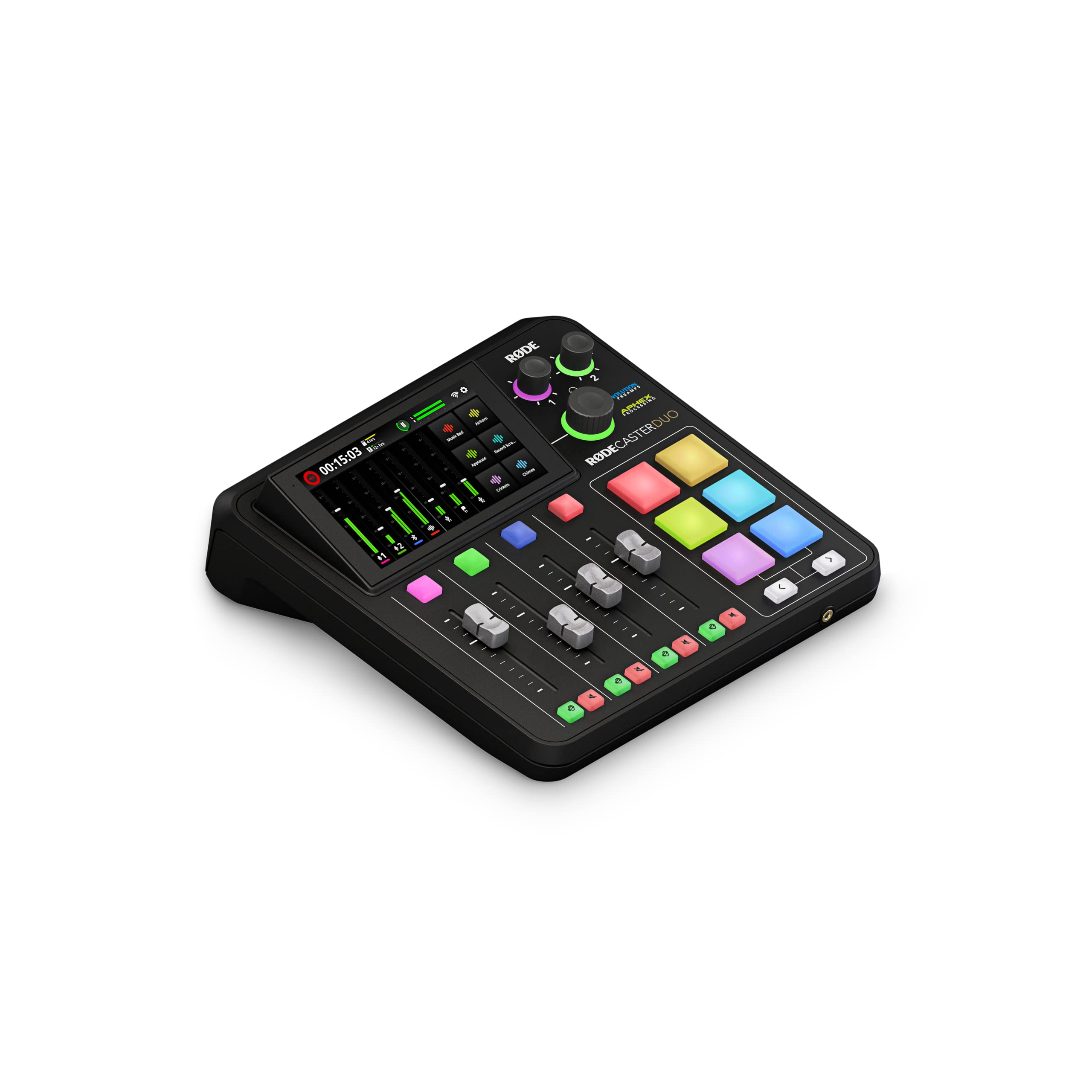
The RØDECaster Duo is the closest thing to a radio broadcast console compressed into a desktop footprint. It features two Neutrik combo inputs with Revolution Preamps that supply 76dB of ultra-low-noise gain, ideal for power-hungry dynamic mics. The four physical faders give you tactile control over mic levels, music, Bluetooth, and system audio without touching a mouse.
APHEX processing—including the Aural Exciter and Big Bottom effects—applies studio-grade polish to voices in real time. The six SMART pads can trigger sound effects, jingles, or pre-recorded segments, and the high-resolution touchscreen provides access to mix routing, effects, and recording management. The built-in recorder saves directly to microSD, offering a safety track independent of your DAW.
The learning curve is steeper than simpler interfaces, and the iPhone connection requires specific cables and adapters. Some firmware bugs have been reported, but the audio quality and workflow integration are unmatched for podcasters who want an all-in-one production center. This is the interface for creators who treat audio production as a dedicated craft.
Why it’s great
- 76dB of pristine preamp gain handles the most demanding mics
- Four physical faders for live mix control during multi-person shows
- Built-in APHEX processing polishes audio before it hits the recording
Good to know
- Setup complexity may overwhelm absolute beginners
- Software and firmware bugs have been reported post-launch
3. Solid State Logic SSL 2 MKII

SSL is synonymous with the world’s most iconic mixing consoles, and the SSL 2 MKII brings that sonic signature into the home studio. The Legacy 4K analog enhancement button adds high-frequency sheen and subtle harmonic saturation reminiscent of the SSL 4000 series, giving voice recordings a polished, radio-ready character without plug-ins.
The 32-bit / 192kHz AD/DA converters capture an extraordinarily wide dynamic range, though for spoken-word podcasting, the practical benefit is the exceptional clarity and headroom in the preamps. The built-in high-pass filter cuts rumble from HVAC systems or desk vibrations before it reaches your recording, a feature often missing from competitor interfaces at this tier.
MIDI I/O on 5-pin DIN jacks is a welcome addition for podcasters who also produce music, and the SSL Production Pack software bundle includes plug-in emulations of the classic SSL channel strip and bus compressor. The metal chassis and weighted knobs communicate durability that justifies the investment for a permanent studio setup.
Why it’s great
- Legacy 4K circuit adds classic analog console character to vocals
- Built-in high-pass filter reduces ambient rumble
- Rock-solid metal build quality with premium tactile components
Good to know
- Larger footprint than comparable two-input interfaces
- No dedicated mix-minus feature for remote callers
4. Focusrite Scarlett 4i4 4th Gen
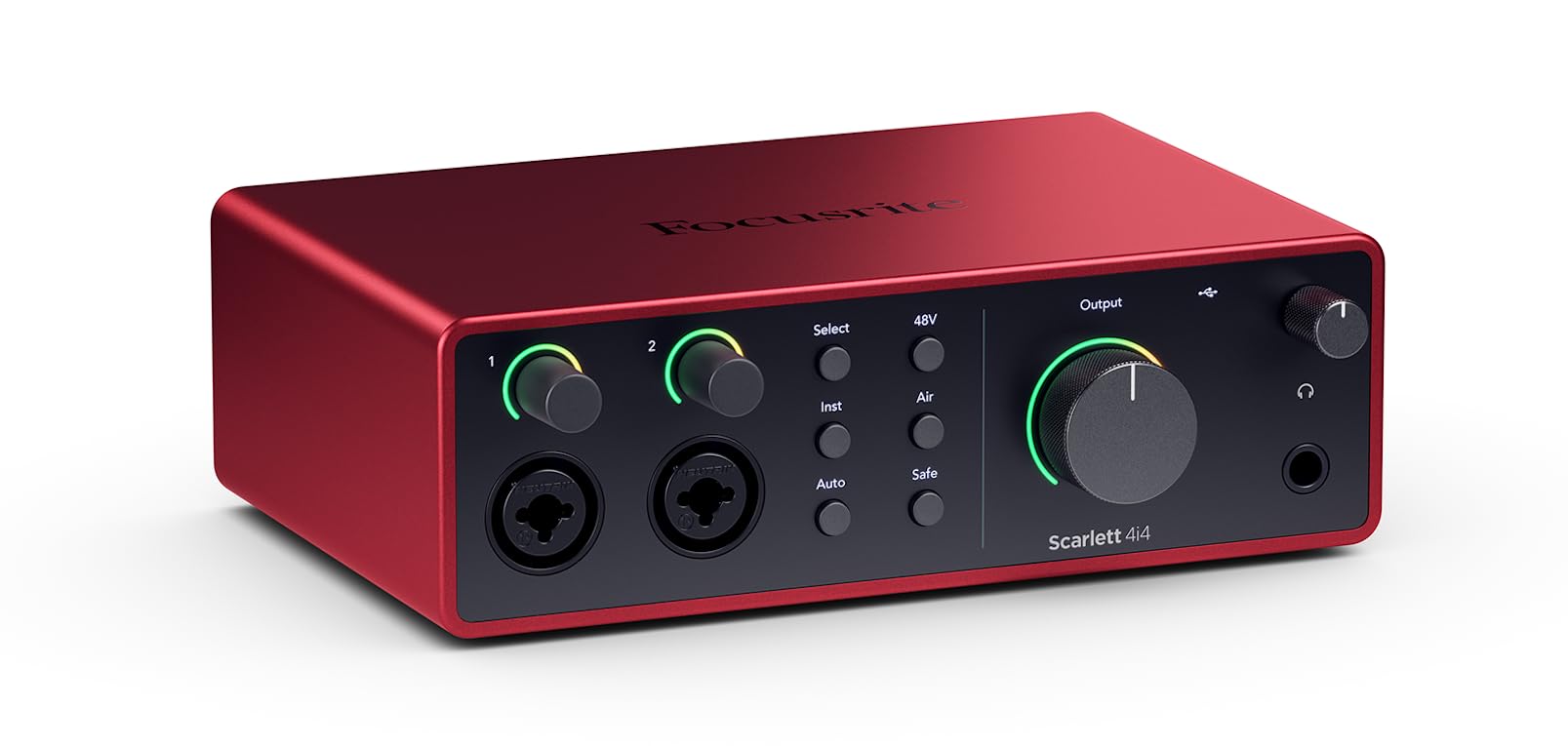
The Scarlett 4i4 4th Gen represents a significant generational leap with 120dB of dynamic range and the same converters found in Focusrite’s flagship RedNet interfaces. The two Scarlett preamps deliver clean gain with a noise floor so low that even quiet vocal performances remain free of hiss. The Air mode engages a fixed high-frequency boost that lifts vocals and acoustic instruments to the front of the mix.
Auto Gain and Clip Safe are safety nets that prevent clipping during loud passages, and the 4-in/4-out configuration includes two line outputs for routing audio to external effects processors or a second monitoring source. MIDI I/O is included for synth integration, and the bundled software includes Pro Tools Intro, Ableton Live Lite, and the Hitmaker Expansion suite.
The unit requires an external USB-C power supply (included) for full operation, which adds one more cable to manage but ensures stable phantom power delivery. Some users note driver conflicts with certain game software, requiring a system reboot. For podcasters who also produce music or run multiple synths, this is the most versatile mid-range option available.
Why it’s great
- 120dB dynamic range matches professional studio converters
- Air mode adds clarity and presence to voice recordings
- MIDI I/O expands integration with synthesizers and controllers
Good to know
- External power supply adds cable clutter
- Occasional driver conflicts with certain gaming software
5. MOTU M4 4×4

MOTU has a long-standing reputation for rock-solid driver support and transparent audio routing, and the M4 continues that legacy. The LCD screen on the front panel provides real-time level metering for all four inputs and the stereo output, allowing you to dial in gain without guessing. The preamps are exceptionally clean with extremely low noise and distortion, making them suitable for critical voice work.
The M4 features hardware-based direct monitoring with a dedicated mix control that blends input and playback signals without any software latency. Loopback functionality is handled at the driver level, making it simple to route system audio into your recording software for live streaming or voice-over demos. The independent 48V phantom power switches per channel let you mix dynamic and condenser microphones without power cycling.
The headphone amplifier is notably weaker than competitors at this tier, which may require high-impedance headphones to reach comfortable monitoring levels. The volume knobs exhibit a dead zone in the first 25 percent of rotation, requiring a firm turn before audio arrives. For users who prioritize pristine preamp quality and routing flexibility over headphone power, the M4 delivers exceptional value.
Why it’s great
- LCD metering provides precise visual gain staging
- Extremely low noise floor and distortion on all preamps
- Rock-solid Windows ASIO drivers with low latency
Good to know
- Headphone output lacks power for high-impedance cans
- Knob dead zone at low rotation can be confusing
6. Universal Audio Volt 2

The Volt 2 brings Universal Audio’s legendary analog circuitry to the desktop with its Vintage mode, which emulates the classic UA 610 vacuum tube preamp found in historic recording studios. Engaging it adds warmth and subtle harmonic saturation that makes voices sound fuller and more intimate without processing. This is particularly effective for podcasters who want a rich, broadcast-ready tone straight out of the box.
The converters support 24-bit/192kHz resolution with crystal clarity, and the bundled LUNA DAW provides an analog-style recording workflow that integrates seamlessly with UAD plug-ins. The Volt 2 is bus-powered via USB-C, making it genuinely portable for mobile recording sessions with a laptop or iPad. The build quality is excellent, with a metal chassis and weighted knobs that feel premium.
The unit lacks loopback functionality natively, which is a significant omission for podcasters who need to stream or record computer audio. The Vintage mode is a single global switch rather than per-channel, limiting flexibility when using two different microphones. For solo podcasters who prioritize tonal quality over routing features, the Volt 2 delivers inspired sound at a approachable price.
Why it’s great
- Vintage mode emulates iconic UA 610 tube preamp warmth
- Bus-powered USB-C for true mobile recording
- Includes LUNA DAW with analog-style workflow
Good to know
- No built-in loopback for live streaming
- Vintage mode applies globally, not per channel
7. M-AUDIO AIR192x4 VSPro

The AIR192x4 VSPro is a complete starter package that includes the audio interface, a Nova condenser microphone, shock mount, XLR cable, and HDH40 headphones. For a podcaster starting from zero gear, this bundle removes the guesswork of matching separate components. The interface itself delivers 24-bit/192kHz resolution with a class-leading round-trip latency of only 2.59ms, ensuring real-time monitoring without echoes.
The single combo input accepts both XLR and 1/4-inch connections, with a dedicated Hi-Z instrument input for direct guitar or bass recording. The software bundle includes MPC Beats, Ableton Live Lite, and a collection of virtual instruments, making it a strong foundation for podcasters who also want to produce music or edit audio without immediately buying a separate DAW.
Build quality is adequate for desktop use, though the Nova microphone included is a condenser type, meaning it will pick up room noise and handling sounds more readily than a dynamic mic would. Some users report the USB port failing after extended use, and customer support experiences vary. For a beginner who wants everything in one box and plans to upgrade the microphone later, this is a practical entry point.
Why it’s great
- Complete bundle includes mic, headphones, cables, and software
- Ultra-low 2.59ms round-trip latency for monitoring
- Hi-Z instrument input for direct guitar recording
Good to know
- Included condenser mic picks up more ambient noise than a dynamic
- Some reliability concerns with USB port longevity
8. Shure MVX2U Gen 2

The MVX2U Gen 2 is not a traditional interface but rather an XLR-to-USB-C adapter with onboard digital audio processing from Shure. It delivers up to 60dB of clean gain and 48V phantom power from a device that fits in the palm of your hand. The onboard processing includes Auto Level Mode, which adjusts gain in real time, a Real-Time Denoiser, and a Digital Popper Stopper for plosive reduction—all without taxing your computer’s CPU.
Three tone presets—Dark, Natural, and Bright—let you shape the voice character before it reaches your recording software. The MOTIV app provides deeper control over compression, EQ, and limiting on desktop or mobile devices. Settings persist when the unit is powered off, so your preferred configuration is ready at every session. This is perfect for podcasters who record from multiple locations or want a minimal desk footprint.
The single XLR input limits you to one microphone, making it unsuitable for dual-host shows without a second unit. The heavy metal body adds travel weight, and some users report compatibility quirks with certain smartphones. For the solo podcaster who values portability and wants Shure’s professional processing in a zero-fuss package, the MVX2U is a clean solution.
Why it’s great
- Professional Shure DSP with Auto Level, Denoiser, Popper Stopper
- Ultra-compact design for portable recording rigs
- Persistent settings eliminate reconfiguration between sessions
Good to know
- Single XLR input limits multi-mic scenarios
- Mobile device compatibility can be inconsistent
9. MAONO MaonoCaster AME2

The MaonoCaster AME2 packs more features into a single enclosure than any other interface in this roundup at its tier. The 10-channel mixer includes 11 customizable sound pads for jingles, applause, and transitions, with three pads capable of recording up to 60 seconds of audio each. The built-in Bluetooth connectivity allows you to stream music or take phone calls directly into your mix without an additional cable.
Six reverb modes, 12-step auto-tune, and three-band EQ give you extensive vocal shaping options during live streaming or recording. The dual microphone inputs support XLR condenser and dynamic microphones with 48V phantom power, and the instrument input accepts guitar or bass with dedicated tone controls. The loopback and sidechain switches simplify live streaming audio routing to platforms like Twitch or YouTube.
Customer reviews indicate that the USB-C ports can fail after roughly a year of light use, and the headphone monitoring audio does not always match the final recorded track. The plastic chassis is lightweight but less durable than metal alternatives. For the budget-conscious podcaster who needs maximum functionality and is willing to accept shorter expected lifespan, the AME2 delivers an extraordinary feature set per dollar.
Why it’s great
- 11 customizable sound pads for interactive podcast production
- Built-in Bluetooth for seamless phone call integration
- Reverb, auto-tune, and EQ for real-time vocal processing
Good to know
- USB port reliability concerns reported after extended use
- Headphone monitoring does not always match final recording
FAQ
What is the minimum gain I need for a dynamic podcast microphone?
Can I use an audio interface designed for music recording for podcasting?
What is the difference between 24-bit/96kHz and 24-bit/192kHz recording?
Do I need phantom power for my podcast microphone?
Final Thoughts: The Verdict
For most users, the best audio interface for podcasting winner is the Focusrite Vocaster Two because it delivers professional preamp gain, Auto Gain, and Enhance processing in a focused package that requires no external software to sound great. If you want tactile fader control and broadcast-style production in one box, grab the Rode RØDECaster Duo. And for a portable, single-mic setup with Shure’s renowned DSP processing, nothing beats the Shure MVX2U Gen 2.

Mo Maruf
I created WellFizz to bridge the gap between vague wellness advice and actionable solutions. My mission is simple: to decode the research and give you practical tools you can actually use.
Beyond the data, I am a passionate traveler. I believe that stepping away from the screen to explore new environments is essential for mental clarity and physical vitality.