Our readers keep the lights on and my smoothie glass nicely filled. As an Amazon Associate, I earn from qualifying purchases.
For anyone living in a rural zone, a steel-framed building, or a home far from the nearest tower, the built-in antennas inside a standard router simply cannot bridge the gap. A dedicated external antenna changes that physics problem by capturing and amplifying the radio waves your wireless equipment needs to lock onto a stable connection.
I’m Mohammad Maruf — the founder and writer behind WellFizz. My research focuses on the real-world radio-frequency performance, gain figures, and weather endurance of outdoor networking gear so you don’t have to parse the fine print yourself.
Whether you need to extend Wi-Fi to a detached workshop, boost your cellular internet for reliable remote work, or create a robust point-to-point link across a large property, finding the right antenna for wireless internet is the single most impactful upgrade you can make to your home network infrastructure.
How To Choose The Best Antenna For Wireless Internet
Choosing the right antenna starts by understanding that one design does not fit every scenario. Your decision should be guided by the distance to your signal source, the physical obstacles in between, and the specific type of network you need to serve—cellular or traditional Wi-Fi.
Directional vs. Omnidirectional
A directional antenna, such as a Yagi or parabolic dish, focuses its energy in a narrow beam—typically between 10 and 45 degrees. This focused beam delivers much higher gain (measured in dBi) and is ideal when you know exactly where your cell tower or Wi-Fi source is located. An omnidirectional antenna radiates signal in a 360-degree pattern. It offers lower gain but provides coverage in every direction, making it a better fit for RVs, boats, or properties where you need consistent signal from multiple towers without re-aiming.
Gain (dBi) and Frequency Range
Gain is the single most important spec for long-range use. Every 3 dBi of gain doubles the effective radiated power in a given direction. A 23 dBi antenna is vastly more capable of bridging a 300-meter gap through light foliage than a 4 dBi omni antenna. However, high-gain directional antennas require much more precise aiming—sometimes within just 5-8 degrees of the target. Also check the supported frequency range: a unit covering 600-6000 MHz will work with all 4G LTE and 5G sub-6 bands, while a 5.8 GHz-only unit is limited to Wi-Fi bridging.
MIMO Configuration
MIMO (Multiple Input Multiple Output) uses two or more antennas on the same device to send and receive multiple data streams simultaneously. A 2×2 MIMO antenna uses two elements to roughly double the throughput of a single antenna setup. A 4×4 MIMO like the Waveform QuadPro can more than double that again, delivering substantially higher upload and download speeds along with better SINR (Signal to Interference plus Noise Ratio). For modern 5G gateways and high-capacity use, 4×4 MIMO is a noticeable step up in real-world performance.
Quick Comparison
On smaller screens, swipe sideways to see the full table.
| Model | Category | Best For | Key Spec | Amazon |
|---|---|---|---|---|
| Waveform QuadPro | Panel Antenna Kit | Maximizing cellular data rates indoors | 4×4 MIMO, up to 9.1 dBi | Amazon |
| WAVLINK AX3000 | Wi-Fi 6 Extender | Covering large outdoor areas with Wi-Fi | AX3000, 4x8dBi omni antennas | Amazon |
| Bolton Long Ranger | Parabolic Antenna | Reaching very distant cell towers >5 miles | +28 dBi gain, 20-mile range | Amazon |
| Proxicast Omni 10 dBi | Omnidirectional Antenna | RV, marine, or multi-directional coverage | 600-6000 MHz, 10 dBi omni | Amazon |
| Adalov CPE660 Bridge | Wireless Bridge | Affordable point-to-point building link | 14 dBi, 300 Mbps, 3 km range | Amazon |
| TP-Link CPE710 | Outdoor CPE | High-speed point-to-point Wi-Fi bridge | 23 dBi, 867 Mbps, 5 GHz | Amazon |
| Proxicast LPDA Yagi | Directional Yagi | Boosting cellular backup internet on a budget | 9/11 dBi, 600-6000 MHz | Amazon |
In‑Depth Reviews
1. Waveform QuadPro 4×4 MIMO Panel Antenna Kit

The Waveform QuadPro is the most complete, high-performance solution for turning a mediocre cellular internet connection into a reliable broadband experience. Its 4×4 MIMO panel antenna packs full support across 600-6000 MHz, covering every 4G LTE and 5G band from AT&T, Verizon, and T-Mobile. Users have reported download speeds jumping from 50 Mbps to over 300 Mbps after a proper install, with uploads tripling and SINR values improving dramatically.
The kit includes everything needed for a DIY installation: the QuadPro antenna, a flexible 20-foot UltraFlex-Quad cable, a unique Window Entry Cable that eliminates drilling, the FlexMount bracket, and weatherproofing boots. The detailed guided manual walks through every step, including connecting to specific gateways like the T-Mobile G4AR or Nokia 5G21. The build quality is exceptional, and the three-year manufacturer warranty provides peace of mind.
The main drawback is the premium investment required and the need for precise aiming—this is a directional panel, so you must know where your tower sits. Some users also note that accessing the internal antenna ports on certain gateways can be fiddly. For anyone serious about squeezing every megabit out of their cellular plan, the QuadPro delivers measurable, consistent results that justify the upfront cost.
Why it’s great
- Complete all-in-one kit with zero extra parts to buy
- 4×4 MIMO dramatically boosts both speed and stability over 2×2 designs
- Window Entry Cable allows clean, no-drill indoor connection
- Exceptional build quality with three-year warranty
Good to know
- Requires clear line-of-sight and precise aiming at the nearest tower
- Accessing gateway antenna ports may void warranty on some devices
- Premium price point may be overkill for short-range urban use
2. WAVLINK AX3000 Outdoor WiFi 6 Extender

The WAVLINK AX3000 is a true heavy-duty outdoor access point designed to blanket large properties with fast Wi-Fi. It uses four detachable 8 dBi omni-directional fiberglass antennas and two high-power amplifiers to deliver a coverage radius of 200-300 meters. Users have successfully connected outbuildings 600 feet away, covered entire 12-acre farms, and supported multiple 4K streams without a hitch.
Its IP67 waterproof enclosure, 15kV ESD protection, and 6kV lightning protection make it fully weatherproof for year-round outdoor mounting. The unit supports dual-band speeds up to 2402 Mbps on 5 GHz and 573 Mbps on 2.4 GHz, along with modern features like MU-MIMO, beamforming, and seamless mesh roaming with other WAVLINK products. Power is supplied via 802.3af/at Active PoE, so only a single Ethernet cable runs to the unit.
Setup can involve either the intuitive web GUI or a dedicated app, and there are multiple operating modes including AP, Router, Repeater, and Mesh. The only real limitation is that mesh mode only works with other WAVLINK series products. For anyone needing to push strong, reliable Wi-Fi across a large yard, farm, or RV park, the AX3000 is a self-contained powerhouse.
Why it’s great
- Exceptional 200-300m omnidirectional coverage with four high-gain antennas
- Wi-Fi 6 speeds capable of handling high-bandwidth streaming and gaming
- Fully weatherproof IP67 enclosure with lightning protection
- Flexible PoE power simplifies outdoor installation
Good to know
- Mesh mode is limited to WAVLINK brand products only
- PoE injector is not waterproof and must be kept indoors
- Setup may require watching the official YouTube guide for first-time users
3. Bolton Technical Long Ranger Parabolic Antenna
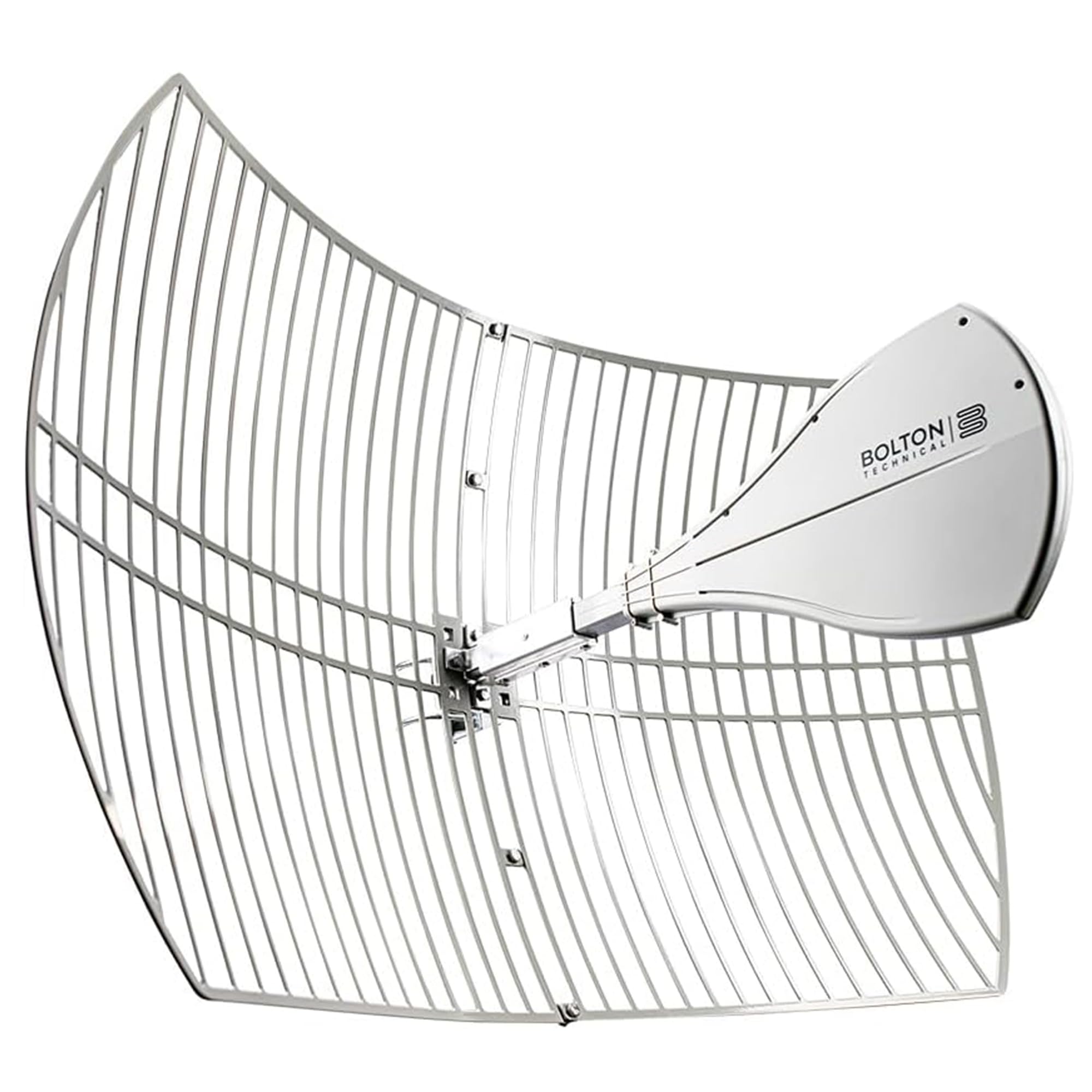
When your nearest cell tower is over five miles away and surrounded by dense forest, a standard Yagi won’t cut it. The Bolton Technical Long Ranger uses a high-gain parabolic dish design to achieve up to +28 dBi of gain—the highest of any antenna in this roundup—with a rated maximum range of over 20 miles. It covers the full 600-6500 MHz frequency spectrum, so it works with every 5G, 4G, LTE, and even 2.4/5 GHz Wi-Fi band.
Real-world users in extremely rural locations have experienced dramatic improvements: where a previous Yagi delivered unstable connections, the Long Ranger provided a solid 14-25 Mbps down and 4-19 Mbps up on Verizon, with stable VOIP calls and 4K streaming. The unit features improved N-Female connection ports and clamps for easier installation, and its weatherproof design handles heavy rain without signal drop. The narrow 10-degree beamwidth means you can target a specific tower without interference from adjacent ones.
The major trade-off is physical size—the dish measures 39 inches wide and requires a sturdy mast mount. Assembly can also be a pain point: some units have arrived with misaligned bolt holes. Precise aiming is critical, with a tolerance of only about 5-8 degrees. For users in deep rural areas with a clear view of a distant tower, this is the most effective tool available.
Why it’s great
- Highest gain (+28 dBi) of any antenna tested, enabling 20+ mile range
- Broad frequency coverage from 600-6500 MHz for future-proofing
- Narrow beamwidth reduces interference and improves signal quality
- Stable performance in heavy rain and adverse weather
Good to know
- Large physical size (39 inches wide) requires substantial mounting space
- Some units have reported assembly issues with misaligned bolt holes
- Requires very precise aiming and a clear line-of-sight to the tower
4. Proxicast High Gain 10 dBi Omni-Directional Antenna

The Proxicast 10 dBi Omni antenna is the go-to choice for mobile setups like RVs, boats, or even fixed installations where the best signal might come from any direction. Unlike directional antennas that lock onto a single tower, this omni radiates 360 degrees, so you can maintain connectivity as you move or when towers are scattered around the property. It covers the full 600-6000 MHz range, making it compatible with all 4G LTE, 5G sub-6, and even Wi-Fi bands.
Build quality is robust: the antenna uses a sleek white ABS radome with an integrated N-Female connector, meaning no additional ground plane is needed. The kit includes a stainless steel two-way pole/wall mounting bracket designed to withstand marine environments. Users report that a roof-mounted installation can jump signal from 2 bars to 5 bars on a Netgear Nighthawk, delivering a solid +10-20 dB gain improvement.
The downside of an omni design is that it cannot match the raw reach of a directional antenna. Some users also found signal improvement inconsistent if the tower was very distant. For anyone needing reliable signal from multiple directions without re-aiming, this is the most practical choice.
Why it’s great
- 360-degree coverage ideal for mobile or changing installations
- Full 600-6000 MHz range supports all modern cellular and Wi-Fi bands
- Integrated N-connector with no external ground plane required
- Marine-grade stainless steel bracket included for durable mounting
Good to know
- 10 dBi gain cannot compete with directional antennas for long-distance bridging
- Requires thick 50-ohm coax cable and proper pigtail splitter for some routers
- Signal improvement may be minimal if the target tower is very far away
5. Adalov CPE660 Wireless Bridge

The Adalov CPE660 is a two-unit kit designed to create a wireless point-to-point (PtP) bridge between two buildings. It replaces the need for trenching Ethernet cables across your yard, driveway, or field. Each unit features a built-in 14 dBi directional antenna and operates on the 5.8 GHz band with data rates up to 300 Mbps. The kit covers up to 3 kilometers with clear line-of-sight, making it suitable for linking a home to a barn, shop, guest house, or even a Starlink router in a separate location.
Installation is straightforward thanks to the pre-configured WDS mode—plug in the PoE adapters, mount the units on poles or walls using the included adjustable brackets, and they link automatically. An IP65-rated enclosure ensures the hardware survives rain, snow, and dust without issues. Users have successfully bridged distances of 100 to 500 feet, streaming 2 TVs and supporting Wi-Fi calling at the far end.
The key limitation is the 100 Mbps Ethernet ports, which cap the wired throughput even though the wireless link can theoretically hit 300 Mbps. The single-band 5.8 GHz operation means it won’t interfere with 2.4 GHz devices but also lacks fallback to a lower frequency. For budget-conscious users needing a reliable, easy-to-deploy bridge, the CPE660 delivers fantastic value.
Why it’s great
- Complete two-unit kit with PoE adapters and brackets included
- Simple plug-and-play setup with pre-configured WDS mode
- 3 km range covers most large property needs
- Weatherproof IP65 enclosure ensures long outdoor life
Good to know
- Ethernet ports are limited to 100 Mbps, creating a bottleneck on fast connections
- Single-band 5.8 GHz design may be less stable through dense foliage than 2.4 GHz
- Requires clear line-of-sight for maximum performance
6. TP-Link CPE710 5GHz AC867 Outdoor CPE

The TP-Link CPE710 is a powerful outdoor CPE (Customer Premises Equipment) designed specifically for high-speed point-to-point or point-to-multipoint Wi-Fi bridging. Its standout feature is the 23 dBi directional antenna combined with an 80 MHz channel bandwidth, enabling theoretical speeds of up to 867 Mbps on the 5 GHz band. Real-world users have achieved 360 Mbps at 350 feet and 90 Mbps at 300 feet, proving its capability for heavy tasks like streaming and Zoom.
The unit is well-built for its class: an IP65 weatherproof enclosure protects it from rain and dust, while 15kV ESD and 6kV lightning protection ensure reliability in stormy conditions. The snap-lock design simplifies assembly, and the included pole mount kit allows three-axis alignment for fine-tuning. Centralized management is available via Pharos Control software, and the web-based PharOS interface gives professionals granular control over settings.
The main consideration is that the CPE710 is a single-band 5 GHz device, so it won’t work for 2.4 GHz applications or standard Wi-Fi client connections—it’s a dedicated bridge. Some users have reported initial stability issues traced back to faulty Ethernet cables rather than the antenna itself. For anyone needing a fast, long-range outdoor link, the CPE710 offers unbeatable value for its performance level.
Why it’s great
- High 23 dBi gain combined with 867 Mbps throughput for demanding links
- Three-axis pole mount makes alignment precise and convenient
- IP65 enclosure with ESD and lightning protection for all-weather use
- Centralized management software (Pharos Control) for professional setups
Good to know
- Single-band 5 GHz design limits compatibility with 2.4 GHz networks
- Requires careful aiming and may need an external router for client access
- Firmware corruption can occur if the update process is interrupted
7. Proxicast LPDA Directional Yagi Antenna

The Proxicast LPDA Yagi is a versatile, budget-friendly directional antenna that covers an extremely wide frequency range from 600 to 6000 MHz. This makes it suitable for 4G LTE, 5G sub-6, CBRS, public safety bands, and even long-range Wi-Fi point-to-point links. It offers a gain rating of 9/11 dBi—sufficient for improving signal in marginal coverage areas without requiring the hefty mounting infrastructure of larger dishes.
This antenna has proven itself in the field: one user has purchased over a dozen for business use, with some units still working flawlessly after five years of continuous outdoor exposure. The plastic cover protects the antenna elements from birds and spider nests, a small but valuable design detail. When paired as a pair at 90-degree angles for MIMO operation, users have successfully achieved 8.2 Mbps down and 1.5 Mbps up from a tower 5 miles away using a Netgear Nighthawk M1.
The main risk is unit-to-unit consistency; some customers reported no improvement in signal strength, likely due to DOA units or mismatched cables. Installation also requires some modification to the bracket for optimal 45-degree MIMO spacing. For the price point, the LPDA Yagi offers broad compatibility and proven long-term reliability, but buyers should be prepared for the occasional quality control variance.
Why it’s great
- Extremely wide 600-6000 MHz coverage works with all carriers and bands
- Proven five-year field reliability in commercial installations
- Plastic radome protects antenna elements from weather and wildlife
- Budget-friendly entry point into directional cellular signal boosting
Good to know
- Some units shipped with functional defects (DOA risk)
- Brackets may need modification for proper MIMO 45-degree angles
- Gain is lower than premium dishes, limiting extreme long-range use
FAQ
Can I use any cellular antenna with a standard Wi-Fi router?
Do I need line-of-sight to the tower for a directional antenna to work?
How do I know if a 2×2 MIMO or 4×4 MIMO antenna is right for me?
Can I install an outdoor antenna myself, or do I need a professional?
Final Thoughts: The Verdict
For most users needing a dramatic, measurable improvement to their home internet, the antenna for wireless internet winner is the Waveform QuadPro 4×4 MIMO Kit because its all-in-one design, complete installation kit, and 4×4 MIMO performance deliver the most consistent real-world speed and stability improvements. If you need to cover a large property with Wi-Fi, grab the WAVLINK AX3000 for its exceptional range and weatherproof build. And for extreme rural locations where the tower is miles away, nothing beats the reach of the Bolton Technical Long Ranger.

Mo Maruf
I created WellFizz to bridge the gap between vague wellness advice and actionable solutions. My mission is simple: to decode the research and give you practical tools you can actually use.
Beyond the data, I am a passionate traveler. I believe that stepping away from the screen to explore new environments is essential for mental clarity and physical vitality.