Our readers keep the lights on and my smoothie glass nicely filled. As an Amazon Associate, I earn from qualifying purchases.
An 8×10 photo is the standard for framing, portfolio prints, and wall art, but getting a true gallery-quality print at home often means fighting with banding, color shifts, or ink that bleeds into the paper fibers. The right printer eliminates those variables and delivers smooth gradients, sharp edges, and long-lasting color density.
I’m Mohammad Maruf — the founder and writer behind WellFizz. I’ve spent years analyzing print head technologies, ink chemistry, and paper feed mechanisms to understand which 8×10 photo printer setups actually deliver professional-grade results without forcing you into a consumables trap.
Whether you print for a small creative business or weekend projects, matching the ink system and paper path to your typical output volume separates a wise purchase from a frustrating one. Choosing the best 8×10 photo printer ultimately comes down to understanding how dye vs. pigment inks, print resolution, and borderless mechanics affect your final framed print.
How To Choose The Best 8X10 Photo Printer
Selecting a printer for 8×10 photo paper is different from buying a general office all-in-one. Your primary concerns are print head technology, ink formulation, and whether the paper path supports borderless 8×10 without cropping or smudging the edges.
Ink Technology: Dye vs. Pigment vs. Dye-Sublimation
Standard consumer printers use dye-based or pigment-based inks. Dye inks offer vibrant, glossy results ideal for framed 8×10 photos but can fade faster under direct sunlight. Pigment inks are more fade-resistant and produce sharper text edges, though they may look less glossy on photo paper. Dye-sublimation printers use heat to transfer dye onto a coated paper, yielding continuous-tone prints with no visible dot pattern — excellent for professional 8×10 output but limited to proprietary paper and ribbon sets.
Color Cartridge Count and Gamut
An 8×10 print covers far more surface area than a 4×6, so smooth gradients and wide color gamut depend on how many ink colors the printer can layer. A four-color system (CMYK) often shows grain in skin tones and skies. Six-color or eight-color systems add light cyan, light magenta, gray, or photo black to reduce dot structure and improve transitions. If you print portraits or landscapes at 8×10, a model with at least six separate ink tanks is usually worth the investment.
Borderless Printing and Paper Path
Not all printers that claim borderless 8×10 actually feed the paper cleanly to the edge. Look for a dedicated photo tray that accepts 8×10 media without bending or skewing. Rear feed slots offer straighter paper paths for heavy photo paper, reducing the risk of jams on thick stock. Also check whether the printer’s software allows true borderless settings on the 8×10 paper size — some models require a slight crop or white margin.
Quick Comparison
On smaller screens, swipe sideways to see the full table.
| Model | Category | Best For | Key Spec | Amazon |
|---|---|---|---|---|
| Epson XP-980 | All-in-One | Borderless up to 11×17 | 6-color Claria Photo HD | Amazon |
| Canon PRO-200S | Print Only | Pro-level 8×10 output | 8-color dye ink system | Amazon |
| HP Envy Photo 7975 | All-in-One | Family photo and docs | Separate photo tray | Amazon |
| Epson F170 | Print Only | Sublimation craft 8×10 | PrecisionCore printhead | Amazon |
| Brother SP1 | Sublimation | DIY garment 8×10 | Artspira app integration | Amazon |
| HPRT CP4100 | Dye-Sub | Portable 4×6 prints | 300 DPI + auto-lamination | Amazon |
| iDPRT CP4100 | Dye-Sub | AR video photo prints | Magic AR photo scan | Amazon |
| Canon PIXMA TS7720 | All-in-One | Budget home 8×10 | Auto duplex + 2.7” touch | Amazon |
| YOTON Photo Printer | Portable | AR video photo keepsake | Dye-sublimation + Wi-Fi | Amazon |
In‑Depth Reviews
1. Epson Expression Photo XP-980

The XP-980 is built around a six-color Claria Photo HD ink system that adds light cyan and light magenta to the standard CMYK set. This extra gamut reduces visible dot structure in portraits and smooths sky gradients on an 8×10 borderless print — the 5760 x 1440 dpi resolution makes grain nearly invisible to the naked eye. A 4.3” color touchscreen and separate paper trays for plain and photo stock simplify borderless 8×10 workflow without requiring a desktop app.
Print speed is genuinely fast for the category, delivering a 4×6 borderless photo in about 11 seconds and a full 8×10 with borders in roughly 30 seconds. The rear specialty feed accepts thick fine-art paper up to 11×17, so the XP-980 can double as a lightweight proofing printer for larger formats. Wireless setup via Wi-Fi Direct or Epson Smart Panel app is straightforward, and the flatbed scanner provides 48-bit color depth for digitizing existing prints.
The main trade-off is ink consumption during head cleaning cycles — reviewers report that the maintenance box fills faster than expected, especially if the printer sits idle for a week. Genuine Epson 279 cartridges are not cheap, though XL-capacity options lower the per-print cost for regular 8×10 volume. For anyone wanting reliable borderless 8×10 output from a single device that also scans and copies, this is the most complete package.
Why it’s great
- Six-color ink system delivers exceptionally smooth 8×10 photo gradients with no visible dot pattern.
- Fast borderless printing with dedicated photo tray reduces alignment hassle for standard 8×10 media.
- Built-in scanner and copier with 48-bit depth supports digitization and duplication workflows.
Good to know
- Frequent nozzle cleaning cycles can waste a significant portion of ink if left unused for several days.
- Proprietary 279 cartridges are expensive; XL cartridges are recommended to improve cost-per-print.
- Paper tray capacity is modest compared to older Epson Photo models, requiring more frequent refills.
2. Canon PIXMA PRO-200S

The PRO-200S is a dedicated photo printer with an eight-color dye-based ink system that includes a dedicated photo black, gray, and two chroma optimizers. For 8×10 prints, this translates to nearly continuous tone reproduction — shadows hold detail without blocking up, and flesh tones transition smoothly across midtones. The printer handles borderless 8×10 in about 53 seconds, which is competitive for an 8-ink device that prioritizes quality over raw speed.
Paper handling is designed specifically for photographers: a front cassette for plain sheets and a rear feed for heavy fine-art media up to 13×19. The 3.0” color LCD displays ink levels and job progress, though the real control is best managed via Canon’s Professional Print & Layout software on a computer. Wireless connectivity via Ethernet or Wi-Fi is reliable once the initial network setup is completed, and the printer is remarkably quiet during operation.
The biggest downside is ink cost — eight separate cartridges means replacing empty tanks more often than a four-color machine, and Canon does not offer a large-volume tank system. Third-party refills are risky because Canon’s print head is sensitive to viscosity changes. If you print 8×10 photos at high volume every week, the PRO-200S delivers reference-grade results, but occasional users may find the consumables burn hard to justify.
Why it’s great
- Eight-color ink system produces archival-grade 8×10 prints with minimal banding and rich shadow detail.
- Rear feed accepts thick fine-art paper up to 13×19, making it versatile for larger proof prints.
- Very quiet operation makes it suitable for a studio or home office environment without distraction.
Good to know
- Eight individual cartridges lead to high consumable costs; each tank holds relatively little ink.
- No built-in scanner or copy function — it is a pure photo printer with no multi-function features.
- Setup process can be frustrating due to the app-based initial connection and occasional Wi-Fi interference.
3. HP Envy Photo 7975

The Envy Photo 7975 is an all-in-one that includes a dedicated photo tray, which is unusual for a home printer in this category. This tray handles 8×10 photo paper directly, reducing the risk of paper skew that plagues many general-purpose machines when printing borderless. Print speeds of 15 ppm black and 10 ppm color are adequate for mixed document and photo use, and the 2-way auto duplex saves paper on non-photo jobs.
HP’s AI-driven print feature automatically removes unwanted content from web pages and emails, which sounds gimmicky but genuinely reduces wasted 8×10 paper when printing layouts that weren’t designed for physical output. The 2.7” color touchscreen is responsive for selecting photo paper type and quality settings without diving into a computer menu. Setup via the HP Smart app is generally smooth, and Wi-Fi connectivity holds stable even on dual-band networks.
Print quality for 8×10 photos is good but not pro-level — the four-color ink system struggles with subtle gradients in skies and skin tones compared to six- or eight-color setups. Ink consumption is typical for HP, and the included trial cartridges run out quickly. The 3-month Instant Ink trial helps offset this, but the subscription model may not appeal to users who print photos sporadically.
Why it’s great
- Dedicated photo tray feeds 8×10 media cleanly without manual rear-paper manipulation.
- AI-based print optimization reduces wasted paper when printing web content at 8×10 size.
- 3-month Instant Ink subscription included for free ink delivery during the trial period.
Good to know
- Four-color ink system produces visible grain in large smooth-gradient areas like sky or skin tones.
- Trial ink cartridges deplete quickly; replacement costs are high without the subscription plan.
- Some units have reported scanning and connectivity issues that require replacement under warranty.
4. Epson SureColor F170

The F170 is a compact dye-sublimation printer designed specifically for transfer printing onto polyester-coated substrates — mugs, apparel, and mouse pads — but it also prints directly onto 8×10 sublimation paper for heat press projects. The PrecisionCore printhead delivers precise droplet placement that carries over to standard 8×10 photo paper if you choose to skip sublimation. The included Epson OEM sublimation ink set is ECO PASSPORT certified for safe use on textiles.
Setup is plug-and-play with a 150-sheet auto-feed tray that closes to block dust, which is crucial for sublimation because any speck on the paper shows as a white dot after transfer. Print quality on sublimation paper is sharp, with saturated colors that pop after heat pressing. The printer also handles plain 8×10 inkjet paper just fine for proofing designs before committing to a transfer.
The major limitation is that the F170 is print-only — no scanner, no auto-duplex, and no wireless printing over a local network (USB or Ethernet required). Some users report needing to download the latest Epson driver separately to access high-quality mode and custom paper sizes like 8.5×14. For dedicated sublimation crafters who need a clean 8×10 transfer source, this is a focused, reliable tool.
Why it’s great
- PrecisionCore printhead provides excellent dot accuracy for sharp 8×10 sublimation transfers and direct prints.
- Included OEM sublimation ink is ECO PASSPORT certified, safe for textile and hard goods use.
- Dust-resistant closed paper tray reduces defects from airborne particles during long print runs.
Good to know
- Print-only configuration with no scanner or copier, limiting functionality for general home use.
- Wireless connectivity is absent; printing requires a wired USB or Ethernet connection to a computer.
- Driver installation may require manual download from Epson’s support site to access all paper size options.
5. Brother Sublimation Printer SP1

The Brother SP1 targets the same sublimation audience as the Epson F170 but differentiates itself through the Artspira mobile app, which provides over 100 built-in design templates and a poster-style image conversion feature. For 8×10 print jobs, the 41ml ink cartridges are larger than Sawgrass equivalents, meaning fewer replacements per print run. The print quality on sublimation paper is bold, with vibrant colors that hold up through repeated wash cycles after heat pressing.
Paper handling includes a standard tray and a rear feed that both work with 8×10 stock. The self-cleaning head mechanism reduces maintenance compared to earlier sublimation printers, which is useful for small craft businesses that might leave the printer idle for a week. Setup is straightforward via USB or Ethernet, and the LCD touchscreen provides basic status and navigation without requiring a computer.
The Artspira app is limited to phone and tablet — there is no desktop design software, which becomes a bottleneck when you need fine control over 8×10 layouts. Connection issues with the app have been reported, though Brother’s chat support resolves most cases. For hobbyists who want an affordable entry into 8×10 sublimation with large ink tanks, the SP1 is a strong contender.
Why it’s great
- 41ml ink cartridges provide a lower per-print cost compared to competitors’ smaller sublimation tanks.
- Self-cleaning print head reduces maintenance frequency, especially useful for intermittent sublimation use.
- Artspira app includes over 100 free designs and templates for quick 8×10 project creation.
Good to know
- App-only design interface is impractical for creating custom 8×10 layouts; no desktop software available.
- Wi-Fi connectivity can be finicky; wired Ethernet connection is more reliable for consistent printing.
- Designed exclusively for sublimation ink — using standard ink will clog the print head irreversibly.
6. HPRT Mobile Photo Printer
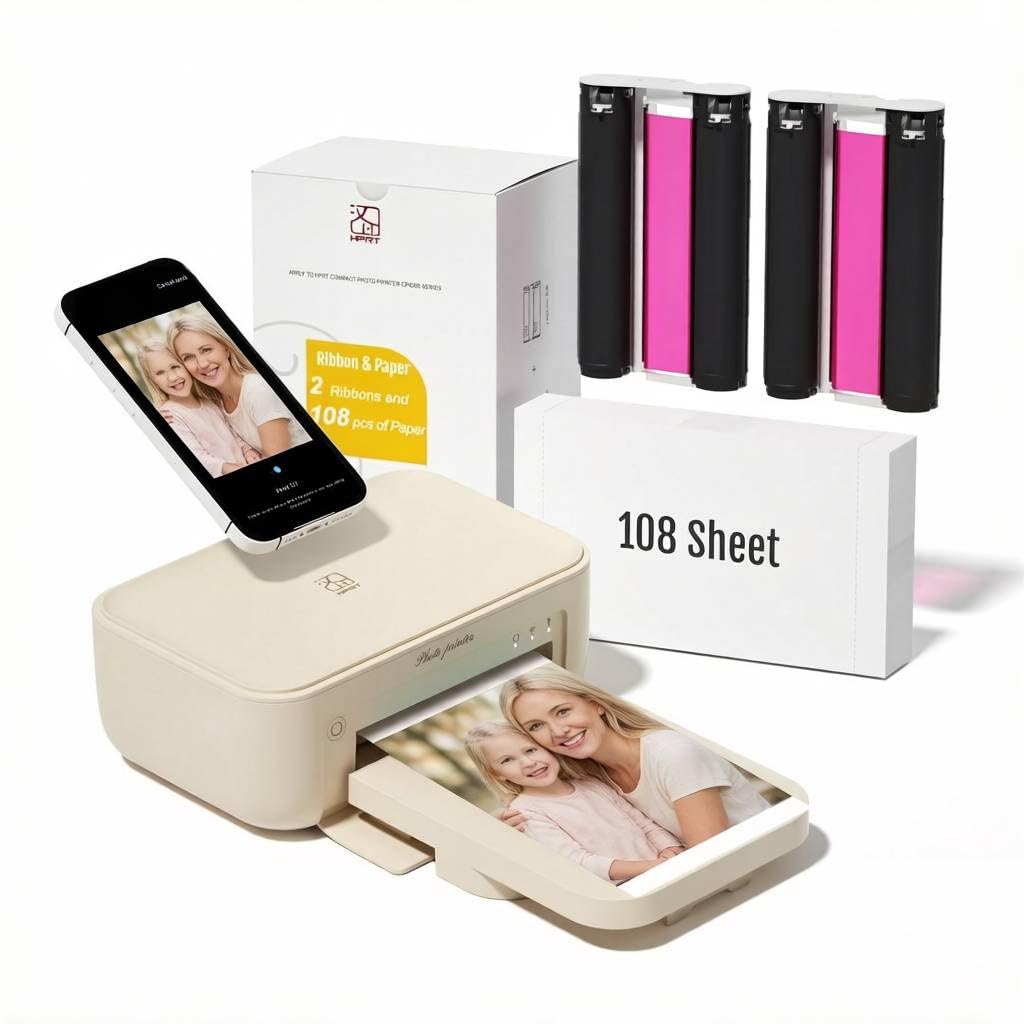
The HPRT is a 4×6 thermal dye-sublimation printer, so it does not print true 8×10 sheets directly. However, its continuous-tone dye-sublimation technology produces zero visible dot pattern — a quality that matters when you are printing smaller prints that are later incorporated into 8×10 scrapbook layouts or framed grids. The 300 DPI resolution and auto-lamination layer protect against fingerprints, dust, and water, which is ideal for albums that get frequent handling.
The printer connects via Wi-Fi to the Heyphoto app, which offers basic editing and filter tools. Setup requires connecting the printer and phone to the same Wi-Fi network, and the process is relatively quick once the app is installed. The included 108 sheets of photo paper and two ink ribbons provide generous starter material for learning the system.
The biggest limitation is the 4×6 format — if your primary need is single-sheet 8×10 prints, this machine cannot serve that purpose. Some users report the app crashing mid-session, which disrupts batch printing. The printer is also somewhat noisy during operation for a compact device. It works best as a secondary output tool for physical photo keepsakes.
Why it’s great
- Dye-sublimation technology produces true continuous-tone prints with no visible dot pattern or banding.
- Auto-lamination coating protects 4×6 prints from water, fingerprints, and dust for long-lasting albums.
- 108 sheets and two ink ribbons included, offering a generous starting bundle for new users.
Good to know
- Limited to 4×6 prints only — cannot print 8×10 sheets directly, limiting use for framed photo projects.
- Heyphoto app can crash unexpectedly during batch printing, interrupting production workflows.
- Operating noise level is higher than average for a compact photo printer, noticeable in quiet rooms.
7. iDPRT CP4100

The iDPRT CP4100 is another 4×6 thermal dye-sublimation printer that differentiates through its Magic AR photo feature — you attach a 15-second video clip to a still print, and scanning the print with the app plays the video on your phone. For 8×10 scrapbook creators, this means you can print a 4×6 insert that links to a video memory, adding a multimedia layer to physical albums. Print quality is excellent for dye-sub, with smooth colors and a glossy protective overcoat.
Connectivity relies on the Hereprint app, which supports both Wi-Fi Direct and Bluetooth for device pairing. The app includes filters, text overlays, and sticker decorations that are easy to apply before printing. The package includes 108 sheets of 4×6 paper and two ink ribbons, providing ample starter stock.
The same 4×6 limitation applies — no native 8×10 output. The printer is also somewhat bulky for a portable model at 10.4 x 7 x 5.5 inches. A few users report that some photos in their library do not appear in the app’s gallery for selection, which may require a manual workaround. It is a niche device that excels if you want interactive photo memorabilia.
Why it’s great
- Magic AR feature links a 15-second video to a printed 4×6 photo for interactive album experiences.
- Dye-sublimation yields vibrant, continuous-tone prints with a protective glossy coating.
- 108 sheets and two ribbons in the box provide a generous starter kit for new users.
Good to know
- Print size is fixed at 4×6; cannot produce single-sheet 8×10 prints directly.
- Some photos in the phone library may not appear in the app’s gallery preview, requiring workarounds.
- Physical footprint is larger than many portable printers, reducing true travel-friendly portability.
8. Canon PIXMA TS7720

The TS7720 is a budget-friendly all-in-one that handles 8×10 photo paper through the rear feed tray, supporting borderless printing on glossy stock. Print quality is decent for casual use — text is crisp, and 8×10 photos look acceptable at arms length, though the four-color ink system produces visible grain in large uniform areas. Print speeds of 15 ppm black and 10 ppm color are competitive for mixed document and photo tasks.
Setup via the Canon PRINT app is reasonably smooth, and the 2.7” color touchscreen makes paper type selection and menu navigation easy without a computer. Auto duplex is a useful feature for multi-page documents, and the machine supports scanning and copying. The two-cartridge system (black + tricolor) simplifies ink replacement, reducing the number of consumables to track.
The trade-off is that the two-cartridge design means the tricolor cartridge must reproduce all color variations, so color accuracy and gradient smoothness fall short of dedicated photo printers. Trial cartridges included in the box run out quickly, sometimes within a few dozen prints. The TS7720 is a capable home hub, but if 8×10 photo quality is a priority, the ink limitations will become apparent.
Why it’s great
- Two-cartridge system simplifies ink replacement and reduces consumable tracking for casual users.
- 2.7” color touchscreen provides intuitive paper type and quality selection without a computer.
- Auto duplex printing helps save paper on multi-page documents and double-sided layouts.
Good to know
- Four-color system produces visible grain on 8×10 prints in smooth gradient areas like skies and skin.
- Included trial ink cartridges deplete rapidly, leading to early consumable purchase requirements.
- No automatic document feeder (ADF) for batch scanning or copying multi-page documents.
9. YOTON Photo Printer

The YOTON is a compact 4×6 dye-sublimation printer that also supports AR video printing — similar to the iDPRT but with a lighter build at 970g and dimensions of 7.1 x 4.9 x 2.2 inches. The dye-sublimation process yields smooth, continuous-tone prints that avoid the dot pattern of inkjet, making each 4×6 suitable as an accent within 8×10 albums or framed collages. The built-in Wi-Fi acts as its own hotspot, allowing direct phone-to-printer connection without a router.
Print quality is strong for the size, with vivid colors and good contrast straight from the app. The app offers basic editing, borders, and tweaks, though it requires location permissions and account registration, which some users find excessive. The ink ribbon is rated for 40-50 prints, and the included starter pack provides one ribbon and 54 sheets.
The 4×6-only output restriction means the YOTON cannot serve as a primary 8×10 photo printer. Connection setup can be frustrating — the printer requires 2.4GHz Wi-Fi, and USB mode is unreliable. Some units have connectivity issues with iOS devices specifically. It is best suited as a portable companion for printing memories on the go.
Why it’s great
- Dye-sublimation produces continuous-tone 4×6 prints with no visible dot pattern for clean inserts.
- Built-in Wi-Fi hotspot allows direct device connection without needing a home network or router.
- Lightweight design at 970g and compact dimensions make it genuinely portable for travel use.
Good to know
- Limited to 4×6 prints only; cannot produce 8×10 sheets directly, limiting its use as a primary printer.
- Setup process can be frustrating, especially with iOS devices, requiring 2.4GHz network or direct mode.
- App requires location permissions and account registration, raising privacy concerns for some users.
FAQ
Can I print 8×10 borderless on a standard 8.5×11 printer?
How many ink cartridges do I need for good 8×10 prints?
What is the difference between dye-based and pigment-based ink for 8×10 photos?
Why do some 8×10 prints show white edges even when borderless mode is enabled?
Does dye-sublimation printing work for 8×10 photo paper?
Final Thoughts: The Verdict
For most users, the 8×10 photo printer winner is the Epson Expression Photo XP-980 because its six-color Claria HD ink system delivers smooth, grain-free borderless prints with a fast dedicated photo tray and multifunction versatility. If you want 8×10 prints with professional archival quality and are willing to invest in consumables, grab the Canon PIXMA PRO-200S. And for sublimation crafters who need a compact, clean 8×10 transfer source, nothing beats the Epson SureColor F170.

Mo Maruf
I created WellFizz to bridge the gap between vague wellness advice and actionable solutions. My mission is simple: to decode the research and give you practical tools you can actually use.
Beyond the data, I am a passionate traveler. I believe that stepping away from the screen to explore new environments is essential for mental clarity and physical vitality.