Our readers keep the lights on and my smoothie glass nicely filled. As an Amazon Associate, I earn from qualifying purchases.
The 75% mechanical keyboard strikes a near-perfect balance between desk space and full functionality—keeping the function row and arrow cluster alive while shaving inches off your mouse sweep. But with hot-swap PCBs, gasket mounts, and a sea of proprietary switches, the “best” board for you depends on whether you prioritize creamy acoustics, metal heft, or a smooth wireless backbone.
I’m Mohammad Maruf — the founder and writer behind WellFizz. I’ve spent months analyzing open-box returns, community sound tests, and switch type longevity reports to separate the boards that sound good from the ones that actually hold up over daily use.
After digging through dozens of models across budget-friendly to premium tiers, this guide to the best 75% mechanical keyboard focuses on the real specs that change your typing and gaming experience, not marketing fluff.
How To Choose The Best 75% Mechanical Keyboard
Picking a 75% board means deciding which compromises matter least to you. The form factor removes the numpad but keeps the F-row—critical for gamers binding abilities and heavy typists using shortcuts. Beyond size, three core specs define how a keyboard feels, sounds, and lasts.
Switch Type & Hot-Swappable PCB
Linear switches (like Cream, Reaper, or NX Snow) deliver a smooth, uninterrupted press ideal for rapid gaming and quiet late-night typing. Tactile and clicky options provide distinct feedback but can be louder. A hot-swappable PCB lets you change switches without soldering—an absolute necessity if you want to tune the feel without buying a new board.
Acoustic Dampening & Mount Structure
Gasket-mounted boards suspend the PCB between soft silicone or poron strips, reducing hollow pinging and creating the “thocky” or “creamy” sound enthusiasts chase. The number of internal foam layers (EVA, IXPE, PET) directly correlates with how much resonance is absorbed. A single-key slotted PCB also stiffens the keystroke for more consistent registration.
Wireless Stability & Battery Capacity
Tri-mode connectivity (Bluetooth, 2.4GHz, USB-C) offers flexibility, but 2.4GHz is the only reliable option for low-latency gaming. Look for a 4000mAh battery at minimum if you plan to run RGB regularly—anything smaller will require daily charging. Boards with QMK/VIA firmware allow deeper key remapping and macro control without proprietary software.
Quick Comparison
On smaller screens, swipe sideways to see the full table.
| Model | Category | Best For | Key Spec | Amazon |
|---|---|---|---|---|
| ASUS ROG Azoth | Premium | Enthusiasts & Competitive Gamers | Full CNC Aluminum / 2000h Battery (RGB off) | Amazon |
| YUNZII AL80 | Premium | Typists Wanting Metal Build & Custom Screen | Full Aluminum / 6000mAh / QMK-VIA | Amazon |
| AULA S75 Pro | Mid-Range | Screen + Knob Combo Lovers | LCD Screen / Side-Printed PBT | Amazon |
| MechLands Aula F75 Pro | Mid-Range | Gamers Needing Creamy Acoustics | LEOBOG Reaper Switches / 5-Layer Foam | Amazon |
| AULA F75 Pro (Gradient Blue) | Mid-Range | Style-First Users & Newcomers | Star Vector Switches / Side-Printed Keycaps | Amazon |
| Womier Retro M87 Pro | Mid-Range | Retro Aesthetic + OLED Display | OLED Color Display / OTEMU White Switches | Amazon |
| RK ROYAL KLUDGE R75 | Value | Budget-Conscious Multipurpose Users | 4000mAh / Hot Swappable Cream Switch | Amazon |
In‑Depth Reviews
1. ASUS ROG Azoth

The ASUS ROG Azoth sets the ceiling for a premium 75% board. Its gasket-mount structure combined with three layers of dampening foam eliminates the hollow ping that plagues lesser plastic frames, producing a deep, satisfying “thock” with the pre-lubed ROG NX Snow linear switches. The 2-inch OLED screen is genuinely useful—monitoring CPU/GPU stats and media without needing Armoury Crate open—and the control knob adds quick volume or lighting adjustment. With ROG SpeedNova wireless, latency stays imperceptible even in 2.4GHz mode, and battery life exceeds 2000 hours with the screen and backlight turned off.
The included professional lube kit (Krytox GPL-205-GD0, switch opener, pullers, lube station) shows ASUS aimed this board at modders who want a perfect factory baseline plus room to tweak. The hot-swap PCB accepts standard 3-pin switches, and the PBT doubleshot keycaps resist shine over long sessions. For gamers and typists who demand zero flex, the aluminum top plate and dense silicone construction deliver a rock-solid typing platform.
The main tradeoff is software: Armoury Crate can be bloated and on rare occasions causes system instability. The OLED screen also loses its PC-stat function when running wirelessly, limiting its utility in pure wireless mode. And at this tier, the plastic bottom plate (for better wireless signal pass-through) feels slightly less premium than the full-aluminum chassis of the YUNZII AL80.
Why it’s great
- Best-in-class gasket dampening with three-layer foam for a refined thocky sound
- ROG SpeedNova wireless offers sub-1ms latency with 2000+ hour battery life
- Complete modding kit in the box—Krytox lube, switch opener, and lube station
Good to know
- Armoury Crate software can cause system bloat and rare BSOD issues
- OLED screen primarily useful in wired mode; limited functionality over wireless
- Plastic bottom plate compromises the otherwise premium anodized feel
2. YUNZII AL80

The YUNZII AL80 delivers a full aluminum CNC chassis at a fraction of what most metal boards cost. The anodized silver frame is heavy—over 1.4 kg—which translates to zero desk sliding even during aggressive gaming sessions. Inside, the gasket mount and multi-layer sound padding (including IXPE and PET layers) yield a buttery smooth keystroke with a muted click-clack that lacks the high-pitched ring of cheaper boards. The 6000mAh battery is the largest in this guide, easily lasting two weeks with moderate RGB use.
What sets the AL80 apart is its QMK/VIA firmware support, giving you full key remapping and macro control without requiring weird OEM software. The customizable LCD screen cycles through time, date, GIFs, and battery status, though updating GIFs requires wired mode on Windows. The hot-swap PCB accepts both 3-pin and 5-pin switches, and the pre-lubed Cocoa Cream V2 linear switches come smooth but can sound slightly loud—swapping to a quieter switch like Keychron Silent Banana transforms the board into a truly office-friendly thock machine.
Potential drawbacks: the knob lacks knurling, making it feel a bit smooth under the thumb, and the driver software is basic with poor translation. The included side-printed PBT keycaps are durable but don’t offer great shine-through for the RGB—south-facing LEDs help but the legends remain dim in dark rooms.
Why it’s great
- Full anodized aluminum CNC frame—hefty, stylish, and vibration-free
- 6000mAh battery lasts weeks even with RGB on at moderate brightness
- QMK/VIA support for advanced key mapping without proprietary software
Good to know
- Stock Cocoa Cream V2 switches can be loud with a high-pitched ring
- Knob has no knurling—smooth to grip and less tactile than competitors
- Side-printed keycaps limit RGB legend brightness in dark rooms
3. AULA S75 Pro

The AULA S75 Pro packs an impressive feature set into a mid-range plastic body. Its 2-inch LCD screen is fully customizable via Windows—you can upload GIFs, monitor battery level, or display the current time and connection mode. The multi-function knob switches between gaming mode (controls brightness and effects) and office mode (volume and play/pause), a dual-mode logic that saves you from digging into software mid-game. Inside, the five-layer dampening stack (silicone pad, IXPE, PET, poron) and PCB single-key slotting produce a creamy, thocky sound signature that rivals boards twice its price.
The hot-swap PCB supports 3-pin and 5-pin switches, and the pre-lubed linear switches (likely LEOBOG Star Vector or similar) come smooth enough for immediate use. The side-printed PBT keycaps are sweat-proof and fade-resistant, though the south-facing LEDs still struggle to illuminate legends in bright ambient light. Connecting up to five devices via BT 5.0, 2.4GHz, or USB-C is seamless, and the 4000mAh battery delivers roughly 20 hours with full RGB—longer with the lights off.
Where the S75 Pro falls short: the plastic enclosure lacks the premium weight of aluminum boards, and the software is Windows-only with a clunky interface. The screen only calibrates date/time in wired mode, and the Mac app is non-functional, limiting appeal for Apple users. Some early units reported inconsistent key stabilizer lube, but overall fit and finish are solid for the price tier.
Why it’s great
- Customizable LCD screen shows real-time battery, system info, and GIFs
- Multi-function knob switches between gaming and office modes
- Five-layer sound dampening delivers creamy, thocky acoustics
Good to know
- Plastic build lacks the rigid feel of aluminum frame boards
- Windows-only software for screen calibration and macro editing
- Side-printed keycaps limit RGB shine-through in low light
4. MechLands Aula F75 Pro

The MechLands Aula F75 Pro is the same core board as the standard F75 but tuned specifically for acoustic performance. The five-layer padding system—dual poron foam, IXPE switch pad, PET sound enhancement layer, and silicone bottom pad—creates one of the creamiest stock sound profiles under . The LEOBOG Reaper linear switches come pre-lubed and feel smooth with a moderate actuation force, making them equally viable for rapid gaming and long typing sessions.
The 75% layout keeps the F-row and arrow cluster while cutting desk footprint by about 25%, and the gasket mount provides a soft, flex-free typing feel that many gamers prefer. Connectivity is tri-mode with a 4000mAh battery, and the side button lets you toggle between Bluetooth, 2.4GHz, and wired on the fly. The RGB system supports 16.8 million colors with 16 preset effects and 10 music-rhythm modes, all adjustable via the knob without opening software.
The catch: the plastic enclosure feels lightweight at 1.02 kg, and the gradient black keycaps—while side-printed and durable—don’t offer strong legend visibility in dim lighting. Some users report that the stock stabs are adequately lubed but not exceptional, so heavy modders may still want to tweak the stabilizers. The software is functional but basic, with limited macro customization compared to QMK/VIA boards.
Why it’s great
- Exceptional five-layer foam stack produces creamy, thocky sound out of box
- LEOBOG Reaper switches are pre-lubed and smooth for gaming and typing
- Dedicated knob controls volume, RGB brightness, and effects without software
Good to know
- Plastic case feels less premium than aluminum or heavier composite boards
- Side-printed keycaps reduce RGB legend brightness in dark environments
- Stock stabilizers are serviceable but may benefit from aftermarket lube
5. AULA F75 Pro (Gradient Blue)

The AULA F75 Pro in Gradient Blue targets users who want a visually striking board without sacrificing performance. The side-printed PBT keycaps are double-injection molded and heat-sublimated, ensuring the gradient blue fade won’t wear off over time, and the south-facing LEDs throw light upward through the board for an underglow effect that looks clean even in bright rooms. The LEOBOG Star Vector linear switches come pre-lubed and offer a smooth, creamy feel with a moderate 45-gram actuation—light enough for gaming but with enough resistance for precise typing.
Like the MechLands version, this board uses a gasket mount with five-layer internal padding (poron, IXPE, PET, silicone) that nearly eliminates hollow cavity noise. The 4000mAh battery delivers solid endurance: roughly four to seven days with RGB at moderate brightness, longer with backlighting off. The multi-function knob works in two modes—gaming mode adjusts brightness and effects, office mode handles volume and media playback—adding real utility.
The plastic chassis is the same lightweight design used across the F75 family, so it won’t compete with premium metal boards for rigidity. The side-printed legends, while stylish, are harder to read in direct frontal lighting, and the stock stabilizers are decent but not exceptional. The software is functional for macro mapping and RGB tuning, though it lacks the depth of QMK/VIA.
Why it’s great
- Side-printed gradient blue PBT keycaps look fresh and resist fading
- LEOBOG Star Vector switches are pre-lubed and smooth for daily use
- Dual-mode knob provides quick access to brightness or volume
Good to know
- Plastic build feels lighter than aluminum frame alternatives
- Side-printed legends are less visible in direct or bright ambient light
- Stabilizers are adequate but may require additional lube for perfectionists
6. Womier Retro M87 Pro

The Womier Retro M87 Pro stands out with its vintage-inspired beige-and-grey colorway and built-in OLED color display. The 1.3-inch screen shows custom GIFs, caps lock status, connection mode, and battery level—all controllable via the integrated knob without needing software. The OTEMU White switches deliver a quiet, thunky sound with a moderate tactile bump, making them a good middle ground for typists who don’t want full linear mush but also dislike loud clicky switches.
The three-layer dampening stack (EVA foam, IXPE switch pad, sponge case foam) reduces resonance, and a dedicated silencer pad under the spacebar prevents that hollow bar-ring that cheap boards struggle with. The hot-swap PCB supports standard 3-pin and 5-pin switches, and the 87-key layout (TKL with a slightly extended F-row gap) feels spacious while still saving desk space. RGB is bright with 19 modes and 9 colors, adjustable through the knob or driver.
Quality control is a mixed bag—some units ship with intermittent key registration issues or LED failures after a few days, though customer support has been responsive with replacements. The software is Windows-only and poorly translated, so beginners may struggle with GIF uploads and macro editing. Battery life sits around 2-2.5 days with RGB active, below the 4000mAh competitors but acceptable for desk users who plug in nightly.
Why it’s great
- Unique retro aesthetic with beige-grey color scheme and OLED display
- OTEMU White switches offer a quiet, thunky feel perfect for shared spaces
- Spacebar silencer pad eliminates hollow ringing common in budget boards
Good to know
- Quality control can be inconsistent—some units arrive with dead keys or LEDs
- Software is Windows-only with poor English translation and limited features
- Battery life is below average at roughly 2.5 days with RGB enabled
7. RK ROYAL KLUDGE R75
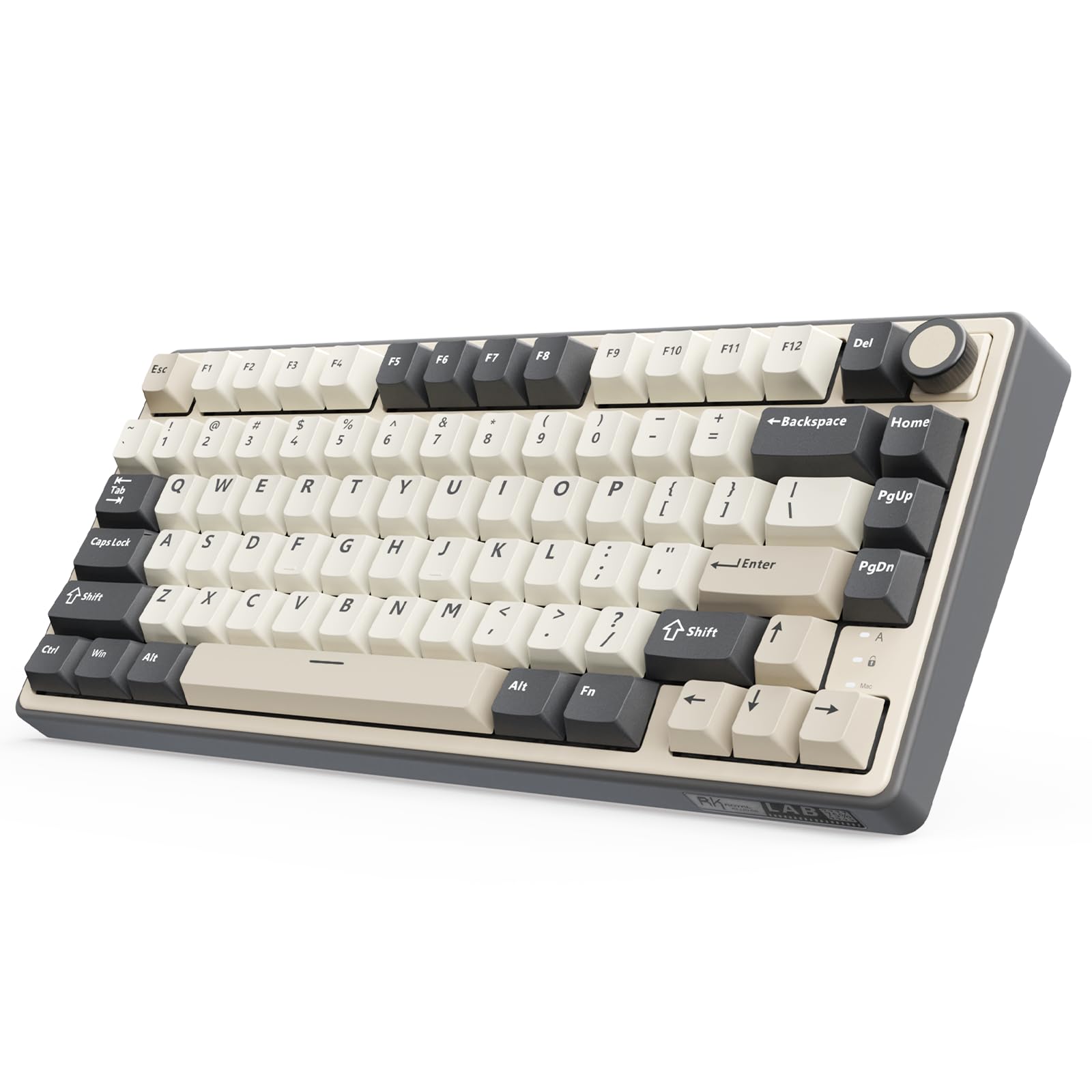
The RK ROYAL KLUDGE R75 proves you don’t need to spend a lot to get a solid 75% mechanical keyboard. It uses the same gasket mount and five-layer sound-dampening foam (poron, IXPE, PET, silicone) found in boards twice its price, producing a creamy, satisfying sound with the pre-lubed Cream linear switches. The 4000mAh battery is generous for this price tier, easily lasting a week or more with moderate RGB use, and the tri-mode connectivity (BT 5.1, 2.4GHz, USB-C) lets you switch between up to three devices.
The hot-swap PCB supports 3-pin and 5-pin switches, and the 1.2mm single-key slotted design improves keystroke consistency—a feature often reserved for mid-range boards. The CNC metal volume knob is programmable and hot-swappable, letting you replace it with the included extra switch if you prefer no knob. The PBT keycaps are doubleshot and feel textured under the fingers, resisting the shine that plagues cheaper ABS caps over time.
Where the R75 cuts corners is build material: the all-plastic enclosure flexes slightly under heavy typing and lacks the rigidity of aluminum boards. The white color shows smudges more easily, and the RGB—while bright and animated—lacks the per-key customization of more expensive options. The software (QMK/VIA-compatible via a separate download) is functional but not as polished as dedicated OEM programs.
Why it’s great
- Five-layer sound dampening delivers creamy, thocky acoustics at a budget price
- 4000mAh battery provides solid wireless endurance with RGB on
- CNC metal knob is programmable and hot-swappable for full customization
Good to know
- Plastic case feels less sturdy and can flex under aggressive typing
- White color attracts visible smudges and dirt over daily use
- RGB customization is less granular compared to higher-tier boards
FAQ
What does the “75%” in a 75% mechanical keyboard actually mean?
Are hot-swappable switches worth it for a beginner?
How do I choose between Bluetooth and 2.4GHz wireless for gaming?
Final Thoughts: The Verdict
For most users, the best 75% mechanical keyboard winner is the ASUS ROG Azoth because it combines exceptional gasket-mounted acoustics, rock-solid wireless performance, and a full modding kit that satisfies both beginners and enthusiasts. If you want a full aluminum chassis with a massive 6000mAh battery and QMK/VIA flexibility, grab the YUNZII AL80. And for a budget-friendly board that sounds far more expensive than it is, nothing beats the RK ROYAL KLUDGE R75.

Mo Maruf
I created WellFizz to bridge the gap between vague wellness advice and actionable solutions. My mission is simple: to decode the research and give you practical tools you can actually use.
Beyond the data, I am a passionate traveler. I believe that stepping away from the screen to explore new environments is essential for mental clarity and physical vitality.