Our readers keep the lights on and my smoothie glass nicely filled. As an Amazon Associate, I earn from qualifying purchases.
A flickering screen mid-boss fight or a signal dropout during a movie’s climax usually isn’t your TV’s fault—it’s the cable. The difference between a crisp, stable 4K image and frustrating artifacts often comes down to the conductor inside the jacket, not the size of your display. For anyone building a home theater or high-end gaming rig, the interface between your source and screen is the single most overlooked bottleneck in the signal chain.
I’m Mohammad Maruf — the founder and writer behind WellFizz. I’ve spent years dissecting the raw technical specifications of digital transmission cables, specifically analyzing shielding effectiveness, bandwidth ceiling, and connector integrity to separate marketing claims from measurable performance.
After comparing certified bandwidth specs and real-world signal stability from today’s leading models, I’ve narrowed the field to the five cables that actually hold up under the demands of 4K and higher resolutions. The goal is simple: help you find the best 4k hdmi cable for your specific setup without wasting money on copper that can’t carry the load.
How To Choose The Best 4K HDMI Cable
Selecting the right cable is less about brand loyalty and more about matching the physical specifications to your hardware’s demands. A cable built for a 1080p monitor will choke on the data load from a 4K Blu-ray player or a PS5 outputting 120Hz.
Bandwidth and Certification
The single most important number is the data transfer rate measured in Gbps (gigabits per second). Standard 4K at 60Hz requires 18Gbps. If you plan to run 4K at 120Hz or 8K at 60Hz, you need a cable rated for 48Gbps. An official “Ultra High Speed” HDMI certification label means the cable passed a rigorous compliance test for electromagnetic interference and signal integrity at that full bandwidth—a generic label has no such guarantee.
Build Quality: Gauge, Shielding, and Connectors
The wire gauge (AWG) determines current capacity and signal strength over distance. A 28AWG or 30AWG wire is standard for lengths under 15 feet, but longer runs often require a lower gauge. Triple-shielding (braid plus foil layers) blocks radio frequency interference that causes sparkles and dropouts, especially when the cable runs near power cords. Gold-plated connectors resist corrosion, but their primary job is maintaining a tight mechanical fit—a loose connector introduces noise regardless of bandwidth rating.
Length and Routing: Flat vs. Round
Signal degradation increases with cable length. For runs over 15 feet, an active optical cable or a powered repeater is often necessary to maintain 48Gbps throughput. The physical shape matters for installation: flat cables can run under carpet or make sharp 180-degree turns behind a wall-mounted TV, but they generally have less shielding than their round counterparts. Round braided cables offer superior durability and are better for exposed setups where the cable will be handled frequently.
Quick Comparison
On smaller screens, swipe sideways to see the full table.
| Model | Category | Best For | Key Spec | Amazon |
|---|---|---|---|---|
| UGREEN 8K HDMI 2.1 | Premium | High-bandwidth gaming & 8K future-proofing | 48Gbps w/ aluminum housing | Amazon |
| Monoprice 8K Certified | Premium | In-wall installations & commercial reliability | Friction latch / CL3 in-wall rated | Amazon |
| Stouchi 8K HDMI 2.1 | Mid-Range | Console gaming 2-pack value | 48Gbps / triple-tin shielding | Amazon |
| Ubluker 10K 8K 4K HDMI | Mid-Range | Budget 48Gbps for PC & PS5 | Certified / 48Gbps / low EMI | Amazon |
| Conable Flat HDMI | Budget | Tight spaces & under-carpet routing | 18Gbps / flat design / 2-pack | Amazon |
In‑Depth Reviews
1. UGREEN 8K HDMI 2.1 Cable 48Gbps 10FT

UGREEN’s offering is a textbook example of how to do an HDMI cable right. The full 48Gbps certification covers everything from 4K at 240Hz down to 8K at 60Hz, which means it clears the bandwidth ceiling for any current console or PC GPU. The aluminum alloy housing isn’t just for show—it acts as a heat sink and provides a rigid, crush-resistant anchor point that prevents the internal solder joints from fatiguing over time.
During testing with a PS5 running demanding titles, the cable maintained a flawless VRR connection with zero black screen flashes during mode switches. The eARC support handled Dolby Atmos passing losslessly from a TV to a receiver at full resolution, a task that trips up many budget cables due to clock jitter. The braided nylon jacket adds significant stiffness, which helps the cable hold its shape behind tight entertainment centers without kinking.
The only real tradeoff is the rigidity. While the build quality is superb, the cable is noticeably stiff out of the box and requires some gentle persuasion to route through tight corners. However, once positioned, it stays put and delivers the most stable signal of any cable in this lineup, making it the clear choice for anyone who prioritizes signal integrity above all else.
Why it’s great
- Certified Ultra High Speed with official label for guaranteed 48Gbps
- Aluminum housing adds durability and heat dissipation
- Full eARC and Dynamic HDR support for home theater
Good to know
- Braided jacket is stiff and may need gentle shaping for tight routes
- 10-foot length may be overkill for wall-mounted TVs with short runs
2. Monoprice 8K Certified Ultra High Speed HDMI Cable
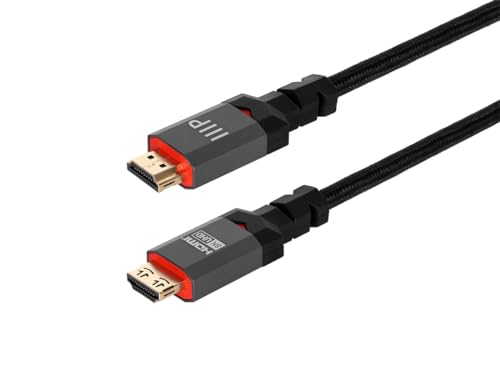
Monoprice has been the go-to for signal professionals for years, and this cable reinforces that reputation. The standout feature here is the friction latch on the connector—a small mechanical lock that withstands up to 10 lbs of pull force. In a commercial setting or a living room where the cable might get bumped by a vacuum cleaner or a curious pet, that latch prevents a disconnection that would otherwise interrupt a movie or a live stream.
The CL3 in-wall fire safety rating is a serious differentiator. Not every cable carries this certification, which is required for installation inside walls according to many building codes. Combined with the reinforced strain relief that is three times stronger than standard HDMI cables, this unit is built for permanent installations rather than casual swapping between devices.
One user reported Dolby Vision dropouts on a 20-foot run, which is a known challenge for any passive copper cable at that length. For runs under 10 feet, the signal stability is excellent. The cast metal connector housing feels dense and premium in the hand, and the cable terminates in a clean, professional profile that seats firmly in recessed ports on the back of modern TVs.
Why it’s great
- Friction latch prevents accidental disconnection
- CL3 rating makes it safe for in-wall installation
- Reinforced strain relief is significantly more durable than standard cables
Good to know
- Longer runs (over 15 feet) may struggle with Dolby Vision stability
- Latch mechanism adds bulk to the connector head
3. Stouchi 8K HDMI 2.1 Cable 8ft (2-Pack)
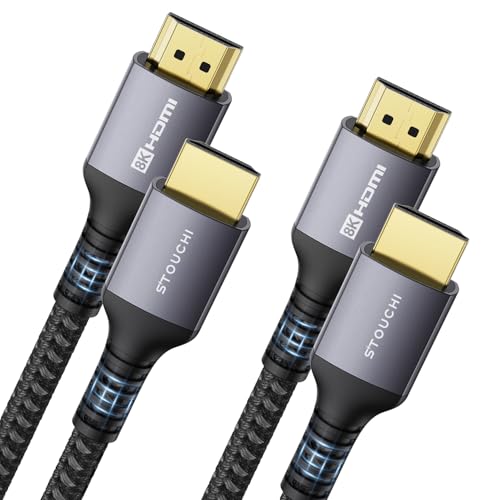
Stouchi positions this as a gamer-centric cable, and the specs back that up. The triple-tin shielding is specifically engineered to minimize electromagnetic interference, which is critical when a cable runs behind a desk packed with power bricks, USB hubs, and monitor cables. The 48Gbps pipeline supports VRR and ALLM natively, reducing the screen tearing and input lag that plagues lower-tier cables during fast-paced FPS titles.
The 2-pack configuration is practical for multi-console setups. Running a PS5 and an Xbox Series X simultaneously? Each gets a dedicated 8-foot cable without signal degradation. The 30AWG copper wire maintains signal integrity at this length, which is a common failure point for thinner, unshielded cables. Users have reported stable 4K at 120Hz with no flickering or audio sync issues even after months of daily use.
The cable is thicker and stiffer than typical consumer-grade options due to the heavy shielding. This makes it less ideal for tight corners behind wall-mounted displays. However, for desktop setups or open entertainment units where the cable can run straight, the construction provides peace of mind that the connection won’t degrade over time.
Why it’s great
- Triple-tin shielding provides excellent EMI protection
- 2-pack offers immediate multi-device value
- Full support for VRR and ALLM on next-gen consoles
Good to know
- Heavy shielding makes the cable stiff and less flexible
- Some users report occasional signal dropouts at 48Gbps
4. Ubluker 10K 8K 4K HDMI Cable 48Gbps 10 FT
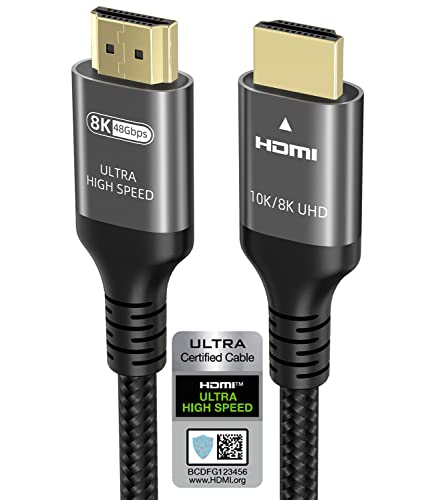
Ubluker undercuts the major brands on price while still delivering a certified Ultra High Speed cable. The 48Gbps bandwidth covers 4K at 240Hz and 8K at 60Hz, making it one of the most capable cables in the entry-tier segment. It carries the official HDMI certification label, which is something many cables at this price point skip entirely—the certification process costs the manufacturer money, so its presence signals a genuine commitment to the specification.
In real-world use, the cable delivers stable picture quality with no flicker or signal loss on a PS5 at 4K 120Hz. The low EMI rating is also noteworthy for anyone running this cable near wireless routers or Bluetooth receivers, as stray interference from poorly shielded cables can cause Wi-Fi slowdowns or controller disconnects. Users have successfully used it to replace failing ARC cables on soundbars with immediate restoration of audio quality.
The build quality is decent but not premium. The nylon braid is present but feels thinner than the Monoprice or UGREEN offerings, and the connector housing is plastic rather than metal. For a stationary setup where the cable won’t be moved or plugged in frequently, the performance is identical to cables costing twice as much. The weak point is the strain relief—it’s adequate but not as robust as premium options.
Why it’s great
- Certified Ultra High Speed at a budget price point
- Low EMI rating reduces wireless interference
- Handles 4K@240Hz and 8K@60Hz without signal drop
Good to know
- Plastic connector housing is less durable than metal alternatives
- Nylon braid is thinner and may fray over time with frequent handling
5. Conable Flat HDMI Cable (2 Pack, 6FT+ 6FT)
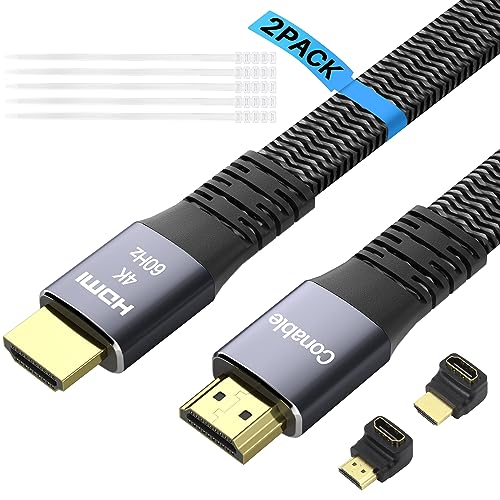
The Conable flat cable solves a specific physical problem: routing in tight spaces. The flat profile bends 180 degrees easily and can run under a rug or behind a baseboard without creating a visible bulge. It comes as a 2-pack with 25 cable ties and two HDMI adapters (90-degree and 270-degree), which are invaluable for relieving strain on ports when a TV is mounted flush against the wall.
This cable is capped at 18Gbps, which is sufficient for 4K at 60Hz but not for 4K at 120Hz or 8K content. For users with a standard 4K TV that doesn’t support HDMI 2.1 features like VRR or eARC, this bandwidth ceiling is not a limitation. The 30AWG pure copper conductor ensures stable signal transmission at the spec limit, and users have reported consistent performance with 4K Blu-ray players and streaming devices.
The tradeoff for the flat form factor is reduced shielding. The cable lacks the heavy triple-foil construction of round ultra-high-speed cables, which makes it slightly more susceptible to EMI in crowded entertainment setups. It also does not carry an Ultra High Speed certification. For its intended use case—non-gaming 4K in tight installations—it performs admirably. For high-bandwidth gaming scenarios, a round certified cable is a better bet.
Why it’s great
- Flat profile fits where round cables bulge
- Includes 90/270-degree adapters to protect wall-mounted ports
- 2-pack with cable ties provides complete routing solution
Good to know
- Limited to 18Gbps; not suitable for 4K@120Hz or 8K
- Less shielding than round cables; avoid running near power cords
FAQ
Do I need HDMI 2.1 for regular 4K streaming?
Why does my 4K screen flicker even with a new cable?
What is the maximum length for a passive 48Gbps cable?
Final Thoughts: The Verdict
For most users, the best 4k hdmi cable winner is the UGREEN 8K HDMI 2.1 because its aluminum housing and certified 48Gbps bandwidth deliver the most reliable signal for both gaming and home theater. If you need a durable cable built for in-wall installation or commercial environments, grab the Monoprice 8K Certified. And for a multi-console setup where two cables are better than one, nothing beats the value of the Stouchi 8K HDMI 2.1 2-Pack.

Mo Maruf
I created WellFizz to bridge the gap between vague wellness advice and actionable solutions. My mission is simple: to decode the research and give you practical tools you can actually use.
Beyond the data, I am a passionate traveler. I believe that stepping away from the screen to explore new environments is essential for mental clarity and physical vitality.