Our readers keep the lights on and my smoothie glass nicely filled. As an Amazon Associate, I earn from qualifying purchases.
The gap between a frustrating hobby and a productive workflow often comes down to one thing: how much time you spend leveling the bed versus actually printing. In the sub- bracket, you’re no longer forced to choose between speed and reliability — several models now deliver Core XY architecture, auto-leveling, and print speeds above 500 mm/s without demanding constant tinkering.
I’m Mohammad Maruf — the founder and writer behind WellFizz. I’ve spent years analyzing extrusion systems, kinematic structures, and material compatibility to separate the machines that *work* from the ones that just *sell*.
Whether you’re a first-time buyer or upgrading from a bed-slinger, this guide evaluates the best 3d printer under 400 by build volume, nozzle temperature range, and real-world print consistency — not just advertised speeds.
How To Choose The Best 3D Printer Under 400
The sub- segment has matured rapidly, but you still need to understand what each machine prioritizes. Enclosed Core XY printers dominate for speed and material options, while open-frame cartesian designs target absolute beginners on a tight budget. Here’s what separates a daily driver from a drawer-filler.
Core XY vs. Cartesian Bed-Slinger
Core XY printers move the print head along two belts simultaneously, achieving accelerations of 20,000 mm/s² or more without sacrificing print quality. Cartesian bed-slingers move the Y-axis via the bed itself, which introduces momentum-induced layer shifting at high speeds. If you plan to print functional parts in under an hour, prioritize Core XY.
Nozzle Temperature and Material Range
A standard 260°C nozzle limits you to PLA and PETG. Look for a 300°C+ hotend if you want to print ABS, polycarbonate, or carbon-fiber composites. The ELEGOO Centauri Carbon hits 320°C out of the box, which unlocks engineering-grade materials without an aftermarket upgrade.
Auto-Leveling: 16-Point vs. 49-Point
Entry-level auto-leveling systems use three to sixteen points to map the bed, which handles minor warping. Higher-end implementations like the Anycubic LeviQ 3.0 measure 49 points and compensate for complex bed defects algorithmically. If you want true “set it and forget it,” choose a 49-point system.
Quick Comparison
On smaller screens, swipe sideways to see the full table.
| Model | Category | Best For | Key Spec | Amazon |
|---|---|---|---|---|
| Bambu Lab A1 | Premium | Multicolor & Quiet Operation | 10,000 mm/s² acceleration, 48 dB | Amazon |
| Creality K1C | Premium | Carbon Fiber & Enclosed Printing | 300°C nozzle, AI camera | Amazon |
| ELEGOO Centauri Carbon | Premium | Engineering-Grade Materials | 320°C nozzle, die-cast frame | Amazon |
| Anycubic Kobra X | Mid-Range | Multicolor & AI Monitoring | 600mm/s, 49-point leveling | Amazon |
| FLASHFORGE Adventurer 5M | Mid-Range | Beginner-Friendly Speed | 600mm/s, 280°C nozzle | Amazon |
| Creality K2 SE | Mid-Range | Clog-Free Direct Extrusion | 600mm/s, 300°C hotend | Amazon |
| ANYCUBIC Photon Mono 4 | Mid-Range | High-Resolution Resin Printing | 10K LCD, 17µm XY resolution | Amazon |
| Geeetech Smart M1S | Budget | Kids & Ultra-Compact Spaces | 250mm/s, 16-point leveling | Amazon |
| Entina TINA2S | Budget | Zero-Assembly Beginner | 200mm/s, WiFi cloud printing | Amazon |
In‑Depth Reviews
1. Bambu Lab A1

The Bambu Lab A1 redefines what a sub- Core XY printer can deliver. With a 10,000 mm/s² acceleration and active flow rate compensation, it produces smooth, dimensionally accurate parts without the ringing artifacts that plague cheaper high-speed machines. The full-auto calibration handles Z-offset, bed leveling, and vibration compensation before every print.
Users report consistent print quality after 1,500+ hours, with only minor material compatibility warnings. The 1-Clip quick-swap nozzle makes maintenance straightforward, and the noise level stays around 48 dB — quiet enough to sit on a desk next to you during a workday. The AMS Lite accessory enables multicolor printing, though it is sold separately.
Where the A1 truly shines is its ecosystem: the Bambu Studio slicer is intuitive, and the printer’s active motor noise canceling keeps operation discreet. If you want a printer that simply works without late-night troubleshooting sessions, this is the one.
Why it’s great
- Full-auto calibration eliminates manual leveling entirely.
- Active flow rate compensation ensures consistent extrusion across filament brands.
- Quiet 48 dB operation suitable for shared spaces.
Good to know
- AMS Lite for multicolor costs extra.
- No enclosure limits high-temp materials like ABS.
2. Creality K1C

The Creality K1C brings an enclosed Core XY design to the sub- category, making it a rare find for users who need to print ABS, ASA, or carbon-fiber composites. The clog-free direct extruder integrates a titanium alloy heatbreak and a steel-tipped copper nozzle rated for 300°C, which handles flexible and abrasive filaments without jamming.
Setup mirrors a smartphone experience — boot-up guide, auto leveling, and auto input shaping complete within minutes. The built-in AI camera monitors prints for spaghetti failures or foreign object interference and supports time-lapse recording. The auxiliary part cooling fan helps reduce stringing on overhangs and bridges.
Some users note that the touchscreen interface can feel less responsive than competitors, and the proprietary nozzle system limits aftermarket upgrades. However, for an enclosed machine that prints carbon fiber right out of the box at 600 mm/s, the K1C offers unmatched material versatility at this price tier.
Why it’s great
- Enclosed chamber supports ABS and carbon-fiber printing safely.
- AI camera with spaghetti detection reduces wasted prints.
- Tri-metal nozzle handles abrasive filaments without wear.
Good to know
- Proprietary nozzle limits easy aftermarket swaps.
- Touchscreen responsiveness could be snappier.
3. ELEGOO Centauri Carbon

The ELEGOO Centauri Carbon packs a 320°C brass-hardened steel nozzle and a die-cast aluminum frame into a fully enclosed Core XY chassis. This combination minimizes vibration even at 20,000 mm/s² acceleration, resulting in consistent layer adhesion and sharp corners on functional parts like drone frames and automotive jigs.
The dual-sided PEI build plate features a dedicated PLA-specific surface that delivers excellent adhesion at lower bed temperatures, reducing warping on large flat prints. A built-in chamber camera with dual LED lighting enables real-time remote monitoring and time-lapse capture. The intuitive touchscreen and auto bed leveling get beginners printing within 20 minutes of unboxing.
Reviewers highlight the printer’s speed — a Benchy finishes in about 18 minutes — and the reliability of the filament runout sensor. The main tradeoff is weight: at 38.5 pounds, this is a stationary machine that you will not want to move between rooms.
Why it’s great
- 320°C hotend unlocks carbon fiber and polycarbonate printing.
- Die-cast frame reduces vibrations for consistent quality at high speeds.
- Integrated camera with remote monitoring is rare at this price.
Good to know
- Heavy build makes relocation inconvenient.
- ElegooSlicer can crash on complex STL files with older laptops.
4. Anycubic Kobra X

The Anycubic Kobra X is the only printer on this list that ships with native four-color support via its built-in ACE Pro system, expandable to 19 colors with additional units. The LeviQ 3.0 auto-leveling system uses 49 calibration points to ensure 100% bed flatness, which dramatically reduces first-layer failures on complex multicolor prints.
A hardened steel nozzle and vibration compensation allow the Kobra X to reach 600 mm/s travel speeds while maintaining smooth layers. The printer reduces filament purging by redesigning the filament path — users report up to 50% less waste compared to other multicolor systems. The top-mount spool holder frees up desk space, and dual-band Wi-Fi supports both 2.4 GHz and 5 GHz networks for stable remote monitoring via the Anycubic App.
While the phone app could benefit from UI polish, the overall package delivers professional-grade multicolor output in the mid-range price tier. A small percentage of units arrive with defective sensor boards, so verify the third filament input during the first day of use.
Why it’s great
- Native 4-color printing with minimal filament waste.
- 49-point auto leveling handles warped beds effectively.
- Hardened steel nozzle supports abrasive filaments.
Good to know
- Occasional quality control issues with sensor boards.
- Phone app interface needs improvement.
5. FLASHFORGE Adventurer 5M

The FLASHFORGE Adventurer 5M achieves a maximum speed of 600 mm/s with 20,000 mm/s² acceleration, thanks to its Core XY architecture and vibration compensation. The 50W heating rod brings the 280°C nozzle to 200°C in just 35 seconds, reducing wait time between prints. The direct-drive extruder delivers a flow rate of 32 mm³/s for consistent extrusion on large parts.
One-click auto leveling combined with a flexible PEI steel plate ensures reliable first-layer adhesion. The printer supports PLA, PETG, and TPU out of the box, with an optional 0.6mm nozzle for carbon-fiber blends. The open-frame design requires a well-ventilated space, and the 220 mm³ build volume suits medium-sized projects like cosplay accessories and functional brackets.
Long-term users report that the firmware can occasionally freeze, requiring a power cycle, and the touchscreen sensitivity is mediocre. However, the print quality-to-speed ratio is excellent, and FLASHFORGE’s tech support receives consistent praise for replacing faulty sensors quickly.
Why it’s great
- 35-second heat-up time to 200°C speeds up workflow.
- Vibration compensation eliminates ghosting at high speeds.
- Excellent customer support for hardware replacements.
Good to know
- Firmware freezes require occasional power cycling.
- Open frame needs ventilation for PETG and TPU odors.
6. Creality K2 SE

The Creality K2 SE bridges the gap between entry-level cartesians and premium Core XY machines with a fully enclosed design, 300°C dual-gear direct extruder, and pre-installed damping pads that reduce vibration-induced artifacts. The Core XY structure delivers 600 mm/s travel speeds with 20,000 mm/s² acceleration, making it 12 times faster than a typical bed-slinger.
The 3-second quick-swap tri-metal nozzle integrates a titanium alloy heatbreak to prevent heat creep, and the dynamically balanced part cooling fan minimizes ringing. Users report zero failed prints out of the box when using the included glue stick as a release agent. The auto-calibration handles Z-offset, bed leveling, and input shaping automatically.
Some owners note that the touchscreen can be unresponsive on the first boot, and the power switch defaults to the EU setting, which causes a dead-on-arrival appearance for North American buyers. Once configured, the K2 SE is a fast, quiet, and reliable option with great build volume for its price point.
Why it’s great
- 300°C direct extruder handles flexible and engineering filaments.
- Pre-installed damping pads improve stability at high speeds.
- Quick-swap nozzle reduces downtime during material changes.
Good to know
- Power switch defaults to EU voltage; must be changed for NA.
- Glue stick required as release agent for bed adhesion.
7. ANYCUBIC Photon Mono 4

The ANYCUBIC Photon Mono 4 is not an FDM machine — it is a resin 3D printer that uses a 7-inch 10K monochrome LCD with 9024×5120 resolution. Each pixel measures 17×17 micrometers on the X and Y axes, which delivers 105% finer detail than the Mono 2. This makes it ideal for miniature figurines, jewelry molds, and dental models where surface finish is critical.
The LighTurbo matrix light source provides uniform UV exposure to reduce layer lines, and the laser-engraved build platform 2.0 improves adhesion without making removal difficult. The 4-point leveling method stays consistent after initial calibration, and power-loss recovery saves mid-print jobs. Print volume measures 153.4 × 87 × 165 mm — suitable for small to medium resin parts.
Setup is beginner-friendly, with users reporting successful first prints within an hour of unboxing. The main downsides are the plastic chassis, a small low-quality touchscreen, and a proprietary FEP vat that scratches more easily than standard units. Replacement LCDs are affordable, and the print quality per dollar is exceptional for the resin category.
Why it’s great
- 10K LCD resolution captures micro-details invisible on 4K screens.
- Uniform matrix light source minimizes visible layer lines.
- Laser-engraved build plate reduces warping and lifting.
Good to know
- Proprietary FEP vat scratches faster than standard designs.
- Plastic chassis feels less durable than metal-framed alternatives.
8. Geeetech Smart M1S

The Geeetech Smart M1S is the smallest printer in this roundup with a 100 × 110 × 100 mm build volume, making it a genuine desktop mini printer for kids and educators. Despite the size, it packs a direct-drive extruder with a 1:5 gear ratio that handles both PLA and TPU filaments without jamming, plus a 50W hotend heating rod for rapid warmup.
The 16-point full-auto leveling and flexible magnetic build plate reduce warping and make model removal simple. Setup takes about five minutes — just plug in, load filament via the one-button feed, and start printing from the Geeetech app or SD card. The 2.4-inch color LCD screen and LED lighting help novices monitor progress.
Print quality at 250 mm/s is good for a machine this small, but the included 0.5 kg filament spool holder is a limitation — you will need to print a 1 kg adapter yourself. Some units experience WiFi connectivity drops after shutdown, though customer support typically resolves the issue within 24-48 hours.
Why it’s great
- Ultra-compact footprint fits on a school desk or bookshelf.
- Direct drive extruder handles TPU without modification.
- Customer support provides fast replacement for defective units.
Good to know
- No wireless printing; must use SD card or USB.
- Proprietary 0.5 kg spool holder; 1 kg adapter requires printing.
9. Entina TINA2S
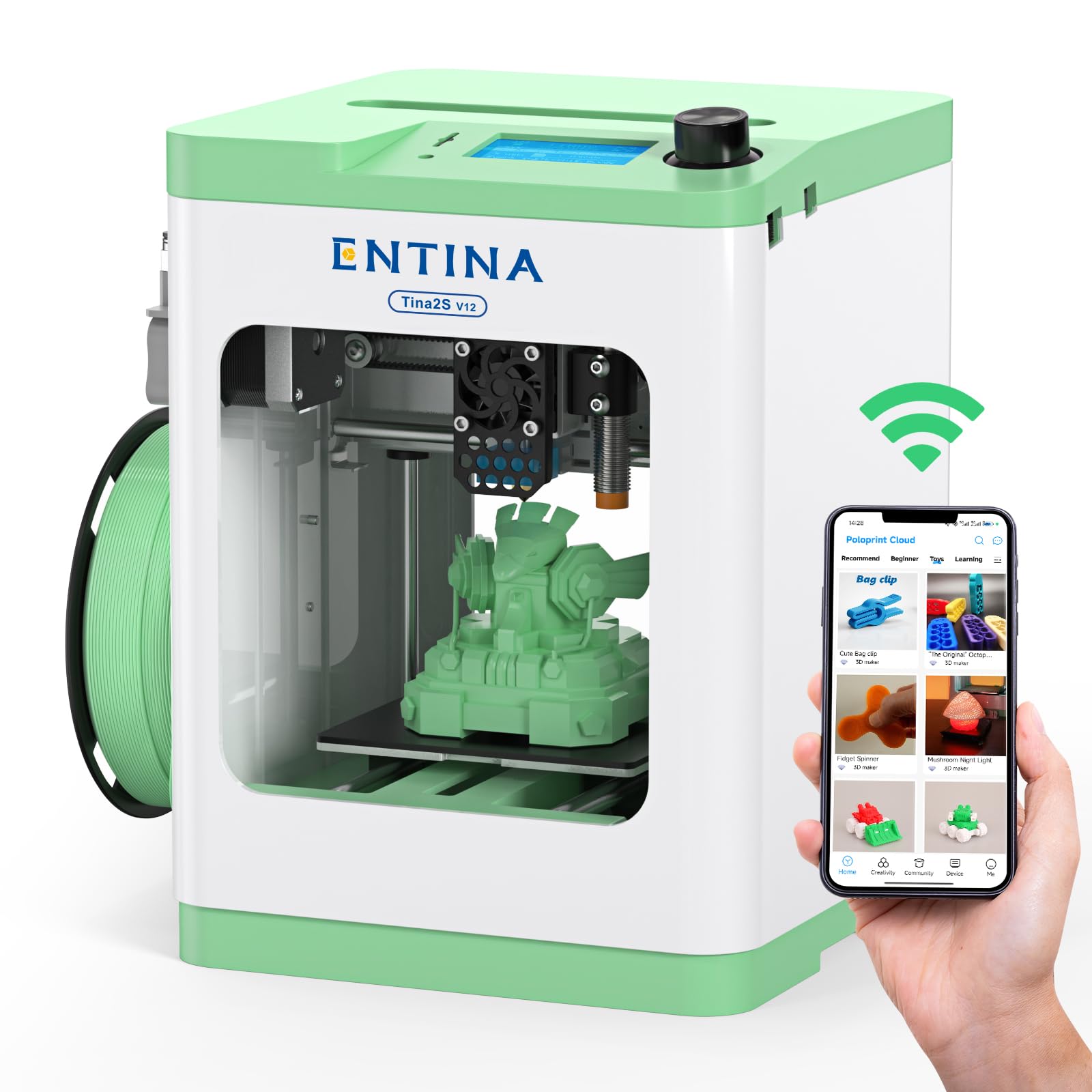
The Entina TINA2S is a fully assembled, zero-setup FDM printer targeting absolute beginners — particularly kids and classroom environments. It prints at up to 200 mm/s with 0.04 mm precision, and the auto bed leveling combined with a flexible spring steel build plate ensures good first-layer adhesion without manual intervention.
The Poloprint Cloud app provides access to 1,500+ preloaded models with regular updates, and the built-in Creative Hub supports simple STEM-based design activities. WiFi connectivity is improved over previous models, offering 5× faster file transfer speeds. The compact dual-Z axis design provides stability for such a small machine, and the enclosed chassis makes it safer for young users.
Print quality is good for the size but not flawless — some stringing and layer inconsistency is visible on detailed models. A small number of users report constant nozzle clogging, which suggests variable quality control. For a cheap, out-of-the-box family printer with WiFi, the TINA2S is functional, but advanced users will outgrow it quickly.
Why it’s great
- Fully assembled with zero calibration required.
- 1,500+ preloaded models in the app keep kids engaged.
- Low-noise motherboard suitable for classroom or bedroom use.
Good to know
- Print quality can show stringing on detailed models.
- Some units suffer from chronic nozzle clogging.
FAQ
Can a 3D printer under 400 print carbon fiber filament reliably?
What is the real difference between 16-point and 49-point auto leveling?
How loud are these printers during operation?
Is multicolor printing practical on a sub-400 budget?
Which filament types can a 300°C hotend print without issue?
Final Thoughts: The Verdict
For most users, the best 3d printer under 400 winner is the Bambu Lab A1 because it combines full-auto calibration, active flow rate compensation, and whisper-quiet operation in a compact Core XY package that works reliably out of the box. If you need enclosed printing for carbon fiber or ABS, grab the Creality K1C. And for multicolor projects without exceeding the budget, nothing beats the Anycubic Kobra X.

Mo Maruf
I created WellFizz to bridge the gap between vague wellness advice and actionable solutions. My mission is simple: to decode the research and give you practical tools you can actually use.
Beyond the data, I am a passionate traveler. I believe that stepping away from the screen to explore new environments is essential for mental clarity and physical vitality.