Our readers keep the lights on and my smoothie glass nicely filled. As an Amazon Associate, I earn from qualifying purchases.
Choosing the right gaming keyboard isn’t about chasing the most famous brand name; it’s about understanding the engineering that turns every keystroke into a precise, satisfying experience. Within a specific budget, you’re no longer limited to basic clicky boards, but can access enthusiast-grade features that define modern mechanical keyboards.
I’m Mohammad Maruf — the founder and writer behind WellFizz. My approach involves deep market research and analyzing thousands of data points and user specifications to separate genuine innovation from marketing hype, ensuring our recommendations are built on substance.
This guide focuses on the tangible differences that matter—like switch type, acoustics, and customization depth—to help you find a board that feels like a true extension of your skill, where the perfect gaming keyboard marries performance with personal expression without compromise.
How To Choose The Best Gaming Keyboard
At this price point, you enter a sweet spot where premium features become standard. The choice shifts from *if* you get certain specs to *which implementation* suits you best. Focus on these core aspects to narrow your search effectively.
Layout & Form Factor
Your desk space and daily needs dictate the layout. Full-size (104/108-key) keyboards include a dedicated number pad, essential for data entry or certain games. Compact 96% and 98-key layouts squeeze the numpad in right next the arrow keys, saving several inches of width. 75% layouts eliminate the numpad and F-key row entirely, offering maximum space savings while keeping arrows and function keys accessible via a layer. Consider what you use daily—losing the numpad can be liberating or frustrating.
Switch Technology & Feel
This is the heart of the typing experience. Traditional mechanical switches (like the HyperX Reds) are reliable and tactile. The newer trend is towards pre-lubed linear switches that offer a smooth, consistent press with a deep, muted “thock” or “creamy” sound, a result of internal dampening foams. The cutting-edge option is Hall Effect magnetic switches, which use sensors instead of physical contact, enabling adjustable actuation points and rapid trigger for competitive gaming. Most boards here are hot-swappable, meaning you can change switches later without soldering.
Construction & Acoustics
Build quality directly impacts sound and feel. Gasket-mounted designs use rubber gaskets to suspend the internal plate, creating a softer, more consistent typing feel and reducing harsh vibrations. Look for mentions of multiple internal sound-dampening foam layers—these eliminate hollow “ping” noises and create that sought-after creamy acoustic profile. A solid, weighty chassis also prevents the keyboard from sliding during intense use.
Connectivity & Features
Tri-mode connectivity (wired USB-C, 2.4GHz wireless dongle, and Bluetooth) offers maximum flexibility. For gaming, the 2.4GHz connection provides near-wired latency. Bluetooth is perfect for switching between multiple devices. Additional features like programmable knobs (for volume or RGB control), smart displays (for system info or GIFs), and extensive software customization add convenience and personal flair. Large batteries are crucial for wireless freedom.
Quick Comparison
On smaller screens, swipe sideways to see the full table.
| Model | Type | Best For | Key Feature | Amazon |
|---|---|---|---|---|
| Keychron K10 HE | Hall Effect | Competitive Tech Enthusiasts | Adjustable Magnetic Switches | Amazon |
| HyperX Alloy Origins | Wired Mechanical | No-Frills Performance | Aluminum Frame, HyperX Switches | Amazon |
| AULA F108 Pro | Tri-Mode Full Size | Full-Featured Desktop Command | Smart Screen & Knob, 8000mAh | Amazon |
| AULA S98 Pro | Tri-Mode 98% | Compact Power Users | LCD Screen, Knob, Creamy Sound | Amazon |
| AULA F99 Pro | Tri-Mode 96% | Balanced Wireless Workhorse | Knob, Long Battery, Gasket Mount | Amazon |
| RK ROYAL KLUDGE S98 | Tri-Mode 98% | Enthusiast Sound & Display | Smart Display, Top Mount, Foams | Amazon |
| Kisnt KN104 | Tri-Mode Full Size | Full-Size Creamy Typing | Knob, Media Keys, Creamy Sound | Amazon |
| AULA F99 | Tri-Mode 96% | Space-Saving Value | 8000mAh Battery, Gasket Structure | Amazon |
| AULA F75 Pro | Tri-Mode 75% | Minimalist Desk Warriors | Compact with Knob, Great Sound | Amazon |
| Womier SK80 | Wired 75% | Aesthetic-Focused Gamers | Color Multimedia Display, Theme | Amazon |
| MageGee LIGHT100 | Tri-Mode 96% | Entry-Level Customization | Gasket Mount, 8000mAh, Hot-Swap | Amazon |
In‑Depth Reviews
1. Keychron K10 HE

The Keychron K10 HE represents the pinnacle of technological innovation in this roundup, justifying its premium position. It moves beyond traditional mechanical switches entirely, utilizing Hall Effect magnetic sensors to detect keypresses. This allows for incredible software customization via the Keychron Launcher, where you can adjust the actuation point of each key from 0.2mm to 3.8mm and enable rapid trigger modes—a dream for competitive gamers seeking every millisecond advantage.
Build quality is immediately apparent, with a solid aluminum frame accented by genuine rosewood sidings that give it a distinct, sophisticated aesthetic far removed from typical gaming gear. The included double-shot PBT keycaps resist shine and feel excellent, though note the RGB lighting shines around the keys, not through legends. It’s a substantial, weighty board that feels incredibly durable and stable on the desk.
Offering robust tri-mode connectivity, it seamlessly fits into any multi-device workflow. While the battery life is good, heavy wireless use with features enabled will require periodic charging. This keyboard is for the user who views their peripherals as long-term investments and desires cutting-edge, customizable performance wrapped in a premium, professional package.
Why it’s great
- Future-proof Hall Effect switches with deep software actuation control.
- Exceptional, premium build quality with aluminum frame and wood accents.
- Highly versatile with tri-mode connectivity and cross-system compatibility.
Good to know
- Occupies the highest tier in this guide.
- Keycaps are not shine-through, which can be less ideal in dark rooms.
- Battery life is solid but not class-leading compared to some 8000mAh options.
2. HyperX Alloy Origins

The HyperX Alloy Origins is the trusted veteran in this lineup, offering proven, no-nonsense performance from a well-established brand. Its standout feature is the full aircraft-grade aluminum body, which provides a rigid, cool-to-the-touch typing platform that feels incredibly solid and durable. This wired-only keyboard is built for reliability and consistent response, with HyperX’s own linear Red switches rated for 80 million keystrokes.
It features a smart, compact form factor that retains the full 104-key layout but trims the bezels, saving desk space without sacrificing functionality. The RGB lighting is notably bright and vibrant, with excellent software control through HyperX NGENUITY for customization and macro programming. The detachable USB-C cable is a welcome feature for portability and easy storage.
This keyboard appeals to gamers who prefer a straightforward, high-performance wired connection, appreciate premium metal construction, and trust in brand-name quality and a strong warranty. It doesn’t have the wireless flexibility or “creamy” acoustic engineering of others, but it delivers where it counts with robustness and responsive, reliable switches.
Why it’s great
- Premium, durable full aluminum construction.
- Bright, beautiful RGB lighting with good software.
- Trusted brand reliability with a solid warranty.
Good to know
- Wired-only connectivity lacks wireless flexibility.
- Not hot-swappable, limiting future customization.
- Sound profile is more traditional mechanical, not the modern “thocky” feel.
3. AULA F108 Pro

The AULA F108 Pro is the ultimate command center for users who need a full-size layout without sacrificing any modern features. It packs a smart TFT color display and a multi-function knob into a 108-key frame, allowing you to monitor battery, connection mode, or display a custom GIF, all while adjusting volume or lighting with the tactile knob. This makes it incredibly functional and visually engaging.
It doesn’t skimp on core performance, boasting a tri-mode connection, hot-swappable PCB, and the now-signature AULA five-layer filling structure for a soft, creamy typing sound. The side-printed, double-shot PBT keycaps keep legends from wearing off, and the south-facing LEDs ensure even backlighting. An 8000mAh battery promises exceptional wireless longevity, even with the screen active.
This is the keyboard for streamers, professionals, or anyone who wants their primary input device to be a feature-rich hub. It offers everything: full layout, great sound, wireless freedom, long battery, and interactive controls, making it a compelling all-in-one solution for a dedicated desktop setup.
Why it’s great
- Feature-complete: screen, knob, full size, huge battery.
- Excellent creamy sound profile from gasket and foam design.
- Versatile tri-mode connectivity for multiple devices.
Good to know
- Its full size requires significant desk real estate.
- The software for GIF customization can be slightly buggy.
- Side-printed keycaps take slight adjustment for some typists.
4. AULA S98 Pro

The AULA S98 Pro takes the smart screen concept and pairs it with a more space-efficient 98-key layout. It features a vivid LCD screen that displays time, date, battery, and connection status, and can be customized with GIFs via software. The accompanying multi-function metal knob feels premium and is your primary tool for navigating menus, adjusting volume, or changing lighting effects, all without software.
It inherits the excellent internal design of the F-series, with a gasket-mount structure and five layers of sound-dampening foam to produce a consistent, thocky sound. The pre-lubed linear switches and stabilizers offer a smooth out-of-box experience. With tri-mode connectivity and a 4000mAh battery, it balances compact form with high-end functionality.
This board is ideal for users who want the interactive screen and knob feature set but prefer a layout that sacrifices only the rarely-used navigation cluster (Insert, Home, etc.) to save substantial desk space. It’s a stylish and smart choice for a cleaner setup.
Why it’s great
- Smart screen and high-quality metal knob for intuitive control.
- Space-saving 98% layout retains numpad in a smaller footprint.
- Excellent out-of-the-box creamy typing sound and feel.
Good to know
- Battery (4000mAh) is smaller than some siblings, though still good.
- The knob controls multiple functions, requiring a quick menu switch for volume changes.
- Screen GIF implementation can be finicky with certain files.
5. AULA F99 Pro

The AULA F99 Pro strikes a fantastic balance between features, form factor, and value. It takes the popular 96% layout of the F99 and adds a highly practical multi-function control knob on the top right. This knob can instantly adjust media volume or RGB brightness depending on the mode, a tactile and convenient upgrade over key combinations.
It maintains all the strengths of the series: the creamy, satisfying typing experience from its gasket mount and foam layers, reliable tri-mode connectivity, and hot-swappable switches. The inclusion of an 8000mAh battery is a standout, offering potentially weeks of use on a single charge with moderate lighting, making it a wireless workhorse.
For those who find screens a bit gimmicky but still want enhanced physical control, the F99 Pro is a perfect choice. It offers the core premium experience—great sound, wireless freedom, customizability—with the superb addition of a knob, all in a compact, battery-efficient package.
Why it’s great
- Useful multi-function knob enhances daily media control.
- Massive 8000mAh battery enables exceptional wireless battery life.
- Excellent creamy acoustic profile in a space-saving 96% layout.
Good to know
- Lacks the visual flair of an LCD screen.
- Side-printed keycaps on some colorways (check model).
- A mid-range option that balances cost and high-end features.
6. RK ROYAL KLUDGE S98

The RK ROYAL KLUDGE S98 is a direct competitor in the smart-display keyboard category, showcasing a slightly different design philosophy. It utilizes a top-mount construction, which provides a firmer, more consistent typing feel compared to gasket mounts, while still employing multiple sound-absorbing foams to achieve a pleasant, creamy sound signature.
Its small screen displays useful info like battery, date, and connection mode, and supports custom GIFs. The accompanying knob is similarly used for navigation and control. The board feels substantial and well-built, with a plastic case that doesn’t feel cheap. The included double-shot PBT keycaps are high quality, and the tri-mode connectivity is flawless.
This keyboard is for the user who values the smart display feature and prefers the slightly more direct, firm feedback of a top-mount design. It’s a highly capable package from another respected brand in the custom keyboard space, offering great out-of-box sound and significant customization potential.
Why it’s great
- Top-mount design offers a firm, consistent typing feel.
- Effective sound-dampening results in a clean, creamy acoustic.
- Full-featured with smart screen, knob, and tri-mode connectivity.
Good to know
- Top mount feel is distinct from softer gasket mounts; preference applies.
- Software experience can be hit or miss.
- Battery life is good, but not class-leading.
7. Kisnt KN104
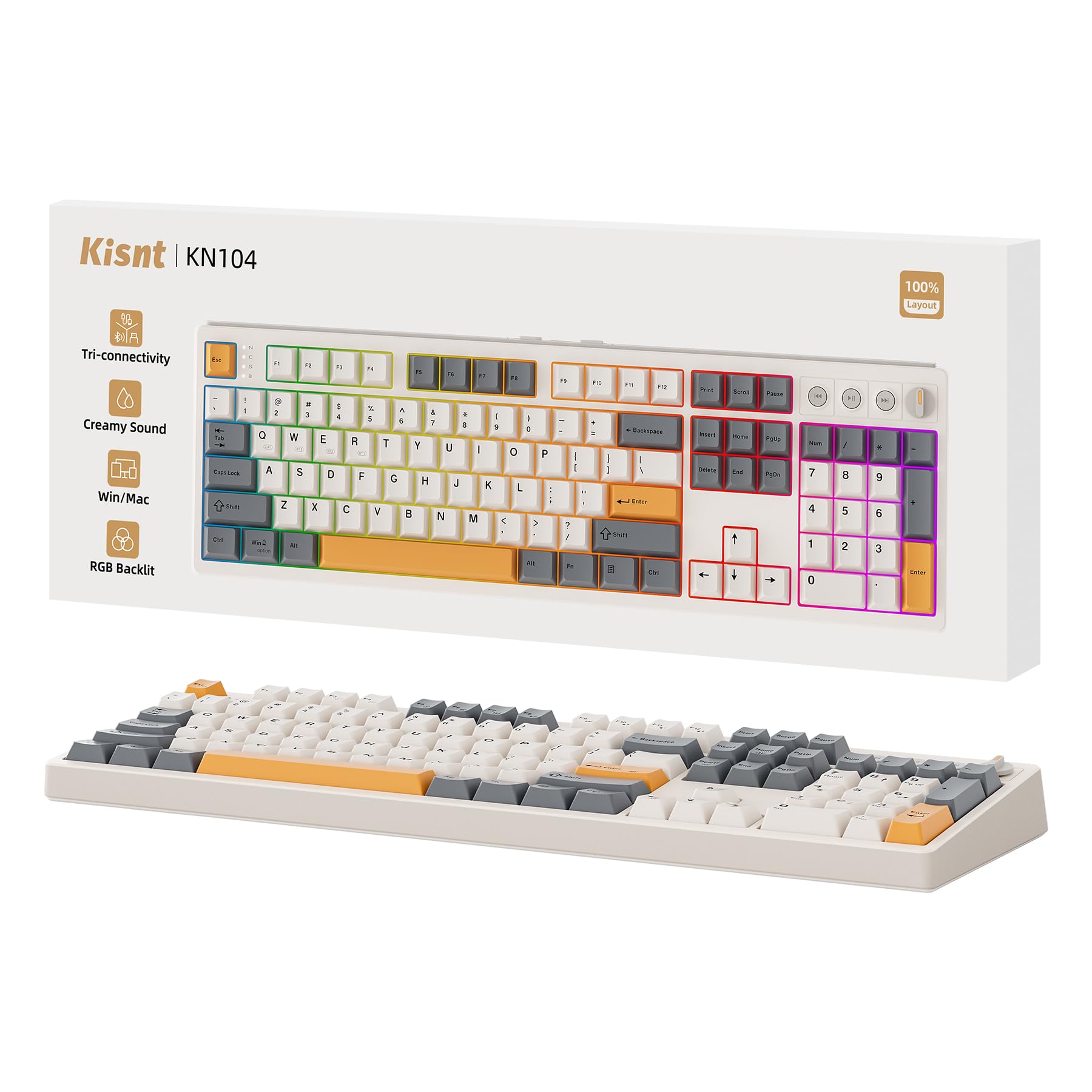
The Kisnt KN104 brings the popular “creamy” sound and gasket-mount design to a full-size, 104-key format. It’s built for those who need a dedicated number pad but refuse to compromise on typing acoustics. The board features a dedicated volume knob and separate media keys (play/pause, next, previous), offering immediate physical control without using function layers.
It promises a satisfying typing experience with its five layers of sound-dampening foam and silicone, aiming to eliminate hollow noises. The tri-mode connectivity, hot-swappable PCB, and PBT keycaps are all present, packaged in a nostalgic retro beige colorway. A 4000mAh battery provides solid wireless endurance.
This is a strong candidate for office workers, accountants, or gamers who heavily utilize the numpad and want a keyboard that sounds as good as it functions. The inclusion of dedicated media controls is a thoughtful touch that enhances daily usability.
Why it’s great
- Full-size layout with dedicated knob and media keys for convenience.
- Designed specifically for a creamy, thocky sound profile.
- Unique retro beige aesthetic stands out from typical black boxes.
Good to know
- Lacks an LCD screen or more advanced visual features.
- Full size demands the most desk space.
- Battery is mid-sized; heavy RGB use will require more frequent charges.
8. AULA F99

The AULA F99 is the foundation of the series and remains an incredibly strong value proposition. It packs the essential premium features into a 96% layout: tri-mode wireless, hot-swappable switches, a gasket-mount structure with five-layer foams for great sound, and a massive 8000mAh battery. What it omits are the extra physical controls like a knob or screen.
This makes it a pure, focused tool for typing and gaming. The double-shot PBT keycaps are durable, and the pre-lubed linear switches provide a smooth, satisfying press right out of the box. For users who want wireless freedom, excellent battery life, a compact form, and a top-tier typing feel without additional bells and whistles, the F99 delivers impressively.
It represents the core of the modern mid-range mechanical keyboard experience. If your priority is performance, acoustics, and battery life over flashy extras, this model provides immense satisfaction and is often available at a very attractive point.
Why it’s great
- Exceptional core performance: great sound, feel, and huge battery.
- Clean, compact 96% layout saves space without losing numpad.
- Offers outstanding value by focusing on fundamentals.
Good to know
- Lacks a control knob or screen found on more feature-rich models.
- Adjusting volume/lighting requires FN key combinations.
- A solid mid-range option that excels at the basics.
9. AULA F75 Pro

The AULA F75 Pro is for the minimalist who wants maximum desk space without giving up premium features. The 75% layout removes the numpad and function row, resulting in an extremely compact footprint. Despite its size, it still incorporates a highly useful multi-function knob for controlling volume or RGB settings.
It doesn’t sacrifice the signature typing experience, utilizing the same advanced gasket structure and sound-dampening layers as its larger siblings to produce a deep, thocky sound. With tri-mode connectivity, a 4000mAh battery, and hot-swappable switches, it’s a fully-capable wireless board. The side-printed PBT keycaps give it a sleek, uniform look from above.
This keyboard is ideal for gamers with limited desk space, or for anyone who uses a separate numpad and wants their main keyboard to be as small as possible while retaining arrow keys and essential controls via the knob.
Why it’s great
- Extremely compact 75% layout maximizes mouse space.
- Includes a practical control knob rarely found on boards this small.
- Maintains excellent creamy sound and wireless performance.
Good to know
- No numpad or dedicated function row (accessed via FN layer).
- Smaller battery (4000mAh) compared to full-size models.
- Adjusting to the compact layout takes a short period of adaptation.
10. Womier SK80

The Womier SK80 is a wired-only keyboard that prioritizes striking visual design and a unique interactive element. Its standout feature is the vibrant color multimedia display screen in the upper right corner, which can show system info, caps lock status, or custom GIFs (with software). This, combined with its themed keycaps like the Black Kanagawa art style, makes it a centerpiece for a themed setup.
It uses a gasket-mounted design with sound-absorbing materials to provide a soft, responsive feel and reduce typing noise. The hot-swappable PCB allows for switch customization, and the pre-lubed linear switches offer a smooth, clean typing sound out of the box. The metal enclosure adds a premium, weighty feel that enhances stability.
This keyboard is for the user who values a unique aesthetic and the fun of a customizable screen, but doesn’t require wireless connectivity. It’s a fantastic choice for a dedicated gaming PC setup where a wired connection is preferred and visual personality is key.
Why it’s great
- Unique multimedia color display for customization and information.
- Beautiful themed keycaps and metal build for a premium aesthetic.
- Solid gasket-mount typing feel with good acoustic dampening.
Good to know
- Wired-only, lacking wireless flexibility.
- 75% layout may not suit those needing a numpad or dedicated F-keys.
- Software for advanced GIF/display control can be basic.
11. MageGee LIGHT100
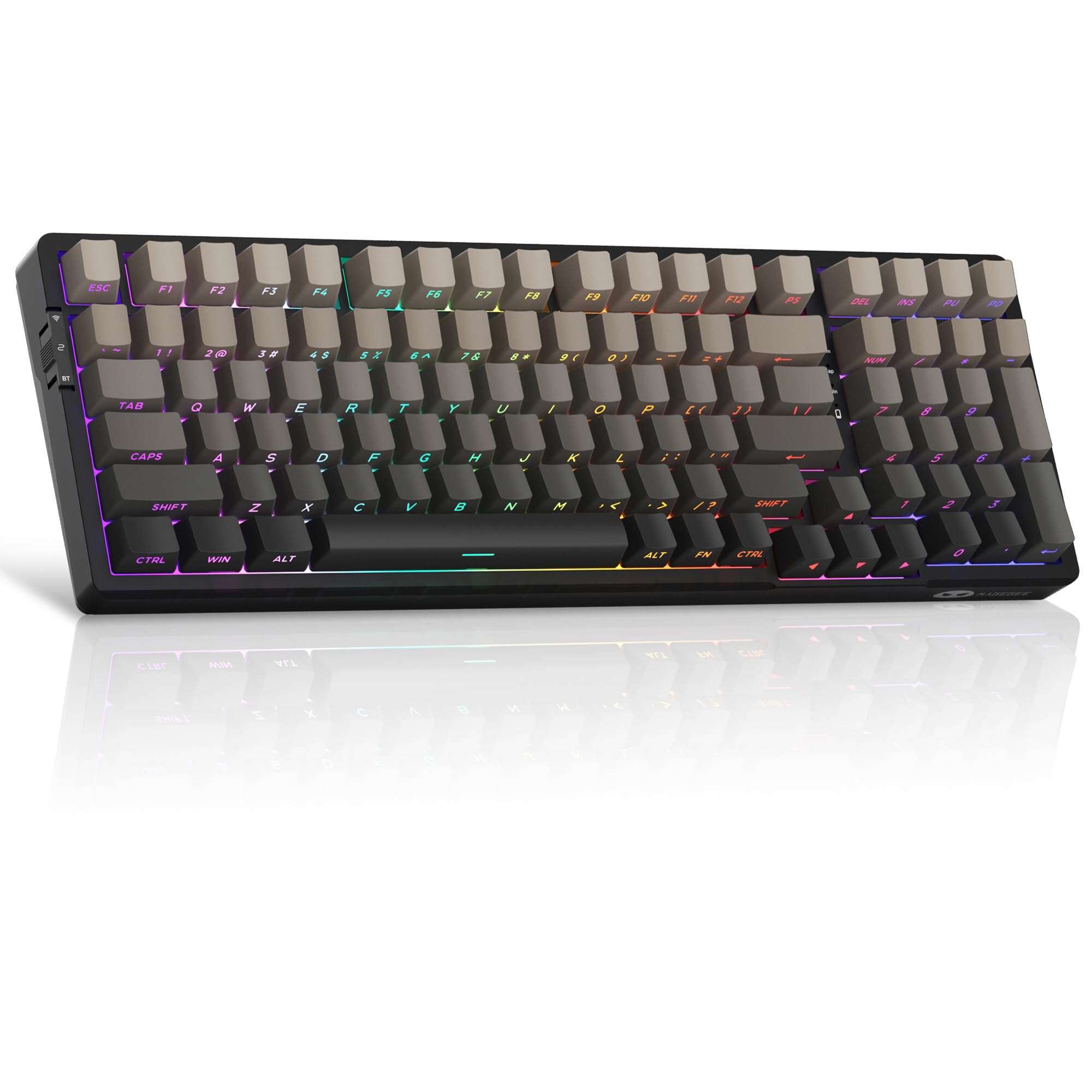
The MageGee LIGHT100 is a compelling entry point into the world of feature-rich mechanical keyboards. It manages to include tri-mode wireless connectivity, a hot-swappable PCB, and a gasket-mount structure for a creamy typing feel at a very accessible point. The inclusion of an enormous 8000mAh battery is particularly impressive, promising exceptional battery life.
It features side-printed PBT keycaps, which offer durability and a clean look, and vibrant RGB backlighting with multiple effects. The pre-installed quiet linear switches aim for a smooth, muted typing experience. For someone new to mechanical keyboards who wants to experience modern features like wireless modes, hot-swap customization, and a softer typing feel without a significant investment, this board is a standout.
While the build and materials may feel more basic compared to higher-tier options, the LIGHT100 delivers remarkable functionality for its category. It proves you don’t have to spend a lot to get a taste of the custom keyboard experience.
Why it’s great
- Incredible value, packing premium features at an entry-level point.
- Massive 8000mAh battery for worry-free wireless use.
- Includes gasket mount and hot-swap, great for beginners to mod.
Good to know
- Build quality and material finish are more basic to meet the price.
- Switch quality and sound tuning may not match more expensive boards.
- Brand has less established long-term support than others.
Understanding the Specs
Gasket Mount vs. Top Mount
These refer to how the internal plate (which holds the switches) is attached to the keyboard case. Gasket Mount uses rubber or silicone gaskets to suspend the plate, creating a softer, more flexible typing feel that absorbs vibration for a deeper, creamier sound. Top Mount fixes the plate directly to the top of the case, resulting in a firmer, more consistent feel with slightly more direct feedback. Both can sound excellent with proper dampening.
Switch Types: Linear, Tactile, & Hall Effect
Linear switches (like Red, Black, or proprietary names) press down smoothly with no bump, preferred for gaming and a consistent feel. Tactile switches have a noticeable bump during the press for typing feedback. Most keyboards here use pre-lubed linears for a smooth, “creamy” experience. Hall Effect switches are a different technology using magnets and sensors, allowing for adjustable actuation points and rapid trigger features, offering the highest degree of customization for performance.
FAQ
Is a wireless gaming keyboard good for competitive play?
What does “hot-swappable” mean and why do I want it?
Are side-printed keycaps hard to get used to?
How important is battery capacity in a wireless keyboard?
Final Thoughts: The Verdict
For most people, the gaming keyboard winner is the AULA F99 Pro because it perfectly balances premium features like a control knob and massive battery with the excellent creamy typing experience of a gasket-mount design, all at a mid-range point. If you want cutting-edge, customizable performance, grab the Keychron K10 HE. And for maximizing value and experiencing core modern features on a budget, nothing beats the MageGee LIGHT100.

Mo Maruf
I created WellFizz to bridge the gap between vague wellness advice and actionable solutions. My mission is simple: to decode the research and give you practical tools you can actually use.
Beyond the data, I am a passionate traveler. I believe that stepping away from the screen to explore new environments is essential for mental clarity and physical vitality.