Our readers keep the lights on and my smoothie glass nicely filled. As an Amazon Associate, I earn from qualifying purchases.
Specs are compiled from manufacturer listings and verified buyer reviews and can change over time — please confirm the key details on the product page before buying.
Jumping from a single-color printer to a multi-color one sounds thrilling until you see the mountain of wasted filament piling up beside your finished model. The promise of vibrant prints is real, but the purge waste, the setup headaches, and the software quirks can turn that excitement into frustration fast. This guide cuts through the promises to the actual performance, helping you choose the colour 3D printer that matches your skill level and your expectations — without the wasteful surprises.
I’m Mohammad Maruf — the founder and writer behind WellFizz. This guide is built by comparing the manufacturers’ published specifications and the patterns across verified customer reviews, so you get each pick’s real strengths and trade-offs instead of marketing spin.
We break down eleven of the most compelling options, from the beginner-friendly to the industrial-grade, to find the best colour 3d printer for your specific use case — balancing print quality, speed, waste, and the all-important ease of ownership.
Our Picks at a Glance



How To Choose The Best Colour 3D Printer
The biggest leap you make with a colour 3D printer is moving from swapping spools by hand to letting the machine handle it. But not all machines handle it the same way. Some use a single nozzle and purge the old colour before loading the new one — this creates significant waste, often doubling the material you use for a single print. Others use multiple independent toolheads, each with its own nozzle, so there is zero purging; the printer simply swaps the entire tool. That first choice — single-nozzle with AMS versus multi-toolhead — is the single most important decision you will make.
Decide on Your Waste Tolerance First
If you plan to print small, single-colour parts most of the time and only occasionally want a multi-colour piece, a single-nozzle system with an AMS (Automatic Material System) is fine. The purge waste is noticeable on small colour changes, but the upfront cost is much lower. If you intend to run large multi-colour projects regularly, a multi-toolhead printer like the Snapmaker U1 or the Prusa XL will save you significant money on filament in the long run because it uses five times less waste.
Match the Print Volume to Your Projects
The build volume determines the maximum size of your model. A compact machine like the Bambu Lab A1 Mini (with a smaller print volume) is perfect for desk toys and small prototypes. A mid-size volume, such as the 260mm³ found on many Creality and Anycubic models, handles most hobbyist projects — helmets, large figures, functional parts. If you need to print industrial components, enclosures, or prop replicas in one piece, you step up to the QIDI Max4, whose 390×390×340mm volume is 55% larger than many competitors and can fit full-size builds without splitting.
Speed Is Not Just the Big Number
Printers boast maximum speeds of 500mm/s, 600mm/s, or even 800mm/s. These numbers matter, but acceleration is what dictates how fast they actually move on small, detailed parts — the kind you print most in colour. A printer like the Bambu Lab P1S Combo has a 20,000 mm/s² acceleration, meaning it reaches high speed quickly on short moves. A higher acceleration figure often makes a bigger difference in total print time than a high top speed number. Look at both — acceleration and top speed — to guess real-world speed.
Don’t Underestimate the Software Experience
The best hardware in the world is useless if the slicer software is confusing or buggy. Several buyers report that apps crash when sending prints, or that Wi-Fi connections drop, rendering the machine hard to control. Check whether the machine uses a proprietary slicer or an open-source one like PrusaSlicer or Orca Slicer, as open-source options have larger communities and more tutorials. Also consider whether the printer supports direct file transfer via SD card as a fallback, so a flaky app doesn’t stop you from printing.
Quick Comparison
| Model | Best For | Max Colors | Max Speed | Build Volume | Amazon |
|---|---|---|---|---|---|
| Bambu Lab P1S Combo★ Best Overall | Best Overall | 16 | 500mm/s | 256×256×256 mm | Amazon |
| Anycubic Kobra XBest Entry-Level Color | Entry-Level Color | 19 | 600mm/s | 260×260×260 mm | Amazon |
| Bambu Lab A1 Mini ComboCompact Color Starter | Compact Starter | 4 | — | 180×180×180 mm | Amazon |
| FLASHFORGE AD5X | High-Speed 4-Color | 4 | 600mm/s | 220×220×220 mm | Amazon |
| Creality SPARKX i7 Combo | AI Photo-to-3D | 4 | — | 260×260×255 mm | Amazon |
| Anycubic Kobra S1 Combo | Mid-Range Color | 8 | 600mm/s | 250×250×250 mm | Amazon |
| Creality K2 Combo | Next-Gen 16-Color | 16 | 600mm/s | 260×260×260 mm | Amazon |
| Snapmaker U1 | Zero-Waste Color | 4 | 500mm/s | 270×270×270 mm | Amazon |
| Creality K2 Plus Combo | Large-Format Color | 16 | 600mm/s | 350×350×350 mm | Amazon |
| QIDI Max4 Combo | Industrial Volume | 16 | 800mm/s | 390×390×340 mm | Amazon |
| Prusa XL 5-Toolhead | Professional 5-Color | 5 | — | 360×360×360 mm | Amazon |
In‑Depth Reviews
1. Bambu Lab P1S Combo
Our pick — over 4★ from 550+ verified ratings; the strongest balance of quality and price.
A fully enclosed CoreXY machine with a 95% first-try success rate, delivering reliable 16-color prints from the start.
The P1S Combo is a fully enclosed CoreXY machine that supports up to 16 colours through its AMS system. You can print PLA, PETG, TPU, PVA, ABS, and ASA right from the start. The critical advantage here is trust: owners mention that failures are almost always user error, not the machine’s fault — which takes the anxiety out of a 20-hour colour print. The auto bed leveling and the simple 15-minute setup mean you spend your time designing, not calibrating.
With an acceleration of 20,000 mm/s², it is twice as fast as the Bambu Lab A1 Mini’s 10,000 mm/s², making complex multi-colour models noticeably quicker to finish. At 47.5 pounds, this is a desk anchor, not a portable unit, but the weight gives it the stability needed to hold precision during high-speed moves. The 500mm/s top speed is lower than some competitors, but the blistering acceleration more than compensates on the sort of intricate colour prints you will actually make.
Customers note that “95% success rate over 100 prints; failures were user error” — a level of reliability that beginners and professionals alike mention over and over. The crowd favourite, with nearly 600 ratings and a 4.4-star average, unanimously praises the flawless out-of-box experience. The biggest caveat is that the touchscreen feels primitive and some users found the Wi-Fi binding process frustrating, but for most owners, the print quality and reliability far outweigh the interface quirks.
What Wins People Over
- 16 colours from a single AMS system, giving you a full palette without manual swaps.
- Enclosed design handles advanced filaments like ABS and ASA without warping.
- Multiple owners call it a “beginner-friendly” machine that delivers professional results.
The Honest Trade-offs
- AMS purge waste is significant on small colour changes — expect to lose some filament.
- The screen is dated and the software can occasionally hiccup during network setup.
- At 47.5 pounds, moving it later is a two-person job.
The No-Brainer Pick: If you want a turnkey colour printer that just works, this is it — the P1S Combo is the highest-rated, most-reviewed machine that balances speed, colour capacity, and reliability perfectly.
Think Twice If: You need a zero-waste colour system or you mostly print small, single-colour parts — the purge waste of the AMS system will frustrate you.
2. Anycubic Kobra X Multicolor 3D Printer
An affordable entry into multi-color printing with expandable capacity up to 19 colors and a compact footprint.
The Kobra X arrives with 4 colours built-in and the ability to expand to 19 colours by adding additional ACE 2 Pro units. This makes it the most affordable path to a large colour palette — and at 600mm/s max speed, it is also one of the fastest on paper. Owners praise the print quality above all else, with 28 positive mentions — more than any other aspect. The ease of use follows closely behind, with 23 owners noting how simple the setup and daily operation are.
The trade-off is that reliability, adhesion, and clogging are all “mixed” in the review data. Some units arrive with defects or develop problems. But the owners who get a good unit report over 265 hours of printing with only one user-error failure. The flexible magnetic bed eliminates the need for glue or tape, which simplifies among the most annoying parts of 3D printing. Compared to the Bambu Lab P1S Combo, the Kobra X is 50% larger by volume — 23 x 13 x 22 inches — so it fits more easily on a crowded desk, but at 20.9 pounds it is less than half the weight of the P1S Combo, which makes it easier to move but also less rigid under high-speed acceleration.
The AI camera with spaghetti detection is a smart addition for unsupervised prints, though owners have mixed success with its reliability. For the price, the Kobra X delivers a genuinely impressive colour printing experience if you are willing to accept the occasional tweak and the possibility of an initial defect. As the review pages sum it up, this is the “perfect machine for a newbie” — just be ready to handle a minor hiccup or two.
The Real Strengths
- Up to 19 colours — the highest colour capacity in this list — for the lowest entry price.
- Compact footprint saves desk space, making it ideal for a home office or school.
- Flexible magnetic bed and auto-leveling remove the two biggest beginner pain points.
Where It Cut Corners
- Reliability and adhesion are hit-or-miss — some units arrive defective or develop clogs.
- The slicer software has reported glitches that can interfere with Wi-Fi connectivity.
- Although fast on paper, the 20,000 mm/s² acceleration of the Bambu P1S gives it an edge on intricate colour parts.
Best for Budget-Minded Beginners: If you want to dip your toes into colour printing without spending a fortune, the Kobra X delivers the highest colour capacity in the list at the lowest entry price.
Look Elsewhere If: You need a printer you can “set and forget” — the mixed reliability scores mean there’s a real chance you will need to diagnose a problem.
3. Bambu Lab A1 Mini Combo
A compact, whisper-quiet printer at ≤48 dB that auto-calibrates in minutes for low-maintenance 4-color prints.
If your biggest constraint is physical space, the A1 Mini Combo is the obvious pick. It supports 4-colour printing through the AMS Lite and is designed to be up and running in about 20 minutes from opening the box. Full-auto calibration means you never touch a bed leveling knob — the printer does everything itself, including Z-offset, bed-leveling, and active flow rate compensation. Owners rate it as the most beginner-friendly printer on this list, with suitability for beginners the single most-mentioned positive aspect (48 mentions).
However, the acceleration is only 10,000 mm/s² — exactly half the acceleration of the full-sized P1S Combo. On multi-colour prints with many small colour changes, the A1 Mini will be noticeably slower. The compact build also means a smaller maximum model size, so forget printing a large helmet or a full-size vase in one piece. The AMS Lite introduces filament waste during colour changes, just like the larger P1S Combo, but some owners note that the waste is higher relative to the small model sizes the Mini produces.
Owners also discovered a quirk: the A1 Mini needs a very rigid, solid desk. If you put it on a carpet or a wobbly table, it can shake during fast moves and produce wavy layers. The community fix is to place it on a concrete paver or a stable bench. This is a printer that rewards a calm, consistent environment. For anyone who wants a reliable, quiet, and laughably easy entry into colour printing, the A1 Mini Combo is the crowd-pleaser — with 350 ratings and a 4.4-star average pulling from nearly 50 owners who specifically praise its beginner-friendly nature.
Why It’s So Liked
- Auto-leveling and active flow compensation mean you get flawless first layers every time.
- Quiet operation at ≤48 dB means it can run in a bedroom or office without bothering you.
- The 1-Click quick-swap nozzle makes maintenance a 10-second job.
Where It Falls Short
- At half the acceleration of the P1S Combo, colour prints take longer to finish.
- Limited build volume — you cannot print large single-piece models.
- Needs a rigid desk; carpet or soft surfaces cause print defects.
For the Desk-Limited Beginner: If your space is small and you want to start printing colour models today with zero calibration frustration, this is your printer.
Skip It For: Large colour projects or if you want to scale up to bigger models later — you will outgrow the print volume quickly.
4. FLASHFORGE AD5X

A CoreXY printer with 20,000 mm/s² acceleration and 600mm/s top speed, offering competitive speed at a lower price.
The AD5X brings 600mm/s top speed and 20,000 mm/s² acceleration — identical acceleration figures to the more expensive Bambu P1S Combo — to a more accessible price point. It prints with up to 4 colours simultaneously using its IFS system and features a 300°C direct-drive extruder that handles everything from standard PLA to more demanding materials. The one-click auto-leveling system takes the guesswork out of bed calibration, and the dual-channel cooling fan plus vibration compensation system produce genuinely clean prints.
The AD5X has a 220×220×220mm build volume, which is smaller than the 260mm³ found on many competitors. This matters for large colour projects. It also weighs 24.2 pounds — roughly half the weight of the P1S Combo — which makes it easier to reposition but also less sturdy under high acceleration. Some reviewers point out catastrophic nozzle failures around the 300-hour mark, though support replacement parts arrived in those cases. The general sentiment from the nearly 1,000 ratings and a 4.0-star average is that the AD5X is “very good” when it works, but reliability is the recurring point of concern.
Owners strongly recommend upgrading to the all-metal hotend and running a firmware update from the start to improve reliability. The machine generates noticeable noise, especially during filament purging and Z-axis movements. For the price, you get CoreXY speed and multi-colour capability, but you accept a slightly higher gamble on initial build quality. The 4-colour IFS system works well for most prints, but some users had filament jams at the 4-in-1 connector. The bottom line: an excellent value for your first colour printer if you are comfortable with occasional troubleshooting.
The Speed Narrative: At 20,000 mm/s² acceleration with 600mm/s top speed, the AD5X matches the Bambu P1S Combo’s acceleration rate, making it one of the fastest machines on this list for detailed colour prints.
Choose This If: You care about raw speed and acceleration over brand polish, and you are willing to spend time on initial setup and occasional part replacements.
Hold Off If: Reliability is your top priority — the Bambu P1S has a much stronger track record of trouble-free ownership.
5. Creality SPARKX i7 Combo
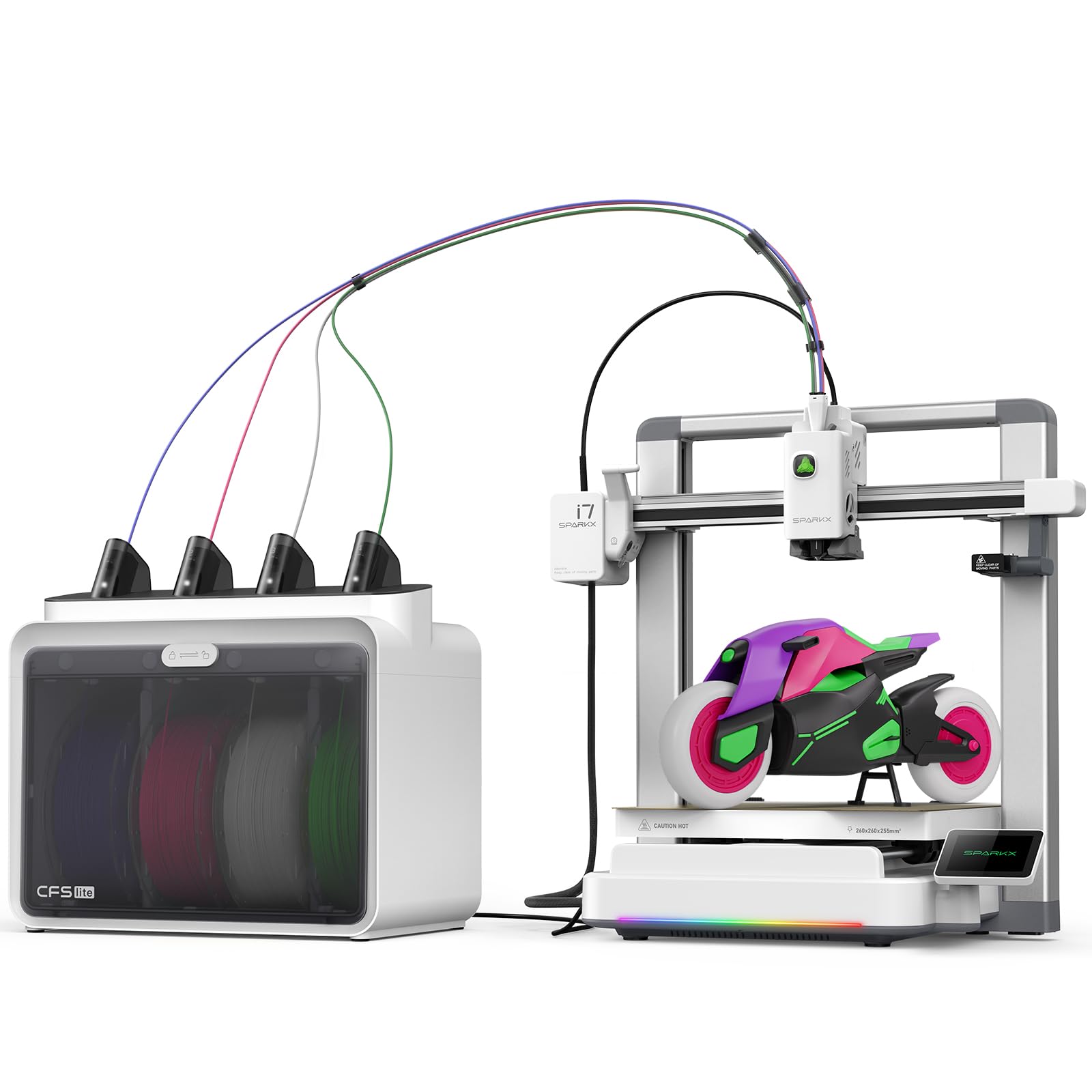
An AI-powered printer that converts a face photo into a 3D model in seconds, ideal for personalized keepsakes.
The Creality SPARKX i7 stands apart with a unique party piece: AI photo-to-3D conversion. You upload a portrait, and the CubeMe AI generates a 3D model in seconds — no modeling software needed. This is a compelling feature for personalised gifts, custom figurines, and keepsakes. The printer also features a four-colour CFS (Creality Filament System) that claims 50% less waste than traditional multi-colour systems, and advanced AI monitoring that detects failures like spaghetti, air printing, and filament tangles.
The SPARKX i7 is 95% pre-assembled, with a build volume of 260×260×255 mm — generous enough for full-size models. It weighs 38.3 pounds, making it substantially heavier than the A1 Mini but lighter than the Bambu P1S. Owners rate build quality as the most positive aspect, with 5 mentions. However, reliability and noise receive mixed reviews, and some shoppers say that the printer rocks on a level table during certain prints — an issue that may require a riser or cable guide fix. The “Night Mode” enables ultra-quiet, light-free overnight operation, but daytime printing is still on the noisy side.
The filament waste issue comes up consistently: while the system claims to cut waste by 50%, owners note that multi-colour prints still generate more purge waste than expected. The CFS lite system has a learning curve for loading filament, but once you get the hang of it, as one owner put it, “it’s really easy.” Overall, the SPARKX i7 is a distinctive choice for creators who want the AI-to-print workflow, but it lacks the proven reliability of the Bambu or Anycubic stablemates.
The Unique Advantage
- AI photo-to-3D conversion is genuinely novel — upload a portrait and print a self-figurine in minutes.
- 50% less waste than traditional systems, saving on filament costs.
- Large 260mm build volume for a printer in this price tier.
Where It Stumbles
- Noise levels are mixed — some owners find it “sounds crazy” during operation.
- Reliability concerns: a few units had nozzle clogs and extruder issues.
- The AI camera detection is less reliable than advertised for failure detection.
Perfect for Gifts and Keepsakes: The photo-to-3D feature is a genuine differentiator — if personalisation is your main goal, this printers for you.
Not Your Pick If: You need a reliable workhorse for daily colour printing — the mixed review scores and noise concerns make this less suited for volume work.
6. Anycubic Kobra S1 Combo

The built-in ACE Pro filament dryer keeps spools at optimal moisture levels, eliminating a common cause of failed prints.
The Kobra S1 Combo includes the ACE Pro, a filament dryer that keeps your spools at optimal conditions with dual PTC heating and 360° hot air circulation. This is a massive quality-of-life improvement: wet filament is the number one cause of failed prints, and this machine tackles it automatically. The printer itself delivers up to 600mm/s speed and 20,000 mm/s² acceleration, with 4-colour printing from the start and the ability to expand to 8 colours by linking two ACE Pro units.
Owners who received the updated unit (with metal sensor tabs and a no-PTFE hot end) report near-perfect performance — over 300 hours with no clogs and flawless bed-leveling. The app-based remote control makes one-click printing easy from anywhere. However, the initial batch had documented issues with the ACE sensor and extruder failures, leading to mixed reliability reviews. The ACE feeder port can leak filament, and the purge waste is considerable for multi-colour prints.
The Kobra S1 Combo’s secret weapon is the build volume — 250×250×250 mm — which is slightly smaller than the Kobra X but still large enough for most hobbyist projects. The enclosure is not included, so printing ABS or ASA requires a separate purchase. Overall, if you get the updated unit, the Kobra S1 Combo is a fantastic mid-range colour printer with a built-in dryer that separates it from most competitors. But the reliability score (3.8/5 across 258 ratings) means it is a pick for the enthusiast who can handle an occasional issue.
The Standout Feature: The built-in ACE Pro filament dryer is a genuine first for this price tier — it actively keeps your filament at optimal moisture levels, eliminating a common failure point.
Best For: Anyone who prints with moisture-sensitive materials like PETG, TPU, or nylon and wants a single-machine solution that cares for the filament automatically.
Think Twice If: You want a printer that works perfectly from the start with zero troubleshooting — the mixed reliability scores flag real risks.
7. Creality K2 Combo

A massive 16-colour palette paired with an aerospace-grade frame for industrial-level stability.
The K2 Combo ships with one CFS unit that gives you four colours, and you can expand to four CFS units for a total of 16 colours. The CFS includes RFID filament recognition and an airtight desiccant system to keep your materials dry. The printer features a 600mm/s top speed with 20,000 mm/s² acceleration, built on an aerospace-grade aluminium frame with steel X-axis rails and dual Z-axis for ultra-smooth layer consistency. The 40 mm³/s high-flow hotend handles standard and engineering-grade filaments, including PLA, ABS, PETG, and PA-CF.
Owners who received a working unit are effusive: “Easy set up, I love the multi color printing… The operation is smooth and very user friendly.” The AI chamber camera monitors for spaghetti and foreign objects, and the carbon air purifier filters VOCs. The built-in 8GB local storage with Wi-Fi connectivity means you can queue prints from anywhere. However, there is a darker side: multiple owners describe catastrophic failures after weeks of use, with one stating their printer became “a dead paperweight” after cascading mechanical issues, and reporting non-existent Creality support. The 3.9-star average across 564 ratings reflects this split.
Reach for the K2 Combo if you want a large-format, 16-colour machine and you are comfortable with the risk of needing to return or repair a unit. The best-case owners call it “the best printer ever.” The worst-case owners got a dead machine with months of no support. It is a high-variance pick. The K2 Combo is a genuine contender for the colour palette, but be ready to navigate Creality’s support system if things go wrong.
What Excites Owners
- 16-colour capability with intelligent RFID filament management.
- Aerospace-grade frame and dual Z-axis deliver flawless layers and zero wobble.
- Silent Mode and vibration-free design make it a quiet neighbour.
The Potential Pitfalls
- Reports of catastrophic mechanical failure after weeks of use are worrying.
- Creality support is described as “incompetent” by some owners who were stuck with dead units.
- The AI failure detection is not reliable enough to prevent all failed prints.
For the Colour Enthusiast Who Dares: The K2 Combo has the potential to be a 16-colour beast, but its reliability track record makes it a pick for tinkerers, not carefree users.
Safer Alternatives: The Bambu P1S Combo (fewer colours, but proven reliability) or the QIDI Max4 (higher reliability, larger volume) are better bets for confidence.
8. Snapmaker U1

Four independent toolheads swap in 5 seconds, eliminating purge waste and reducing filament use by up to 5X.
The Snapmaker U1 is the definitive answer to the purge-waste problem. Instead of a single nozzle that loads, unloads, and purges filament for each colour change, the U1 uses four dedicated toolheads that stay preheated and preloaded. The SnapSwap system changes tools in about 5 seconds — the fastest tool change on this list — and the locking mechanism has passed over 1,000,000 swaps with zero failures. This design reduces filament waste by up to 5X and makes multi-colour printing up to 5X faster than traditional systems.
The U1 prints at 500 mm/s on a rigid CoreXY frame with carbon fibre X-axis rails, maintaining stability across a 270×270×270 mm build volume. It supports multi-material printing, combining rigid and flexible materials like PETG+TPU or PLA+TPU in a single job, with soluble supports for complex geometry. Owners praise the “zero-waste multi-color printing with excellent speed and quality” and note that a 4 Tigers model took 32 hours compared to 58 hours with 350g of waste on a single-nozzle printer.
Setup takes under 20 minutes, and the on-screen calibration is step-by-step. The Snapmaker Orca slicing software includes a built-in model library. The printer is 4.6-star rated across 57 ratings — the highest star rating in this list. The only downside: at 59 pounds, it is heavy, and the four independent toolheads mean a larger footprint. This is the printer for the colour enthusiast who cares about efficiency and quality above all else.
Why It’s a Game-Changer
- Zero-waste colour printing — no purge tower, no filament purging, just pure material savings.
- 5-second tool swap vs. 2 minutes per colour change on single-nozzle systems.
- Handles mixed materials like TPU with rigid in a single print job.
The Small Compromises
- Large and heavy footprint at 59 pounds — you need a dedicated desk space.
- Only 4 colours vs. 16 on some competitors — but you lose zero filament per colour.
- Smaller owner community means less online support and fewer custom profiles.
If You Hate Filament Waste: The U1 is the most efficient colour printer on the market — every gram of filament goes into the model, not the bin.
Not Your Match If: You need 16 colours regularly or you want the largest possible build volume — the U1’s 270mm³ is generous but not massive.
9. Creality K2 Plus Combo

A 350mm³ build volume with blistering 30,000 mm/s² acceleration for large colour prints.
The K2 Plus Combo moves up to a massive 350×350×350mm build volume — enough for full-size helmets, large cosplay props, and functional prototypes. It achieves a staggering 30,000 mm/s² acceleration with a top speed of 600mm/s, making it one of the fastest large-format printers available. The step-servo motor system ensures quiet operation even at high speeds. It supports 16 colours using up to four CFS units, and the active heated chamber allows printing with advanced materials like PPA-CF and PA-CF.
Owners are overwhelmingly positive, calling it a “beast of a machine” that produces “perfect prints every time, zero failures.” The dual AI cameras provide real-time monitoring, spaghetti detection, and time-lapse recording. The anti-tilt auto-leveling system and strain gauge ensure a perfect first layer. The printer ships with one CFS unit and two 250g filament spools. It weighs only 27.5 pounds — surprisingly light for a 350mm³ machine, though this is likely a data anomaly versus the actual packaged weight.
The drawbacks are notable. Multiple owners reported Y-axis servo communication failures on initial setup, with one saying the printer took 36 hours to get a first print. The support team is slow to respond, with replacement parts taking up to two weeks. The colour purge noise is loud. This is a printer for the large-project enthusiast who is comfortable with an initial technical challenge but will be rewarded with industrial-level print volume and speed. The 4.0-star rating across 885 ratings is strong, but the worst-case review is a story of a very rough start.
The Big Picture Highlights
- 350mm³ build volume fits full-size props, helmets, and large prototypes without splitting.
- 30,000 mm/s² acceleration is the fastest acceleration figure on this list — lightning quick even on huge models.
- Active heated chamber for engineering-grade materials like PA-CF and PPA-CF.
The Setup Reality Check
- Documented initial setup issues with servo failure and extruder wiring — needs a technically competent owner.
- Support is slow; a replacement from Creality took 2 weeks for one owner.
- Loud during colour changes — not a silent printer by any stretch.
Your Pick If: You need a large build volume for big colour projects and you have the patience and skill to handle initial hardware troubleshooting.
Stick With the P1S Combo If: You want proven reliability without the risk of a frustrating first-week setup — the P1S has fewer issues from the start.
10. QIDI Max4 Combo

The industrial-scale workhorse with an actively heated 65°C chamber for engineering-grade materials.
The QIDI Max4 Combo has a 390×390×340mm build volume — 55% larger than its predecessor and the largest single-volume printer on this list. The 65°C active heated chamber, combined with a full-surface silicone heated bed, enables reliable printing of advanced materials like ABS-CF, PC, and PPS-CF. The closed-loop X/Y motors achieve 800mm/s top speed with 30,000 mm/s² acceleration, making it both the fastest and the largest printer here. The QIDI BOX add-on supports up to 16 colours with intelligent filament management.
Owners are rapturous: “outstanding print quality with engineering filaments” and “700+ hours with minimal issues” are common themes. The Max4 has the highest star rating in this list at 4.9 stars across 23 ratings — a small sample, but every single owner is overjoyed. The printer is also notably open-source compatible, working with other slicers besides QIDI’s own. The 40mm³/s high-flow hotend with a hardened steel nozzle handles abrasive filaments like carbon-fiber-reinforced nylon without issue.
There are honest caveats. The pre-print start time is long — the printer runs a thorough calibration routine before each job. The user interface is described as “choppy” and the software error handling is imperfect. The Max4 also consumes significant power during initial heating of the 65°C chamber. And at 120 pounds, this is a permanent installation — you will not be moving it to a different desk. For the professional or serious enthusiast who demands industrial volume and colour, the Max4 is an exceptional choice.
What Makes It Exceptional
- Massive 390×390×340mm volume for industrial parts and large multi-colour projects.
- 65°C active heated chamber enables reliable printing of materials like PPS-CF and PC.
- Closed-loop motors on X/Y axes achieve 800mm/s top speed — fastest in this list.
Practical Limitations
- 120-pound weight requires a permanent, dedicated, and sturdy desk or stand.
- Long pre-print calibration time adds several minutes before each job.
- High initial power consumption to heat the 65°C active chamber — not energy efficient for quick prints.
For the Engineering Professional: The Max4 is the only printer on this list that combines large volume, active chamber heating, 16-colour support, and high-speed motion in one machine.
Skip If: You only print PLA and want a compact desktop unit — the Max4 is overkill and will dominate your workspace.
11. Original Prusa XL 5-Toolhead
 Check Price on Amazon
Five independent toolheads driven by an open-source ecosystem that protects your freedom to tinker.
The Prusa XL 5-Toolhead is the professional’s choice for multi-material and multi-colour printing. It features five independent toolheads that swap in seconds with no purge waste — the same zero-waste philosophy as the Snapmaker U1, but with one extra toolhead capacity. The build volume is 14.17×14.17×14.17 inches (360×360×360 mm), making it a large-format machine suited for industrial prototyping. The segmented heated bed system heats only the zones needed, reducing energy consumption and warping on large prints.
Owners who love this printer praise its “outstanding print quality” and describe it as “made by people who actually care about the maker community.” The Prusa ecosystem — PrusaSlicer, Printables.com, and lifetime technical support from a company with decades of industry experience — is the real draw. The machine is designed for open-source workflow with no forced updates or logins, which matters to many professionals. The print quality is consistently described as excellent, with 8 positive mentions for this aspect.
The XL has notable drawbacks. The durability score is mixed, with the same number of negative mentions as positive (8 each). Several buyers report that their units arrived with broken plastic parts or defects from shipping — a result of Prusa’s complex assembly and international logistics. The “assembled” printer requires significant setup: the extruder assembly and LCD are packed separately for safety and can take half a day to install. Prusa’s support, while generally good, can be slow for international customers. At 75 pounds and 35.43×31.49×31.49 inches, this is the second-heaviest printer here and requires a substantial footprint.
The Professional Advantages
- 5 independent toolheads provide zero-waste colour and unlimited multi-material possibilities.
- Lifetime technical support and an open-source ecosystem with no vendor lock-in.
- Segmented heated bed reduces warping and saves energy on large prints.
Realistic Cons
- Shipping damage is a theme — several owners received units with broken parts.
- Requires significant post-ship assembly despite being sold as “assembled.”
- Software experience is less polished than Bambu’s offering, with buggy UI and connectivity issues reported.
The Right Fit For: Professional users who value open-source freedom, need 5-toolhead colour capacity, and are comfortable with an involved setup process.
Avoid If: You want a turnkey experience — the Prusa XL demands patience and technical skill to get running smoothly.
Understanding the Specs
Acceleration vs. Top Speed
Top speed (measured in mm/s) tells you how fast the print head can move across a straight, long distance — say, printing the side of a large box. Acceleration (measured in mm/s²) tells you how quickly the printer reaches that top speed on short, intricate moves, which is what you have during colour changes and detailed geometry. A printer with high acceleration (20,000 mm/s² or above) will finish detailed colour prints faster than one with a high top speed but low acceleration. The Bambu P1S Combo at 20,000 mm/s² beats slower-accelerating machines on the same print.
Colour Channels vs. Toolheads
A single-nozzle colour system (like Bambu’s AMS or Creality’s CFS) uses one print head but switches between multiple filaments — each colour change purges the old colour before extruding the new one. This is efficient for simple colour prints but wasteful on frequent changes. A multi-toolhead system (Snapmaker U1’s 4 heads, Prusa XL’s 5 heads) never purges; it just swaps the active tool. Multi-toolhead machines are drastically more material-efficient and faster on multi-colour prints, but they cost more upfront and have a larger physical footprint.
FAQ
What is the real difference between 4-colour and 16-colour printing?
Does the Bambu Lab P1S Combo work with non-Bambu filament?
Is the Snapmaker U1 worth the higher price for zero-waste color?
How much filament waste does a single-nozzle colour printer create?
Can I use the Prusa XL for materials like PPA-CF or PEEK?
What is the best colour 3D printer for a total beginner?
How much desk space do I need for a large-format colour printer?
Does the Anycubic Kobra X require an enclosure for printing ABS?
What is the best colour printer for cosplay and large props?
Final Thoughts: The Verdict
For the majority of shoppers, the best colour 3d printer winner is the Bambu Lab P1S Combo because it combines 16-colour flexibility, a 95% first-try success rate, and proven reliability that beginners and professionals alike rely on for trouble-free ownership. If you want zero waste and efficient multi-material printing, grab the Snapmaker U1. And for industrial-scale builds with a 65°C active chamber for engineering filaments, the QIDI Max4 Combo is the one to reach for.
How We Picked
We do not accept paid placement. Every pick is matched to a real buyer and a real use-case; we do not hands-on test units.
Sources & Methodology
Specifications: manufacturer listings and product documentation. Review insights: verified customer reviews, as of July 2026. Pricing: not shown on this page (it changes often); check the current price via the retailer link.
As an Amazon Associate, WellFizz earns from qualifying purchases. This does not affect which products we feature.
Related Guides

Mo Maruf
I created WellFizz to bridge the gap between vague wellness advice and actionable solutions. My mission is simple: to decode the research and give you practical tools you can actually use.
Beyond the data, I am a passionate traveler. I believe that stepping away from the screen to explore new environments is essential for mental clarity and physical vitality.