Our readers keep the lights on and my smoothie glass nicely filled. As an Amazon Associate, I earn from qualifying purchases.
Specs are compiled from manufacturer listings and verified buyer reviews and can change over time — please confirm the key details on the product page before buying.
You don’t need to spend a fortune to get clear, professional-sounding audio for your gaming streams, podcasts, or remote meetings. The real trick is knowing which budget-friendly mic blocks out the hum of your computer fan and the clatter of your keyboard, while making your voice sound rich and present. This guide cuts through the noise to find the cheap microphone that actually delivers on its promises.
I’m Mohammad Maruf — the founder and writer behind WellFizz. This guide is built by comparing the manufacturers’ published specifications and the patterns across verified customer reviews, so you get each pick’s real strengths and trade-offs instead of marketing spin.
A good cheap microphone does more than save you money—it picks up your voice clearly while blocking everyday room noise so your listeners hear only you. The key is the polar pattern (the direction the mic listens from) and a build sturdy enough to reject background sounds.
Quick Picks
- TONOR Dynamic Gaming Microphone, TD510 Air S H+ — Best Overall
- HyperX SoloCast 2 – Gaming USB Condenser Mic — Top Performer
- MAONO USB/XLR Podcasting Microphone, PD100X — Best Value
- Razer Seiren V3 Mini USB Microphone — Compact Pick
- ZealSound Podcast Microphone for iPhone PC & Android, K66 — Best for ASMR
- TONOR USB Microphone for PC, TC30 — Budget Champion
- FIFINE Gaming USB Microphone, AmpliGame A6V — Entry-Level Pick
How To Choose The Best Cheap Microphone
Picking a budget microphone means knowing what specs actually translate to a better sound for your specific use case. You can save a lot of money, but only if you prioritize the right features.
Polar Pattern: Cardioid Is Your Friend
The polar pattern decides which direction the microphone picks up sound from. For a cheap microphone, a cardioid (heart-shaped) pattern is ideal because it focuses on what is directly in front and rejects sound from the sides and rear—perfect for ignoring your computer fans or a noisy roommate. A supercardioid pattern, found on the Razer Seiren V3 Mini, is even tighter, offering slightly better noise rejection but a very narrow balance you must stay inside.
Quick Comparison
| Model | Best For | Polar Pattern | Sample Rate | Connection | Amazon |
|---|---|---|---|---|---|
| TONOR TD510 Air S H+ | Noisy Home Offices & Streamers | Dynamic | — | USB / XLR | Amazon |
| HyperX SoloCast 2 | Plug-and-Play Clarity | Cardioid | 96kHz / 24-bit | USB-C | Amazon |
| MAONO PD100X | Versatile Input & App Control | Cardioid | 48kHz / 24-bit | USB / XLR | Amazon |
| Razer Seiren V3 Mini | Ultra-Compact & Simple Setup | Supercardioid | — | USB | Amazon |
| ZealSound K66 | ASMR & On-Mic Effects | Cardioid | 48kHz | USB / Lightning | Amazon |
| TONOR TC30 | Vocal Rejection of Room Noise | Cardioid | 48kHz | USB-C | Amazon |
| FIFINE AmpliGame A6V | Gaming Rig Aesthetics | Cardioid | 192kHz | USB | Amazon |
In‑Depth Reviews
1. TONOR Dynamic Gaming Microphone, TD510 Air S H+

The dynamic mic that uses AI to kill keyboard clatter before it reaches the stream.
This is the best overall pick because it tackles the single biggest problem with cheap microphones: background noise. Unlike the condenser mics below that pick up every tap and hum, the TONOR TD510 is a dynamic microphone, which is naturally less sensitive to ambient sound. It goes a step further with triple AI noise cancellation technology which buyers report effectively eliminates distracting sounds like keyboard clatter. The result is a clean vocal track that lets your voice through while the rest of the room fades away.
It also offers flexibility for the future with dual USB and XLR outputs. You can plug it in via USB right now for a simple setup, and later connect it to a professional sound card or mixer via an XLR cable for enhanced audio quality. The customizable RGB lighting adds a bit of flair, and the included boom arm keeps your desk uncluttered. It weighs 850 grams, giving it a solid, non-plastic feel. One reviewer noted that the physical settings don’t change things drastically, but for a budget-friendly mic that handles noise so well from the start, the core sound is what counts.
The Noise Killer: At 850 grams and with AI processing, this mic punches well above its tier for how clean your audio sounds in a typical room.
Future-Proof Input: The XLR port means you are not locked into USB only, a rarity at this price point.
Reach for this if: you game or stream in a room with a mechanical keyboard, a loud fan, or ambient chatter and want the best cleanup without spending a lot.
A trade-off to know: The boom arm is a bit bulky and the onboard controls are subtle, but the core noise-handling is class-leading.
2. HyperX SoloCast 2 – Gaming USB Condenser Mic

Studio-quality sound squished into a tiny footprint that stays out of your way.
What you get with the HyperX SoloCast 2 is the best audio resolution in this budget lineup, thanks to a 24-bit / 96kHz sampling rate. This gives your voice more detail and a cleaner, more professional tone compared to the standard 48kHz mics. It is a condenser mic with a cardioid polar pattern, which captures sound best from the front while naturally reducing pickup from the sides and rear. The built-in suspension system acts as a shock absorber to dampen vibrations from accidental knocks or desk bumps, keeping your audio smooth.
The design is brilliantly simple: a compact, tiltable weighted base that won’t tip over, a built-in foam pop filter so you don’t have to buy one, and a tap-to-mute sensor on top with an LED indicator. Reviewers rave about the crisp, clear audio and how easy it is to set up. It is also quite light at 330 grams. One owner did mention a quirk where the USB-C connection felt a little loose and could disconnect if bumped, but using a boom arm solves that issue easily.
Why It Shines
- Best sample rate in the guide at 96kHz/24-bit for highest vocal fidelity
- Built-in shock mount and pop filter mean no extra accessories needed
- Ultra-compact and stable weighted base
Minor Quirks
- USB-C port on the back can feel insecure if moved often
- Very sensitive; picks up background noise if you are not careful about gain
The Resolution King: For the cleanest, most detailed audio from a plug-and-play USB mic, this is the one.
One thing to plan for: Because it is very sensitive, you will want to manage your background noise or use the high-pass filter in the NGENUITY software.
3. MAONO USB/XLR Podcasting Microphone, PD100X

A feature-packed mic with app control and dual connectivity that feels like a smarter buy.
The MAONO PD100X is a fantastic value because it combines a 24-bit/48kHz dynamic mic with software control (MaonoLink) that lets you adjust the noise reduction level to fit your environment. The manufacturer compares its 24-bit/48kHz rate with similar mics using 16-bit/48kHz audio. It uses a customized cardioid capsule to capture clear audio while rejecting ambient sound, making it solid for noisy rooms. You also get a smart 2-in-1 knob that independently controls gain and monitoring volume, plus a tap-to-mute button.
It also offers USB and XLR dual connectivity, so you can upgrade to a professional audio interface later. The customizable RGB lighting has 3 modes and 8 color options, controlled via the MaonoLink software or a button on the bottom. Reviewers report clear audio with a warm tone and effective double noise cancellation. One caveat: the mute light appears orange on camera, and XLR mode disables the mute button and headphone jack. Still, for a starter mic that bridges beginner and pro gear, it is tough to top.
Loaded with Features
- MaonoLink software gives you customizable noise reduction levels
- Dual USB/XLR for future upgrade paths
- Smart knob for separate gain and monitor control
Know These Limits
- XLR mode disables onboard mute, RGB, and headphone jack
- Limited range; you must stay close to the mic
Best For Software Tweakers: If you like to dial in your sound with an app rather than just plugging in, the PD100X gives you that control.
A trade-off to know: Relying on XLR means losing the convenience of the mute button and monitoring, so keep it USB for daily use.
4. Razer Seiren V3 Mini USB Microphone

The tiny desktop mic with a super-tight pickup that ignores the world around you.
The Razer Seiren V3 Mini packs a unique supercardioid pickup pattern into a chassis that measures just 3.59 x 3.59 x 6.38 inches and weighs a mere 0.52 pounds. This tighter polar pattern focuses on your voice more aggressively than a standard cardioid, so sounds like typing or mouse clicks are less likely to make it into the broadcast. It is a condenser mic, so it is sensitive, but the supercardioid pattern helps compensate for that. The built-in shock absorber dampens noise from accidental bumps, and the tiny, tiltable stand can be detached for a boom arm setup.
Setup is truly plug-and-play: just plug it into a PC and it works with Discord, OBS Studio, and XSplit. The tap-to-mute sensor on the top is very satisfying, with an LED indicator that shows your mute status at a glance. Reviewers love its small size and the fact that it looks great on a clean desk. One owner mentioned the tap-to-mute can be a little too sensitive and sometimes needs multiple taps, but it is still a great feature. It lacks onboard gain or volume controls, which is a trade-off for its tiny size.
Space Saver
- Smallest footprint of any mic here at just 0.52 lbs
- Supercardioid pattern offers superior room noise rejection
- Tap-to-mute is intuitive and responsive
What You Give Up
- No physical gain or volume knobs on the mic
- Can be too sensitive; background dampener works better with software settings
Reach for this if: you have a small desk and want a chic, ultra-compact mic that keeps the audio clean without taking up space.
One thing to plan for: Lacking onboard controls means you will need to manage your levels through your computer’s sound settings or Razer Synapse software.
5. ZealSound Podcast Microphone for iPhone PC & Android, K66

The only budget mic with a dedicated echo knob and a noise reduction mode for whisper-clean takes.
The ZealSound K66 is perfectly tuned for ASMR creators and podcasters who need precise control right on the mic. It has a wide frequency response of 40Hz–18kHz to capture whisper-level detail, and a unique onboard Noise Reduction Mode that you can turn on by holding the mute button. This helps tame keyboard clicks and PC fan hum so the soft details remain clear. It also has an echo knob that lets you add a subtle room ambience or keep it dry for a clean, intimate sound—no plugins needed.
It also offers zero-latency monitoring via a 3.5mm headphone jack so you hear exactly what is being recorded, with dedicated knobs for mic gain and headphone volume. It is among the most versatile mics here because it supports USB, USB-C, and even Lightning adapters (included) to work directly with iPhones and iPads. One buyer mentioned clear sound on Android but a faint background hiss on a PC at high volumes, though it is acceptable at lower levels. The weighted, anti-vibration base helps keep it stable.
The Effects Master: With an echo knob, noise reduction mode, and zero-latency monitoring, the K66 gives you studio-like control without a computer.
Mobile Ready: The included Lightning and USB-C adapters make it a rare find for recording on iPhones and modern tablets.
Best For ASMR Artists: Anyone recording whispers, tapping, or breathing sounds will appreciate the echo knob and noise reduction mode right on the mic.
One thing to note: On some PCs, you may need to keep the gain low to avoid a faint hiss in the background.
6. TONOR USB Microphone for PC, TC30

The budget mic that blocks toddler noise better than anything else near its price.
One of the standout qualities of the TONOR TC30 is its excellent off-axis suppression. This means it is very good at rejecting sound that comes from the sides or back, focusing almost exclusively on what is directly in front of it. The cardioid polar pattern does this job so well that owners mention it can block out unexpected household sounds like a toddler or a cat meowing in another room. It uses a USB Type-C connector for a modern, stable connection, and has an impedance of around 2200 Ohms.
It comes as a complete kit with a condenser microphone, a concealed shock mount, a foldable tripod stand, a pop filter, and a USB Type-C to USB-A 2.0 cable. At 9.25 x 4.13 x 5.59 inches versus the FIFINE gaming mic at 6.93 x 7.05 x 3.78 inches, it offers a more substantial presence on your desk. It is a great entry-level pick for podcasting, Zoom meetings, or streaming. One owner reported it lacks a gain control knob, so you will need to manage volume via your computer’s settings or software.
Why It Wins on Value
- Best background noise rejection for the price, blocking room noise effectively
- Includes everything you need in the box: shock mount, tripod, pop filter
- USB Type-C for modern compatibility
A Few Shortcomings
- No physical gain or volume control on the mic body
- Sound quality is decent but not as crisp as pricier options on this list
Best For Quiet Offices: If your main concern is being heard clearly without your family’s noise leaking in, the TC30 is your best budget friend.
A trade-off to know: The lack of onboard gain control means you must tweak levels in software, which is less convenient.
7. FIFINE Gaming USB Microphone, AmpliGame A6V
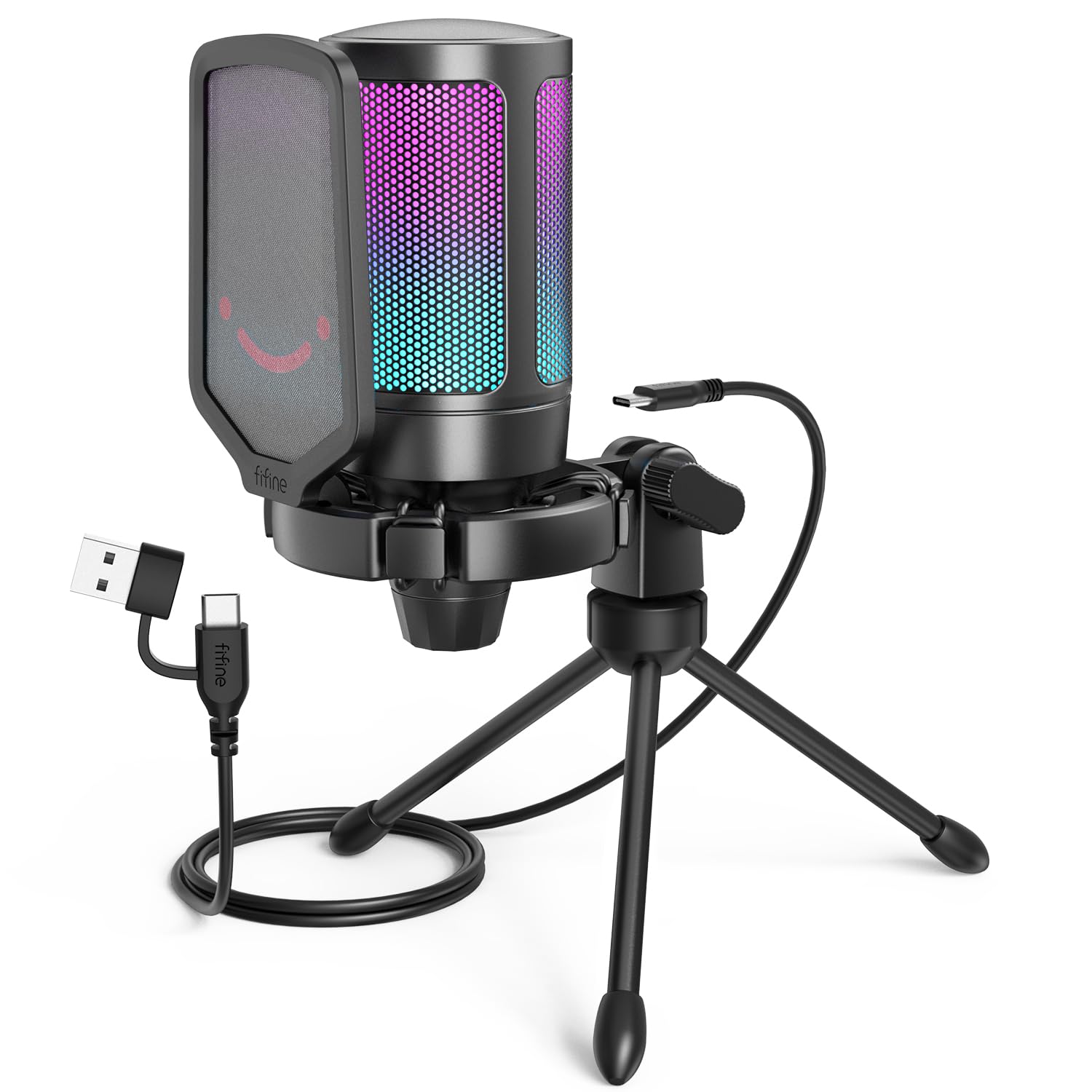
A surprisingly high 192kHz sample rate in a very wallet-friendly gaming mic.
The FIFINE AmpliGame A6V is the most affordable microphone on this list, yet it has the highest sampling rate at 192kHz (the number of times per second it captures audio). That means it captures a wider range of audio frequencies than typical 48kHz mics, giving you very detailed, natural-sounding audio. It uses a cardioid polar pattern and has a 70dB signal-to-noise ratio (SNR, a measure of how much it reduces background hiss). It earned the globally recognized iF Design Award, and the sturdy metal construction and attractive gradient RGB lighting show why.
The A6V has a quick mute button that silences the mic instantly, with the RGB turning off to confirm you are muted. It also has a gain knob on the front so you can adjust volume without opening software. It comes with an anti-vibration shock mount, a detachable pop filter, and a stable tripod stand. Reviewers consistently note the excellent sound quality for the price, but they also warn that it “picks up all background noise unless using software like Discord.” You will need to adjust the gain low and use noise suppression in your chat app to get the best results.
Surprising Specs for the Price
- 192kHz/24-bit sampling rate captures more detail than most budget mics
- iF Design Award build quality feels premium
- Quick mute with RGB status indicator is very convenient for gaming
Two Things to Manage
- Picks up background noise easily; needs gain tweaking or software to tame it
- RGB lighting cannot be turned off if you prefer a stealthy look
skip it if: you need a purely plug-and-play solution in a noisy room without any software tweaks—the FIFINE needs a bit of gain management.
Reach for this if: you are on a very tight budget but want a feature-rich mic with the highest sample rate in the guide and a gamer-friendly look.
Understanding the Specs
Polar Pattern (Cardioid vs Supercardioid)
This describes the shape of the microphone’s listening zone. A cardioid (heart-shaped) pattern picks up sound from the front and sides while rejecting what is behind it, making it great for blocking out computer fans and room echo. A supercardioid is even tighter, with a narrower balance but better noise rejection—perfect for very noisy rooms where you always sit in one spot. For most budget buyers, a standard cardioid is a safe, forgiving choice.
Sample Rate and Bit Depth (48kHz vs 96kHz)
These numbers (like 48kHz or 96kHz) tell you how many times per second the microphone captures a snapshot of your audio, and the bit depth (16-bit or 24-bit) tells you how much detail each snapshot holds. A 96kHz / 24-bit setup gives you a much higher ceiling for audio quality, meaning your voice sounds clearer and more natural. A 48kHz sample rate is standard and fine for podcasts and calls, while 96kHz is a treat for music or ASMR where every detail matters.
FAQ
Will a cheap microphone work for professional podcasting?
What is the difference between a condenser and a dynamic microphone?
Do I need a pop filter for a cheap USB microphone?
Can I use a USB microphone with my PS4 or PS5 for game chat?
How important is a shock mount for a cheap microphone?
What does “cardioid” polar pattern mean in plain English?
How far away from the microphone should I sit?
Why does my microphone pick up so much background noise?
Final Thoughts: The Verdict
If you want one dependable pick, the cheap microphone winner is the TONOR TD510 Air S H+ because its dynamic design and triple AI noise cancellation solve the biggest problem (background noise) better than anything else near its price. If you want the cleanest, highest-resolution audio in a tiny footprint, grab the HyperX SoloCast 2. And for the best blend of features, software control, and lasting value, the MAONO PD100X stands out.
How We Picked
We do not accept paid placement. Every pick is matched to a real buyer and a real use-case; we do not hands-on test units.
Sources & Methodology
Specifications: manufacturer listings and product documentation. Review insights: verified customer reviews, as of July 2026. Pricing: not shown on this page (it changes often); check the current price via the retailer link.
As an Amazon Associate, WellFizz earns from qualifying purchases. This does not affect which products we feature.

Mo Maruf
I created WellFizz to bridge the gap between vague wellness advice and actionable solutions. My mission is simple: to decode the research and give you practical tools you can actually use.
Beyond the data, I am a passionate traveler. I believe that stepping away from the screen to explore new environments is essential for mental clarity and physical vitality.