Our readers keep the lights on and my smoothie glass nicely filled. As an Amazon Associate, I earn from qualifying purchases.
Specs are compiled from manufacturer listings and verified buyer reviews and can change over time — please confirm the key details on the product page before buying.
The good news is you do not have to compromise on everything. The key is knowing which two or three specs actually matter for your workday or light gaming session, and which brands deliver them at this price without hidden gotchas.
I’m Mohammad Maruf — the founder and writer behind WellFizz. This guide is built by comparing the manufacturers’ published specifications and the patterns across verified customer reviews, so you get each pick’s real strengths and trade-offs instead of marketing spin.
These monitors proved they can deliver sharp text, smooth motion, and solid colors while staying affordable. This guide breaks down five of the most capable options so you can confidently pick the computer monitor under 150 that fits your actual desk and daily routine.
Quick Picks
- Samsung 27″ S3 (S32GF) FHD 120Hz Monitor — Best Overall
- MSI PRO MP251W E2 24.5-inch IPS 120Hz Monitor — Premium Pick
- ViewSonic VA2456A-MHD 24-Inch IPS 120Hz Monitor — Best Value
- BenQ GW2490 24-Inch IPS 100Hz Monitor — Eye Care Expert
- Amazon Basics 24-inch Full HD IPS Monitor, 75 Hz — Budget Champion
How To Choose The Best Computer Monitor Under 150
The challenge with budget monitors is that everything looks fine in a product photo. You need to look past the picture and focus on the panel technology, refresh rate, and connectivity to avoid ending up with a screen that feels sluggish or washed out a week later.
Panel Type: IPS is the baseline you want
A monitor’s panel technology controls how colors look when you are not sitting dead-center. IPS (In-Plane Switching) panels maintain consistent brightness and color even when you view from an angle, which is crucial for sharing your screen or using a multi-monitor setup. TN panels (Twisted Nematic panels) are cheaper but shift colors at any tilt. All five picks here use IPS or IPS-level technology.
Refresh Rate: the smoothness you actually feel
Measured in Hz (hertz, or cycles per second), the refresh rate tells you how many times the screen redraws each second. A 60Hz standard (60 redraws per second) feels fine for static office work. A 75Hz (75 redraws per second) already feels noticeably smoother when scrolling through documents. Jumping to 100Hz or 120Hz makes dragging windows and reading long web pages feel fluid, and it reduces eye fatigue during long sessions — without needing a gaming PC to benefit.
Connectivity: plan for what you plug in
HDMI (High-Definition Multimedia Interface, the standard digital port on most modern devices) is standard on any modern computer, but having a DisplayPort (a digital port often found on desktop PCs that can handle higher bandwidth) gives you the full capability for higher refresh rates on many laptops and desktops. VGA (Video Graphics Array, an older analog port) is a legacy port useful for older PCs or secondary rack setups. Built-in speakers are common in this price tier, but they are almost universally weak — plan for external speakers or headphones if audio matters.
Quick Comparison
| Model | Best For | Screen Size | Refresh Rate | Connectivity | Amazon |
|---|---|---|---|---|---|
| Samsung 27″ S3 | Big-screen work and entertainment | 27-inch | 120Hz | HDMI | Amazon |
| MSI PRO MP251W E2 | Creative and office use with smooth scroll | 24.5-inch | 120Hz | HDMI, VGA, DisplayPort | Amazon |
| ViewSonic VA2456A-MHD | Budget-minded users who want 120Hz | 24-inch | 120Hz | HDMI, DisplayPort, VGA | Amazon |
| BenQ GW2490 | Eye comfort for long work sessions | 24-inch | 100Hz | HDMI (x2), DisplayPort | Amazon |
| Amazon Basics 24-inch | Simple plug-and-play at the lowest price | 24-inch | 75Hz | HDMI, DisplayPort, VGA | Amazon |
In‑Depth Reviews
1. Samsung 27″ S3 (S32GF) FHD 120Hz Monitor

You get a bigger 27-inch screen than the competition and a 120Hz refresh rate that makes every scroll feel smooth.
You get a 27-inch IPS panel at a price where most monitors stop at 24 inches, so the extra screen real estate is immediately useful whether you are spreadsheeting or watching a show. The 120Hz refresh rate (double the 60Hz standard, so motion looks fluid) makes scrolling and mouse movements feel significantly smoother than the 75Hz Amazon Basics monitor here. Samsung’s Game Picture Mode, a preset that adjusts color and contrast for different game types, helps if you do light gaming on the side.
Buyers report the setup is easy even with a multi-monitor stand, and the Eye Saver Mode (a blue-light filter that reduces eye strain) keeps long sessions from tiring your eyes as quickly. The biggest trade-off found in the data is that connectivity is limited to a single HDMI port — there is no DisplayPort or VGA input if you need to hook up an older PC. But for a primary 27-inch daily driver at 120Hz, this is a compelling anchor for any home office.
Unlike the 1000:1 contrast ratio on most budget IPS panels, this one holds that same level but delivers it on a noticeably larger 27-inch canvas, giving you more workspace without going over.
The big-screen edge: For anyone who wants the largest usable monitor in this budget, the 27-inch Samsung delivers that with a 120Hz IPS panel, Eye Saver Mode, and an ultra-thin bezel that looks clean on any desk.
Reach for this if: You want a 27-inch primary monitor with smooth 120Hz motion and a slim bezel for a modern desk.
Look elsewhere if: You need multiple video inputs (HDMI only here) or require height-adjustable ergonomics.
2. MSI PRO MP251W E2 24.5-inch IPS 120Hz Monitor
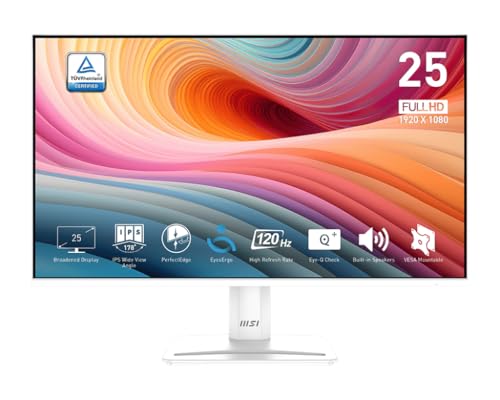
The 2000:1 contrast ratio (double the typical budget IPS monitor) delivers deeper blacks that make text and images pop more than any other monitor here.
Most budget monitors land a 1000:1 contrast ratio (meaning white is 1000 times brighter than black), but this MSI sits at 2000:1 — a 2.0x gap over the Amazon Basics model — which means deeper blacks and richer color separation that makes documents and images pop. The 24.5-inch IPS panel runs at 120Hz with Adaptive-Sync (a technology that matches the screen’s refresh rate to your graphics card’s frame rate, compatible with Nvidia G-Sync) for smooth motion in both gaming and everyday scrolling. The 1ms response time (the speed a pixel changes color, measured in milliseconds) keeps fast-moving text crisp without blur.
Owners mention the colors and blacks are great for the price, the 120Hz motion is smooth, and the premium white design fits nicely into creative office setups. The stand is fixed with no height adjustment, but it includes HDMI, VGA, and DisplayPort connections for full flexibility. The built-in speakers are serviceable for basic audio, and the four-sided slim bezel makes it look cleaner in multi-monitor configurations. Its unusual white finish and 2000:1 contrast ratio give it a distinctive visual edge over the Samsung 27″ S3, which has a standard 1000:1 ratio.
Contrast champion: The 2000:1 IPS panel (double the 1000:1 typical in this tier) delivers richer blacks and more defined color depth, making this the best pick for anyone who works with visual content and wants a monitor that looks distinct on the desk.
Go with this for: Deeper blacks and a premium white aesthetic that stands out, plus 120Hz smoothness and full connectivity.
Skip if: You need height-adjustable ergonomics or prefer a traditional black monitor.
3. ViewSonic VA2456A-MHD 24-Inch IPS 120Hz Monitor

A 120Hz IPS monitor with HDMI, DisplayPort, and VGA ports — a rare triple that punches way above its budget price, per multiple reviewers.
The ViewSonic VA2456A-MHD delivers a 120Hz refresh rate combined with a SuperClear IPS panel (brand name for wide-viewing-angle technology) at a price that is essentially unheard of for that spec combination. With HDMI, DisplayPort, and VGA inputs (a rare triple at this level), plus FreeSync (AMD’s adaptive sync technology to prevent screen tearing) support for adaptive frame rates during gaming sessions, it is among the most versatile value picks in this segment.
One reviewer noted using this as a secondary display for work and light gaming from their home office, saying it has punched way above its budget price point. Another reviewer noted the setup was plug-and-play and that the 120Hz with Adaptive Sync makes scrolling feel buttery smooth. The built-in speakers are decent for casual use like video calls, but the main draw is the combination of 120Hz motion clarity and IPS color accuracy at a price that undercuts most competition — especially notable since it offers a 60% gap in refresh rate compared to the 75Hz Amazon Basics monitor.
Why it stands out
- 120Hz IPS panel at a budget price — rare spec for the tier
- HDMI, DisplayPort, and VGA for legacy and modern gear
- FreeSync support for smoother gaming without tearing
The trade-offs
- Stand has minimal tilt and no height adjustment
- Brightness maxes at 250 nits — fine indoors but not HDR-grade
- No USB hub for peripheral connections
Right for you if: You want 120Hz IPS performance and versatile ports at a price that leaves room in your budget for a monitor arm or external speakers.
Not for you if: You need height adjustment in the stand or brighter outdoor-visible levels.
4. BenQ GW2490 24-Inch IPS 100Hz Monitor

BenQ’s Eye-Care technology (a set of built-in filters to reduce eye strain) pairs with a smooth 100Hz refresh rate and 99% sRGB color coverage for accurate colors.
The BenQ GW2490 is built for people who spend long hours staring at a screen and want to reduce eye strain without sacrificing image quality. It covers 99% of the sRGB color gamut (a standard color space used for web and office content), which means colors appear accurate and lifelike — a clear advantage if you do photo editing or design work. The 100Hz refresh rate sits right in the balance between the standard 75Hz of the Amazon Basics and the enthusiast 120Hz of the Samsung, giving you noticeably smoother motion than a basic office monitor.
Reviewers report the 24-inch GW2490 offers a great price, sharp and clear image, and comes well-packaged with a 3-year warranty. One buyer mentioned the brightness is good enough that they run it at 40% in a dim room, which helps with eye comfort. The dual HDMI inputs let you share the monitor between two computers (work laptop and a desktop, for example) with a single click using the Input Hotkey. The Low Blue Light Plus filter (a more effective blue-light reduction than standard modes) is genuinely effective, though some users find the joystick menu button sensitive and the speakers very tinny — one owner reported setting the volume to 95 if you use them at all.
Strengths
- 99% sRGB color gamut for accurate, vivid colors
- 100Hz refresh rate for smooth daily scrolling
- Dual HDMI inputs with an easy Input Hotkey for switching
- Eye-Care tech reduces strain during long sessions
Limitations
- Built-in speakers are tinny and quiet even at max
- Joystick menu button is sensitive and tricky initially
- Capped at 100Hz — not the 120Hz found on other picks like the Samsung or ViewSonic
Best suited for: Professionals and students who sit at a desk all day and prioritize eye comfort plus accurate color reproduction over raw refresh rate.
Consider another if: You game competitively and want the highest possible refresh rate at this price tier — the ViewSonic VA2456A-MHD gives you 120Hz for a similar cost.
5. Amazon Basics 24-inch Full HD IPS Monitor, 75 Hz

A reliable workhorse: 1080p IPS panel, 75Hz refresh rate, and HDMI, DisplayPort, and VGA ports at an entry-level price.
The Amazon Basics 24-inch IPS monitor is the straightforward workhorse of this list: you get a 1080p IPS panel with 75Hz refresh rate, HDMI and DisplayPort and VGA inputs, an adjustable tilt stand, and VESA mount compatibility (a standard 100x100mm hole pattern for mounting on an arm or wall) — all at a price that is frankly tough to top. The 75Hz refresh rate is a genuine upgrade over a 60Hz monitor, making scrolling feel smoother during regular office tasks, and the IPS panel keeps colors consistent from any angle.
Customers note smooth tilt, easy setup, and zero input lag — but they also note the built-in speakers are very weak even at max volume, with one recommending an external sound bar. The stand tilts from -5 to 23 degrees, and the VESA 100x100mm pattern means you can mount it on an arm for a cleaner desk. The 1000:1 contrast ratio is standard for this tier, but the 2.0x gap to the MSI’s 2000:1 is noticeable if you put them side by side; the ViewSonic VA2456A-MHD offers a 60% gap in refresh rate (120Hz vs 75Hz) for not much more money.
Simple and solid: At the entry-level price, this Amazon Basics monitor delivers reliable 1080p IPS performance, easy setup, and multiple inputs — perfect for a second screen or a budget home office where the refresh rate difference to 120Hz is not a priority.
Choose this if: Your budget is tight and you need a reliable 24-inch IPS monitor for basic office tasks, email, and web browsing that includes both DisplayPort and VGA.
Look elsewhere if: You want 120Hz smoothness or need decent built-in audio — the speakers are genuinely weak and you should budget for external ones.
Understanding the Specs
Refresh Rate (Hz)
Measured in hertz (Hz, cycles per second), the refresh rate tells you how many times per second the monitor redraws the image. A 75Hz monitor refreshes 75 times per second, which already feels smoother than the old 60Hz standard when you scroll through a document. Jumping to 100Hz or 120Hz makes mouse movement feel more responsive and reduces perceived flicker, which helps your eyes during a long day at the desk — not just for gaming, but for any activity where you move your mouse or drag windows.
Contrast Ratio
Contrast ratio measures the difference between the brightest white and the deepest black the monitor can display at the same time. A 1000:1 ratio (white is 1000 times brighter than black) is typical for budget IPS panels: white is nicely bright and black is a dark gray. A 2000:1 ratio, like the MSI PRO MP251W E2 provides, delivers noticeably deeper blacks and more punch in colors, making text pop and images feel more dimensional — a real advantage if you work with photos, design, or just want a richer-looking screen.
Color Gamut (sRGB)
Color gamut refers to the range of colors a monitor can display. sRGB (standard Red Green Blue, the standard color space for the web and most office content) is the standard color space for the web and most office content. A monitor covering 99% sRGB, like the BenQ GW2490, shows reds, greens, and blues that look true to the original image, which matters for photo editing, watching videos, and general visual fidelity. Lower coverage means colors can look slightly washed out or less accurate.
Connectivity Ports
HDMI (High-Definition Multimedia Interface) is the modern standard for laptops, game consoles, and streaming devices. DisplayPort often supports higher refresh rates and is common on desktop PCs and docking stations. VGA (Video Graphics Array) is the legacy analog connector — rare on new laptops but still found on older desktop computers and server rack gear. Having two or three of these gives you the flexibility to connect multiple devices without an adapter.
FAQ
Is 75Hz worth it over 60Hz for office work?
Can I use a 120Hz monitor with a standard office laptop?
Is an IPS panel really better than a TN panel for office use?
Do I need DisplayPort or is HDMI enough?
What does VESA mount compatibility mean for my desk?
Will a 27-inch monitor at 1920×1080 look pixelated?
How important is Adaptive Sync (FreeSync or G-Sync) on a monitor under ?
Can I use a monitor under for console gaming like PS5 or Xbox?
Are the built-in speakers on these monitors good enough for everyday use?
How long should a budget IPS monitor last with daily use?
Final Thoughts: The Verdict
If you want one dependable pick, the best computer monitor under 150 is the Samsung 27″ S3 because you get a 27-inch IPS screen with 120Hz smoothness that transforms everyday scrolling and work tasks, all within budget. If you want deeper blacks and a distinctive white design, grab the MSI PRO MP251W E2 with its 2000:1 contrast ratio. And for long work sessions where eye comfort is the priority, the BenQ GW2490 with 99% sRGB and Eye-Care technology is a rock-solid pick.
How We Picked
We do not accept paid placement. Every pick is matched to a real buyer and a real use-case; we do not hands-on test units.
Sources & Methodology
Specifications: manufacturer listings and product documentation. Review insights: verified customer reviews, as of July 2026. Pricing: not shown on this page (it changes often); check the current price via the retailer link.
As an Amazon Associate, WellFizz earns from qualifying purchases. This does not affect which products we feature.

Mo Maruf
I created WellFizz to bridge the gap between vague wellness advice and actionable solutions. My mission is simple: to decode the research and give you practical tools you can actually use.
Beyond the data, I am a passionate traveler. I believe that stepping away from the screen to explore new environments is essential for mental clarity and physical vitality.