Our readers keep the lights on and my smoothie glass nicely filled. As an Amazon Associate, I earn from qualifying purchases.
Specs are compiled from manufacturer listings and verified buyer reviews and can change over time — please confirm the key details on the product page before buying.
A great keyboard under 100 dollars used to mean rattly keys or that cheap, plasticky feel that makes you dread typing. That line has almost vanished today. This guide highlights the seven best models now, explains what each does differently, and helps you pick the one that fits your typing and gaming habits.
I’m Mohammad Maruf — the founder and writer behind WellFizz. This guide is built by comparing the manufacturers’ published specifications and the patterns across verified customer reviews, so you get each pick’s real strengths and trade-offs instead of marketing spin.
You might need a spacious full-size layout with a number pad (a dedicated block of number keys on the right side) for spreadsheets, or a compact 75% board (roughly 80 keys, no number pad) that saves desk space for mouse swipes. Here is the breakdown of the best computer keyboard under 100 dollars on the market.
Quick Picks
- ASUS ROG Strix Scope II X — Best Overall
- AULA S75 PRO — Best Compact
- RK ROYAL KLUDGE R98 Pro — Best Value
- Keychron C2 — Mac Friendly
- Redragon K745 PRO — Wireless Champ
- Cherry KC 200 MX — Office Premium
- KOPJIPPOM Large Print Keyboard — Budget Accessible
How To Choose The Best Computer Keyboard Under 100
The right keyboard is not just about a low price. Under 100 dollars the market is fiercely competitive, so the differences come down to the switch type, the build structure, and the small extras that change how the keyboard feels and sounds all day long. Here is what to keep an eye on.
Membrane vs Mechanical Switches
The switch type is the heart of any keyboard. A membrane keyboard uses a rubber dome under each keycap — quiet and cheap, but the feel can get mushy after a few months. Mechanical switches use an individual spring-loaded mechanism under each key, giving you a crisp, predictable pushback that many typists and gamers swear by. Almost every keyboard in this price range is mechanical, but if you see the word “membrane” you should only pick it if absolute silence is your priority and you are okay with a softer, less defined feel.
Layout Size: Full-Size, 96%, or 75%
Full-size keyboards (around 104 keys) include a dedicated number pad on the right — a lifesaver if you enter spreadsheets or invoices every day. A 96% layout keeps the number pad but condenses the spacing, so the keyboard is shorter and leaves more room for your mouse. A 75% layout (roughly 80 to 84 keys) drops the number pad entirely and shrinks the whole board, which is perfect for gamers who want maximum desk space for sweeping arm movements. Think about what sits next to your keyboard before you decide.
Gasket Mount and Dampening Layers
A gasket mount uses soft silicone or foam pads between the plate and the case instead of hard screws, creating a bouncier, more cushioned feel when you bottom out a key. Multiple dampening layers (IXPE foam, PET sound pads, silicone pads) absorb the hollow pinging that plagues cheaper boards. The result is that creamy or thocky sound you hear enthusiasts talk about — a muffled, satisfying thud rather than a high-pitched clack. Budget boards rarely used these features a few years ago; now several keyboards under 100 dollars include them.
Connectivity and Hot-Swappable Sockets
Wired USB-C keyboards offer the lowest latency (delay between pressing a key and the signal reaching your computer) and never need charging. Wireless options add Bluetooth or a 2.4 GHz dongle (a small plug-in receiver) for a cleaner desk, but you will have to recharge or swap batteries. Hot-swappable sockets let you pull out the stock switches and install different ones (3-pin or 5-pin) without soldering — a great way to change the feel of the keyboard later without buying a whole new board.
Quick Comparison
| Model | Best For | Switch Type | Layout / Keys | Connectivity | Amazon |
|---|---|---|---|---|---|
| ROG Strix Scope II X | Wired gaming & build quality | ROG NX Snow V2 Linear | 100% / 104 keys | USB-C Wired | Amazon |
| AULA S75 PRO | Compact wireless with LCD screen | Pre-lubed Linear | 75% / 80 keys | BT 5.0, 2.4 GHz, USB-C | Amazon |
| RK ROYAL KLUDGE R98 Pro | Space-saving with numpad & creamy feel | Pre-lubed Cream Linear | 96% / 98 keys | USB-C Wired | Amazon |
| Keychron C2 | Mac/Windows office typing | Keychron Brown (Tactile) | 100% / 104 keys | USB-C Wired | Amazon |
| Redragon K745 PRO | Wireless value with gasket mount | Mint Mambo Linear | 100% / 108 keys | BT 3.0/5.0, 2.4 GHz, USB-C | Amazon |
| Cherry KC 200 MX | Premium office durability | MX2A Silent Red (Linear) | 100% / 108 keys | USB-A Wired | Amazon |
| KOPJIPPOM Large Print | Budget accessible / low-vision | Membrane | 100% / 104 keys | USB-A Wired | Amazon |
In‑Depth Reviews
1. ASUS ROG Strix Scope II X

A wired full-size veteran built to survive years of gaming and spreadsheets.
The aluminum top plate gives this board a weighty, anchored feel — you will not shove it around the desk during an intense match. Under the keycaps, the pre-lubed ROG NX Snow V2 linear switches deliver smooth, thocky keystrokes, and the integrated sound-dampening foam along with switch-dampening pads kill the pinging echoes that cheaper boards suffer from. The hot-swappable sockets accept both 3-pin and 5-pin switches, so you can swap in clicky or tactile switches later without a soldering iron.
A multi-function wheel on the top-left corner lets you tweak volume or lighting on the fly, and the pre-programmed F1-F5 hotkeys give you instant access to the Xbox Game Bar and recording tools — a convenience for streamers. Buyers report the space bar and left shift key felt “sticky” on one unit, so the factory lubrication might vary, but the overall build is so sturdy that most reviewers call it their favorite keyboard. The detachable wrist rest makes long typing sessions more comfortable, though a few owners mention the pad feels slightly hard.
The Heavyweight Edge
- Aluminum top plate and PBT (polybutylene terephthalate) doubleshot keycaps resist wear and keep the board planted
- Hot-swappable with pre-lubed ROG NX Snow V2 linear switches for a smooth, thocky feel
- Three tilt angles plus a detachable wrist rest for ergonomic comfort
A Couple Hiccups
- Some units arrive with a sticky space bar or left shift key
- Lighting control relies on ASUS software, not a standalone board setting
Who it fits: If you want a premium wired full-size board with a rock-solid build, hot-swappable versatility, and a multi-function wheel for volume and lighting, this is the pick under 100 dollars.
One trade-off: The factory lubrication inconsistency on the space bar means you may need to re-lube or swap that switch right from the start.
2. AULA S75 PRO
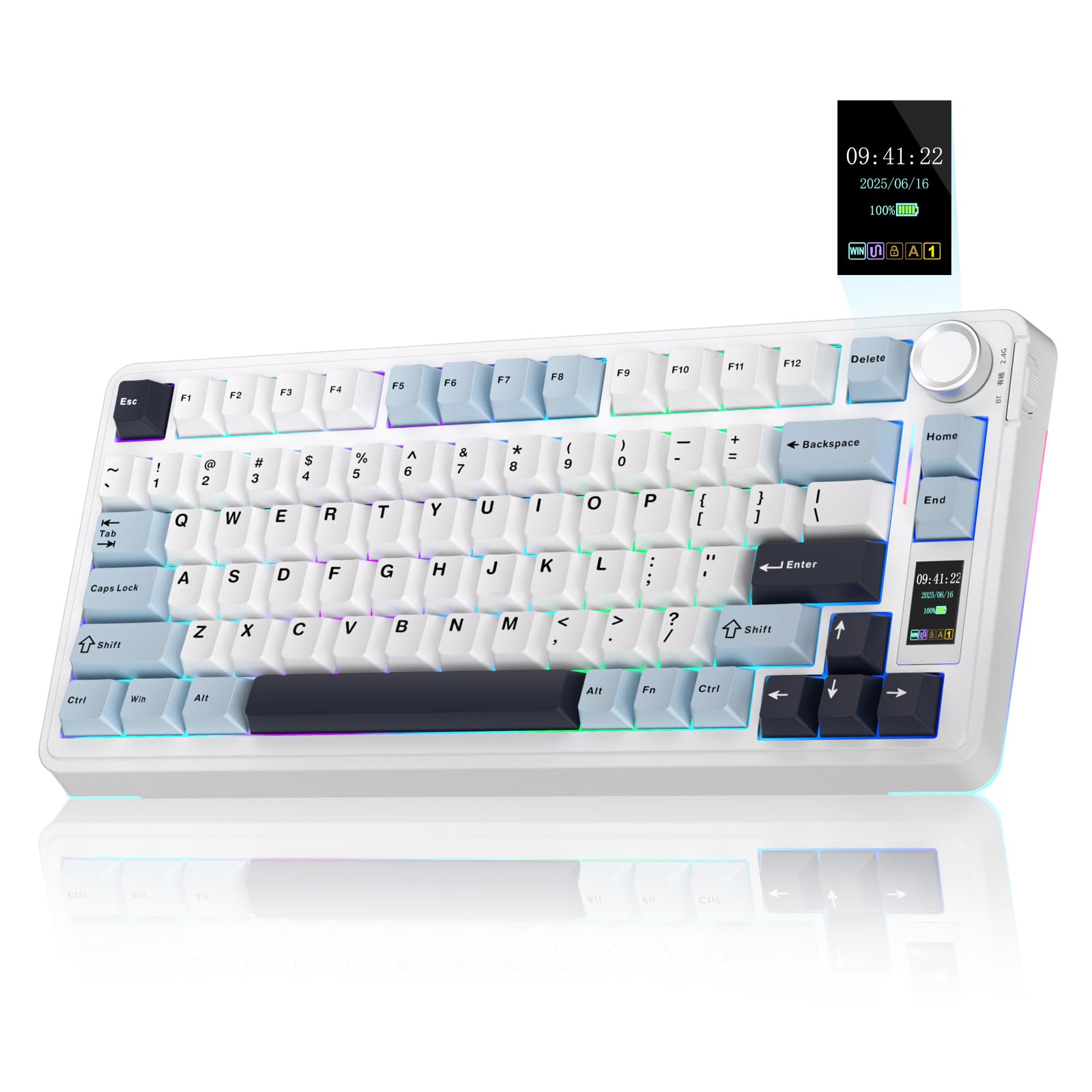
A tiny 75% board that puts a GIF screen and a knob at your fingertips.
The LCD screen (a liquid crystal display) on this keyboard shows your battery level, date, time, current connection mode, and even a custom GIF image — a trick you usually only see on boards that cost twice as much. The multi-function knob next to the screen lets you adjust volume, switch RGB effects, or change settings without reaching for the mouse. Inside, the pre-lubed linear switches and five layers of filling silencer (including an extended integrated silicone pad) produce a creamy, thocky sound that feels softer and more elastic than the price suggests.
You get three connection options — Bluetooth 5.0, 2.4 GHz wireless, and USB-C wired — so you can pair it with a PC, a tablet, or a gaming console. The 75% layout (80 keys) frees up desk space for your mouse, while the PBT keycaps resist shine over months of use. One reviewer noted the default switches feel light but supports heavy springs up to 150g, so you can customise the actuation force (the amount of pressure needed to register a key press). The only catch is that the LCD screen requires Windows software (in wired mode) to upload your own GIFs; owners who use Mac or Linux cannot customise the screen without a Windows machine.
Big Features, Tiny Footprint
- Customisable LCD screen shows battery, time, GIFs, and connection info
- Tri-mode wireless (BT, 2.4 GHz, USB-C) connects up to five devices
- Five-layer dampening delivers a creamy, thocky typing sound
Screen Limitations
- Setting a custom GIF requires Windows software in wired mode — no native Mac support
- Battery lasts about 20 hours with full RGB on, enough for a few days but not a full work week
Reach for this if: You love a space-saving 75% layout but still want a number pad substitute via the screen and a knob for quick volume changes, and you are willing to use Windows once to customise the display.
Keep in mind: The LCD screen cannot be configured from macOS or without the wired connection, so if you live entirely inside the Apple ecosystem, the screen stays at its default clock and battery readout.
3. RK ROYAL KLUDGE R98 Pro

A 96% board that keeps your number pad without hogging your entire desk.
This keyboard squeezes a number pad, arrow keys, and most functions into a 98-key layout — noticeably shorter than a full-size board, so your mouse arm sits closer without losing any data-entry convenience. The pre-lubed cream linear switches are smooth and buttery right from the start, and the five layers of sound-absorbing foam plus a gasket mount produce a creamy, thocky sound that makes each keystroke feel cushioned rather than jarring.
The detachable aluminum CNC (computer numerical control) volume knob is a polished touch — you can pull it off and put it back on when you pack up the board. The PBT keycaps use a double-shot molding process, so the legends will not fade, and the matte surface resists the greasy shine that cheaper ABS (acrylonitrile butadiene styrene) caps develop. The RK online driver lets you remap keys, set macros, and customise RGB. One buyer mentioned the keycaps lack backlighting, so the letters are not illuminated even though the RGB underglow is vivid; if you need shine-through legends in a dark room, the side-lit glow may not be bright enough for you.
Clever Space-Saver
- 96% layout keeps the numpad and arrow keys in a shorter chassis than standard full-size boards
- Gasket mount plus five-layer foam gives a creamy, thocky sound
- Detachable aluminum knob for volume and programmable RGB via an online driver
Dim Legends
- Keycaps are solid PBT with no shine-through, so the letters stay dark even with RGB on
- The USB-C port sits on the left side, which can create cable drag for some desk setups
Grab this when: You need a number pad for work but the standard full-size footprint is too wide — the 96% layout is the smart middle ground, and the creamy linear switches make it pleasant for both typing and gaming.
One honest limitation: If you type in a dim room and rely on backlit legends to see the letters, the non-shine-through keycaps will leave you guessing at the keys in the dark.
4. Keychron C2

A wired full-size workhorse that treats Mac and Windows users equally.
Keychron designed the C2 layout specifically for macOS — the modifier keys match the Apple order, and there is a dedicated Siri/Cortana key — but they also throw in extra keycaps for Windows, so you can switch between two operating systems without the layout feeling wrong. The Keychron Brown tactile switches offer a light bump at the actuation point without the loud click of a Blue switch, making it a balanced choice for an open office where you want some feedback but not noise complaints.
At 1.5 kilograms it is noticeably heavier than many competitors; the weight and the inclined bottom frame with two adjustable feet (6 and 9 degrees) keep the keyboard planted on the desk. The pre-installed tactile Keychron switch provides “unrivaled tactile responsiveness with up to 50 million keystroke durable lifespan,” according to buyers who praise its durability. One downside: this is the non-backlight version, so there are no glowing legends — just blue LED indicators for Caps Lock and Num Lock. Owners mention the plastic build feels durable and has a nice weight, but a few mention that corporate IT policies blocked the proprietary drivers, so they wished they had bought the Bluetooth version instead.
Dual-OS Ready
- Mac-optimised layout with extra Windows keycaps and a switch to toggle between them
- Durable build weighs 1.5 kg, which helps it stay in place on the desk
- Tactile Brown switches give a satisfying bump without annoying co-workers
No Backlight
- No key backlight — you rely on room lighting or the blue status LEDs to see the keys at night
- Proprietary drivers may be blocked by corporate IT policies, limiting software customisation
Perfect for: Anyone who switches between a MacBook and a Windows PC all day and wants a tactile, no-nonsense full-size board that arrives ready for both operating systems right from the start.
Consider skipping if: You need backlighting to type in a dim room or at night — the C2 non-backlight version keeps things simple and dark.
5. Redragon K745 PRO

A wireless gasket-mount board that sounds like a much more expensive custom build.
Redragon uses a gasket mount here — the plate sits on silicone gaskets instead of being screwed into the case — which cuts out the harsh bottom-out noise and gives each keystroke a softer, cushioned landing. The thick-lubed Mint Mambo linear switches (with a 40-gram actuation force and 2.0mm actuation point) feel silky and creamy, and the five-layer dampening setup (3.5mm PO foam, IXPE switch foam, PET sound pad, bottom socket foam, and a silicone bottom pad) kills the hollow echo that cheap wireless boards often have. Buyers describe the sound as a “very quiet thocky sound” with a creamy feel at a low actuation force.
The tri-mode connectivity (USB-C wired, Bluetooth 3.0/5.0, and 2.4 GHz wireless) lets you jump between devices without fumbling with cables. Battery life lands around 40 hours with the backlight off and roughly 20 hours with it on — enough for a work week if you keep the RGB dimmed. The 108-key layout includes four extra hotkeys for quick access to media or macros. At 0.88 kilograms, versus the Keychron C2 at 1.5 kilograms, it is easier to toss in a bag but less planted on a wobbly desk.
Creamy Wireless
- Gasket mount and five-layer dampening deliver a quiet, thocky sound
- Tri-mode wireless with Bluetooth 5.0, 2.4 GHz, and USB-C for multi-device use
- Hot-swappable socket supports almost all 3/5-pin switches for future upgrades
Lighter Build
- At 0.88 kg it is less stable than heavier rivals — easy to slide on a smooth desk
- Battery drops to about 20 hours with the RGB backlight turned on
Reach for this if: You want a wireless mechanical keyboard with a gasket mount, creamy linear switches, and the ability to swap switches later — all while staying well under 100 dollars.
The real limitation: The lightweight plastic chassis means it can skid around on a glass or gloss desk during fast-paced gaming unless you use a desk mat for grip.
6. Cherry KC 200 MX

A no-nonsense office keyboard with an anodised aluminum plate and genuine Cherry MX2A Silent switches.
Cherry is the company that invented the mechanical switch standard, and the KC 200 MX uses their latest MX2A Silent Red switches — a linear design (no click) with a smooth, quiet keystroke that is rated for more than 50 million actuations per key. The anodised metal top plate gives the board a premium heft, and the laser-etched keycaps resist abrasion so the lettering stays crisp after years of use. The compact full-size layout (108 keys) includes four extra keys for calculator, volume mute, and volume up/down — small conveniences that save a click when you are in the middle of a spreadsheet.
Customers note that the MX2A Brown version (a tactile variant) feels “buttery smooth with a satisfying thock” and increases typing speed, but the Silent Reds here are even quieter, making this an excellent choice for a shared office where noise is a concern. The full N-key rollover and anti-ghosting ensure every simultaneous key press registers correctly. A couple of reviewers mention that the rubber feet are tiny and ineffective, causing the keyboard to slide on a smooth surface, and the non-replaceable USB-C cable is a letdown for those who prefer a detachable cord.
Quiet Authority
- Genuine MX2A Silent Red switches with a 50-million-actuation lifespan for long-term reliability
- Anodised aluminum top plate adds weight and a sleek, durable surface
- Laser-etched, abrasion-resistant keycaps keep legends legible for years
Slippery Base
- Small rubber feet do not grip well on glossy desks — the board shifts during use
- Cable is permanently attached (non-replaceable USB-C), so a damaged cord means a dead keyboard
Who should pick this: Professionals who want a durable, quiet, no-frills mechanical keyboard from the most trusted name in switches — ideal for open-plan offices where silence matters.
What holds it back: The tiny rubber feet and non-removable cable feel like cost-cutting on an otherwise premium board; you will want a desk mat to stop it from sliding.
7. KOPJIPPOM Large Print Keyboard

A membrane keyboard with oversized letters and a backlight that finally makes the keys readable.
If you or someone in your home struggles with small print on standard keyboards, this model uses fonts that are four times larger than usual, making each letter visible at a glance. The 7-color adjustable backlight (blue, green, red, cyan, purple, yellow, and white) with three brightness levels ensures the keys stay readable even in a dim room. It is a membrane keyboard, so the key press is soft and quiet rather than crisp and clicky — which some people prefer for late-night typing when the rest of the house is asleep.
The full 104-key QWERTY US layout includes a number pad, and the spill-resistant design means a tipped coffee cup is not a catastrophe. Reviewers point out that “keys life of more than 5000W times” and that the heavy, stable build with foldable stands reduces hand fatigue during long typing sessions. The plug-and-play USB connection works with Windows, Mac OS, and Raspberry Pi without any driver installation. The catch, as one owner reported, is that the keyboard flashes the backlight when the PC enters sleep mode (no memory of previous settings) and there is no Fn lock for the multimedia keys.
Easy to See
- Four-times-larger font makes keys readable for low-vision users or anyone tired of squinting
- Seven backlight colours plus three brightness levels for any lighting condition
- Spill-resistant membrane design handles coffee accidents without dying
Membrane Limits
- Soft rubber-dome feel lacks the crisp feedback of a mechanical switch
- No memory of backlight preference after unplugging or PC sleep — resets to default each time
Grab this when: The priority is large, illuminated letters for a family member with vision challenges, or you just want the most affordable spill-resistant board that works without any setup fuss.
skip it if: You need mechanical switches for precise typing feedback or a board that remembers your backlight colour after the computer goes to sleep — this one resets every time.
Understanding the Specs
Switch Type: Linear vs Tactile vs Clicky
The switch type determines the feel and sound under your finger. A linear switch (like the Mint Mambo or ROG NX Snow V2) travels straight down with a smooth, uninterrupted push — great for fast double-taps in gaming because there is no bump to slow you down. A tactile switch (like the Keychron Brown) gives you a small bump at the actuation point so you feel exactly when the key registers, which many typists say reduces bottoming out and finger fatigue. A clicky switch adds an audible click on top of the tactile bump — satisfying for solo typing but potentially annoying in an open office.
Hot-Swappable Sockets
A hot-swappable keyboard lets you pull out the stock switches and push in different ones without any soldering. This is a huge advantage at this price point because you can start with a pre-lubed linear switch and later swap to a tactile or clicky switch if your preferences change. Most hot-swappable boards support both 3-pin and 5-pin switches, giving you access to the vast aftermarket switch ecosystem. If you are new to mechanical keyboards, a hot-swappable board is the safest way to experiment without committing to a single switch feel.
Gasket Mount and Dampening Layers
Traditional keyboards screw the plate directly into the case, creating a hard, resonant clack when a key bottoms out. A gasket mount places soft silicone or foam gaskets between the plate and the case, so the plate floats slightly and absorbs the impact. Multiple dampening layers (IXPE foam, PET sound pads, silicone pads) fill the empty space inside the case to kill the hollow pinging sound. The combination of a gasket mount and layered foam is what creates that sought-after creamy or thocky typing sound — a muffled, satisfying thud rather than a metallic ping.
PBT vs ABS Keycaps
Keycap material affects both feel and longevity. ABS (acrylonitrile butadiene styrene) is the cheaper plastic used on most budget keyboards — it feels smooth at first but develops a shiny, greasy look over months of use. PBT (polybutylene terephthalate) is a harder, more textured plastic that resists shine and feels slightly grainier under the fingertips. Most keyboards under 100 dollars now use PBT keycaps, which keep their matte look and sharp legends much longer than ABS. Double-shot PBT keycaps mold the legend into the plastic itself, so the lettering will never rub off.
FAQ
Can I get a good mechanical keyboard under 100 dollars?
What is the difference between a membrane keyboard and a mechanical keyboard?
Will a 75% keyboard work for data entry without a number pad?
What does gasket mount mean for typing feel?
Are hot-swappable keyboards worth it?
How do I clean a mechanical keyboard?
What is the best keyboard switch for an open office?
Does a wired keyboard perform better than a wireless one for gaming?
How long do mechanical keyboard switches typically last?
Can I use a Windows keyboard with a Mac?
Final Thoughts: The Verdict
For most buyers, the computer keyboard under 100 winner is the ASUS ROG Strix Scope II X because it combines a rock-solid aluminum build, hot-swappable pre-lubed ROG NX Snow V2 switches, and quiet sound-dampening foam — all at a price that stays under 100 dollars. If you want a compact wireless board with a customisable LCD screen and a volume knob, grab the AULA S75 PRO. And for a 96% wired board with creamy linear switches and a gasket mount, the standout is the RK ROYAL KLUDGE R98 Pro.
How We Picked
We do not accept paid placement. Every pick is matched to a real buyer and a real use-case; we do not hands-on test units.
Sources & Methodology
Specifications: manufacturer listings and product documentation. Review insights: verified customer reviews, as of July 2026. Pricing: not shown on this page (it changes often); check the current price via the retailer link.
As an Amazon Associate, WellFizz earns from qualifying purchases. This does not affect which products we feature.

Mo Maruf
I created WellFizz to bridge the gap between vague wellness advice and actionable solutions. My mission is simple: to decode the research and give you practical tools you can actually use.
Beyond the data, I am a passionate traveler. I believe that stepping away from the screen to explore new environments is essential for mental clarity and physical vitality.