Our readers keep the lights on and my smoothie glass nicely filled. As an Amazon Associate, I earn from qualifying purchases.
Specs are compiled from manufacturer listings and verified buyer reviews and can change over time — please confirm the key details on the product page before buying.
When you shop for a laptop for a young child, the biggest fear is usually not the processor speed — it is the juice box heading for the keyboard or the drop off the kitchen table. The best Chromebook for elementary students needs to survive those moments first, then handle schoolwork and video calls second. This guide walks you through six models built for the chaos of a busy kid’s day, with one clear rule: the real test is how well it bounces back.
I’m Mohammad Maruf — the founder and writer behind WellFizz. This guide is built by comparing the manufacturers’ published specifications and the patterns across verified customer reviews, so you get each pick’s real strengths and trade-offs instead of marketing spin.
For a kindergartner, you might need a rugged tank. For an older student working on slideshows, a faster 2-in-1 may suit them better. The right chromebook for elementary students balances durability with enough performance for the next few school years.
Quick Picks
- Acer Chromebook Plus 514 — Best Overall
- ASUS Chromebook Flip CX1 — Best 2-in-1 Touchscreen
- ASUS Chromebook C403 — Most Rugged Design
- HP Chromebook 11-inch (MediaTek) — Best Battery Life
- ASUS Chromebook C202SA — Best Rugged Budget
- HP Chromebook 11A G8 Education — Budget Entry Pick
How To Choose The Best Chromebook For Elementary Students
When the user is between five and eleven years old, the buying criteria shift away from raw speed toward survival. Here are the three things to get right before you click “add to cart.”
Durability and spill resistance come first
Your child’s school Chromebook will be dropped, shoved into a backpack with a loose water bottle, and probably used near a snack. Look for a model that specifically mentions a spill-resistant keyboard and a MIL-STD-810G or 810H rating — that is a military standard for surviving drops, vibrations, and temperature extremes. The ASUS C202SA, for example, is built to survive a drop from 3.9 feet, which is roughly table height. The ASUS C403 and Acer Chromebook Plus 514 also carry MIL-STD ratings. Without those words, you are gambling on a standard consumer laptop that may crack on the first drop.
Enough RAM and storage for school apps
Chrome OS is lightweight, but Google Classroom, Khan Academy, and a handful of open tabs can eat up memory. 4GB of RAM (random access memory, which is short-term memory for running apps) is the bare minimum you will find at this level, and it will do the job for a young student who is not running a dozen tabs at once. If you can step up to 8GB, you get noticeably smoother multitasking — the ASUS Chromebook Flip CX1 and the Acer Chromebook Plus 514 both have 8GB. For storage, 32GB eMMC (a memory chip soldered to the motherboard that stores files and apps) fills up fast when kids download apps from the Google Play Store. A 128GB or 512GB drive gives you much more breathing room to install apps without hunting for what to delete.
Battery life that lasts the whole school day
Your elementary student should not have to remember a charger. Look for a battery life of at least 10 hours. The HP 11-inch with the MediaTek processor claims 15 hours, which easily covers a full day plus after-school time. Several models in this list claim 10 to 12 hours, which is enough for a typical school day if the laptop is charged overnight. A lower battery life means you will be hunting for an outlet by mid-afternoon.
Quick Comparison
| Model | Best For | RAM / Storage | Battery Life | Weight | Amazon |
|---|---|---|---|---|---|
| Acer Chromebook Plus 514 | Best Overall Power | 8GB / 512GB SSD | Long battery life | 3.09 lbs | Amazon |
| ASUS Chromebook Flip CX1 | Best 2-in-1 Touchscreen | 8GB / 128GB eMMC | 11 hours | 3.59 lbs | Amazon |
| ASUS Chromebook C403 | Most Rugged Design | 4GB / 32GB eMMC | 12 hours | — | Amazon |
| HP Chromebook 11-inch (MediaTek) | Best Battery Life | 4GB / 32GB eMMC | 15 hours | — | Amazon |
| ASUS Chromebook C202SA | Best Rugged Budget | 4GB / 16GB eMMC | 10 hours | 2.65 lbs | Amazon |
| HP Chromebook 11A G8 Education | Budget Entry Pick | 4GB / 32GB eMMC | 10 hours | 2.65 lbs | Amazon |
In‑Depth Reviews
1. Acer Chromebook Plus 514
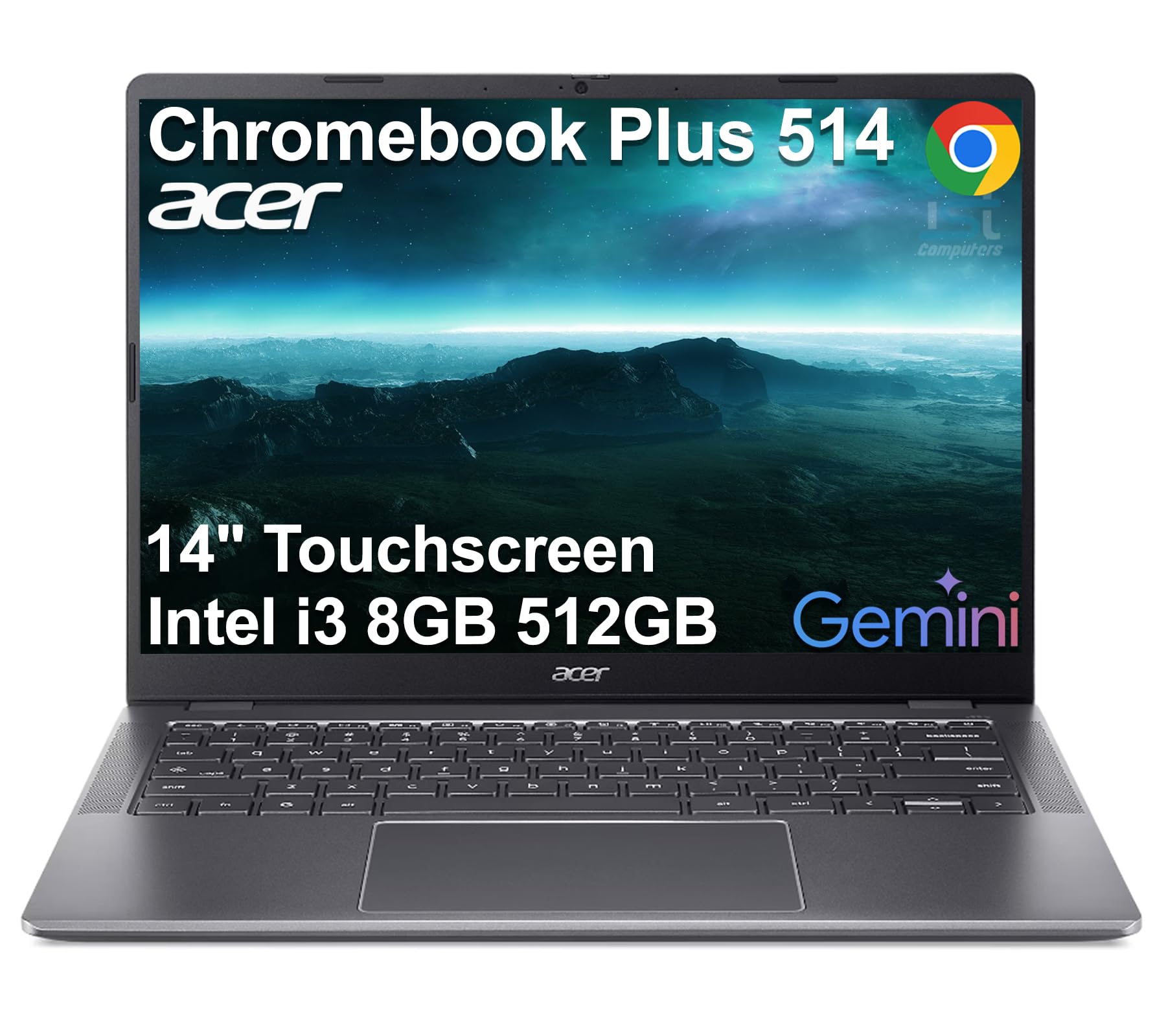
More power than a typical student Chromebook, wrapped in a MIL-STD-810H body that weighs only 3.09 lbs.
The 8-Core Intel Core i3-N355 processor with 8GB LPDDR5X RAM means your child gets a real leap in performance compared to the other picks. Multitasking between Google Classroom, a dozen browser tabs, and a video call stays completely smooth. The 512GB SSD (a fast storage drive that holds files and apps) is a massive upgrade from the 32GB or 128GB eMMC drives on the rest of this list — it means your child can install apps, save projects, and never worry about running out of space mid-school-year. The 14-inch WUXGA touchscreen (1920 x 1200 resolution) with 300-nit brightness provides a crisp, responsive display that works well for touch-based learning apps.
Buyers report the laptop is fast and has a beautiful non-glare screen, though one reviewer noted the speakers sound tinny with no bass. This is a trade-off for the thin, light chassis. At 3.09 lbs, it is lighter than the ASUS Chromebook Flip CX1 (3.59 lbs), yet it packs far more storage and a faster processor. The MIL-STD-810H rating means it meets military standards for surviving harsh conditions, which gives you some confidence if it gets knocked off a desk.
What puts it ahead
- 512GB SSD storage is 4x more than most student Chromebooks
- 8-Core Intel i3-N355 processor (up to 3.9 GHz) handles multiple apps easily
- MIL-STD-810H certified durability
- Wi-Fi 6E and Bluetooth 5.3 for fast wireless
Where it falls short
- Speakers are tinny with no bass according to a buyer
- Higher price point than other elementary student options
Reach for this if: you want a Chromebook that can last through elementary school and still feel fast for middle school work, with plenty of storage for apps and projects.
Look elsewhere if: your budget is tight or your child only needs a basic device for typing assignments and video calls.
2. ASUS Chromebook Flip CX1

A 14-inch 360-degree touchscreen laptop that flips into a tablet for drawing or watching videos, with 8GB of RAM for smoother multitasking.
What sets this Chromebook apart is its versatility. The Intel Celeron N4500 processor (2.8 GHz) and 8GB of RAM deliver decent multitasking, and the 128GB eMMC storage gives you four times the space of the HP Chromebook 11A G8 Education’s 32GB eMMC. The 14-inch FHD NanoEdge display (1920 x 1080 resolution) is significantly sharper than the 1366 x 768 screens on the smaller, budget Chromebooks in this list — so reading text and viewing images is noticeably clearer. The 360-degree hinge lets you use it in tent mode for watching a show or in tablet mode for touch-based learning games.
Owners mention the setup takes about 5 minutes, and the battery lasts between 7 to 14 hours depending on use, though it can feel occasionally slow. At 3.59 lbs, it is heavier than some smaller 11.6-inch models like the ASUS C202SA (2.65 lbs), but you are trading that extra weight for a much larger screen and the convertible flexibility. The MIL-STD-810H rating means it shares the same military-grade durability as the Acer, so it can handle some real-world bumps.
The standout features
- 360-degree touchscreen with four modes (laptop, tent, stand, tablet)
- 8GB RAM for smoother multitasking
- 128GB eMMC storage — more than budget options
- MIL-STD-810H certified
The downsides
- Heavier than 11.6-inch models at 3.59 lbs
- Limited for gaming or graphics-heavy tasks
This is the pick for: a student who uses touchscreen apps, watches educational videos in tent mode, and will benefit from a larger, sharper screen for reading and writing over the smaller HP 11-inch models.
Not for a kindergartner who needs the lightest possible backpack weight and the most drop-resistant design.
3. ASUS Chromebook C403

A 14-inch screen paired with a spill-resistant keyboard and MIL-STD-810G toughness for accident-prone environments.
This is the Chromebook that was literally designed for the classroom. The rugged body meets MIL-STD-810G durability standards, and the keyboard is spill-resistant — meaning a tipped-over water bottle is not a disaster. The 180-degree hinge lays the screen flat for easy group work with a classmate. The Intel Dual-Core Celeron N3350 processor runs up to 2.4 GHz, which is fine for web browsing and Google Docs, though it is not as fast as the Acer’s i3. The 12-hour battery life covers a full school day without a charger.
Customers note that it is great value for the money, with one noting it is “great for younger teens that can be hard on things” and another saying the keyboard is excellent. However, the 1366 x 768 screen resolution is the same lower-res panel found on the budget 11.6-inch models, and at this higher price point it feels like a compromise. The newer ASUS C202SA is actually lighter at 2.65 lbs, but the C403 offers a larger 14-inch screen in a similarly tough package.
Built to survive
- MIL-STD-810G durability rating
- Spill-resistant keyboard
- 12-hour battery life
- 180-degree hinge for collaborative work
The trade-offs
- Low-resolution 1366 x 768 screen at a premium price
- Older Celeron N3350 processor
Buy this when: you need the toughest, most classroom-ready Chromebook with a large screen and spill protection, and you are not focused on screen sharpness.
If screen clarity matters more to you than raw toughness, consider the ASUS Chromebook Flip CX1 for its sharper 1920 x 1080 display.
4. HP Chromebook 11-inch (MediaTek)

Longest battery life on the list at 15 hours, so a full school day plus after-school play does not need a charger.
The MediaTek MT8183 processor runs at up to 2 GHz and is paired with 4GB of RAM and 32GB of eMMC storage — the same memory and storage combo as many budget Chromebooks. That means your child can leave the charger at home, use the laptop all day at school, and still have power for homework in the evening. The 11.6-inch HD touchscreen with 178-degree viewing angles is a nice bonus for interactive apps.
Reviewers point out “I love this chrome book! Does as it should and I have had it awhile and the battery still holds up and no issues at all! Good buy.” The processor speed is slower than the ASUS Chromebook Flip CX1’s 2.8 GHz, so expect occasional lag with more demanding apps. The 32GB storage is also tight if you download many Android apps from the Google Play Store. Think of this as the “low-maintenance” pick for battery confidence.
Battery champion
- 15-hour battery life — best in this list
- 11.6-inch HD touchscreen with wide viewing angles
- Light and portable
- Access to Google Play Store
The limits
- Slower processor (2 GHz) than other picks
- 4GB RAM and 32GB storage are entry-level
The battery life is the headline here. If you want a Chromebook that can reliably last an entire school day and beyond without needing to be charged, and your child’s tasks are mostly web-based, this HP model delivers that freedom.
If your student needs to run many Android apps or demands snappier performance for multitasking, the Acer Chromebook Plus 514 with its 8GB RAM and 512GB SSD is a better fit.
5. ASUS Chromebook C202SA

The tank of the budget category — built to survive a 3.9-foot drop and a spilled drink without breaking a sweat, and it weighs just 2.65 lbs.
At 2.65 lbs, this is one of the lightest rugged Chromebooks you can buy, which matters when a small child is carrying it in a backpack. The rubber-reinforced guards and spill-resistant keyboard mean it is ready for the real-world abuse of elementary school life. The 11.6-inch HD 1366×768 anti-glare display is easy to read even near a bright window, and the 180-degree hinge makes it simple to share the screen with a classmate. The Intel Celeron N3060 processor runs up to 2.48 GHz, and the 10-hour battery life is enough for a full school day.
Shoppers say it is “Great for homeschooling 3 kids; fast, easy setup, rugged enough for minor drops.” The 16GB eMMC storage is smaller than the 32GB found on most other budget models, so you will need to rely on cloud storage for files and be selective with app downloads. The ASUS C202SA actually weighs the same 2.65 lbs as the HP Chromebook 11A G8 Education, but feels noticeably tougher thanks to the rubber bumpers and reinforced build.
Built for drops
- Survives drops from 3.9 feet (table height)
- Spill-resistant keyboard
- Lightweight at 2.65 lbs for a rugged device
- 10-hour battery life
What to know
- Only 16GB eMMC storage — very limited for app downloads
- No caps lock key (Chrome OS layout)
Perfect for: a young, accident-prone child who needs a Chromebook that can survive being knocked off a table and still work perfectly.
Not for: anyone who plans to download many Android apps — the tiny 16GB drive fills up fast.
6. HP Chromebook 11A G8 Education

The most affordable entry point in the list, built on an AMD processor with a lightweight 2.65-pound frame and 32GB of storage.
If the budget is the first and most important consideration, this HP Education model gets the job done for the basics. The AMD A4-9120C APU with Radeon R4 Graphics runs up to 2.4 GHz and is paired with 4GB of RAM and 32GB of eMMC storage. That 32GB of storage is double the 16GB found on the ASUS C202SA, giving you a bit more room for apps. The 11.6-inch HD anti-glare display is the same standard resolution as the other budget picks, and the 10-hour battery life fits a typical school day. It charges via a 45W USB-C adapter, which is convenient since many phones and tablets use the same type of charger.
Buyers report “Not a long life on the battery But overall good quality,” suggesting real-world battery life may fall short of the 10-hour claim for some users. The Education designation means it is built for school environments, but it lacks the explicit spill-resistant or MIL-STD ruggedness claims of the ASUS C202SA or C403.
What you get for the price
- Lowest cost option in this guide
- 32GB eMMC storage
- Lightweight at 2.65 lbs
- Charges via USB-C
Where it cuts corners
- Some owners mention shorter battery life than the 10-hour claim
- No explicit rugged or spill-resistant rating
- 4GB RAM limits multitasking
Grab this if: you need the absolute lowest-cost Chromebook for basic schoolwork and are willing to trade ruggedness and battery endurance for the price.
Spend more if: your child is hard on laptops or you need a device that can go a full day without charging.
Understanding the Specs
eMMC vs SSD Storage
Most budget Chromebooks use eMMC storage, which is basically a memory chip soldered onto the motherboard — it is slower than an SSD but good enough for basic tasks. You will see sizes like 16GB, 32GB, or 128GB. A 32GB drive fills up quickly once you download a few apps from the Google Play Store. The Acer Chromebook Plus 514 uses a 512GB SSD, which is much faster and gives you far more space for files and apps. If your child will be downloading many learning apps or saving lots of documents locally, aim for at least 128GB.
MIL-STD-810G vs MIL-STD-810H
These are military durability standards that mean the laptop has been tested to survive drops, vibrations, temperature extremes, and humidity. The “G” and “H” refer to different revisions of the standard — 810H is the newer one, but both indicate a tougher-than-average build. The ASUS Chromebook C202SA is built to survive a drop from 3.9 feet and has a spill-resistant keyboard. If the product page does not mention MIL-STD or spill-resistant, assume it is a standard consumer laptop that is more likely to crack on a drop.
Processor Speed (GHz)
The processor speed tells you how fast the chip can work. Higher numbers mean snappier performance when switching between apps or loading web pages. The ASUS Chromebook Flip CX1 runs at up to 2.8 GHz, which is noticeably faster than the 2 GHz speed of the HP 11-inch MediaTek model. For an elementary student doing mostly web-based schoolwork, 2 GHz is fine. For a child who will multitask between several apps and browser tabs, look for 2.4 GHz or more.
Battery Life (Hours)
Battery life is usually measured in hours of mixed use — web browsing, video playback, and typing. A 10-hour battery can get through a typical school day if the laptop is fully charged in the morning. The HP 11-inch MediaTek model claims 15 hours, which is the best on this list and gives you a full day plus evening use. Keep in mind that real-world battery life depends on screen brightness, what apps are running, and the age of the battery. A lower claim like 10 hours may mean you need the charger by mid-afternoon.
FAQ
How much RAM does my elementary student need in a Chromebook?
Is 32GB of storage enough for a child’s Chromebook?
What does MIL-STD-810G mean on a Chromebook?
How long should the battery last for a school Chromebook?
Can a Chromebook replace a Windows laptop for a student?
Are touchscreen Chromebooks worth it for kids?
What is the difference between an Education Chromebook and a regular Chromebook?
Will a Chromebook work offline for schoolwork?
What is a 180-degree hinge and why does it matter?
How often do Chromebooks get software updates?
Final Thoughts: The Verdict
For most parents, the best chromebook for elementary students is the Acer Chromebook Plus 514 because it combines a fast 8-Core Intel i3-N355 processor with 8GB of RAM, a roomy 512GB SSD, and MIL-STD-810H durability in a lightweight 3.09-pound frame. If you want a touchscreen and 2-in-1 flexibility, grab the ASUS Chromebook Flip CX1. And for the tightest budget where ruggedness still matters, the ASUS Chromebook C202SA survives a 3.9-foot drop and has a spill-resistant keyboard.
How We Picked
We do not accept paid placement. Every pick is matched to a real buyer and a real use-case; we do not hands-on test units.
Sources & Methodology
Specifications: manufacturer listings and product documentation. Review insights: verified customer reviews, as of July 2026. Pricing: not shown on this page (it changes often); check the current price via the retailer link.
As an Amazon Associate, WellFizz earns from qualifying purchases. This does not affect which products we feature.

Mo Maruf
I created WellFizz to bridge the gap between vague wellness advice and actionable solutions. My mission is simple: to decode the research and give you practical tools you can actually use.
Beyond the data, I am a passionate traveler. I believe that stepping away from the screen to explore new environments is essential for mental clarity and physical vitality.