Our readers keep the lights on and my smoothie glass nicely filled. As an Amazon Associate, I earn from qualifying purchases.
The market is flooded with tiny thermal and inkjet machines that promise instant memories, but the cost per sheet, the paper compatibility, and the long-term ink or ribbon expenses separate the smart buys from the drawer-fillers. You need a unit that delivers sharp, fade-resistant prints without forcing you into a subscription model every month.
I’m Mohammad Maruf — the founder and writer behind WellFizz. I dig into the technical specs, ink yields, paper sizes, and real-world review patterns of every model in this space to separate the genuinely useful options from the gimmicks.
This guide breaks down the top seven contenders across portable instant printers and traditional home all-in-ones to help you find the best cheap photo printer for your specific needs—whether that’s scrapbooking, travel journaling, or just printing family snapshots without breaking the bank.
How To Choose The Best Cheap Photo Printer
Selecting a budget-friendly photo printer means balancing the upfront cost with the ongoing expense of consumables. A model that looks cheap today could cost you more than a premium unit within a year if the ink or paper is proprietary and expensive. Focus on total cost of ownership, not just the purchase price.
Understand the Printing Technology
Inkjet printers like the Canon PIXMA and HP Envy series use liquid ink cartridges and can print on a wide range of paper sizes, including letter-size documents. Dye-sublimation printers such as the iDPRT CP4100 and Liene M200 use a ribbon that heats and vaporizes dye onto specialized paper, producing borderless, water-resistant prints with a protective coating. Dye-sub typically offers more consistent photo quality but locks you into proprietary paper-and-ribbon kits. Inkjet offers more flexibility but costs more per photo if you use OEM cartridges.
Check the Paper Size and Portability
Portable models like the Nelko PP01 print 2×3-inch sticky-backed photos ideal for scrapbooks and journals, while the iDPRT and Liene produce standard 4×6-inch prints you can frame or give as gifts. Traditional all-in-one units like the Canon TR7120 and HP Envy 7975 handle up to 8.5×11 inches, making them suitable for both documents and larger photos. Consider where you’ll use the printer most—on a desk at home or in a bag for travel—to decide between pocket-sized and full-featured.
Evaluate Connectivity and App Quality
Most modern photo printers connect via Bluetooth or Wi-Fi to a companion app. The app’s editing tools, filter options, and ease of use significantly affect the final print quality. Look for apps that allow you to adjust brightness, contrast, and cropping before printing. Models that rely on a direct Wi-Fi hotspot (like the Liene M200) avoid home network issues but limit remote printing. All-in-one printers with physical touchscreens offer a more traditional setup but can be slower to navigate.
Quick Comparison
On smaller screens, swipe sideways to see the full table.
| Model | Category | Best For | Key Spec | Amazon |
|---|---|---|---|---|
| iDPRT CP4100 | Dye-Sub | Premium 4×6 prints | 300 DPI, 108 sheets + 2 ribbons | Amazon |
| HP Envy Photo 7975 | Inkjet | Home all-in-one with photo tray | 15 ppm black, 10 ppm color | Amazon |
| Canon PIXMA TS7720 | Inkjet | Compact all-in-one with touchscreen | Auto duplex, 2.7″ LCD touchscreen | Amazon |
| Canon PIXMA TR7120 | Inkjet | Home office with ADF | ADF, auto duplex, dual-band Wi-Fi | Amazon |
| HP Envy 6155 | Inkjet | Budget home all-in-one | Dual-band Wi-Fi, 2.4″ touchscreen | Amazon |
| Liene M200 Battery Edition | Dye-Sub | Portable 4×6 with rechargeable battery | 40 prints per charge, built-in Wi-Fi hotspot | Amazon |
| Nelko PP01 | Inkjet | Ultra-portable 2×3 sticker photos | 603 DPI, 0.6 lbs, Bluetooth | Amazon |
In‑Depth Reviews
1. iDPRT CP4100 4×6 Photo Printer

The iDPRT CP4100 uses dye-sublimation technology to produce 4×6-inch prints with a protective coating that resists water, scratches, and fading. The package includes 108 sheets of photo paper and two ribbon cartridges, significantly lowering the per-print cost compared to other portable options. Each print completes in about 60 seconds, and the 300 DPI resolution delivers crisp detail suitable for framing and gifting.
Setup relies on the “HeyPhoto” app available for both Android and iOS, which offers filters, text overlays, and sticker decorations. A unique AR feature lets you scan the printed photo with the app to replay the original video clip associated with that image. The printer weighs just over 2.4 kilograms (about 5.3 pounds) and measures 10.5 x 7 x 5.5 inches—portable enough to bring to gatherings but not pocket-sized.
Customer feedback highlights the printer’s ease of use and excellent print quality, with multiple users noting it replaced trips to CVS or Walgreens for standard-sized photos. The ribbon-based system means no ink cartridges to clog or dry out, making it ideal for intermittent use. The only downside reported is that prints include a small white border that some users trim manually for edge-to-edge results.
Why it’s great
- Superior print quality with fade-resistant coating
- Bulk paper and ribbon kit reduces per-print cost
- AR feature adds interactive value to physical prints
Good to know
- Requires proprietary paper-and-ribbon kits
- Prints have a white border; no borderless option
- Heavier than true pocket printers at nearly 5.5 lbs
2. HP Envy Photo 7975

The HP Envy Photo 7975 is a full-featured all-in-one that prioritizes photo quality without sacrificing document printing. It includes a dedicated photo paper tray so you don’t have to swap paper constantly, and its AI-powered print formatting automatically removes unwanted content from web pages and emails before printing. Print speeds reach 15 pages per minute in black and 10 pages per minute in color.
Setup is handled through the HP Smart app, which guides you through Wi-Fi connection and ink installation. The 2.7-inch color touchscreen offers intuitive navigation for copying, scanning, and adjusting settings. The unit supports automatic duplex printing, a 35-sheet auto document feeder, and borderless photo printing up to 8.5 x 11 inches. A three-month trial of HP Instant Ink is included, which can significantly reduce ongoing costs if you print regularly.
User reviews consistently praise the ease of setup and print quality, though a small number of buyers reported issues with paper jams and connectivity drops after several weeks. The initial ink cartridges are setup cartridges with lower page yields, so budget for replacements sooner than you might expect. Overall, the Envy Photo 7975 offers the best balance of photo-dedicated features and home-office versatility in this lineup.
Why it’s great
- Separate photo tray for convenient switching
- AI-powered web print formatting saves paper
- 3-month Instant Ink trial included
Good to know
- Starter cartridges run out quickly
- Some users report connectivity issues over time
- Bulky footprint compared to portable models
3. Canon PIXMA TS7720

The Canon PIXMA TS7720 is a compact wireless all-in-one that excels at home photo printing without the bulk of a larger office machine. It prints at 15 pages per minute in black and 10 pages per minute in color, and includes automatic duplex printing to save paper. The 2.7-inch LCD touchscreen provides a clear interface for navigating copy, scan, and photo print functions.
Ink is handled by just two cartridges—a PG-285 black and a CL-286 color—which simplifies replacement and reduces the number of consumables you need to stock. The printer supports a standard paper tray and a rear feed for photo paper up to 8.5 x 11 inches. Setup is guided through the Canon PRINT app, though some users noted that initial wireless configuration on certain devices required manual network selection.
Customer reviews are largely positive, with many highlighting the printer’s reliable performance and compact footprint. A few users reported that photo colors appeared slightly less vivid compared to Canon’s five-ink models, and the printer defaults to an auto power-off setting after four hours that must be changed in preferences. For a budget-friendly all-in-one that delivers solid photo and document quality, the TS7720 is a dependable pick.
Why it’s great
- Simple two-cartridge ink system
- Intuitive touchscreen interface
- Auto duplex for two-sided printing
Good to know
- Colors less vibrant than higher-end Canon models
- Default auto power-off may be inconvenient
- Setup can be finicky on some mobile devices
4. Canon PIXMA TR7120

The Canon PIXMA TR7120 is designed for hybrid workers who need a reliable all-in-one for both documents and photos. It includes an auto document feeder (ADF) for multi-page scanning and copying, plus automatic duplex printing to reduce paper consumption. The hybrid ink system uses two cartridges to deliver sharp text and vibrant colors, and the dual-band Wi-Fi ensures stable connections on 2.4GHz or 5GHz networks.
The 1.42-inch monochrome OLED display provides quick access to ink levels, printer status, and settings. The paper tray holds approximately 50-100 sheets, and the printer supports media sizes up to 8.5 x 11 inches with borderless photo printing. Setup is straightforward via the Canon PRINT app, and the unit is compact enough to fit on a desk without dominating the workspace.
User reviews are generally very positive, with buyers noting the printer’s ease of setup, quiet operation, and lack of “offline” connection issues that plague some competitors. The primary complaint centers on the cost of replacement ink—the starter cartridges don’t last long, and replacement cartridges are expensive relative to the printer’s price point. For light to moderate use, the TR7120 offers excellent value, but heavy users should budget for ongoing ink costs.
Why it’s great
- Auto document feeder for efficient multi-page jobs
- Reliable dual-band Wi-Fi connectivity
- Compact footprint for home office setups
Good to know
- Starter ink runs out quickly
- Replacement cartridges are pricey
- Monochrome display is basic compared to color touchscreens
5. HP Envy 6155

The HP Envy 6155 is a low-cost entry point into the HP ecosystem, offering print, copy, and scan capabilities with automatic duplex printing. It features a 2.4-inch color touchscreen for navigation and dual-band Wi-Fi for reliable wireless printing. HP’s P3 color technology aims to deliver prints that match what you see on screen, making it a reasonable choice for occasional photo printing alongside everyday documents.
Setup is handled via the HP Smart app, which also offers AI-powered formatting for web pages and emails. The 100-sheet input tray supports up to letter-size paper, and the printer can handle borderless photos. A three-month trial of HP Instant Ink is included, which automatically sends replacement cartridges before you run out, potentially saving up to 50% on ink versus buying at retail. After the trial, a monthly fee applies unless cancelled.
User feedback is mixed but leans positive for basic home use. Many buyers appreciate the easy setup and compact design, while a few report frustration with the touchscreen interface for scanning—some note that initiating a scan from the computer is not intuitive. The starter cartridges have low page yields (approximately 120 black pages and 75 color pages), so factor in replacement costs early. For low-volume printing of school assignments and the occasional photo, the Envy 6155 is a functional budget option.
Why it’s great
- Low upfront cost for an all-in-one
- HP Instant Ink trial reduces initial consumable costs
- Compact and modern design
Good to know
- Starter ink cartridges hold very little ink
- Scanning workflow via touchscreen can be clunky
- Not ideal for high-volume home use
6. Liene M200 Battery Edition

The Liene M200 Battery Edition sets itself apart with a built-in rechargeable battery that delivers up to 40 prints per charge, making it the most travel-friendly 4×6 photo printer in this lineup. It uses dye-sublimation printing to produce water-resistant, scratch-resistant photos with a protective gloss layer. The printer creates a direct Wi-Fi hotspot for connection, bypassing home network issues entirely, and supports up to five simultaneous users.
The Liene app offers basic editing tools, filters, and borders, and includes a useful ID photo mode for creating multiple passport-style prints on a single sheet. The package includes 20 sheets of photo paper, one ink cartridge, and a power adapter. A magnetic top panel lets you place the photo cassette on the printer after use, keeping your workspace tidy. The unit itself is compact and sleek, weighing just enough to feel solid without being burdensome.
Customer reviews are overwhelmingly positive, with many users noting that photo quality rivals local photo labs. The battery life is a common highlight, and the brand’s customer service receives specific praise for quickly replacing a unit that stopped working. The primary trade-off is the per-print cost, which is higher than inkjet models when printing large volumes, but for occasional photo printing on the go, the M200 is a standout performer.
Why it’s great
- Built-in rechargeable battery for true portability
- Direct Wi-Fi hotspot eliminates network issues
- Photo quality rivals retail lab prints
Good to know
- Higher per-print cost for consumables
- Limited to 4×6 paper size only
- No document printing capability
7. Nelko PP01
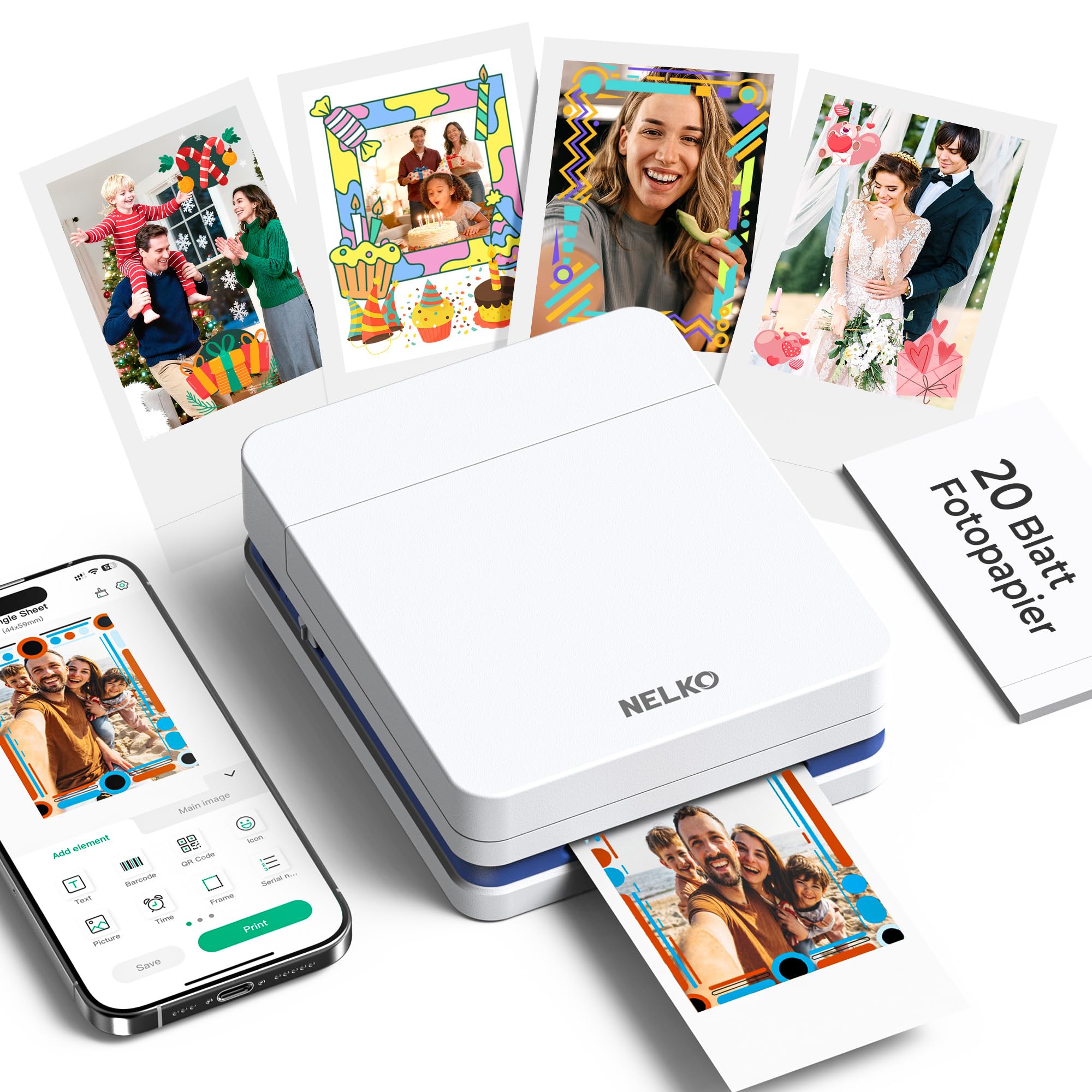
The Nelko PP01 is the most portable printer in this guide, weighing just 0.6 pounds and small enough to slip into a jacket pocket. It prints 2×3-inch photos on sticky-backed paper, making it ideal for scrapbooking, journaling, label-making, and instant party favors. The inkjet system delivers 603 DPI resolution, and the adhesive backing means no glue or tape is needed to attach photos to surfaces.
Connectivity is handled via Bluetooth through the Nelko app, which offers a wide range of editing tools including filters, stickers, text overlays, borders, collage creation, and AI image editing. Each ink cartridge yields up to 80 full-color 2×3 prints, and the printer charges via USB-C (adapter not included). Setup requires installing the ink cartridge and loading the photo paper with the smooth side facing down, and the app guides users through the process.
Users consistently praise the printer’s compact size, ease of use, and vibrant print quality. Some note that the ink cartridge can dry out if the printer is left unused for extended periods, and the printer is compatible only with the brand’s proprietary sticky-backed paper. For anyone who wants to print instant sticker photos for creative projects without lugging around a full-size machine, the Nelko PP01 is the obvious choice.
Why it’s great
- Extremely lightweight and truly pocketable
- Sticky-backed paper eliminates need for glue
- Robust app with AI editing features
Good to know
- Ink cartridge may clog if not used regularly
- Only prints 2×3 sticker paper
- USB charger not included in the box
FAQ
Will a cheap photo printer work with standard 4×6 paper from the store?
How long do photos from a dye-sublimation printer last compared to inkjet?
Can I print regular documents on a dedicated photo printer?
Final Thoughts: The Verdict
For most users, the best cheap photo printer winner is the iDPRT CP4100 because it delivers lab-quality 4×6 prints at a competitive per-print cost with the durability of dye-sublimation technology. If you want a traditional all-in-one that also scans and copies, grab the Canon PIXMA TS7720. And for true pocket-sized sticker prints for scrapbooking and journaling, nothing beats the Nelko PP01.

Mo Maruf
I created WellFizz to bridge the gap between vague wellness advice and actionable solutions. My mission is simple: to decode the research and give you practical tools you can actually use.
Beyond the data, I am a passionate traveler. I believe that stepping away from the screen to explore new environments is essential for mental clarity and physical vitality.