Our readers keep the lights on and my smoothie glass nicely filled. As an Amazon Associate, I earn from qualifying purchases.
The difference between landing a clutch headshot and whiffing entirely often comes down to the mouse in your hand. For competitive gamers, every millisecond of latency and every gram of unnecessary weight translates directly into missed shots and lost rounds. A gaming mouse built for this arena must prioritize sensor accuracy, switch response, and a weight-and-balance profile that lets you flick and track without fighting the hardware.
I’m Mohammad Maruf — the founder and writer behind WellFizz. I analyze sensor specifications, polling rate capabilities, switch lifecycles, and ergonomic theories across dozens of gaming mice to determine which models actually deliver on their performance promises in real competitive play.
If you are tired of double-clicking switches, inconsistent tracking, or a cable that drags during critical moments, this guide to the best competitive gaming mouse will help you cut through the marketing and pick the tool that complements your reflexes.
How To Choose The Best Competitive Gaming Mouse
Choosing the right tool for competitive play is about matching the hardware to your grip style, aiming technique, and the game titles you play most. Here are the key factors to consider before you buy.
Sensor Accuracy and Tracking
The sensor is the heart of any competitive mouse. Look for flagship optical sensors like the PixArt PAW3395 or the Razer Focus Pro 35K. These sensors eliminate smoothing, acceleration, and jitter across their entire DPI range, ensuring that your crosshair moves exactly where you intend it to go. Sensors with a high IPS (inches per second) rating, above 400, handle fast flicks without spinning out.
Switch Reliability and Click Feel
Mechanical switches are rated for a certain number of clicks, but optical switches use light-based actuation, eliminating the debounce delay that can cause double-clicking. For MOBA and RTS players who click rapidly, optical Gen-3 switches with a 0.2 ms actuation provide a distinct speed advantage. Mechanical switches with metal tensioning, like those in Logitech’s G502 Hero, offer a crisp, tactile feel preferred by many FPS players.
Weight and Balance
Ultralight mice, around 55g, allow for faster flicking and less fatigue over long sessions, which is why they dominate the competitive scene. However, some players prefer a heavier mouse with adjustable weight systems that add stability for lower-sensitivity aiming. Your decision should be based on whether you use high or low DPI settings and arm vs. wrist aiming.
Connectivity and Cable Quality
Wired mice eliminate the possibility of wireless interference, but a stiff cable can drag. Look for a Speedflex or braided-fiber cable that is lightweight and flexible. For wireless, a 4000Hz polling rate option and a stable 2.4GHz connection is now the standard for competitive play, offering latency that matches or beats wired connections.
Quick Comparison
On smaller screens, swipe sideways to see the full table.
| Model | Category | Best For | Key Spec | Amazon |
|---|---|---|---|---|
| Logitech G502 Hero | Wired | FPS with low sensitivity | 25,600 DPI, Adjustable 5×3.6g weights | Amazon |
| Razer Basilisk V3 35K | Wired | All-around competitive play | 35K DPI, HyperScroll Tilt Wheel, Gen-3 Optical Switches | Amazon |
| Razer Basilisk Essential | Wired | Budget-conscious FPS players | 6,400 DPI, Mechanical Omron switches | Amazon |
| VGN Dragonfly F1 MOBA | Wireless | Lightweight MOBA/RTS play | 26K DPI, 55g, 4000Hz polling supported | Amazon |
| Redragon M901P-KS | Wireless | MMO with 12 side buttons | 16K DPI, 70hr battery, 20 programmable buttons | Amazon |
In‑Depth Reviews
1. Logitech G502 Hero

The G502 Hero is a legendary shape in competitive gaming, and the HERO 25K sensor keeps it relevant. This sensor delivers zero smoothing or acceleration, tracking at a sub-micron level. For players who use a low sensitivity arm-aim style, the five removable 3.6-gram weights let you fine-tune the balance precisely, providing stability that ultralight mice simply cannot offer.
The mechanical switch button tensioning system uses a metal spring to keep the left and right buttons crisp and responsive after millions of clicks. The dual-mode hyper-fast scroll wheel can spin freely for fast bhopping or switch to indexed mode for weapon selection. The 11 programmable buttons and onboard memory mean your profile travels with you without needing G Hub installed.
One aspect that surprises many users is the build quality. The metal enclosure and braided cable give it a durable, premium feel. The sensor performance is consistent enough for professional-level play, and the ergonomic shape fits medium to large hands exceptionally well. It is a wired solution that eliminates any latency concerns entirely.
Why it’s great
- HERO 25K sensor with zero smoothing
- Adjustable weight system for custom balance
- Crisp mechanical switches with metal tensioning
- Onboard memory for portable profiles
Good to know
- Heavier than ultralight competitors at ~121g without weights
- Wired only; no wireless option available
- G Hub software can be resource-heavy for some users
2. Razer Basilisk V3 35K

The Razer Basilisk V3 35K redefines what a wired mouse can do with the Focus Pro 35K Optical Sensor Gen-2. This sensor tracks on glass surfaces and offers 1-DPI step adjustments for granular aim customization. The 35,000 DPI ceiling is more marketing than practical, but the tracking fidelity at common competitive DPIs like 400 and 800 is flawless, with no jitter or smoothing.
The standout feature here is the HyperScroll Tilt Wheel. It auto-switches between tactile and free-spin scrolling based on how fast you spin it, a genuine productivity and gaming benefit. The 11-zone Chroma underglow lighting is the most customizable RGB implementation among these picks, reacting dynamically with over 200 games. The Gen-3 Optical Switches actuate in 0.2 ms with no debounce delay, eliminating double-click issues entirely.
The Speedflex cable is significantly lighter and more flexible than standard braided cables, reducing drag during wide swipes. The ergonomic shape includes a comfortable thumb rest and a multi-function trigger paddle. At 101g, it is heavier than ultralight options, but the balance is excellent and many players prefer the stability for tracking shots in tactical shooters.
Why it’s great
- 35K DPI Gen-2 sensor with glass tracking
- Gen-3 optical switches with 0.2ms actuation
- HyperScroll Tilt Wheel with Smart-Reel mode
- Lightweight Speedflex cable minimizes drag
Good to know
- 101g weight may feel heavy for ultralight fans
- Synapse software required for full customization
- Wired only; no wireless version of this model
3. VGN Dragonfly F1 MOBA
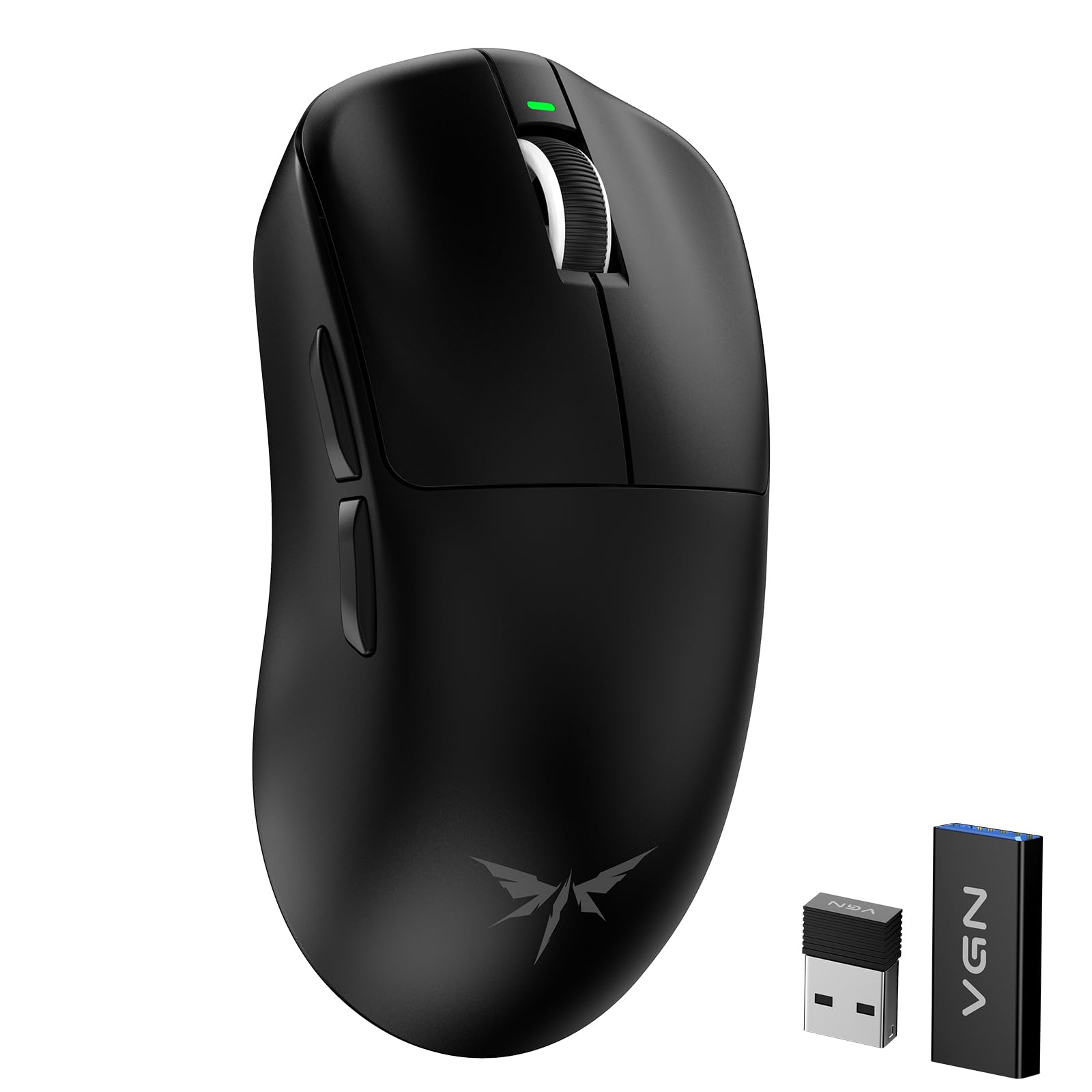
The VGN Dragonfly F1 MOBA challenges much more expensive mice with a 55g weight and the flagship PAW3395 sensor. This sensor supports up to 26,000 DPI and 4000Hz polling rate with a separate dongle, matching the tracking performance of premium competitors. The ultralight construction makes it ideal for high-APM MOBA and RTS play where fast, repeated flicks are required.
The optimized tactile click feel uses switches tuned for high-frequency clicking, reducing finger fatigue during extended gaming marathons. The silver-ion frosted coating provides a sweat-resistant anti-slip grip that maintains texture over heavy use. With up to 130 hours of battery life on a single charge, it solves the common pain point of daily recharging that plagues many wireless mice.
Dual-mode connectivity between 2.4GHz wireless and USB-C wired mode offers flexibility for different setups. The included small PTFE feet are functional but not the fastest gliding option available. Customer reviews consistently praise its performance against Razer and Logitech models at a fraction of the cost, though the 4K dongle must be purchased separately.
Why it’s great
- 55g ultralight design for rapid flicking
- PAW3395 sensor with 26K DPI
- 130-hour battery life for extended sessions
- Anti-slip frosted coating for sweat resistance
Good to know
- 4000Hz polling requires separate dongle purchase
- Stock PTFE feet could be smoother for competitive play
- Some units report scroll wheel failure after months
4. Razer Basilisk Essential

The Razer Basilisk Essential delivers the ergonomic Basilisk shape at a budget-friendly price point. Its 6,400 DPI optical sensor is lower resolution than flagship models, but for many competitive FPS players who play at 400 to 800 DPI, it offers sufficient precision without smoothing artifacts. The rubberized scroll wheel and side grips improve control during long sessions.
The 7 programmable buttons include a replaceable side paddle for quick DPI toggle—a feature useful for sniping in tactical shooters. The mechanical switches use Omron 20m technology, which some users find more reliable than the higher-rated 50m switches found on the standard Basilisk. The Chroma RGB lighting with 16.8 million colors is fully customizable via Synapse.
Build quality is solid with a stiff braided cable and wide Teflon feet that glide well. The ergonomic design fits medium-sized hands comfortably, and the on-the-fly sensitivity adjustment via dedicated buttons is handy for players who change DPI mid-game. Some users report side grip peeling over time, and the Synapse software has limitations on macOS.
Why it’s great
- Comfortable ergonomic Basilisk shape
- Replaceable side paddle for DPI toggle
- Wide Teflon feet for smooth glide
- Good build quality for the budget tier
Good to know
- 6,400 DPI sensor is entry-level for competitive play
- Debouncing issues reported after extensive use
- Synapse software has issues on macOS
5. Redragon M901P-KS

The Redragon M901P-KS is built for MMO players who need 12 side buttons at their thumb. The 16,000 DPI sensor is paired with a 1000Hz polling rate and 40G acceleration, making it responsive enough for fast-paced gaming. The 20 total programmable buttons include a red power button that can now be reprogrammed via software, a feature earlier reviews noted as missing.
The ergonomic design includes a wave-shaped side button layout that reduces misclicks, with slanted rows and a raised bump on key 5 for tactile orientation. The grippy texture is similar to fine sandpaper, providing excellent hold during intense sessions. A 1000mAh battery delivers over 70 hours of use with RGB off, and the mouse can be used while wired charging.
Five memory profiles and two working modes let you switch between configurations on the fly. The included removable weights cater to different preferences. Customer reviews spanning two years of use report minimal wear, outperforming Razer Naga and Logitech G600 in durability. It is not ideal for FPS sniping due to the sensor’s tracking ceiling, but for MMO gameplay, it is a standout value.
Why it’s great
- 20 programmable buttons with 12 thumb keys
- Wave-shaped button layout prevents misclicks
- 70-hour battery life with 1000mAh cell
- Durable construction outlasts major brands
Good to know
- Not ideal for competitive FPS sniping
- Sensor has slight acceleration above 8000 DPI
- Right-hand only design; no left-handed version
FAQ
Is a 4000Hz polling rate noticeable in competitive play?
Should I choose optical or mechanical switches for competitive gaming?
What weight should I look for in an ultralight mouse?
Final Thoughts: The Verdict
For most users, the best competitive gaming mouse winner is the Logitech G502 Hero because its adjustable weight system and HERO 25K sensor provide the flexibility to match any aiming style while delivering proven tracking performance. If you want the latest optical switch technology and HyperScroll versatility, grab the Razer Basilisk V3 35K. And for ultralight wireless performance without breaking the bank, nothing beats the VGN Dragonfly F1 MOBA.

Mo Maruf
I created WellFizz to bridge the gap between vague wellness advice and actionable solutions. My mission is simple: to decode the research and give you practical tools you can actually use.
Beyond the data, I am a passionate traveler. I believe that stepping away from the screen to explore new environments is essential for mental clarity and physical vitality.