Our readers keep the lights on and my smoothie glass nicely filled. As an Amazon Associate, I earn from qualifying purchases.
Every artist knows the frustration: you spend hours perfecting a gradient on screen, only to see it fall flat when printed or viewed on another device. A machine built for creative work must prioritize color accuracy, raw rendering speed, and the ability to handle massive file layers without stuttering. That is what separates a true creative workstation from a general-purpose computer.
I’m Mohammad Maruf — the founder and writer behind WellFizz. This guide represents weeks of cross-referencing CPU and GPU benchmarks, display gamut coverage data, RAM bandwidth figures, and real-world user feedback from digital painters, 3D modelers, video editors, and illustrators to isolate the machines that genuinely serve creative workflows.
After sifting through the latest hardware, the strong contenders for the best computer for artists balance a high-refresh, wide-gamut display with a processor and GPU combo that renders without lag, regardless of whether you work in 2D, 3D, or motion graphics.
How To Choose The Best Computer For Artists
Selecting a creative workstation means prioritizing specs that many general-use buyers ignore. An artist’s workflow — whether in Adobe Photoshop, Clip Studio Paint, Blender, or DaVinci Resolve — places unique demands on every component. Understanding these demands prevents costly missteps.
Display Color Accuracy & Gamut Coverage
The monitor is your canvas. Look for panels covering at least 100% sRGB for web work and 95% or higher DCI-P3 for print and video. OLED displays offer true blacks and infinite contrast, while high-end IPS panels provide consistent brightness across viewing angles. A Delta E under 2 ensures colors appear as intended.
Graphics Processing and VRAM
A dedicated GPU with ample VRAM is essential. Integrated graphics struggle with 3D viewport navigation and high-resolution texture painting. For 2D work, 4 GB of VRAM is a bare minimum; for 3D sculpting or video editing, 8 GB or more prevents crashes when layering complex scenes.
RAM Capacity and Speed
Art applications devour memory. A 16 GB baseline handles moderate Photoshop work, but 32 GB allows for seamless multitasking with multiple large files, browser tabs, and reference images open simultaneously. DDR5 RAM offers faster data transfer, reducing save and load times for big projects.
Processor Core Count and Clock Speed
Rendering and export tasks benefit from higher core counts, while brush stroke responsiveness and filter application rely on single-core speed. Modern chips like the Intel Core Ultra 9 and AMD Ryzen 7 balance both, with integrated NPUs in some models accelerating AI-driven tools like background removal and upscaling.
Quick Comparison
On smaller screens, swipe sideways to see the full table.
| Model | Category | Best For | Key Spec | Amazon |
|---|---|---|---|---|
| Apple iMac M4 (24GB) | All-in-One | Color-critical design | 4.5K Retina display, 1B colors | Amazon |
| ASUS Zenbook Duo | Laptop | Multi-screen workflow | Dual 14″ OLED 3K 120Hz | Amazon |
| MSI Stealth 18 AI | Laptop | 3D + gaming | RTX 4080, 32GB DDR5 | Amazon |
| Microsoft Surface Pro 11 | 2-in-1 | On-the-go sketching | 13″ OLED, Snapdragon X Elite | Amazon |
| GIGABYTE AERO X16 | Laptop | Mobile 3D rendering | RTX 5070, 165Hz QHD+ | Amazon |
| Apple iMac M4 (16GB) | All-in-One | Everyday creative use | M4 10-core, 24″ 4.5K display | Amazon |
| Dell Tower ECT1250 | Desktop | Expandable workstation | Core Ultra 7, 32GB RAM | Amazon |
| Wacom MovinkPad Pro 14 | Drawing Tablet | Dedicated digital art | 14″ OLED 3K, 8,192 pen levels | Amazon |
| Lenovo Yoga 7 2-in-1 | 2-in-1 | Versatile sketching & typing | 16″ FHD+ touch, stylus included | Amazon |
| HP OmniDesk Desktop | Desktop | Budget-friendly 2D work | Ryzen 7 8700G, Radeon 780M | Amazon |
| Dell 24 All-in-One Touch | All-in-One | Touch-based illustration | FHD touch, 99% sRGB | Amazon |
| HP 24 All-in-One | All-in-One | Space-saving creative setup | Ryzen 7 7730U, 16GB RAM | Amazon |
| Microsoft Surface Laptop 7 | Laptop | Portable creative work | 13.8″ touch, Snapdragon X Elite | Amazon |
In‑Depth Reviews
1. Apple iMac M4 (24GB/512GB)

The iMac M4 with 24 GB of unified memory is the gold standard for artists who demand color accuracy above all else. Its 24-inch 4.5K Retina display supports one billion colors and 500 nits of brightness, making color-critical tasks like photo retouching and digital painting feel precise. The M4 chip’s 10-core GPU handles heavy layer stacks in Photoshop and Affinity Photo without stuttering, while the six-speaker array with Spatial Audio provides immersive reference monitoring for video editors.
The 512 GB SSD offers ample room for project files and creative suites, and the four Thunderbolt 4 ports allow connection to dual 6K external displays for a sprawling canvas. The integrated 12MP Center Stage camera keeps you framed during client reviews, and the three-microphone array captures clean audio for voiceovers. macOS’s color management pipeline ensures consistency across the entire workflow.
Where this configuration truly pulls ahead is memory. The jump from 16 GB to 24 GB makes a tangible difference when running multiple pro apps simultaneously — keeping Blender, After Effects, and dozens of browser tabs open without hitting swap. The all-in-one design saves desk space and the vibrant color options add personality to any studio. For pure creative horsepower and display quality, this is the benchmark.
Why it’s great
- Exceptional 4.5K Retina display with 1B color support
- 24 GB unified memory handles heavy multitasking
- Thunderbolt 4 supports dual 6K external displays
Good to know
- Base storage at 256 GB on standard config; 512 GB upgrade recommended
- Limited expansion options compared to tower desktops
2. ASUS Zenbook Duo (UX8406CA-PS99T)

The ASUS Zenbook Duo redefines portable creativity with two 14-inch 3K OLED 120 Hz touchscreens. Digital painters can keep their reference images on one screen and their canvas on the other, while video editors can stack timeline and preview panels vertically. The detachable Bluetooth keyboard and built-in kickstand allow seamless transition between laptop, dual-screen, and tablet modes — no dongles required.
Under the hood, the Intel Core Ultra 9 285H processor with Intel Arc graphics delivers AI-accelerated performance for tasks like upscaling and object selection in creative suites. The 32 GB of LPDDR5x RAM ensures that even a 50-layer Photoshop file with dozens of vector shapes remains fluid. The included ASUS Pen 2.0 with MPP 2.0 support offers 4,096 pressure levels for precise brush strokes, and the 120 Hz refresh rate makes the cursor feel immediate.
The 75 Wh battery provides up to 16 hours of video playback in laptop mode, though dual-screen operation cuts that to roughly nine hours. At only 3.64 pounds and 0.57 inches thin, this machine fits into a standard laptop bag. The military-grade MIL-STD 810H durability certification adds confidence for artists who work on location or in shared studio spaces.
Why it’s great
- Two dedicated 3K OLED screens for expanded workspace
- Included stylus with 4,096 pressure levels
- MIL-STD 810H durability rating
Good to know
- Speakers lack low-end presence for critical audio work
- Battery life drops significantly in dual-screen mode
3. MSI Stealth 18 AI Studio (A1VHG-019US)

The MSI Stealth 18 AI Studio is built for artists who also need serious rendering and gaming performance. Its NVIDIA GeForce RTX 4080 with 12 GB of GDDR6 VRAM accelerates 3D viewports in Blender and Maya, handles GPU-accelerated rendering in Octane and Redshift, and powers through 4K video exports in DaVinci Resolve. The 18-inch QHD+ display with 100% DCI-P3 coverage and a 240 Hz refresh rate provides both color accuracy and buttery-smooth cursor movement.
The Intel Core Ultra 9-185H processor with 16 cores (6 performance, 8 efficient, 2 low-power) balances heavy compute loads with battery saving for lighter tasks. The 32 GB of DDR5 RAM ensures ample headroom for simulation-heavy projects, while the 1 TB NVMe SSD offers rapid load times for large asset libraries. The Cooler Boost 5 thermal solution uses dual fans and six heat pipes to keep the system from throttling during long render sessions.
Connectivity is comprehensive with Thunderbolt 4, HDMI 2.1, and Wi-Fi 7, enabling fast external monitor and NAS transfers. The keyboard with per-key RGB lighting is comfortable for long typing sessions, and the 1080p webcam with facial recognition supports secure logins. Be aware that the system runs warm under sustained load, and the battery life drops to around 3–4 hours during intensive tasks — this is a desktop replacement best used plugged in.
Why it’s great
- RTX 4080 with 12 GB VRAM for 3D and rendering
- Large 18″ display with 100% DCI-P3
- 240 Hz refresh rate for smooth viewport interaction
Good to know
- Heavy chassis at over 6 pounds
- Battery life is short under load; best used plugged in
4. Microsoft Surface Pro 11 (32GB/1TB)

The Surface Pro 11 with 32 GB of RAM and a 1 TB SSD is the ultimate device for artists who need a laptop and a drawing tablet in one chassis. The 13-inch OLED display with a 1 million-to-1 contrast ratio delivers true blacks and vibrant colors, making digital paintings pop. The Snapdragon X Elite processor with a 12-core CPU and powerful NPU accelerates AI features in Windows 11, such as real-time background blur and automatic compositing in supported apps.
The 14-hour battery life frees you from constant charging, and the fast charging via Surface Connect or USB-C gets you back to work quickly. The kickstand allows for an adjustable viewing angle, and the Surface Slim Pen 2 (sold separately) offers haptic feedback and tilt support for natural shading and line variation. This is a machine designed for sketching on the go, whether you are in a coffee shop or a client meeting.
The trade-off is the lack of Thunderbolt 4 support — a limitation compared to the Surface Pro 8 and competing ultrabooks. This prevents the use of external GPU enclosures for heavy rendering tasks, so this device is best suited for 2D illustration, note-taking, and light 3D work. The 32 GB configuration ensures that even complex Clip Studio Paint files with hundreds of layers remain manageable.
Why it’s great
- Stunning OLED display with true blacks and vivid color
- 32 GB RAM for large, multi-layer art files
- Long 14-hour battery life for portable use
Good to know
- No Thunderbolt 4 for external GPU support
- Surface Pen sold separately
5. GIGABYTE AERO X16 (RTX 5070)
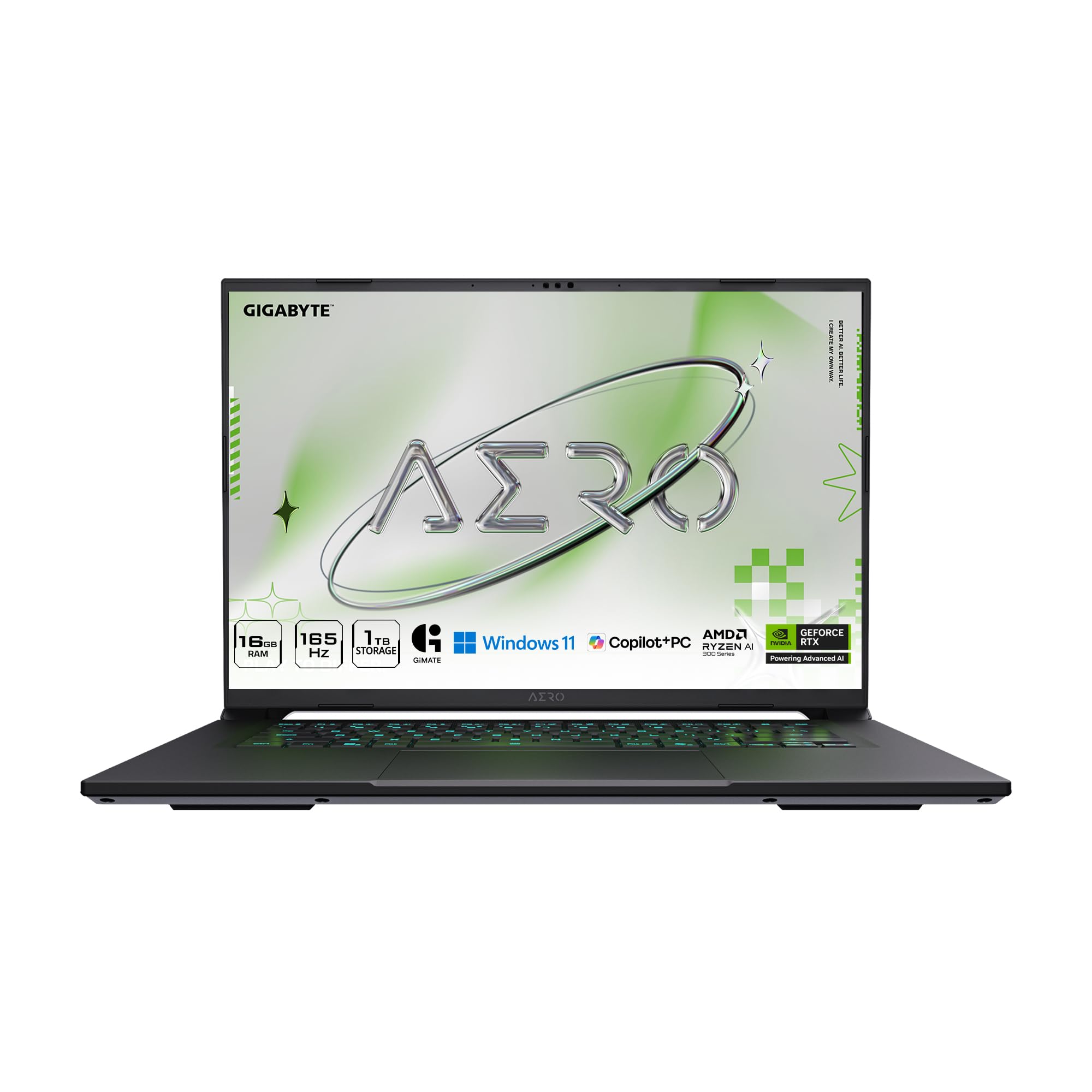
The GIGABYTE AERO X16 combines a Copilot+ PC experience with dedicated NVIDIA GeForce RTX 5070 graphics, making it a strong contender for artists who want AI-assisted workflows. The 16-inch 2560×1600 WQXGA display with a 165 Hz refresh rate provides sharp detail and fluid scrolling through complex timelines and high-res canvases. The thin 0.65-inch profile and 4.18-pound weight make it surprisingly portable for a machine with this level of GPU power.
The AMD Ryzen AI 7 350 processor includes a dedicated NPU that accelerates AI features in Windows and creative apps, such as real-time object selection and noise reduction. The RTX 5070 with NVIDIA Studio drivers ensures certified stability for apps like Adobe Creative Cloud, Blender, and DaVinci Resolve. The 1 TB SSD offers generous storage for project files, while the 16 GB DDR5 RAM handles moderate multitasking — though power users may wish for 32 GB.
The laptop runs quietly under light loads, but the fans become audible during rendering or gaming sessions. The keyboard is comfortable for typing, and the port selection, including USB-C and HDMI, covers most peripherals without requiring a hub. The biggest limitation is the 8 GB of VRAM on the RTX 5070, which may bottleneck very complex 3D scenes, but for most 2D and moderate 3D workflows, this machine delivers excellent value.
Why it’s great
- Dedicated RTX 5070 with NVIDIA Studio drivers
- Thin and light for a gaming-class creative laptop
- High-refresh 165 Hz QHD+ display
Good to know
- Only 8 GB VRAM limits heavy 3D workloads
- 16 GB RAM may feel tight for heavy multitasking
6. Apple iMac M4 (16GB/256GB)

The base configuration of the Apple iMac M4 offers the same stunning 24-inch 4.5K Retina display and the same M4 chip with a 10-core CPU and 10-core GPU as its more expensive sibling, making it a smart entry point for artists committed to the Apple ecosystem. The display supports 500 nits of brightness and one billion colors, which is exceptional for photo editing, vector illustration, and UI design work. macOS’s robust color management system ensures consistency when moving files between devices.
The 16 GB of unified memory is sufficient for most 2D creative workflows — running Photoshop, Illustrator, and Safari with a dozen tabs open feels responsive. The 256 GB SSD stores the operating system and essential apps, but artists with large media libraries should plan to use external Thunderbolt drives for active projects. The six-speaker system with Spatial Audio provides clear reference sound for video editors, and the 12MP Center Stage camera keeps you framed during virtual client presentations.
The limitation becomes apparent when pushing into 3D modeling or heavy video compositing. The 16 GB memory ceiling can cause swap usage with very large Blender scenes or After Effects compositions, and the base 256 GB storage fills quickly. However, for the vast majority of freelance illustrators, graphic designers, and photographers, this iMac delivers premium screen quality and responsive performance at a more accessible tier.
Why it’s great
- Industry-leading 24″ 4.5K Retina display
- M4 10-core GPU provides smooth 2D performance
- Quiet, space-saving all-in-one design
Good to know
- 16 GB memory limits heavy 3D and video compositing
- 256 GB storage fills quickly; external storage recommended
7. Dell Tower Desktop ECT1250

The Dell Tower Desktop ECT1250 is a traditional tower aimed at artists who want freedom to upgrade components over time. The Intel Core Ultra 7-265 processor with built-in AI capabilities handles multitasking and creative applications with ease, and the 32 GB of DDR5 RAM provides a generous baseline for running heavy software suites. The tool-less entry and removable side panel make opening the case and swapping parts straightforward — a rare feature in pre-built office towers.
Connectivity is a strong point, with support for up to four FHD monitors via DisplayPort and daisy chaining, or two 4K displays via HDMI 2.1 and DisplayPort. The integrated UHD Graphics suffice for 2D work and basic UI design, but artists who need 3D rendering or GPU-accelerated effects will want to add a discrete graphics card. The 1 TB M.2 SSD provides fast boot times and quick application loading.
The 180W bronze-rated power supply is the main limitation — it lacks the wattage and PCIe power connectors needed for a high-end GPU upgrade without also replacing the PSU. There is only one M.2 slot and a single SATA port, so expansion options are more constrained than a custom-built PC. This machine is a solid foundation for budget-conscious artists who want a reliable system today with the possibility of a moderate GPU upgrade tomorrow.
Why it’s great
- 32 GB DDR5 RAM ready for heavy creative apps
- Tool-less entry for easy component upgrades
- Supports multi-monitor setups for expanded canvas
Good to know
- 180W PSU limits high-end GPU upgrade options
- Limited internal expansion slots
8. Wacom MovinkPad Pro 14

The Wacom MovinkPad Pro 14 is a dedicated Android drawing tablet designed specifically for digital artists who want a distraction-free creation device. The 14-inch OLED display with 3K resolution (2880×1800), 100% sRGB, and 100% DCI-P3 color gamut delivers vibrant, accurate colors with true blacks. The Premium Texture etched glass provides a paper-like feel with minimal parallax, and the battery-free Wacom Pro Pen 3 offers 8,192 pressure levels for the most nuanced brush control.
Powered by a Snapdragon 8s Gen 3 processor and 12 GB of RAM, this tablet runs apps like Clip Studio Paint and Infinite Painter smoothly, without the bloat of a general-purpose operating system. The Android 15 OS provides access to the Google Play Store for additional creative tools, and the 256 GB internal storage (expandable via microSD) gives artists room for their portfolio. The front and rear cameras support video calls and reference capture.
This is not a laptop replacement — it cannot run desktop versions of Photoshop or Blender, and the processor is not designed for heavy 3D rendering. The file management system can be initially confusing for users accustomed to Windows or macOS. However, for pure digital painting, sketching, and comic creation, the MovinkPad Pro offers a focused, high-quality experience that excels precisely because it removes the distractions of a full desktop OS.
Why it’s great
- Best-in-class pen feel with 8,192 pressure levels
- Stunning 14″ OLED with 100% DCI-P3 coverage
- Focused Android OS reduces distractions
Good to know
- Cannot run full desktop creative software
- Android file management can be cumbersome
9. Lenovo Yoga 7 2-in-1 (Ryzen 7)
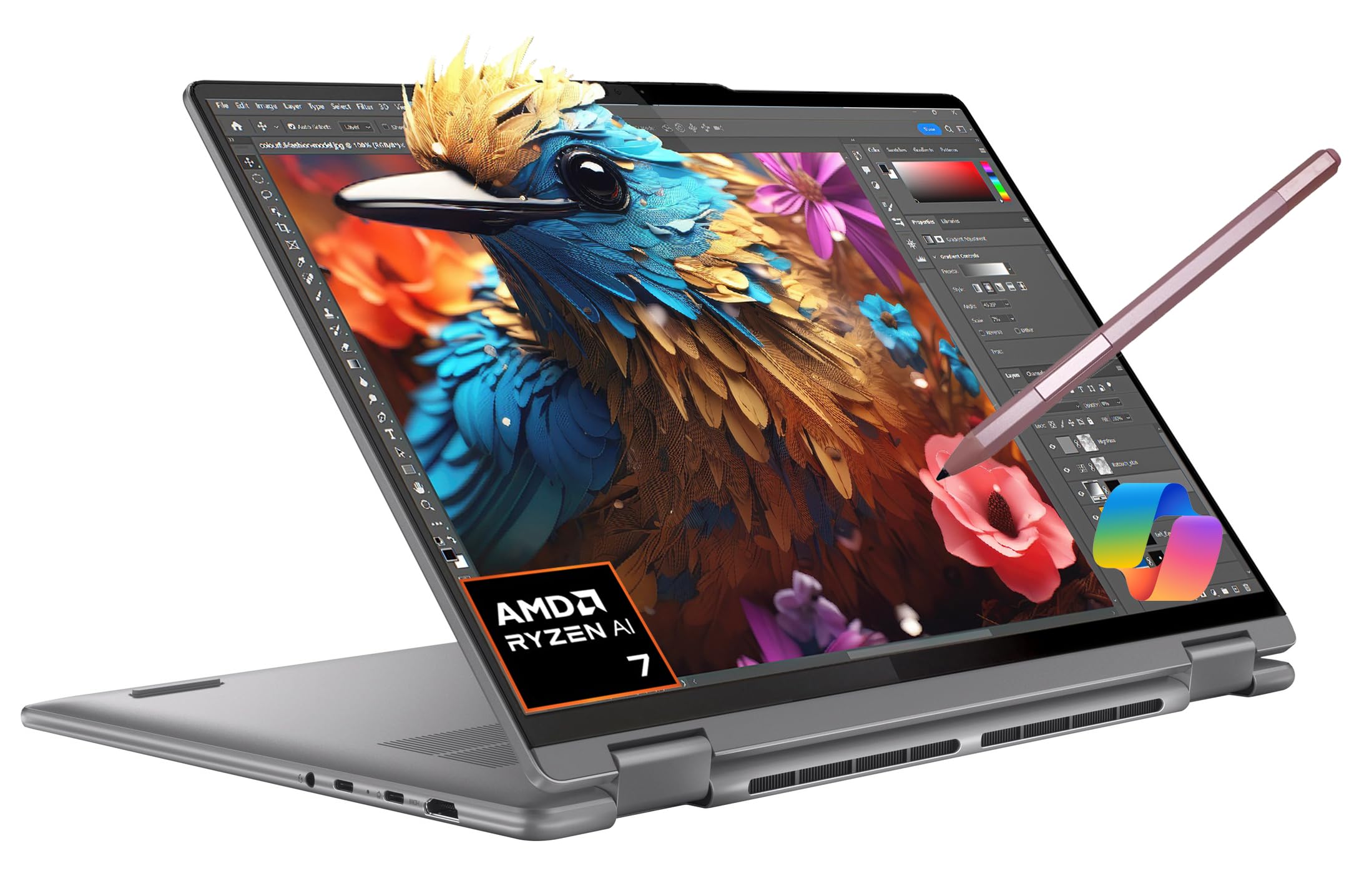
The Lenovo Yoga 7 2-in-1 combines a 16-inch FHD+ touchscreen with a 360-degree hinge, allowing artists to switch between laptop mode for typing and tablet mode for sketching. The AMD Ryzen 7 7735U processor with Radeon 680M integrated graphics provides good performance for 2D illustration, photo editing, and light 3D modeling. The included IST Precision Pen offers a responsive sketching experience right out of the box.
The 16 GB of LPDDR5 RAM and 1 TB SSD provide ample speed and storage for most creative projects, and the 71 Wh battery lasts up to 15 hours for all-day fieldwork. The display covers the standard sRGB gamut adequately, though it does not reach the DCI-P3 coverage of premium OLED panels. The port selection — two USB-C, two USB-A, HDMI 1.4, and a card reader — covers most peripherals without needing a hub.
The Yoga 7 is not designed for heavy GPU-accelerated tasks; the integrated graphics will struggle with complex 3D viewports and 4K video timelines. The 16-inch size in tablet mode can feel large and heavy for extended handheld sketching sessions. However, for a versatile machine that handles both productivity and creative work at a mid-range tier, the Yoga 7 offers excellent value.
Why it’s great
- Versatile 2-in-1 design with included stylus
- Large 16″ touchscreen display for detailed work
- Good battery life for portable use
Good to know
- Integrated graphics limit 3D capability
- Large and heavy in tablet mode
10. HP OmniDesk Desktop (Ryzen 7)

The HP OmniDesk Desktop with an AMD Ryzen 7 8700G is a smart entry-level tower for artists focused on 2D illustration, graphic design, and photo editing. The integrated Radeon 780M graphics is one of the most capable integrated GPUs on the market — it can handle light 3D modeling and casual 1080p video editing, though it is not a replacement for a discrete card. The 32 GB of DDR5 RAM is generous at this tier and provides smooth multitasking when running Photoshop alongside browsers and communication apps.
The 1 TB NVMe SSD ensures fast boot times and quick asset loading, and the Wi-Fi 6 + Bluetooth 5.4 connectivity supports modern wireless peripherals. The included keyboard and mouse combo gets you started immediately, though users may want to upgrade to a more comfortable keyboard for long creative sessions. The tool-less case design allows for future component upgrades.
The integrated graphics do share system memory, which can impact performance in memory-intensive tasks. The lack of a discrete GPU means this machine is not suitable for 3D rendering or GPU-accelerated effects in After Effects. However, for the price, this desktop delivers a solid foundation for budding digital artists and graphic designers who need reliable performance without the premium cost of a high-end workstation.
Why it’s great
- 32 GB DDR5 RAM provides smooth multitasking
- Capable Radeon 780M integrated graphics for 2D work
- Tool-less case for easy upgrades
Good to know
- No discrete GPU; not suitable for heavy 3D rendering
- Included keyboard and mouse are basic quality
11. Dell 24 All-in-One Touch (EC24250)

The Dell 24 All-in-One with its 23.8-inch FHD touchscreen is designed for artists who prefer direct touch interaction with their canvas. The IPS panel covers 99% sRGB with 50% higher contrast than previous generations, providing decent color accuracy for illustration and design work. The Dell ComfortView Plus technology reduces harmful blue light emissions, which is a welcome feature for artists who spend long hours at the screen.
The Intel Core 5 120U processor with Intel Graphics handles 2D creative apps, web browsing, and light multitasking smoothly. The 16 GB of DDR5 RAM is sufficient for standard Photoshop and Illustrator workflows, while the 512 GB SSD provides adequate storage for active projects. The 5MP infrared camera with HDR technology produces clear video for client calls, and the tiltable design (0 to 20 degrees) helps find the best angle for collaboration.
The integrated graphics cannot handle 3D modeling or GPU-accelerated effects, and the 1080p display resolution is lower than what many creative professionals prefer for detailed work — consider a 4K monitor upgrade for more serious use. The limited connectivity (no Thunderbolt) and the lack of a discrete GPU peg this as an entry-level creative machine. However, the touchscreen responsiveness and the all-in-one convenience make it a compelling choice for educators, students, and casual digital painters.
Why it’s great
- Responsive 23.8″ FHD touchscreen display
- Dell ComfortView Plus reduces eye strain
- Space-saving all-in-one design
Good to know
- Integrated graphics limit creative capabilities
- 1080p resolution is low for detailed design work
12. HP 24 All-in-One (Ryzen 7)

The HP 24 All-in-One is a straightforward, space-saving desktop for artists who need a clean setup with minimal cable clutter. The AMD Ryzen 7 7730U processor with Radeon integrated graphics offers solid performance for 2D creative work — users report significant speed improvements in Lightroom and Photoshop compared to older machines. The 16 GB of DDR4 RAM and 512 GB SSD ensure responsive application launching and basic multitasking.
The 23.8-inch FHD display features a three-sided micro-edge bezel with an 89% screen-to-body ratio, providing an immersive viewing experience for a monitor at this tier. The pop-up privacy camera protects your privacy when not in use, and the dual-array microphones with noise reduction help keep virtual meetings clear. The all-in-one design includes the keyboard and mouse, so you are ready to start creating immediately after unboxing.
The 1080p resolution is adequate for web and social media content creation, but lacks the pixel density needed for detailed print work or high-resolution photo editing. The integrated graphics cannot handle 3D applications or hardware-accelerated video encoding. The non-adjustable stand is another limitation — artists should consider an external monitor arm or a taller desk setup for ergonomic comfort during long sessions.
Why it’s great
- Fast AMD Ryzen 7 performance for 2D apps
- Easy setup with built-in keyboard and mouse
- Privacy camera and noise-reducing microphones
Good to know
- 1080p display is low resolution for detailed work
- Non-adjustable stand limits ergonomics
13. Microsoft Surface Laptop 7 (Snapdragon X Elite)

The Microsoft Surface Laptop 7 with the Snapdragon X Elite processor is a sleek, ultra-portable option for artists who prioritize battery life and mobility. The 13.8-inch PixelSense touchscreen with a 3:2 aspect ratio offers more vertical screen real estate than typical 16:9 laptops, making it ideal for reading documents, browsing references, and working on tall canvases. The 120 Hz refresh rate provides smooth scrolling and pen input.
The ARM-based Snapdragon X Elite delivers excellent power efficiency, providing up to 20 hours of battery life — enough for a full day of sketching and note-taking without hunting for an outlet. The haptic trackpad and solid keyboard provide a comfortable typing experience, and the Windows Hello IR camera enables instant, secure logins. The design is thin and lightweight, making it easy to carry to client meetings or co-working spaces.
The ARM architecture is the main caveat: some legacy x64 creative applications may not run, and some hardware peripherals have driver compatibility issues. Users have reported problems with USB-C dock stability and resume-from-sleep reliability. This machine is best suited for artists whose workflow is centered on web-based tools, Microsoft Office, and ARM-native apps like Photoshop and Lightroom (which run well). For traditional desktop-heavy workflows, a standard x64 laptop is a safer bet.
Why it’s great
- Excellent battery life (up to 20 hours)
- Beautiful 3:2 touchscreen with 120 Hz refresh
- Lightweight and portable design
Good to know
- ARM architecture limits software compatibility
- Some driver and peripheral issues reported
FAQ
Do I need a discrete GPU for digital painting?
Is 16 GB of RAM enough for a creative workstation?
Does a high refresh rate benefit digital artists?
Can I use an Apple Silicon Mac for 3D modeling?
Final Thoughts: The Verdict
For most users, the best computer for artists winner is the Apple iMac M4 (24GB/512GB) because it combines an industry-leading color-accurate display with unified memory architecture that handles multitasking without stutter. If you want a mobile dual-screen setup that transforms how you manage references and palettes, grab the ASUS Zenbook Duo. And for a dedicated 3D rendering and gaming powerhouse that fits in a backpack, nothing beats the MSI Stealth 18 AI Studio.

Mo Maruf
I created WellFizz to bridge the gap between vague wellness advice and actionable solutions. My mission is simple: to decode the research and give you practical tools you can actually use.
Beyond the data, I am a passionate traveler. I believe that stepping away from the screen to explore new environments is essential for mental clarity and physical vitality.