Our readers keep the lights on and my smoothie glass nicely filled. As an Amazon Associate, I earn from qualifying purchases.
A computer for a teacher is the command center for lesson plans, grade entry, video calls with parents, and hours of curriculum research — and it needs to survive being tossed into a bag between classrooms. The wrong machine means fighting with sluggish boot times, a dead battery by third period, or a screen that causes eye strain during late-night grading sessions. You need something that starts fast, runs all day, and handles a dozen open tabs without stuttering.
I’m Mohammad Maruf — the founder and writer behind WellFizz. For this guide, I’ve analyzed hundreds of data points across 11 specific models, cross-referencing processor benchmarks, battery capacity ratings, display resolution, and chassis weight to find the machines that genuinely serve a teacher’s workflow.
After filtering through the specs and real user feedback, I’ve narrowed the field to the machines that earn their place in a classroom bag. Here is my detailed breakdown of the best computer for teachers on the market right now.
How To Choose The Best Computer For Teachers
A teacher’s computer isn’t just a personal device — it’s a classroom tool that must handle presentation software, grade management systems, and endless browser research simultaneously. Picking the right one means focusing on factors that directly affect your daily workflow, not just raw specs on paper.
Battery Life and Real-World Endurance
A standard school day spans 7-8 hours, and you won’t always have access to an outlet. Look for a battery rated for at least 10 hours of mixed use, and pay attention to the watt-hour (Wh) rating of the battery — numbers above 50Wh generally indicate a full-day-capable machine. The difference between “up to 15 hours” and actually lasting through a full day often comes down to the processor’s efficiency.
Screen Size and Resolution for All-Day Reading
You’ll be staring at spreadsheets, lesson plans, and online grade books for hours. A 15.6-inch or larger screen at 1920×1080 or higher resolution reduces eye fatigue. Consider a taller 16:10 aspect ratio if you often have toolbars and menus open simultaneously — the extra vertical space helps you see more of a document without scrolling. Anti-glare coatings are also a real benefit in brightly lit classrooms.
Keyboard and Portability
A comfortable keyboard with decent key travel is essential for typing lesson plans and email responses. A numeric keypad is a huge plus for teachers who frequently enter grades or work with spreadsheets. Weight is equally critical — anything over 4.5 pounds will feel heavy after a week of carrying it between rooms and home. Aim for under 3.5 lbs if you walk between multiple classrooms.
Quick Comparison
On smaller screens, swipe sideways to see the full table.
| Model | Category | Best For | Key Spec | Amazon |
|---|---|---|---|---|
| ASUS Vivobook S16 AI PC | Premium | Creator and Multi-Tasking | 32GB RAM, 1TB SSD, OLED 2.8K 120Hz | Amazon |
| Samsung Galaxy Book5 Pro 360 | Premium | All-Day Battery and Note Taking | 25-Hour Battery, 3K AMOLED Touch | Amazon |
| GEEKOM GeekBook X16 Pro | Premium | Lightweight Powerhouse | 2.8 lbs, Ultra 9, 2TB SSD, 17H Battery | Amazon |
| Microsoft Surface Laptop 2024 | Premium | Copilot+ AI and Touchscreen | Snapdragon X Elite, 20H Battery | Amazon |
| Dell 14 Plus DB14250 | Mid-Range | AI-Enhanced Productivity | 2.5K 16:10 Display, Intel Core Ultra 7 | Amazon |
| Lenovo IdeaPad 15.6″ | Mid-Range | Massive RAM and Storage | 40GB RAM, 2.5TB Total Storage | Amazon |
| Lenovo Yoga 7i 2-in-1 | Mid-Range | Versatile 2-in-1 with Touch | 16″ 2K Touch, Core Ultra 7, 1TB SSD | Amazon |
| Samsung Galaxy Book3 | Mid-Range | Premium Ultraportable with OLED | 13th Gen i7, 16GB RAM, 512GB SSD | Amazon |
| HP Business Laptop 17.3″ | Budget | Large Screen for Budget | 17.3″ 1600×900 Display, 16GB RAM | Amazon |
| Apple 2026 MacBook Neo | Budget | Ecosystem and Portability | 2.71 lbs, A18 Pro, 16H Battery | Amazon |
| HP 15.6″ FHD Laptop 2026 | Budget | High RAM for Multitasking | 32GB RAM, 1TB SSD, Intel N100 | Amazon |
In‑Depth Reviews
1. ASUS Vivobook S16 AI PC

The ASUS Vivobook S16 is the top-tier pick for teachers who refuse to compromise on screen quality. Its 16-inch 2.8K OLED panel with a 120Hz refresh rate produces deep blacks and rich colors that make reading text on lesson plans and research papers incredibly easy on the eyes. The 16:10 aspect ratio also provides that extra vertical real estate — perfect for viewing a full grading rubric without scrolling.
Under the hood, the Intel Core Ultra 9 285H processor with 32GB of LPDDR5X RAM handles everything from a dozen Chrome tabs to running video calls simultaneously without any lag. The 1TB SSD offers fast boot and load times, and the inclusion of Thunderbolt 4 and Wi-Fi 7 future-proofs your connectivity. The Intel Arc Graphics and dedicated NPU also make this a viable option if you create multimedia content for your classroom.
One common feedback point involves the RGB backlit keyboard — some users find the characters hard to read against the black keys when the backlight is on, especially in low-light conditions. It’s a minor design flaw in an otherwise phenomenal machine. At a featherlight chassis size, it’s extremely portable given the screen real estate.
Why it’s great
- Stunning 2.8K OLED 120Hz display reduces eye strain
- Massive 32GB RAM and Core Ultra 9 provide effortless multitasking
- Ultra-light and thin for a 16-inch laptop, easy to carry between rooms
Good to know
- Backlit keyboard characters can be difficult to read due to dim LEDs on dark keys
- No S3 sleep mode — Modern Standby can lead to occasional bugs
- Premium-tier pricing reflects the top-end display and processor
2. Samsung Galaxy Book5 Pro 360

The Samsung Galaxy Book5 Pro 360 is a standout for teachers who want a single device for both traditional laptop work and handwritten note-taking. The included S Pen is responsive enough for annotating PDFs, drawing diagrams on the fly, or jotting down meeting notes directly on the 16-inch 3K AMOLED touchscreen. The Dynamic AMOLED 2X display is vivid and offers 120Hz smooth scrolling for an incredibly fluid visual experience.
The battery life is genuinely impressive — real-world use often delivers a full two-day stretch without needing a charger, aligning with the claimed 25-hour figure. The Intel Core 7 Ultra processor handles multi-tasking with ease, and the integration with Samsung phones via Phone Link is seamless for teachers who use Galaxy devices. The quad AKG speakers with Dolby Atmos also make video presentations sound clear and immersive.
Despite its premium feel, some users report that the keyboard feels slightly soft or rubbery, which may not suit everyone’s typing preference. There are also isolated reports of screen fragility, so a good protective sleeve is recommended for daily bag transport. For a teacher’s primary machine, this is a powerful and versatile option.
Why it’s great
- Outstanding 25-hour battery life covers multiple school days
- S Pen is incredibly useful for annotating and note-taking
- Brilliant 3K AMOLED touchscreen with 120Hz is a joy to use
Good to know
- Keyboard has a slightly mushy feel compared to typical Samsung laptops
- Fragile screen requires careful handling and a quality sleeve
- Premium price point reflects the high-end display and S Pen inclusion
3. GEEKOM GeekBook X16 Pro

The GEEKOM GeekBook X16 Pro is the ultimate solution for teachers who commute between multiple classrooms or buildings. At just 2.8 pounds, it’s one of the lightest 16-inch machines available, and its aerospace-grade magnesium alloy chassis feels surprisingly premium for the weight. The 2.5K IPS display with a 16:10 ratio and 120Hz refresh rate delivers a crisp, spacious workspace that’s kind to eyes during long grading sessions.
Performance-wise, the Intel Core Ultra 9 185H paired with 32GB of LPDDR5x RAM is a beast — it chews through heavy multi-tasking workflows without a hitch. The IceBlade 2.0 cooling system with dual fans is essential here, as the powerful CPU can generate heat under sustained loads. The 2TB PCIe Gen4 SSD offers immense storage for all your files. The 77Wh battery is rated for up to 17 hours, and early user reports confirm it easily lasts a full day.
The fan noise can be noticeable under full load, and the touchpad only clicks reliably at the corners, which is a common complaint. The RAM is also soldered, so you won’t be upgrading it later. For pure, ultra-portable power, this is an excellent choice for a teacher on the move.
Why it’s great
- Super-light 2.8 lbs is perfect for carrying between rooms all day
- Powerful Ultra 9 processor and 32GB RAM handle everything you throw at it
- Stunning 2.5K 16:10 display with 120Hz and 100% sRGB
Good to know
- Fans become audible under sustained load
- Trackpad click only functions reliably on the bottom corners
- RAM is soldered and not upgradable
4. Microsoft Surface Laptop (2024)

The Microsoft Surface Laptop (2024) marks a major shift with its ARM-based Snapdragon X Elite processor, which delivers remarkable battery efficiency and silent, cool operation. Teachers will appreciate the all-day battery life — real-world use easily clears 15-18 hours on a full charge, meaning you can confidently leave the charger at home. The 15-inch PixelSense touchscreen is bright, colorful, and ideal for interactive presentations or navigating lesson plans.
The Copilot+ AI features are genuinely useful for a teacher: you can quickly summarize documents, draft emails, or search through files with natural language. The build quality is top-tier, with a solid aluminum chassis and a keyboard that feels precise and comfortable for long typing sessions. The omnisonic speakers with Dolby Atmos are surprisingly loud and clear for a laptop this thin.
The major caveat is app compatibility. The ARM architecture means some older applications (especially certain educational tools, virtual machine software, and legacy games) may not run natively or will require emulation, which can impact performance. If your school uses specific x86-based software, verify compatibility before purchasing. For a cloud-first workflow using standard office tools and browsers, this laptop excels.
Why it’s great
- Outstanding battery life that lasts multiple school days
- Touchscreen display works great for classroom presentations
- Premium build quality and silent, fanless operation
Good to know
- ARM-based processor may cause compatibility issues with some older educational apps
- No standard USB-A port — you will need a dongle for older peripherals
- Premium price for the Snapdragon X Elite configuration with 1TB SSD
5. Dell 14 Plus DB14250

The Dell 14 Plus DB14250 is a brilliantly balanced machine for the tech-savvy teacher. Its 14-inch 2.5K (2560×1600) display with a 16:10 aspect ratio is a standout feature — it offers significantly more vertical screen space than a typical 16:9 panel, which is incredibly useful for viewing a full online gradebook or a long document without constant scrolling. The resolution is sharp enough for detailed presentations.
Powered by the Intel Core Ultra 7-258V processor and 32GB of LPDDR5X RAM, this laptop handles multi-tasking with impressive fluidity. The Intel Arc Graphics provide a noticeable boost for any light creative work. The all-aluminum chassis feels robust, and the keyboard is comfortable for extended typing. The battery life is solid for a full school day, and fast charging gets you back up quickly between periods.
Users consistently praise its lightweight design and snappy performance. The main downsides are the lack of a numeric keypad (expected on a 14-inch chassis) and no fingerprint reader, relying on camera-based Windows Hello instead. A few isolated reports mention keyboard failures after a few months, so a warranty check is worthwhile.
Why it’s great
- Sharp 2.5K 16:10 display provides excellent vertical workspace
- 32GB RAM and Core Ultra 7 deliver snappy all-day performance
- Lightweight aluminum build is comfortable to carry
Good to know
- No numeric keypad for easy grade entry
- Lacks fingerprint reader — relies on IR camera for sign-in
- Some reports of keyboard issues after extended use
6. Lenovo IdeaPad 15.6″

The Lenovo IdeaPad 15.6″ is built for teachers who hoard files and need limitless multitasking headroom. With 40GB of DDR4 RAM and a massive 2.5TB of total storage (2TB SSD plus a docking station set), you can keep every lesson plan, video, PDF, and photo archive for years without worrying about space. It simply does not stutter, no matter how many tabs or applications you throw at it.
The 15.6-inch FHD anti-glare display is a comfortable workhorse for spreadsheets and web browsing, and the included numeric keypad is a fantastic feature for grade entry. The bundle also includes Microsoft Office with a lifetime license, which is a real value add for teachers who want to avoid subscription fees. The Intel Core i5 processor is dependable for everyday tasks, though not as powerful as the Core Ultra series.
The build quality feels a bit plasticky compared to premium aluminum laptops, and the battery life is merely average — you will likely need to plug in before the end of a full school day. The machine also arrived in a default user mode for some buyers, requiring a factory reset. If raw storage and RAM are your priority at a mid-range price, this is a compelling option.
Why it’s great
- Massive 40GB RAM provides extreme multitasking headroom
- 2.5TB total storage (2TB SSD) is incredible for file hoarders
- Includes lifetime Microsoft Office license and numeric keypad
Good to know
- Battery life is average — may require a mid-day charge
- Build quality feels less premium than aluminum rivals
- Some units arrive in a reset-required state out of the box
7. Lenovo Yoga 7i 2-in-1

The Lenovo Yoga 7i is the ultimate chameleon for the classroom. Its 360-degree hinge lets you switch between laptop mode for grading, tent mode for showing a video to a small group, tablet mode for annotating a worksheet with the touchscreen, and stand mode for watching professional development videos. The 16-inch 2K resolution touchscreen is sharp and bright, making it easy to see from across a desk.
Powered by the Intel Core Ultra 7 155U and 16GB of DDR5 RAM, it handles moderate multitasking, note-taking, and presentation work with ease. The 1TB PCIe SSD offers fast boot times and ample storage. The inclusion of a fingerprint reader and backlit keyboard adds daily convenience. The battery life is solid, easily covering a full school day of mixed use.
The main trade-off is weight — at this size, it’s not the lightest 2-in-1, so it’s less ideal if you’re walking between classrooms. A few users also noted pushed Lenovo Vantage ads and Microsoft upsell notifications. For a teacher who wants a single flexible device for both desk work and interactive student engagement, this is a great fit.
Why it’s great
- Versatile 2-in-1 design adapts to any teaching scenario
- Beautiful 16-inch 2K touchscreen with excellent color
- Fingerprint reader and backlit keyboard add convenience
Good to know
- Not the lightest for frequent room-to-room travel
- Lenovo Vantage and Microsoft can be pushy with upsell ads
- Battery life, while good, won’t set records
8. Samsung Galaxy Book3

The Samsung Galaxy Book3 is a sleek, ultraportable option that excels in display quality. Its 15.6-inch 120Hz AMOLED panel is simply gorgeous — colors are vibrant and blacks are deep, making text exceptionally crisp and images pop. This display is a genuine pleasure for teachers who spend hours reading documents or creating presentation materials. The laptop itself is very thin and light, making it easy to slide into a bag.
The 13th Gen Intel Core i7-1360P processor combined with 16GB of RAM ensures smooth performance for everyday teaching tasks, including running multiple Office apps, browsers, and video conferencing software simultaneously. The fingerprint reader is a handy security feature for fast login, and the selection of ports (including USB-C and HDMI) reduces adapter dependency. The Samsung ecosystem integration with Quick Share and Link to Windows is a plus for Samsung phone users.
Battery life is a notable weak spot — real-world use often falls short of the advertised number, with some users reporting under 6 hours of intensive use. This may require a lunchtime charge. The keyboard has been described as slightly flimsy by some, and a few units have had hinge issues over time. For the display quality alone, it’s a strong mid-range contender.
Why it’s great
- Stunning 120Hz AMOLED display with incredible color and contrast
- Very thin, lightweight design for effortless portability
- Fingerprint reader and versatile port selection
Good to know
- Battery life is disappointing — may not last a full school day
- Keyboard feels less premium than the rest of the build
- Some reports of hinge durability issues over time
9. HP 17.3″ Business Laptop
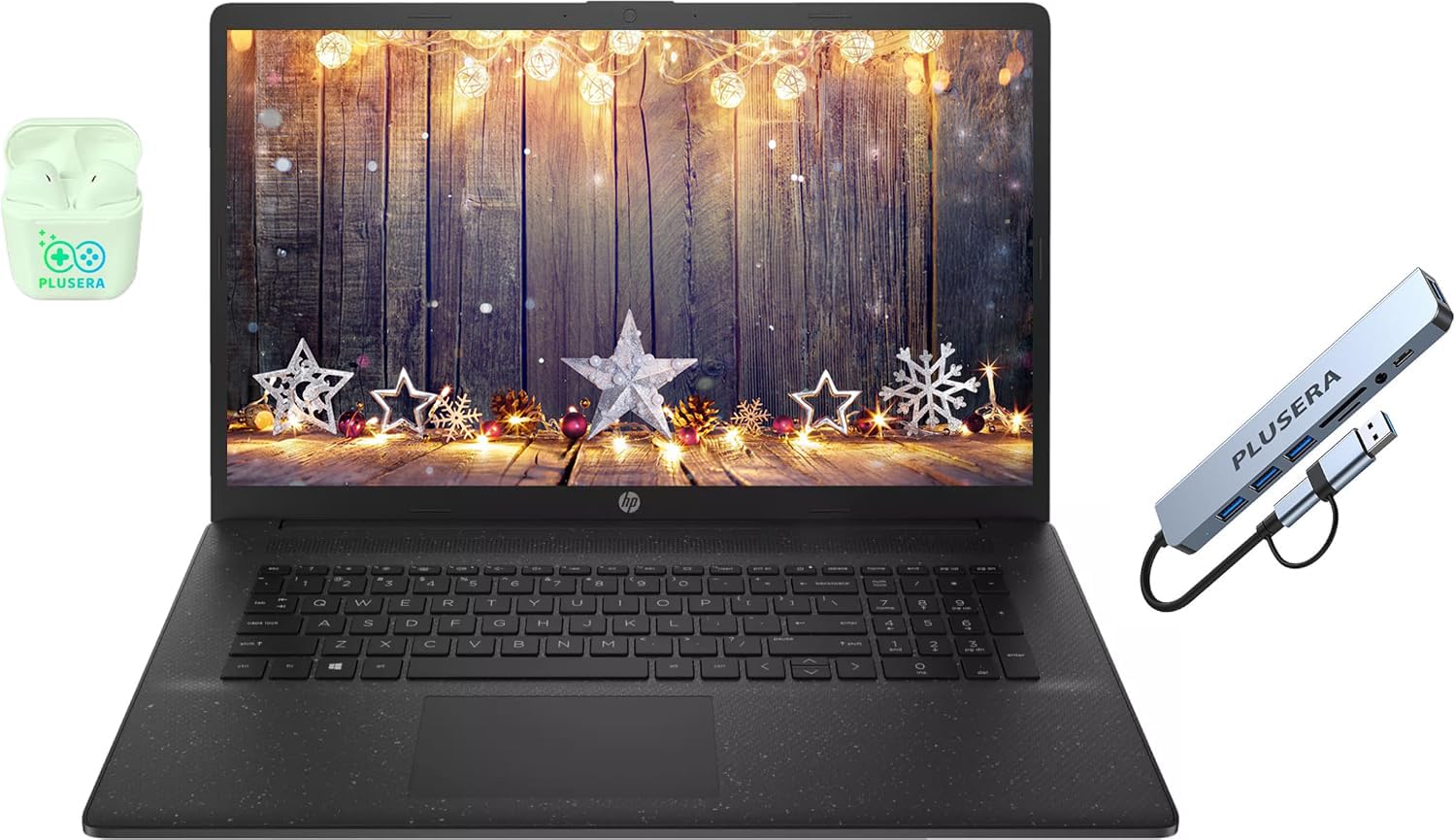
The HP 17.3″ Business Laptop is the budget-friendly option for teachers who prioritize screen real estate above all else. The 17.3-inch display, while only 1600×900 resolution, provides a massive canvas for viewing spreadsheets, lesson plans, and multi-window workflows. The larger chassis also accommodates a full numeric keypad, which is a significant advantage for quick grade entry. The bundle includes a PLUSERA earphone and an 8-in-1 hub, adding immediate peripheral value.
Performance is handled by an Intel Core i5 processor with 16GB of RAM and a 256GB SSD, which is adequate for web browsing, Office applications, and video streaming. The Intel Iris Xe graphics can handle light photo editing. Windows 11 Pro is included, which offers more robust management features than the Home edition. The 10-core design provides decent multi-tasking for a budget machine.
The low-resolution display is a major compromise — text and images are noticeably less sharp than on a 1080p panel. Some users report frequent crashing and stability issues, which raises reliability concerns despite the positive reviews. The lack of an Ethernet port is also a drawback for those in schools with unreliable Wi-Fi. For a tight budget where screen size is king, this is an option with notable caveats.
Why it’s great
- Huge 17.3-inch screen is excellent for multi-window multitasking
- Numeric keypad makes grade entry faster
- Includes an 8-in-1 hub and earphones for extra connectivity value
Good to know
- Display resolution is 1600×900 — noticeably less sharp than FHD panels
- Some users report stability issues and frequent crashes
- No Ethernet port — relies on Wi-Fi for internet connection
10. Apple 2026 MacBook Neo 13-inch

The Apple MacBook Neo is the entry-level gateway into the Apple ecosystem for teachers. It features the new A18 Pro chip, which delivers smooth, responsive performance for everyday tasks like browsing, email, and Office apps. The 13-inch Liquid Retina display is bright (500 nits) and sharp (2408×1506 resolution), making text easy to read. At just 2.71 pounds, it’s incredibly portable and easy to carry between classrooms.
The battery life is outstanding — the advertised 16 hours holds up in real-world mixed use, easily lasting a full day without needing a charge. The build quality is typical Apple: a rigid aluminum chassis that feels premium. The 1080p FaceTime HD camera and dual-mic array ensure you look and sound good on video calls. MacOS is intuitive and efficient, especially for users already in the Apple ecosystem with an iPhone or iPad.
The major limitation is the 8GB of unified memory — while MacOS manages it efficiently, power users with dozens of tabs and heavy applications may notice limitations over time. The 256GB SSD is also on the small side for storing large media files. The single USB-C port (depending on the configuration) may require a hub for connecting peripherals. For a teacher focused on portability, battery, and ecosystem, it’s a solid entry-level Mac.
Why it’s great
- Incredibly light 2.71 lbs for all-day carry comfort
- Long battery life easily lasts a full school day
- Excellent build quality with a sharp, bright display
Good to know
- 8GB unified memory may be limiting for heavy multitaskers
- 256GB SSD requires cloud storage or external drives for large files
- Limited ports — a dongle is often required
11. HP 15.6″ FHD Laptop 2026 Edition

The HP 15.6″ FHD Laptop is a budget-focused machine that packs a surprising 32GB of RAM and a 1TB SSD. This combination is unusual at this spending tier and makes it a strong candidate for teachers who routinely have dozens of browser tabs, grade books, and documents open simultaneously without sacrificing speed. The 15.6-inch 1080p anti-glare display is easy on the eyes during long grading sessions.
Portability is decent at 3.64 lbs, and the full-size keyboard with numeric keypad is a boon for data entry. Wi-Fi 6 ensures stable connections, and the variety of ports (USB-C, USB-A, HDMI) covers most peripheral needs. The bundle includes Windows 11 Home and lifetime Office for web, which is convenient for immediate productivity. The Intel N100 processor is adequate for basic tasks but is not a performance powerhouse.
The Intel N100 processor is the biggest bottleneck here — it’s a low-power chip that can feel sluggish with intensive multitasking or large spreadsheet calculations, despite the generous RAM. Some users have reported defects with the unit failing to start or freezing during initial setup. Battery life is also modest. It’s a mixed bag: great on paper for RAM and storage, but the processor and build quality can disappoint.
Why it’s great
- Massive 32GB RAM handles heavy multi-tasking better than most budget laptops
- Large 1TB SSD provides plenty of storage for files
- Full keyboard with numeric keypad for easy grade entry
Good to know
- Intel N100 processor is a significant performance bottleneck
- Mixed reports of units arriving with defects or setup issues
- Battery life is only average for a budget 15.6-inch laptop
FAQ
How much RAM does a teacher realistically need?
Is an AMD or Intel processor better for a school laptop?
Is a touchscreen important for teaching?
Should I get a laptop with a dedicated graphics card for teaching?
Final Thoughts: The Verdict
For most users, the best computer for teachers winner is the ASUS Vivobook S16 AI PC because it combines a world-class OLED display with powerful performance and 32GB of RAM in a 16-inch chassis that is still portable enough for daily carry. If you want all-day battery and the ability to take handwritten notes, grab the Samsung Galaxy Book5 Pro 360. And for the teacher on a tight budget who needs a huge screen and numeric keypad, nothing beats the HP 17.3″ Business Laptop for sheer value.

Mo Maruf
I created WellFizz to bridge the gap between vague wellness advice and actionable solutions. My mission is simple: to decode the research and give you practical tools you can actually use.
Beyond the data, I am a passionate traveler. I believe that stepping away from the screen to explore new environments is essential for mental clarity and physical vitality.