Our readers keep the lights on and my smoothie glass nicely filled. As an Amazon Associate, I earn from qualifying purchases.
Pairing a Radeon RX 9070 XT with the wrong processor leaves performance on the table — the GPU idles while the CPU chokes on frame pacing, especially at 1080p or 1440p high-refresh. The 9070 XT can push well past 144 frames per second in modern titles, but it needs a chip that feeds data fast enough to keep the render pipeline full. That means cache architecture, memory bandwidth, and per-core throughput matter more than core count alone.
I’m Mohammad Maruf — the founder and writer behind WellFizz. I’ve spent hundreds of hours analyzing benchmark data, thermal profiles, and motherboard compatibility matrices to separate the processors that genuinely unlock the 9070 XT from those that just look good on a spec sheet.
Whether you are building fresh on AM5 or upgrading an existing LGA1700 rig, this guide covers every meaningful option. Here is my curated selection of the best cpu for 9070 xt, ranked by real-world gaming throughput and platform longevity.
How To Choose The Best CPU For 9070 XT
The 9070 XT is a high-throughput GPU that rewards processors with fast memory access and low-latency cache. Choosing a CPU for it means weighing core count against cache size, platform support, and thermal overhead — not just picking the most expensive chip on the shelf.
3D V-Cache vs. Clock Speed
AMD’s X3D processors stack additional L3 cache directly on the die, which dramatically reduces the number of round trips the CPU must make to system RAM. In GPU-bound scenarios below 4K, this translates directly into higher 1% low frame rates and smoother motion. Processors without stacked cache rely on higher boost clocks to compensate, often consuming more power to do so.
Core Count vs. Gaming Reality
Most current game engines utilize six to eight cores efficiently. Extra cores beyond eight (such as 12 or 16) benefit streaming, rendering, and multitasking but do not meaningfully improve gaming frame rates with the 9070 XT. A six-core X3D chip can outpace a 16-core non-X3D chip in pure gaming because the cache hit rate matters more than thread count.
Platform Longevity and Memory
AM5 supports DDR5 exclusively and is confirmed for at least a few more CPU generations. LGA1700 is a dead socket for new builds — no further CPU upgrades are expected. LGA1851 (Intel Core Ultra 200 series) is fresh but unproven for long-term support. If you plan to keep your motherboard for a future GPU upgrade, AM5 offers the most straightforward upgrade path.
Quick Comparison
On smaller screens, swipe sideways to see the full table.
| Model | Category | Best For | Key Spec | Amazon |
|---|---|---|---|---|
| Ryzen 7 9800X3D | Premium | Highest frame rates at 1440p/1080p | 104 MB cache, 5.2 GHz boost | Amazon |
| Ryzen 7 9850X3D | Premium | Best-in-class single-thread + cache | 104 MB cache, 5.6 GHz boost | Amazon |
| Ryzen 9 9900X3D | Premium | Gaming + heavy productivity | 140 MB cache, 12 cores | Amazon |
| Ryzen 7 7800X3D | Mid-Range | Value-focused high-refresh gaming | 104 MB cache, 5.0 GHz boost | Amazon |
| Core Ultra 7 270K Plus | Mid-Range | Multi-core + VR simulation | 24 cores, 5.5 GHz boost | Amazon |
| Ryzen 5 7600X3D | Mid-Range | Budget 1440p gaming with 3D cache | 96 MB L3 cache, 6 cores | Amazon |
| Core Ultra 7 265KF | Mid-Range | Casual gaming + light encoding | 20 cores, 5.5 GHz boost | Amazon |
| Core i7-12700KF | Budget | Entry-level DDR4/DDR5 hybrid builds | 12 cores, 5.0 GHz, LGA1700 | Amazon |
| Skytech Rampage (7700 + 9070 XT) | Pre-Built | Out-of-box 9070 XT system | Ryzen 7 7700, 16GB DDR5 | Amazon |
In‑Depth Reviews
1. AMD Ryzen 7 9800X3D

Built on the Zen 5 architecture with second-generation 3D V-Cache, the 9800X3D delivers a roughly 16% IPC uplift over Zen 4 while retaining the massive 96 MB L3 cache that makes X3D parts dominant in gaming. Boost clocks hit 5.2 GHz — a meaningful increase over the 7800X3D — and the redesigned cache placement improves thermal transfer, allowing higher sustained clocks under load. With a 9070 XT, this chip consistently posts the highest 1% low frame rates at 1440p, making motion feel visibly smoother than any non-X3D alternative.
Power efficiency remains excellent for a flagship part. Gaming power draw hovers around 80-100 watts, which means a quality air cooler like a dual-tower design is fully sufficient — a 360 mm AIO is overkill unless you are pushing aggressive overclocks. The chip drops into any AM5 motherboard with a BIOS update, and the platform supports PCIe 5.0 for the GPU and NVMe drives.
Customer reviews consistently describe it as the best gaming CPU available. Benchmarks show it outperforms the 7800X3D by 8-15% depending on the title, and the price premium over last-gen is modest considering the IPC and clock improvements. If raw gaming throughput with the 9070 XT is the only metric that matters, this is the chip.
Why it’s great
- Highest gaming frame rates of any consumer CPU
- Manageable thermals with standard air cooling
- Drop-in upgrade on existing AM5 boards
Good to know
- Premium price tier compared to non-X3D alternatives
- Cooler not included in the box
2. AMD Ryzen 7 9850X3D

The 9850X3D pushes the Zen 5 X3D formula further with a 5.6 GHz boost clock — 400 MHz higher than the 9800X3D. This extra frequency headroom benefits lightly-threaded workloads and older game engines that cannot fully exploit stacked cache. When paired with the 9070 XT, the 9850X3D shows measurable gains in titles like CS2 and Valorant where clock speed matters as much as cache size.
Thermal management requires more attention than the 9800X3D. A 240 mm or larger liquid cooler is recommended to keep boost clocks stable during extended gaming sessions, especially if you enable PBO (Precision Boost Overdrive). The chip idles around 38°C and stays under 70°C with a 360 mm AIO, as noted by buyers who upgraded from older Ryzen parts.
Buyers report excellent stability after BIOS updates and chipset driver installations. One caveat: the VSOC voltage should be manually capped at 1.200V to avoid potential degradation on early AM5 boards. For users who want the absolute highest single-threaded performance available on AM5 without moving to a workstation platform, this is the pick.
Why it’s great
- Highest boost clock of any X3D desktop chip
- Excellent frame rates in CPU-bound esports titles
- Strong single-thread performance for general use
Good to know
- Requires capable liquid cooling for sustained boost
- Higher power draw than 9800X3D at full load
3. AMD Ryzen 9 9900X3D

The 9900X3D packs 12 cores and 140 MB of total cache (L2 + L3), combining the gaming benefits of 3D V-Cache with enough compute throughput for video editing, 3D rendering, and live streaming. With a 9070 XT, the chip delivers frame rates within a few percent of the 9800X3D in most games while offering substantially faster export times in Premiere Pro and DaVinci Resolve.
Thermal performance is surprisingly good for a 12-core part. The 3D V-Cache die sits under the CCD, so heat dissipation is improved over the non-X3D 9900X. Users report idle temperatures around 40°C and gaming loads in the mid-60s with a dual-tower air cooler. A 240 mm AIO provides enough headroom for all-core workloads.
The value proposition depends on your workload mix. Pure gamers should choose the 9800X3D instead. But if you stream, edit, or compile code on the same machine where you game, the 9900X3D eliminates the need for a separate workstation PC. Buyers praise its snappy responsiveness under heavy multitasking, with zero stability complaints after months of daily use.
Why it’s great
- Excellent gaming performance plus 12-core productivity
- Runs cool for a high-core-count chip
- Massive 140 MB cache reduces memory latency
Good to know
- Premium price point
- Gaming-only gains are marginal over 9800X3D
4. AMD Ryzen 7 7800X3D

The 7800X3D set the standard for gaming-focused processors when it launched, and it remains a strong choice for the 9070 XT. Its 96 MB of L3 cache provides the same fundamental advantage that the 9800X3D offers — dramatically reduced data round trips to RAM — at a lower price. In GPU-bound scenarios at 4K, the performance gap between the 7800X3D and 9800X3D shrinks to under 5%, making last-gen a smart buy for high-resolution gaming.
Power efficiency is exceptional. Gaming power consumption sits around 75 watts, which means even a budget air cooler like a single-tower design keeps temperatures under 70°C. Boost clocks peak at 5.0 GHz, and the chip runs cool enough that undervolting is unnecessary for most users. The 7800X3D also works on any AM5 motherboard with a straightforward BIOS update.
Customer reviews overwhelmingly highlight the value. Upgraders from older Ryzen parts report frame rate improvements of 50% or more in CPU-limited titles. One reviewer noted a jump from 60 FPS to over 120 FPS in CS2 at 1440p. For builders who want X3D performance without paying the premium for Zen 5, this is the most logical choice.
Why it’s great
- Near-flagship gaming performance at a lower price
- Very low power draw for an 8-core chip
- Runs cool on basic air cooling
Good to know
- Zen 4 architecture (not Zen 5)
- Boost clock 200 MHz lower than 9800X3D
5. Intel Core Ultra 7 270K Plus

The Core Ultra 7 270K Plus is Intel’s most compelling mid-range offering on the new LGA1851 platform. With 8 Performance-cores and 16 Efficiency-cores reaching 5.5 GHz, it offers strong multi-threaded throughput that rivals AMD’s 12-core parts in rendering and encoding. Paired with the 9070 XT, gaming performance is solid, though it trails the 7800X3D in titles that favor large L3 caches.
Where this chip shines is VR simulation and mixed workloads. VR sim-racing at 4K per eye demands consistent sub-10 ms CPU frame times, and the 270K Plus delivers that reliably, as confirmed by a reviewer who upgraded from a 14700K for use with a Pimax Crystal Super. The cost savings versus a 9800X3D — especially when reusing DDR5 RAM — make it an attractive option for users who prioritize multi-core performance over absolute gaming peak.
The LGA1851 platform is brand-new, so motherboard availability and BIOS maturity are considerations. Early adopters report stable performance after BIOS updates, and the chip supports PCIe 5.0 for both GPU and storage. For builders who want the latest Intel architecture and do not plan to upgrade CPUs again soon, the 270K Plus delivers strong long-term value.
Why it’s great
- High core count for rendering and multitasking
- Competitive gaming performance in non-cache-bound titles
- New LGA1851 platform with PCIe 5.0
Good to know
- Trails X3D chips in cache-sensitive games
- Requires powerful cooling for sustained all-core loads
6. AMD Ryzen 5 7600X3D

The 7600X3D brings 3D V-Cache to the 6-core segment at a 65-watt thermal envelope, making it the most power-efficient X3D chip available. With 96 MB of L3 cache, it punches well above its core count in gaming, delivering frame rates that rival the 7800X3D in many titles. Paired with the 9070 XT, it handles 1440p high-refresh gaming without bottlenecking the GPU in the vast majority of scenarios.
Real-world performance is remarkable for the price. A verified buyer reported upgrading from a 9600X and saw average frame rates jump from sub-100 in F1 25 at 32:9 1440p to over 160 fps with path tracing enabled. Another paired it with a 9070 XT and confirmed stable 1440p gaming at maximum settings. The 65W TDP means a budget air cooler is entirely adequate, and the chip runs cooler than the 7800X3D under load.
The main limitation is multi-threaded throughput. 6 cores are sufficient for gaming and light productivity, but heavy rendering or encoding workloads will struggle. For pure gaming builds on a tight budget, the 7600X3D offers the best price-to-performance ratio of any AM5 processor. It drops into any A620, B650, or X670 board with a simple BIOS update.
Why it’s great
- Best value entry point to 3D V-Cache gaming
- Extremely low power draw and heat output
- AM5 platform with upgrade path
Good to know
- 6 cores limit heavy productivity
- Heatsink not included in box
7. Intel Core Ultra 7 265KF

The Core Ultra 7 265KF is Intel’s entry-level Arrow Lake-S processor, offering 8 Performance-cores and 12 Efficiency-cores that boost up to 5.5 GHz. It fits the LGA1851 platform with support for PCIe 5.0 and DDR5. Paired with the 9070 XT, it delivers competent gaming performance, though it lags behind AMD’s X3D lineup in cache-sensitive titles like Factorio, Minecraft, and some Unreal Engine 5 games.
Where the 265KF excels is value for mixed-use workloads. Verified buyers report stable performance in Call of Duty, Battlefield 4, and light video encoding. The 36 MB L2/L3 cache is smaller than X3D parts, so higher-resolution gaming (4K) is where this chip’s GPU-bound nature makes the cache deficit less noticeable. The processor requires an Intel 800-series motherboard and benefits from early BIOS updates for stability.
Users upgrading from Intel 12th-gen parts report noticeably faster OS boot times and improved stability compared to the 13th and 14th-gen chips that had voltage issues. The 265KF does not include integrated graphics, so a discrete GPU — like the 9070 XT — is mandatory. For builders on a budget who prefer the Intel ecosystem, the 265KF is a solid pick.
Why it’s great
- Good gaming performance for the price
- New Arrow Lake architecture with PCIe 5.0
- Stable platform after BIOS updates
Good to know
- Smaller cache limits cache-sensitive games
- No integrated graphics
8. Intel Core i7-12700KF

The i7-12700KF remains a compelling budget option for the 9070 XT, especially if you already own an LGA1700 motherboard. Its hybrid architecture (8 P-cores + 4 E-cores) delivers 12 cores at up to 5.0 GHz, providing enough throughput for modern games without bottlenecking the 9070 XT at 1440p or 4K. The unlocked multiplier allows overclocking, and the chip supports both DDR4 and DDR5 memory, giving builders flexibility.
Buyers consistently highlight its longevity and value. One reviewer reported 18 months of heavy use — 12-16 hours daily — including 4K video editing, After Effects, and AI workloads without issues. Gaming performance is strong, though the lack of 3D V-Cache means it falls behind AMD’s X3D lineup in cache-sensitive titles. A capable air cooler or 120mm AIO is sufficient for stock operation.
The main drawback is platform obsolescence. LGA1700 is a dead socket with no new CPU releases expected. If you are building from scratch, an AM5 board with a 7600X3D offers better gaming performance and a future upgrade path for a similar total investment. However, for upgrading an existing LGA1700 system, the 12700KF delivers excellent value.
Why it’s great
- Low cost for solid 1440p/4K gaming
- Supports DDR4 memory (cheaper builds)
- Proven reliability after years on the market
Good to know
- Dead socket — no upgrade path
- Lags behind X3D chips in cache-sensitive games
9. Skytech Gaming Rampage (Ryzen 7 7700 + 9070 XT)
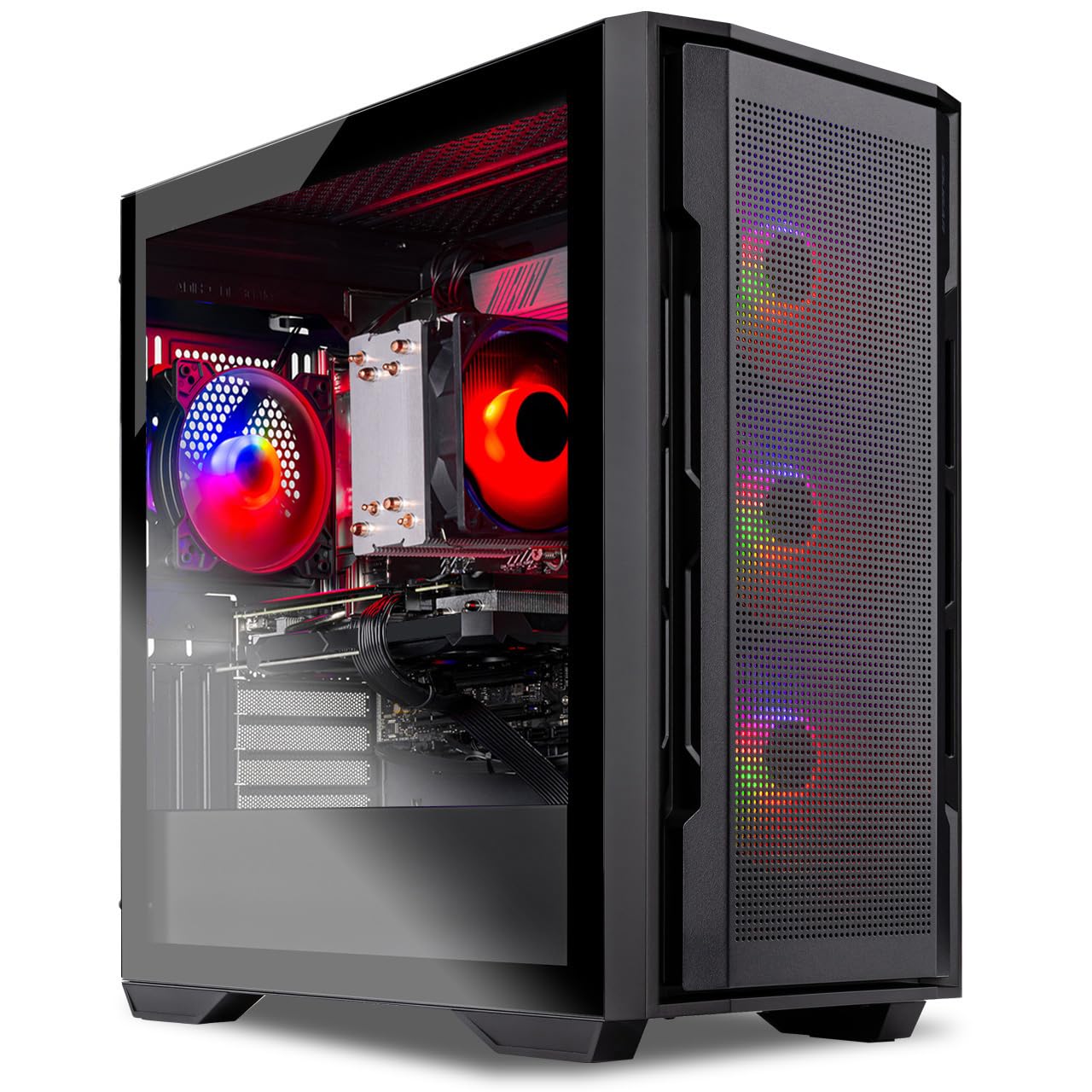
The Skytech Gaming Rampage is a pre-built system that pairs a Ryzen 7 7700 (8 cores, 5.3 GHz boost) with the AMD Radeon RX 9070 XT 16GB. This is a turnkey solution for users who want 9070 XT performance without assembling components. The 7700 is a solid mid-range AM5 chip with enough throughput to avoid GPU bottlenecks at 1440p and 4K, though it lacks the 3D V-Cache found in the X3D parts.
Real-world feedback from buyers is overwhelmingly positive. Users report smooth 60+ FPS gameplay at 4K Ultra settings in titles like Cyberpunk 2077, Elden Ring, and Baldur’s Gate 3. The system runs quietly — a common point of praise — and includes a free keyboard and mouse bundle. One reviewer noted stable performance over six months of daily use with no crashes. The 850W Gold ATX 3.0 power supply provides ample headroom for the 9070 XT’s peak draw.
The Ryzen 7 7700 is not a high-end gaming chip; it will deliver slightly lower 1% low frame rates than an X3D part. But for a pre-built system that arrives ready to play, the Rampage offers excellent out-of-box value. The 16GB of DDR5-5200 is adequate for gaming but could be tighter for multitasking. Buyers who need more RAM can upgrade easily since the board has open slots.
Why it’s great
- Complete system with 9070 XT, ready to use
- Quiet operation and stable performance
- Good 4K Ultra gaming capability out of box
Good to know
- 7700 lacks 3D V-Cache of X3D parts
- 16GB RAM may need upgrade for heavy multitasking
FAQ
Will a Ryzen 5 7600X3D bottleneck a 9070 XT at 1440p?
Is the Intel Core i7-12700KF still a good choice for a 9070 XT build in 2025?
Does the 9070 XT benefit from Intel’s P-cores and E-cores architecture?
Should I get a 12-core CPU like the 9900X3D just for gaming with the 9070 XT?
How much does RAM speed affect performance with the 9070 XT?
Final Thoughts: The Verdict
For most users, the best cpu for 9070 xt winner is the AMD Ryzen 7 9800X3D because it delivers the highest gaming frame rates with excellent efficiency and a clear upgrade path on AM5. If you want the absolute best single-threaded performance and are willing to invest in liquid cooling, grab the Ryzen 7 9850X3D. And for budget-conscious builders who refuse to compromise on cache, nothing beats the value of the Ryzen 5 7600X3D.

Mo Maruf
I created WellFizz to bridge the gap between vague wellness advice and actionable solutions. My mission is simple: to decode the research and give you practical tools you can actually use.
Beyond the data, I am a passionate traveler. I believe that stepping away from the screen to explore new environments is essential for mental clarity and physical vitality.