Our readers keep the lights on and my smoothie glass nicely filled. As an Amazon Associate, I earn from qualifying purchases.
Pairing a CPU with an RTX 2080 Ti is a high-stakes balancing act. Drop in a processor that can’t feed frames fast enough, and you leave performance on the table, especially at 1080p or high-refresh 1440p where the GPU isn’t the bottleneck. Get the right match, and every dollar invested in that GPU translates into smooth, consistent gameplay without stutter.
I’m Mohammad Maruf — the founder and writer behind WellFizz. I dig through benchmarks, core architectures, real-world thermal reports, and customer experiences to find the processors that genuinely complement a high-end GPU like the 2080 Ti.
Whether you’re upgrading an existing build or starting fresh, understanding how core count, boost clocks, and cache architecture interact with NVIDIA’s Turing-based card is critical. This guide cuts through the noise to deliver the best cpu for 2080 ti based on real performance data and user feedback.
How To Choose The Best CPU For 2080 Ti
The RTX 2080 Ti remains a capable 4K/1440p card, but its performance ceiling is heavily influenced by the processor driving it. Choosing the right CPU for this GPU requires balancing clock speed, core architecture, and platform longevity.
Single-Core vs Multi-Core: What Matters More?
For gaming, single-core performance and boost clock remain king. The 2080 Ti benefits from CPUs that can deliver high IPC and raw frequency, especially in esports and older titles where draw calls are CPU-bound. Multi-core performance becomes relevant for streaming, rendering, or multitasking while gaming.
Cache Size and Architecture
AMD’s 3D V-Cache technology (found on X3D chips) dramatically reduces latency and improves frame rates in simulation and strategy games. Intel’s hybrid architecture with P-cores and E-cores prioritizes game threads on the fastest cores. The cache hierarchy directly impacts how well the CPU feeds data to the 2080 Ti’s GDDR6 memory.
Platform and Upgrade Path
Socket AM5 offers long-term support with PCIe 5.0 and DDR5 compatibility, making it future-proof. Intel’s LGA1851 platform is newer but has an uncertain upgrade path. Consider the motherboard ecosystem and whether you intend to reuse the CPU in a future build.
Quick Comparison
On smaller screens, swipe sideways to see the full table.
| Model | Category | Best For | Key Spec | Amazon |
|---|---|---|---|---|
| AMD Ryzen 7 9800X3D | Mid-Range | Ultimate Gaming Performance | 8 Cores / 16 Threads, 5.2 GHz Boost | Amazon |
| AMD Ryzen 7 7800X3D | Mid-Range | High FPS Consistency | 8 Cores / 16 Threads, 96MB L3 Cache | Amazon |
| Intel Core Ultra 7 270K Plus | Mid-Range | Multi-Core Value | 24 Cores (8P+16E), 5.5 GHz Boost | Amazon |
| Micro Center AMD Ryzen 7 9700X Bundle | Mid-Range | All-in-One AM5 Upgrade | 8 Cores / 16 Threads, 5.5 GHz Boost | Amazon |
| Micro Center Intel Core Ultra 7 265K Bundle | Mid-Range | Intel Platform Value | 20 Cores (8P+12E), 5.5 GHz Boost | Amazon |
| Intel Core Ultra 9 285K | Premium | Creator & Pro Workloads | 24 Cores (8P+16E), 5.7 GHz Boost | Amazon |
| Skytech Gaming King 95 Prebuilt | Premium | Ready-to-Play 1440p Gaming | 9800X3D + RTX 5070 Ti | Amazon |
| Cooler Master NR2 Pro Prebuilt | Premium | Compact ITX Gaming PC | 9800X3D + RTX 5070 Ti, ITX Build | Amazon |
| Corsair Vengeance i7500 Prebuilt | Premium | High-End Liquid Cooled Build | i9-14900KF + RTX 5080 | Amazon |
In‑Depth Reviews
1. AMD Ryzen 7 9800X3D

The AMD Ryzen 7 9800X3D is the current king of gaming CPUs, and it pairs exceptionally well with the RTX 2080 Ti. Built on the Zen 5 architecture and featuring a second-generation 3D V-Cache design, this 8-core, 16-thread processor delivers a massive +~16% IPC uplift over the previous generation while maintaining excellent thermal performance. The 96MB L3 cache is the secret weapon here, dramatically reducing latency in CPU-bound titles and ensuring your 2080 Ti receives frames as fast as it can render them.
Real-world performance is outstanding. Customer reviews highlight consistent frame times, minimal CPU bottlenecks, and flawless stability even without overclocking. At 1080p and 1440p, this chip pulls ahead of almost everything else on the market, making it the ultimate upgrade for anyone who wants to maximize their 2080 Ti’s potential in competitive shooters, simulation games, and heavily modded titles. It runs cool with a decent cooler, and its power efficiency is impressive for the performance delivered.
While it’s a premium investment, the 9800X3D requires no special cooling beyond a quality air cooler or AIO, and it drops right into existing AM5 motherboards with a simple BIOS update. If your primary goal is gaming, this CPU is the definitive choice for your 2080 Ti.
Why it’s great
- Class-leading gaming performance with 3D V-Cache
- Excellent power efficiency and thermal behavior
- Drop-in compatible with AM5 motherboards
Good to know
- Requires a quality cooler for sustained loads
- Premium price reflects top-tier performance
2. AMD Ryzen 7 7800X3D

The AMD Ryzen 7 7800X3D remains one of the most compelling CPUs for the RTX 2080 Ti, especially if you prioritize gaming consistency over raw multi-core throughput. Its 8 cores and 16 threads, combined with the now-famous 3D V-Cache that gives it 96MB of L3 cache, make it a beast in games that love large caches, like Factorio, Warhammer, and most modern strategy titles. The real magic is its efficiency: with a default TDP of just 75W, it runs cool and quiet even with a modest cooler.
Customer reviews consistently praise its value and performance. Users report massive FPS jumps when upgrading from older platforms, with one tester noting a 100%+ increase in CS2 at 1440p. The chip runs between 65-70°C under gaming loads and idles around 40°C, making it extremely easy to cool. It also pairs beautifully with the RTX 2080 Ti, allowing the GPU to stretch its legs without thermal throttling from the CPU side.
The 7800X3D is an excellent choice for budget-conscious builders who want near-flagship gaming performance without breaking the bank. It’s also a drop-in upgrade on any AM5 board, ensuring a long upgrade path. For the 2080 Ti, it offers the best balance of gaming-focused performance and cost.
Why it’s great
- Exceptional gaming performance with low power draw
- Runs cool with any decent cooler
- Best value-to-performance ratio for gaming
Good to know
- Multicore performance lags behind premium chips
- Not ideal for heavy content creation workloads
3. Intel Core Ultra 7 270K Plus

The Intel Core Ultra 7 270K Plus is a dark horse in the CPU for 2080 Ti discussion. With 24 cores split into 8 P-cores and 16 E-cores, and a max turbo of 5.5 GHz, it offers a compelling mix of high single-core speed and massive multi-core throughput. The 40MB of cache and support for DDR5 memory up to 7200 MT/s make it a strong contender for gamers who also render, encode, or stream.
Customer reviews are very positive, with many noting it often outperforms the more expensive 285K in benchmarks despite being nearly half the price. One VR simracer reported it matches the 9800X3D for headset use at 4K per eye, running stutter-free with an RTX 5090. Another user praised its stability and efficiency, calling it a great upgrade from a 14700K. It runs cool with a large air cooler, and its IMC is noted as excellent.
For the 2080 Ti, this CPU ensures no bottleneck even in the most demanding games, while providing extra horsepower for background tasks. Just be aware it requires a new LGA1851 motherboard and a good cooler to handle its 250W max turbo power. It’s a smart, cost-effective choice for the Intel loyalist.
Why it’s great
- Excellent single-core and multi-core balance
- Outperforms much more expensive Intel chips
- Great for mixed gaming and creator workloads
Good to know
- Requires new LGA1851 motherboard
- Needs robust cooling for peak boost
4. Micro Center AMD Ryzen 7 9700X Bundle
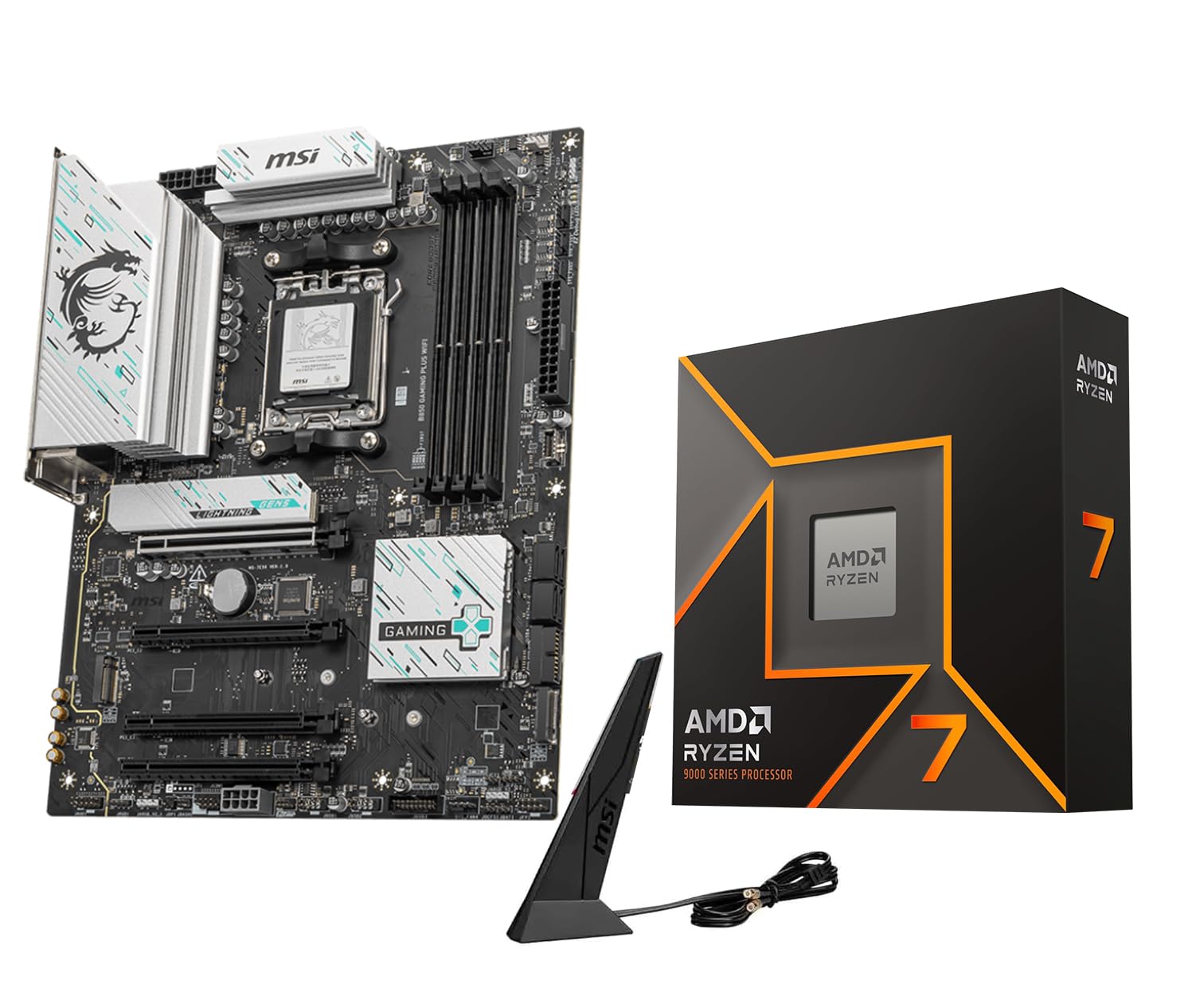
This Micro Center bundle pairs the AMD Ryzen 7 9700X with an MSI B850 Gaming Plus WiFi motherboard. The 9700X is an 8-core, 16-thread Zen 5 chip with a 5.5 GHz max boost and a default TDP of just 65W. This combination is a fantastic entry point for anyone building a new system around the RTX 2080 Ti, as it delivers strong gaming performance while keeping power consumption and heat output low.
Customer feedback highlights the motherboard’s quality: 12+2+1 Duet Rail power design, Wi-Fi 7, 5G LAN, and easy M.2 mounting. The CPU runs cool and efficiently, with one reviewer noting it pairs nicely with an RTX 5060 Ti. The bundle is described as a solid, stable platform with zero installation issues. It’s an AI-ready setup that handles modern games without breaking a sweat.
For the 2080 Ti, this bundle offers a complete, cost-effective solution. The 9700X provides enough single-core grunt to keep the 2080 Ti fed at 1440p, and the B850 board ensures you have access to PCIe 5.0 for future storage upgrades. If you need a motherboard anyway, this bundle simplifies the build process.
Why it’s great
- Excellent value with motherboard included
- Very low TDP with strong performance
- Feature-rich MSI B850 board with Wi-Fi 7
Good to know
- Combo may have limited customization
- Not the absolute fastest gaming CPU available
5. Micro Center Intel Core Ultra 7 265K Bundle

For Intel fans, the Micro Center Intel Core Ultra 7 265K bundle with an Asus Tuf Gaming Z890-Plus WiFi motherboard is a strong contender. The 265K has 20 cores (8 P-cores + 12 E-cores) and reaches up to 5.5 GHz. This configuration provides excellent multi-core performance for productivity tasks while maintaining strong single-core speeds for gaming with the 2080 Ti.
Customer reviews rave about the Asus motherboard’s premium build, Thunderbolt 4 support, and robust 16+1+2+1 power delivery. One builder noted the CPU reached a maximum of 52°C while gaming, which is impressive. The bundle is praised for its ease of installation and excellent cooling, making it a reliable foundation for a high-end PC. Users report strong benchmarks and snappy performance in everyday tasks.
For the 2080 Ti, this bundle offers a balanced platform with PCIe 5.0 support and advanced connectivity. The 265K’s hybrid architecture ensures gaming threads are prioritized on P-cores, while E-cores handle background processes. It’s a premium-feeling bundle at a mid-range price point, ideal for those building a new Intel system.
Why it’s great
- Premium Asus TUF motherboard included
- Excellent cooling and low temperatures reported
- Thunderbolt 4 and Wi-Fi 7 connectivity
Good to know
- Requires LGA1851 motherboard platform
- Not the absolute top gaming performer
6. Intel Core Ultra 9 285K

The Intel Core Ultra 9 285K is the flagship of Intel’s new ultra-efficient architecture. With 24 cores (8 P-cores + 16 E-cores) reaching up to 5.7 GHz, this is the ultimate processor for users who demand both top-tier gaming performance and heavy multi-threaded throughput. For the RTX 2080 Ti, it removes every possible CPU bottleneck, handling even the most demanding games while allowing full multitasking.
Customer feedback from professional environments is glowing. Engineers using SolidWorks workstations report these CPUs are reliable compared to previous Intel generations that suffered from overheating and crashing. It pairs well with high-end boards like the Asus ProArt Z890 Creator. Gaming reviews confirm it’s a beast in titles like Call of Duty, rendering, and AI workloads. It runs hot under load, requiring a 360mm AIO or high-end air cooler, but it’s noted as being easier to cool than 13th/14th gen chips.
For a 2080 Ti build that doubles as a workstation, the 285K is unmatched. Its 40MB cache and support for fast CUDIMM RAM (up to 7200 MT/s) ensure the GPU is constantly fed with data. Just be prepared for the power draw (250W max turbo) and the cost of a premium motherboard.
Why it’s great
- Fastest Intel core for gaming and creation
- Excellent single-core and multi-core performance
- Stable memory controller with CUDIMM support
Good to know
- High power draw requires strong cooling
- Requires new LGA1851 platform
7. Skytech Gaming King 95 Prebuilt

The Skytech Gaming King 95 is a fully assembled system featuring the AMD Ryzen 7 9800X3D and an NVIDIA RTX 5070 Ti. While the GPU here is newer than the 2080 Ti, the CPU is the same generation that we recommend for the 2080 Ti. This prebuilt showcases exactly how the 9800X3D behaves in a real-world, high-end gaming setup with robust cooling and a clean build.
Customer reviews are overwhelmingly positive. Users report it runs graphic-intensive games without lag, with spectacular video quality and silent fans from the 360mm AIO. One reviewer called it a “mid-range system” that runs like top-tier, which speaks to the CPU’s value. The 9800X3D keeps frame rates high and consistent, handling everything from AAA titles to esports with ease. It includes a 1TB Gen4 NVMe SSD and 32GB of DDR5 RAM.
If you’re building a new system and considering the 2080 Ti, this prebuilt demonstrates the ideal pairing. The 9800X3D ensures the GPU is fully utilized, especially at 1440p and 4K. Just be aware that prebuilt systems can have some cable management quirks, and the fan controller may need adjustment.
Why it’s great
- Top-tier 9800X3D CPU for unstoppable gaming
- Comes fully built with a 360mm AIO
- Excellent 1440p and 4K gaming performance
Good to know
- Prebuilt with limited customization options
- Some units may have fan noise issues
8. Cooler Master NR2 Pro Prebuilt

The Cooler Master NR2 Pro is a compact Mini ITX desktop that packs the same powerhouse pairing of an AMD Ryzen 7 9800X3D and an NVIDIA GeForce RTX 5070 Ti. This tiny 18.25L chassis proves that small form factor doesn’t mean compromising on CPU performance for the 2080 Ti. It delivers 120+ FPS on high settings at 1440p in most modern titles.
Customer reviews highlight its portability and quiet operation. One college student said it’s a beast that fits easily in a dorm setup. Another reviewer praised it as an excellent SFF PC that handles AAA games at 1080p 60Hz with ~300 FPS on ultra. The 280mm AIO keeps temperatures in check, and the Gigabyte B850I AORUS PRO motherboard provides strong power delivery. A minor gripe is that the front USB-C port may not work on some units, but it’s not a widespread issue.
For builders looking to replicate this CPU performance in a smaller footprint, the NR2 Pro is a masterclass in space efficiency. The 9800X3D’s efficiency means it doesn’t generate excessive heat, making it ideal for SFF builds. If you want a 2080 Ti-level system that won’t dominate your desk, this prebuilt is the answer.
Why it’s great
- Compact ITX design with monster performance
- Cool and quiet operation
- Excellent for small spaces and portability
Good to know
- Limited upgrade potential in small case
- Front USB-C port issue on some units
9. Corsair Vengeance i7500 Prebuilt

The Corsair Vengeance i7500 is a fully built system featuring a liquid-cooled Intel Core i9-14900KF and an RTX 5080. While the GPU here is newer, the i9-14900KF remains a relevant comparison for the RTX 2080 Ti. With 24 cores and a 5.8 GHz boost, this Intel chip offers raw compute power that can easily saturate the 2080 Ti’s capabilities in CPU-bound scenarios.
Customer reviews are mixed. One user loves its speed and says it’s the first computer that can keep up with them. Another reports that the computer was DOA but Corsair’s customer service quickly replaced it. However, there are concerning reports about the 13th/14th gen Intel CPUs potentially degrading over time, and one reviewer warns the CPU may go bad within a year. The build quality issues with fans and window panels are also noted.
For the 2080 Ti, the i9-14900KF at the heart of this prebuilt is more than capable, but the potential reliability issues with this generation of Intel chips are a serious consideration. If you prefer a prebuilt, this is a high-performance option with a premium look, but you may want to ensure you update the BIOS to mitigate the voltage problems associated with these CPUs.
Why it’s great
- Very fast CPU with liquid cooling
- High-end Corsair components throughout
- Stunning wraparound tempered glass case
Good to know
- Potential 13th/14th gen instability issues
- Mixed reports on build quality and DOA units
FAQ
Will a weaker CPU bottleneck my RTX 2080 Ti at 1080p?
Does the RTX 2080 Ti benefit from 3D V-Cache on AMD CPUs?
Should I worry about PCIe Gen 4 vs Gen 5 for my 2080 Ti?
Final Thoughts: The Verdict
For most users, the best cpu for 2080 ti winner is the AMD Ryzen 7 9800X3D because it offers unmatched gaming performance with the 3D V-Cache, excellent power efficiency, and a solid AM5 upgrade path. If you want the best value without sacrificing gaming consistency, grab the AMD Ryzen 7 7800X3D. And for heavy multi-tasking or creator workloads where you also want great gaming, nothing beats the Intel Core Ultra 7 270K Plus for its core count and boost speed.

Mo Maruf
I created WellFizz to bridge the gap between vague wellness advice and actionable solutions. My mission is simple: to decode the research and give you practical tools you can actually use.
Beyond the data, I am a passionate traveler. I believe that stepping away from the screen to explore new environments is essential for mental clarity and physical vitality.