Our readers keep the lights on and my smoothie glass nicely filled. As an Amazon Associate, I earn from qualifying purchases.
The wrong gear clutters your flow; the right gear turns a grueling work session into a creative ritual. We sorted through the noise to find the gadgets that do not just sit there, but actually improve how you work, play, and recharge.
I’m Mohammad Maruf — the founder and writer behind WellFizz. I’ve spent hundreds of hours analyzing hardware specs, decoding real user pain points, and comparing build materials across dozens of desk accessories to separate the genuinely useful from the merely decorative.
Whether you need a smarter way to charge, a conversation starter that doubles as a tool, or a visual escape from spreadsheets, this roundup of the best desk gadgets covers real products backed by real specs and real reviews.
How To Choose The Best Desk Gadgets
Not every desk accessory earns its footprint. The best ones solve a real problem — cord clutter, task switching, ambient inspiration — without creating new annoyances like noise or heat. Focus on these factors to avoid buying something that collects dust after a week.
Total Power Output Versus Port Count
A charging station with eight ports is useless if the total wattage can’t handle a laptop plus a phone plus an iPad simultaneously. Look at the combined power rating first (a figure like 252W tells you it can sustain multiple high-draw devices). Then check the per-port maximum — 100W on a USB-C port means it can fast-charge a MacBook Pro, not just trickle a phone.
Build Materials and Desk Presence
Aluminum alloy, zinc alloy, and weighted bases prevent tipping and signal durability. ABS plastic is lighter and cheaper but can feel hollow over time. For items that sit on your desk 24/7 — a clock, a pen stand, a speaker — the material dictates both longevity and how it integrates with your existing setup.
Connectivity and Software Ecosystem
A macro pad is only as good as its software. Look for drag-and-drop editors, plugin libraries (OBS, Spotify, Discord), and cross-platform support (Windows and macOS). For smart clocks, Wi-Fi connectivity (2.4GHz) matters more than Bluetooth if you want live data feeds like weather, stocks, or crypto prices.
Quick Comparison
On smaller screens, swipe sideways to see the full table.
| Model | Category | Best For | Key Spec | Amazon |
|---|---|---|---|---|
| Sabrent Voltik Charging Station | Charging Hub | Powering 8 devices with real-time monitoring | 252W total, 100W per USB-C | Amazon |
| Divoom Times Gate Clock | Smart Clock | Live data dashboards & pixel art display | 5x LCD screens, 128×128 pixels | Amazon |
| VSDINSIDE Macro Pad | Stream Controller | One-tap macros for streaming & editing | 10 LCD keys, 4 RGB knobs | Amazon |
| WKYSTR Levitation Speaker | Wireless Speaker | Sci-fi visual centerpiece with background audio | 2.25″ driver, 5W, 10hr battery | Amazon |
| novium Hoverpen Interstellar | Desk Pen | Fidget-friendly floating pen & conversation piece | 23.5° hover angle, Schmidt cartridge | Amazon |
| Divoom Ditoo Speaker | Pixel Speaker | Retro pixel art & multifunctional desk companion | 16×16 LED, 15W, 5000mAh | Amazon |
| TPHRAVAL Nixie Clock | Nixie Clock | Vintage fluorescent tube aesthetic & cyberpunk decor | RGB gradient, remote controlled | Amazon |
In‑Depth Reviews
1. Sabrent Voltik Charging Station
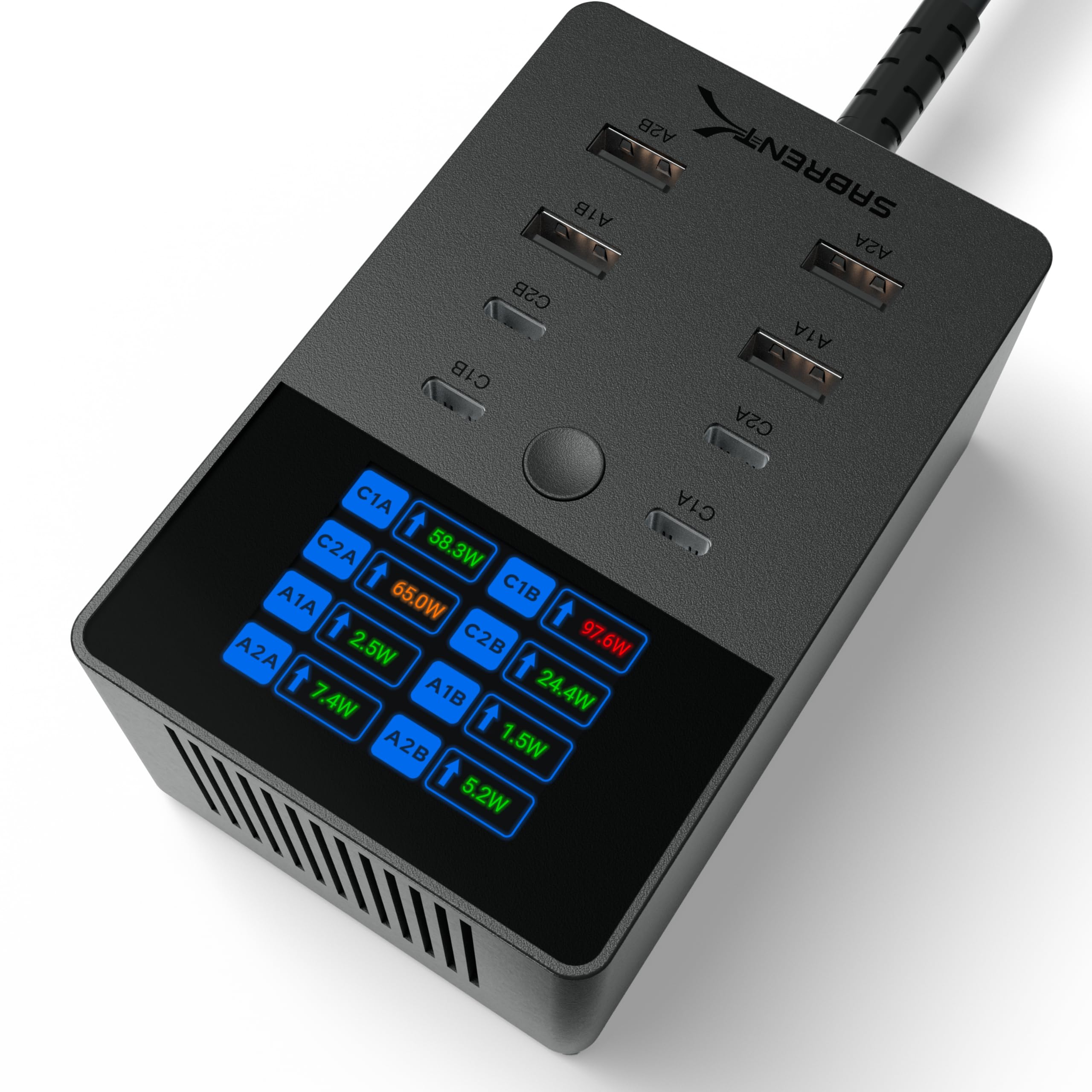
This is not a basic multi-port brick. The Sabrent Voltik delivers 252W total across four USB-C ports (up to 100W per port) and four USB-A ports (up to 18W each), meaning you can charge a MacBook Pro, an iPad, an iPhone, and a pair of earbuds simultaneously without any port throttling. The real-time LCD display cycles through each port’s wattage, voltage, amperage, and internal temperature — a feature rarely seen at this level.
UL certification adds a layer of safety that generic chargers skip: overcharge, overcurrent, overheating, and short-circuit protection are all baked in. Support for PD 3.0, PPS, QC 4.0, and QC 3.0 ensures fast-charging compatibility across Samsung Galaxy, Google Pixel, and Apple devices. The compact rectangular footprint replaces a tangle of individual wall warts with one clean hub.
One small trade-off: the power cable exits the bottom, which makes wall-mounting cleaner but desk placement slightly less flexible. A few users wished for a tenth port or a wireless charging pad built in, but for pure wired efficiency and real-time feedback, this is the most disciplined charging solution on the list.
Why it’s great
- 252W total output handles laptops, tablets, and phones at full speed
- Color LCD screen shows exact wattage per port in real time
- UL certified with comprehensive safety protections
Good to know
- Power cord exits bottom, less ideal for desktop cable management
- No wireless charging pad or power-saving standby mode
2. Divoom Times Gate Clock

Five full-color LCD screens, each capable of displaying 128×128 pixel art and animated GIFs, make the Times Gate the most visually rich desk clock we tested. It connects via 2.4GHz Wi-Fi (not Bluetooth) to pull live data: world clocks, weather forecasts, stock prices, social media follower counts, and crypto rates. The Divoom App acts as the command center for customizing each screen independently.
The metal frame and 2-pound weight give it a premium, anchored feel on the desk. There is no built-in battery — it requires continuous USB power to operate, which makes sense for an always-on data dashboard. The community gallery offers millions of pixel-art designs, from retro game characters to original animations, refreshed daily.
Setup requires a USB wall adapter (not included, needs 5V/1A) and a 2.4GHz network. Some users found the 84-page manual excessive and noted that the app could be more intuitive, particularly for clock customization. But once configured, it functions as a stunning ambient display that doubles as a functional productivity tool.
Why it’s great
- Five independent screens for pixel art, live data, and animations
- Wi-Fi connectivity streams real-time weather, stocks, and crypto
- Metal build and 2-pound weight feel substantial and durable
Good to know
- Requires continuous USB power, no internal battery
- Power adapter not included and app UI could be more polished
3. VSDINSIDE Macro Pad
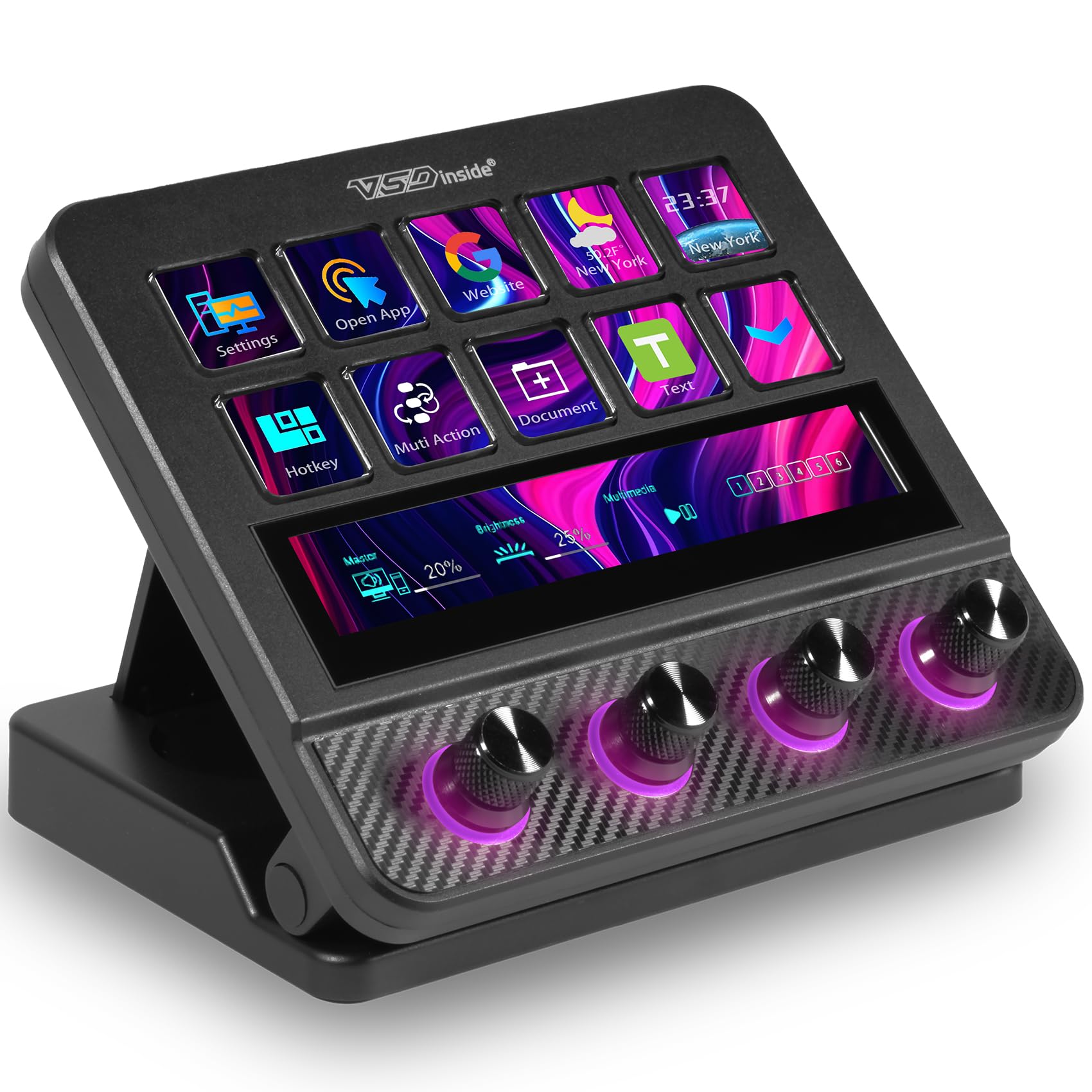
This macro pad replaces dozens of keyboard shortcuts with ten programmable LCD keys and four RGB-lit knobs. Each key can trigger a single action or a chained multi-step workflow — launching OBS, muting Discord, inserting a text snippet, or executing a video editing command — all with one tap. The customizable GIF icons on each key make it easy to identify functions at a glance.
The software supports over 500 plugins, including deep integrations with OBS, Discord, Spotify, and productivity utilities like clock, weather, and stopwatch. The four knobs have dynamic RGB lighting that syncs with audio-reactive visuals, and each knob includes a touch display for context-sensitive controls. The carbon-fiber-like overlay and adjustable stand add a premium feel for a device in this range.
On the downside, the software consumes about 300 MB of RAM while running, and the plugin marketplace is separate from the Stream Deck ecosystem, so existing Elgato plugins won’t transfer. The button feel is less crisp than pricier alternatives, though the toggleable haptic vibration helps compensate. For streamers, editors, and spreadsheet warriors, this is a budget-friendly version of a much more expensive tool.
Why it’s great
- 500+ plugins with OBS, Discord, Spotify integration
- 4 RGB knobs with touch displays and dynamic lighting
- Adjustable stand and carbon-fiber overlay for desk appeal
Good to know
- Software uses about 300 MB of RAM while active
- Plugin marketplace is separate from Stream Deck ecosystem
4. WKYSTR Magnetic Levitation Speaker
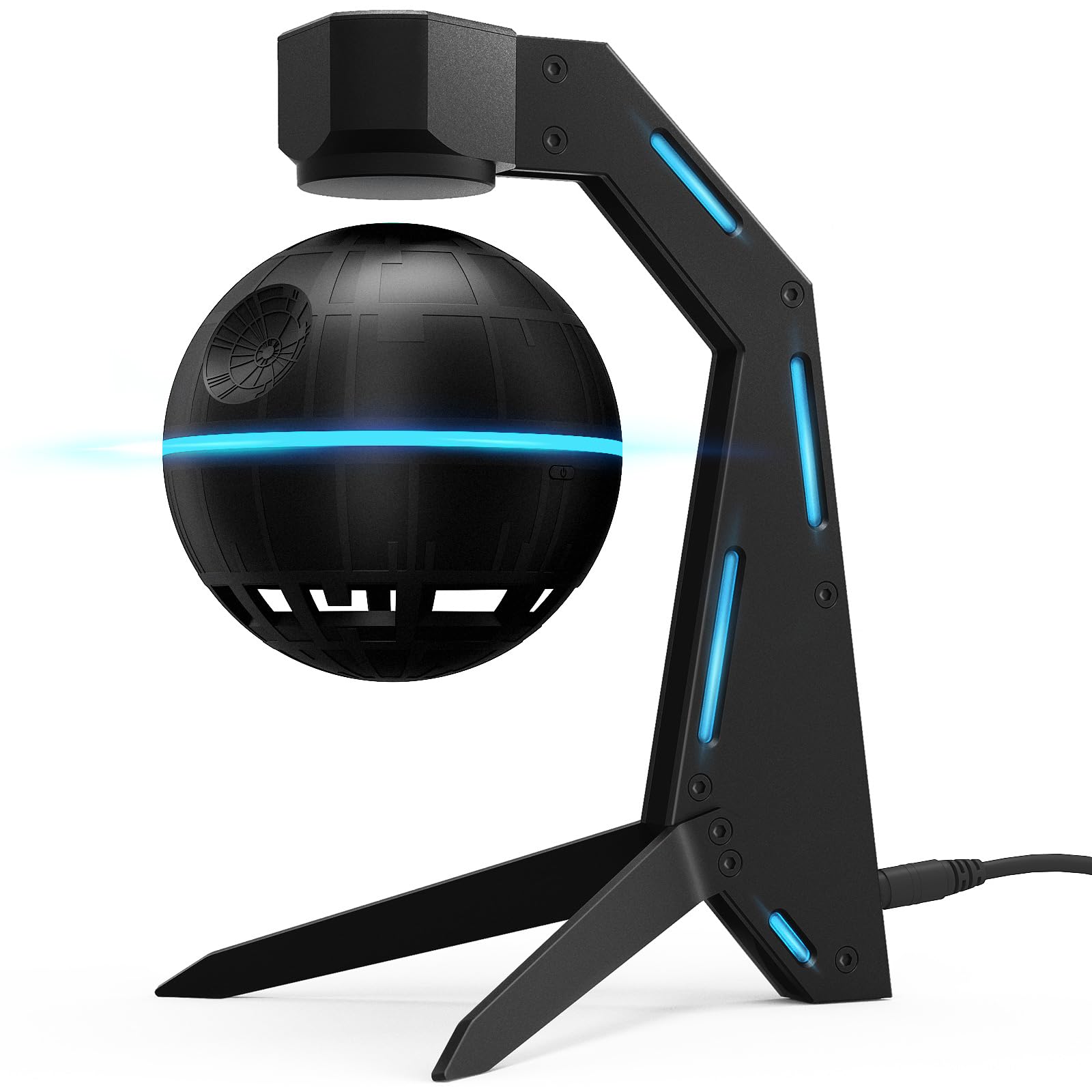
The core appeal of this speaker is the floating orb: advanced magnetic levitation keeps a 2.25-inch driver spinning gracefully above an aluminum alloy base. The 5W output delivers clear, balanced audio suitable for podcasts, background music, and casual listening. Bluetooth 5.1 provides stable pairing up to 10 meters, and the 1500mAh battery supports up to 10 hours of playback on a single charge.
The build combines a durable aluminum alloy base with a textured ABS orb, giving it a weighty, stable presence that doesn’t tip. The 360-degree sound dispersion means the audio fills the room evenly, though it lacks deep bass — this is not a party speaker. The Type-C charging port allows quick recharges in about three hours.
Some users noted that the “levitation” effect is more of a magnetic hold against a supporting arm rather than true free-floating, and the orb does not spin independently (the rotating LED lights create that illusion). Volume control is limited to the source device. For a desk that needs a sci-fi focal point with acceptable sound, it delivers visual drama that few other speakers can match.
Why it’s great
- Magnetic levitation creates a captivating floating visual effect
- 10-hour battery life with Type-C fast charging
- Aluminum alloy base feels stable and premium
Good to know
- Audio lacks deep bass, suited for background listening only
- “Levitation” is magnetic hold against an arm, not free floating
5. novium Hoverpen Interstellar

The Hoverpen Interstellar uses a precision magnetic system to angle its body at 23.5 degrees above the pedestal — no batteries, no wires, just permanent magnets holding the pen in a continuous hover. Aircraft-grade aluminum and zinc alloy construction give it a weighty, precision-engineered feel. The pen spins freely on its base, providing a satisfying fidget experience that many users cite as its most addictive feature.
Writing performance comes from a German-engineered Schmidt ballpoint cartridge, known for smooth, skip-free ink flow. The black oil-based ink produces clean lines suitable for notes, signatures, and daily writing. The package includes a spare cartridge and a removal tool, so replacing the ink is straightforward.
The pen itself is lightweight and comfortable for extended writing, though some users who are particular about grip or barrel thickness may prefer their daily driver. For desk presence, it functions 24/7 without any power draw — it simply sits in its magnetic hover, ready to be grabbed. The Space Black finish matches modern dark desk setups, and the rubberized stand base keeps everything planted.
Why it’s great
- True magnetic hover at 23.5°, no batteries or charging needed
- Schmidt ballpoint cartridge delivers smooth, professional writing
- Aircraft-grade aluminum and zinc alloy build feels premium
Good to know
- Writing feel is good but not for those with specific grip preferences
- Hover effect is purely magnetic, not powered or illuminated
6. Divoom Ditoo Speaker
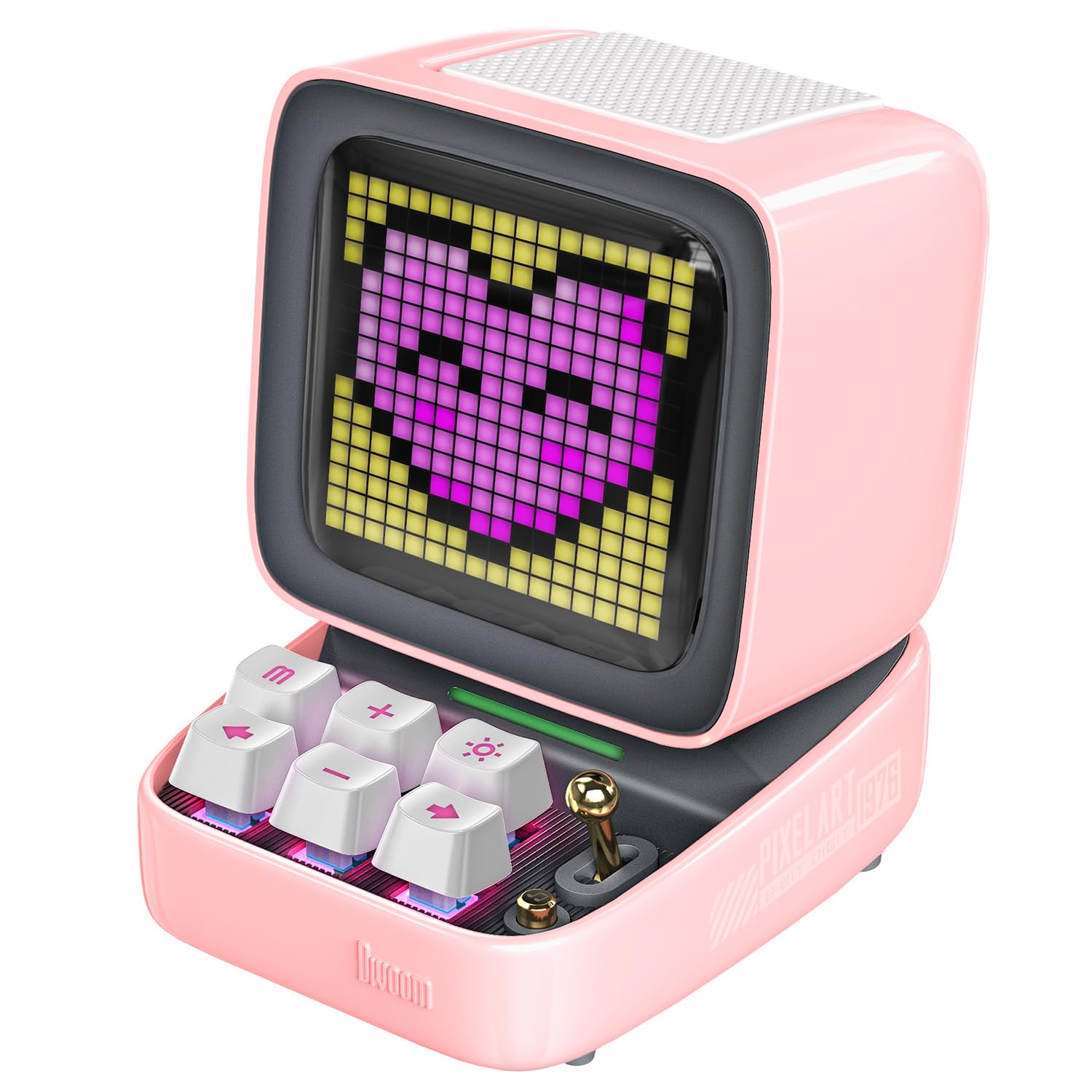
The Ditoo combines a retro mini-computer shell with a 16×16 pixel LED front screen and a 15W dynamic driver tuned for near-field listening. The result is a gadget that functions as a Bluetooth speaker, a pixel art canvas, and a desk companion with alarm, timer, white noise, and game capabilities. The 5000mAh battery provides extended runtime between charges.
Sound quality punches above its size: vocals stay clear and warm, with enough headroom for casual desk listening. The Divoom App unlocks the pixel art gallery, letting you design custom animations or download from millions of community creations. The joystick and mechanical-style buttons add a tactile nostalgia layer, and built-in games like Tetris and Snake work as genuine distractions during breaks.
The app interface, while powerful, has a learning curve — some users find the layout confusing and documentation sparse. The retro design (especially in pink) will not suit every desk aesthetic. But for those who want a speaker that also functions as a customizable digital companion, the Ditoo offers the most features per square inch on this list.
Why it’s great
- 15W output with clear vocals, ideal for near-field desk listening
- 16×16 LED screen fully customizable with pixel art and animations
- Multifunctional: speaker, alarm, games, white noise, and timer
Good to know
- App UI has a learning curve and documentation is minimal
- Retro aesthetic (especially pink) may not match all desk setups
7. TPHRAVAL Nixie Clock

The TPHRAVAL clock uses vintage fluorescent tubes — originally developed in the Soviet Union — to display time, date, weather, and temperature through transparent, evenly lit digits. The exposed circuit board and RGB gradient modes give it a distinct cyberpunk aesthetic that stands out against minimalist or industrial desk setups. A built-in high-precision chip manages the display logic, while the included remote control allows color and mode adjustments from a distance.
The clock greets you with “HELLO” on startup and “SEE YOU” on shutdown — a small human detail that users appreciate. The RGB color gradients can cycle through multiple modes, and each digit section is independently customizable for color. The IV18-style tubes offer uniform brightness and are rated for long service life, making this a durable display piece rather than a fragile novelty.
There are meaningful trade-offs: the display defaults to Celsius, 24-hour time, and year/month/day format, with no clear way to switch to Fahrenheit or 12-hour mode via the provided instructions. The temperature reading can be off by several degrees. It uses a micro-USB port (not USB-C), and the lack of a built-in alarm limits its utility as a primary desk clock. For pure atmospheric value, it is hypnotic — just know the quirks before buying.
Why it’s great
- Genuine fluorescent tubes with uniform brightness and long life
- RGB gradient modes with independent digit color control
- Unique cyberpunk aesthetic with exposed circuit board design
Good to know
- Display locked to Celsius, 24-hour time, and YY/MM/DD format
- Uses micro-USB instead of USB-C, and temperature accuracy is suspect
FAQ
Can a magnetic levitation speaker be used as a primary audio source?
How much total wattage do I need for a multi-device charging station?
Final Thoughts: The Verdict
For most users, the best desk gadgets winner is the Sabrent Voltik Charging Station because it solves the universal desk problem of cord clutter while giving you real-time power feedback and enough headroom to charge eight devices at full speed. If you want a conversation starter that doubles as a functional writing tool, grab the novium Hoverpen Interstellar. And for a purely visual addition that turns your desk into a cyberpunk command center, nothing beats the Divoom Times Gate.

Mo Maruf
I created WellFizz to bridge the gap between vague wellness advice and actionable solutions. My mission is simple: to decode the research and give you practical tools you can actually use.
Beyond the data, I am a passionate traveler. I believe that stepping away from the screen to explore new environments is essential for mental clarity and physical vitality.