Our readers keep the lights on and my smoothie glass nicely filled. As an Amazon Associate, I earn from qualifying purchases.
A vinyl cutting machine that hesitates on a curve, tears a delicate letter, or misaligns a registration mark turns a promising project into wasted material and wasted time. The difference between a clean, professional decal and a frustrating mess often comes down to the mechanical stability of the cutter, the force of its motor, and the intelligence of its software. This guide breaks down the real engineering trade-offs in every tier of the category.
I’m Mohammad Maruf — the founder and writer behind WellFizz. I’ve spent hundreds of hours analyzing the cutting force curves, blade calibration systems, material database depths, and software ecosystems that separate a capable vinyl cutter from a frustrating one.
Whether you are outfitting a small sticker business or building a home craft station, the right choice starts with understanding cutting force, matless compatibility, and registration accuracy. This is the definitive guide to finding the best cutting machine for vinyl.
How To Choose The Best Cutting Machine For Vinyl
Selecting a vinyl cutter involves more than brand loyalty. The machine’s mechanical architecture — its cutting force, blade system, feeding mechanism, and design software — dictates what you can produce reliably. A machine that excels at cutting 0.1mm heat transfer vinyl may struggle with 2mm glitter cardstock. Understanding these parameters prevents buyer’s remorse.
Cutting Force and Blade System
The cutting force, measured in grams, determines the range of materials a machine can handle. Entry-level machines often max out around 200 to 250 grams of force, which is adequate for standard adhesive vinyl and paper. For thicker materials like faux leather, magnetic sheets, or craft foam, you need a machine capable of 500 grams or more. Automatic blade systems (AutoBlade) adjust depth dynamically, saving you from manual blade swaps between materials. Fixed blade systems require you to stop, measure material thickness, and turn a dial — slowing production runs.
Matless vs. Mat-Based Cutting
Matless cutting, sometimes called Smart Material technology, lets you load vinyl rolls directly into the machine without a sticky cutting mat. This speeds up workflow for long runs — banners, wall decals, continuous labels — because you skip the peeling and re-squeegee step. Mat-based cutting, by contrast, gives you dimensional stability for flimsy materials like thin paper or fabric that would otherwise shift during cutting. A machine that supports both modes offers the most flexibility.
Registration Mark Detection for Print-Then-Cut
If you plan to produce full-color stickers or labels, the cutter must read printed registration marks to align the blade precisely around your printed artwork. The number of optical sensors and the processing speed of those sensors determines accuracy. Four-point systems (as found on higher-end models) correct for vertical and horizontal skew simultaneously, producing tighter borders around complex shapes. Two-point systems may drift on longer cuts or angled designs.
Software Ecosystem and Connectivity
The software is the silent partner in every cut. Some manufacturers require a subscription for the full design library and advanced features; others include robust offline software with no recurring cost. Bluetooth connectivity frees you from USB cables, but some machines require a wired connection for firmware updates or initial setup. WiFi-based connections offer longer range and more stable data transfer than Bluetooth for large design files. Verify that the software runs natively on your operating system — many professional-grade cutters do not support macOS.
Quick Comparison
On smaller screens, swipe sideways to see the full table.
| Model | Category | Best For | Key Spec | Amazon |
|---|---|---|---|---|
| Cricut Maker 4 | Premium | Versatile heavy material cutting (leather, wood, vinyl) | 300+ materials, 1.5M-image library | Amazon |
| Siser Juliet | Premium | High-detail precision with matless cutting | 12″ cutting width, WiFi + touchscreen | Amazon |
| Silhouette Cameo 5 Alpha Plus | Premium | Large format (15″) and electrostatic mat | 15″ cutting width, 400mm/s speed | Amazon |
| Silhouette Cameo 5 Alpha | Mid-Range | Quiet operation with AutoBlade | 12″ cutting width, 4-point registration | Amazon |
| LOKLiK Cutting Machine 2 | Mid-Range | AI design support and 5-in-1 functions | 5X cutting force, 60k+ built-in designs | Amazon |
| Cricut Joy Xtra | Mid-Range | Compact bundle for beginner vinyl projects | 5.5″W x 12.5″D, matless Smart Vinyl | Amazon |
| VEVOR Vinyl Cutter 28″ | Budget / Large-Format | Large decals and commercial banners | 28″ paper feed, 500g max pressure | Amazon |
| 17mm Pro Floor Cutter | Flooring Specialist | Thick vinyl plank and laminate flooring | 13″ wide, 17mm thick capacity | Amazon |
| 18″ Pro Max Floor Cutter | Flooring Specialist | Wide planks and diagonal cuts (45°) | 18″ wide, 17mm thick, tungsten blade | Amazon |
In‑Depth Reviews
1. Cricut Maker 4

The Cricut Maker 4 represents the pinnacle of the Cricut ecosystem, delivering a tool that cuts vinyl, leather, wood, fabric, and iron-on materials without hesitation. Its motor handles thicker stock with a clean, consistent edge — a direct result of the upgraded drive train that reduces vibration during intricate curves. The included Fine-Point Blade and Light Grip Mat get you started immediately, and the machine’s compatibility with over 300 materials means you are unlikely to outgrow it.
Setup flows through the Design Space app, which connects wirelessly for design uploads but requires an internet connection for initial activation. The Print-Then-Cut feature reads registration marks reliably when paired with any inkjet printer, making sticker production seamless. Users report that the machine is noticeably faster and quieter than earlier Cricut generations, cutting standard vinyl decals in under a minute even with multiple color layers.
The bundle sweetens the deal with a Materials Sampler — Smart Vinyl, Smart Iron-On, cardstock, and transfer tape — so you can test workflows before buying in bulk. The 30 bonus digital images in Design Space expand your project library immediately. For crafters building a small business or a serious home studio, this machine offers the most balanced combination of material range, cut quality, and design software integration.
Why it’s great
- Cuts 300+ materials including wood and leather
- Matless Smart Materials speed up long projects
- Print-Then-Cut works accurately with standard inkjets
- Fast, quiet operation compared to previous models
Good to know
- Design Space requires internet connection for some features
- Full image/ font library requires Cricut Access subscription
2. Siser Juliet

The Siser Juliet is engineered for detail. Its motor and blade assembly produce finer cuts on small text and intricate vector shapes than most desktop cutters in its class, making it a strong choice for sticker makers and heat-transfer designers who demand edge-to-edge precision. The machine ships with a High Tack 12-inch cutting mat but also supports matless cutting for Siser HTV and EasyPSV, letting you run longer sheets without a carrier.
An intuitive touchscreen interface replaces the need to control everything from the software — you can adjust blade offset, pressure, and speed directly on the machine. WiFi connectivity frees the cutter from USB tethers, and the Leonardo Design Studio software offers professional-grade node editing and vector control. The learning curve for the software is steeper than Cricut’s Design Space, but users who invest the time report that the toolpath optimization reduces material waste noticeably on complex multi-part designs.
The build quality feels commercial. The chassis is rigid, the pinch rollers are adjustable for different material widths, and the included Marker Adapter allows drawing and calligraphy without swapping blades. Siser provides pre-installed cut settings for its own vinyl line, ensuring consistent depth out of the box. For crafters who prioritize cut fidelity over ease of onboarding, this machine delivers professional results.
Why it’s great
- Extremely precise cutting on small, detailed designs
- Touchscreen for on-machine adjustments
- WiFi connectivity, no USB cable needed
- Matless cutting reduces workflow steps
Good to know
- Leonardo software has a steeper learning curve
- Higher upfront investment than mid-range options
3. Silhouette Cameo 5 Alpha Plus
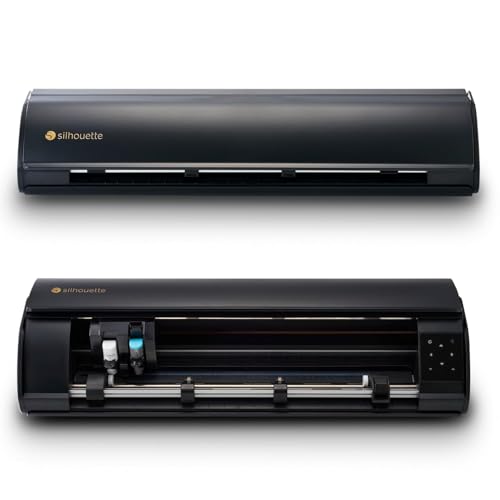
The Cameo 5 Alpha Plus expands the cutting width to 15 inches, making it one of the few desktop machines that can handle large decals, wide-format stickers, and signage without tiling. Its electrostatic mat holds materials flat without adhesive residue, solving the common frustration of cardstock curling or thin vinyl shifting mid-cut. The power-slide lid opens automatically when you start a job, reducing friction in a production environment.
Speed reaches 400mm/s, which translates to rapid output on long runs. The 4-point registration mark system improves print-then-cut accuracy over earlier Cameo generations, especially on designs where the printed artwork extends close to the edge of the material. The AutoBlade adjusts depth automatically, removing the guesswork when switching between vinyl and thicker materials like fabric or foam.
Silhouette Studio software is included with no subscription required, and the machine ships with 100 exclusive designs plus a one-month subscription to the Silhouette Design Store. The built-in roll feeder handles continuous material up to 16 feet, ideal for long banner runs. For crafters whose projects push past the standard 12-inch limit, the extra width eliminates the need for a separate large-format plotter.
Why it’s great
- 15-inch cutting width for oversized projects
- Electrostatic mat prevents curling without stickiness
- 4-point registration for precise print-then-cut
- AutoBlade handles material transitions automatically
Good to know
- 16-foot continuous roll capacity, but large footprint
- Some users report noise at high speeds
4. Silhouette Cameo 5 Alpha
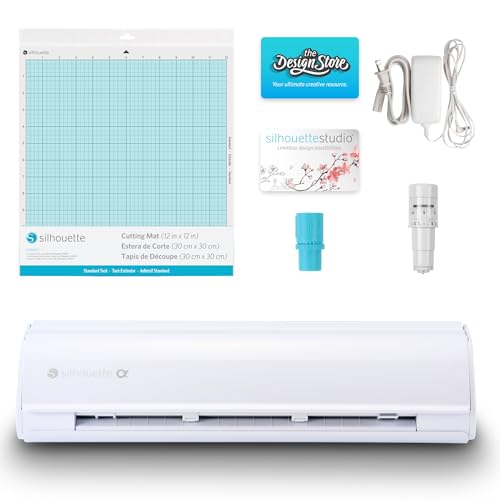
The standard Cameo 5 Alpha keeps the engineering improvements of the Plus model — the 4-point registration, AutoBlade, and Fast Sketch Mode — in a 12-inch format that fits more comfortably on a desk. Its whisper-quiet motor is a genuine upgrade over earlier Silhouette generations, making it suitable for late-night crafting or shared workspaces without disturbing others. The Intelligent Path Technology optimizes the cutting sequence to reduce material stress, which shows up as cleaner edges on delicate script fonts.
Customers report that the included AutoBlade works well with standard vinyl and sticker paper, requiring no manual depth adjustment for most projects. The Fast Sketch Mode draws at higher speeds without sacrificing line quality, useful for card making and labeling where the machine acts as a plotter for fine details. Silhouette Studio software gives you full vector control without a subscription gate.
Setup requires downloading the latest Studio software and performing a firmware update via a printer cable (not included) to resolve Bluetooth connectivity. Several users noted the cable was necessary, but once updated, the wireless connection held steady. The machine ships with a cutting mat, sketch pen adapter, and 100 designs. For crafters who want Silhouette’s precision without the extra width, this is the sweet spot.
Why it’s great
- Very quiet operation compared to previous models
- AutoBlade simplifies material changes
- No subscription required for Silhouette Studio
- Fast Sketch Mode for efficient drawing projects
Good to know
- Bluetooth may require printer cable for firmware update
- No physical manual included
5. LOKLiK Cutting Machine 2

The LOKLiK Cutting Machine 2 (by HTVRONT) brings a strong hardware specification to the mid-range bracket: 5X cutting force relative to typical entry-level units, enabling it to handle up to 2mm thick materials such as faux leather and glitter cardstock. Its step-motor system includes noise reduction technology, producing a quieter cutting cycle than many comparably priced machines. The 13-inch matless cutting capacity supports Smart Vinyl up to 21 feet long for uninterrupted banner work.
What distinguishes this machine is the software package. LOKLiK IdeaStudio comes with over 60,000 built-in designs and a built-in AI painting tool that generates vector-ready artwork from text prompts. This lowers the barrier for users who lack advanced graphic design skills. The 5-in-1 functionality includes fine cutting, writing, scoring, foiling, and deep cutting, with the scoring and foiling tools sold separately. The compact footprint includes a removable storage cup for weeding tools and blades.
Print-then-cut accuracy is rated at 0.5mm, sufficient for sticker production with clean borders. The main constraint is that the machine requires an internet connection for the full software feature set — offline use is limited. Some users also noted that the deep cut blade is not readily available in the US market. For crafters who want a feature-dense machine with a modern design and a generous built-in image library, the LOKLiK is a compelling value.
Why it’s great
- 5X cutting force for thicker materials
- AI painting tool generates designs from text
- 60,000+ built-in designs and fonts
- Compact design with removable storage cup
Good to know
- Requires internet connection for full software use
- Deep cut blade not easily available in US
6. Cricut Joy Xtra

The Cricut Joy Xtra is the smallest and most approachable machine in the Cricut lineup, designed for quick, low-volume projects like labels, decals, cards, and small home organization tasks. Its 5.5-inch width limits the maximum cut size, but that constraint also makes the machine remarkably portable — small enough to store in a drawer or move from room to room. The bundle includes rainbow Smart Vinyl, transfer tape, tools, and digital design guides, so you can produce your first decal within thirty minutes of unboxing.
Matless Smart Vinyl loads directly into the machine, eliminating the need for a cutting mat. This cuts setup time significantly for small runs. The included tool set covers the basics: a weeder, scraper, and transfer tape. The Design Space app works with the Joy Xtra for all project design, offering access to thousands of images and fonts, though the full library requires a Cricut Access subscription.
The cutting quality is reliable for standard permanent vinyl and iron-on HTV. It handles cardstock and paper for card making without issue. The machine is not designed for thick materials like leather or wood — its motor lacks the force for those applications. For a teacher organizing classroom supplies, a hobbyist making party decorations, or anyone who needs a second cutter for quick jobs, the Joy Xtra bundle delivers excellent convenience in a small package.
Why it’s great
- Very compact and portable design
- Matless Smart Vinyl speeds up workflow
- All-in-one bundle includes tools and materials
- Intuitive setup for beginners
Good to know
- Limited to 5.5-inch cutting width
- Not suitable for thick materials like leather or wood
7. VEVOR Vinyl Cutter 28″
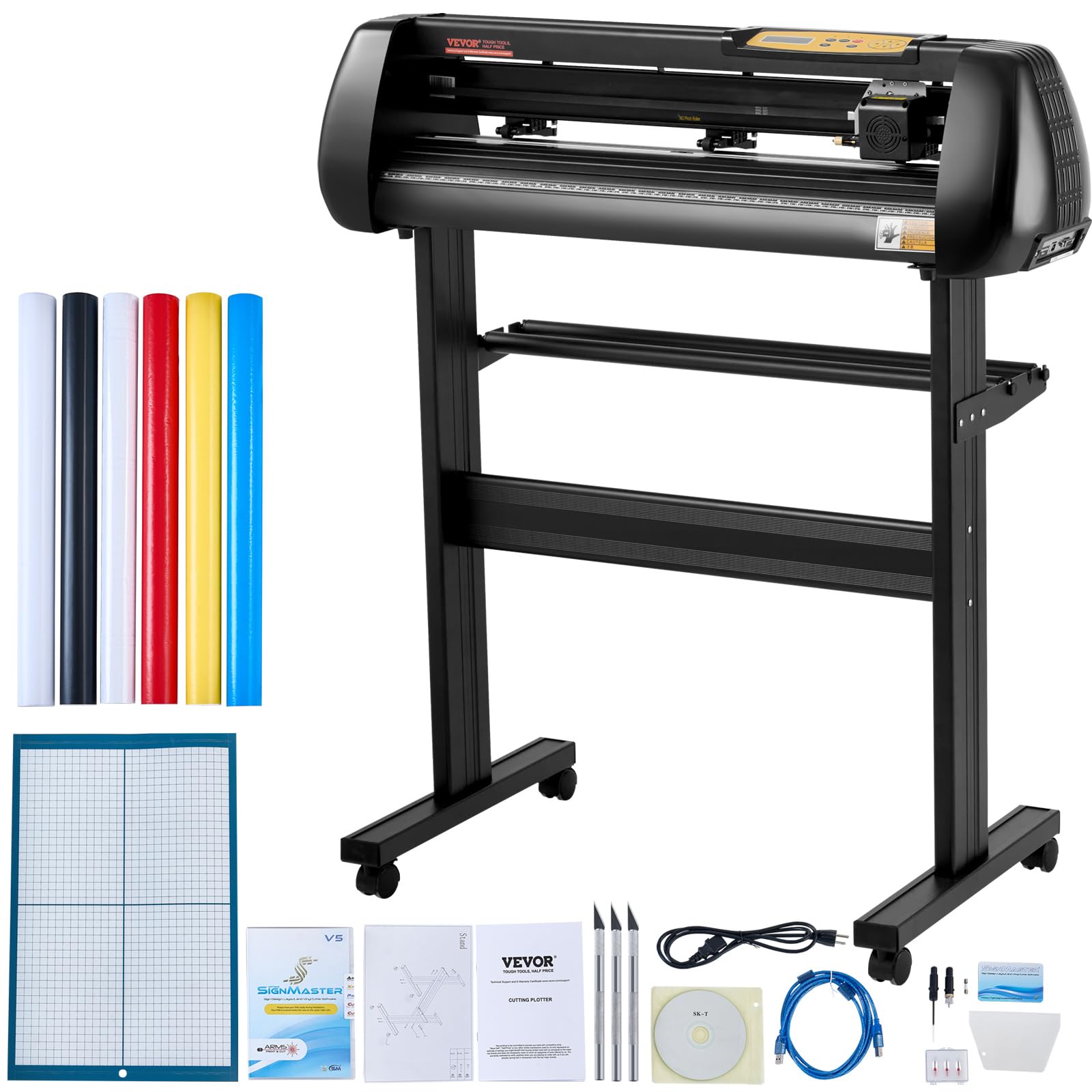
The VEVOR 28-inch vinyl cutter is a different class of machine — a full-size plotter designed for commercial signage, large decals, and production environments where desktop machines are too small. Its 720mm paper feed and 630mm actual cutting width handle banners, vehicle graphics, and window decals without tiling. The aluminum body and stepper motors provide the rigidity needed for consistent pressure across the full width at speeds up to 800mm/s.
Adjustable cutting pressure from 10 to 500 grams covers standard adhesive vinyl, heat transfer film, and reflective materials. The LCD panel allows pressure and speed changes without connecting to a computer. The machine ships with SignMaster software (Windows only), five vinyl sample rolls, a utility knife, blades, and a ball pen core for plotting instead of cutting. COM and USB interfaces provide connectivity, but there is no native macOS support — users must run Windows via Boot Camp or a virtual machine.
The included SignMaster software is functional but limited in the basic version; advanced features like vectorizing require an additional paid upgrade. Several users noted that the included vinyl rolls have thin backing and recommended switching to premium brands like Oracal or 3M for best results. The machine requires careful setup of blade depth and pressure calibration — too much pressure cuts through the backing, too little leaves incomplete lines. For sign makers and small print shops that need wide-format capability on a budget, this machine fills a real gap.
Why it’s great
- 28-inch paper feed for large banners and decals
- Adjustable pressure up to 500g
- Sturdy aluminum construction for consistent cuts
- Includes sample vinyl rolls and basic tools
Good to know
- No macOS support
- Basic software limits advanced features without paid upgrade
8. 17mm Pro Heavy Duty Laminate & Vinyl Floor Cutter

This 13-inch guillotine-style floor cutter is built for one job: cleanly snapping thick LVP, SPC, WPC, and laminate planks without the dust and noise of power saws. The aircraft-grade aluminum frame, rated for materials up to 17mm thick, provides the leverage needed to cut dense click-lock flooring with a single press of the handle. The telescoping handle adds extra mechanical advantage, reducing the physical effort required for heavier planks.
The dual symmetrical cutting positions accommodate both left- and right-handed users and effectively double the blade’s lifespan — when one edge dulls, you rotate the blade to the fresh side. The cutter supports 45-degree angle cuts for flooring edges and transitions, with angle markings at 15, 30, and 45 degrees. Assembly is straightforward, with most users reporting the cutter is functional within ten minutes of unboxing.
The main requirement for clean cuts is pressing the flooring material flat against the base before engaging the handle. If the plank lifts, the blade can chip or crack — a common user error noted in the instructions. The cutter weighs 20.7 pounds, making it portable for jobsite work but less suited for stationary use. For professional installers or serious DIYers laying hundreds of square feet of vinyl plank, this tool eliminates cutting station setup and produces zero airborne particles.
Why it’s great
- Dust-free, quiet operation (no electricity needed)
- Cuts planks up to 17mm thick
- Dual-sided blade extends lifespan
- Telescoping handle for extra leverage
Good to know
- Limited to 13-inch width full cuts
- Requires material to be pressed flat during cut
9. 18″ Pro Max Laminate & Vinyl Floor Cutter
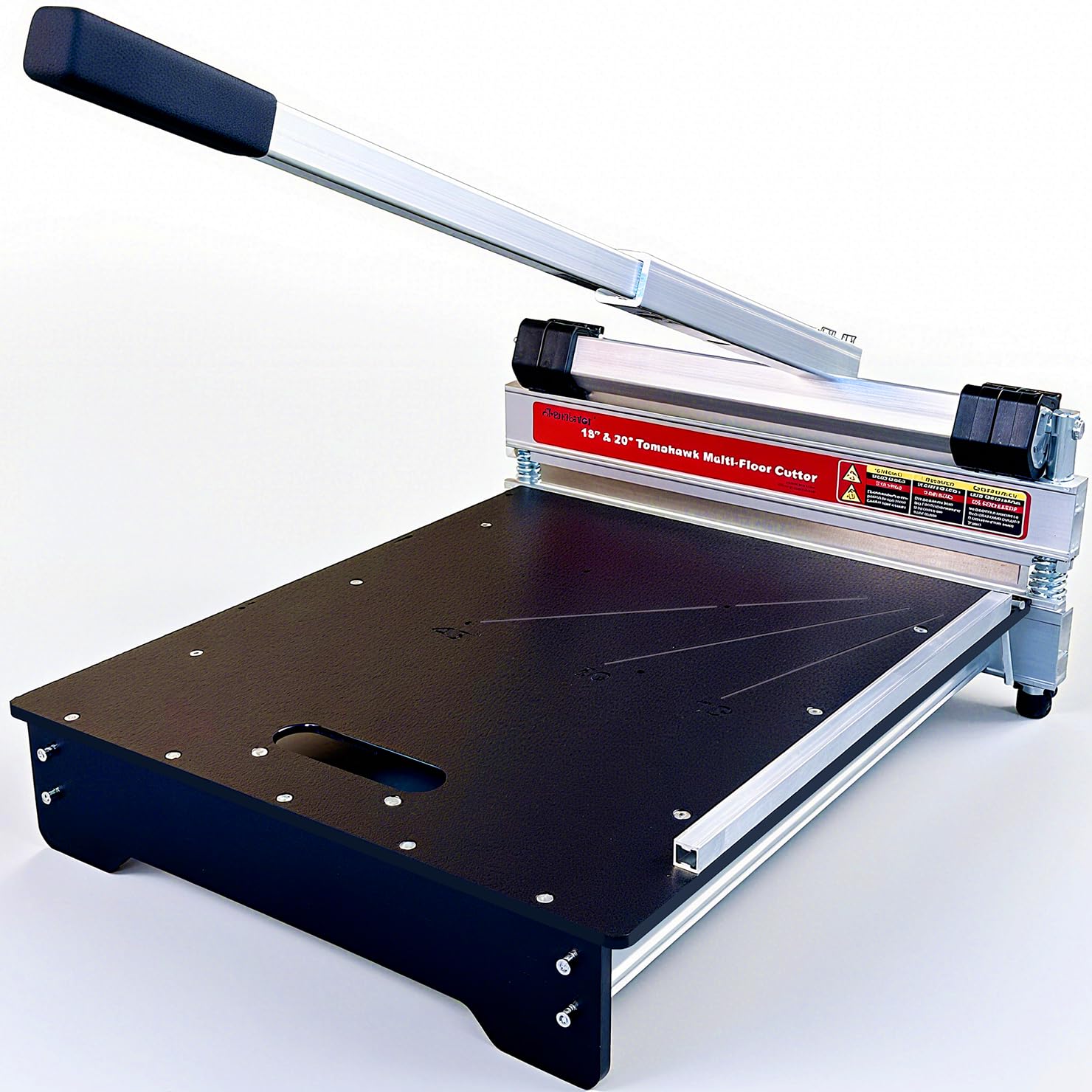
The 18-inch Pro Max cutter expands on the previous model’s capability with a wider throat that handles planks up to 18 inches across — essential for wide luxury vinyl tiles and large-format laminate boards. The tungsten-steel blade holds an edge noticeably longer than standard steel, resisting chipping even on engineered hardwood flooring up to 15mm thick with a Janka hardness of 1250. Diagonal cuts reach 13 inches, and the machine marks 0, 15, 30, and 45-degree angles for both sides.
Like its smaller sibling, this cutter is hand-powered and produces zero dust, making it suitable for interior installation where noise and debris are a concern. The extruded aluminum base provides a stable platform, and the long handle generates sufficient leverage to snap thick commercial-grade vinyl planks with a clean break. The replaceable blade can be ordered from the manufacturer’s online store, and the blade cover increases safety during blade changes.
The assembly is minimal, and the cutter breaks down easily for transport between job sites. The unit weighs 21 pounds — slightly heavier than the 13-inch model but still manageable for a flooring professional. The main limitation is that this cutter is not designed for bamboo flooring (the harder material requires a different blade geometry). For installers who regularly work with wide-format LVP and laminate, the extra 5 inches of cutting width saves significant time by reducing the number of rip cuts required.
Why it’s great
- 18-inch cutting width for large-format planks
- Tungsten-steel blade for long life
- Dust-free, quiet, no power source needed
- Supports 45-degree diagonal cuts up to 13 inches
Good to know
- Not suitable for bamboo flooring
- Heavier than smaller models, at 21 pounds
FAQ
Can a desktop vinyl cutter handle heat transfer vinyl for t-shirts?
What is the real difference between a 2-point and 4-point registration system?
Do I need a subscription to use the design software?
Can I cut materials other than vinyl?
Final Thoughts: The Verdict
For most users, the cutting machine for vinyl winner is the Cricut Maker 4 because it combines the widest material compatibility with reliable print-then-cut accuracy and a large design library. If you want high-detail precision and matless workflow with professional build quality, grab the Siser Juliet. And for large-format vinyl work or commercial signage, nothing beats the VEVOR 28-inch vinyl cutter for its wide feed and adjustable pressure range at an accessible price point.

Mo Maruf
I created WellFizz to bridge the gap between vague wellness advice and actionable solutions. My mission is simple: to decode the research and give you practical tools you can actually use.
Beyond the data, I am a passionate traveler. I believe that stepping away from the screen to explore new environments is essential for mental clarity and physical vitality.