Our readers keep the lights on and my smoothie glass nicely filled. As an Amazon Associate, I earn from qualifying purchases.
Nothing kills a high-end gaming session or a precision creative workflow faster than a cable that can’t hold a stable signal. You drop on a GPU and on a 4K high-refresh monitor, only to be greeted by random black screens, annoying flicker, or handshake failures that force you to reboot your entire rig. The culprit is almost always a cable that can’t handle the bandwidth or certified signal integrity your hardware demands.
I’m Mohammad Maruf — the founder and writer behind WellFizz. My buying guides come from hundreds of hours analyzing technical specifications, cross-referencing user reports of signal dropouts, and verifying which cables actually pass the rigorous VESA certification tests required for DisplayPort 2.1 compliance.
This guide cuts through the marketing noise to focus on the cables that deliver stable, certified performance for your setup. After reviewing the top options, I have identified the best displayport 2.1 cable to give you a clear buying recommendation without confusion or guesswork.
How To Choose The Best DisplayPort 2.1 Cable
Selecting the wrong DisplayPort cable can leave you stuck with a monitor that refuses to hit its rated refresh rate or a screen that goes black mid-game. The core of a good choice rests on three things: certification, bandwidth tier, and build quality. Below are the critical factors to evaluate before buying.
Always Confirm VESA Certification
Look for cables explicitly labeled as VESA Certified. This means the cable passed official compliance testing for signal integrity and bandwidth. Non-certified cables often produce flicker, screen dropouts, or fail to negotiate a stable link at high resolutions. A VESA logo on the packaging or listing is your assurance of reliable performance.
Match the Bandwidth Tier to Your Hardware
DisplayPort 2.1 cables come in two main speed tiers: DP54 (54Gbps, UHBR13.5) and DP80 (80Gbps, UHBR20). A DP54 cable is sufficient for 8K 165Hz or 4K 500Hz with DSC. For future-proofing with upcoming GPUs or 16K displays, a DP80 cable offers the full bandwidth headroom. Always check your monitor and GPU specifications to see which tier they support.
Consider Cable Length and Connector Design
Longer cables (over 6 feet) can introduce signal degradation, especially at the highest bandwidths. Stick with the shortest practical length for your setup. Also, look for cables with sturdy, snag-free connectors and gold-plated pins to resist corrosion and ensure a secure connection over many plug-and-unplug cycles.
Quick Comparison
On smaller screens, swipe sideways to see the full table.
| Model | Category | Best For | Key Spec | Amazon |
|---|---|---|---|---|
| Cable Matters DP80 3.3ft | DP80 UHBR20 | Best Overall Value | 80Gbps, VESA Certified, 3.3ft | Amazon |
| Cable Matters DP54 9.8ft | DP54 UHBR13.5 | Longer Run Stability | 54Gbps, VESA Certified, 9.8ft | Amazon |
| Stouchi DP80 3.3ft | DP80 UHBR20 | Snag-Free Connector | 80Gbps, VESA Certified, 3.3ft | Amazon |
| Capshi DP80 6.6ft | DP80 UHBR20 | Nylon Braided Durability | 80Gbps, VESA Certified, 6.6ft | Amazon |
| Ubluker DP80 5ft | DP80 UHBR20 | Certified Budget Pick | 80Gbps, VESA Certified, 5ft | Amazon |
In‑Depth Reviews
1. Cable Matters [VESA Certified] 80Gbps DisplayPort 2.1 Cable – 3.3ft

The Cable Matters DP80 cable hits the sweet spot of certified performance and everyday value. It carries full VESA certification for the UHBR20 standard, supporting 80Gbps bandwidth to unlock 16K 60Hz, 8K 240Hz, or 4K 240Hz with DSC enabled. Users pairing it with an RTX 4090 and a 4K 240Hz monitor report flawless operation with G-Sync, FreeSync, and HDR enabled — no flicker, no signal drops.
Build quality is a clear step above generic cables. Gold-plated connectors resist corrosion, and the locking latch keeps the cable firmly seated in your GPU port — a welcome feature for setups that get bumped during desk cleaning or cable management. The 3.3-foot length is short enough to keep cable clutter minimal in a standard desktop arrangement but may be too short for elevated monitors or standing desks.
One user with an RTX 3080 and 1440p monitor confirmed the cable worked flawlessly, specifically warning against cheap alternatives that caused GPU issues. Another reviewer running a 500Hz LCD with a DP 1.4 GPU noted the cable is thick yet flexible, reducing port torque compared to stiffer competitors. This cable is a dependable, certified link for demanding setups.
Why it’s great
- Full VESA DP80 certification for guaranteed 80Gbps
- Gold-plated connectors with locking latch for secure fit
- Flexible enough to reduce torque on GPU ports
Good to know
- 3.3ft length may be too short for some setups
- One user report of HDR Cinema handshake issues on extended displays
2. Cable Matters [VESA Certified] 54Gbps DisplayPort 2.1 Cable – 9.8ft

When your monitor sits on an arm or across a large desk, a standard 3-foot cable won’t cut it. This Cable Matters DP54 cable stretches to 9.8 feet while maintaining VESA certification for 54Gbps bandwidth (UHBR13.5). It supports 8K 165Hz or 4K 500Hz with DSC enabled, making it a solid option for ultra-wide 4K monitors running at 240Hz or 360Hz.
The cable retains the same high build standard as the DP80 sibling: gold-plated connectors, a locking latch, and robust shielding to prevent signal degradation over the longer distance. Users replacing old DP 1.2 cables report immediate fixes for black screens, stutters, and delays on RTX 4090 systems with 4K 240Hz QD-LED monitors. The cable runs full 4K 240Hz at 10-bit color depth without artifacts.
One reviewer noted the cable is sturdy but manageable — thick enough to resist interference, yet flexible enough for routing behind a monitor arm. The DP54 rating is a deliberate trade-off: you sacrifice the maximum 80Gbps overhead, but you get a stable, certified signal at a longer distance where DP80 cables can struggle. For most 8K and 4K high-refresh setups, this cable delivers everything you need.
Why it’s great
- VESA certified at 9.8ft — rare for long certified cables
- Perfect for 4K 240Hz with 10-bit HDR
- Fixes black screen issues from older cables
Good to know
- DP54 tier is limited to 54Gbps, not full 80Gbps
- Not ideal for 16K or future 8K 240Hz without DSC
3. Stouchi VESA Certified DisplayPort 2.1 Cable 3.3FT

Stouchi’s DP80 cable addresses a specific pain point: the fear of damaging your GPU port with a stuck locking latch. They engineered a precision friction-fit connector that holds securely enough to resist desk bumps but pulls out cleanly without the risk of tearing the port. This is especially valuable for users who frequently swap GPUs or change monitor configurations.
The cable is VESA certified for the full 80Gbps UHBR20 standard, supporting 16K 60Hz, 8K 120Hz, or 4K 240Hz without compression. Triple-layer shielding (nylon braid, aluminum foil, and metal braiding) protects against EMI and RFI interference, which is a common cause of random flicker in dense cable management setups. The 28AWG oxygen-free copper core helps maintain signal integrity over the short 3.3-foot length.
Users pairing it with an MSI 500Hz OLED gaming monitor and an RTX 5080 report flawless operation with no issues. Another long-term user praised its flexibility for monitor arms while resisting sharp kinks. The 2-year service plan adds confidence, and the standard-profile zinc-alloy housing fits tightly in MATX cases without blocking adjacent ports. The braided sheath offers 10x more abrasion resistance than basic PVC cables.
Why it’s great
- Snag-free friction-fit connector protects GPU ports
- Triple-layer shielding for interference-free signal
- 2-year service plan exceeds typical 1-year warranty
Good to know
- 3.3ft length limits placement options
- No locking latch — less secure than latching designs
4. Capshi DP80 DisplayPort 2.1 Cable (VESA Certified) 6.6 Ft
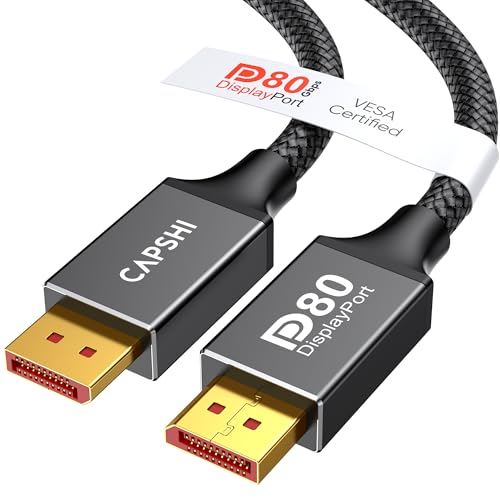
The Capshi DP80 cable offers a well-rounded package at a very accessible price point. It carries VESA certification for the full 80Gbps UHBR20 standard, supporting uncompressed 4K 240Hz, 8K 60Hz, or 16K 60Hz with DSC. The 6.6-foot length is a practical middle ground — long enough for most desktop setups and monitor arms without introducing the signal loss risks of 10-foot cables.
Build quality features a durable nylon-braided jacket that is 10x stronger than standard PVC, with 24K gold-plated connectors and triple shielding for stable high-speed transmission. The cable supports all the expected DP 2.1 features: VRR, FEC, DSC 1.2a, ALLM, HDR10+, and 32-bit audio. Users report compatibility with a wide range of gaming monitors, including Odyssey G8/G9, Alienware, and LG UltraGear panels.
One review noted it replaced a cable causing black screens and flickering — after the swap, everything worked perfectly. Another user specifically bought this cable for a new docking station to keep a clean desk layout, praising its clean look and solid performance. The cable is also compatible with RTX 5090, RTX 4090, and AMD 7900XTX GPUs, making it a future-proof choice for next-gen builds.
Why it’s great
- Full DP80 certification at a very competitive price
- Versatile 6.6ft length works for most setups
- Nylon braided jacket for long-term durability
Good to know
- Some user reports of delayed delivery times
- Not the thickest shielding available for extreme EMI environments
5. Ubluker 80Gbps DisplayPort 2.1 Cable 5 FT

The Ubluker DP80 cable brings certified 80Gbps performance to a budget-friendly tier without cutting corners on construction. It passed VESA compliance testing for the full UHBR20 standard, supporting 16K 60Hz, 8K 240Hz, or 4K 540Hz with DSC. The 5-foot length splits the difference between a short patch cable and a medium run, fitting well in most standard desktop configurations.
Build quality is surprisingly solid for the price point. The cable features a braided exterior for abrasion resistance, and the connectors are well-constructed with a secure fit. Users with an RTX 4080 Super and an LG 34GP950G-B at 3 meters (10 feet) reported a crisp, stable connection with no flickering or artifacts. Another user called it “a chunky cable but perfect for my needs,” noting improved picture quality over an older cable.
While the certified status and 80Gbps bandwidth make it technically capable of powering future GPUs like the RTX 5090, the real-world performance is best validated at DP 1.4 bandwidths for now. One reviewer using it with a DP 1.4 setup confirmed it works perfectly. This cable is a strong choice for budget-conscious builders who want certified DP80 performance without overspending.
Why it’s great
- VESA certified for 80Gbps at an entry-level price
- 5ft length offers good flexibility for most desks
- Stable signal with no flicker reported by users
Good to know
- Some users note it’s thicker and less flexible than premium cables
- Packaging described as a sealed anti-static bag — no retail box
FAQ
Can I use a DisplayPort 2.1 cable with a DisplayPort 1.4 GPU?
Why does my monitor go black when I use a non-certified DP 2.1 cable?
Is a longer DisplayPort 2.1 cable more likely to lose signal?
Final Thoughts: The Verdict
For most users, the best displayport 2.1 cable winner is the Cable Matters DP80 3.3ft because it delivers full VESA certification, reliable 80Gbps performance, and a flexible build that minimizes port stress — all at a very accessible price point. If you need a longer run for a monitor arm setup, grab the Cable Matters DP54 9.8ft for its certified stability at distance. And if you want to protect your GPU ports with a snag-free design, nothing beats the Stouchi DP80 3.3ft.

Mo Maruf
I created WellFizz to bridge the gap between vague wellness advice and actionable solutions. My mission is simple: to decode the research and give you practical tools you can actually use.
Beyond the data, I am a passionate traveler. I believe that stepping away from the screen to explore new environments is essential for mental clarity and physical vitality.