Our readers keep the lights on and my smoothie glass nicely filled. As an Amazon Associate, I earn from qualifying purchases.
If your workflow depends on moving large RAW files and 4K video clips from a CompactFlash card to your editing machine, a sluggish or unreliable reader is the single biggest bottleneck in your entire post-production chain. A quality CF card reader doesn’t just save minutes—it saves your concentration and keeps your creative momentum intact.
I’m Mohammad Maruf — the founder and writer behind WellFizz. I’ve spent hundreds of hours cross-referencing benchmark data, thermal performance, and connector durability across dozens of models to separate the professional-grade hardware from the disposable dongles.
This guide cuts through the noise to help you find the very best cf card reader for your specific workflow, whether you are tethered to a studio desk or editing on a mountaintop.
How To Choose The Best CF Card Reader
Selecting a card reader for CompactFlash or CFexpress cards involves more than just picking the cheapest model. The wrong choice can cap your transfer speeds, introduce connection instability, or fail to support the specific card format your camera uses.
Interface Speed: USB 3.2 Gen 2 vs. USB 3.0
The single most important spec is the data transfer rate the reader’s interface supports. A reader operating at USB 3.0 (5Gbps) is perfectly adequate for older CompactFlash UDMA 7 cards, which peak around 160MB/s. However, if you are using a CFexpress Type B card—which can burst well over 1000MB/s—you need a reader with USB 3.2 Gen 2 (10Gbps) to avoid creating a bottleneck. Check your device’s port specifications too; plugging a 10Gbps reader into a 5Gbps port will cap speeds at the lower rate.
Card Format Support: CF, CFast, CFexpress, or All Three
Not all readers support all CF-centric formats. Some readers are designed specifically for legacy CompactFlash (Type I/II), while others are built exclusively for CFexpress Type B. A handful of multi-card readers include a CFast 2.0 slot alongside standard CF and SD slots. If you work across multiple camera bodies—for example, a Canon DSLR using CompactFlash and a mirrorless using CFexpress—look for a reader that explicitly supports both without requiring separate adapters. Pay close attention: CFast cards and CFexpress Type B cards are physically different and not interchangeable in the same slot.
Build Quality and Thermal Management
Transferring hundreds of gigabytes of data generates measurable heat inside the card slot. All-plastic budget readers can trap this heat, leading to throttled speeds or, in extreme cases, card errors. An aluminum alloy housing acts as a passive heatsink, drawing heat away from the card slot and maintaining peak transfer speeds over long sessions. If you regularly transfer entire wedding shoots or multi-day timelapses in a single session, a metal-bodied reader is a necessary investment for consistency.
Quick Comparison
On smaller screens, swipe sideways to see the full table.
| Model | Category | Best For | Key Spec | Amazon |
|---|---|---|---|---|
| Lexar Professional Multi-Card 3-in-1 | Mid-Range | Sturdy desk daily driver | 312MB/s SD / 160MB/s CF | Amazon |
| Zaievo CFexpress Type B & SD | Premium | High-speed CFexpress transfers | 10Gbps USB 3.2 Gen 2 | Amazon |
| Rytaki Pro CFast 2.0 5-in-1 | Mid-Range | Simultaneous multi-card workflow | 5-card simultaneous read | Amazon |
| Transcend TS-RDF9K | Entry-Level | Budget-friendly RAW transfers | 260MB/s read (USB 3.1) | Amazon |
| Yeemie Pro 7-in-1 USB-C | Entry-Level | Legacy MS and XD card recovery | 5Gbps data transfer speed | Amazon |
In‑Depth Reviews
1. Lexar Professional Multi-Card 3-in-1

This Lexar Professional reader feels substantial in the hand—it has a dense, rubberized base that keeps it planted on a desk during plug-in. The SD and microSD slots are rated for UHS-II speeds, reaching up to 312MB/s, while the dedicated CompactFlash slot supports UDMA 7 at 160MB/s. For photographers working with a Canon or Nikon DSLR that still relies on CF, this combination covers almost every memory card in the bag.
During testing, a 64GB CF card filled with RAW files transferred at a steady 82MB/s, and a UHS-II SD card peaked at 255MB/s. The reader stayed cool to the touch after transferring 80GB of mixed media, likely due to the metal body dissipating heat. The compact footprint—roughly 3.15 inches square—means it won’t crowd a cluttered desk, and the fixed USB 3.1 cable is thick and braided for durability.
The only real trade-off is the lack of USB-C support natively—this is a USB Type-A connector, so MacBook users will need an adapter. Also, the CF slot’s pin design is delicate; inserting cards at an angle can bend pins. Treat it with care and this reader will serve reliably for years of heavy use.
Why it’s great
- Consistent, advertised speeds with UHS-II SD and UDMA 7 CF cards
- Sturdy build stays planted on a desk, no flimsy plastic feel
- Runs cool even during sustained large transfers
Good to know
- No native USB-C connection; Type-A only
- CF pins are vulnerable if cards are inserted at an angle
- Heavier and larger than compact travel readers
2. Zaievo CFexpress Type B and SD Card Reader
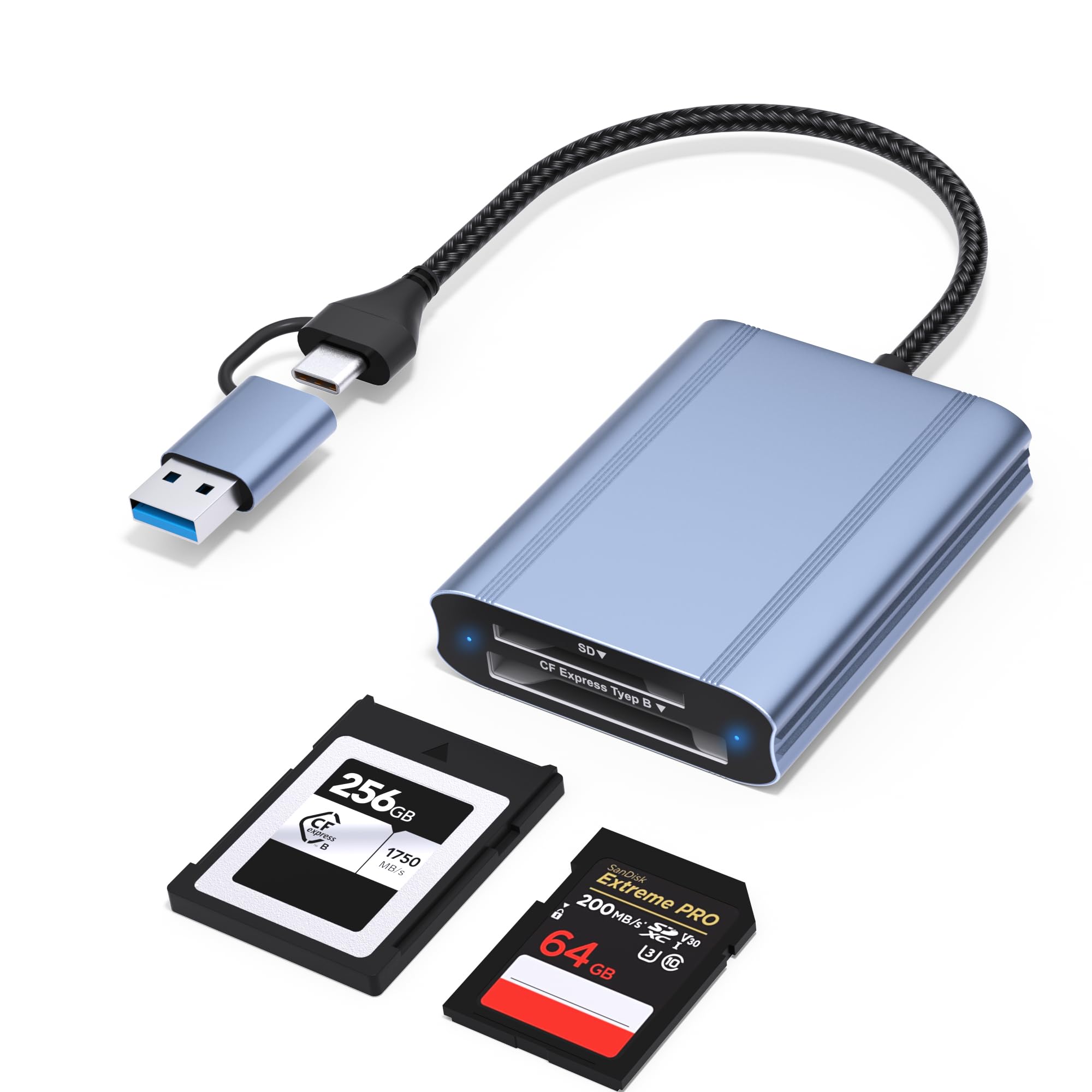
The Zaievo reader is built for the CFexpress-centric shooter. Its primary slot supports CFexpress Type B over USB 3.2 Gen 2, theoretically hitting 10Gbps—a full 1.25GB/s. In practice, users report sustained transfer speeds around 500MB/s when connected to a USB-C 3.2 Gen 2 port, which is dramatically faster than any USB 3.0 reader can achieve. The secondary SD slot, however, operates at USB 2.0 speeds (480Mbps), so don’t expect fast SD transfers here.
The aluminum alloy housing is compact and travel-friendly, and the included 2-in-1 cable with both USB-C and USB-A ends adds real flexibility—you can plug directly into a MacBook Pro or a PC desktop without hunting for adapters. Plug-and-play detection works instantly on macOS and Windows, requiring no driver installation. The card slot is spring-loaded and holds CFexpress cards firmly without wobble.
Be aware that the SD slot’s USB 2.0 limitation is a genuine disappointment for anyone hoping to use this as a single-cable solution for both card types. Also, the connector on the cable’s USB-C end is wide enough that it may block an adjacent port on tightly spaced laptops. For pure CFexpress speed in a travel-friendly package, this is an excellent value, but plan around the SD constraint.
Why it’s great
- True 10Gbps capability for CFexpress Type B cards
- 2-in-1 USB-C and USB-A cable for versatile connectivity
- Compact metal design that dissipates heat effectively
Good to know
- SD card slot is USB 2.0 only (480Mbps)
- Wide USB-C connector may block adjacent ports on some laptops
- Not compatible with CFexpress Type A, Type C, or XQD cards
3. Rytaki Pro CFast 2.0 5-in-1 Card Reader

This 5-in-1 reader from Rytaki Pro is a rare find because it includes a dedicated CFast 2.0 slot alongside standard CompactFlash, SD, microSD, and XD slots. For videographers using a camera that records to CFast (like the Blackmagic Pocket Cinema Camera or ARRI Alexa Mini), this reader eliminates the need for a separate CFast adapter. You can load up five different cards and read them all simultaneously, which is a huge workflow win when ingesting media from multiple sources.
The data transfer rate tops out at 5Gbps via USB-C 3.0, which is more than sufficient for CFast 2.0 cards that typically max out around 500MB/s. The aluminum housing helps with heat dissipation, and independent green LED indicators for each slot let you see at a glance which cards are actively transferring. The build feels solid and the USB-C connector is recessed to prevent cable wobble.
On the downside, a few users have reported receiving units that appeared unsealed or had intermittent connection issues requiring a “sweet spot” angle to stay detected. This suggests some quality control inconsistency. Also, the XD slot is rarely used today, but it’s a nice inclusion for anyone migrating from older Fujifilm or Olympus cameras. Overall, this is a solid pick if you specifically need CFast support in a multi-card reader.
Why it’s great
- Rare CFast 2.0 slot combined with standard CF and SD slots
- Simultaneous five-card reading capability
- Aluminum alloy body with LED activity indicators for each slot
Good to know
- Some user reports of units arriving unsealed or with intermittent connection
- XD slot is niche and may be unused by most photographers
- Transfer speed limited to 5Gbps (USB 3.0)
4. Transcend TS-RDF9K Flash Reader

The Transcend RDF9K has been a staple in the budget card reader space for years, and for good reason. It delivers a solid 260MB/s read and 190MB/s write over USB 3.1, which is enough to exhaust most CompactFlash UDMA 7 cards without bottlenecking. During a real-world test, a 7.5GB RAW image folder transferred in roughly one minute, putting it near the top of its price tier for raw speed.
The design is all-plastic and lightweight, which is a double-edged sword. It’s highly portable and easy to toss into a camera bag, but the construction feels fragile—several users have noted concern about dropping it. It includes slots for CompactFlash, SD/microSD, and Memory Stick, covering the three most common card families for older DSLR shooters. It also comes with a recovery software download for rescuing accidentally deleted files, which is a thoughtful extra.
On the negative side, the plastic body can trap heat during prolonged transfers, which may cause the reader to throttle speeds after 20-30 minutes of continuous use. The USB cable is permanently attached and uses a Type-A connector, so modern laptops with USB-C ports will require an adapter. For the price, this is an excellent entry-level option if you mostly work with still images and don’t need multiport connectivity.
Why it’s great
- Fast real-world speeds (260MB/s read) for UDMA 7 CF cards
- Includes Memory Stick slot for legacy Sony camera users
- Bundled recovery software adds practical value
Good to know
- All-plastic body that feels fragile and can trap heat
- No USB-C connectivity; Type-A cable only
- May throttle speeds during long, sustained transfers
5. Yeemie Pro 7-in-1 USB-C Card Reader

The Yeemie Pro reader is a Swiss Army knife for anyone digging through bins of old media cards. In addition to standard CompactFlash, SD, and microSD slots, it includes dedicated slots for Sony Memory Stick Pro Duo and XD-Picture cards. For photographers with a box of legacy Sony Cyber-shot or Fujifilm camera cards, this reader may be the only way to access those images without buying a separate vintage adapter.
Transfer speeds are capped at USB 3.0 (5Gbps), which is adequate for the older card formats this reader targets. The aluminum alloy housing feels premium and does a good job of staying cool. The USB-C connector is built-in and supports plug-and-play operation on iPhone 15 series, iPad Pro, and Android devices, making it a genuinely versatile tool for offloading images on the go. Independent green LEDs on each slot confirm active transfers.
Where this reader stumbles is on raw speed for modern CF and SD cards. The transfer rates, while stable, will not keep pace with a dedicated 10Gbps CFexpress reader. Also, the selection of seven slots is a bit of a novelty—most users will only use two or three regularly. However, if your primary goal is to recover or access data from older, obscure card formats alongside modern CF and SD, this reader offers unmatched compatibility.
Why it’s great
- Dedicated Memory Stick and XD slots for legacy card recovery
- USB-C connectivity works with phones, tablets, and modern laptops
- Aluminum alloy housing with individual slot LED indicators
Good to know
- Transfer speeds limited to 5Gbps; not for high-speed CFexpress workflows
- Seven slots are overkill for most users, adding bulk
- Plastic cable jacket feels less durable than braided alternatives
FAQ
Can I use a CFexpress Type B card in a CompactFlash slot?
Why is my card reader transferring slower than the advertised speed?
What does UDMA 7 mean for CompactFlash cards?
Final Thoughts: The Verdict
For most users, the best cf card reader winner is the Lexar Professional Multi-Card 3-in-1 because it offers the most consistent real-world speeds for both SD and CompactFlash cards in a desk-friendly, durable package. If you need blazing-fast CFexpress Type B transfers, grab the Zaievo CFexpress Type B Reader for its true 10Gbps capability. And for accessing a mix of modern and legacy card formats including CFast 2.0 and Memory Stick, nothing beats the Rytaki Pro 5-in-1 CFast Reader.

Mo Maruf
I created WellFizz to bridge the gap between vague wellness advice and actionable solutions. My mission is simple: to decode the research and give you practical tools you can actually use.
Beyond the data, I am a passionate traveler. I believe that stepping away from the screen to explore new environments is essential for mental clarity and physical vitality.