Our readers keep the lights on and my smoothie glass nicely filled. As an Amazon Associate, I earn from qualifying purchases.
Moving from a craft hobby to a real, sellable product line hinges on one big decision: the printer. Standard inkjets won’t cut it for sublimation — the ink, the head, and the paper path are all different. The wrong choice means faded transfers, constant nozzle clogs, or ink costs that eat into every mug and t-shirt you sell.
I’m Mohammad Maruf — the founder and writer behind WellFizz. To build this guide, I’ve spent dozens of hours analyzing the specifications, customer complaints, and real-world performance of every dedicated and converted sublimation printer available at home, cross-referencing ink yields, printhead technology, and heat-transfer results.
No matter if you are launching a side hustle or upgrading from a converted tank printer, this deep-dive on the best at home sublimation printer will help you pick the right machine for vibrant, wash-fast results every time.
How To Choose The Best At Home Sublimation Printer
Picking a sublimation printer isn’t like picking a regular document printer. The ink chemistry, printhead durability, and paper handling all change how your final heat transfer looks. Focus on a few critical specs and your decision gets much easier.
Dedicated vs. Converted Printers
A dedicated sublimation printer — like the Sawgrass SG500 or Brother SP1 — leaves the factory with sublimation ink and a printhead tuned for high-temperature release. Converted printers, such as refilled EcoTanks, require you to flush out water-based ink and risk permanent clogging. Dedicated machines also come with color profiles preloaded, so you avoid weeks of trial-and-error to get skin tones right.
Print Resolution and Droplet Size
Look for a minimum of 1200 x 1200 dpi for sharp text and detailed graphics. Printers using Epson’s PrecisionCore or MicroTFP head produce smaller ink droplets (around 3–5 picoliters), which translates to smoother gradients and less grain on hard substrates like ceramic and aluminum.
Media Support: Paper Size and Pass-Through
Most home sublimation jobs fit on 8.5 x 11 or 8.5 x 14 paper. If you plan to make full-back t-shirt designs or large wall art, consider a model that can handle 11 x 17 or 24-inch roll media. A straight paper path (rear feed) also helps prevent jams when using heavier sublimation paper.
Quick Comparison
On smaller screens, swipe sideways to see the full table.
| Model | Category | Best For | Key Spec | Amazon |
|---|---|---|---|---|
| Brother Sublimation Printer (B0CFNF17RH) | Dedicated | All-around home sublimation | 41ml ink cartridges, self-cleaning heads | Amazon |
| Sawgrass SG500 Bundle | Dedicated | Business-grade color accuracy | Anti-clog technology, SubliJet UHD inks | Amazon |
| Epson SureColor F170 (B0DB6JMQKS) | Dedicated | Beginner-friendly bundles | PrecisionCore printhead, auto-stop ink bottles | Amazon |
| Epson SureColor F170 Starter (B0DB6K4CHN) | Dedicated | Value bundle with paper and blanks | 150-sheet tray, dust-resistant paper path | Amazon |
| Epson SureColor F570 Pro 24″ | Professional | Large-format roll sublimation | 24″ roll support, Nozzle Verification Technology | Amazon |
| Brother Sublimation Printer Bundle (B0CNKTFMLS) | Dedicated | Bundle value with paper and ink | 4-color cartridge, 100 sheets sublimation paper | Amazon |
| Pinckney Super-Tank Bundle | Converted | Budget entry with sublimation ink included | 5760 x 1440 dpi, 382ml total ink included | Amazon |
| PC Universal Super-Tank Bundle | Converted | Bundle with heat press and accessories | Up to 10,000 page yield, includes press machine | Amazon |
| Epson EcoTank ET-2980 | Standard Inkjet | Everyday office documents | Supertank system, 3 years of ink included | Amazon |
| HP DesignJet T210 24″ | Large Format | CAD, posters, sewing patterns | 24-inch roll, HP Click software, auto cutter | Amazon |
| Canon imagePROGRAF TC-21 24″ | Large Format | Large posters and technical prints | 280ml ink included, tiltable touchscreen | Amazon |
In‑Depth Reviews
1. Brother Sublimation Printer (B0CFNF17RH)

The Brother SP1 hits the sweet spot for home crafters who want a dedicated sublimation machine without paying for a wide-format chassis. The printhead self-cleans automatically when the printer powers on, a feature that matters a lot if your printer sits idle for a week between craft fairs.
Setup is straightforward with the Artspira app, though serious designers will want a computer-based program since the mobile-only Artspira canvas is cramped for detailed layouts. Print speeds sit around 1 page per minute, which is common for this class, but the output is consistently vibrant — colors hold up through multiple washes on 100% polyester shirts. Users report excellent results on mugs, mousepads, and keychains with none of the banding issues that plague converted EcoTanks.
The main trade-off is the fixed ink cost: Brother cartridges are proprietary, so you can’t refill with third-party bottles. But given the reliability and the fact that it ships with a full starter set plus sublimation paper, the upfront value is strong for any serious hobbyist or small-batch seller.
Why it’s great
- Larger 41 ml cartridges reduce mid-project ink swaps
- Self-cleaning heads prevent clogs during idle periods
- Artspira app provides 100+ designs and poster-style conversion
Good to know
- Proprietary cartridges lock you into Brother ink
- Artspira mobile app is too small for complex design work
2. Sawgrass SG500 Sublimation Printer Bundle

The Sawgrass SG500 is the only printer in this roundup that was engineered from the ground up exclusively for sublimation — not a converted office machine. The SubliJet UHD inks are batch-formulated for consistent color from cartridge to cartridge, and the anti-clog technology actively monitors and clears the printhead during idle periods. For small business owners selling tumblers and mousepads, that means less wasted time on nozzle checks and alignment sheets.
Print quality hits 1200 dpi with very smooth gradients — noticeably cleaner than converted EcoTanks on ceramic coasters. The MySawgrass platform includes color presets for common blank substrates, which reduces the guesswork of tweaking RGB curves. One frequent user note is that the print driver is feature-rich but slow to load; you’ll want to batch your prints rather than queue them one by one.
The main criticism is ink cost: replacement cartridges are expensive compared to bottle-based systems. However, the SG500 is the most reliable plug-and-play choice for anyone who prioritizes print consistency over consumable savings. The bundle also includes TruePix paper, so you can start producing transfer-ready prints immediately.
Why it’s great
- Anti-clog technology for worry-free idle periods
- Batch-formulated SubliJet UHD inks deliver consistent color
- MySawgrass platform with substrate-specific presets
Good to know
- Replacement ink cartridges carry a high per-page cost
- Print software is capable but loads slowly
3. Epson SureColor F170 (B0DB6JMQKS)

Epson’s SureColor F170 brings genuine OEM sublimation from a brand known for its PrecisionCore printhead. The nozzle technology fires very small droplets — around 3 picoliters — which gives you fine detail for logos and photo-realistic transfers. The included ink bottles use an auto-stop mechanism, so you can refill the tanks without measuring or spilling.
The 150-sheet front tray is enclosed, which reduces dust accumulation on your transfer paper — a small but real upgrade over open-tray designs that let lint settle on the sheets. Setup is clean on both Mac and Windows, and the printer is compact enough to sit on a standard craft desk. Several users mention that the initial WiFi setup can be finicky; an Ethernet cable solves it in minutes.
Print resolution is outstanding for an entry-level dedicated machine, and the OEM inks are ECO PASSPORT certified for safe use on textiles and drinkware. The main limitation is the 8.5 x 11 maximum size, which forces you to tile larger designs. For crafters focused on mugs, phone cases, and small-format blanks, this is a reliable starting point.
Why it’s great
- PrecisionCore printhead delivers sharp 3-picoliter droplets
- Auto-stop ink bottles make refills mess-free
- Dust-resistant enclosed paper tray
Good to know
- WiFi setup can be inconsistent on first connection
- Limited to letter/legal size; no roll support
4. Epson SureColor F170 Starter Bundle (B0DB6K4CHN)
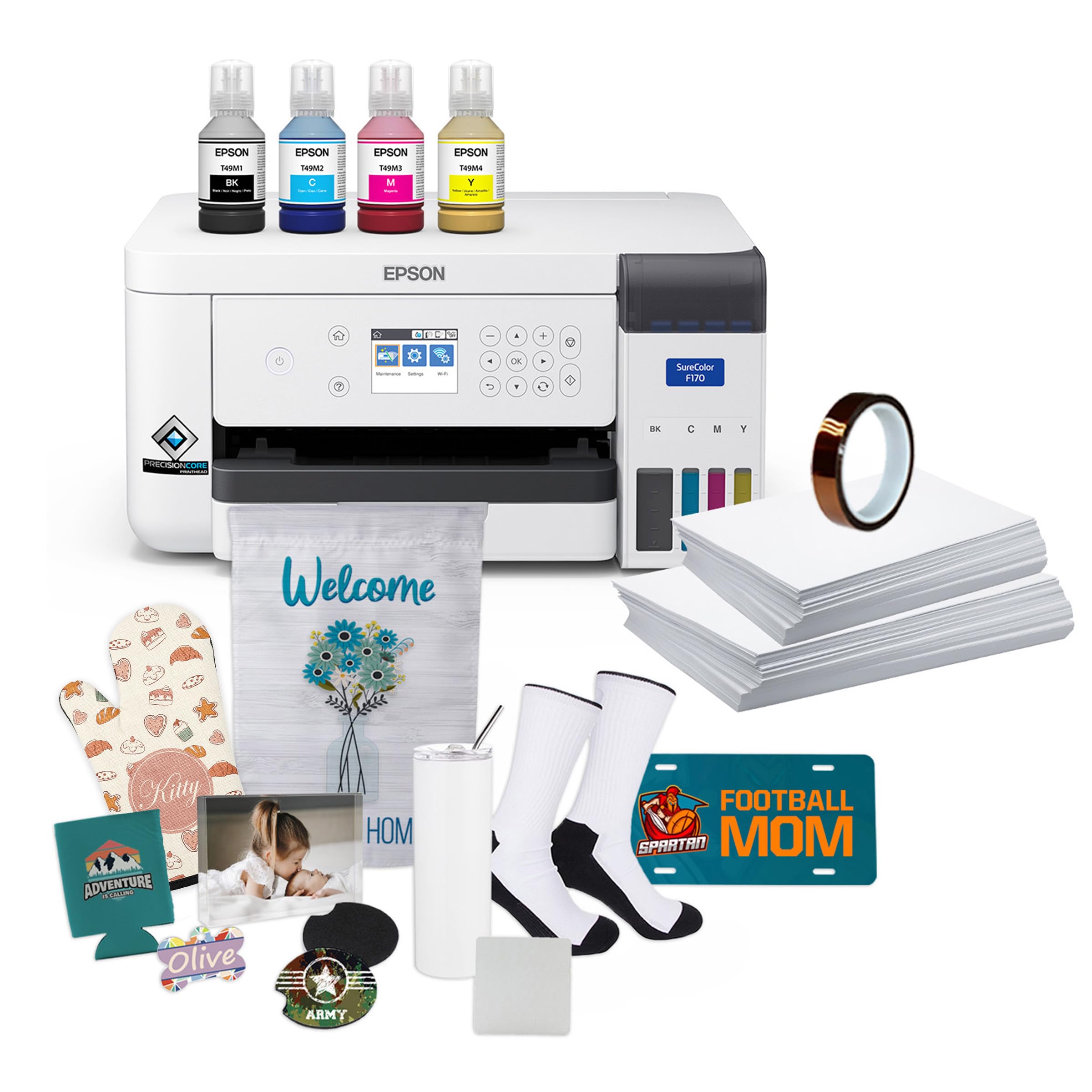
This bundle version of the F170 adds real accelerators for a new sublimation setup: thermal tape, starter blanks, and both 8.5 x 11 and 8.5 x 14 transfer paper. The thermal tape alone saves you from having to buy a roll separately before your first heat press attempt, and the included blanks let you test your prints immediately rather than waiting for supplies to arrive in a separate delivery.
The print engine is identical to the standalone F170 — PrecisionCore head, auto-stop bottles — but the extra accessories make this the better pick for anyone who hasn’t yet built a sublimation supply stash. Users report that the colors on the bundled DS Multi-Use paper transfer with excellent saturation on both polyester fabric and coated ceramic.
One user flagged a blurry print issue that required a return, but the overwhelming majority of buyers describe vibrant, crisp results that best anything from a converted inkjet. The dust-resistant tray keeps the paper clean, and the small footprint still fits beside a standard 15 x 15 heat press.
Why it’s great
- Comes with thermal tape, blanks, and two sizes of transfer paper
- Same reliable PrecisionCore printhead as standalone F170
- DS Multi-Use paper produces well-saturated transfers
Good to know
- Some units arrived with blurry output requiring return
- No rear feed for thicker media
5. Epson SureColor F570 Pro 24″

For home businesses that want to print full-back t-shirt designs, oversized banners, or yard signs, the F570 Pro is the only real choice in this list. It handles rolls up to 24 inches wide, includes a built-in cutter, and ships with two full 140 ml sets of initial ink — enough to run dozens of large transfers before needing a refill. The MicroTFP printhead includes Nozzle Verification Technology, which automatically detects and compensates for clogged nozzles mid-print.
Epson Edge Print Pro software comes in the box, bringing nesting, pattern repeats, and precise color controls that are critical when you’re producing sellable inventory at scale. The 50-sheet auto-feed tray handles smaller jobs, but the real productivity gain is the roll path, which lets you print multiple transfers in one continuous run. Users upgrading from desktop-sized units report a dramatic jump in throughput.
The downsides are the footprint — this is a 24-inch desktop machine that requires dedicated space — and the LTL freight shipping, which demands a scheduled drop-off appointment. The per-print ink cost is lower than cartridge-based systems thanks to the high-volume bottles, making this a smart investment for anyone printing more than 50 large transfers per month.
Why it’s great
- 24-inch roll support with built-in cutter for large transfers
- Nozzle Verification Technology reduces print failures
- Two full 140 ml ink sets included for high-volume start
Good to know
- Requires LTL freight delivery scheduling
- Large footprint needs dedicated workspace
6. Brother Sublimation Printer Bundle (B0CNKTFMLS)
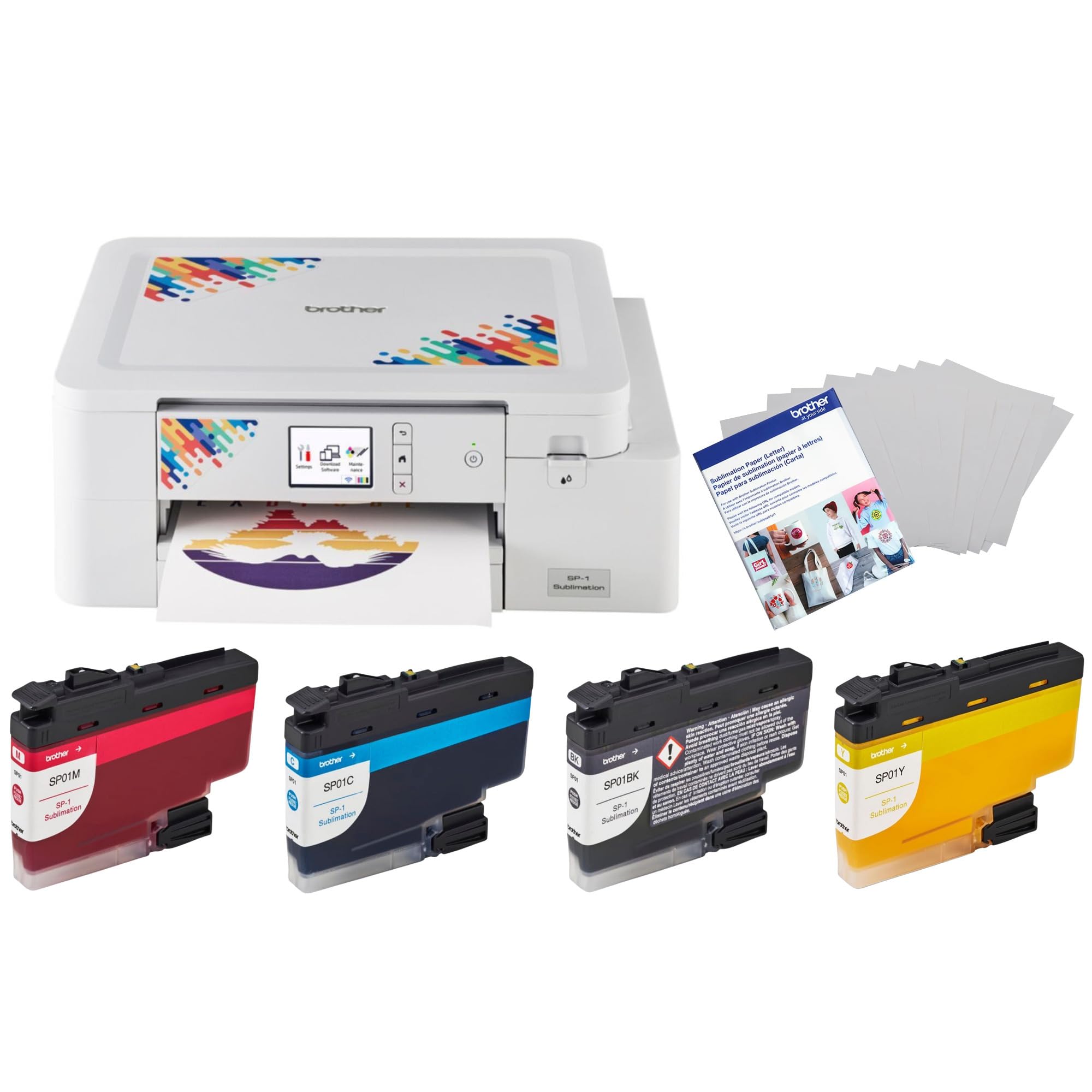
This bundle packages the same Brother SP1 engine with four genuine ink cartridges and 100 sheets of Brother sublimation paper. The paper is specifically matched to the ink chemistry, so your first 100 prints should come out with accurate color without fiddling with ICC profiles. Users find the setup easy enough to unbox, connect via USB or WiFi, and print a test transfer within an hour.
The printer itself prints at 300 dpi — lower than the Epson F170’s 1200 dpi — but for most craft applications like tumblers, keychains, and ceramic ornaments, the output is indistinguishable. The Artspira app includes a mirror option by default, which eliminates a common mistake for beginners. Several buyers mention making dozens of items after initial setup and barely budging the ink level indicators.
One reviewer experienced fading after two washes on a shirt, but the broader feedback is that the prints hold color well through repeated laundry cycles. Since the ink is cartridge-based, the per-print cost is higher than a tank system, but the convenience and reliability of a dedicated sublimation printer make it a strong plug-and-play option for craft fairs.
Why it’s great
- 100 sheets of matched sublimation paper included
- Default mirror option prevents beginner mistakes
- Ink usage is efficient during heavy project runs
Good to know
- 300 dpi resolution may show grain on very detailed designs
- Cartridge-based system has higher per-print cost than tank printers
7. Pinckney Super-Tank Sublimation Bundle

The Pinckney bundle is a converted Epson EcoTank ET-2800 factory-filled with Pinckney-brand sublimation ink. It offers the lowest entry price of any dedicated sublimation option in this guide, and the included ink volume — 382 ml total across four colors — could easily yield thousands of small transfers. The print resolution maxes out at 5760 x 1440 dpi on the spec sheet, though real-world sharpness depends heavily on the paper and transfer temperature used.
Setup is similar to a standard EcoTank: the auto-fill nozzles lock into the tanks, and the ink flows without syringes or squeezing. Users report vibrant colors on t-shirts, microfiber cloths, and ceramic coasters once the heat press settings are dialed in. The main risk of a converted printer is the lack of a dedicated sublimation warranty — if the printhead clogs from dried ink, Epson won’t cover it, and Pinckney’s support handles issues on a case-by-case basis.
One buyer had a black ink bottle leak during shipping, which created a mess but didn’t damage the printer itself after cleanup. Given the savings on ink, this is a logical value pick for crafters who don’t mind occasional troubleshooting and want to keep per-transfer costs near zero.
Why it’s great
- Very low per-transfer cost with 382 ml total ink included
- Auto-fill nozzles eliminate syringe mess during refills
- Vibrant color output on various substrates once dialed in
Good to know
- No dedicated sublimation warranty — Epson won’t cover printhead issues
- Black ink bottle has leaked in transit for some buyers
8. PC Universal Super-Tank Bundle

This set bundles a PC Universal converted super-tank printer with a flat heat press machine and all necessary accessories, making it a turnkey start for someone who owns zero sublimation equipment. The printer boasts a claimed 33 ppm black-and-white speed, though real sublimation print speed is much slower at high-quality settings. The bundle aims to remove all the separate shopping — paper, press, transfer tape — from the buying process.
User feedback is mixed. Several buyers report easy setup and good results, but a significant number struggled with Mac connectivity and region-locked software that refused to install outside the US. The printer itself is a generic EcoTank conversion, so the manufacturer support is limited compared to an Epson or Brother branded machine.
The heat press included in the bundle is a basic clamshell model, which is adequate for flat items like t-shirts and mousepads but not for mugs or hats. For a total beginner who wants one box to open and start pressing immediately, this delivers. For anyone who values long-term reliability, separate component purchases from reputable brands may be a wiser path.
Why it’s great
- Complete setup with heat press included in one box
- Fast claimed print speed for high-volume document printing
- Low barrier to entry for total beginners
Good to know
- Mac connectivity issues and region-locked software reported
- Generic conversion lacks robust manufacturer support
9. Epson EcoTank ET-2980

The Epson ET-2980 is a standard inkjet supertank printer, not a sublimation machine. It’s included here because many hobbyists convert this exact model by flushing the OEM ink and refilling with sublimation ink. The EcoTank system is the cheapest way to get high-volume ink capacity at home, and the ET-2980’s auto-duplex feature makes it a good general-purpose document printer when it’s not being used for transfers.
As a converted sublimation printer, the ET-2980 works well for budget-oriented crafters, but the printhead is not optimized for the higher temperatures of sublimation ink. Users report good results for mugs and small shirts, but they also caution that the conversion voids the Epson warranty and can lead to nozzle clogs if the printer sits unused. The included ink set (502 series) is for standard dye-based printing, so you must purchase a separate sublimation ink set for conversion.
Print quality at 600 dpi is acceptable for simple text and graphics, but the 1200 dpi mode apparently requires the printer to have extra memory that the base model lacks, leading to crashes. For someone who needs a regular printer first and wants to experiment with sublimation on the side, this is the most versatile option. For dedicated sublimation, a purpose-built machine is a better long-term bet.
Why it’s great
- Extremely low ink cost with supertank system for daily printing
- Auto-duplex scanning and printing for home office use
- 3 years of standard ink included in the box
Good to know
- Conversion to sublimation voids the Epson warranty
- Printhead not designed for sublimation ink, may clog when idle
10. HP DesignJet T210 24″

The HP DesignJet T210 is a 24-inch plotter designed for CAD drawings, posters, and sewing patterns — not for sublimation. It uses HP 712 dye-based ink, which does not bond with polyester coatings through heat transfer. However, for a craft business that also prints large-format technical drawings or art prints, this machine fills a specific niche that sublimation printers cannot.
The roll feed with built-in horizontal cutter and the HP Click software (which supports nesting and error checking) make it easy to batch print large jobs with minimal waste. Setup is straightforward, and Gigabit Ethernet plus WiFi ensure reliable network printing. The print speed is reasonable at 45 seconds for an A1 sheet, though high-quality poster mode slows it down considerably.
The major frustration is ink availability: HP 712 cartridges are not stocked at most local stores, and delivery times can stretch beyond a week. Several users mention they would prefer an Epson Smart Tank for easier ink sourcing. This printer is a specialized tool for those who need large format for non-sublimation projects alongside their craft work.
Why it’s great
- 24-inch roll support with auto cutter for oversized prints
- HP Click software with nesting and error checking saves media
- Fast A1 speed for technical drawings and posters
Good to know
- Uses dye-based ink, not compatible with sublimation
- Proprietary ink cartridges can be hard to source locally
11. Canon imagePROGRAF TC-21 24″

The Canon TC-21 is a 24-inch large-format printer that ships with a full 280 ml set of ink — the highest starter capacity in its class. It’s aimed at architects, engineers, and designers producing technical drawings, posters, and banners, and like the HP T210, it uses standard pigment ink, not sublimation dye. It is not a sublimation transfer machine, but it’s included here because some users consider it for wide-format craft templates and patterns.
The tiltable touchscreen interface and animated setup guides make the TC-21 one of the easiest large-format printers to get running. The roll feed and automatic sheet feeder support both roll and cut-sheet media up to 24 inches wide. Print quality is excellent for line work and text, with vibrant color output on glossy poster paper. ENERGY STAR and EPEAT Gold ratings mean it runs efficiently for an office environment.
One significant software limitation: the driver blocks 12 x 18 inch (ARCH B) sheet printing, capping width at A3 (11.69 inches). That’s an annoying workaround for US architectural users. There are also isolated reports of error codes and cartridge-fit issues, though most buyers report trouble-free operation. This is a solid pick for a design business that needs large-format output alongside its craft work.
Why it’s great
- 280 ml total ink included — highest starter yield in class
- Tiltable touchscreen and animated setup guides simplify installation
- Excellent line and text quality for technical prints
Good to know
- Driver limits US ARCH B (12×18) to narrower A3 width
- Not a sublimation printer; standard pigment ink cannot transfer
FAQ
Can I use any inkjet printer for sublimation?
How often do I need to print to prevent clogs?
Is a higher DPI always better for sublimation?
Final Thoughts: The Verdict
For most users, the best at home sublimation printer winner is the Brother Sublimation Printer because it balances reliability, ink capacity, and print quality in a dedicated machine that won’t clog or require conversion. If you want professional-grade color accuracy and anti-clog protection for a small business, grab the Sawgrass SG500 Bundle. And for high-volume large-format transfers up to 24 inches wide, nothing beats the Epson SureColor F570 Pro.

Mo Maruf
I created WellFizz to bridge the gap between vague wellness advice and actionable solutions. My mission is simple: to decode the research and give you practical tools you can actually use.
Beyond the data, I am a passionate traveler. I believe that stepping away from the screen to explore new environments is essential for mental clarity and physical vitality.