Our readers keep the lights on and my smoothie glass nicely filled. As an Amazon Associate, I earn from qualifying purchases.
The gap between a frustrating print and a flawless one often comes down to how well a budget 3D printer handles its first layer. Many inexpensive machines promise reliability but deliver endless bed leveling, constant clogs, and failed prints that devour time and filament. A truly capable budget model must balance fast printing speeds, reliable auto-leveling, a heated bed, and a sturdy frame — all without crossing into premium pricing territory.
I’m Mohammad Maruf — the founder and writer behind WellFizz. This guide is the result of many hours of market research, spec analysis, and cross-referencing real user experiences across the full range of affordable desktop FDM printers.
Whether you are a complete beginner or a hobbyist looking for a reliable secondary machine, finding the best budget 3d printer requires understanding which features actually reduce failure rates and which are just marketing gloss. This guide breaks down the nine strongest contenders that deliver real value.
How To Choose The Best Budget 3D Printer
Selecting a budget-friendly 3D printer is less about finding the cheapest price and more about identifying the machine that minimizes failed prints and maintenance headaches. The sub- market is crowded with machines that look similar on paper but differ sharply in print quality, reliability, and community support. Focus on the four factors that make the biggest real-world difference.
Auto Bed Leveling vs Manual Leveling
Manual leveling requires turning knobs at each corner of the bed until the nozzle sits at a consistent height — a skill that takes practice and patience. A printer with auto-leveling uses a probe sensor to map the bed surface and compensate for irregularities in software. For a beginner, auto-leveling drastically reduces the failure rate on the critical first layer. Several budget models now include this feature, making them far more forgiving than older designs.
Direct Drive vs Bowden Extruder
A direct drive extruder places the motor and gear directly above the hot end, giving the printer precise control over filament retraction and feeding. This design handles flexible materials like TPU much better than Bowden setups, where the motor is mounted on the frame and filament is pushed through a long PTFE tube. For users who want to print anything beyond standard PLA, a direct drive system is a meaningful upgrade that raises the success rate on complex geometries.
Build Volume and Frame Construction
The build volume determines the maximum size of objects you can print in one piece. Budget printers typically offer volumes between 100 mm³ and 220 mm³ on each axis. A larger volume is useful for functional parts like brackets or containers, while smaller volumes often come with more rigid frames that reduce vibration. A metal frame with dual Z-axis leadscrews provides better stability, especially at higher print speeds, than single-axis designs with plastic components.
Filament Compatibility and Hot End Temperature
The maximum hot end temperature determines which materials a printer can melt and extrude reliably. A standard 240°C limit covers PLA and PETG, while a 260°C or 300°C rated hot end unlocks tougher materials like ABS and polycarbonate blends. If you only plan to print PLA, a lower temperature limit is acceptable, but a higher ceiling adds flexibility for future projects without requiring a hardware upgrade.
Quick Comparison
On smaller screens, swipe sideways to see the full table.
| Model | Category | Best For | Key Spec | Amazon |
|---|---|---|---|---|
| Anycubic Kobra X | Premium | Multicolor & fast prints | 260 x 260 x 260 mm | 600 mm/s | Amazon |
| AOSEED X-Maker Joy AI+ | Premium | Kids & AI-guided printing | 0.05 mm precision | 400 mm/s peak | Amazon |
| Creality Ender-3 V3 KE | Mid-range | High-speed with Sprite extruder | 220 x 220 x 250 mm | 300°C nozzle | Amazon |
| Flashforge Adventurer 5M | Mid-range | Reliable Core XY printing | 220 x 220 x 220 mm | 600 mm/s | Amazon |
| Entina Tina2C | Mid-range | App-controlled STEM learning | 100 x 105 x 100 mm | WiFi control | Amazon |
| Geeetech M1 Mini | Mid-range | Direct drive in small format | 100 x 110 x 100 mm | 1:5 metal gears | Amazon |
| Entina Tina2 Basic | Value | Simple out-of-box learning | 100 x 105 x 100 mm | No manual level | Amazon |
| Tina2S Fully Assembled | Value | Compact starter kit | 100 x 105 x 100 mm | Wi-Fi + SD card | Amazon |
| Creality Ender 3 | Value | DIY tinkering & community mods | 220 x 220 x 250 mm | Bowden extruder | Amazon |
In‑Depth Reviews
1. Anycubic Kobra X

Anycubic’s Kobra X stands out in the budget tier by offering 4-color multicolor printing out of the box, something previously reserved for machines costing twice as much. The LeviQ 3.0 49-point auto-leveling system and vibration compensation deliver a consistent first layer that greatly reduces failed starts. With a 260 mm³ build volume and a hardened steel nozzle rated to 300°C, this printer handles PLA, PETG, TPU, and even ASA without modification.
At 600 mm/s maximum speed, the Kobra X completes detailed models in a fraction of the time a typical entry-level printer requires. The integrated 720P camera provides real-time monitoring and AI-driven spaghetti detection, alerting users to failures before they waste significant filament. The 48 dB operating noise level keeps the printer unobtrusive in a shared home environment.
The ACE 2 Pro expansion allows up to 19 colors for those who want to push multicolor further, but even in its base 4-color configuration, this machine dramatically expands creative possibilities. The power loss recovery and filament runout sensor further protect long prints. For a user seeking future-ready features without leaving the budget bracket, the Kobra X represents the strongest overall package.
Why it’s great
- First multicolor printer in this price bracket
- 49-point auto-leveling virtually eliminates failed first layers
- Generous 260 mm³ build volume for larger projects
Good to know
- Nozzle changes are more involved than on simpler designs
- Some users report clogs requiring fine-tuning of retraction settings
2. AOSEED X-Maker Joy AI+

Designed specifically as a 3D printer for kids, the X-Maker Joy AI+ wraps a fully enclosed, pinch-resistant body around a surprisingly capable printing system. The AI Doodle feature allows children to turn voice prompts or simple drawings into printable 3D models, removing the steep learning curve of 3D modeling software. Its print precision reaches 0.05 mm, producing smooth surfaces on small toys, fidgets, and STEM projects.
The included 8 rolls of TÜV Rheinland ISO 16000-tested PLA filament mean families can start creating immediately without buying additional supplies. A built-in camera enables real-time monitoring and automatic time-lapse recording, letting parents and kids review the printing process from a smartphone. The leveling-free platform eliminates the most common source of beginner frustration.
The printer peaks at 400 mm/s and completes small toy projects in roughly 20 minutes, maintaining engagement for younger users. The Poloprint Cloud app contains over 8,000 digital models and 17 themed design modules that update regularly. For a household wanting a safe, guided introduction to 3D printing with strong parental oversight tools, this is the most complete package available.
Why it’s great
- Enclosed, pinch-resistant body designed for child safety
- AI voice and drawing-to-3D feature removes modeling barriers
- Includes 8 rolls of certified safe PLA filament
Good to know
- Print quality on small complex parts can feel fragile
- Longer prints still require patience typical of FDM machines
3. Creality Ender-3 V3 KE

The Ender-3 V3 KE upgrades the classic Ender formula with a Sprite direct drive extruder capable of 300°C printing, opening the door to ABS, PETG, TPU, and ASA filaments without an upgrade path. The 500 mm/s print speed combined with 8000 mm/s² acceleration means complex prints finish hours faster than on older Creality models. The CR Touch sensor provides automatic bed leveling across a 220 x 220 x 250 mm build volume.
Creality equipped the V3 KE with a bi-metal heatbreak and copper nozzle for consistent thermal performance, and dual fans cool overhangs and bridges effectively. The 0.1 mm printing accuracy holds up well even at higher speeds, and the smart vibration compensation algorithm reduces ringing artifacts on sharp corners. Most users report assembly time around 10 minutes thanks to the all-in-one design.
The large open-source community around the Ender platform means troubleshooting guides, third-party upgrades, and custom firmware profiles are abundant. The printer includes filament detection and power loss recovery, two features that prevent wasted material during long jobs. For a maker who wants speed, material flexibility, and a massive support ecosystem, the V3 KE delivers exceptional value.
Why it’s great
- Sprite direct drive handles flexible filaments effortlessly
- 300°C hot end unlocks engineering-grade materials
- 10-minute assembly with clear guided instructions
Good to know
- Unit-to-unit quality control can require adjustment out of box
- Fan noise can be loud at sustained higher speeds
4. Flashforge Adventurer 5M

The Flashforge Adventurer 5M uses a Core XY motion system that achieves 600 mm/s print speeds with 20000 mm/s² acceleration, enabling very fast travel moves between print zones without sacrificing positional accuracy. The full-auto one-click leveling system calibrates the bed before every print, ensuring consistent first layer adhesion without user intervention. The quick-detachable 280°C nozzle with 50W heating power reaches 200°C in 35 seconds, drastically reducing warm-up time.
The dual-sided PEI coating plate provides strong bed adhesion across PLA, PETG, and TPU materials, and the flexible steel platform makes print removal straightforward. Vibration compensation eliminates ghosting artifacts commonly seen on faster motion systems. Filament runout detection and power loss recovery protect multi-hour prints from unexpected interruptions.
Users consistently describe the Adventurer 5M as a reliable daily workhorse that produces consistent results across dozens of prints without recalibration. The 220 mm³ build volume is adequate for most functional parts, though the open frame design requires placement in a well-ventilated area when printing PETG or TPU. For a buyer who prioritizes reliability and speed in a refined package, this printer justifies its mid-range position.
Why it’s great
- Core XY motion system allows extremely fast travel moves
- 50W heater reaches 200°C in under 40 seconds
- Dual-sided PEI plate for excellent material adhesion
Good to know
- Open frame requires good ventilation for non-PLA materials
- Some firmware versions have freezes that require power cycling
5. Entina Tina2C

The Tina2C is a thoughtfully refined mini 3D printer designed for kids and first-time users, with a guided setup that can produce a first print in as little as 8 minutes. The Poloprint Cloud app includes AI-powered search and photo-to-print features, making it simple for young users to turn a picture into a 3D object. The printer supports both 2.4G WiFi and TF card offline modes, so it works without a dedicated computer nearby.
The self-cleaning nozzle and quick-swap printhead design reduce maintenance downtime, a real advantage for classroom or home environments where multiple users share the machine. The magnetic flexible build plate allows models to pop off with a simple bend, avoiding the scraping that can damage a fixed bed. Intelligent auto-leveling paired with power-loss recovery keeps success rates high even for inexperienced users.
With a compact 100 x 105 x 100 mm build volume and a footprint of 8 x 6.5 x 10 inches, this printer fits easily on a desk or shelf. The LED lighting and low-noise operation make it comfortable for continuous use in shared spaces. For educators or parents wanting a low-friction introduction to 3D printing with strong app-based guidance, the Tina2C is a standout choice.
Why it’s great
- 8-minute first print time from unboxing
- Self-cleaning nozzle reduces maintenance hassle
- App-based AI search and photo-to-print features
Good to know
- Small build volume limits projects to miniature objects
- Relies on app ecosystem for full feature set
6. Geeetech M1 Mini
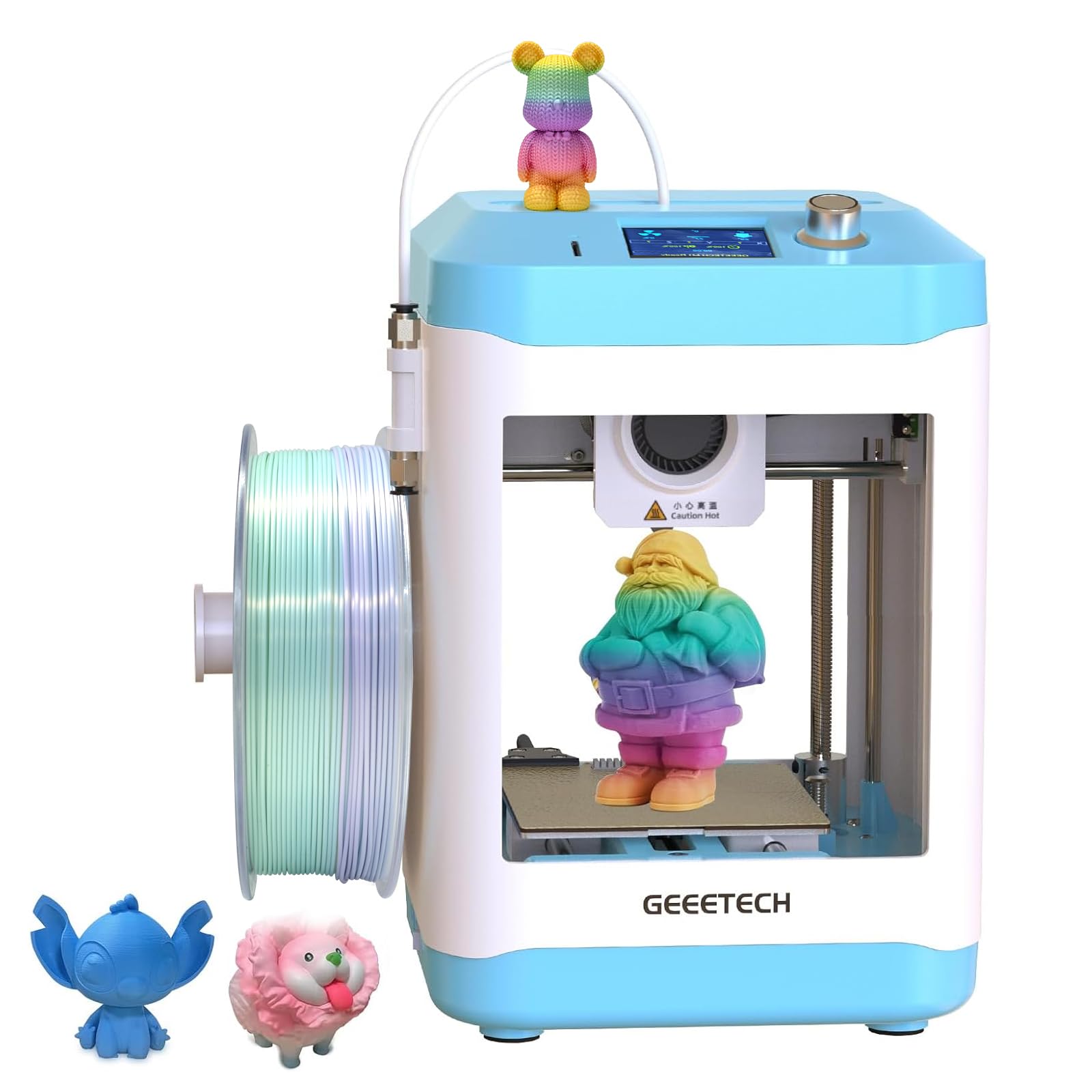
The Geeetech M1 Mini packs a direct drive extruder with a 1:5 gear ratio into a tiny frame, giving it the torque to handle TPU and PLA with equal reliability. The 16-point full-auto leveling technology and heated platform ensure consistent first layer adhesion across the 100 x 110 x 100 mm print area. The 50W hot end heating rod and large-capacity nozzle allow a maximum printing speed of 250 mm/s, which is fast for a machine in this size class.
The spring steel PEI build plate offers strong grip during printing and releases models easily once cooled. A high-brightness LED light and 2.4-inch LCD color screen make monitoring print progress simple. The M1 Mini comes fully assembled out of the box — users only need to insert the TF card and load filament to begin their first print.
Experienced users note that the M1 Mini behaves like a real 3D printer despite its toy-like appearance, producing clean prints with PLA and PLA+. The direct drive design and metal gears deliver extrusion accuracy that cheaper Bowden setups cannot match. For a beginner on a tight budget who wants direct drive capabilities without moving up to a mid-range price, this machine offers strong print quality per dollar.
Why it’s great
- Direct drive extruder with high 1:5 gear ratio for TPU
- Fully assembled with minimal setup steps required
- Spring steel PEI plate for easy model removal
Good to know
- Open design has no hand guard near the hot end
- 1kg spool can block filament tube if placed incorrectly
7. Entina Tina2 Basic

The Entina Tina2 Basic is the stripped-down version of the Tina2 line, retaining the auto-leveling and dual Z-axis rails that produce stable, high-precision prints in a compact 100 x 105 x 100 mm volume. The printer arrives fully assembled — users can load filament, insert the included TF card, and print a test frog in about 5 minutes. The magnetic build plate lets models release without tools or scraping.
The knob-operated interface and one-button filament loading/retracting make this machine particularly accessible for children and absolute beginners. The 2.4-inch LCD screen shows print progress clearly, and the printer supports offline SD card printing so it does not require a tethered computer. The open-source compatibility means users can experiment with different slicing software as they gain confidence.
Users consistently praise the Tina2 Basic for being quiet during operation and small enough to fit in a dorm room or on a classroom desk. The safety-first design philosophy shows in the rounded edges and enclosed electronics. For the lowest possible entry barrier to FDM printing, the Tina2 Basic is the simplest machine to just start using.
Why it’s great
- Fully assembled and ready within 5 minutes of opening
- Auto-leveling eliminates manual bed adjustment
- Quiet operation suitable for shared learning spaces
Good to know
- Small build volume limits practical project size
- Knob interface feels basic compared to touchscreen models
8. Tina2S Fully Assembled

The Tina2S expands on the core Tina2 platform by adding WiFi connectivity and a more complete starter kit that includes 10 meters of PLA filament, a pre-loaded microSD card, and basic tools. The printer uses the same auto-leveling system and magnetic flexible build plate as the Basic model but adds the convenience of wireless printing from Mac, Windows, or Linux systems. The dual Z-axis rails keep the gantry stable even at higher print speeds.
One-touch filament loading and retraction simplify material changes, and the active pause and resume function gives users control over multi-part prints. The printer is compatible with Cura, Simplify3D, and Slic3r, offering flexibility as users grow beyond the basic WiiBuilder software. The compact 8.3 x 8.3 x 11.4 inch footprint fits easily on a desk without dominating the workspace.
While some users report the need to use the included glue stick for reliable first-layer adhesion, those who follow this guidance consistently achieve good results. The Tina2S is an ideal entry point for a family or classroom that wants a fully equipped starter set with minimal assembly. It delivers the same reliable print quality as the Basic model in a slightly more feature-rich bundle.
Why it’s great
- WiFi connectivity for cable-free operation
- Includes 10 meters of PLA filament and pre-loaded SD card
- One-touch filament loading for easy material changes
Good to know
- Glue stick on the build plate is sometimes needed for adhesion
- WiFi setup can be finicky on 5 GHz networks
9. Creality Ender 3

The original Creality Ender 3 remains one of the most popular budget 3D printers ever made, and for good reason: its 220 x 220 x 250 mm build volume is competitive with mid-range machines, and the open-source design has spawned an enormous ecosystem of upgrades and community troubleshooting guides. The resume printing function allows the printer to continue a job after a power interruption, a critical feature for long prints.
The Bowden extruder setup and manual bed leveling means this printer requires a real time investment to tune properly. Most users report spending 2 to 4 hours on initial assembly and another hour dialing in the bed leveling before achieving reliable first layers. The hot bed reaches 100°C in roughly 5 minutes, and the V-slot with POM wheels provides smooth quiet motion once adjusted.
The Ender 3 is not a beginner-friendly machine in the way that auto-leveling printers are. However, the knowledge gained from assembling and calibrating an Ender 3 provides a deep understanding of how FDM printers work. For a hobbyist who enjoys tinkering and wants the largest possible upgrade path, the Ender 3 is an excellent blank canvas. It demands patience but rewards that effort with a fully customized machine.
Why it’s great
- Massive community support with countless free upgrades available
- Large 220 mm³ build volume for its price tier
- Resume printing function protects against power outages
Good to know
- Requires 2-4 hours of assembly and manual bed leveling skills
- Out-of-box quality control can be inconsistent between units
FAQ
What is the most important feature for a complete beginner on a budget?
Can a budget 3D printer print flexible TPU filament?
How much assembly is typically required for a budget 3D printer?
Is a heated bed necessary for PLA printing?
Do budget 3D printers need a dedicated computer to run?
Final Thoughts: The Verdict
For most users, the budget 3d printer winner is the Anycubic Kobra X because it delivers multicolor capability, a large 260 mm build volume, and fast 600 mm/s speeds at a price that undercuts anything similarly equipped. If you want AI-guided ease of use for younger family members, grab the AOSEED X-Maker Joy AI+. And for the tinkerer who values community support and material flexibility above all else, nothing beats the Creality Ender-3 V3 KE.

Mo Maruf
I created WellFizz to bridge the gap between vague wellness advice and actionable solutions. My mission is simple: to decode the research and give you practical tools you can actually use.
Beyond the data, I am a passionate traveler. I believe that stepping away from the screen to explore new environments is essential for mental clarity and physical vitality.